U.S. Digital Passport Photo Size Guide
Table of contents:
- Standard U.S. Passport Photo Size in MM, Inches, and Pixels
- U.S. Digital Passport Photo Specifications
- Pixel Dimensions for U.S. Passport, Visa and DV Lottery Photos
- Biometric Image Requirements – How to Compose and Crop Your Photo
- Conversion Table for MM, Inches and Pixel
- Top Causes of Rejection for U.S. Digital Photos
- Summary table of requirements for a US digital passport photos
- FAQ (U.S. Digital Passport Photos Only)
If you’ve ever tried to upload a U.S. digital passport photo online only to watch it get rejected for being the "wrong size", you already know why a neat, precise digital passport photo size guide is essential. From 2×2 inches (51×51 mm) to 600×600 pixels – 1200×1200 pixels.
The U.S. Department of State and other agencies are very strict about the passport photo dimensions, and having the wrong size is one of the quickest ways to have your photo uploaded rejected.
This guide breaks down every element of a valid digital passport photo in plain English, explaining everything from mm/in/px conversions to the pixel size requirements as specified by the U.S. State Department, so you’ll always know exactly what size the system is expecting.
Standard U.S. Passport Photo Size in MM, Inches, and Pixels
The size of the U.S. passport photo is standard for all applicants, no matter where you apply. Photos should be 2 x 2 inches (51 x 51 mm). This is a rigid square aspect ratio, and that’s the case whether you’re providing a printed photo or generating a digital image for print.
Physical dimensions required:
Width: 2 inches (51 mm)
Height: 2 inches (51 mm)
Shape: Square
The U.S. does not have any other formats for photos, and so every valid photo has this precise physical size.
Digital Dimensions in pixels for U.S. Submitting Systems
But, for digital submissions, rather than checking inches, the Department of State checks pixel information. Your image should be a square digital photo with:
Minimum: 600×600 px
Maximum: 1200×1200 px
- Shape: square (1:1 ratio)
These specifications are the standard digital passport photo size for all US systems. The file must have good pixel resolution within this interval, or it will fail automatic validation.
Valid pixel sizes are:
- 600×600 px
- 700×700 px
- 900×900 px
- 1200×1200 px
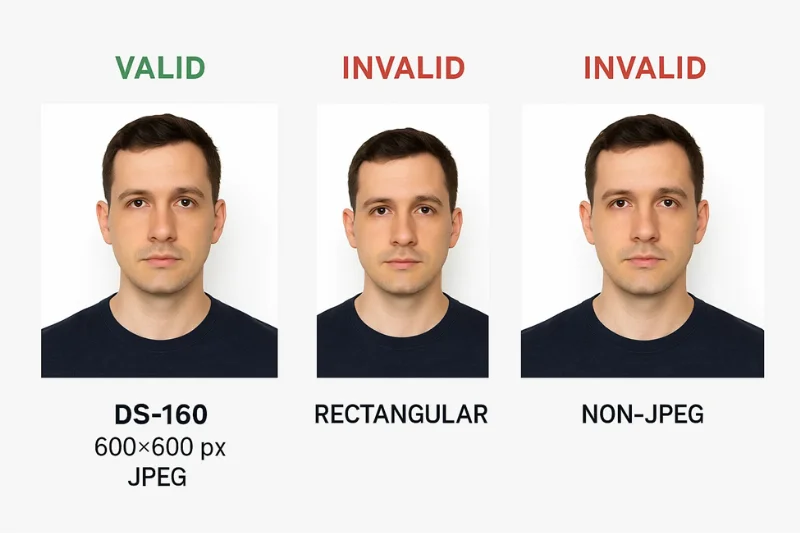
Anything that’s not square (e.g. 600×800 px) is immediately rejected.
|
Requirement |
Value |
Notes |
|
Minimum size |
600×600 px |
Must be square |
|
Maximum size |
1200×1200 px |
Hard upper limit |
|
Shape |
1:1 ratio |
Required for all digital uploads |
|
Approved range |
600–1200 px |
Any equal-width/height value in between |
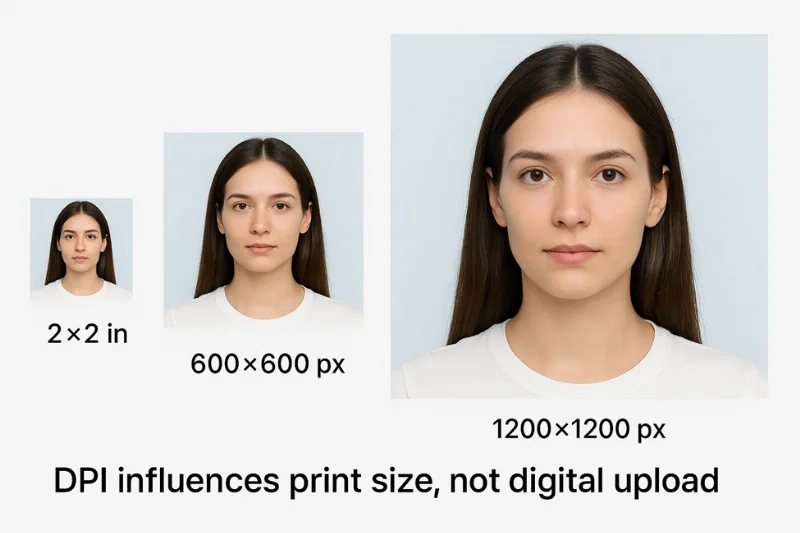
Why 600×600 pixels equals 2×2 inches at a resolution of 300 DPI
Many size guides are confusing, mixing
physical and digital dimensions. Here is the clean version:
- A 2x2 photo at 300 DPI is 600x600 px.
- The same image at a higher resolution (e.g. 600 DPI) = 1200x1200 px.
That is the reason for the Department of State allowing anything from 600 to 1200 px, it is just the possible pixel outputs of a DPI conversion from the standard physical format.
But here is the crux of it - DPI is disregarded for digital submissions. The system just verifies:
- Pixel count
- Square aspect ratio
- The appropriate image resolution range
- The file format and any metadata
Your file having a tag of 72, 96, 300 or 600 DPI won’t get your file rejected. Pixel dimensions are really the only thing that matters.
U.S. Digital Passport Photo Specifications
For digital submissions, the requirements are more strict than most people realize. The U.S. Department of State does not review photos for the manner in which they were taken. It only examines photos on a technical basis - pixel count, file type, color profile, and compression. Here are the minimum requirements that every US digital passport photo should adhere to in order to pass the upload screening process.
The Necessary Range of Pixel Dimension for All Uploads
A proper photo needs to be the right pixel dimensions and is the aspect ratio of a perfect square. Nothing else is allowed - not rectangular images, not "close enough to square" guesses.
Required digital size:
- Minimum: 600×600 px
- Maximum: 1200×1200 px
- Shape: square (1:1 aspect ratio)
If the photo is less than 600 px or more than 1200 px or is not square in shape, it will be rejected by the system. These pixel dimensions form the basis of all U.S. digital submissions, whether the file be for a passport, visa, or DV-lottery entry.
|
Requirement Type |
Accepted Range |
Notes |
|
Minimum size |
600×600 px |
Required for all uploads |
|
Maximum size |
1200×1200 px |
Upper limit enforced by upload system |
|
Shape |
Square (1:1) |
Image must be perfectly symmetrical |
|
Compression |
Standard JPEG only |
No nonstandard or extreme compression |
These limits define the allowed digital passport photo size. Your file is good for automated validation as long as it is a square and it falls within the pixel window.
File Format and Color Space Requirements
All systems in the U.S. check the file type and color space. This is non-negotiable.
Your file must use:
- JPEG format (.jpg or .jpeg)
- 24-bit color
- sRGB color space (the universal standard for digital passport imaging)
No other file types (such as PNG, HEIC, WebP, TIFF) are accepted. A non-JPEG image will also fail on an old system that warns you, albeit later in the review process. Exporting in AdobeRGB or Display P3 may also alter colors upon upload, contravening the expectations for digital photo formats in the U.S.
File Size and Compression
There is a stringent file size cap established by the U.S. Department of State. Your photo must meet the official file size limit:
- Maximum file size: 240 KB
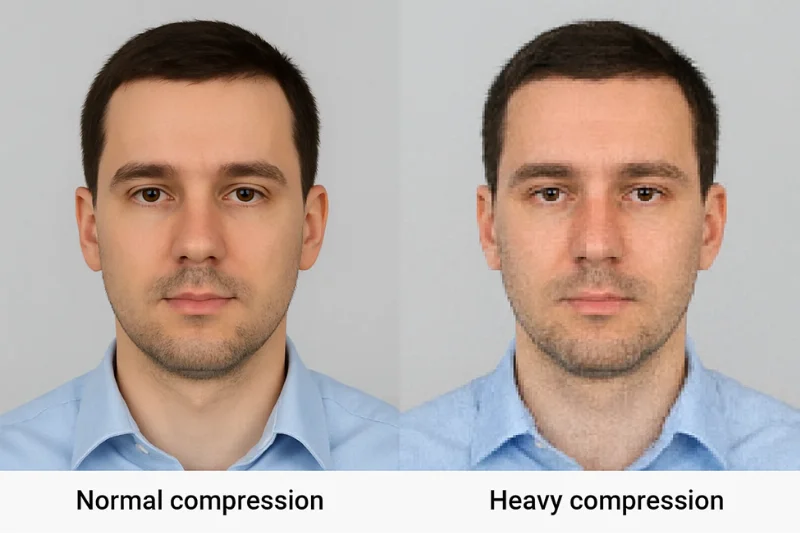
This is what people get wrong most of the time — too big a file and it won’t upload, too small and the file looks too damaged.
Acceptable compression for U.S. systems:
- Use standard digital photo compression (nothing extreme)
- Avoid very small files less than about 20 KB (could be blurry or have artifacts)
- Please don’t upload photos that have JPEG blocks or blurry edges
These are true for all the U.S. visa photo requirements, passport uploads, and dv-lottery systems.
Pixel Dimensions for U.S. Passport, Visa and DV Lottery Photos
All standard U.S. dimensions for digital photos are based on the same basic size: 2×2 inches (physical size) and an approximately square digital size between 600 and 1200 pixels. If you are applying for a passport, a visa, or the Green Card lottery, the pixel range is almost the same — some system-level differences, nothing much.
Getting an application for a passport (DS-11) or passport renewal (DS-82)
U.S. passport photos should meet the requirements outlined by the Department of State. All files must correspond to the official digital passport photo size, keeping the square aspect ratio and the pixel dimension.
Passport upload requirements:
- Format should be at least 600×600 px
- Maximum pixel dimension is 1200×1200 px
- The image must be kept square (1:1)
- The same head-height and centering requirements apply in all U.S. photo checks
The passport systems are designed to do very rigid pixel validation and any image that is not exactly this square dimension is rejected.
Apply for a U.S. Visa (DS-160)
DS-160 photo has to comply with the same online specification the only difference is the upload tool is less forgiving. The size of the pixel, file format, color space is checked automatically by the system.
DS-160 upload requirements:
- U.S. visa photo size: 600–1200 px
- Format de fichier JPEG en sRGB
- The image should be a perfect square
- The pixel data should conform to the official pixel dimensions
If the picture is off even a little bit, if it's rectangular, low resolution or you've saved it in the wrong color space, the DS-160 system rejects it immediately.
DV Lottery and Green Card Lottery
DV Lottery photo is the same for the biometric and has to meet the same size requirements as the one used for passports and visas, but the DV system wants even more uniformity. Although the entire permitted size range is from 600 to 1,200 px, the DV system normally wants 600×600 px, so this is the best and most common option you can take.
DV-Specific Expectations:
- Required to be in square format
- Exact 600×600 px is strongly preferred
- Same cropping & facial-proportion rules
- Subject to all DV image requirements for head height, eye line, and background
DV review is completely automated, so having the exact pixel size will save you from being disqualified on the spot.
Biometric Image Requirements – How to Compose and Crop Your Photo
Cropping is a very common cause of a rejection of a U.S. passport photo. These aren't rules for how you should take the photo, they're strict biometric requirements that say roughly where your head, eyes and background need to be within the frame. Here are the exact cropping rules that are applied by the U.S. Department of State’s automated systems.
Head size
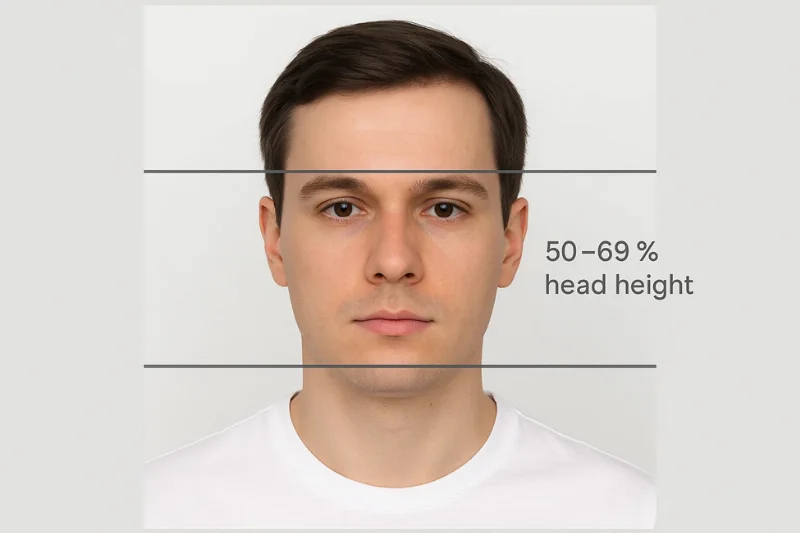
Your face should take up 50–69% of the photo from the bottom of the chin to the top of the head.
The State Department applies exacting standards for facial proportions to ensure uniformity in identification. Your head size (from the bottom of your chin to the top of your head) should occupy 50-69% of the total image height. This rule also applies for all kinds of submissions that are digital.
What system expects:
- Head should not be too large (over 69%)
- Head should not be too small (under 50%)
- The proportions should be the same as the the official biometric requirements
Internal practicality conversion (for your understanding only):
- In a 600×600 px image, the head height is usually 300–414 px
- In a 1200×1200 px image the head height is approximately 600-828 px
These are the approved proportions to the image, not to a “technical” cropping method.
Eye Position
The eyes should be 56 to 69% of the distance from the bottom of the eye to the bottom of the head.
Along with the head height, DoS defines a certain vertical range for the eyes. This is a parameter of the official biometric template that is used to capture and verify images.
The eye height should be:
- 56–69% from the bottom of the image
- Horizontally centered on the basis of the official image ratios
If the eyes are positioned too low or high, automated validation will mark the photo as invalid even if the head height is right.
Background and face visibility
Part and full faces can only be visible to the extent that requirements allow. U.S regulations have also determined what can be shown behind and around the face. These aren’t aesthetic preferences – they are technical requirements to work with facial recognition systems.
A photo that is compliant must contain:
- A solid white background or a very light off-white
- The face is centered and not tilted or subject to angular distortion
- A neutral expression (required) - mouth relaxed, eyes open
- Full visibility of forehead, eyes, nose, and chin
- No shadows, color casts, or any visual obstructions
These factors ensure the photo passes automated biometric checks prior to being reviewed by a human.
Conversion Table for MM, Inches and Pixel
U.S passport systems are based on one rigid format, and the calculations between mm, inches and pixels are pretty straightforward when you put them side by side. There is a pixel conversion chart for the U.S standard here – nothing global, no other formats – just the numbers used in every 2×2-inch guide and every online submission.
The following are specifications for the passport photo size in mm, inches and pixels for the U.S. in the 2×2 format. You can also get a sense for how DPI affects pixel output — not for uploading, but to see how those pixel numbers are calculated.
|
Format Conversion |
Result |
Notes |
|
2×2 inches to mm |
51×51 mm |
Standard U.S. size |
|
2×2 inches to pixels (300 DPI) |
600×600 px |
Matches digital minimum |
|
2×2 inches to pixels (600 DPI) |
1200×1200 px |
Matches digital maximum |
|
600×600 px to inches |
2×2 in equivalent |
Reflects standard conversion |
These figures form the basis of every digital submission - be it through a passport portal, a visa system, or a DV Lottery form. They are the only conversions needed for U.S. formats and match the Department of State digital size specifications exactly.
Top Causes of Rejection for U.S. Digital Photos
Because they test so heavily against automated validation, the U.S. passport, visa and DV systems, are among the strictest in the world. A photo is rejected very early, before a human even sees it. Below are the most common requirement-based rejection triggers, each of which relates directly to a technical or biometric rule, not a photographic technique.
Size-Related Rejections
Poor pixel size is the root of most digital problems. The square shape, the minimum resolution and the proportional limits are firmly enforced by the system.
A photo is disapproved when:
- The image is not square (breaks 1:1 rule)
- The file size is less than the minimum of 600×600 px
- It is larger than 1200×1200 px
- The image has a invalid aspect ratio (such as 600×800, 720×900 and the like)
The system automatically fails for even the tiniest non-compliance to the square rule.
Cropping-Related Rejections
Cropping is one of the main causes
biometrics checks a file. These errors are related to mandatory ratios and not
shooting technique.
The rejections happen when:
- The head height is less than 50% or more than 69% of the total image height
- The eye position is not within the 56–69% vertical zone
- The face is off center by a large margin
- There is cropping of the top of the head or the chin
These breaches go against the official biometric regulations, which guarantee that the photo is machine-readable for use in facial recognition.
Rejections for Digital Quality
Technical Aspect of the File Even if the size and dimensions are correct, with the file technical quality it still can be refused. These problems sometimes appear as a result of automated checks during uploading or they could be activated by manual reviews.
Photos are refused when:
- The color profile is not sRGB which can cause unnatural tones in the image
- The file is heavily JPEG compressed (blockiness, ringing, blurred detail)
- The file is larger than 240 KB
- The image is over-sharpened, over-smoothed, or otherwise digitally manipulated
These conditions help to guarantee that the uploaded image is still true to life, natural and works with the biometric verification instruments.
Summary table of requirements for a US digital passport photos
This table is about size, pixels, format, biometric proportions, and background for every U.S. digital passport photo requirement. These are the precise criteria that are validated by automated systems under passport, visa and the DV Lottery applications.
|
Requirement Type |
Official U.S. Standard |
|
Size |
2×2 in (51×51 mm) |
|
Pixels |
600–1200 px (square) |
|
Ratio |
1:1 |
|
Format |
JPEG |
|
Color |
sRGB, 24-bit |
|
File Size |
≤240 KB |
|
Head Height |
50–69% of total image height |
|
Eye Line |
56–69% from bottom of image |
|
Background |
White or off-white |
FAQ (U.S. Digital Passport Photos Only)
1. What is the pixel size of a US
digital passport photo?
There are no exceptions for the digital
passport photo to be square, with a minimum size of 600x600 pixels and a
maximum size of 1200x1200 pixels. Any image with less than 600 pixels or more
than 1200 pixels will not be accepted. It is out of the recommended range, the
resolution validation on the online tool will reject your photo.
2. Are U.S. digital photos always 2×2
inches?
Yes. With the exception of when you
submit a digital file, its physical version must be a standard 2×2 in (51×51
mm) U.S. format. Digital images just manifest this – in the form of pixel
dimensions – usually 600×600 px (lower resolution) or 1200×1200 px (higher
resolution).
3. Is DPI important in digital passport photos?
DPI is irrelevant for digital uploads. DPI is ignored by validation systems and they only check the actual pixels, so make sure your digital passport photo image width and height is between 600×600 px and 1200×1200 px. DPI influences the results when printing, but it does not affect compliance when submitting digitally.
4. What is the format of the U.S. Digital Passport Photo files?
U.S. systems require the photo to be encoded in JPEG using sRGB color space and 24-bit color depth and a file size of ≤ 240 KB. Other file formats such as PNG, HEIC, or TIFF are not supported and usually fail during the file upload.
5. Can I upload a rectangular photo for a U.S. application?
No. A digital passport photo needs to be square and correspond to the 1:1 ratio applicable for the 2×2 in physical standard. Any non-square file, whether it is 600×600 px or 1200×1200 pixels, is invalid as it breaks the shape rule.
Authored by:
Nathaniel K. RowdenApproved by Association of Visa center
On this page:
- Standard U.S. Passport Photo Size in MM, Inches, and Pixels
- U.S. Digital Passport Photo Specifications
- Pixel Dimensions for U.S. Passport, Visa and DV Lottery Photos
- Biometric Image Requirements – How to Compose and Crop Your Photo
- Conversion Table for MM, Inches and Pixel
- Top Causes of Rejection for U.S. Digital Photos
- Summary table of requirements for a US digital passport photos
- FAQ (U.S. Digital Passport Photos Only)