Make a Schengen Visa Photo Size 35x45 mm Online for Free
Applying for a Schengen visa for tourism, business, study, or family visits? Our Schengen visa photo tool converts a simple selfie into a 35 × 45 mm visa photo online for free, producing a digital file for online portals or a print-ready sheet for embassy appointments. Use it on iPhone, Android, or any browser — no editing skills needed.
No studio · No app · 30 seconds
We value your Privacy
We use cookies to enhance your browsing experience, serve personalized ads or content. By clicking “Accept All”, you consent to our use of cookies.
Source:
PhotoGov is an independent service. We are not affiliated with any government, embassy, or consulate. All information on this website is based on official government requirements and verified primary sources. Final acceptance is determined solely by the issuing authority.
Turn Your Selfie into a Schengen Visa Photo
Turn your selfie into a Schengen visa-ready photo in under a minute with our online photo-making tool. Upload your portrait, and follow the step-by-step instructions below.
Get photo for: Schengen Visa 35x45 mm (3.5x4.5 cm)
Instructions:
How to take a good photo?


1/7 Image format
Photo must be in color. Taken within the last 6 months.
How to take a good photo?
1/7 Image format
Photo must be in color. Taken within the last 6 months.
ID & Passport Photo Tool. Your personal data is processed in accordance with security and privacy standards.
If you need assistance, don’t hesitate to contact our Support team, which is always there to help.
How Our Schengen Visa Photo Tool Works
PhotoGov formats your original photo into the official 35 × 45 mm biometric layout required for Schengen visas, automatically setting the crop, dimensions, alignment, and background. You can add extra services, such as Human Verification or casual-to-formal clothing adjustment, and download your ready photo as a digital or printable file.
Photo Upload
Take a selfie and upload it to PhotoGov
Processing
Wait while automatic resizing and cropping are applied
Service Selection
Add Human Verification or bundle other services
Download
Get a Schengen visa photo size 35 × 45 mm
Written by Olia Potiagaeva, Managing Editor Reviewed by the PhotoGov Editorial Team★ 4.8 / 5.0 GoogleChecked against official government requirements
On THIS PAGE:
- Turn Your Selfie into a Schengen Visa Photo
- How Our Schengen Visa Photo Tool Works
- What Is a Schengen Visa Photo?
- Your Final Schengen Visa Photo from PhotoGov
- Schengen Visa Photos That Pass the Checks
- Schengen Visa Photos That Don’t Pass the Checks
- Why Use PhotoGov for Your Schengen Visa Photo
- PhotoGov and the European Commission Standards for Schengen Visa Photos
- Frequently Asked Questions
- Official Government Sources
- Other Documents — ID Photos
What Is a Schengen Visa Photo?
The Schengen Visa Photo editor crops your image to the selected format and positions the head within the frame. It sizes the picture you upload without changing your facial features, and the built-in photo checker tests the file against the selected format. The selected format is 35 x 45 mm. Before you submit the photo, check the photo instructions for the application you are completing.
The official biometric photo required for any Schengen visa application.
Created by PhotoGov in the correct size and format required by the European Commission and ICAO 9303 rules.
Ready for upload to the application portal, or for in-person submission at visa centers, consulates, and embassies.
Your Final Schengen Visa Photo from PhotoGov
PhotoGov automatically applies all official European Commission requirements to your original photo. The final image is ready for submission and doesn’t require any adjustments from you. Below are the key technical parameters of your final Schengen visa photo from PhotoGov.
For a full overview of official standards, please see our Schengen Visa Photo Requirements Guide.
Parameter | Your Final Photo |
Photo size | 35 × 45 mm (3.5 × 4.5 cm) / 413 × 531 pixels |
Head size | 32–36 mm from chin to crown, about 70–80% of the photo |
Background | Plain — white, off-white, or very light grey |
File format | JPEG (digital) / printable PDF |
Resolution | High-resolution digital file at 600 DPI |
Head positioning | Automatically centered |
Colour | Full colour |
Face visibility | Fully visible, no retouching |
Submission | Ready for online applications / Printable for your visa appointment |
If your photo is rejected due to technical issues on PhotoGov’s side, we provide a free retake or a full refund.
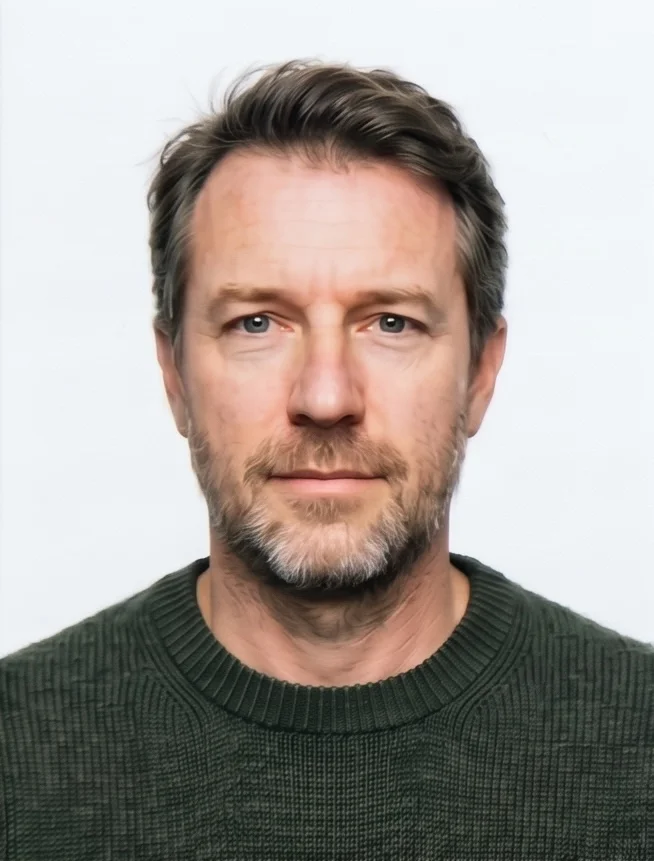
Schengen Visa Photos That Pass the Checks
Schengen Visa Photos That Don’t Pass the Checks
Your photo is processed in a private session in a secure environment. Facial features are never altered — the tool only resizes, crops, and replaces the background. If you want extra reassurance, optional Human Verification is available at checkout.
Why Use PhotoGov for Your Schengen Visa Photo
Convenience
Your final photo is accepted for online and in-person submissions
Compliance-Aligned Output
Designed to meet the current European Commission and ICAO 9303 guidelines
Availability
No registration, installation, or studio visits
Extra Assurance
Optional Human Verification by an in-house compliance specialist
Secure Processing
Your data is secure and not transferred to third parties
Our platform is designed to align with the European Commission’s Schengen visa photo rules. Final acceptance is at the discretion of the consular officer or visa-center reviewer handling your application.
PhotoGov and the European Commission Standards for Schengen Visa Photos
The Schengen visa photo rules are defined by the European Commission — Migration and Home Affairs and the International Civil Aviation Organization (ICAO) Document 9303 biometric standard. We track these requirements continuously, review each country’s guidance by hand, and keep our automatic template up to date. The final photo you download from PhotoGov complies with all current official specifications of Schengen consulates and visa centers.
A Schengen visa photo produced with our visa photo-making tool is a 35 × 45 mm biometric image with a white background, cropped and framed according to the ICAO requirements, with your head centered and within the required 32–36 mm range. Our Schengen visa photo tool changes only the size, the crop, and the background of the image — it never reshapes or alters your facial features. Your final photo can be downloaded as a JPEG for online submissions or a printable PDF sheet for printouts and in-person applications.
If you want a second opinion before you apply, add the Human Verification service. A senior PhotoGov compliance specialist checks your photo against the latest Schengen visa rules and either approves it or recommends a re-upload. This is the option most worth using when your appointment is already booked, when a previous photo was refused, or when you are applying for a child whose appearance changes quickly.
For other European document photos, see our dedicated tools: German Visa Photo Tool, French Passport Photo Tool, Spanish Visa Photo Tool, and Italian Visa Photo Tool.
The European Commission and Schengen authorities prohibit digital alterations of ID photographs. Our platform provides sizing and cropping services only and does not modify or enhance images.
Frequently Asked Questions
Yes, you can make a Schengen visa photo online for free. A reliable online visa photo maker converts an ordinary selfie into a Schengen visa-ready image without a studio visit: you upload the picture, select the 35 × 45 mm format, and download a file built to the biometric standard. For example, at PhotoGov, the digital photo is free; printable PDF sheets and premium add-ons are charged separately — always check the provider's rates before you begin.
The best online tool for Schengen visa photos is one that applies the official biometric template, but not only simply crops the image to size. By independent user ratings, PhotoGov holds a 4.7-star average based on 2,500+ Google reviews. It resizes your original picture to 35 × 45 mm, sets head height to 32–36 mm, centres the face, and replaces the background with a uniform white one — in line with European Commission and ICAO specifications. A final image can be downloaded as both a digital file for online submissions and a professional-grade printable sheet for in-person applications in embassies and at visa centres.
PhotoGov is free in every country except the United States, the United Kingdom, and Canada, where a low fixed price applies — current rates are on the Pricing page. For applicants across Europe and most other regions, that means a compliant digital photo at no cost, and add-ons such as casual-to-formal clothes change in your photo, a Human Verification service, a printable sheet — for affordable prices that are cheaper than at any professional studio, pharmacy, or photo booth.
To make a Schengen visa photo from a selfie, photograph yourself correctly, and let an online visa photo tool do the formatting:
Stand near a window so soft daylight falls evenly on your face, keep the phone at eye level and straight-on with no tilt, switch off filters and portrait mode, and hold a neutral expression with your mouth closed.
Upload the sharpest photo to the online visa photo maker, select the Schengen format, and it sets the size, head position, and background.
Download the result as a digital file or a printable PDF — useful when your appointment is already booked.
To generate a compliant Schengen visa photo online, start with a clean, recent photo: a sharp portrait taken in even daylight, with no retouching, AI edits, or phone filters. Upload it to an online photo tool, select "Schengen visa" as the document type, and the tool sets the size, crop, head position, and background. The output must match the 35 × 45 mm EU format and the 32–36 mm head range, with your facial features left unedited — which matters, because altered images are routinely rejected.
Yes, you can resize an existing passport photo to the Schengen 35 × 45 mm format. Upload the photo to an online visa or passport photo maker, select Schengen visa as the document type, and the tool crops the frame to 35 × 45 mm, refits the head into the 32–36 mm range, and applies a uniform white background. For example, a US passport photo (2 × 2 inch / 51 × 51 mm) cannot simply be stretched — it has to be re-cropped to the Schengen frame. Use only established tools with strong reviews on Google.
PhotoGov is an online Schengen visa photo editor with built-in background removal: it isolates the face and replaces the backdrop with the plain white background consular standards require, so a studio wall is unnecessary — a selfie against any light surface produces a clean result. It also offers a casual-to-formal clothing change, where the algorithm swaps your outfit for business attire suitable for visa and passport applications: five looks are included in the initial add-on pricing, and nine more are available for an additional fee.
Before submitting to a consulate or visa centre, run through this checklist:
The frame is exactly 35 × 45 mm
Head height falls between 32 and 36 mm
The face is centred and looking straight at the camera
The background is plain, uniform, and very light — no shadows or objects
The expression is neutral, mouth closed, eyes fully open
No hats or items obscure the facial features
No glare or reflections on prescription glasses (tinted glasses and sunglasses are not allowed)
The photo was taken within the past six months and reflects your current appearance
The image is sharp, correctly exposed, and free of compression artefacts
With PhotoGov, you don't need to run this check by hand: it applies the ICAO and European Commission requirements automatically and flags anything that falls outside them before you download.
An online Schengen visa photo crop and alignment tool applies the Schengen biometric template to your image automatically. It fixes the frame at 35 × 45 mm, places the crown, eye line, and chin within the permitted band, and centres the face — the exact measurements a consular officer checks, handled without manual dragging or guesswork. These are the parameters that cause most first-attempt rejections, which is why automated alignment is worth more than a general photo editor.
PhotoGov is a Schengen visa biometric photo generator with a built-in compliance check. It validates every image against the official template — 35 × 45 mm frame, head height, eye line, face centring, and a uniform light background — before you download or print. For a further layer, use an optional Human Verification where a compliance specialist reviews it by hand and confirms whether it will pass or exactly what to adjust.
Yes, a digital Schengen visa photo works for most online appointment portals. Systems such as France-Visas, Germany's VIDEX, and the platforms run by VFS Global and TLScontact accept a digital photo built to the 35 × 45 mm proportions, with the head in the 32–36 mm range, a light background, and a capture no older than six months. A file prepared to those specs uploads directly wherever the authority allows it, and a printable sheet covers the physical copies you bring to the appointment.
Yes, if you produced your photo with PhotoGov, choose a printable PDF sheet upon checkout, and print it at home. Use glossy or semi-gloss photo paper and set the printer to 600 DPI, the sRGB colour profile, "Best" quality, and 100% scaling (disable any "fit to page" resizing). Trim each photo to 35 × 45 mm with a sharp blade and a metal ruler rather than scissors. The finished print should be sharp to the edges, with accurate skin tones and no streaks, banding, or pixelation.
Yes, you can use an online tool if you apply through VFS Global or TLScontact. These centres — along with BLS International and Capago — apply the same European Commission photo rules as the consulates they serve. A file built to that shared standard works for applications through any of them, as well as for filings made directly at an embassy or consulate.
No online service can legally guarantee that a Schengen visa photo will be accepted — that decision rests solely with the authority processing your application. What a serious provider commits to is strict technical compliance: photos built to the biometric template (35 × 45 mm, 32–36 mm head height, centred face), a uniform light background, and automatic checks on size, crop, face position, resolution, and file format. A tool that enforces the official template and validates each parameter sharply reduces the risk of technical rejection, even though approval itself can never be promised.
Online Schengen visa photo tools run in any current mobile or desktop browser — Safari, Chrome, Edge, or Firefox — on iPhone, Android, Mac, Windows, or iPad, with nothing to install and no account required. Your input can be a fresh photo or one already in your camera roll, as long as it was taken within the last six months.
Yes, your photo and personal data are safe with PhotoGov. Your image is processed in a private session, used only to create your visa photo, and removed from the servers once the session ends. PhotoGov does not pass your data to third parties or external AI services, and the site runs on HTTPS encryption. Full details are in the Privacy Policy, and our Customer Support can answer any further questions.
No, there is no single official EU-wide photo tool. The rules are set centrally by the European Commission, but each member state's consulate and each visa centre publishes its own guidance and runs its own appointment system. Reputable third-party tools apply the 35 × 45 mm biometric standard through a guided interface, which makes them a practical alternative to a studio visit.
Yes. Open photogov.net in the phone browser, upload a picture and download the finished file. No app is required; the PhotoGov app for iOS and Android does the same job if you prefer it.
No. PhotoGov applies the selected format automatically: the tool sets the frame and the head position for you. Before you submit the photo, check the photo instructions for the application you are completing.
PhotoGov.net strictly adheres to the Global regulations for ID photos.
PhotoGov is an independent service. We are not affiliated with any government, embassy, or consulate. All information on this website is based on official government requirements and verified primary sources. Final acceptance is determined solely by the issuing authority.
Official Government Sources
Schengen Visa Policy: European Commission — Migration and Home Affairs
EU Common Visa Code: Regulation (EC) No 810/2009
Uniform Format for Visas: Council Regulation (EC) No 1683/95
Biometric Regulations for International ID Documents: International Civil Aviation Organization (ICAO) Document 9303
Other Documents — ID Photos
Europe
2 doc.
- EU Blue Card 35x45 mm (3.5x4.5 cm)
- Schengen Visa 35x45 mm (3.5x4.5 cm)
Service provided by Y VISION TECHNOLOGIES LLP · Stoney Works 8 Stoney Lane, London, England, SE19 3BD · Terms · Refund policy · Contact
We value your Privacy
We use cookies to enhance your browsing experience, serve personalized ads or content. By clicking “Accept All”, you consent to our use of cookies.