U.S. Passport Photo Requirements
Table of contents:
- What Is a Digital Passport Photo in the U.S.
- Core Digital Passport Photo File Specifications (Pixels, Format, Size)
- Biometric passport photo rules still apply to digital images
- Passport, Visa and DV: Which Requirements Apply to You?
- 7 Steps to Check If Your Digital Passport Photo Meets U.S. Requirements
- Reasons the U.S. Passport photo is rejected
- Summary Table of All U.S. Digital Passport Photo Requirements
- How U.S. Officials Check Your Digital Passport Photo
- Quick Answers About U.S. Digital Passport Photo Requirements
When you hear the words "digital passport photo", it sounds straightforward - snap a picture, save it, upload it. But the fact is that the U.S. has some of the toughest and most technical passport photo requirements in the world.
And if that one thing is wrong, wrong pixels, wrong file type, wrong background - the system rejects it immediately. No explanation. No hint. Just an "invalid photo."
Everything here is distilled into plain English for the human mind to understand, so you always have an idea of what the system is expecting.
What Is a Digital Passport Photo in the U.S.
A digital passport photo is more than just a digital version of a printed 2x2 photo. It is a separate digital image file for use, for example, for online passport renewal via MyTravelGov.
The U. S. Department of State imposes two layers of requirements for you to comply with your:
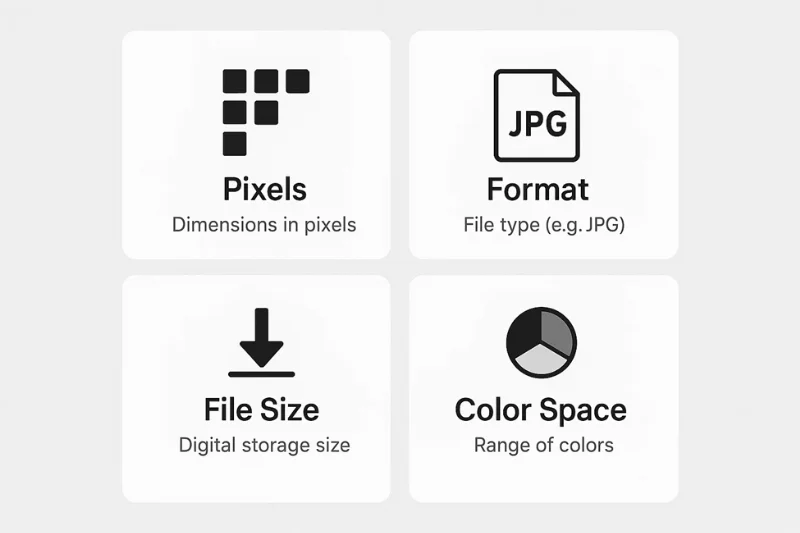
- Technical file rules - pixels, format, color space, file size
- Biometric rules - background, head size, expression, visibility
Every digital photo must meet the requirements of both, without exception.
What a Digital Passport Photo Is and Isn’t
It is:
- A square, color digital image that complies with precise pixel and file-type specifications
- A file ready to be uploaded to the U.S. Department of State
- A picture that undergoes automatic verification upon upload and subsequent manual review by a specialist
- Understand it must meet your ordinary requirements for passport photos (including facial expression, background, your head size, etc)
It is not:
- A screenshot
- A cropped picture from a Facebook profile
- A phone selfie with a filter
- A scanned, low-resolution image from an old passport
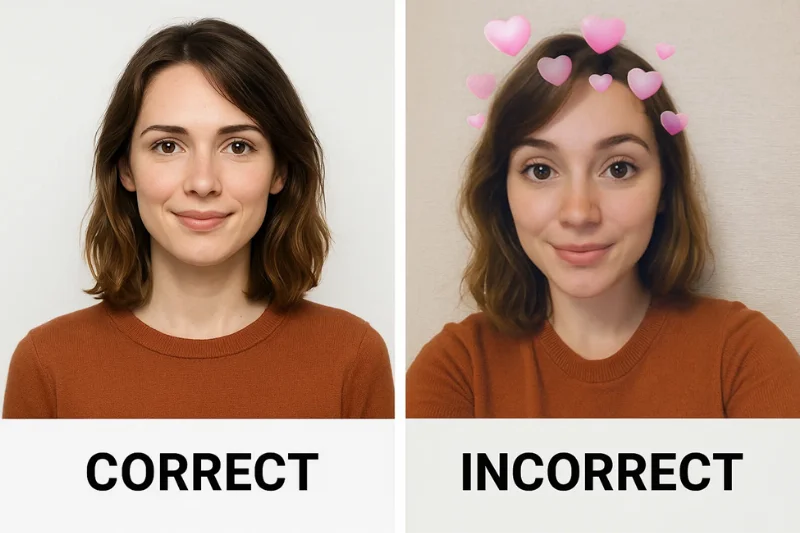
Electronic submissions are subject to an automated review within the Department of State’s system. The tool checks: pixel dimensions, file type and size, color profile, compression quality, visibility of face, background color.
If your photo isn’t the right size to the exact official specifications, you’ll receive an error - and it will be reviewed by a computer long before ever a human will see it. This is the reason it is so important to know the exact U.S. requirements for digital passport photos.
Printed Photo Rules Still Apply
You are uploading a file, but the regular biometric rules apply:
- The background is white or off-white
- Your head is centered and sized correctly
- Neutral expression is mandatory
- No glasses
- Photo must be taken within the last 6 months
TL; DR: Digital photo = printed photo rules + Technical file rules.
Core Digital Passport Photo File Specifications (Pixels, Format, Size)
You may have the lighting perfect, the posture perfect, and the background perfect - but if your file does not comply with the technical passport photo requirements, it is rejected by the system immediately.
This section provides the exact digital specification used by the U.S. Department of State. No guesswork, no interpretation - just plain rules.
Pixel Dimensions and the Necessity of a Square Aspect Ratio
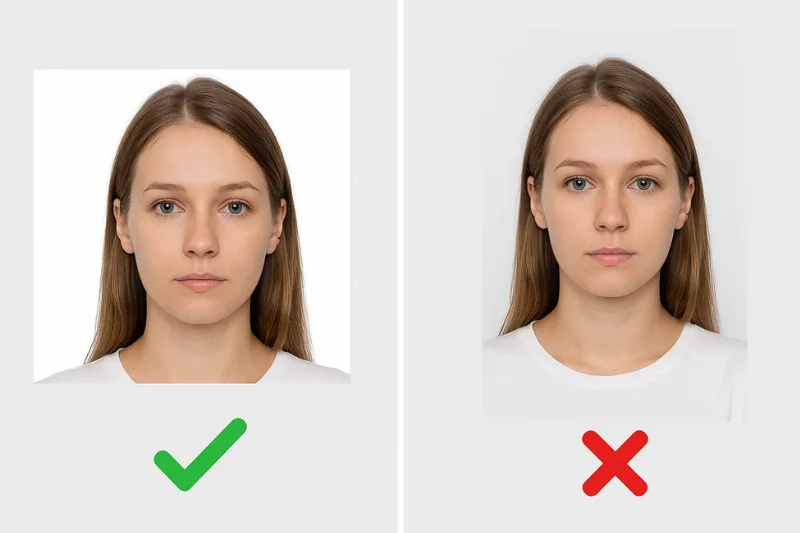
The U.S. is very clear that all digital passport photos must be square. This is because the height and width must be the same.
Required Pixel Range
Your passport photo for the U.S. must lie in this range:
- Minimum: 600 × 600 pixels
- Maximum: 1200 × 1200 pixels
Anything beyond this range is disqualified automatically.
The system applies a biometric mapping algorithm that is based on a 1:1 aspect ratio. A rectangular photo, no matter how good it is, will be rejected immediately.
Supported file formats: JPEG or HEIF
The U.S. has two-file format restrictions when it comes to digital copies of passport photos.
JPEG (JPG):
It was good for all the places, online passport renewal, DS-11 renewal, visa system, dv submission pages. When in doubt, use this format.
HEIF (HEIC):
Accepted only for online passport renewal through your MyTravelGov account.
Not good for:
- Visa photos
- DV entries
- In-person passport applications
- Photo-submission portals outside MyTravelGov
Size requirements: 54 KB-10 MB (Passport) and 240 kB (Visa/DV)
There are two size standards in the U.S. digital photo world.
Which one you need depends on what you are applying for.
For U.S. Passport Online Renewal
Your digital passport picture has to be:
- At a minimum: 54 KB
- At most: 10 MB
This range is much more flexible than the visa/DV system.
For Visa & Diversity Visa (DV) Program Applications
Your photo must be:
- No more than: 240 kB. This is a hard limit.
|
Program |
Allowed Size |
Notes |
|
Passport Online Renewal |
54 KB – 10 MB |
JPEG or HEIF allowed |
|
Visa Applications |
≤ 240 kB |
JPEG only |
|
DV Program |
≤ 240 kB |
JPEG only, strict limit |
Color, Color Space, and Resolution
Digital passport photos are subject to rigorous color and quality standards.
- Required Color Settings
Your image have to be:
- A color, not black and white photo
- 24-bit color (this is the norm for contemporary hardware)
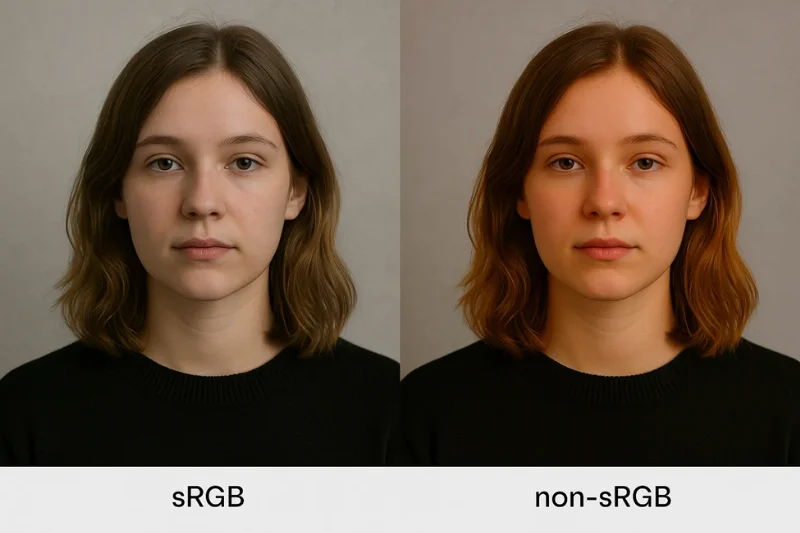
- Stored in sRGB color profile
sRGB provides a consistent color display. Posting photos in AdobeRGB or Display P3 shifts skin tones and causes a rejection. For digital submissions, DPI isn’t the biggest concern - pixels are. Although DPI matters only when you are scanning a printed photo.
For example, a stunningly shot photo in the Display P3 color profile may look perfect on your iPhone – yet the upload system may still reject it for not being in sRGB.
- Compression and Quality of the Image Requirements
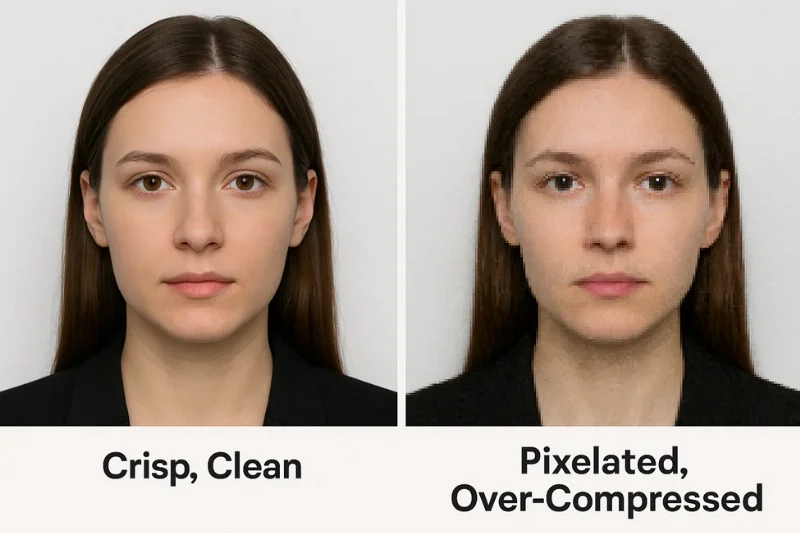
Your digital passport photo should have minimal compression as possible to avoid rejection.
- The compression ratio must not exceed that equivalent to a 20:1
- No blocky textures or blurred edges, or pixelated
- The face should be crisp and natural looking
People frequently compress to reduce the file size to meet the DV 240 kB limit - but compress it so much that the image is fuzzy or blocky.
- Scanning a 2×2 Photo If you have to
The U.S. is a strong advocate for original, digital images, but if you must scan you must comply with the technical requirements.
- Scan original 2×2 inch printed photo at 300 DPI
- Crop a perfect square image
- Final file still has to comply with:
Pixel size (600×600–1200×1200)
- Color (24-bit, sRGB)
- Format (JPEG)
- File size rules
Biometric passport photo rules still apply to digital images
Even though your submission is a file, and not a printed photo, the U.S. still assesses biometric standards in the same way.
These regulations make sure your face can be read by a machine and recognized by one.
Background Specification: White Plain And Without Shadows
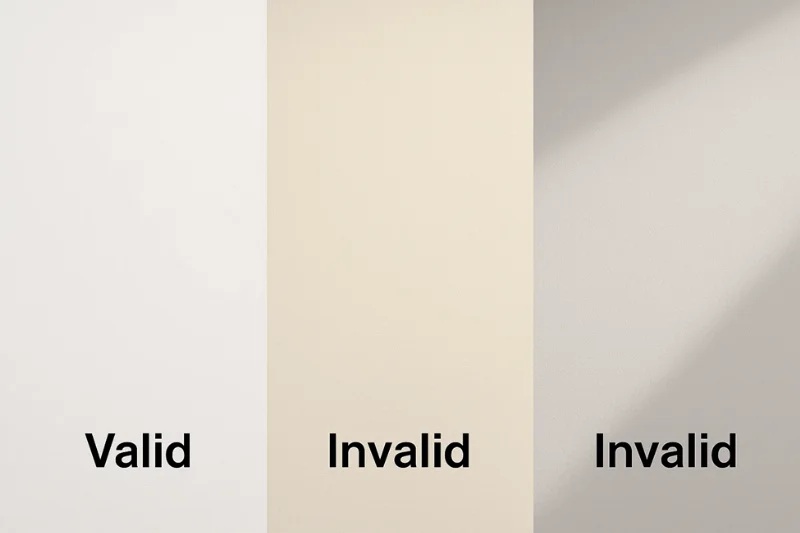
Background is one of the largest stumbling blocks in digital uploads.The rules are simple but non negotiable:
You must use:
- A white or off-white background
- A plain, consistent surface
- Even lighting and no shadows anywhere
Do not use:
- Grey, cream, beige, or any other-colored walls
- Textured surfaces
- Patterned backgrounds
- Anything with corners, objects or furniture that are visible
Requirements regarding the Size, Position and Framing of the Head
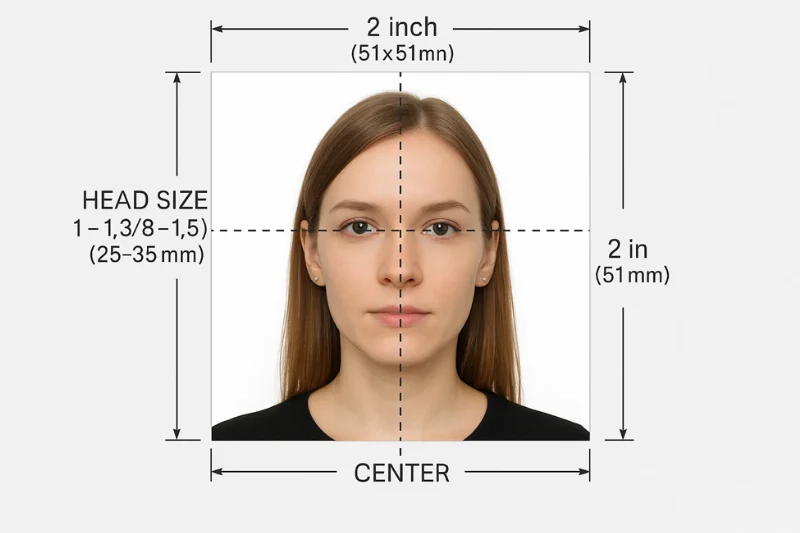
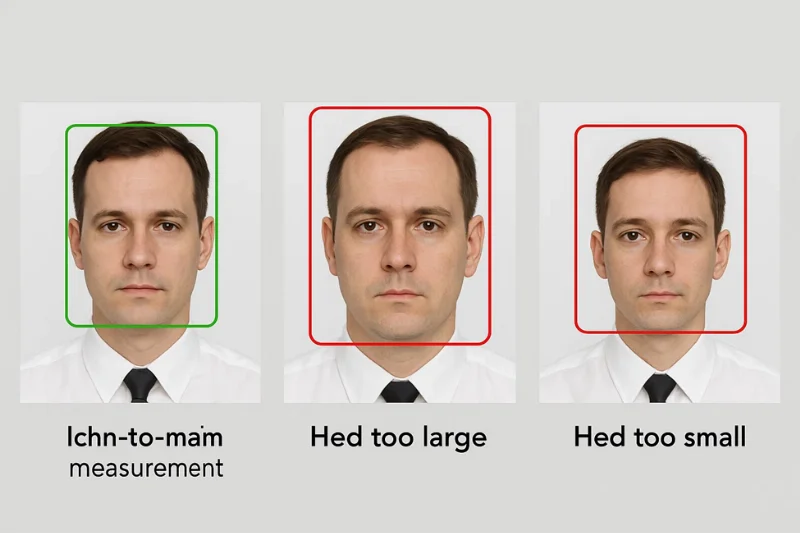
Your face needs to be the right size and position to comply with biometric capture standards. The distance from the bottom of your chin to the top of your head must be:
- 1 inch to 1⅜ inches (25–35 mm). This is the equivalent measurement applied to digital square photos.
Your head needs to be the correct size - not too small, not too large.
Position Requirements
- Face is centered in frame
- Head should be straight, not tilted
- Both ears visible if naturally visible
- Shoulders are visible at the bottom of the frame
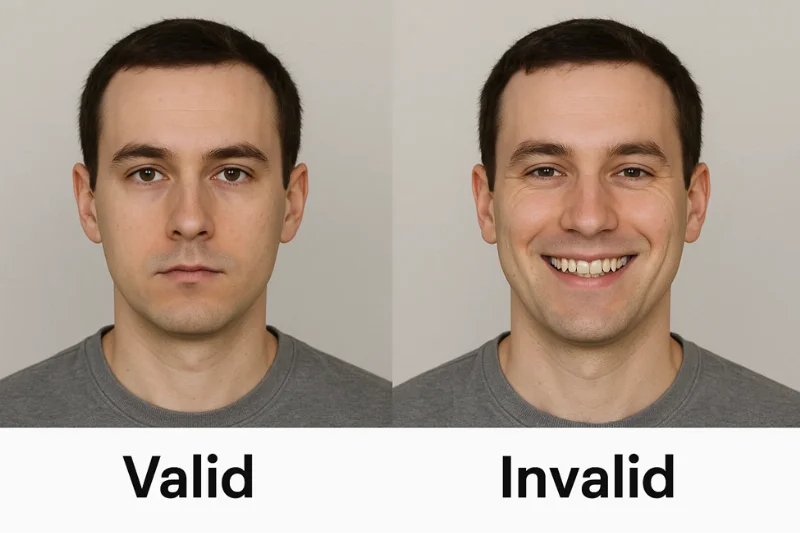
Expression, Eyes and Face Visibility
Whether digital or printed, the U.S. requires a neutral expression with a natural appearance.
Expression Rules
- Eyes open
- Mouth closed
- Do not smile showing your teeth
- No exaggerated facial expression
Face Visibility
- Your face must be fully visible
- No hair in the eyes
- No bangs covering the eyebrows
- No shadows on your face
U.S. biometric algorithms compare your image with that of your official records. Any sort of concealment or distortion of your features will cause a mismatch.
Glasses, Accessories and Headwear
This section is responsible for thousands of rejections annually.
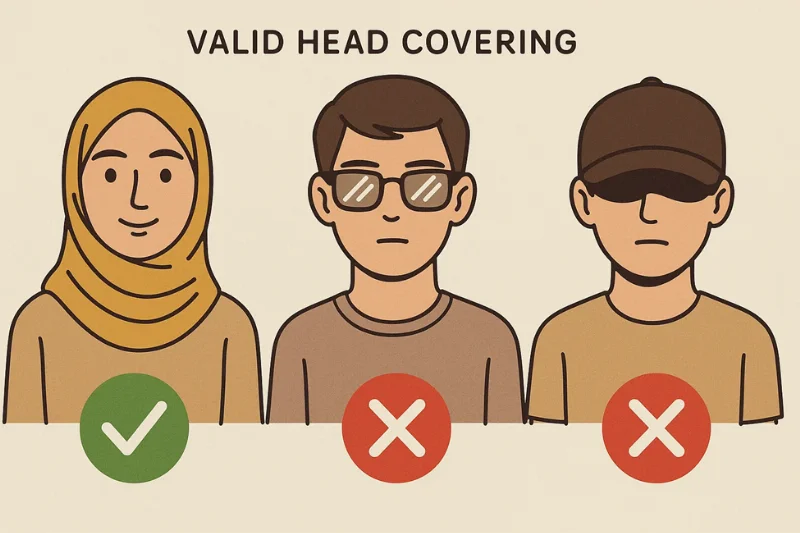
Glasses are not permitted to use them at all, except for extraordinary documented medical cases. They must be clear with no glare. But still no sunglasses.
Head Coverings allowed only for religious purposes and medical reasons. But only if:
- The entire face is open
- The shadow is absolutely no cover required
- It not too much covers the hair line
- It doesn’t cover your face
Accessories Not Allowed
- Sunglasses
- Fashion hats
- Wireless earbuds
- Hairbands that hide your face
- Face jewelry that impacts visibility
Recency Requirement
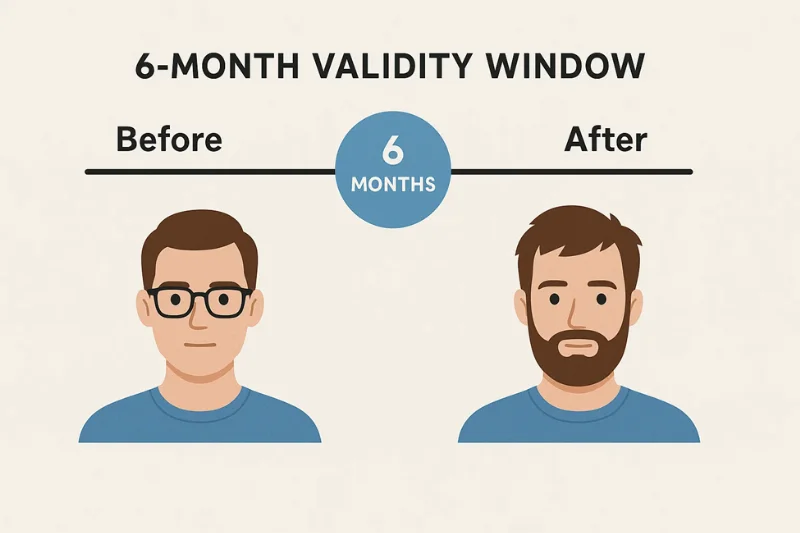
All passport photos digitally submitted must reflect the way you look now.
Official Rule
- Photo must have been taken within the past 6 months
- Should reflect the way you look now
When to Get a New Photo If your appearance has changed dramatically as a result of:
- Significant weight loss or gain
- Facial surgery
- Gender transition
- Aging that significantly alters your face
- Drastic changes in your facial hair
You need to update your photo - even if it’s not that old.
No Filters, No Editing, No Retouching of Any Kind
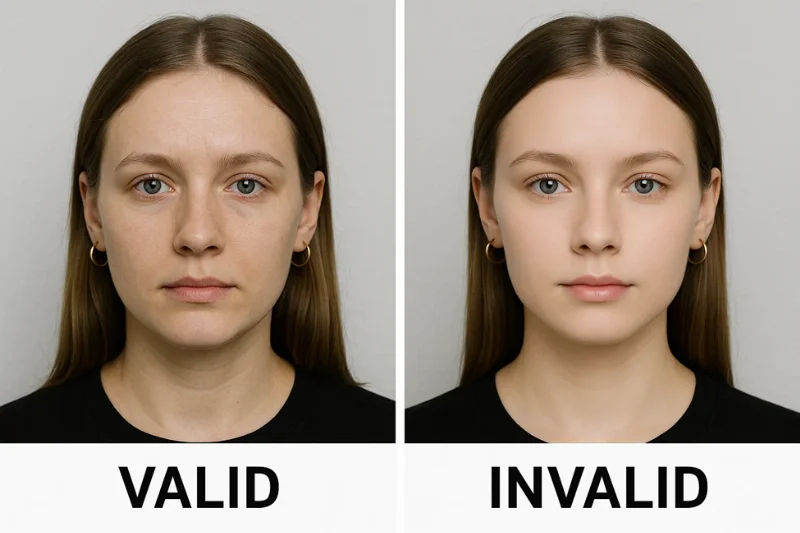
This is definitely one of the most misinterpreted passport photo rules.
Not Allowed:
- Skin smoothing
- AI retouching
- Face-reshaping filters
- Eye-enhancing filters
- Teeth-whitening tools
- Color filters or tones
- Removing blemishes manually
- Adjusting facial proportions
Allowed:
- Small overall brightness/contrast adjustments
- Cropping (as long as proportions are kept)
- Straighten the photo
Filters mess with the biometric comparison algorithms used in passport and border control systems.
Passport, Visa and DV: Which Requirements Apply to You?
There are differences in photo requirements across US government systems. That’s why people get confused - and rejected - even though their photo "looks fine".
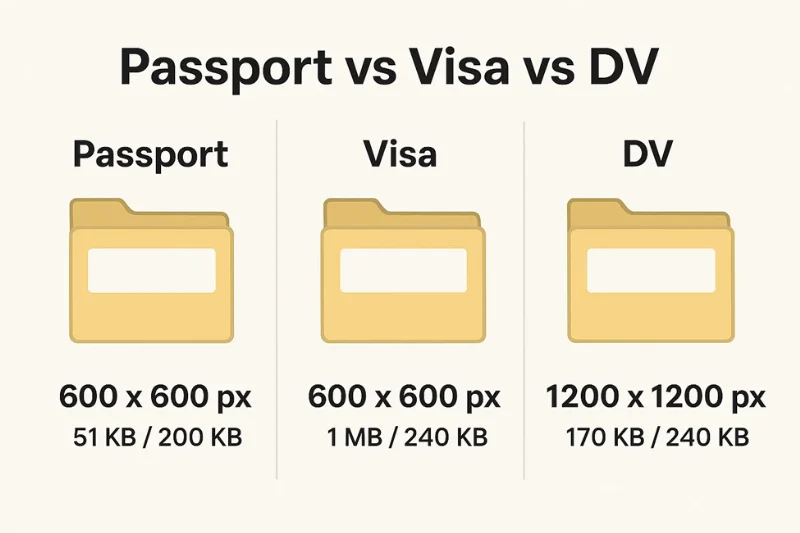
U.S. passport renewals, visa applications, and the diversity visa (DV) program all have slightly different technical requirements.
Renew a U.S Passport Online (MyTravelGov Digital Upload)
If you are renewing your passport online, this is how you do it. This is the most simple - it handles more file sizes, and two file types.
Required Technical Specs:
- File format: JPEG or HEIF
- File size: 54 KB – 10 MB
- Pixel dimensions: 600×600 to 1200×1200 px
- Color: sRGB, 24-bit color
- Square image required
- No filters, retouching, or editing
Biometric Rules That Still Apply
- White/off-white background
- Neutral expression
- No glasses
- No shadows
- Correct head size
U.S. Visa Applications (Non-DV)
Visa applications are subject to similar pixel requirements but much stricter file size requirements.
Required Technical Specs:
- File format: JPEG only
- File size: ≤ 240 kB
- Pixel dimensions: 600×600 to 1200×1200 px
- Color: sRGB, 24-bit color
- Square image required
Biometric Rules same as passport:
- Neutral expression
- White background
- No glasses
- Correct head size
Diversity Visa (DV Program) Digital Photo Requirements
The DV Program (Green Card Lottery) has the most stringent digital photo requirements.
This process is very brutal - if you are off by 1 pixel or 1 kB the image is rejected.
Required Technical Specs:
- File format: JPEG only
- File size: ≤ 240 kB (strict cap)
- Pixel dimensions: 600×600 px minimum
- Square aspect ratio required
- Color: sRGB, 24-bit
- No editing, retouching, filters
Biometric Rules: Identical to passport and visa standards.
Quick Comparison Table: Passport vs Visa vs DV Digital Photo Specs
|
Requirement |
Passport Online Renewal |
U.S. Visa Application |
DV Lottery Entry |
|
File Format |
JPEG or HEIF |
JPEG only |
JPEG only |
|
File Size |
54 KB – 10 MB |
≤ 240 kB |
≤ 240 kB |
|
Pixel Size |
600×600–1200×1200 px |
600×600–1200×1200 px |
600×600–1200×1200 px |
|
Color Space |
sRGB |
sRGB |
sRGB |
|
Biometric Rules |
Yes |
Yes |
Yes |
|
Filters Allowed |
No |
No |
No |
|
Square Aspect Ratio |
Required |
Required |
Required |
7 Steps to Check If Your Digital Passport Photo Meets U.S. Requirements
This is the most skipped step by most people - and this is the reason they get rejected.
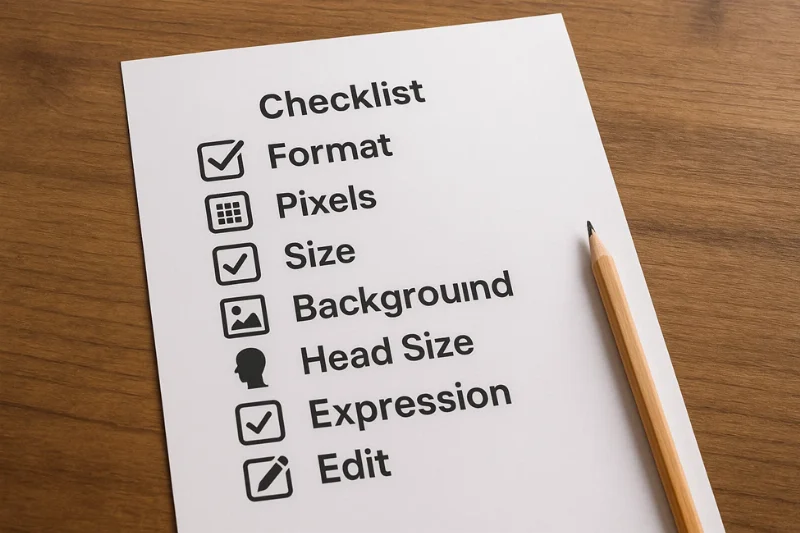
Before you upload anything to MyTravelGov, a visa application, or the DV system, run your photo through this exact list. Each step is based on official passport photo rules and the technical standards behind the U.S. systems.
Step 1: Check Your File Format (JPEG or HEIF)
Begin with the simplest rule.
- Make sure your photo is in JPEG/JPG format.
- You may use HEIF/HEIC if you are renewing your passport online only.
Step 2: Make Sure the Image Is Square (1:1 Ratio)
The system will reject if your image is not perfectly square.
- The width and height must be the same.
- Any images that are not square are refused.
Step 3: Check Pixel Dimensions (600x600 to 1200x1200)
The pixel size is more important than dpi, file size or camera model.
- Minimum: 600 × 600 px
- Maximum: 1200 × 1200 px
Step 4: Check the file size (different for Passport vs Visa vs DV)
This is the point at which many people fall.
If you are renewing a passport online the file should be no less than 54 KB and not more than 10 MB.
If you are applying for a visa or DV program - must be ≤ 240 kB.
Step 5: Check the Background (White or Off-White, no shadows)
Background problems are one of the top three reasons for rejection.
- Background is white or off-white
- No shadows behind you
- No textures, patterns, or visible corners
Step 6: Check Head Size, Position, and Visibility
If your head is too large, too small, or is off center your photo will not be accepted.
- Chin-to-crown measurement is 1-1⅜ inches (applied proportionally to digital photos)
- Face centered
- No tilt
- Full face visible
Step 7: Verify No Filters or Retouching or Editing has been used
Any form of artificial means will activate the automatic rejection system.
Not allowed:
- Skin smoothing
- Face shaping
- AI beauty filters
- Teeth whitening
- Manual blemish removal
Permitted:
- Cropping
- Minor brightness or contrast tweaks
- Rotation
Reasons the U.S. Passport photo is rejected
Most people don’t get to find out why their photo was rejected. The upload tool almost never explains anything - it just says, "Invalid photo" or "Photo failed".
Here are some of the most common and real-world reasons why U.S. digital photos get automatically rejected. If your photo is not going through, it’s probably because of one of these problems.
Wrong file format (PNG, PDF, HEIC in Mac System)
This is the top cause of an instant-rejection.
Why it’s declined? The U.S. passport system only accepts:
- JPEG for all submissions
- HEIF/HEIC for online passport renewal only
Anything else fails immediately.
Typical Mistake: Users upload screenshots saved as PNG → instant failure.
Wrong Pixel Size (Not Square, Too Small or Too Large)
Your image has to be perfectly square otherwise it immediately fails the test.
Reason for Rejection: The face-detection algorithm needs a 1:1 aspect ratio.
Photos are also rejected if:
- Smaller than 600×600 px
- Larger than 1200×1200 px
Your app type is not matching with file size
There are two systems for file size:
- Passport renewal → 54 KB – 10 MB
- Visa/DV → ≤ 240 kB
When you upload the inappropriate size for your case, it fails - even if the photo looks perfect.
Over-Compression or Too Blurry Image
A photo can comply with all the technical rules and still be rejected if the face is not clear enough.
Why it’s rejected:
The biometric system should identify:
- Eyes
- Eyebrows
- Nose outline
- Mouth shape
- Chin/jaw contour
Compression artifacts blur these details.
Typical signs of over-compression include:
- Pixelated edges
- Blocky patches
- Blurry skin texture
- Loss of contrast
Shadows on Background or Face
This is a leading cause of failure for biometrics.
Why it’s rejected? Illumination changes the face shape and uniformity of the background.
Common shadow problems:
- Shadow behind the head
- Shadow on the cheek or jawline
- Shadow under chin
- Lighting uneven on both sides of the face
Wrong Background Color or Pattern
Even minor deviations cause rejection.
Why it’s rejected? The background must be:
- White or off-white
- Plain
- Smooth
- Untextured
If there is any pattern, color shift or shadow from a corner of a wall it is flagged.
Size or Placement of Head Incorrect
Even a technically perfect image fails if the face is not the right size.
Common errors:
- Head too close to the top
- Too much shoulder visible
- Face too small
- Head tilted slightly
- Face not centered
Glasses or facial features obstructed
The rule was easy: no glasses unless they had to wear them for medical reasons.
Why it’s rejected: Glasses cause glare, reflections, and interfere with biometrics.
Not allowed:
- Clear glasses
- Blue-light glasses
- Readers
- Sunglasses
- Face coverings
- Hair hiding eyebrows
Filters, Smoothing, Retouching, or AI Editing
If the photo appears to be at all altered-reject.
Examples of forbidden edits:
- Smoothing or softening skin
- Enhancing eyes
- Slimming the face
- Changing hair color
- Whitening teeth
- Removing blemishes
- FaceTune or AI filters
Photo Not Taken Within the Last 6 Months
You must be able to recognize yourself in your digital photos.
Rejected if:
- Your appearance has changed considerably
- The photo is more than 6 months old
- Significant events have taken place since it was captured
Summary Table of All U.S. Digital Passport Photo Requirements
If you want a quick no-fuss guide that serves as a complete checklist, this table is meant for you. All of the important parameters from the U.S. Department of State requirements are covered here: pixels, file size, color space, format, biometric rules and software differences.
Complete Requirements Table
|
Requirement |
Specification / Rule |
Value |
Applies To |
Notes |
|
Image Shape |
Must be a perfect square |
1:1 aspect ratio |
All |
Rectangular images auto-reject |
|
Pixel Size |
Minimum and maximum pixel dimensions |
600×600 to 1200×1200 px |
All |
Smaller/larger images rejected |
|
File Formats |
Accepted digital formats |
JPEG or HEIF * |
Passport renewal / All programs |
*HEIF only for online passport renewal |
|
Color Mode |
Must be a full-color photo |
24-bit color |
All |
No black-and-white allowed |
|
Color Space |
Required color profile |
sRGB color space |
All |
Ensures consistent skin tones |
|
File Size (Passport Renewal) |
Minimum and maximum allowed |
54 KB – 10 MB |
Passport Renewal |
Most flexible system |
|
File Size (Visa / DV) |
Maximum allowed |
≤ 240 kB |
Visa, DV |
Strictest requirement |
|
Background |
Must be plain, uniform, bright |
White or off-white |
All |
No patterns or shadows |
|
Lighting |
Even, shadow-free lighting |
Uniform exposure |
All |
No harsh light on face or wall |
|
Head Size |
Chin-to-crown measurement |
1–1⅜ inches equivalent |
All |
Must be proportional in digital image |
|
Head Position |
Centered, straight, fully visible |
No tilt |
All |
Both eyebrows visible |
|
Expression |
Natural, neutral expression |
Eyes open, mouth closed |
All |
No big smiles with teeth |
|
Glasses |
Not allowed |
None |
All |
Medical exception requires documentation |
|
Head Coverings |
Allowed only for specific reasons |
Religious / medical |
All |
Face must remain fully visible |
|
Recency |
Must reflect current appearance |
Taken within last 6 months |
All |
Older photos rejected |
|
Editing / Filters |
Prohibited |
No smoothing, no AI edits |
All |
Cropping & exposure tweaks allowed |
|
Compression |
Must preserve facial detail |
Reasonable compression |
All |
Avoid visible artifacts |
|
Scanned Photos |
Must meet scanning standards |
300 dpi, clean scan |
All |
Must still meet pixel specs |
|
Background Objects |
Not allowed |
Zero distractions |
All |
No furniture, patterns, or corners |
|
Facial Visibility |
Full face required |
No obstruction |
All |
Hair cannot cover eyes/eyebrows |
|
Program Differences |
Passport vs Visa vs DV |
See below |
All |
File-size differences matter |
Program Differences Table
This second table clarifies the biggest point of confusion - each U.S. program uses its own technical limits for digital photos.
|
Program |
File Size |
File Format |
Pixel Size |
Color Space |
Notes |
|
U.S. Passport Renewal (MyTravelGov) |
54 KB – 10 MB |
JPEG or HEIF |
600×600–1200×1200 |
sRGB |
Most flexible; HEIF allowed |
|
U.S. Visa Application |
≤ 240 kB |
JPEG only |
600×600–1200×1200 |
sRGB |
Stricter file-size cap |
|
DV Lottery Program |
≤ 240 kB |
JPEG only |
600×600–1200×1200 |
sRGB |
Extremely strict; auto-rejection if exceeded |
Quick Takeaways From the Table
- A digital passport photo always must be square and in sRGB.
- The pixel size should be no less than 600×600 and no more than 1200×1200 px.
- Visa & DV images are limited to 240 kB - that’s final.
- Passport renewals permit up to 10 MB, plus HEIF format.
- Biometric requirements (head size, background, expression, visibility) are the same for all programs.
How U.S. Officials Check Your Digital Passport Photo
Your digital passport photo is put through a series of automated checks long before any human begins looking at your passport, visa, or DV application.
These applications were intended to detect even minuscule errors - a pixel too small, a shadow too dark, or a filter too subtle to be detected with the naked eyes.
Automated Technical Validation (Instant System Check)
As soon as you upload your file, the system reads your file's technical properties.
It is done in a fraction of a second and verifies the following:
- File format (must be JPEG or applicable HEIF)
- Image shape (must be 1:1 square)
- Pixel dimensions (600×600 to 1200×1200)
- File size
- Color space (sRGB)
- Compression quality
- Corrupted metadata or missing EXIF fields
If that’s all that failed, you never got to the next step.
Automated Biometric Detection (Face & Background Analysis)
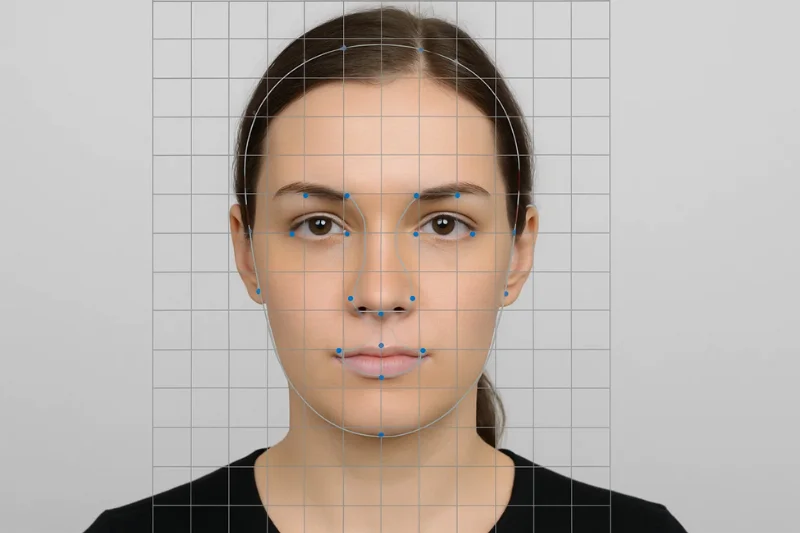
If the technical verification is successful, a biometric scan is performed by the system. This program examines:
- Position of the eyes
- Visibility of eyebrows
- Chin-to-crown height
- Neutral expression
- Facial symmetry
- Face orientation (straight vs tilted)
- Background consistency (white or off-white)
- Presence of shadows
- Potential face filters or smoothing
When your face can’t be detected with a high degree of confidence the submission fails, not once looked at by a human.
Common Automated Rejections:
- Shadows behind head - "Background not uniform"
- Face too small - "The face is not centered in the frame"
- Filter detected - "Photo was altered"
But there is no bypass in this stage: if the software doesn't like it, it ends there.
Manual Review by a Passport Specialist
If your image successfully passes the automated checks, it gets sent to a U.S. passport specialist for review.
A human reviewer is waiting to check:
Facial Accuracy:
- Does the image reflect a real, natural face?
- Is the expression neutral?
- Are the eyes open and eyebrows visible?
Background Consistency:
- Any small shadows that automation missed?
- Any indications of digital manipulation?
Identity Consistency:
- Is the image consistent with previous passport photos?
- Does it match any supporting IDs (if applicable)?
Recency of Appearance:
If you’ve undergone a major transformation since your last passport photo or IDs, the agent can mark it for review.
Why is there such a multilayered process
The infrastructure of U.S. passports is built on biometric integrity. Even the smallest of discrepancies can cause:
- Problems at border control
- Delays when verifying identity
- I False matches with faces in security systems
This is also why very small filters, shadows or compression artifacts can lead to a rejection.
If your image passes: technical validation, biometric detection, and human review - then your digital passport photo is considered compliant in all respects.
Quick Answers About U.S. Digital Passport Photo Requirements
We could save them for later. But these are the most frequently asked questions people ask when uploading a digital passport photo for a US passport renewal, visa application and dv entry.
All answers adhere strictly to official passport photo requirements.
1. Do I Need to Make a Digital Passport Photo Square?
Yes. Every digital passport photo in the U.S has to be 1:1 square, meaning the width and the height are equal. Even if the image is a bit rectangular, the system rejects it immediately.
2. What size should a U.S. digital passport photo be in pixels?
Your image must be one of the following sizes:
- 600 × 600 px (minimum)
- 1200 × 1200 px (maximum)
Anything outside that range fails automated checks.
3. Can I submit a HEIF/HEIC file for a U.S. passport?
Yes. But only if you are applying for the passport online.
For visa or DV applications, you cannot submit HEIF files. Those systems require JPEG only.
4. What size should a U.S. digital passport photo be?
It depends on your application:
- Passport online renewal: 54 KB – 10 MB
- Visa applications: ≤ 240 kB
- DV Program: ≤ 240 kB
Just 1 kb over the size limit for the DV and you’re out.
5. Should my photo be taken in the last 6 months?
Yes. Current Appearance Your photo must represent your current appearance and be taken within the last six months. Major changes (surgery, significant weight change, shaving off large beard) necessitate a new photo.
6. Can I retouch or alter my digital passport photo?
No. You cannot:
- Smooth skin
- Brighten eyes
- Reshape facial features
- Remove blemishes
- Add filters
Only slight corrections to exposure or cropping can be made.
7. Can I wear glasses in a U.S. digital passport photo?
No. Glasses are not allowed unless you have a a rare medical exemption from a certified doctor. Even clear and glare-free lenses are not permitted.
8. Can I take a selfie and use it as my digital passport photo?
Only if it complies with all the passport photo requirements:
- Neutral expression
- Correct head size
- White background
- No filters
- Correct pixel dimensions
- Proper file size and format
Most casual selfies just don’t cut it for most of these rules.
9. Why is my photo rejected when I think it looks fine?
Perhaps due to one of the following secret reasons:
- Incorrect file size
- Wrong color space (other than sRGB)
- Slight background shadow
- Slight tilt of head
- Over-compression
- Hidden filter applied by your camera app
You can get automated systems that find problems your eyes never will.
10. Can I use a previous photo file for a new passport application?
No. An image, no matter how good it is, must have been captured not more than 6 months ago and must represent your current look.
Authored by:
Nathaniel K. RowdenApproved by Association of Visa center
On this page:
- What Is a Digital Passport Photo in the U.S.
- Core Digital Passport Photo File Specifications (Pixels, Format, Size)
- Biometric passport photo rules still apply to digital images
- Passport, Visa and DV: Which Requirements Apply to You?
- 7 Steps to Check If Your Digital Passport Photo Meets U.S. Requirements
- Reasons the U.S. Passport photo is rejected
- Summary Table of All U.S. Digital Passport Photo Requirements
- How U.S. Officials Check Your Digital Passport Photo
- Quick Answers About U.S. Digital Passport Photo Requirements