1x1 Picture Size Requirements in 2026: a Complete, Expert-Verified Checklist
Table of contents:
- 10 Essential 1x1 ID Picture Requirements: Checklist
- Acceptable 1x1 Picture Size Examples
- Unacceptable 1x1 Picture Size Examples
- Where the 1x1 Picture Size is Used Worldwide
- Where to Take 1x1 Picture Size: Online Tool vs. Professional Services
- Tips on Taking a 1x1 ID Picture at Home
- How to Print a 1x1 Picture?
- 10 Common Reasons for a 1×1 ID Photo Rejection
- What to Do if Your 1×1 Photo Has Been Rejected
- Frequently Asked Questions
- Official Government Sources
- Other Documents — Philippines ID Photos
A 1×1 picture size is widely used for IDs and other documents in the Philippines and in some other countries. Official standards require a recent photo taken within the past 6 months, with the subject looking directly into the camera with a neutral facial expression, and mouth closed, against a plain white or light background. 1x1 picture size in cm is 2.54 × 2.54 cm, 1x1 picture size in inches is 1 x 1 inches. The 1x1 picture size itself is prepared on a dedicated page, where a selfie is cropped to the square ID format.
This 2026 Guide сovers the key 1×1 picture size requirements you must follow before submitting a photo for your official ID. If you follow these standards and use a reliable 1x1 picture maker such as PhotoGov, you can quickly create a submission-ready photo that is accepted on the first try.
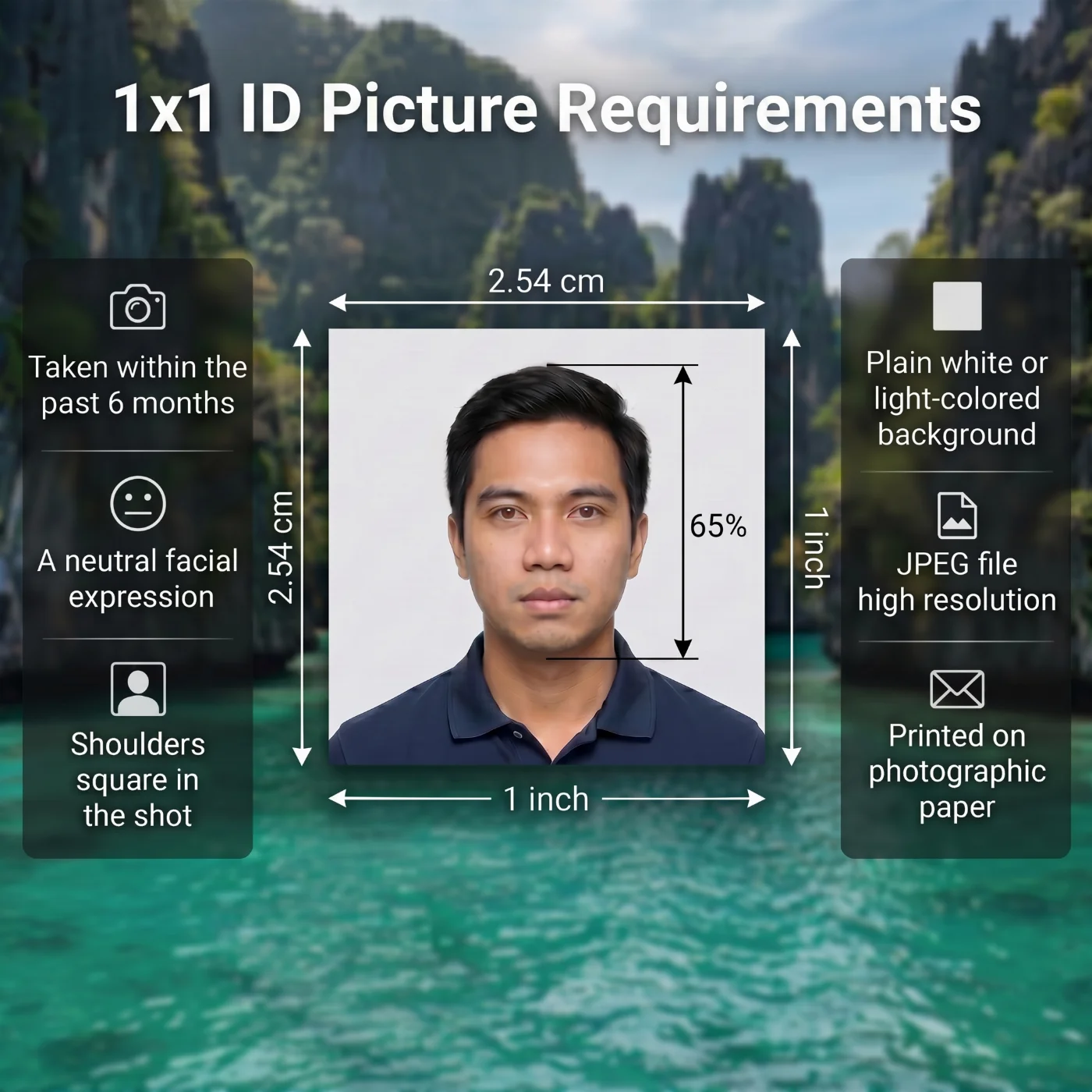 Source: ICAO Doc 9303
10 Essential 1x1 ID Picture Requirements: Checklist
The 1x1 ID picture requirements are based on the International Civil Aviation Organization Document 9303 standards. Below is a list of key rules that every applicant must follow.
Requirement | Details |
1. Recency | The 1x1 ID picture must be taken within the last six months, showing the applicant’s current appearance. In case of significant appearance changes, a more recent photo must be provided. |
2. Photo Size | 1x1 picture size in cm is 2.54 × 2.54 cm, 1x1 picture size in mm is 25.4 mm x 25.4 mm, 1x1 picture size in inches is 1 x 1 inches. |
3. Background | A white or light-colored background is required for a 1x1 ID photo. The background must be plain and free from shadows, patterns, and objects. |
4. Color | A colored image is required. The color must naturally reflect the applicant’s skin tone and hair color, and not be either under- or overexposed. |
5. Lighting | Even, natural lighting, accurately representing the subject and the background. |
6. Positioning and Framing | The applicant must look directly into the camera. The full face and the top of the shoulders must be square in the shot. |
7. Facial Expression | A neutral expression is required: eyes open, mouth closed, no smiling, frowning, or raised eyebrows. |
8. Attire, Head Coverings, and Accessories | Regular daily clothes are required, no uniforms; no head coverings unless worn for religious or medical reasons. Accessories must not obstruct facial features or cover the neckline. |
9. Glasses | Allowed. But glare and reflections must be avoided, and the eyes must remain fully visible. |
10. Print and Digital Quality | Sharp, high-quality prints on professional photo paper are accepted. Digital files for online submission must be free of any compression artifacts. |
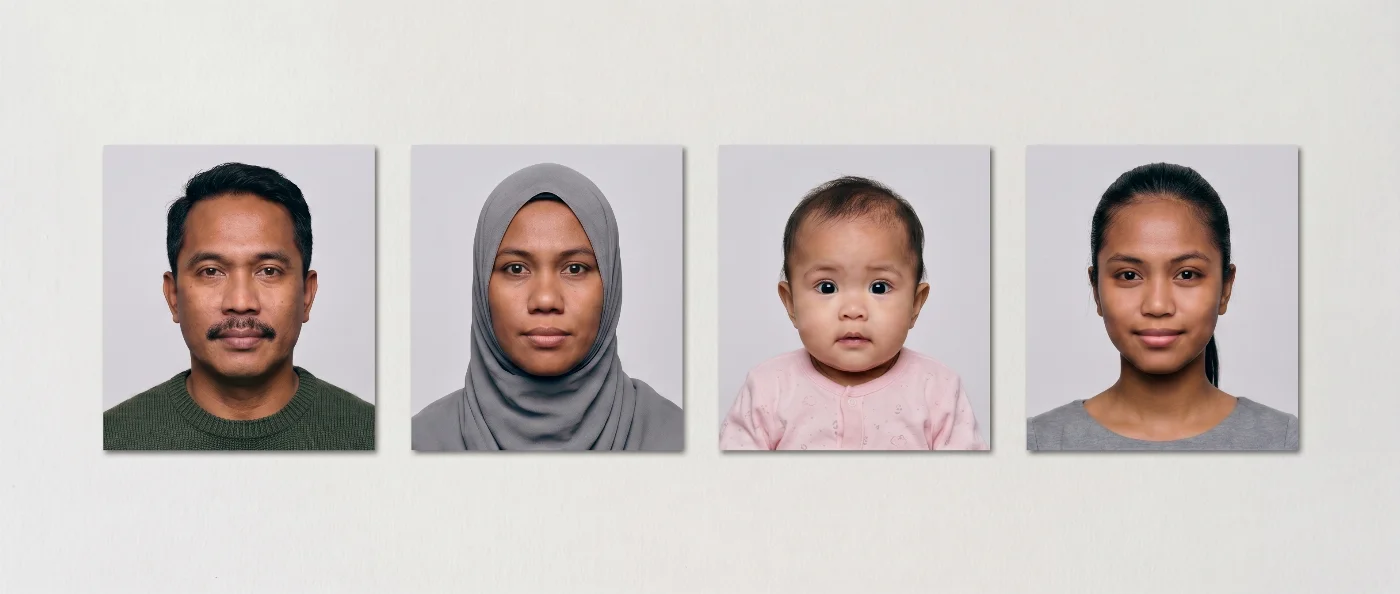
Acceptable 1x1 Picture Size Examples
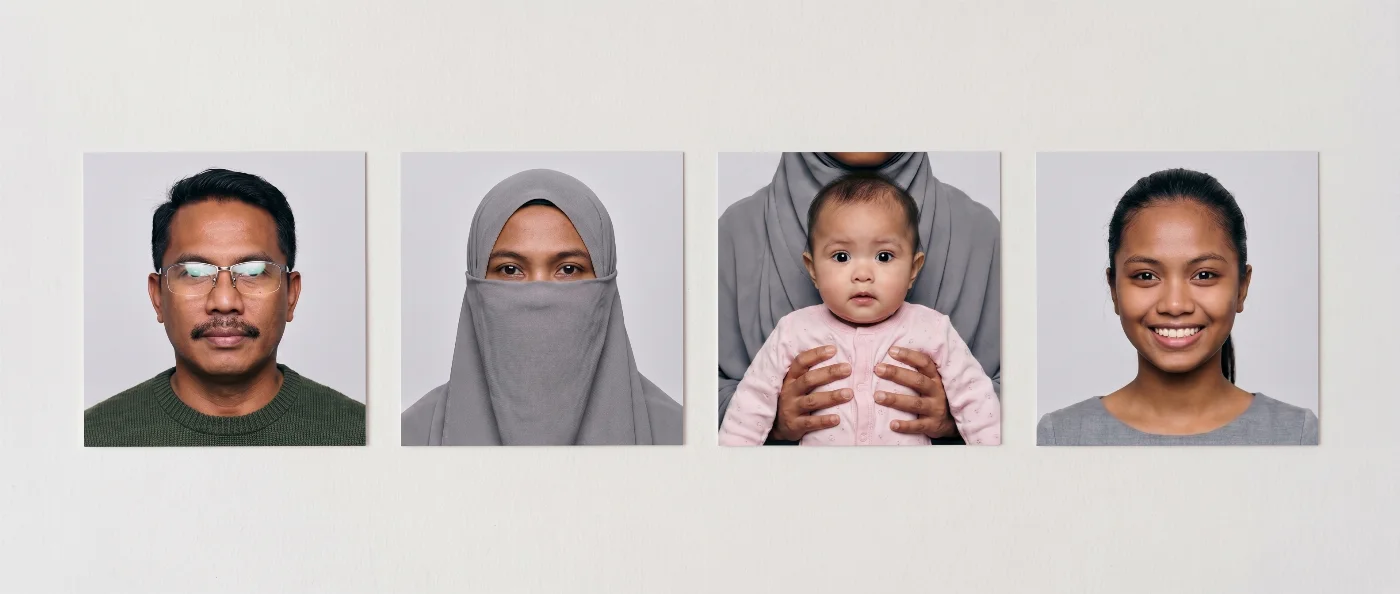
Unacceptable 1x1 Picture Size Examples
Where the 1x1 Picture Size is Used Worldwide
The 1x1 picture size is a relatively rare photo format worldwide, and it's never required for passport photos. However, in the Philippines, the 1x1 picture size in cm is widely used for official identification:
Passports use larger formats, so make a 35x45 photo online when the form asks for that size.
These and a few other IDs require 1 x 1-inch photographs. You can also find the 1x1 photo size requirements in a number of government agencies across different countries — the USA, Thailand, Indonesia, India. If that is your case, and you're about to renew or apply for the official document, you don't need to rush to the photo service. Other countries use rectangular formats: our 30x40 mm photo tool prepares the 3 x 4 cm variant.
Some forms ask for a slightly bigger square: the 4x4 cm photo size is prepared on its own page.
With our 1x1 picture maker, all you need is your phone. Our software will take care of the rest: it crops your image to the correct size and makes it compliant with the official 1x1 ID picture standards set by the International Civil Aviation Organization (ICAO). An employer asking for a headshot can be sent a 2x2 inch resume photo online, cropped from the same picture.
Where to Take 1x1 Picture Size: Online Tool vs. Professional Services
Option | Pros | Cons | Timing | Cost | Chance of approval |
1x1 Photo Maker Tool | Easy, instant, works as 1x1 photo maker, 1x1 photo converter, and 1x1 photo resizer | Needs a clear original image | Fastest. Less than a minute | Free | Very High |
Professional Services (photo shops, copy centers) | Staff usually know ID standards | Requires travel, limited retries | Moderate. 10-30 minutes, plus travel | $10–20 | High |
Photo Booth | Cheap, quick printouts | Not suitable for young children; shadows, unclear images; no resize option. | Fast. 5 minutes, plus travel | $5–10 | Medium to Low |
Professional Photographer | Highest quality, expert lighting | Expensive, requires an appointment | Slowest. May take up to a couple of days | $30–100 | Very High |
Tips on Taking a 1x1 ID Picture at Home
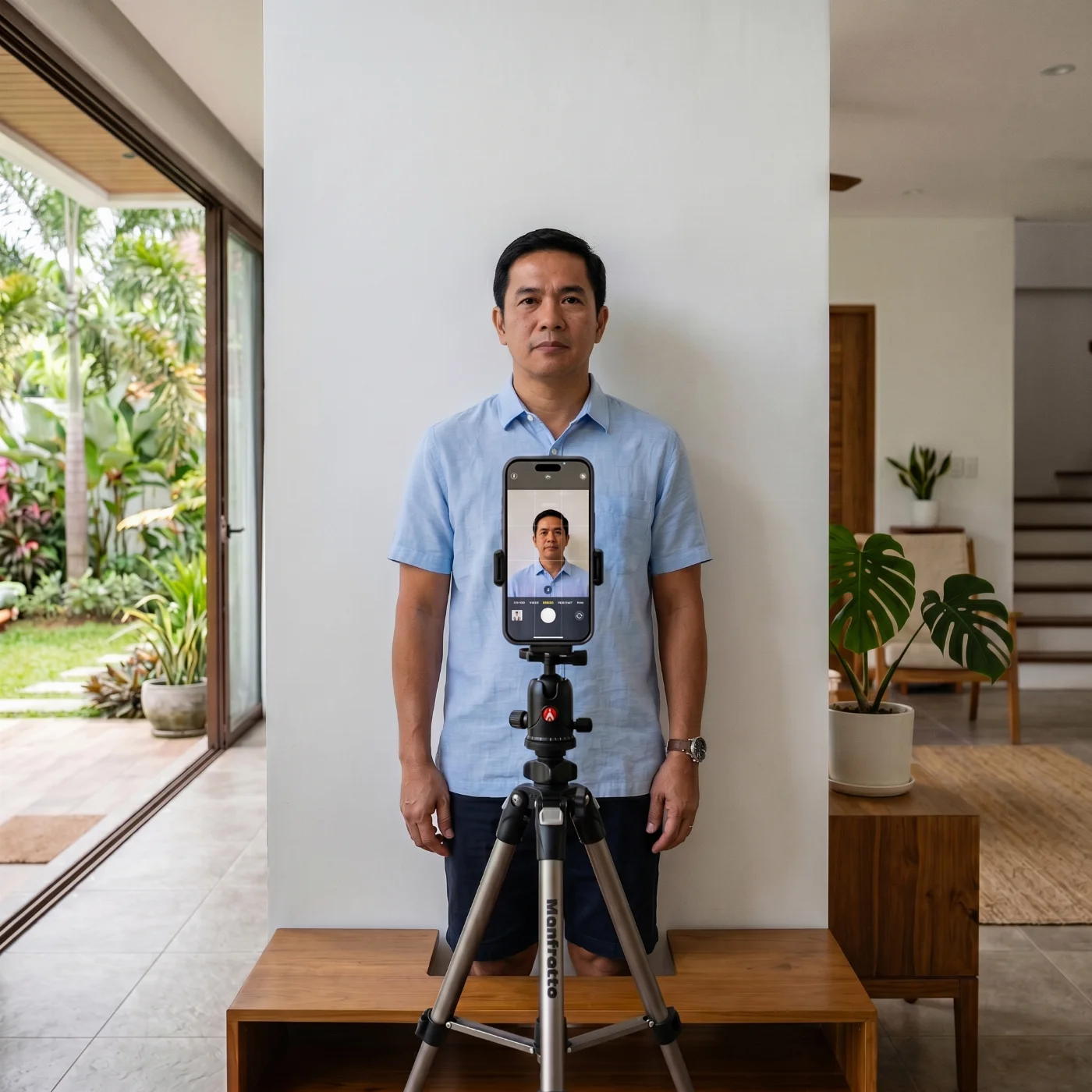
If you think only a professional photographer can capture a perfect photo, you might be surprised. You can easily create your 1x1 photo at home — all you need is a smartphone and a simple setup. Our free 1x1 photo maker will handle the rest.
Lighting. Choose a spot near the window. Natural daylight from the side works best for a home photoshoot — it softens the face and helps avoid harsh shadows.
Background. If you don't have white walls, use a plain white background without patterns or textures.
Phone setup. Use the back iPhone camera for a better shot. Choose the square framing in the settings. Automatically set the timer for 3 or 10 seconds. Place the smartphone on a tripod right in front of your face.
Taking a 1x1 photo. Stand in front of your phone, look straight into the lens, relax your expression, and keep both eyes open. Take a few shots to choose the best one.
Image adjustments. Once the photo is taken, upload it to our online 1x1 picture editor. It will adjust the image to the standard requirements: crop it precisely to 2.54 × 2.54 cm, replace the background if needed, and save it in JPG for a free download.
Get your 1x1 ID picture. Download your photo in a JPEG for online submission or as a printable PDF file.
How to Print a 1x1 Picture?
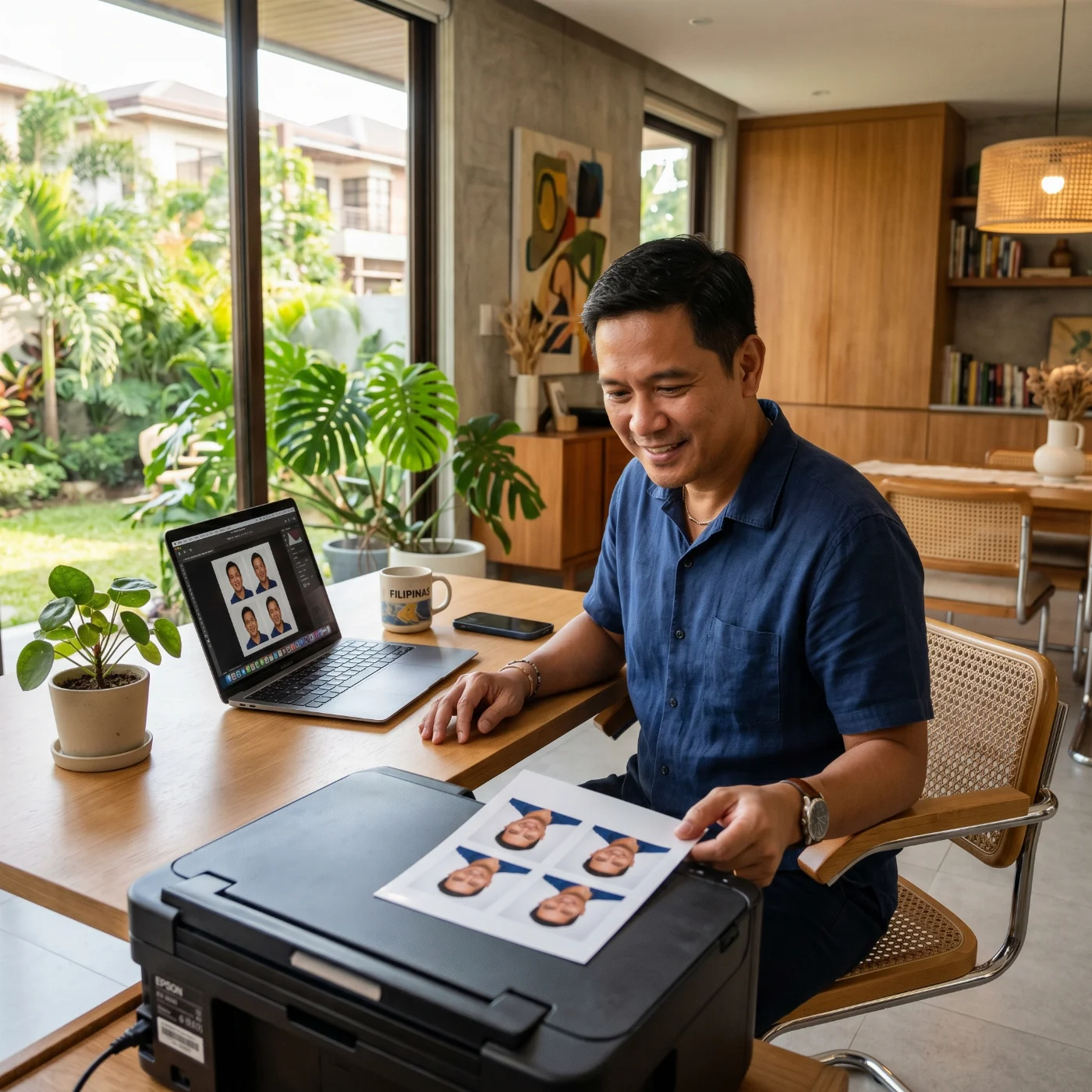
Printing a 1x1 picture is easy: you can do it in a nearby photo lab, or at home, if you have a printer and photographic paper. When printing at home, set the print quality to “high” or “best,” select the original size (100% scale), and turn off any “fit to page” or auto-scaling options so the 1×1 dimensions are preserved. Before you print, make sure your image is prepared at 1×1 inch (2.5 × 2.5 cm) and 600 dpi in a 1:1 square format so the final photo has the correct size and clarity. You don’t need to worry about your 1x1 picture size print parameters if you use PhotoGov: our 1x1 photo maker automatically prepares a print-ready PDF file.
10 Common Reasons for a 1×1 ID Photo Rejection
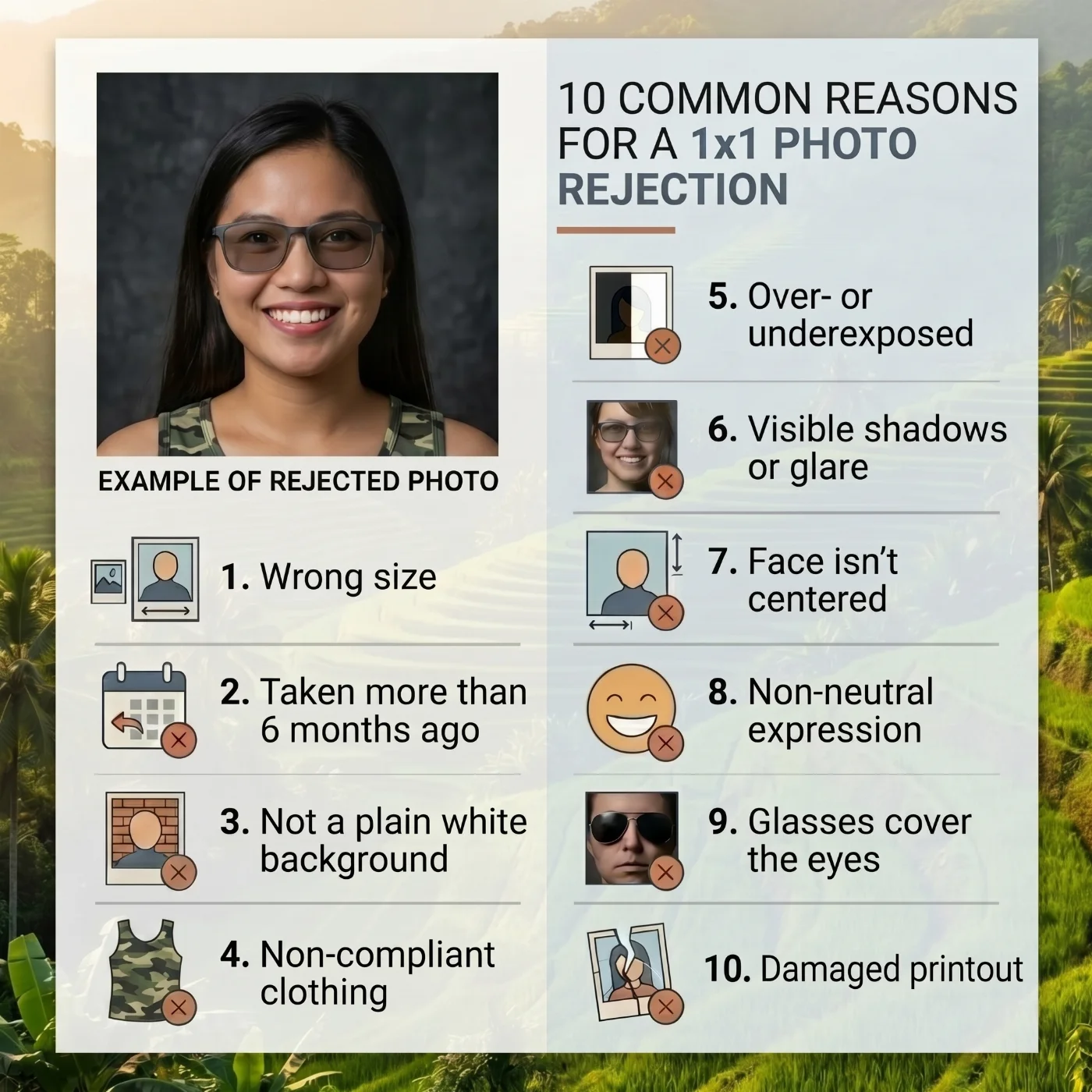
A 1×1 ID photo is evaluated against standard biometric criteria: how recently it was taken, exact dimensions, background, color, lighting, framing, facial expression, clothing, accessories, and overall technical quality. Any deviation from these requirements may result in rejection and a request for a new image.
The most common reasons for rejection are:
The photo was taken more than six months ago.
The image does not measure exactly 1 × 1 inch (2.54 × 2.54 cm).
The background is not plain white or a uniform light color.
The image lacks natural color, or is visibly overexposed or underexposed.
Uneven lighting creates harsh shadows or glare on the face.
The face is not centered or does not fill the required portion of the frame.
The expression is not neutral — smiling, frowning, or eyes not fully open.
Clothing, head coverings, or accessories do not comply with the official rules.
Glasses obscure the eyes or produce noticeable lens reflections.
The print or digital file is blurry or shows visible compression artifacts.
What to Do if Your 1×1 Photo Has Been Rejected
If your photo has been rejected, the most reliable course of action is to replace it with a new image that clearly meets the official specifications. Rather than attempting to salvage a flawed file through heavy editing, retake the photo and control each step of the process. The new image should be taken within the past six months, formatted to exactly 1 × 1 inch, and shot against a plain white or light matte background. Follow the guidance in this article to produce a compliant photo, then resubmit it according to the official instructions.
Once a photo is rejected, the application is typically placed on hold until a compliant image is received. The issuing authority sends an official notice — by letter, email, or through an update in the online portal — explaining the reason for rejection and providing instructions for submitting a replacement. The new photo must meet the current specifications and be submitted through the method specified in that notice, whether by uploading a file to the portal or mailing printed photos along with the application reference number. In many cases, a fixed response deadline applies: if the corrected photo is not received in time, the application is cancelled and must be filed again from scratch, including all applicable fees.
Frequently Asked Questions
What is 1x1 Picture?
A 1x1 picture is a format for IDs, widely used in the Philippines and a few other countries. It is an official, square, 1x1 ID photo sized exactly 1x1 inches or 2.54 x 2.54 cm. The 1x1 photo must be taken within the past 6 months and show an applicant’s full face and upper part of the shoulders, looking directly into the camera with a neutral expression. The background must be plain white or light-colored.
What is the Size of 1x1 Picture?
The 1x1 photo size is always a perfect square. Here are the exact dimensions:
1x1 picture size in cm: 2.54 cm x 2.54 cm
1x1 picture size in inches: 1 inch x 1 inch
1x1 picture size in mm: 25.4 mm x 25.4 mm
Knowing the precise 1x1 picture size in cm helps avoid rejection when submitting your photo for official documents.
What is a 1x1 Picture Size in cm?
A 1x1 picture size in cm is 2.54 × 2.54 cm.
What is the Width and Height of 1x1 Picture?
The height and width are both 2.54 cm (25.4 mm).
How Many Inches is 1x1 Picture?
A 1x1 picture is exactly 1 x 1 inches in size.
How Many cm is 1x1 Picture?
1x1 picture is 2.54 × 2.54 cm.
How Big is a 1x1 Picture?
A 1x1 picture is one of the smallest ID photo sizes: it is only 2.54 cm x 2.54 cm, or 1 x 1 inches.
How Do I Know if My 1×1 Photo Will Be Accepted?
Check the image against the official requirements before submitting: the dimensions must be exactly 1 × 1 inch, the background plain white or light-colored, the face centered and fully visible, the expression neutral, and the file sharp and undistorted. Many online ID photo tools include a built-in compliance check that flags common issues before you upload or print.
Can I Take a 1×1 Picture With My Phone?
Yes. Most modern smartphones produce images of sufficient quality for a 1×1 ID photo, provided the lighting is good, the background is plain white or light-colored, and the shot is taken straight on with the face properly centered. The image must then be cropped and resized to exactly 1 × 1 inch before submission.
Can I Print a 1×1 Picture at Home?
Yes, if you use photo-quality paper and a printer capable of accurate color reproduction. The print must be sharp, without visible pixelation, color cast, or banding. Matte or semi-gloss photo paper is generally preferred over standard office paper.
How Many 1×1 Photos Do I Need for a Philippine ID?
The number of required photos varies by document type. Most Philippine government IDs and application forms require one to four 1×1 photos. Always check the specific requirements of the issuing authority before your appointment.
What Is the Difference Between a 1×1 and a 2×2 Photo?
Both are square ID photo formats, but a 2×2 photo is four times larger in area. The 2×2 format (5.08 × 5.08 cm) is the standard for US passports and many international documents, while the 1×1 format is primarily used in the Philippines.
Can I Smile in a 1×1 ID Photo?
No. A neutral expression with the mouth closed is required. Smiling, even slightly, is a recognized reason for rejection because it alters the geometry of facial features used in biometric verification.
Does the 1×1 Photo Format Have a Standard Background Color?
Yes. The required background is plain white or a uniform light color, free of patterns, shadows, or gradients. Some authorities specify white only; others accept light gray or light blue. Check the requirements of the specific document before taking the photo.
What Should I Wear for a 1×1 ID Photo?
Wear plain, neutral-colored clothing. Avoid white tops, which can blend into the background, as well as uniforms, heavily patterned fabrics, and anything that obscures the neckline. The goal is for the face to remain the clear focal point of the image.
Are Head Coverings Allowed in a 1×1 ID Photo?
Religious head coverings are generally permitted, provided they do not cast shadows on the face or obscure any facial features. Decorative hats, caps, and non-religious head coverings are not allowed.
Are Glasses Allowed in a 1×1 ID Photo?
Glasses are generally allowed, provided they do not obscure the eyes or cause reflections on the lenses. Tinted, mirrored, or heavily framed glasses are likely to result in rejection. If your glasses produce glare under studio or flash lighting, removing them is the safest option.
Can I Use an Old Photo for a 1×1 ID Application?
No. The photo must have been taken within the past six months. An image older than that will be rejected regardless of its technical quality, because ID photos are required to reflect your current appearance.
Where Can I Get a 1×1 Photo Taken?
A 1×1 photo can be taken at a professional photo studio, a photo booth, or at home using a smartphone or camera. Online tools and dedicated ID photo apps can help resize and reformat the image to the correct dimensions before printing or digital submission.
Can a 1×1 Photo Be Used for Multiple Documents?
In many cases, yes. If the photo meets the standard specifications — correct dimensions, plain background, neutral expression, taken within the past six months — the same image can often be used for several Philippine government IDs and application forms. Always verify the exact requirements of each issuing authority, as some have additional conditions such as a specific background color or a colored border.
Official Government Sources
Biometric Regulations for International ID Documents: International Civil Aviation Organization (ICAO) Document 9303
Philippines Visa Photo Requirements: The Republic of the Philippines Office of Consular Affairs
Other Documents — Philippines ID Photos
Was this helpful?
82 found this helpful
Top expert
Based on official government sources
Helpful votes: 82
Was this helpful?
82 found this helpful
Service provided by Y VISION TECHNOLOGIES LLP · Stoney Works 8 Stoney Lane, London, England, SE19 3BD · Terms · Refund policy · Contact
We value your Privacy
We use cookies to enhance your browsing experience, serve personalized ads or content. By clicking “Accept All”, you consent to our use of cookies.