Digital Passport Photo: a Complete 2026 Guide
Table of contents:
- What is a Digital Passport Photo in the U.S.?
- Why Technical Compliance Matters
- Key Digital Passport Photo File Specifications
- Pixel Dimensions and Square Aspect Ratio
- Digital Photos Follow Strict Biometric Requirements
- Passport, Visa, and DV: Which Requirements Apply to You?
- Quick Comparison Table: Passport vs. Visa vs. DV Lottery Photo Requirements
- Checklist: 7 Steps to Take Before Uploading Your Digital Passport Photo
- Why U.S. Digital Passport Photos Get Rejected
- Summary of All U.S. Digital Passport Photo Requirements
- Application Types and Required Photo Formats
- How U.S. Officials Check Your Digital Passport Photo
- Frequently Asked Questions
A U.S. digital passport photo is a biometric image following a strict set of requirements. It must have a 1:1 aspect ratio, with pixel dimensions from 600 × 600 up to 1200 × 1200, a plain white or off‑white background, showing the applicant facing the camera directly with a neutral expression. For online U.S. passport renewal, the file must be saved as a JPG, PNG, or HEIF and sized between 54 KB and 10 MB. DV Lottery and most U.S. visa applications require a JPEG file only, with a maximum size of 240 KB.
Even a tiny mistake in your digital photo can trigger an automatic rejection of your application. But don’t worry — this Guide walks you through every U.S. Department of State rule for digital passport photos, so your image gets accepted on the first upload.
What is a Digital Passport Photo in the U.S.?
A digital passport photo is a biometric image that follows two layers of requirements set by the US Department of State and the International Civil Aviation Organization (ICAO):
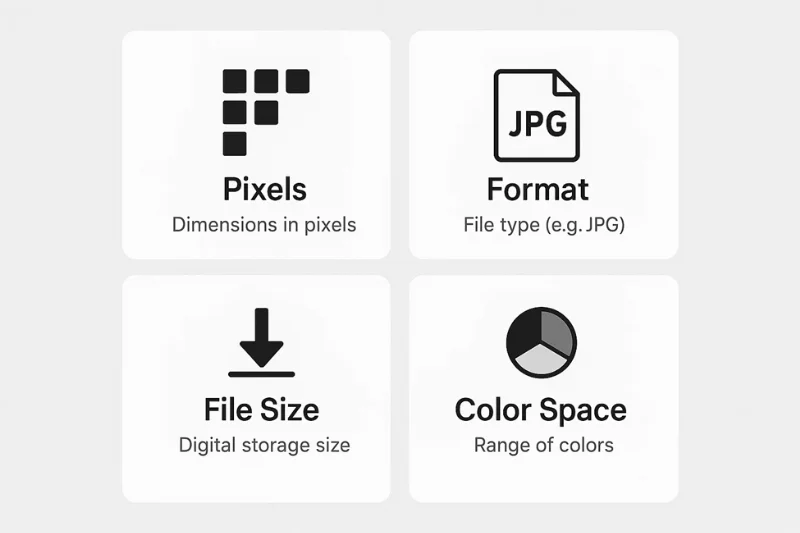
Technical specifications — pixel dimensions, file format, color space, file size;
Biometric standards — background, head size, facial expression, face visibility.
The U.S. has some of the toughest and most technical digital passport photo requirements in the world, so it’s important to follow them exactly for your photo to get accepted. Let’s see what these requirements mean in practice.
A Digital Passport Photo Is:
A square, full-color digital image that meets precise pixel and file-type specifications
A file ready for upload to the U.S. Department of State system via Travel.State.Gov
An image that is screened by an automated verification system and then manually reviewed by a specialist
Subject to all standard biometric passport photo rules — expression, background, head size, and more.
A Digital Passport Photo Isn’t:
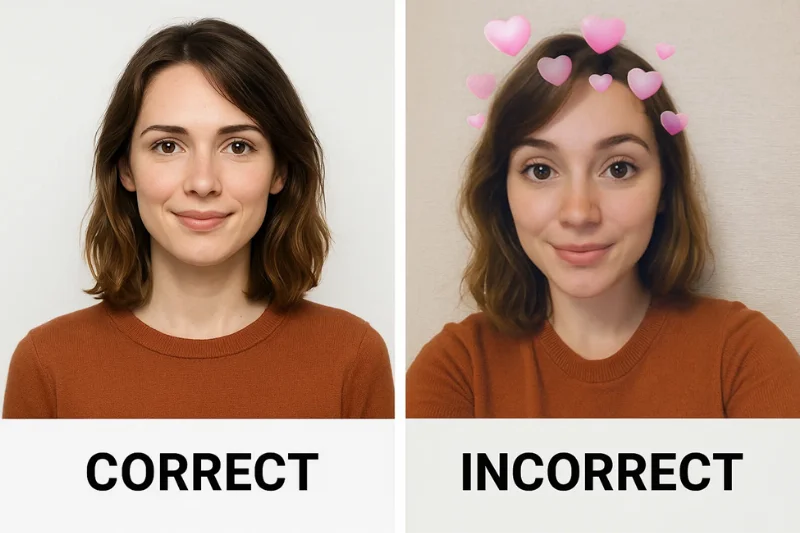
A screenshot
A cropped social media profile photo
A selfie with a beauty or color filter applied
A low-resolution scan of an old passport photo.
Why Technical Compliance Matters
An automated compliance system processes every digital photo submitted through the official U.S. Department of State website. In mere seconds, it checks pixel dimensions, file format, file size, color profile, compression quality, and facial visibility of your file. If your image doesn’t meet the official specifications, the system will simply display an “Invalid photo” message — without explaining what needs to be fixed.
Printed Photo Rules Still Apply
Uploading a file does not exempt a photo from biometric standards. All of the following still apply:
Background must be white or off-white
The head must be correctly centered and sized
Facial expression must be neutral
Glasses are not permitted
The photo must have been taken within the last 6 months.
Key Digital Passport Photo File Specifications
This section covers every official technical specification for digital passport photos.
 Pixel Dimensions and Square Aspect Ratio
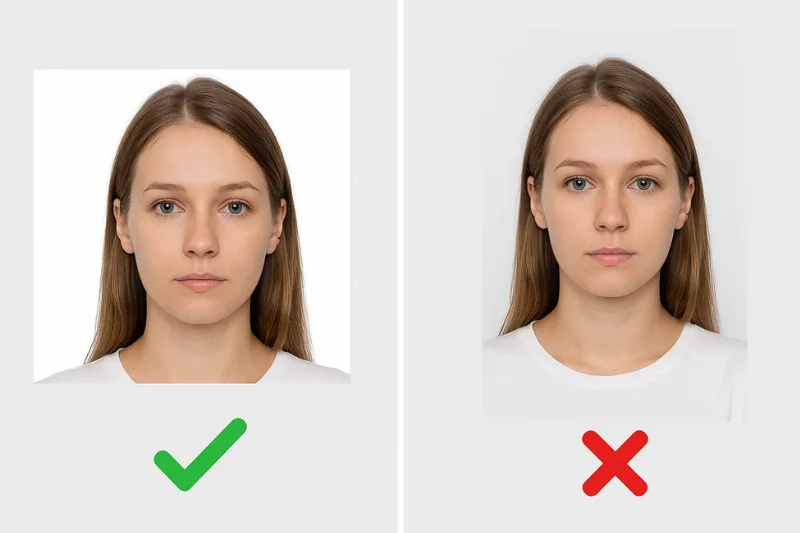
The U.S. Department of State requires all digital passport photos to have a 1:1 square aspect ratio. Printed photos for many other countries are rectangular, such as 35 × 45 mm, and you can prepare them with a photo tool for other document sizes.
Required pixel range:
Minimum: 600 × 600 pixels
Maximum: 1,200 × 1,200 pixels
Any image outside this range will be automatically rejected.
Supported File Formats: JPEG, PNG, and HEIF
The U.S. accepts three file formats for digital passport photo submissions:
JPEG (JPG) — Accepted for all applications: online passport renewal, DS-11 submissions, visa applications, and DV lottery entries. When in doubt, use JPEG.
PNG — Accepted only for online passport renewal through MyTravelGov.
HEIF (HEIC) — Accepted only for online passport renewal through MyTravelGov.
HEIF is not accepted for:
Visa photo submissions
Diversity Visa (DV) Lottery entries
In-person passport applications
Other submission portals outside MyTravelGov.
File Size Requirements: 54 KB–10 MB (Passport) and 240 KB (Visa/DV Lottery)
File size limits differ by application type.
For U.S. Online Passport Renewal:
Minimum: 54 KB
Maximum: 10 MB
For U.S. Visa and Diversity Visa (DV) Program Applications:
Maximum: 240 KB — a hard limit with no exceptions
Program | Allowed File Size | Format |
Passport Online Renewal | 54 KB – 10 MB | JPEG, PNG, or HEIF |
Visa Applications | ≤ 240 KB | JPEG only |
DV Lottery Program | ≤ 240 KB | JPEG only |
Color Mode, Color Space, and Resolution
Required color settings:
Must be a full-color photograph — black-and-white is not accepted
Must use 24-bit color depth (standard on all modern devices)
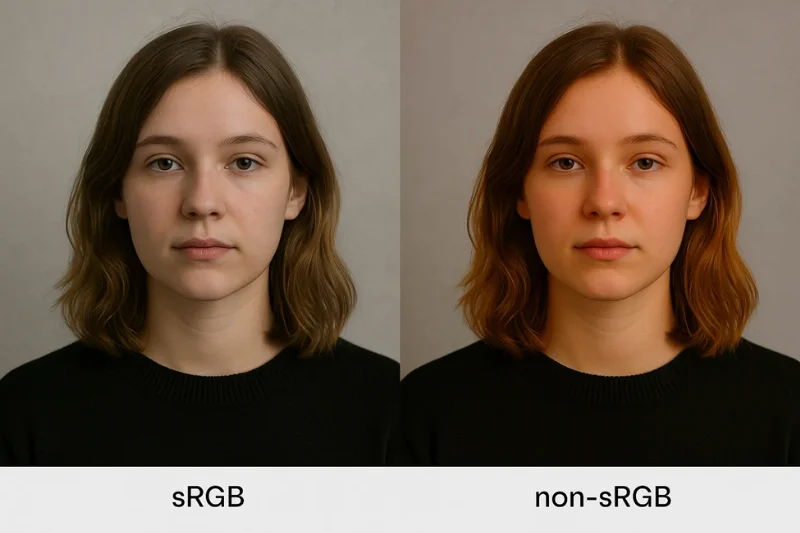
Must be saved in the sRGB color profile
The sRGB requirement is critical. Photos exported in AdobeRGB or Display P3 — common on professional cameras and newer iPhones — will shift skin tones and trigger a rejection. A photo that looks correct on a high-resolution screen may still fail if saved in the wrong color profile.
Note on DPI: For digital passport photos, the only resolution that matters is the pixel size — for example, 600×600 pixels for a square image. As long as your photo meets the required pixel dimensions, the DPI value (such as 72 or 300 DPI) makes no difference for online uploads. DPI only matters when a printed photo is being scanned or prepared for printing, not when you submit a ready‑made digital file.
 Compression and Image Quality
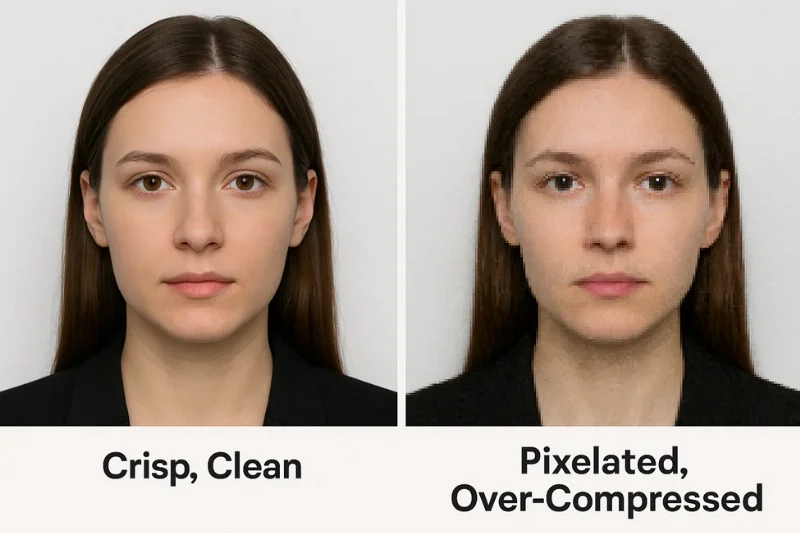
The photo must preserve enough facial detail for biometric processing.
Compression must not exceed a 20:1 ratio
The image must be free of visible artifacts: no blocky patches, no blurred edges, no pixelation
Facial features — eyes, nose, mouth, jawline — must appear crisp and natural.
A common mistake when preparing DV Lottery submissions: compressing the file too aggressively to meet the 240 KB limit, resulting in a blurry or blocky image that fails biometric detection.
Scanning a Printed 2×2 Photo
Original digital photos are strongly preferred. If scanning is unavoidable, the following standards apply:
Scan the original 2×2-inch print at 300 DPI
Crop to a perfect square
The final file must still comply with:
Pixel dimensions: 600×600 to 1,200×1,200 pixels
Color: 24-bit, sRGB
Format: JPEG
File size rules for the relevant application type.
Digital Photos Follow Strict Biometric Requirements
Passport photos submitted digitally must meet strict biometric requirements — official rules for facial identification based on standardized facial measurements and image properties. Biometrics is used by national and international authorities to reliably verify a person’s identity in travel documents. Here is a list of key biometric specifications that your digital photo must follow.
Background: White or Off-White, No Shadows
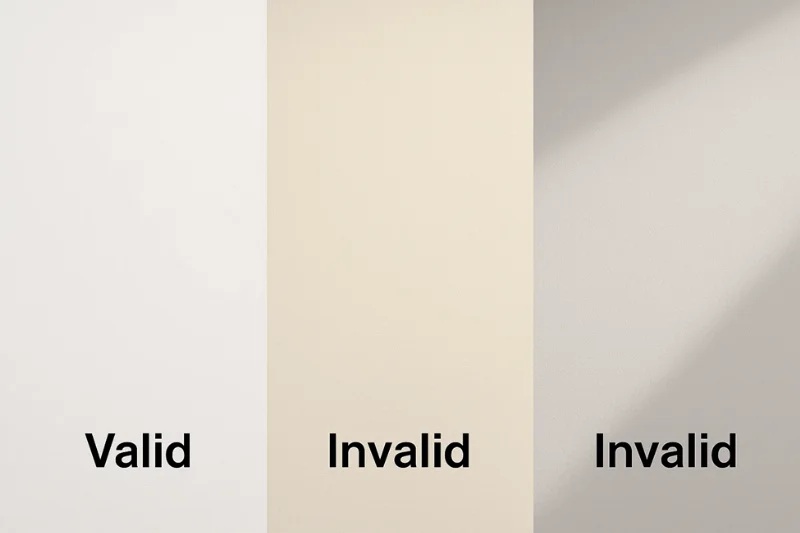
The background is one of the most common sources of rejection in digital submissions.
Required:
White or off-white background
Plain, uniform surface
Even lighting — no shadows anywhere in the background
Not permitted:
Gray, cream, beige, or any colored surface
Textured or patterned backdrops
Any visible objects, furniture, or other distractions
Shadows on the background or around the subject’s head or body.
 Head Size, Position, and Framing
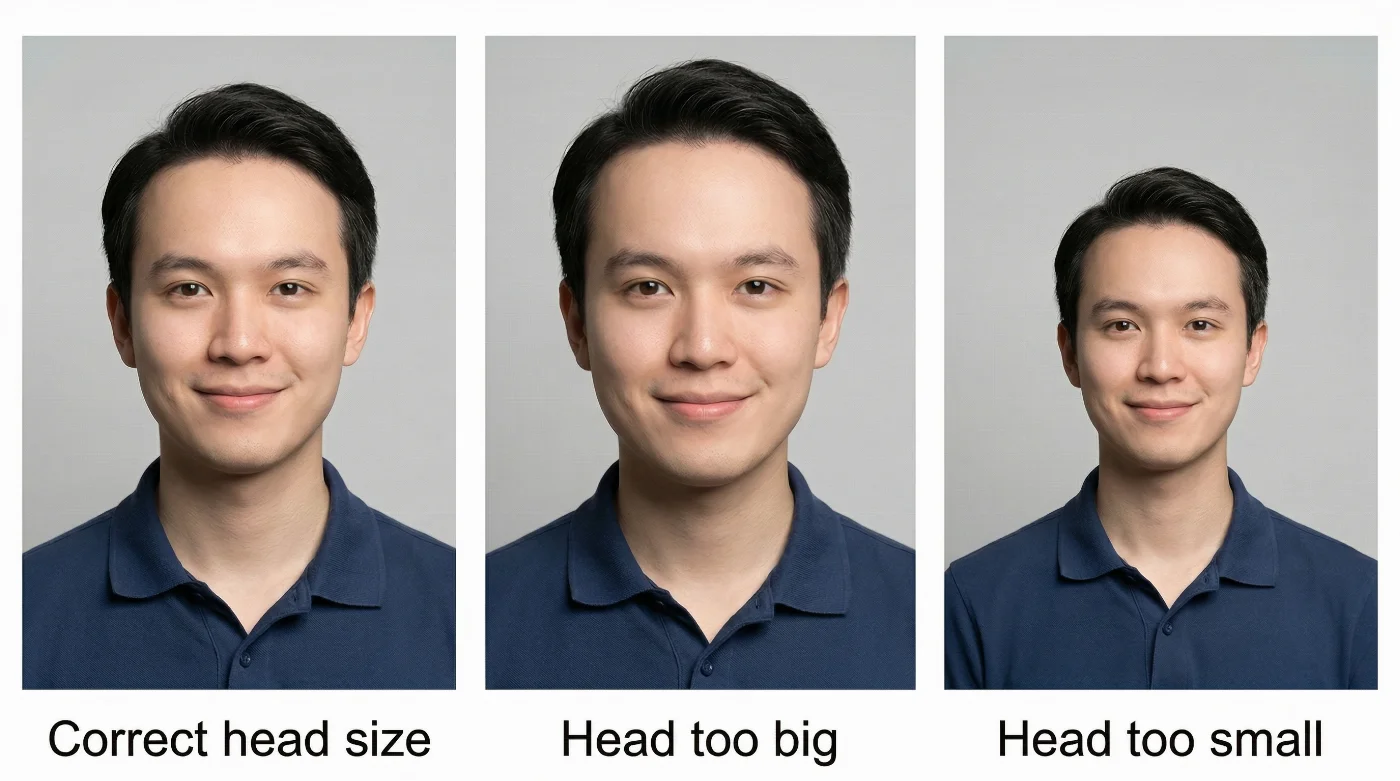
The face must take up the correct proportion of the image frame.
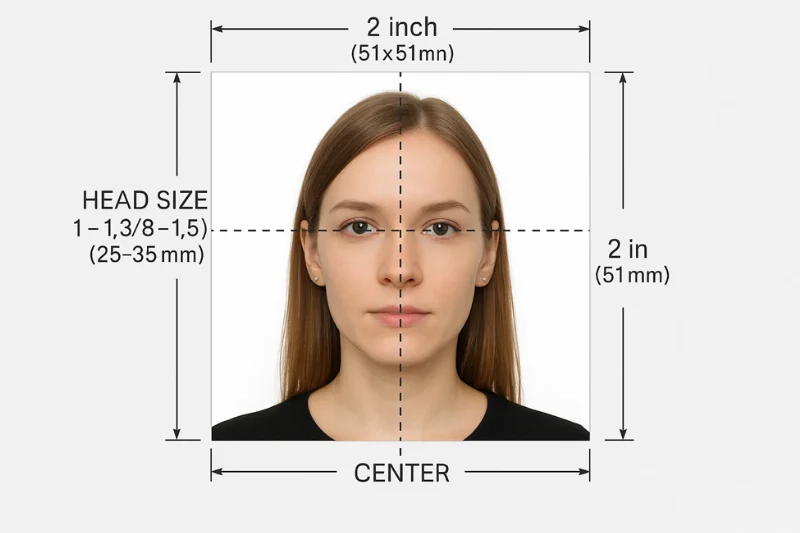
Head height: In U.S. passport photos, the head height — from the bottom of the chin to the top of the head — must be between 1 inch and 1⅜ inches.
Head position requirements:
Face centered in the frame
Head straight — no tilt in any direction
Both ears are visible
Upper part of the shoulders visible in the frame.
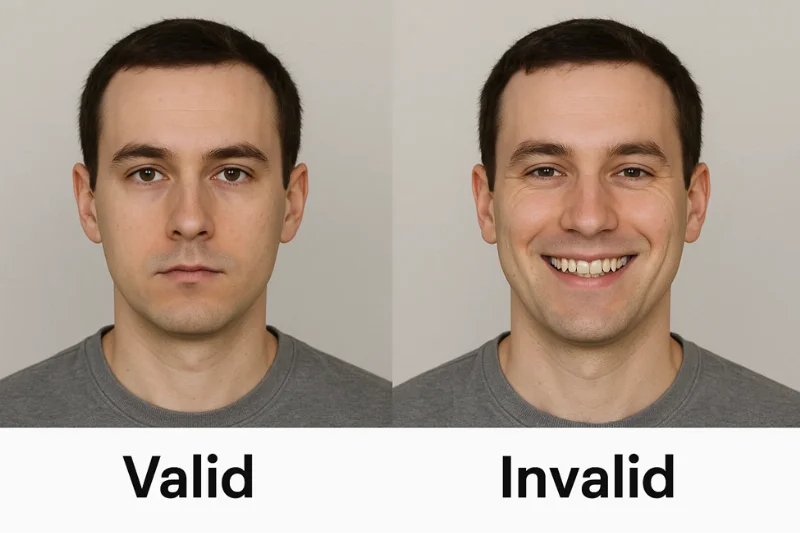
Expression, Eyes, and Face Visibility
Expression rules:
Only neutral expression
Eyes fully open
Mouth closed
No smile showing teeth
No exaggerated expressions of any kind
Face visibility:
Full face must be visible
No hair across the eyes
No bangs covering the eyebrows
No shadows falling across the face
Biometric comparison algorithms map facial geometry against official records. Any obstruction or distortion — even subtle — can result in a mismatch and an automatic image rejection.
Glasses, Accessories, and Headwear
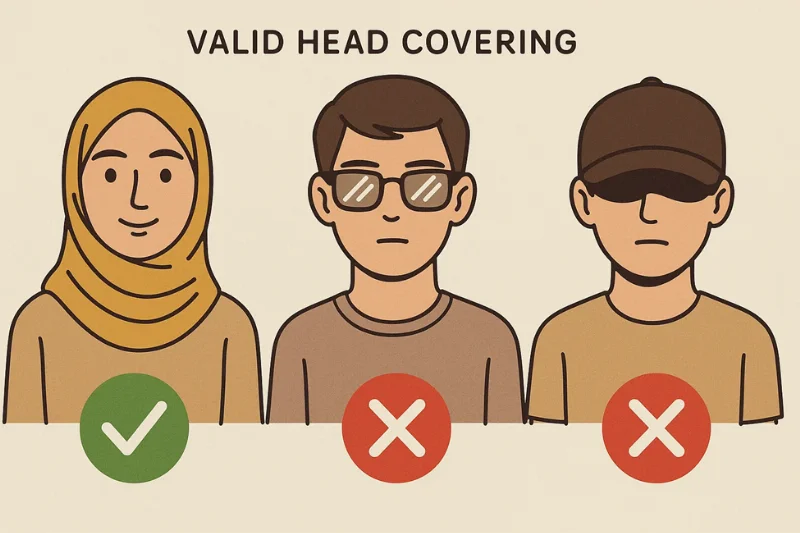
A large share of all annual passport photo rejections comes from issues with glasses, accessories, and headwear.
Glasses
Glasses are not permitted under any circumstances, unless you have a documented medical condition and a formal exemption.
Even clear lenses without any glare are not allowed in standard passport photos.
Head coverings
Head coverings are allowed only for established religious or medical reasons.
The entire face must remain fully visible.
No shadows may fall on the face.
The hairline should not be significantly obscured.
The face itself cannot be covered in any way.
Prohibited accessories
Sunglasses of any kind.
Fashion hats or caps.
Wireless earbuds or headphones.
Headbands or decorative accessories that obscure facial features.
Facial jewelry that interferes with a clear view of the face.
Recency Requirement
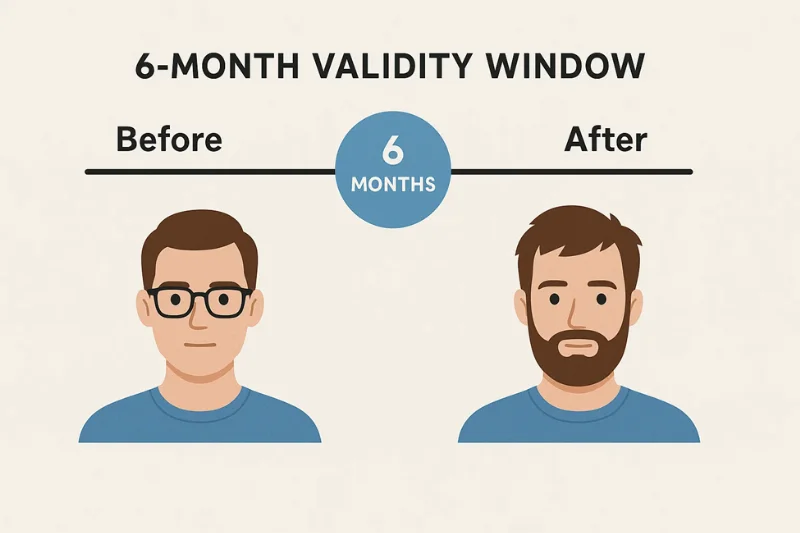
Official rule: The photo must have been taken within the past 6 months and must reflect the applicant’s current appearance.
A new photo is required — even if you possess an image taken within the past 6 months — if any of the following have occurred since it was taken:
Significant weight gain or loss
Facial surgery or other major facial procedures
Gender transition
Age‑related changes that noticeably alter your facial appearance
Major changes in facial hair (for example, growing or removing a full beard).
No Filters, Editing, or Retouching of Any Kind
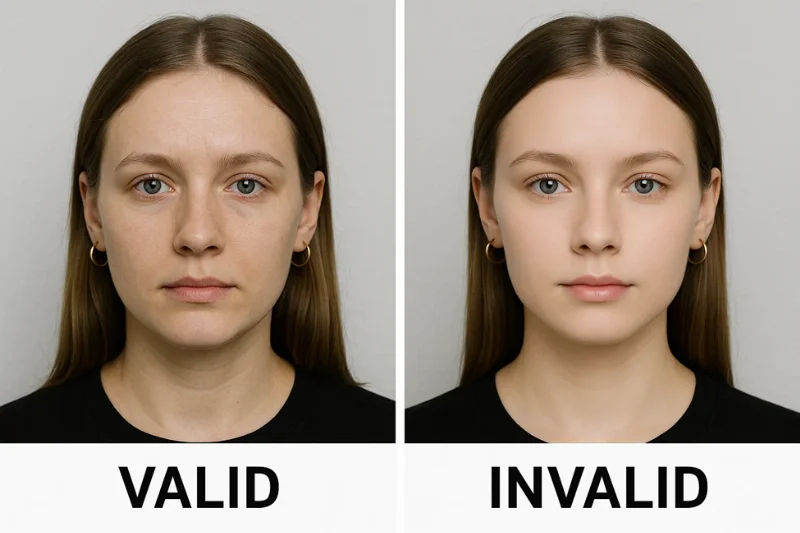
Passport photo rules on digital alteration are among the most frequently misapplied.
Not permitted:
Skin smoothing or softening
AI retouching or beauty filters
Face-reshaping tools
Eye-enhancing effects
Teeth whitening
Color filters or tonal adjustments
Manual blemish removal
Any adjustment to facial proportions
Permitted:
Minor overall brightness or contrast corrections
Cropping (maintaining the required square proportions)
Straightening a slightly rotated photo.
Filters may alter natural facial features and interfere directly with the biometric comparison algorithms used in passport processing and border control systems, increasing the risk that your photo will be rejected or flagged for additional checks.
Passport, Visa, and DV: Which Requirements Apply to You?
Different U.S. government programs use different technical thresholds for digital photo submissions. This is a frequent reason for seemingly acceptable photos to be rejected. Let’s look at the most common document types and their specific digital photo requirements.U.S. passport renewals, visa applications, and the diversity visa (DV) program all have slightly different technical requirements.
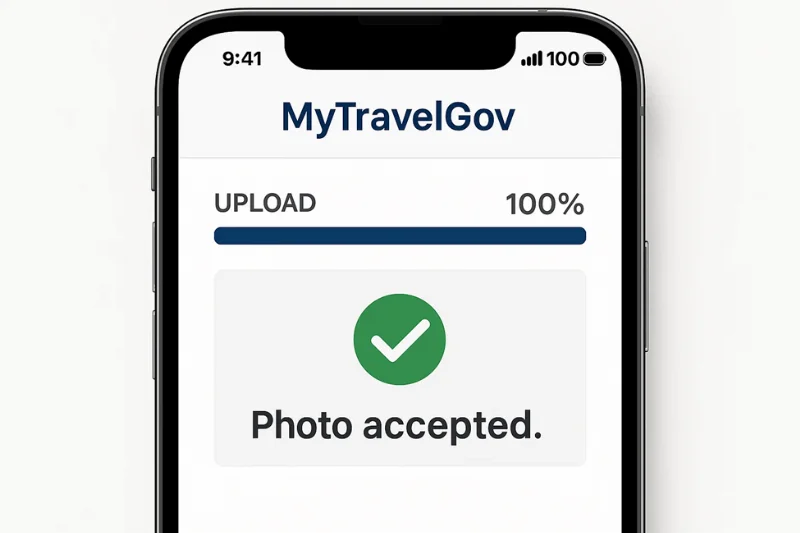
Online U.S. Passport Renewal (MyTravelGov)
This is the most flexible of the three systems. It accepts a wider file size range and is the only system that accepts HEIF in addition to JPEG.
Required technical specifications:
File format: JPEG, PNG, or HEIF
File size: 54 KB – 10 MB
Pixel dimensions: 600×600 to 1,200×1,200 px
Color: sRGB, 24-bit
Square aspect ratio 1:1
No filters, retouching, or editing
Biometric rules:
White or off-white background
Neutral expression
No glasses
No shadows
Correct head size and position.
U.S. Visa Applications (Non-DV)
Visa applications share the same pixel requirements as passport renewal but impose a significantly stricter file size cap.
Required technical specifications:
File format: JPEG only
File size: ≤ 240 KB
Pixel dimensions: 600×600 to 1,200×1,200 px
Color: sRGB, 24-bit
Square aspect ratio 1:1
Biometric rules are identical to passport requirements.
Diversity Visa (DV Lottery) Digital Photo Requirements
The DV program has the most stringent digital photo requirements of any U.S. government system. Submissions are processed automatically — a single pixel or kilobyte outside specification results in immediate rejection.
Required technical specifications:
File format: JPEG only
File size: ≤ 240 KB — a strict, absolute cap
Pixel dimensions: 600×600 px minimum
Square aspect ratio 1:1
Color: sRGB, 24-bit
No editing, retouching, or filters of any kind.
Quick Comparison Table: Passport vs. Visa vs. DV Lottery Photo Requirements
Requirement | Passport Online Renewal | U.S. Visa Application | DV Lottery Entry |
File Format | JPEG, PNG, or HEIF | JPEG only | JPEG only |
File Size | 54 KB – 10 MB | ≤ 240 KB | ≤ 240 KB |
Pixel Size | 600×600–1,200×1,200 px | 600×600–1,200×1,200 px | 600×600–1,200×1,200 px |
Color Space | sRGB | sRGB | sRGB |
Biometric Rules | Yes | Yes | Yes |
Filters Allowed | No | No | No |
Square Aspect Ratio | Required | Required | Required |
Checklist: 7 Steps to Take Before Uploading Your Digital Passport Photo
Many digital passport photo rejections can be avoided with a proper pre‑upload check. Before submitting your image to MyTravelGov for a passport renewal, a visa application, or a DV Lottery, run through this checklist. Each step is based on official U.S. Department of State requirements.
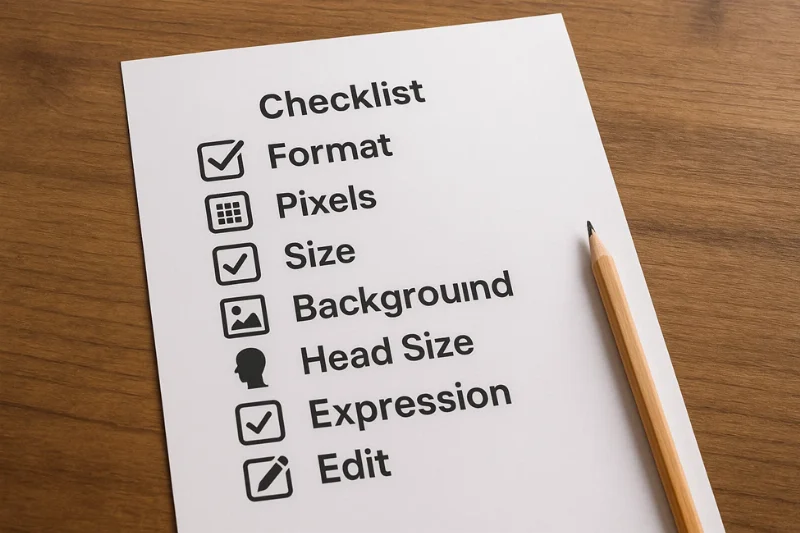 Step 1: Confirm the File Format
Verify the file is saved as JPEG/JPG.
HEIF/HEIC and PNG are acceptable for online passport renewals only.
Step 2: Confirm the Image Is Square (1:1 Ratio)
Only photos with a 1:1 ratio are accepted
Any image that is not perfectly square is rejected automatically.
Step 3: Check Pixel Dimensions (600×600 to 1,200×1,200)
Pixel size is more consequential than DPI, file size, or camera model
Minimum: 600 × 600 px
Maximum: 1,200 × 1,200 px.
Step 4: Check the File Size
Online passport renewal: 54 KB – 10 MB
Visa or DV applications: must not exceed 240 KB.
Step 5: Check the Background (White or Off-White, No Shadows)
Background issues are among the top three reasons for rejection.
Background must be white or off-white
No shadows anywhere behind the subject
No textures, patterns, or visible room elements.
Step 6: Check Head Size, Position, and Visibility
Face centered in the frame
Chin-to-crown measurement: 1–1⅜ inches
No tilt in any direction
Full face visible — no obstructions.
Step 7: Confirm No Filters, Retouching, or Editing Were Applied
Any artificial alteration of your digital passport photo will trigger an automatic rejection.
Not allowed: skin smoothing, face shaping, beauty filters, teeth whitening, blemish removal
Allowed: cropping, minor brightness or contrast adjustments, rotation.
Why U.S. Digital Passport Photos Get Rejected
The Travel.State.Gov portal doesn’t explain a reason behind the photo rejection — it only returns an “Invalid photo” or “Photo failed” message. Below are the most common real‑world issues that trigger this error.
Wrong File Format (PNG, PDF, or HEIC Outside Passport Renewal)
The most common cause of instant rejection. The U.S. passport system accepts:
JPEG for all submissions
HEIF/HEIC or PNG for online passport renewal only.
Other file types are immediately rejected. A common mistake leading to a rejection: uploading a screenshot saved as PNG as your digital passport photo.
Wrong Pixel Size (Not Square, Too Small, or Too Large)
The image must be a perfect square. The face detection algorithm requires a strict 1:1 aspect ratio.
Images will be rejected if their dimensions are:
Smaller than 600 × 600 px
Larger than 1,200 × 1,200 px.
File Size Doesn’t Match the Application Type
As we mentioned before, your digital photo size must match your document submission type:
Passport renewal: 54 KB – 10 MB
Visa/DV Lottery: ≤ 240 KB.
For example, for DV Lottery submissions, a file that is valid for online passport renewal but exceeds the DV file size cap will still be rejected — even if the image itself is technically flawless.
Over-Compression or Insufficient Image Clarity
Over‑compressed files or images with insufficient clarity can be rejected even if they meet all formal technical specifications. When compression is too aggressive or the image is blurred, the biometric system cannot reliably resolve key facial details, such as the eyes, eyebrows, nose, mouth, and the contours of the face.
The biometric system needs to reliably distinguish the following facial details:
Eyes and eyebrows
Nose contour
Mouth shape
Chin and jaw outline.
Common signs of over-compression: pixelated edges, blocky patches, blurred skin texture, loss of contrast.
Shadows on the Face or Background
Shadows are one of the main reasons biometric checks fail. They distort the apparent shape of the face and break the uniform background that the system expects.
Typical shadow issues include:
A dark halo or shadow directly behind the head
A shadow falling across one cheek or the jawline
A heavy shadow under the chin or on the neck
Uneven lighting across both sides of the face.
Wrong Background Color or Pattern
Background issues are a common cause of automated failure. The background must be:
White or off‑white
Completely plain, smooth, and without visible texture
Any pattern, color cast, gradient, or shadow in the background typically causes the file to fail automated checks.
Incorrect Head Size or Position
A file that otherwise meets all specifications can still fail if the head size or position is outside the required range. Typical issues include:
Head placed too close to the top edge of the frame
Excessive shoulders or upper body visible in the frame
Face rendered too small
Slight head tilt instead of a straight, neutral pose
Face not centered.
Glasses or Facial Features Obstructions
Glasses are not permitted, except in rare, documented medical cases. Common reasons for rejection include:
Clear prescription glasses
Blue‑light or computer glasses
Reading glasses
Sunglasses
Face coverings
Hair obscuring the eyebrows or eyes.
Filters, Retouching, or AI Editing
Any visible digital alteration is treated as non‑compliance with photo standards. Prohibited edits include:
Skin softening or smoothing
Eye brightening or color enhancement
Face slimming or reshaping
Hair color changes
Teeth whitening
Blemish removal
Beauty filters, “FaceTune” effects, or AI‑generated enhancements.
Photo Not Taken Within the Last 6 Months
The appearance in the photo must correspond to the applicant’s current look. Rejection is likely when:
The photo is more than 6 months old
The person’s appearance has changed significantly since the photo was taken
Major changes (surgery, substantial weight change, gender transition) are not reflected in the image.
Summary of All U.S. Digital Passport Photo Requirements
If you want a quick no-fuss guide that serves as a complete checklist, this table is meant for you. All of the important parameters from the U.S. Department of State requirements are covered here: pixels, file size, color space, format, biometric rules and software differences.
Requirement | Specification | Value | Applies To | Notes |
Aspect Ratio | A perfect square | 1:1 aspect ratio | All | Rectangular images are auto-rejected |
Pixel Size | Min and max pixel dimensions | 600×600 to 1,200×1,200 px | All | Images outside the range are rejected |
File Format | Accepted digital formats | JPEG, PNG, or HEIF | All* | *HEIF and PNG are accepted for online passport renewals only |
Color Mode | Must be a full-color photo | 24-bit color | All | Black-and-white not accepted |
Color Space | Required color profile | sRGB | All | Ensures accurate, consistent skin tones |
File Size — Passport Renewal | Min and max allowed | 54 KB – 10 MB | Passport Renewal | Most permissive system |
File Size — Visa/DV | Maximum allowed | ≤ 240 KB | Visa, DV | Strictest size requirement |
Background | Plain, uniform, bright surface | White or off-white | All | No patterns, textures, or shadows |
Lighting | Even, shadow-free | Uniform exposure | All | No harsh light on face or wall |
Head Size | Chin-to-crown height | 1–1⅜ inches equivalent | All | Must be proportional in the digital image |
Head Position | Centered, straight, unobstructed | No tilt | All | Both eyebrows must be visible |
Expression | Natural and neutral | Eyes open, mouth closed | All | No smiling with teeth |
Glasses | Not permitted | None | All | Medical exemption requires documentation |
Head Coverings | Restricted use only | Religious or medical only | All | Face must remain fully visible |
Recency | Must reflect current appearance | Taken within the last 6 months | All | Older photos are rejected |
Editing/Filters | Prohibited | No smoothing, no AI edits | All | Cropping and minor exposure corrections allowed |
Compression | Must preserve facial detail | Reasonable compression only | All | Visible artifacts cause rejection |
Scanned Photos | Must meet scanning standards | 300 DPI, clean scan | All | Must still meet all pixel specifications |
Background Objects | Not permitted | None | All | No furniture, patterns, or room corners |
Facial Visibility | Full face required | No obstruction | All | Hair must not cover the eyes or eyebrows |
Application Types and Required Photo Formats
Check this table before preparing your file for the U.S. passport renewal, visa application, or a DV Lottery entry.
Program | File Size | File Format | Pixel Size | Color Space | Notes |
U.S. Passport Renewal | 54 KB – 10 MB | JPEG, PNG, or HEIF | 600×600–1,200×1,200 px | sRGB | Most flexible requirement range; HEIF and PNG accepted |
U.S. Visa Application | ≤ 240 KB | JPEG only | 600×600–1,200×1,200 px | sRGB | Stricter file size cap |
DV Lottery Program | ≤ 240 KB | JPEG only | 600×600–1,200×1,200 px | sRGB | Strictest system; auto-rejected if exceeded |
Key takeaways:
Every digital passport photo must be square and use the sRGB color profile.
Pixel dimensions must fall between 600×600 and 1,200×1,200 px.
Visa and DV images are capped at 240 KB with no exceptions.
Passport renewals allow up to 10 MB and accept HEIF and PNG formats.
Biometric requirements — head size, background, expression, and face visibility — are identical across all three programs.
How U.S. Officials Check Your Digital Passport Photo
A submitted digital passport photo passes through three distinct layers of review before a decision is made.
Automated Technical Validation
As soon as a file is uploaded, the system reads its technical properties in a fraction of a second. It checks:
File format (JPEG, or HEIF and PNG, if applicable)
Aspect ratio (must be a 1:1 square)
Pixel dimensions (600×600 to 1,200×1,200)
File size
Color space (sRGB)
Compression and image quality.
If the file does not meet these criteria, it does not advance to the next stage.
Automated Biometric Detection
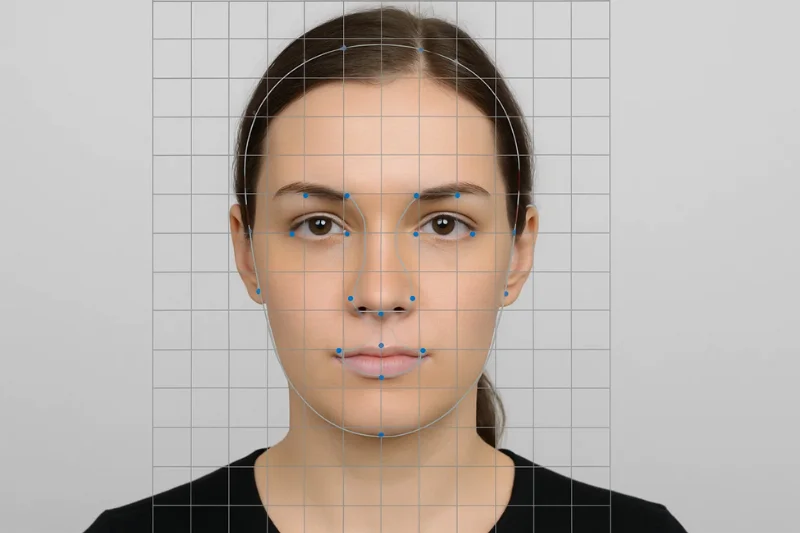
If an image passes the initial technical validation, the system performs its biometric analysis. It examines:
Eye position and visibility
Eyebrow visibility
Chin‑to‑crown measurement
Neutrality of expression
Basic facial symmetry
Head orientation
Background consistency
Presence of shadows
Signs of filtering, over‑smoothing, or other artificial enhancement
If the system cannot detect and analyze a face with sufficient confidence, the submission fails at this stage without any human review.
Examples of automated rejection messages include:
"Background not uniform" — a shadow or gradient detected behind the head
"Face not centered in the frame" — the face is too small or off‑center
"Photo may have been altered" — a filter or smoothing effect is detected.
Manual Review by a Passport Specialist
Images that pass both automated stages are forwarded to a U.S. passport specialist for a final review. The specialist evaluates:
Facial accuracy — whether the face appears natural and unaltered, the expression is neutral, and the eyes and eyebrows are clearly visible
Background consistency — whether there are shadows, artifacts, or signs of digital manipulation that automated checks may have missed
Identity consistency — whether the image matches previous passport records and supporting identity documents
Recency — whether any major change in appearance should trigger additional verification
Why the Process Is Multilayered
The U.S. passport system is built around biometric integrity. Even small discrepancies — a subtle filter, a faint shadow, or mild compression artifacts — can slow down identity verification or increase the risk of false matches in security systems. This is why the review pipeline is designed to detect details that a casual human review would likely miss.
A digital photo that passes all three stages — technical checks, automated biometrics, and manual review — is considered acceptable for use in a U.S. passport.
Frequently Asked Questions
Does a U.S. Digital Passport Photo Have to be Square?
Yes. Every digital passport photo submitted to U.S. government systems must have a 1:1 aspect ratio — meaning width and height are equal. Even a slightly rectangular image is rejected automatically by the upload system.
What Pixel Dimensions are Required for a U.S. Digital Passport Photo?
The image must be between 600 × 600 pixels (minimum) and 1,200 × 1,200 pixels (maximum). Any image outside this range fails the automated technical check immediately.
Can I Submit a HEIF, HEIC, or PNG File for a U.S. Passport?
Yes, but only for online passport renewal through MyTravelGov. HEIF and PNG formats aren’t accepted for visa applications or DV lottery entries — they require JPEG files only.
What is the Required File Size for a U.S. Digital Passport Photo?
File size requirements differ by application type. For online passport renewal, the file must be between 54 KB and 10 MB. For visa applications and the DV lottery program entries, the file must not exceed 240 KB — a strict limit with no exceptions.
Does a Digital Passport Photo Need to be Taken Within the Last 6 Months?
Yes. The photo must have been taken within the past 6 months and must accurately reflect the applicant’s current appearance. If significant changes have occurred — such as surgery, substantial weight change, or a major change in facial hair — a new photo is required regardless of when the previous one was taken.
Can I Retouch or Edit My Digital Passport Photo?
No. Any editing that alters facial features is prohibited. This includes skin smoothing, eye brightening, blemish removal, face reshaping, color filters, and AI-generated enhancements. Only minor overall exposure corrections and cropping are permitted.
Can I Wear Glasses in a U.S. Digital Passport Photo?
No. Glasses are not permitted in U.S. passport, visa, or DV photos. The only exception is a rare medical case supported by formal documentation from a certified physician. Even clear, prescription, glare-free lenses are not allowed.
Can a Selfie be Used as a U.S. Digital Passport Photo?
Only if it fully complies with all applicable requirements — neutral expression, correct head size, white or off-white background, no filters, correct pixel dimensions, and the required file format and size. The majority of casual selfies do not meet these standards, particularly the background and filter requirements.
To create a 100% technically compliant biometric passport photo from a selfie, use the PhotoGov passport photo maker — it automatically applies all official requirements to your original photo, producing a ready-to-submit digital image.
Why Was My Digital Passport Photo Rejected When It Looks Fine?
Automated rejection often occurs due to issues invisible to the naked eye. Common causes include: incorrect size (not perfectly square, falls outside 600x600 to 1200x1200-pixel requirement), color space (non-sRGB), a faint background shadow, a slight head tilt, over-compression that blurs facial details, or a filter applied automatically by the camera app. The upload system detects these at a technical level before any human sees the image.
Can I Reuse a Previous Photo File for a New Passport Application?
No. Every U.S. passport application requires a photo taken within the last 6 months that reflects the applicant's current appearance. A high-quality older image — regardless of how well it was originally accepted — does not satisfy the recency requirement.
Was this helpful?
13 found this helpful
Top expert
Based on official government sources
Helpful votes: 13
Was this helpful?
13 found this helpful
Service provided by Y VISION TECHNOLOGIES LLP · Stoney Works 8 Stoney Lane, London, England, SE19 3BD · Terms · Refund policy · Contact
We value your Privacy
We use cookies to enhance your browsing experience, serve personalized ads or content. By clicking “Accept All”, you consent to our use of cookies.