Check the 2027 DV Lottery Photo Requirements & Get Your DV Photo Accepted on the First Upload
Table of contents:
- Quick Diversity Visa Photo Specs:
- 11 Essential DV Lottery Photo Requirements: Checklist
- Acceptable DV Lottery Photo Example
- Unacceptable DV Lottery Photo Example
- DV Lottery Digital Photo Specifications Explained
- Where to Take a DV Lottery Photo?
- Taking Your DV Lottery Photo at Home
- Taking a DV Lottery Photo of Your Baby
- 5 Main Reasons DV Lottery Photos Get Rejected
- What to Do If Your DV Lottery Photo Is Rejected: 4 Scenarios
- DV Lottery Photo: a Pre‑submission Сhecklist
- Diversity Visa Lottery Photo Requirements: Final Thoughts
- Frequently Asked Questions
- Official Government Documentation Sources
A DV Lottery photo is an official biometric image used by the U.S. Department of State during the Electronic Diversity Visa Program, commonly known as the Green Card Lottery, the DV Lottery, or DV-2027 in the current cycle, the annual lottery that allocates up to 55,000 immigrant visas through random selection. It is uploaded directly into the official entry form at dvprogram.state.gov as a single JPEG file and is later compared with the photo of the principal applicant — and every qualifying derivative — at the consular interview.
The image must meet the strict biometric specifications laid out in 9 FAM 504.4-4 and the Department of State's Photograph Requirements page: a perfectly square aspect ratio between 600 × 600 and 1200 × 1200 pixels, a file size no larger than 240 KB, 24-bit color depth (sRGB), taken within the last six months against a plain white or off-white background, showing the full face with a neutral expression. After selection, two identical 2 × 2 inch (51 × 51 mm) printed copies must be brought to the consular interview.
This 2027 Guide covers the essential U.S. DV Lottery photo requirements you must follow to avoid automatic rejection of your entry — a single non-compliant upload disqualifies the entire entry for the year, with no appeal.
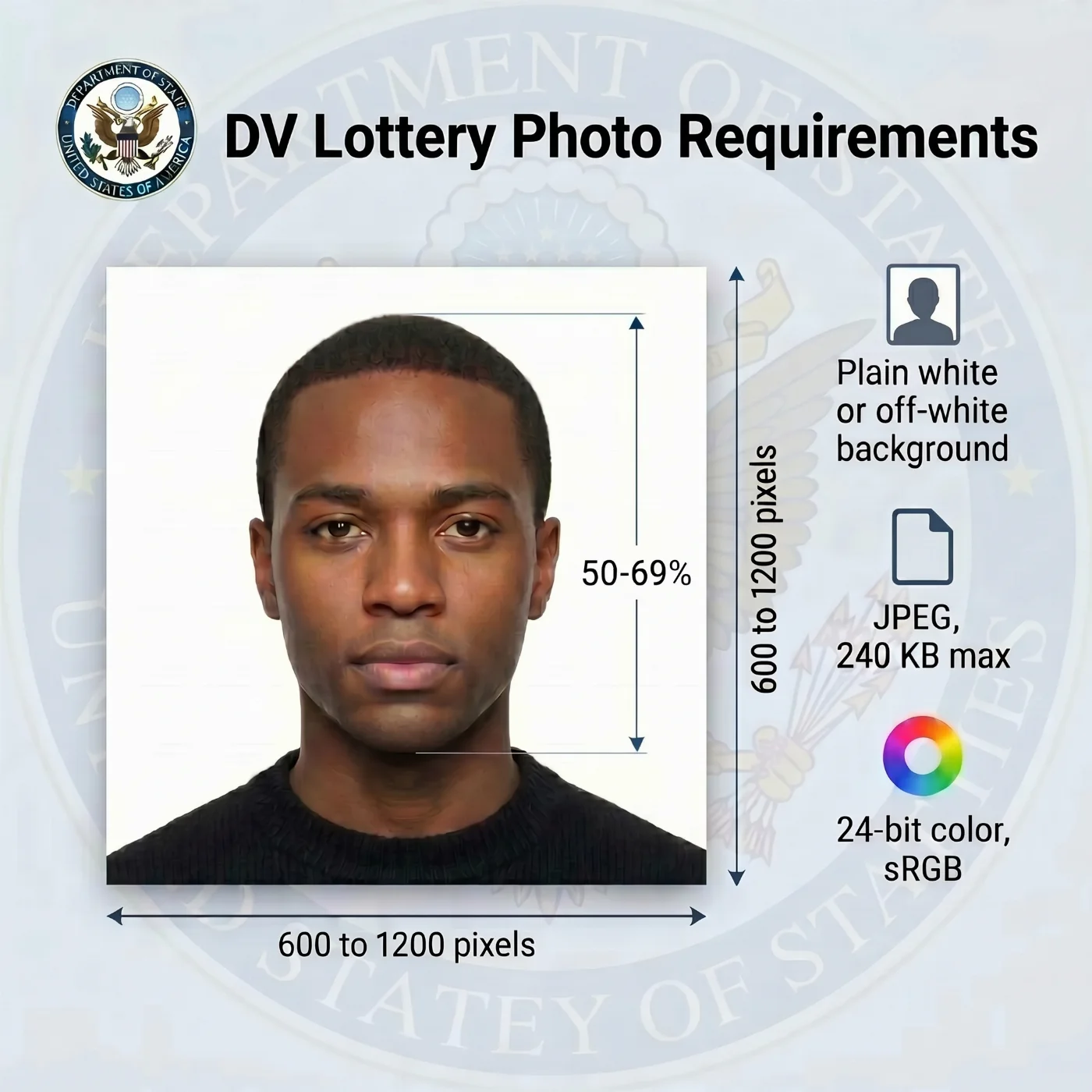 Source: US Department of State
Quick Diversity Visa Photo Specs:
Digital file: JPEG, ≤ 240 KB, sRGB
Dimensions: aspect ratio 1:1, 600 × 600 to 1200 × 1200 pixels
Background: white or off-white
Expression: neutral, both eyes open, mouth closed
Note (May 2026). The U.S. State Department is implementing changes to the Diversity Visa (DV) entry process, and the DV‑2027 registration dates have not yet been announced. According to the Department’s official notice on travel.state.gov, it “will announce the start date for the DV‑2027 registration period as soon as practicable.” These changes do not affect the visa application window for selected entrants, which remains October 1, 2026 through September 30, 2027. All photo requirements in this guide remain applicable and will continue to apply once DV‑2027 registration opens.
11 Essential DV Lottery Photo Requirements: Checklist
Including the correct photograph with your US Electronic Diversity Visa Lottery application is essential for its successful approval. A DV lottery photo must meet the strict US DV lottery photo requirements set by the US Department of State, as well as the international biometric standards defined by the International Civil Aviation Organization (ICAO) Document 9303.
Every parameter listed below is enforced by the upload form at dvprogram.state.gov, and entries that fall short on even one rule are dropped during the registration window — with no notification and no opportunity to resubmit inside the same annual cycle.
To increase your chances of DV Lottery photo acceptance, you can use PhotoGov’s DV Lottery Photo Tool, which provides a built‑in U.S. Diversity Visa template and automatically crops and formats your image to meet the latest official photo specifications for lottery entries.
Specification | Requirement |
|---|---|
1. Number of photos | One file per entrant. A separate JPEG must accompany each individual listed on the registration: the primary entrant, the legal spouse (regardless of whether the spouse intends to immigrate), and every unmarried child under twenty-one — biological, adopted, or step. Missing derivatives and duplicate files are treated as a non-compliant entry under 22 CFR §42.33. |
2. Recency | The shot must be no older than 180 days at the moment of submission. Images recovered from an earlier DV cycle, from a passport renewal, or from any non-immigrant visa file are detected by the Department's similarity engine and rejected. Major changes to facial appearance during the six-month window — cosmetic procedures, large weight shifts, new permanent facial hair, removal of long-standing facial hair — call for an even fresher capture. |
3. Dimensions and Aspect Ratio | A perfectly square crop is mandatory. Pixel sides must fall between 600 × 600 (minimum) and 1200 × 1200 (maximum). Both pixel sides must match exactly: a 600 × 599 frame fails the automated check, the same as a 4:3 portrait crop. |
4. File Format, Color Profile, and File Size | JPEG (.jpg) exclusively, capped at 240 KB. HEIC files taken straight from an iPhone, PNG screenshots, BMP, TIFF, GIF, and WebP exports are not allowed and will be rejected at upload. The file must use 24-bit color encoded in the sRGB IEC61966-2.1 profile. CMYK, Adobe RGB, ProPhoto RGB, and 16-bit-per-channel JPEGs are not accepted. Full-color photo is mandatory — black-and-white, sepia, duotone, and grayscale conversions are rejected. |
5. Head and Eye Position | The full head — from the lowest point of the chin to the top of the hair — must occupy between 50% and 69% of the image height. The center of the eyes must sit between 56% and 69% of the way up from the bottom edge. Horizontally, the bridge of the nose aligns with the vertical center of the frame within a tolerance of about three percent. Posture is square to the camera: head upright, neck centered, shoulders level, gaze straight ahead, no tilt, no rotation. |
6. Backdrop | A solid, uniform plane in plain white or off-white. The background must contain no shadow, no texture, no gradient, no doorframe, no electrical outlet, no furniture edge, and no second person. Cream, ivory, beige, gray, and pale blue walls fail the automated background check even when they read as "almost white" to the eye. |
7. Lighting | Soft, balanced illumination spread evenly across the face. No bright spots on the forehead or the bridge of the nose, no shadow below the chin or behind the head, no red-eye, no flash reflection, no specular highlights on the skin. Skin tones must read naturally, with no orange, yellow, or magenta cast. |
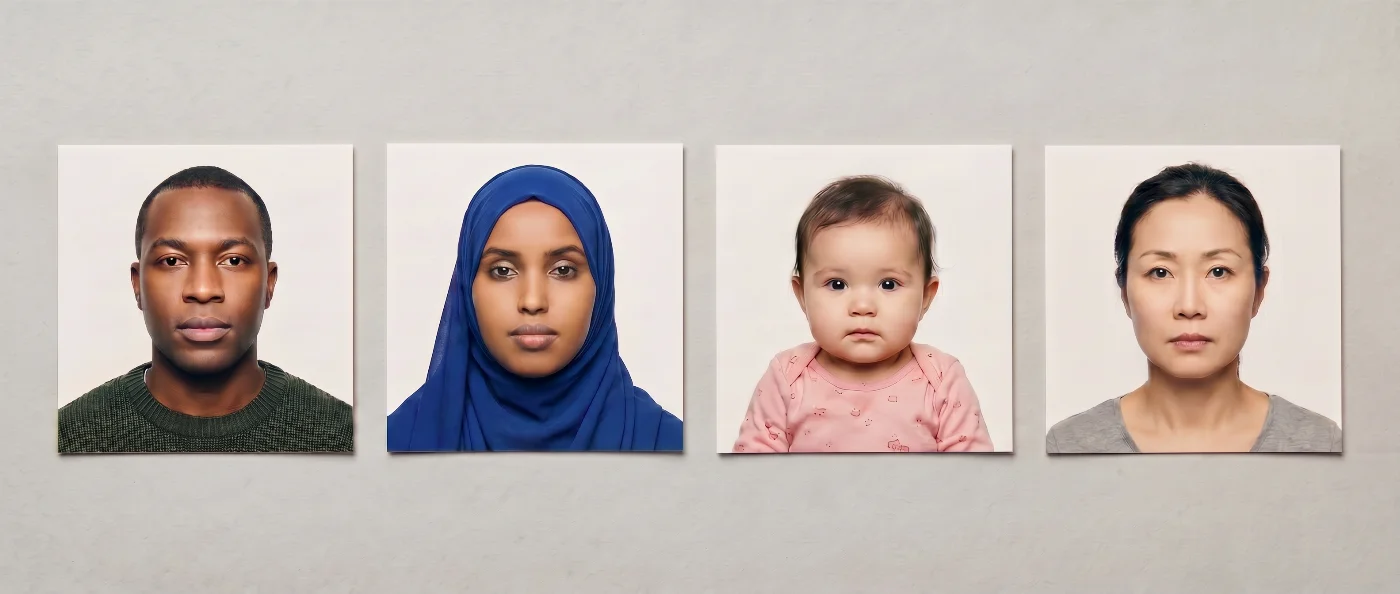
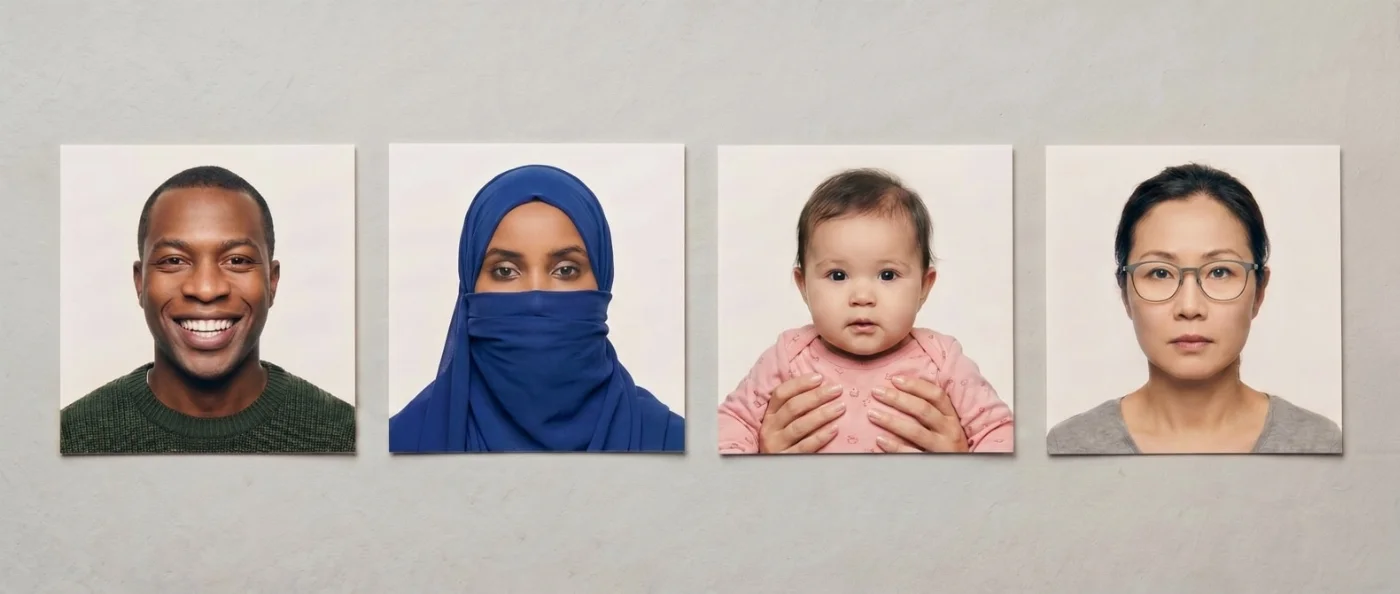
8. Expression | Relaxed and neutral. Both eyes fully open, mouth closed, no smile, no frown, no raised eyebrows, no pursed lips, no clenched jaw. The lens must receive a direct, level gaze. |
9. Wardrobe and Headwear | Solid mid-to-dark tones that visually separate from the white backdrop. Logos, slogans, military attire, hospital scrubs, school uniforms, and camouflage are excluded. Daily religious head coverings are accepted on the condition that nothing from hairline to chin is concealed and that the covering casts no shadow on the face. Non-religious caps, beanies, hoods, and headbands are not permitted. |
10. Eyewear and Ear Devices | Eyeglasses of every kind — prescription, reading, sunglasses, decorative, even rimless — are prohibited. The medical exemption that historically permitted prescription frames was withdrawn in November 2016 and has not been restored. Tinted or decorative contact lenses, headphones, earbuds, AR/VR headsets, and any visible wireless device are equally barred. Hearing aids and cochlear implants worn every day are accepted when they do not obstruct facial features. |
11. Authenticity | The photograph must be a single, unedited frame produced by a real camera. Beauty filters, skin-smoothing, teeth-whitening, eye enhancement, face slimming, AI-generated faces, AI background replacement, composite portraits, and identical reuse of a prior image are flagged by the Department's similarity and AI-detection systems. Material misrepresentation under INA §212(a)(6)(C)(i) carries a lifetime bar from every U.S. visa category. |
Acceptable DV Lottery Photo Example
Unacceptable DV Lottery Photo Example
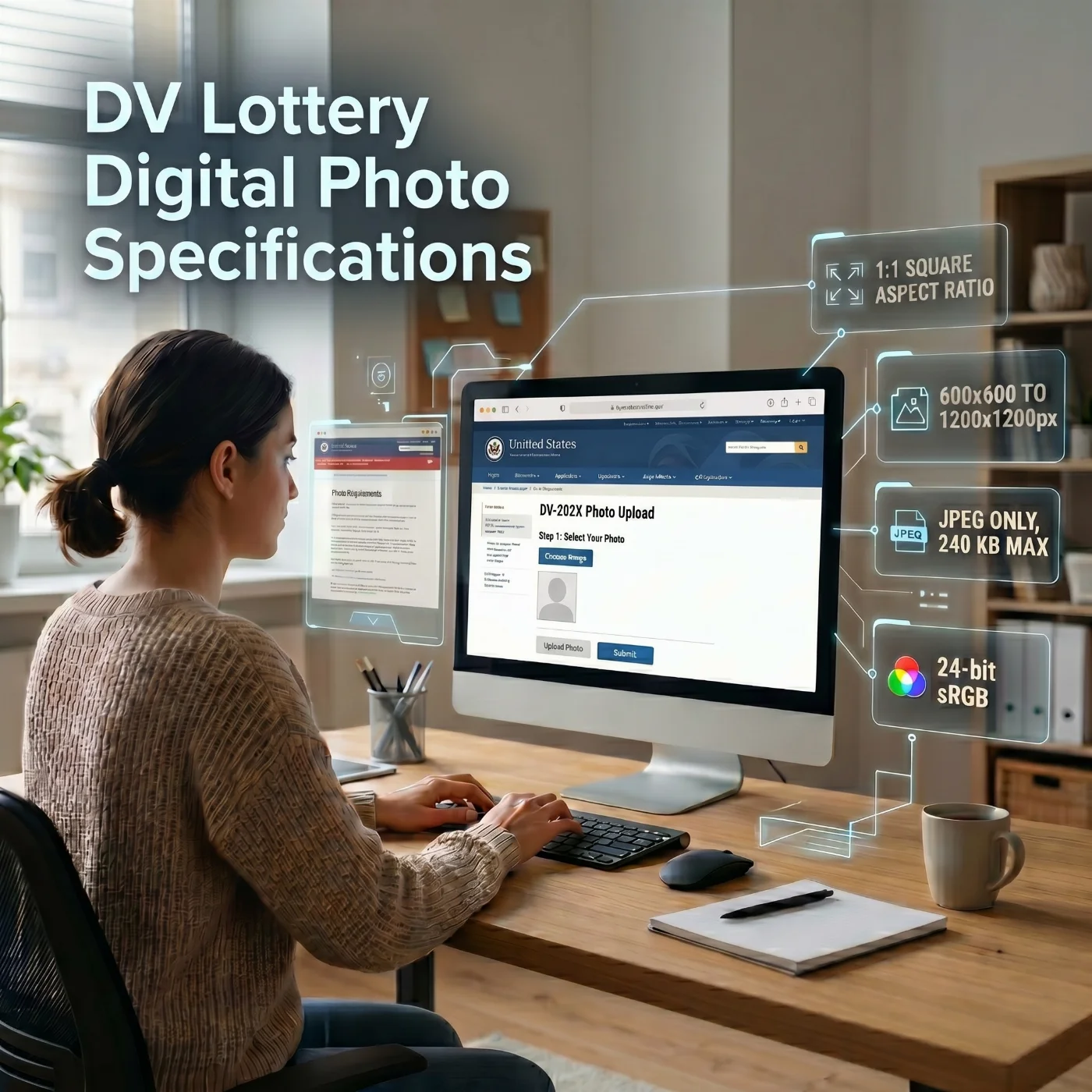
DV Lottery Digital Photo Specifications Explained
The Diversity Visa Lottery is the only U.S. immigration program conducted entirely online at the entry stage. The single deliverable during the registration window is a digital JPEG attached to each family member's record at dvprogram.state.gov. No printed copy, scan, or email attachment is accepted at the entry stage.
The file specifications are direct and strict. The image must be a perfect square measuring between 600 × 600 and 1200 × 1200 pixels, saved as JPEG with a maximum size of 240 kilobytes, encoded in the standard sRGB color space at 24 bits per pixel (8 bits per channel). The resulting frame has to be visually sharp — no banding, no JPEG blockiness around the eyes and lips, no chroma noise on the cheeks, no posterization on the backdrop. Compression levels in the 70–85% quality range typically deliver the right balance between sharpness and the 240 KB ceiling.
All compositional rules — uniform white backdrop, neutral expression, no eyewear, recent capture — apply identically regardless of which camera produced the source frame.
Specification | Requirement |
|---|---|
Aspect ratio | Square (1:1) |
Minimum dimensions | 600 × 600 pixels |
Maximum dimensions | 1200 × 1200 pixels |
File format | JPEG (.jpg) only |
Maximum file size | 240 KB |
Color depth | 24-bit sRGB |
Head height | 50–69% of image height |
Eye height | 56–69% from the bottom edge |
Background | Plain white or off-white, uniform |
Recency | Captured within the past 180 days |
Key Differences Between DV Lottery Entry Photo and Green Card Interview Photo
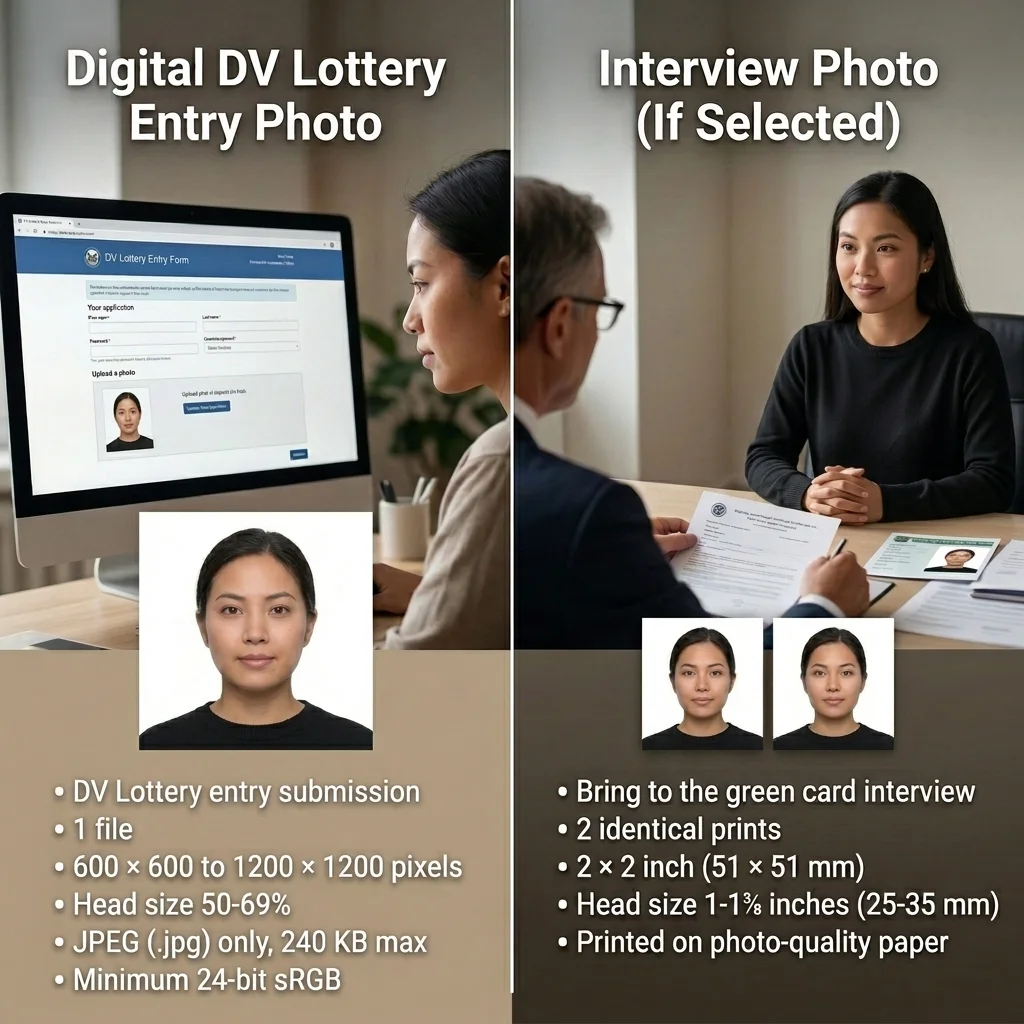
Requirement | Digital Entry Photo (E-DV) | Interview Photo (If Selected) |
Purpose | At the time of online entry submission | After selection, during the visa interview appointment |
Size | 600 × 600 to 1200 × 1200 pixels (square aspect ratio) | 2 × 2 inch (51 × 51 mm) |
File format | JPEG (.jpg) only, maximum 240 KB | Printed photo on photo-quality paper |
Head size | 50-69% of total image height | 1-1⅜ inches (25-35 mm) from chin to crown |
Color | 4-bit sRGB | Color photo |
Quantity | 1 file per applicant | 2 identical prints per applicant |
Where to Take a DV Lottery Photo?
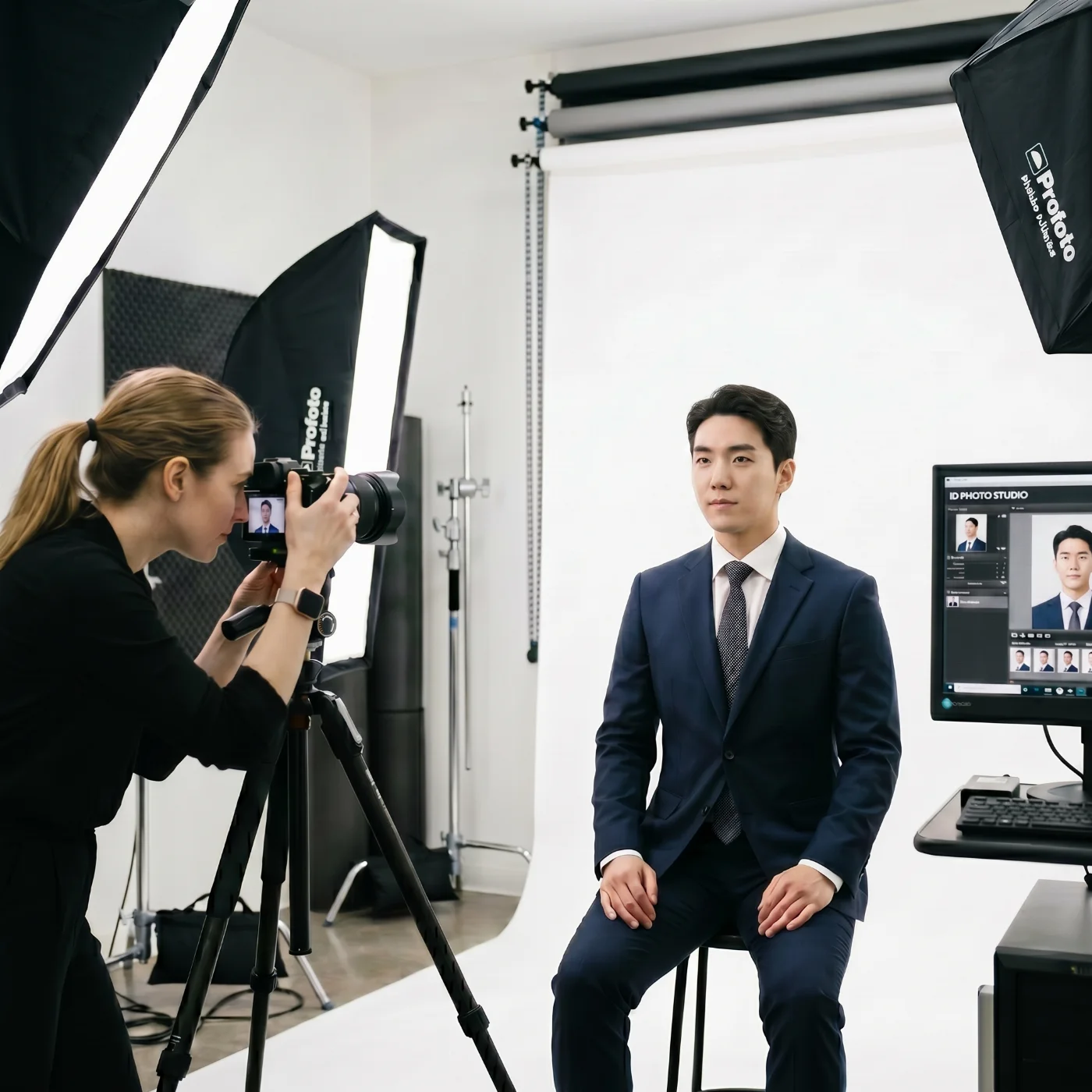
There are several ways to get a DV Lottery photo — whether you're in the U.S. or anywhere else in the world. The options below are ordered from the fastest in-person service to the most flexible at-home approach.
Pharmacy and Drug Store Counters. The passport-photo desks at Walgreens, CVS, and Rite Aid produce reliably formatted 2 × 2-inch prints from a brief in-store session. The digital file they hand over for download is rarely compressed below 240 KB on its own and almost always benefits from a final pass through an online editor before the DV upload.
Shipping Outlets. UPS Store and FedEx Office locations run passport-style photo sessions by appointment. Print output is clean; the digital file typically needs to be re-encoded for the DV envelope.
Post Office Branches. A selection of USPS branches offer passport photography by appointment. Availability is uneven — confirm with the specific branch ahead of the visit.
Photography Studios. A dedicated commercial studio remains the strongest in-person option for challenging subjects: infants, applicants with low vision who rely on a guide to remove their glasses, applicants with motor restrictions, and anyone whose features defeat phone autofocus. Controlled lighting and a proper backdrop almost always produce a clean source frame; the file may still need to be re-encoded to clear the 240 KB ceiling.
Online DV Lottery Photo Editor. A web tool built specifically for DV submissions works around every limitation above in a single pass. Capture a selfie on any current smartphone, upload it, and the system crops to the exact square envelope, corrects the background color, calibrates exposure, recompresses under 240 KB, embeds sRGB, and validates head position and eye placement against the U.S. Department of State template. The output is ready to drop straight into the E-DV form.
Diversity Visa Lottery Photo Services: Overview
Option | Time Required | Budget (Approx.) | Approval Chance |
|---|---|---|---|
Pharmacies and Drug Stores (Walgreens, CVS, Rite Aid) | Short visit (about 10–20 minutes) | About $15 per photo set | Moderate to high |
Shipping Centers (UPS Store, FedEx Office) | Short visit (about 10–20 minutes) | About $12–20 | Moderate to high |
Post Offices | Short visit (may require waiting) | About $15 | Moderate to high |
Photo Studios and Professional Photographers | Medium visit (20–30 minutes) | About $25–100 | Very high |
Photobooths | Very short visit (a few minutes) | About $5–10 | Low (not recommended) |
Online DV Lottery Tool (PhotoGov) | 30 seconds | $5.50 in the US | Very high |
Taking Your DV Lottery Photo at Home
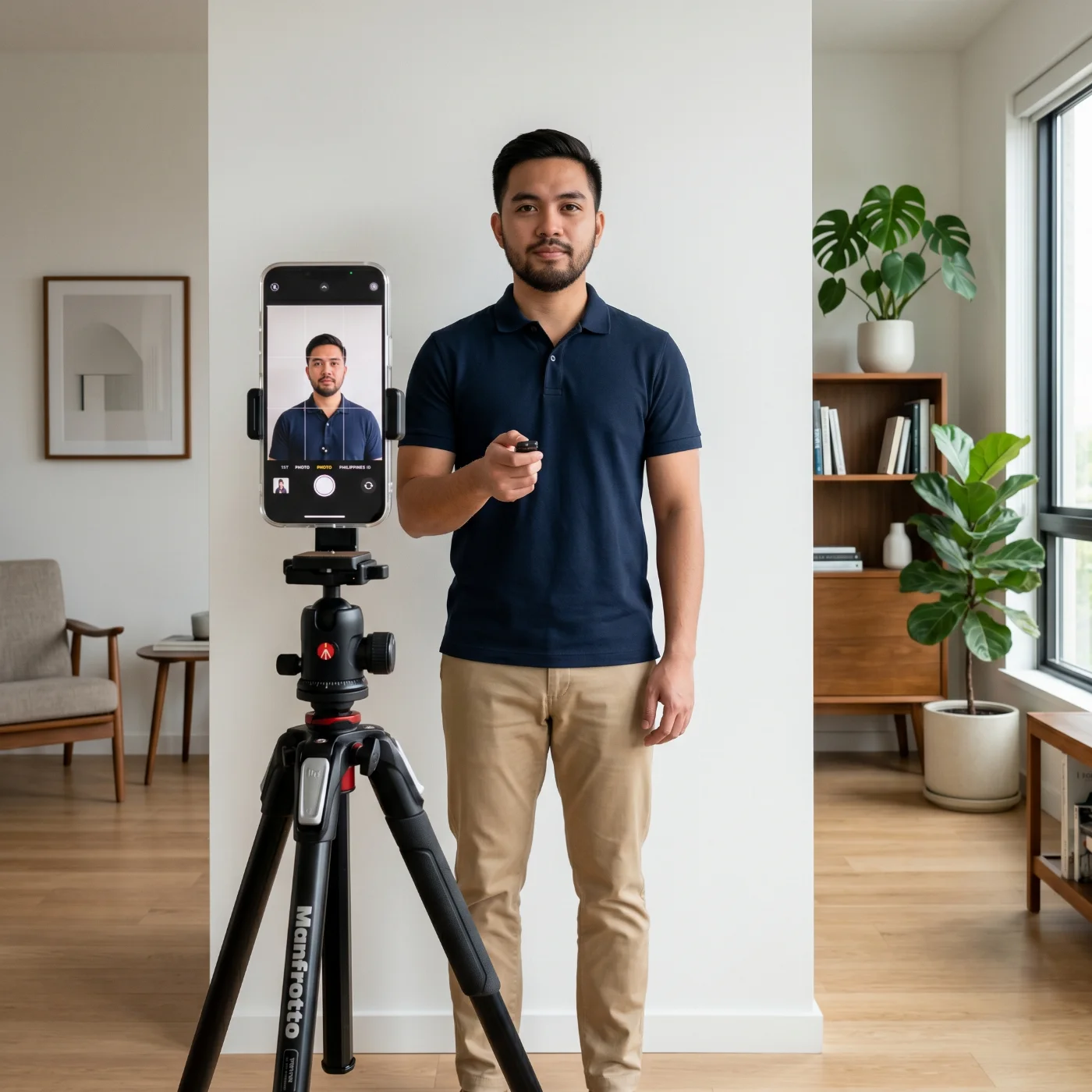
A home-shot Diversity Visa Lottery photo is fully acceptable in 2027 — the State Department doesn’t have an “only professional studio” requirement. The eight steps below will help you produce a compliant file in roughly ten minutes. All you need is a smartphone and a simple setup with natural, daily light.
1. Choose the spot with soft, natural daylight. Position yourself at the side of a window during the afternoon — the diffused daylight without direct sunshine is best. Never stand with the window behind you — backlight throws the face into shadow.
2. Prepare the background. A cleanly painted matte-white wall is an ideal backdrop. If there are no white walls in your home or office, a freshly ironed white bedsheet, a roll of white seamless paper, or a foam board mounted to the wall will also work. Leave at least 20 inches (50 cm) of space between your body and the surface so the wall stays shadow-free and in soft focus.
3. Mount the camera. A small tripod, a stack of books, or the top edge of a chair at eye level is enough. If a partner is operating the camera, ask them to use the rear lens at a distance of 5 to 7 feet (1.5 to 2 m). For a hand-held selfie with the front camera, keep the phone roughly 20 inches (50 cm) from your face to minimize lens distortion.
4. Choose appropriate clothing. Solid mid-tones — charcoal, navy, burgundy, forest green, warm brown — separate cleanly from a white background. Avoid white tops, bright logos, neon colors, and tight repeating stripes. Daily religious garments are permitted; sunglasses, tinted lenses, and decorative contacts are not.
5. Set the posture. Sit or stand upright. Hold the shoulders level, the neck centered, the chin in a neutral position. Look straight ahead at the lens with the mouth closed.
6. Capture multiple frames. Take eight to twelve shots at native resolution, with no zoom, no Portrait mode, no beauty filter, and no HDR portrait enhancement. Pick the sharpest, best-lit frame.
7. Run the file through PhotoGov. Select DV Lottery as the document type, upload the chosen frame, and let the system square the crop, correct the background color, balance the exposure, place the head at the required height inside the frame, recompress under 240 KB, and embed sRGB.
8. Download and submit. Save the validated JPEG. During the official registration window (typically early October to early November), sign in to dvprogram.state.gov, attach the file to the correct person's record, and submit the entry.
Taking a DV Lottery Photo of Your Baby
Photographing a child or an infant for any biometric file is genuinely difficult, but the U.S. Department of State recognizes the practical constraints and codifies a set of accommodations for entrants under one year old in 9 FAM 504.4-4(C). The four-line setup below handles the most common scenarios at home.
Light. Soft, indirect daylight against a uniform white sheet, foam board, or freshly painted wall. Switch off any colored room lighting so the white balance does not drift.
Pose. Newborns and infants under one year may be photographed lying on their back on a flat white surface, with the camera held directly above. Older infants who can sit unaided should sit upright, head level, facing the camera. From the first birthday onward, the adult rules apply in full — eyes open, mouth closed, gaze on the lens.
Expression. Aim for a relaxed, neutral expression. For infants under twelve months, partially closed eyes are tolerated when fully open eyes are impossible to capture. Crying, laughing, screaming, and any wide-open-mouth shot are rejected.
Frame. The image must contain only the child. No toys, pacifiers, bottles, patterned blankets, parental hands, or supporting arms can appear inside the rectangle of the final crop. If the head must be supported from behind, the supporting hand stays completely outside the cropped frame.
5 Main Reasons DV Lottery Photos Get Rejected
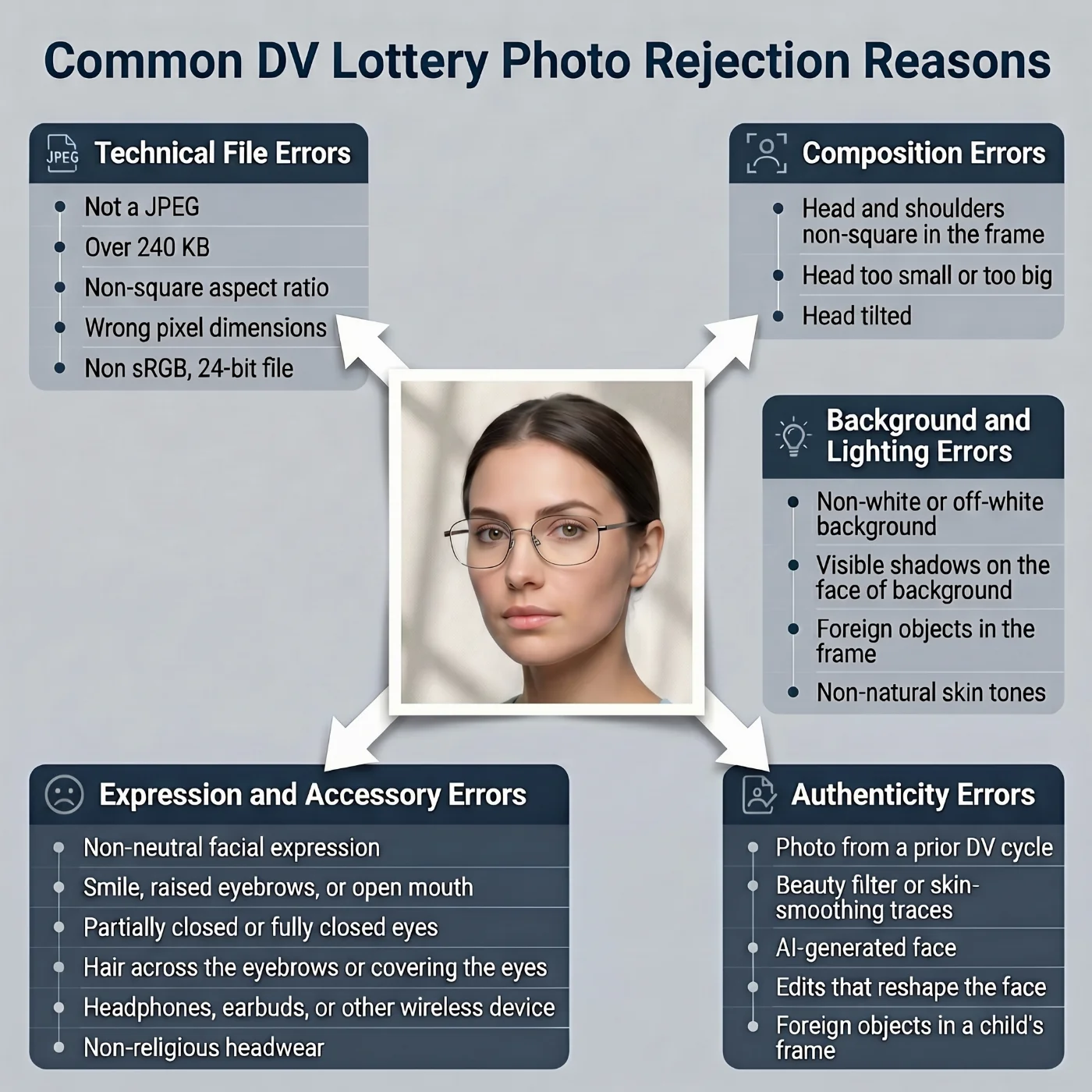
The Department of State data from the 2024–2025 DV Lottery cycles reveals the same recurring reasons for disqualification.
1. Technical File Errors (~40% of Rejections)
JPEG file size over the 240 KB cap — by far the single most common cause
Non-square aspect ratio — off by even one or two pixels after a careless crop
Wrong file format — HEIC from an iPhone, PNG from a screenshot, BMP, TIFF, GIF, or WebP
Pixel dimensions below 600 × 600 or above 1200 × 1200
Wrong color profile — CMYK, Adobe RGB, ProPhoto RGB, or grayscale instead of sRGB
16-bit-per-channel JPEG instead of 24-bit
Image transmitted through a messaging app and recompressed below the 600-pixel floor.
2. Composition Errors (~25% of Rejections)
Head too small (below 50% of frame height) or too large (above 69%)
Eyes positioned outside the 56–69% vertical band
Head tilted, rotated, or off-axis
Face off-center horizontally.
3. Background and Lighting Errors (~15% of Rejections)
Gray, cream, beige, ivory, or pale-blue walls read as "not white" by the automated check
Visible shadow projected onto the wall behind the head
Doorframes, art, shelves, or furniture edges inside the frame
Hot spots on the forehead or nose from a single overhead light
Skin tones shifted orange, yellow, or magenta by warm artificial light.
4. Expression and Accessory Errors (~10% of rejections)
Visible eyeglasses, sunglasses, or tinted contact lenses
Smile, half-smile, raised eyebrows, or open mouth
Partially closed or fully closed eyes (in entrants over one year of age)
Hair across the eyebrows or covering the eyes
Headphones, earbuds, or any visible wireless device
Non-religious headwear — caps, beanies, hoods, headbands.
5. Authenticity Errors (~10% of Rejections)
Reused photograph from a prior DV cycle, passport renewal, or visa application
Beauty filter or skin-smoothing traces
AI-generated face, AI face swap, or AI background replacement
Composite portrait assembled from multiple frames
Edits that reshape the face, narrow the nose, slim the jaw, or whiten the teeth
Foreign objects in a child's frame — pacifiers, toys, parental hands.
What to Do If Your DV Lottery Photo Is Rejected: 4 Scenarios
Rejection mechanics differ depending on where the failure occurs and what produced the original photograph. The four scenarios below cover every realistic path and provide actionable steps to resolve the issue.
1. The dvprogram.state.gov upload form refuses the file during the registration window
The upload returns only a generic "photo does not meet specifications" message with no indication of which requirement failed. Do not try to submit the same file repeatedly. Identify and correct the error in the following order:
Identify the failing parameter. Open the file in any image viewer to check pixel dimensions, file size, and format. Confirm the image is JPEG (.jpg), perfectly square, between 600 × 600 and 1200 × 1200 pixels, and 240 KB or smaller. Then visually check the U.S. Department of State photo template areas: head height, eye height, expression, background uniformity, and accessories.
If the photograph was taken at a pharmacy, post office, shipping center, or studio, return to the provider with the rejection notice and ask for a recapture. Most retail photo services include a free retake when the file fails an official upload; UPS Store, Walgreens, CVS, FedEx Office, and most professional studios honor this on the same day.
If the photograph was taken at home, the fastest fix is usually a reshoot under the home-photo routine described above, followed by manual cropping in any image editor and JPEG export at quality 75–80% to clear the 240 KB ceiling.
If only the technical parameters are wrong (for example, issues like faulty dimension — a 1201 × 1201 frame, or a wrong file size — a 250 KB file, or an unacceptable format — an HEIC straight from an iPhone) and the underlying photograph is otherwise compliant, an online tool such as PhotoGov, the State Department's own DV Photo Validator, or a desktop editor like Photoshop, Affinity Photo, or GIMP can re-crop and re-encode the file in a few minutes.
Submit before the registration window closes. The window is typically four to five weeks long; do not leave the upload until the final 48 hours, when dvprogram.state.gov servers run at peak load, and individual upload errors take longer to diagnose.
2. The upload form accepted the file, but you notice a problem before the window closes
The submitted entry cannot be edited after submission, and a replacement entry is not allowed either — a second registration from the same principal entrant disqualifies both filings. If the error is minor (a slightly off-center crop that nonetheless passed the automated check, a small piece of furniture in the corner of the backdrop), the entry will usually still proceed without consequence. (But we still don’t recommend trying your luck!) If the error is severe — the wrong photograph attached, a photograph of the wrong person, a smiling shot accepted by mistake — there is no formal correction mechanism, and the entrant must wait for the next annual cycle.
The practical implication is that the time to validate the photograph carefully is before you click submit, not after. Save a copy of the exact file you upload so it can be matched against the consular interview photograph later.
3. You were selected, but the consular officer rejects the photograph at the DS-260 stage or at the interview
Under 22 CFR §42.33(b)(3), the consular officer may deny the immigrant visa application if the photograph submitted with the entry was non-compliant or no longer matches the selectee. There is no appeal of a DV photo rejection.
Reduce the risk of your photo rejection in advance. Before the interview:
Bring a fresh, recent photograph that meets the same biometric template — even if your entry photograph is still inside the 180-day window, a brand-new shot taken close to the interview date is the safest option.
Keep the entry photograph and the DS-260 photograph visually consistent (same hairstyle, no new glasses, no major change in facial hair).
If your appearance has changed materially since the entry, prepare documentation that explains the change (a medical statement, a court-ordered name change, or a recent ID with the new appearance).
Confirm with the specific embassy or consulate ahead of the appointment which print format and how many copies they want — most posts request two identical 2 × 2 inch prints, but the practice varies.
If the consular officer rejects the photograph at the interview itself, the typical outcome is a request to recapture on the spot at a nearby provider and return the same day or the next morning. Most posts maintain a list of approved photo studios within walking distance.
4. The photograph was prepared by a paid service and was still rejected
Most paid photo services — pharmacies, shipping centers, professional studios, and online editors — include some form of compliance coverage. The protections vary, so check the specific policy before paying:
Retail and pharmacy chains (Walgreens, CVS, Rite Aid, Walmart) typically offer a free in-store retake when the official authority refuses the file, on presentation of the rejection notice.
Shipping outlets (UPS Store, FedEx Office) usually honor the same retake policy on the original receipt.
Professional studios generally include at least one free reshoot in the original session price; many include unlimited reshoots inside a thirty-day window.
Online DV photo tools offer guarantees or refunds if a photo they generated is rejected for technical reasons, but conditions differ, so always review the provider’s return policy before using their service.
PhotoGov offers an optional Human Verification service for critical applications such as DV Lottery entries. You upload the photo you plan to submit, and a senior compliance specialist reviews it against a strict DV Lottery photo template and official U.S. Department of State requirements, then either confirms compliance or recommends a retake if the image does not meet the standards. This paid add‑on can provide an extra layer of assurance that your photo is technically compliant before you submit your lottery application.
DV Lottery Photo: a Pre‑submission Сhecklist
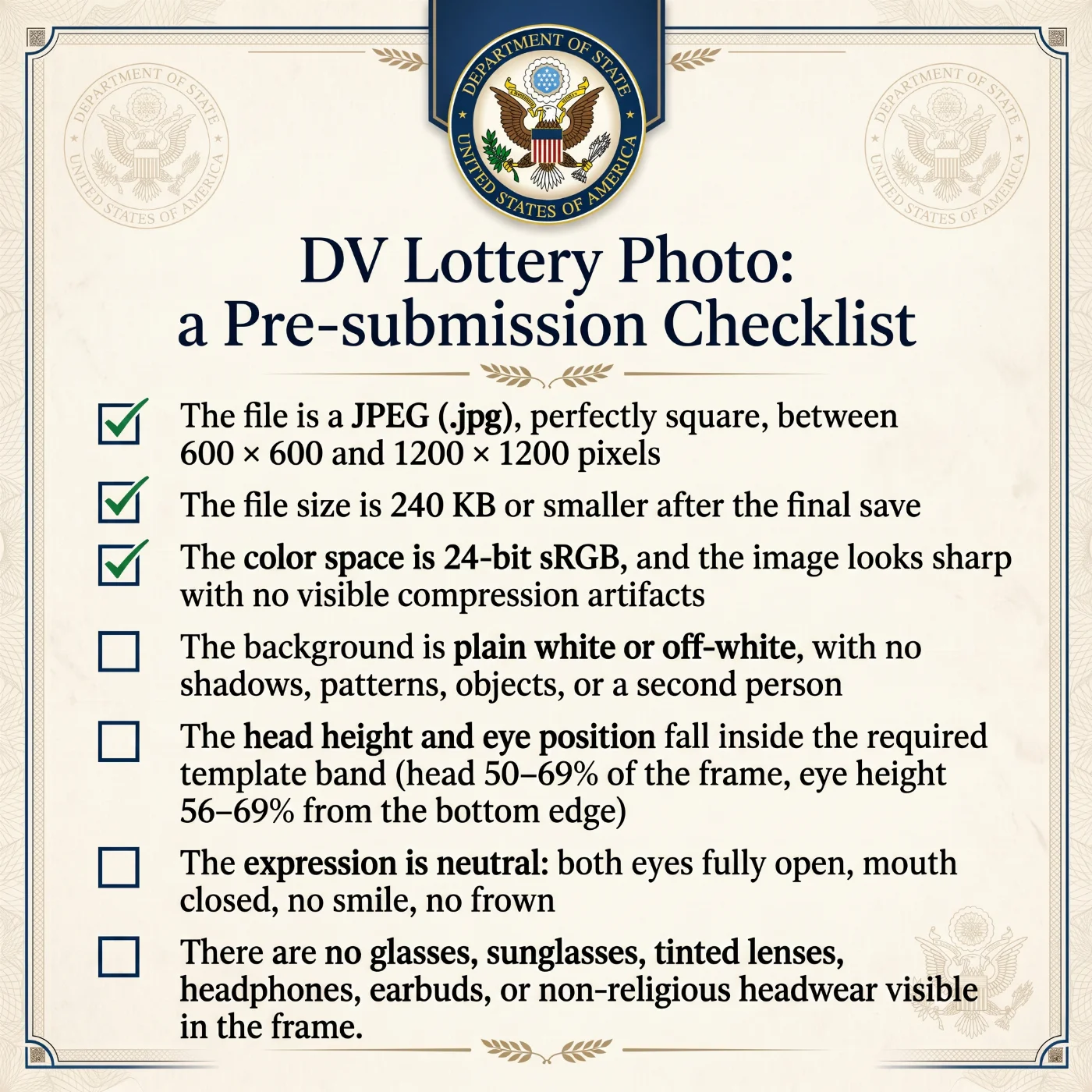
Before you submit your DV Lottery entry, make sure the final JPEG for each person meets all of the following:
The file is a JPEG (.jpg), perfectly square, between 600 × 600 and 1200 × 1200 pixels.
The file size is 240 KB or smaller after the final save.
The color space is 24‑bit sRGB, and the image looks sharp with no visible compression artifacts.
The background is only plain white or off‑white, with no shadows, patterns, objects, or a second person.
The head height and eye position fall inside the required template band (head 50–69% of the frame, eye height 56–69% from the bottom edge).
The expression is neutral: both eyes fully open, mouth closed, no smile, no frown.
There are no glasses, sunglasses, tinted lenses, headphones, earbuds, or non‑religious headwear visible in the frame.
If any of these points are not met, it is better to re‑save, re‑crop, or retake the photo before submission, because once the entry is filed, the image cannot be replaced.
Diversity Visa Lottery Photo Requirements: Final Thoughts
The DV Lottery is the only U.S. immigration program that requires a photograph in fully digital form at the entry stage, and dvprogram.state.gov enforces a tighter technical envelope than any other State Department submission. In practice, the 240 KB file ceiling, the perfectly square aspect ratio, and the 600 × 600 to 1200 × 1200 pixel range are the parameters that fail most often — composition, expression, and accessory rules account for a smaller share of rejections than first-time entrants usually expect.
Using a dedicated DV Lottery photo tool such as PhotoGov helps reduce the risk of technical rejection, as it generates the image to match the official DV Lottery photo template, including aspect ratio, pixel dimensions, and file size limits. You can also enable the Human Verification option so that a compliance specialist reviews the photo you intend to submit for the DV Lottery and flags any issues before upload. Together, the automated template and expert check cover both the technical envelope and the basic biometric requirements, giving you a much higher level of confidence in the final image.
You get only one valid entry per DV Lottery year. After you submit the form, you cannot replace the photo, and if a consular officer later finds it non‑compliant, there is no appeal. Careful pre‑submission validation is the only safeguard that really matters, and it takes just a few minutes compared with the cost of losing a full year and waiting for the next registration window.
Frequently Asked Questions
What Are the Main DV Lottery Photo Requirements in 2027?
The 2027 DV Lottery requires a single digital JPEG per entrant, uploaded directly to dvprogram.state.gov. The complete list specifications is:
File format: JPEG (.jpg) only
Aspect ratio: square (1:1), enforced to the pixel
Pixel dimensions: between 600 × 600 and 1200 × 1200
File size: maximum 240 KB
Color depth: 24-bit sRGB
Head height: 50–69% of the image
Eye height: 56–69% from the bottom edge
Background: plain white or off-white, uniform, no shadow or texture
Expression: neutral, both eyes open, mouth closed, no smile
Recency: taken within the last 180 days, no reuse from prior applications
No glasses, no headphones, no non-religious headwear, no uniforms
No filters, no beauty modes, no AI generation or AI enhancement.
Every parameter is enforced by the upload form's automated check. One missed parameter is enough to fail the upload, and the second attempt isn’t available inside the same annual window.
How Do I Prepare a DV Lottery Photo That Will Pass the Upload Check?
A compliant DV Lottery photo can be produced in three ways, each with a similar workflow at a different price point:
At home with a smartphone. Stand facing a window in soft daylight, against a plain white wall or sheet. Use the rear camera, no zoom, no Portrait mode, no beauty filter. Capture eight to twelve frames in standard photo mode. Pick the sharpest, then crop to a perfect square between 600 × 600 and 1200 × 1200 pixels and export to JPEG at 75–80% quality so the file lands under 240 KB.
At a retail or studio counter. Walgreens, CVS, Rite Aid, Walmart, UPS Store, FedEx Office, and most independent photography studios offer passport-style photo sessions. Request the digital file in addition to the prints, and confirm the operator can deliver a square JPEG under 240 KB rather than only a print or a standard rectangular file.
Through an online DV photo tool. Tools like PhotoGov and similar services accept a raw selfie and automatically square the crop, normalize the backdrop, place the head at the required height, recompress it to under 240 KB, embed it in sRGB, and validate the result against the State Department template.
Whichever channel you use, pre-validate the final JPEG before clicking submit — the dvprogram.state.gov form returns no comments on failure images, and the application can only be resubmitted the following year.
How can I check if my DV Lottery Visa Photo Meets all Official Requirements Before Submitting?
Use PhotoGov's free DV lottery tool to upload and check your picture. It automatically resizes, crops, and checks the background to meet 100% official DV Lottery requirements.
When Is the DV Lottery 2027 Registration Window, and What Photo Format Is Required?
The DV-2027 registration window dates have not been officially announced as of May 2026. Monitor travel.state.gov for the confirmed start date. The visa application period for selected entrants runs October 1, 2026, through September 30, 2027.
Throughout the window, the single accepted photo format is a square JPEG between 600 × 600 and 1200 × 1200 pixels, encoded in 24-bit sRGB, at most 240 KB. One file per family member is required. Submissions before the window opens or after it closes are not accepted; submissions during the window cannot be edited or replaced once filed.
What Does the State Department Actually Check When I Upload My DV Photo?
The dvprogram.state.gov system runs an automated parameter audit on every uploaded file before it is attached to an entry record. The automated review checks:
Square (1:1) aspect ratio, validated to the pixel
Pixel dimensions within the 600 × 600 to 1200 × 1200 range
JPEG format and ≤ 240 KB file size
24-bit color depth in the sRGB color space
Head height between 50% and 69% of the image
Eye position between 56% and 69% from the bottom edge
Plain white or off-white background, uniform across the frame
Eyes open, mouth closed, no smile
No glasses, no headwear (outside permitted religious headwear)
No visible signs of AI generation, filtering, or composition
What Background is Required for a DV Lottery Photo?
The background must be only plain white or off‑white, with no patterns, textures, shadows, or objects visible behind you. Any colored, patterned, or uneven background makes the photo non‑compliant and will cause an automated rejection.
What Are the Pixel Dimensions and File-Size Limits for a DV Photo in 2026?
The file must be a perfectly square JPEG with both sides between 600 and 1200 pixels. The maximum permitted file size is 240 KB. Saving a 1200 × 1200 JPEG under that ceiling typically requires a JPEG quality setting in the 70–85% range and the removal of embedded thumbnails and EXIF metadata. A native phone image of 3 to 5 MB is always rejected on size alone and must be downscaled and re-encoded before submission.
Do I Need a Separate Photo for My Spouse and Each Child on the Entry?
Yes. Every individual listed on the entry — the principal entrant, the legal spouse, and every unmarried child under twenty-one — must have their own unique, recent photograph attached to their record. The spouse must be included even if they currently live abroad and have no plans to immigrate. Children must be included, whether biological, adopted, or step. Submitting the same image for two people, missing a derivative, or attaching the wrong file to the wrong record voids the entire registration.
Is a U.S. Passport Photo Acceptable as a DV Lottery Submission?
No. The composition of these two photos is identical, but the technical envelope is not. A U.S. passport renewal accepts JPEG uploads up to 10 MB, while the DV Lottery is capped at 240 KB. In practice, a passport-grade file almost always has to be re-saved at a lower JPEG quality and a smaller pixel dimension before the DV upload accepts it. A Schengen visa photo cannot be reused at all — its rectangular 35 × 45 mm crop fails the DV square-ratio check.
How Should I Dress for my DV Lottery Photo?
Dress. Solid colors in the mid-to-dark range — charcoal, navy, burgundy, forest green, warm brown — separate cleanly from a white backdrop. Avoid logos, slogans, white shirts, fluorescent tones, and tight stripes. Uniforms (military, police, hospital, school) and camouflage are not permitted. Daily religious garments are allowed.
Pose. Head upright and centered, shoulders level and square to the lens, gaze straight ahead, mouth closed, expression relaxed. A thin band of background must remain above the hair.
Can I Wear Glasses, a Hijab, a Turban, or a Cap in a DV Photo?
Glasses are not allowed under any circumstances. The medical exemption that once permitted prescription frames was eliminated by the State Department in November 2016 and has not been reinstated for 2026. Sunglasses, tinted lenses, decorative cosmetic contacts, and reading glasses are equally prohibited.
Religious head coverings — hijab, turban, kippah, sheitel, and similar daily garments — are permitted as long as nothing from hairline to chin is concealed, and the covering casts no shadow on the face.
A baseball cap, beanie, hood, or any non-religious head covering is not permitted.
Which JPEG Settings are Required for the Diversity Lottery Photo?
The upload form accepts only baseline or progressive JPEG encoded with the sRGB IEC61966-2.1 color profile and 24-bit color depth (8 bits per channel). Files saved as CMYK, Adobe RGB (1998), ProPhoto RGB, grayscale, or 16-bit-per-channel are rejected. Use a JPEG quality setting between 70% and 85%: below 70% introduces visible blockiness around the eyes and lips; above 85% typically pushes the file over the 240 KB ceiling at 1200 × 1200 pixels. Use chroma subsampling 4:4:4 when available; 4:2:2 is acceptable. Strip embedded thumbnails and unnecessary EXIF metadata before saving.
How Much of the Frame Should My Head Occupy in a Diversity Visa Photo?
The head — measured from the lowest point of the chin to the top of the hair — must take up between 50% and 69% of the image height. Translated to pixels: in a 600 × 600 master, the head should measure 300 to 414 pixels from chin to crown; in a 1200 × 1200 master, 600 to 828 pixels. The center of the eyes must sit between 56% and 69% from the bottom edge of the frame. Horizontally, the bridge of the nose aligns with the vertical center line of the frame within a tolerance of about three percent.
What Wall Color and Lighting Setup Produces a Compliant Backdrop?
Wall. A freshly painted matte-white interior wall is the easiest and most reliable backdrop. A clean, unwrinkled white bedsheet stretched flat across a doorway works almost as well. A roll of white seamless paper or a foam-core board mounted to the wall is ideal for repeated sessions. Avoid eggshell, off-white-tinted, and partially yellowed walls.
Lighting. Two soft sources placed at roughly forty-five degrees to either side of the face, slightly above eye level, deliver the cleanest, even illumination. A single overhead light casts shadows under the eyes and chin and should be avoided. Indirect daylight from a north-facing window between 10 a.m. and 2 p.m. on an overcast day is the easiest natural option.
Which Studios, Pharmacies, or Apps Reliably Produce a 240 KB DV-Ready File?
The four channels with the most consistent track record on the DV-specific 240 KB envelope, observed across PhotoGov support cases in 2024–2025, are:
Pharmacies. Walgreens, CVS, and Rite Aid — typically $15–$18 for a print set. The 2 × 2-inch print is reliable; the digital file almost always needs final compression.
Shipping and postal counters. UPS Store and FedEx Office — typically $12–$15. Same caveat on the digital file.
Professional studios. Independent studios and chains such as Picture People — typically $25–$50. The strongest option for difficult subjects.
Online DV editors. These services automatically apply the 240 KB cap, the square crop, the sRGB profile, and the head-proportion check natively, with no further editing required before upload.
Are the DV Lottery Photo Rules Different for Children, Infants, and Teenagers?
Teenagers and children aged one year and older follow the adult specification in full: eyes open, mouth closed, head upright, gaze on the lens, against a plain white backdrop. No glasses, no headphones, no school uniform, no smile.
Infants under one year of age receive a documented accommodation in 9 FAM 504.4-4(C): the eyes may be partially or fully closed, the gaze need not meet the camera, and the child may be photographed from above while lying on a white sheet. Toys, pacifiers, bottles, patterned blankets, and any visible hand or arm of a supporting adult remain prohibited at every age.
What Edits Are Allowed in Diversity Visa Photos, and Which Ones Get the Entry Disqualified?
The 2026 State Department guidance is unusually explicit on prohibited edits. The following are flagged automatically and routinely produce disqualification — in many cases with a finding of misrepresentation under INA §212(a)(6)(C)(i) and a lifetime visa bar:
AI-generated images and AI face swaps
AI background replacement of any kind
Beauty filters, skin smoothing, Portrait-mode background blur
Teeth whitening, eye color or shape changes, iris reshaping
Face slimming, jaw reshaping, nose narrowing
Composite portraits assembled from multiple frames
Identical reuse of a prior DV, passport, or visa photo
Brightness or color edits that shift the natural appearance
The following adjustments are acceptable:
Mild brightness or contrast correction that preserves true skin tone
White-balance correction toward neutral
Square cropping that keeps the head proportions inside the 50–69% rule
JPEG re-encoding to the 240 KB ceiling at quality 70–85%
Can I Use My iPhone or Android Camera to Take the DV Lottery Photo?
Yes. A current-generation iPhone, Pixel, or Galaxy is more than capable of capturing a DV-compliant frame. Use the rear (main) lens for the lowest distortion and the highest resolution. Keep four to six feet between you and the camera, on a tripod or supported by a partner. Disable Portrait mode, every "beauty" toggle, HDR portrait enhancement, and any third-party camera filter. Shoot in standard photo mode.
Once captured, do not pass the file through WhatsApp, iMessage, Telegram, Instagram, or any other messaging or social platform — each of those services re-compresses and downsamples the image, often below the 600-pixel floor. Transfer the original by AirDrop, cable, or cloud storage.
Is There a Free Tool That Tells Me Why My DV Lottery Photo Upload Failed?
No. The dvprogram.state.gov form itself returns only a generic error and no diagnostic. The Department's DV Photo Validator at travel.state.gov inspects aspect ratio, JPEG format, and the head-position template, and reports those three checks back to the user — but it does not detect color-profile issues, oversized files after re-encoding, AI manipulation, beauty-filter traces, shadowed backdrops, or non-neutral expressions, which together account for the majority of avoidable 2024–2025 rejections.
Why Is the DV Lottery File Size Limited to 240 KB?
The 240 KB ceiling exists because the dvprogram.state.gov entry portal processes several million submissions inside a four- to five-week window each year on legacy server infrastructure. Capping each file at roughly a quarter of a megabyte keeps each upload small enough for bulk algorithmic review while preserving enough resolution for the image to be matched against the entrant in person at a later consular interview. A native phone photo — typically 3 to 5 megabytes straight out of the camera roll — must always be downscaled and re-encoded before it fits inside the envelope.
Can I Reuse the Photo From My Last DV Lottery Entry or My Passport?
No. The Department of State runs an image-similarity comparison against prior DV submissions, U.S. passport files, and visa applications. Reusing a previous photograph — even one taken less than six months ago for a different purpose — is treated as a non-compliant entry and disqualifies the submission. A fresh photograph is required for every annual DV cycle, separately for every family member, even if a prior photograph would still technically fall inside the 180-day recency window.
Can I Replace the Photo After Submitting My DV Lottery Entry?
No. Once the entry is filed at dvprogram.state.gov, the attached photograph cannot be replaced, edited, or re-uploaded. Each principal entrant is permitted exactly one entry per cycle; filing a second registration to correct a photo error disqualifies both. Pre-upload validation is therefore essential — there is no second chance inside the same annual window.
Are AI-Generated or AI-Enhanced DV Lottery Photos Rejected?
Yes. The State Department has issued explicit guidance that AI-generated photographs, AI face-swapped images, AI background replacement, and AI portrait enhancement are not acceptable for any U.S. immigration submission, including the Electronic Diversity Visa Program. The Department's similarity and AI-detection systems flag generative output, Generative Fill, neural filter passes, and most consumer "AI enhance" toggles. Submitting an AI-manipulated photograph can be treated as material misrepresentation under INA §212(a)(6)(C)(i) and trigger a lifetime bar from every U.S. visa category — not only from future DV cycles.
What Is the Difference Between a DV Lottery Photo and Other U.S. Immigration Photos?
All U.S. immigration photographs share the same biometric template — a square crop, plain white backdrop, neutral expression, no glasses, head between 50% and 69% of frame height. The differences sit at the file level and at the submission stage:
DV Lottery (E-DV entry): digital JPEG only, 600 × 600 to 1200 × 1200 pixels, ≤ 240 KB, 24-bit sRGB. Uploaded online during the October–November window. No printed copy at entry.
U.S. Passport (online renewal): JPEG, 600 × 600 to 1200 × 1200 pixels, up to 10 MB. Or two printed 2 × 2 inch photos submitted by mail.
Green Card (USCIS forms / consular interview): two identical printed 2 × 2 inch photos on photo-quality paper, brought to the interview.
DS-160 (non-immigrant visa): digital JPEG, 600 × 600 to 1200 × 1200 pixels, ≤ 240 KB. An identical envelope to the DV Lottery.
DS-260 (immigrant visa, post-DV selection): digital JPEG with the same specifications as DS-160, plus two printed 2 × 2 inch copies for the consular interview.
USCIS N-400 (naturalization): two printed 2 × 2 inch photos.
Schengen visa: rectangular 35 × 45 mm, not interchangeable with U.S. formats.
The composition is portable across all of them — a single recent capture that satisfies the biometric template can be re-exported into each program's specific envelope. The DV Lottery's 240 KB cap is the strictest of the digital envelopes, so a DV-ready file will usually pass the other U.S. digital submissions without further editing.
Why Was My DV Lottery Photo Rejected, and What Should I Do?
DV Lottery photo rejections fall into a few major categories. The likely cause is usually identifiable from the photograph alone:
Technical: file over 240 KB, non-square aspect ratio, wrong format (HEIC, PNG), wrong color profile, pixel dimensions outside the 600–1200 range
Composition: head too small or too large, eyes outside the 56–69% band, head tilted, face off-center
Background and lighting: gray or beige wall, shadow behind the head, doorframe or furniture in the frame, harsh lighting
Expression and accessories: glasses, smile, closed eyes, hair across the eyebrows, earbuds, non-religious cap
Authenticity: reused photograph, AI-generated or AI-edited image, beauty filter, composite
If the dvprogram.state.gov upload form rejected the file, you still have time to correct and resubmit before the registration window closes — diagnose the failed parameter, then either reshoot (preferred for composition, expression, or accessory failures) or re-encode the file (sufficient for technical failures). If a paid provider produced the photograph, request a free recapture; most retail and studio services include one at no charge on presentation of the rejection notice. If the photograph was rejected by the consular officer at the DS-260 stage or at the interview, there is no formal appeal — the only mitigation is preventative pre-validation and a fresh photograph close to the interview date.
Official Government Documentation Sources
DV Lottery Photo Requirements: The U.S. Department of State — Travel
Diversity Visa Instructions: The U.S. Department of State — Travel
Electronic Diversity Visa Entry Form (E-DV): dvprogram.state.gov
DV Photo Validator and Template Tool: The U.S. Department of State — Photo Tool
9 FAM 504.4-4 — Photographs: Foreign Affairs Manual, U.S. Department of State
22 CFR §42.33 — Diversity Immigrants: Code of Federal Regulations
Biometric Regulations for International ID Documents: International Civil Aviation Organization (ICAO) Document 9303
Was this helpful?
81 found this helpful
Top expert
Based on official government sources
Helpful votes: 81
Was this helpful?
81 found this helpful
Service provided by Y VISION TECHNOLOGIES LLP · Stoney Works 8 Stoney Lane, London, England, SE19 3BD · Terms · Refund policy · Contact
We value your Privacy
We use cookies to enhance your browsing experience, serve personalized ads or content. By clicking “Accept All”, you consent to our use of cookies.