US EAD Photo Requirements for Form I-765: 2026 Guide
Table of contents:
- 12 Essential EAD Photo Requirements: a Checklist
- Acceptable EAD Photo Examples
- Online Filing Availability for Form I-765
- How Many EAD Photos Does Form I-765 Require — and In What Format?
- How to Take an Acceptable EAD Photo: Five Easy Steps
- How to Prepare Photos for a Paper I-765 Application
- How to Prepare a Digital Photo for an Online I-765 Application
- Preparing for a Biometrics Appointment
- Four Common Reasons for an EAD Photo Rejection
- Form Edition Alert for September 2026
- Frequently Asked Questions
- Official Government Sources
If you're filing Form I-765 for an Employment Authorization Document (EAD), you'll need a passport-style photo that follows specific USCIS rules: 2 x 2 inches, in color, with a plain white to off-white background. Paper applications require two identical photos printed on glossy paper; if your category qualifies for online filing, you must upload one digital photo in JPG, JPEG, or PNG format under 240 KB.
This guide breaks down the exact EAD photo requirements, walks through paper vs. online submission, and explains key 2026 rules for mail-in filings.
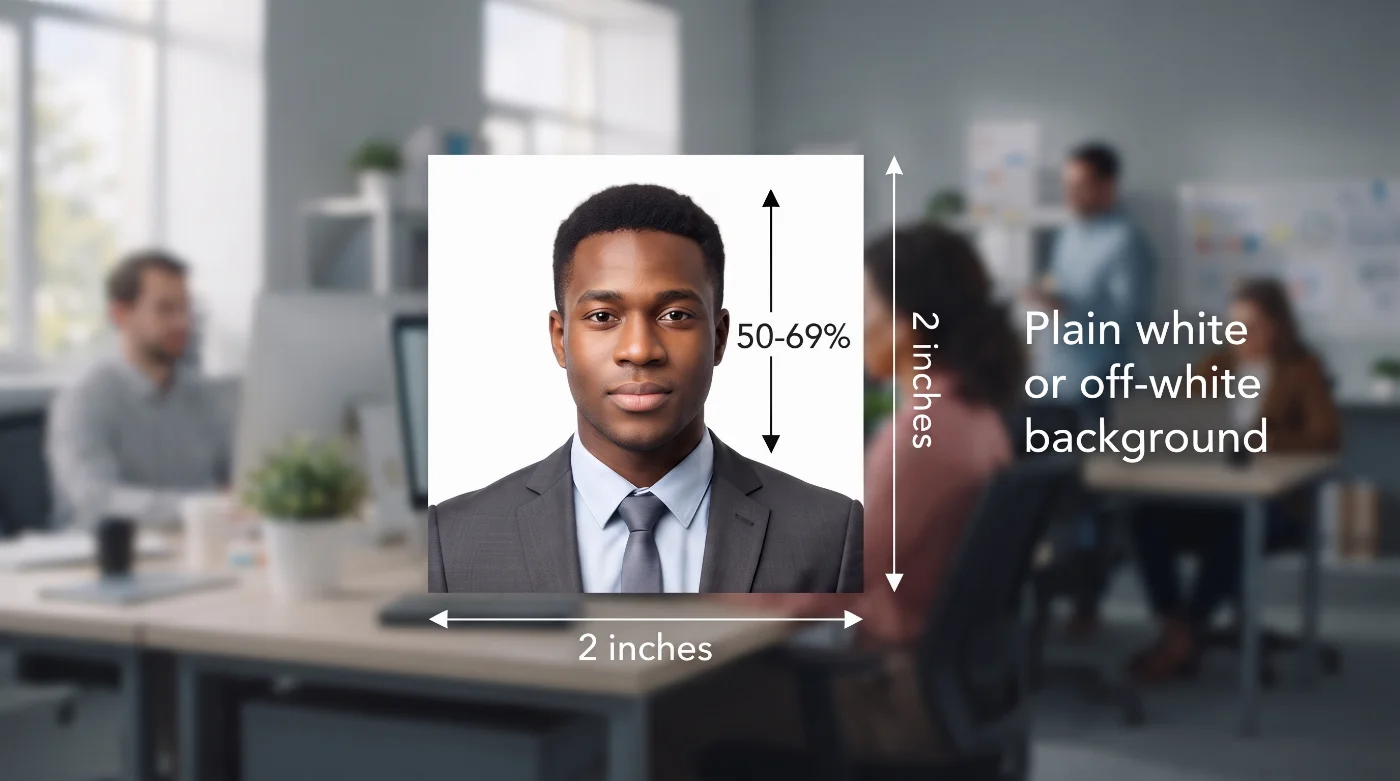
12 Essential EAD Photo Requirements: a Checklist
Every EAD photo has to meet the same core specifications, whether you're filing on paper or online. Check out the complete breakdown, straight from the current Form I-765 instructions, in the table below.
Requirement | Current USCIS standard |
1. Number of photos | Two EAD photos for mail-in filing / One digital photo for online filings |
2. Photo size | 2 x 2 inches (51 x 51 mm) |
3. Head height | 1 to 1⅜ inches from chin to crown |
4. Background | Plain, white or off-white, texture, pattern, and shadow-free |
5. Color | Colored photo |
6. Recency | An EAD photo must be taken within 30 days of filing and accurately reflect your current appearance |
7. Framing | Full face, frontal view, looking directly at the camera |
8. Image editing | No editing is allowed. The photo must be unretouched — no beauty filters, facial edits, AI enhancement, or digital background changes |
9. Headwear | No headwear is allowed unless it is worn daily for religious purposes |
10. Glasses | Remove eyeglasses. Your EAD photo must show your face with unobstructed facial features. A medical exception may apply in rare, documented cases, similar to the Department of State passport-photo policy |
11. Print quality | Printed from a high-resolution source photo on glossy photographic paper. Printed photos submitted by mail must be unmounted |
12. Digital format and quality | JPG, JPEG, or PNG. 600 x 600 pixels, 240 KB max (Form I-765 follows the general U.S. Department of State photo specifications) |
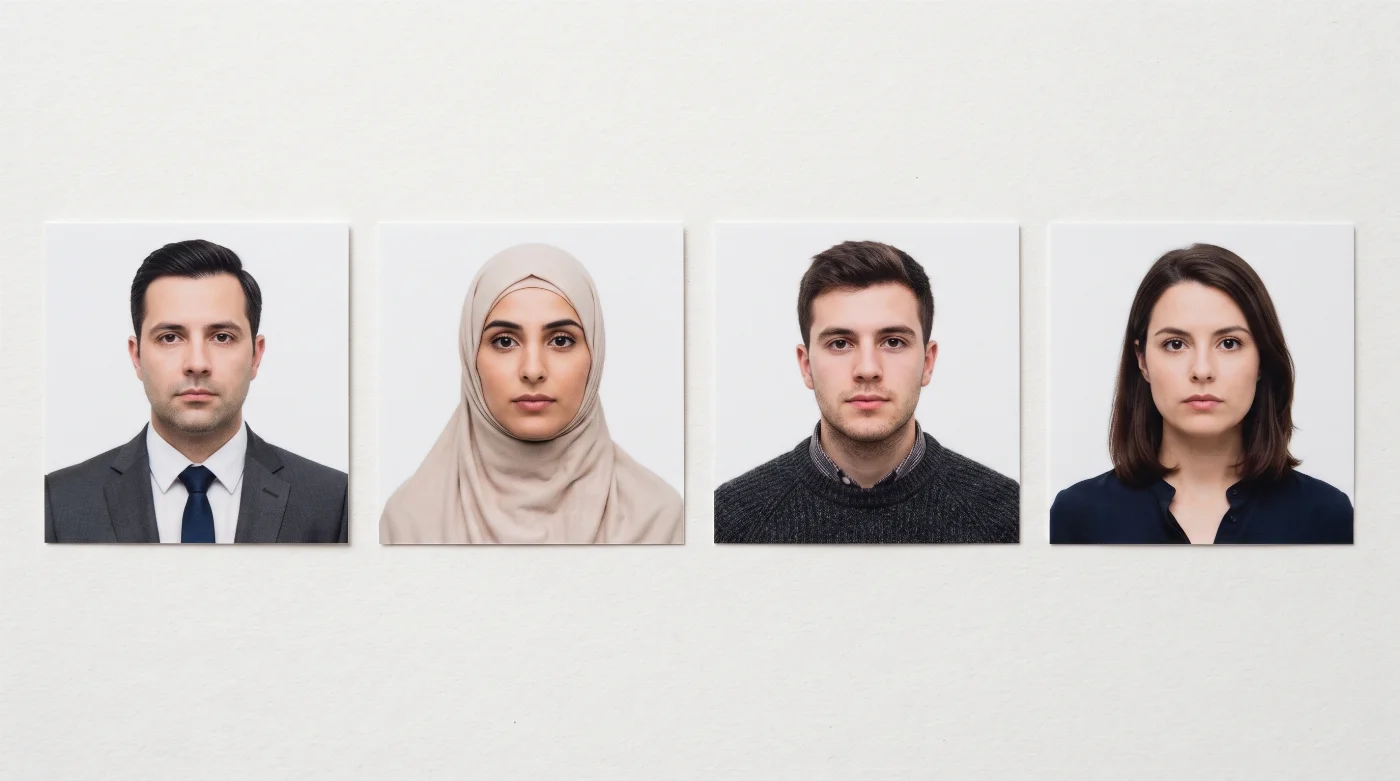
Acceptable EAD Photo Examples
Online Filing Availability for Form I-765
Online filing for Form I-765 has expanded significantly since its introduction. Starting in 2021, USCIS gradually broadened the list of categories eligible for online submission, beginning with F-1 students filing for OPT. By 2026, online filing is available for most major categories, including OPT, STEM OPT, DACA, adjustment of status, and parole-based statuses.
USCIS no longer publishes a single official list showing every category alongside its exact rollout date, so there's no definitive public page to confirm category-by-category eligibility once and for all. The most reliable way to confirm whether your category qualifies is to open the guided workflow in your myUSCIS account and enter your eligibility category in Question 27—the form will indicate whether online filing is currently available for that category.
How Many EAD Photos Does Form I-765 Require — and In What Format?
The number of photos and their format depends on the submission method — whether you apply in-person or online.
Filing Method | Photos Required |
Paper Form I-765 | Two identical, recent color passport-style photos, 2 x 2 inches each, printed on glossy photo paper, unmounted and unretouched, with name and A-Number (if any) lightly written on the back. |
Eligible online Form I-765 | One digital passport-style photo, uploaded in the evidence section of the online form. Accepted formats: JPG, JPEG, PNG. |
Online filing is available only for specified I-765 categories — confirm yours by opening the guided workflow in your myUSCIS account, as described above.
Please remember that photos submitted to USCIS must be unmounted and unretouched. Unretouched means the photos must not be edited or digitally enhanced. The submission of any mounted or retouched images will delay the processing of your application and may prompt USCIS to require that you appear at an Applicant Support Center to verify your identity.
How to Take an Acceptable EAD Photo: Five Easy Steps
Step 1. Use the Correct Background Before You Take the Photo
Stand in front of a plain white or off-white wall with enough distance to prevent shadows. USCIS requires an unretouched image, so background replacement is not a safe way to repair a photo taken against the wrong surface. Retake the picture instead.
Step 2. Face the Camera Directly
Keep your head upright and your shoulders square to the camera. Your full face should be visible, with both eyes open. A neutral expression or a natural closed-mouth smile works best. Keep hair, scarves, and other items away from the face.
Step 3. Use Even, Natural-Looking Light
The image should show accurate skin tones and clear facial detail. Avoid harsh side lighting, overhead shadows, overexposure, blur, grain, red eye, and visible compression or printer dots. Set the camera to a high-quality mode and check focus before taking the final picture.
Step 4. Crop Without Altering Facial Features
Cropping and sizing should preserve the original proportions of the face and head. Do not stretch the image, narrow the face, smooth the skin, reshape features, remove shadows digitally, or generate missing image areas with AI. USCIS specifically warns that mounted, retouched, or digitally enhanced photographs can delay processing and may lead to an identity-verification appointment.
Step 5. Use an Online Tool to Prepare the Final Photo
Once the photo is ready, upload it to an online photo-making tool to adjust it to all current USCIS specifications, avoiding manual adjustments. Download your final photo in a digital or printable format.
How to Prepare Photos for a Paper I-765 Application

Prepare two matching prints. Both photos should come from the same recent image and measure exactly 2 x 2 inches.
Use the required paper. The I-765 instructions specify thin paper with a glossy finish. Keep the prints flat, clean, unmounted, and free of staples, tape, creases, or writing on the image side.
Label the backs lightly. Write your full name and A-Number, if you have one, on the back of each photo with a pencil or felt-tip pen. Apply light pressure so the writing does not mark the front.
Check your filing category. The photograph is part of the general documentation, but the rest of the evidence and the mailing address depend on the eligibility category entered on Form I-765. Use the current USCIS instructions and filing-address page for your category.
How to Prepare a Digital Photo for an Online I-765 Application
Start with an original, recent image that meets the same passport-style standards for background, pose, framing, and image integrity. USCIS online-filing materials describe a 2 x 2-inch image in JPG, JPEG, or PNG format. Upload the image directly in the evidence section of the online form.
The live form controls the technical upload rules, including any current file-size limit. Read the on-screen instructions before exporting the file. If the system rejects the upload, correct the file format or size without altering the applicant's appearance.
Preparing for a Biometrics Appointment
Since December 12, 2025, USCIS has stopped using self-submitted photos for the actual EAD card. Instead, USCIS captures your photo directly at a Biometric Services Appointment (BSA) at an Application Support Center. You're still required to submit passport-style photos with Form I-765 for now — USCIS hasn't formally updated the form instructions — but expect a BSA notice, especially if you don't already have a USCIS photo on file from the last three years.
USCIS may require an I-765 applicant to attend a biometric services appointment for fingerprints, a photograph, a signature, or identity and security checks. USCIS schedules these appointments case by case and sends a notice with the appointment details.
If you receive a notice, follow the date, time, location, and identification instructions printed on it. USCIS generally allows a timely rescheduling request through a USCIS online account when there is good cause. Missing an appointment can lead USCIS to treat the application as abandoned and deny it.
Submitting the required photo with Form I-765 and attending a later biometrics appointment serve different parts of the application process. Complete both steps when USCIS asks for them.
Four Common Reasons for an EAD Photo Rejection
1. The Photo Was Digitally Retouched
Beauty filters, AI enhancement, background replacement, skin smoothing, face reshaping, and other edits conflict with the unretouched-photo requirement.
2. The Crop Is Incorrect
A photo can measure 2 x 2 inches and still fail if the head is too large, too small, off-center, tilted, or outside the required head- and eye-height ranges.
3. The Background or Lighting Is Uneven
Patterns, objects, visible texture, strong shadows, and blown-out highlights can make the image unsuitable. Fix the setup and take a new photo.
4. The Prints Are Mounted or Damaged
Do not glue, tape, or mount the photographs. Replace prints with creases, stains, tears, or visible printer defects.
Form Edition Alert for September 2026
Under a September 14, 2026 court order, USCIS continues to accept the 08/21/25 edition of Form I-765 and is not accepting the 09/15/26 edition. The photo requirements remain the same: two identical color passport-style photos for paper filings.
Always download the form from the live USCIS Form I-765 page immediately before filing. USCIS can reject a form submitted under the wrong edition.
Frequently Asked Questions
What Are the EAD Photo Requirements?
Your EAD photo must be in color, 2 x 2 inches (51 x 51 mm), with a plain white or off-white background free of shadows, texture, or patterns. Your head should measure 1 to 1⅜ inches from chin to crown, taken full-face and frontal with both eyes open, no headwear (except daily religious wear) and no glasses. The photo must be unretouched — no filters, AI edits, or background changes — and taken within 30 days of filing. Paper filers submit two identical prints on unmounted glossy photo paper; applicants filing online upload one digital photo in JPG, JPEG, or PNG format, 600 x 600 pixels, under 240 KB.
How Many Photos Do I Need for a Paper I-765 Filing?
Two identical recent color passport-style photographs.
What Size Should an EAD Photo Be?
Each photo must measure 2 x 2 inches, or 51 x 51 mm.
Can USCIS Take My Photo at a Biometrics Appointment Instead?
A scheduled biometrics appointment may include another photograph. It remains separate from the photo submitted with Form I-765. Follow any case-specific instructions from USCIS.
Can I Wear Glasses in My EAD Photo?
No. Remove glasses for the photo. The I-765 instructions require unobstructed facial features — similar to the U.S. Department of State’s passport-photo requirements.
How Recent Must the EAD Photo Be?
The photo must be taken within 30 days of filing Form I-765 and accurately reflect your current appearance.
Should I Write Anything on the Back of My EAD Photo?
For printed photos, lightly write your name and A-Number, if any, on the back of each copy with a pencil or felt-tip pen.
Do I Need to Mount Photos to My Form I-765?
No. USCIS requires printed EAD photos to be unmounted — do not glue, tape, or attach them to cardstock or any backing. Submit them as loose, flat prints only. A mounted photo can delay processing of your Form I-765 and may prompt USCIS to require an in-person identity-verification appointment.
How Do I Submit an EAD Photo With Form I-765?
Paper applicants submit two printed passport-style photos. Applicants in categories eligible for online filing upload one digital image through their USCIS account.
Is a Refugee Travel Document Photo the Same as an EAD Photo?
No. A Refugee Travel Document is requested on Form I-131 and follows a separate filing process. Use the dedicated Refugee Travel Document photo tool and I-131 instructions for that application; this guide covers Form I-765 only.
Official Government Sources
Form I-765, Application for Employment Authorization: U.S. Citizenship and Immigration Services
Current Form I-765 Instructions: U.S. Citizenship and Immigration Services
Checklist of Required Initial Evidence for Form I-765: U.S. Citizenship and Immigration Services
Direct Filing Addresses for Form I-765: U.S. Citizenship and Immigration Services
Forms Available to File Online: U.S. Citizenship and Immigration Services
Tips for Filing Forms Online: U.S. Citizenship and Immigration Services
USCIS Online Filing Webinar: Form I-821, Application for Temporary Protected Status (includes Form I-765 photo and evidence requirements): U.S. Citizenship and Immigration Services
Preparing for Your Biometric Services Appointment: U.S. Citizenship and Immigration Services
USCIS to Publish New Editions of Form I-539 and Form I-765 (September 15, 2026 edition change): U.S. Citizenship and Immigration Services
USCIS Policy Manual: U.S. Citizenship and Immigration Services
Digital Image Requirements (referenced by USCIS for passport-style photo specifications): U.S. Department of State
Was this helpful?
38 found this helpful
Top expert
Based on official government sources
Helpful votes: 38
Was this helpful?
38 found this helpful
Service provided by Y VISION TECHNOLOGIES LLP · Stoney Works 8 Stoney Lane, London, England, SE19 3BD · Terms · Refund policy · Contact
We value your Privacy
We use cookies to enhance your browsing experience, serve personalized ads or content. By clicking “Accept All”, you consent to our use of cookies.