Passport Photo Requirements in Malaysia: the Complete 2026 Guide
Table of contents:
- 11 Essential Passport Photo Requirements in Malaysia: a Checklist
- Acceptable Malaysia Passport Photo Sample
- Unacceptable Malaysia Passport Photo Sample
- Do You Need to Bring a Photo? How the JIM System Actually Works
- Photographing Babies and Children for a Malaysian Passport
- Where to Get a Compliant Malaysian Passport Photo
- Malaysian Passport Photo Options: Speed, Cost, and Compliance Compared
- Taking Your Own Malaysian Passport Photo: A Step-by-Step Setup
- 12 Reasons Malaysia Passport Photos Get Rejected — and How to Fix Each Issue
- Frequently Asked Questions
- Official Government Sources
Getting a Malaysian passport photo right means understanding a set of rules that differ from most countries. Malaysia uses a 35×50 mm portrait format; the background must be pure white — not cream or off-white. Applicants who submit their passport files at a Jabatan Imigresen Malaysia (JIM) counter inside Malaysia do not need to bring a printed photo at all — their biometric image is captured on-site using JIM's Facial Live Capture system.
This guide explains every official requirement issued by JIM and aligned with ICAO Document 9303, along with the practical details that determine whether you need a printed photo, a digital file, or neither.
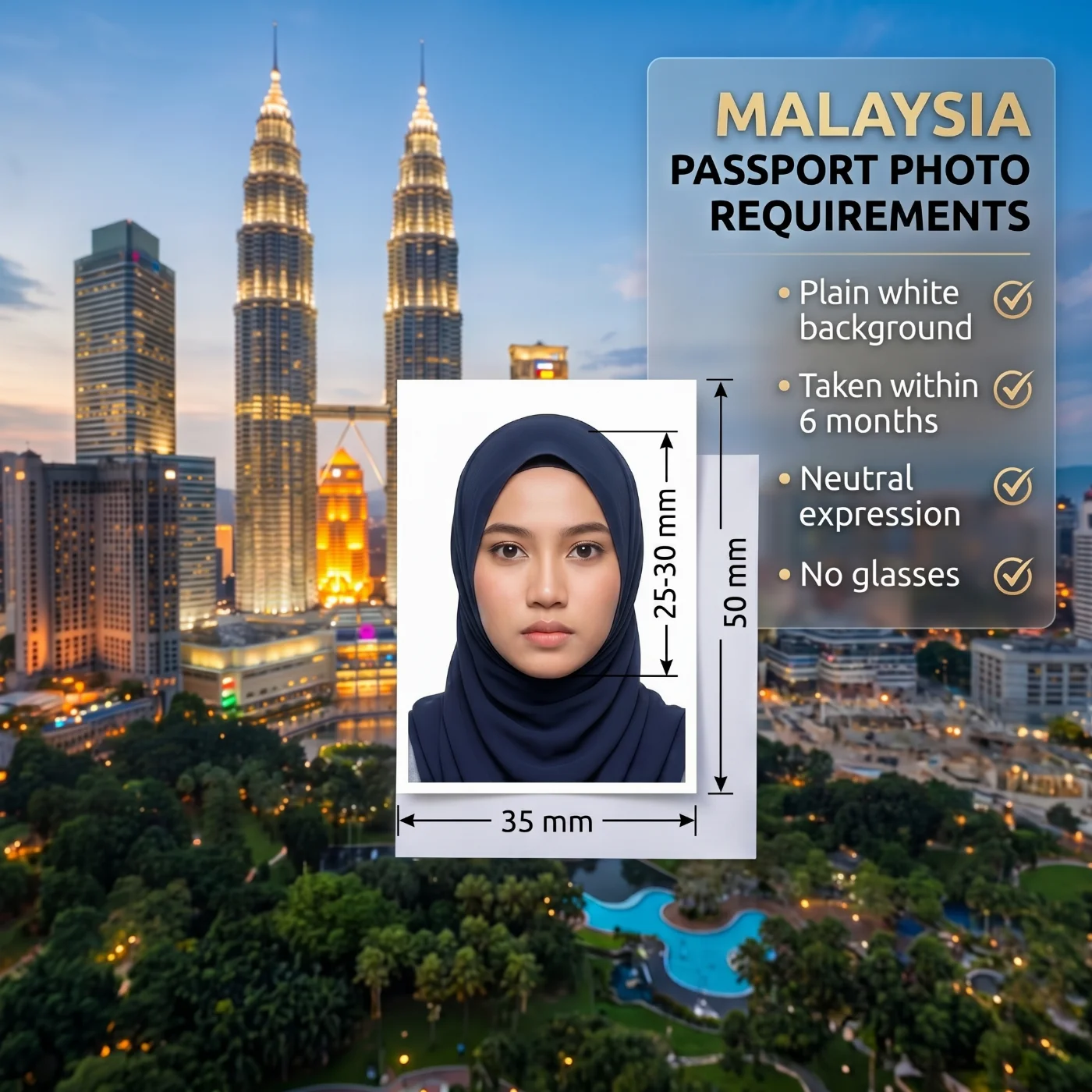 Source: Jabatan Imigresen Malaysia (Immigration Department of Malaysia)
11 Essential Passport Photo Requirements in Malaysia: a Checklist
All Malaysian International Passport (Pasport Malaysia) applications — whether filed at a domestic JIM counter, an overseas Malaysian Mission, or via the MyOnline Passport portal — must meet these specifications. They are set by Jabatan Imigresen Malaysia in line with ICAO Document 9303 biometric standards. The PhotoGov passport photo generator applies all of these specifications automatically. Visa applicants need a separate file, prepared with our Malaysia visa photo 35x50 mm maker.
Specification | Requirement |
1. Printed photo size | 35×50 mm |
2. Digital photo size | 413×591 px at 300 DPI |
3. Background | Plain, white |
4. Head size | 25-30 mm crown to chin |
5. Head positioning | Full frontal, сentred in the frame |
6. Facial expression | Neutral, eyes open, mouth closed |
7. Glasses | Not permitted |
8. Head coverings | Not allowed. Religious and medical are permitted — full face must be visible |
9. Clothing | No uniform or white/near-white tops |
10. Image quality | Sharp, shadow-free, natural colour, no retouching or filters; only basic cropping and resizing allowed |
11. Recency | Taken within the past 6 months |
Expert tip: Use PhotoGov's Malaysia passport photo tool to create a submission-ready photo — the platform applies all Jabatan Imigresen Malaysia and ICAO 9303 biometric rules in under 30 seconds, delivering a digital file or a printable PDF sheet for in-person applications.
Acceptable Malaysia Passport Photo Sample
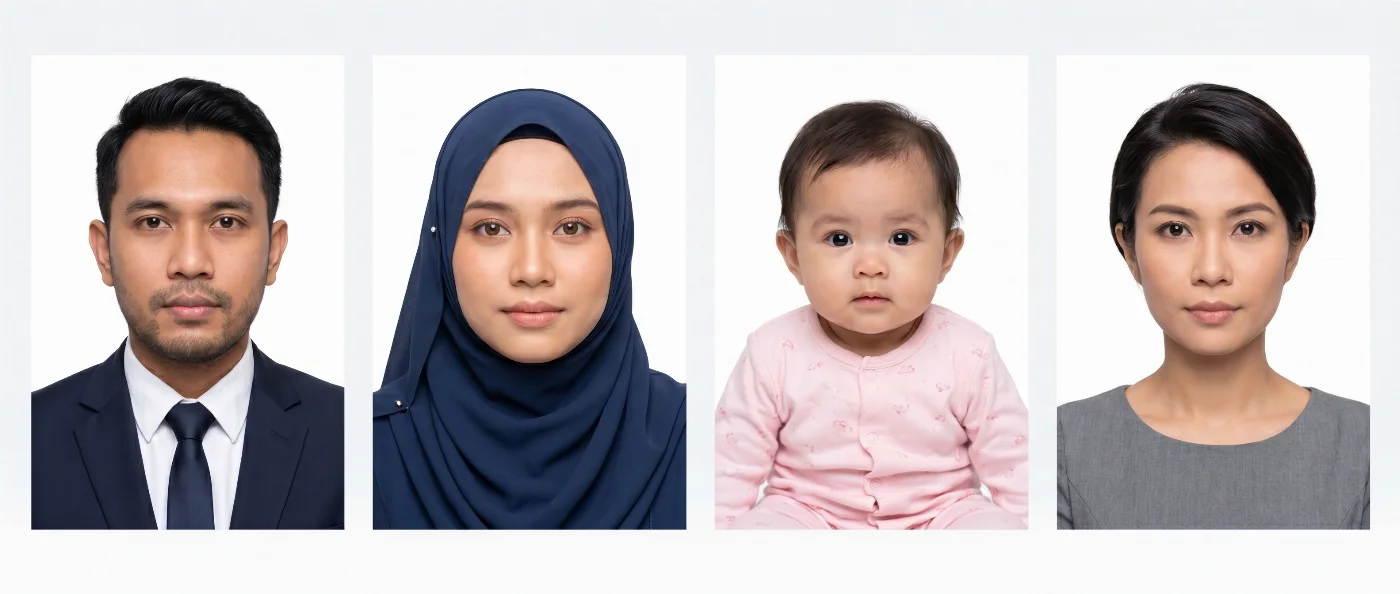
A photo that passes a JIM officer check, and the MyOnline Passport portal's automated validator shows a sharp, evenly lit colour image of the applicant alone against a seamless, white background. The full head and upper shoulders fill the frame; the face occupies 25–30 mm of the 50 mm height; both eyes are open and looking at the camera; the expression is neutral with the mouth closed.
Photos that consistently pass JIM review share all of the following characteristics:
Crisp, in-focus colour photograph with even lighting — no shadows on the face or backdrop
Strictly white background across the entire frame
Face centred, head level, both eyes at the same height
Neutral expression: mouth firmly closed, eyes open and naturally relaxed
Hair neatly arranged and away from the face, forehead, eyebrows, and ears
Dark hijab, with the full face visible — from forehead to chin, completely unobstructed
No glasses, earrings, or accessories visible anywhere in the image
Photo taken within 6 months, with no filters applied.
Unacceptable Malaysia Passport Photo Sample
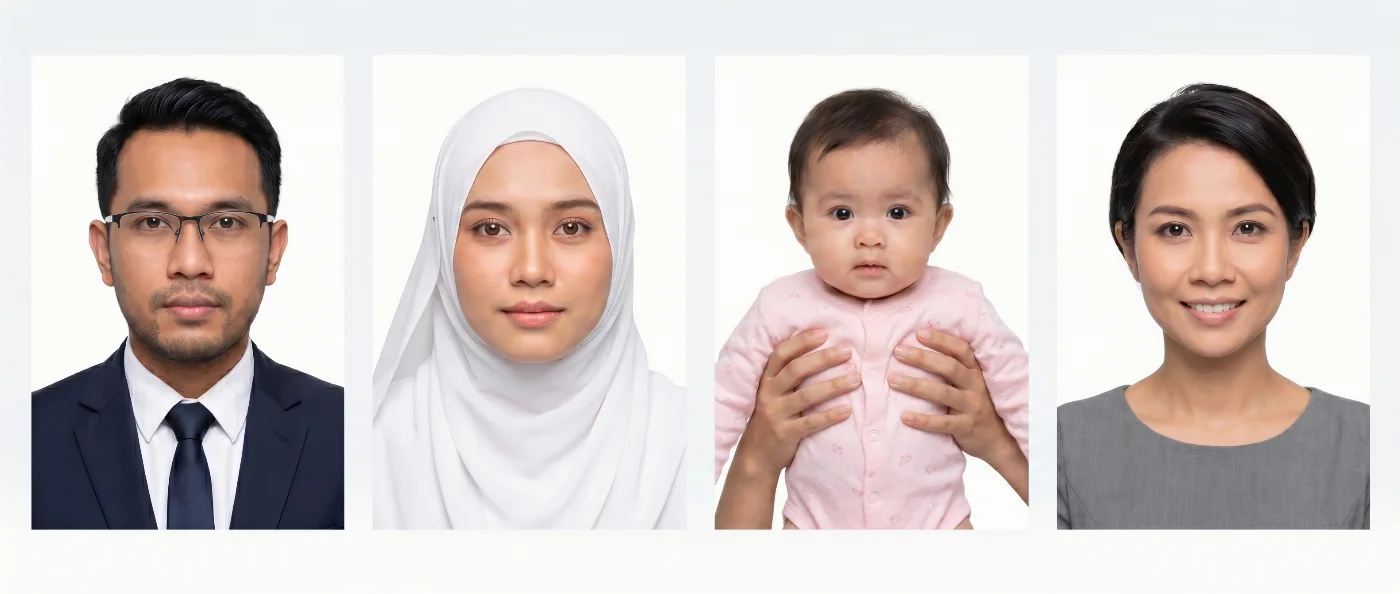
Below are the most common reasons for passport photo rejections at JIM counters and on the MyOnline Passport portal:
Background that is not pure white — JIM's standard has always required white, but applicants frequently submit cream or off-white backgrounds, mistaking them for 'white enough'. They are not.
Shadows on the face or background — directional lighting, overhead lighting, or a subject standing too close to the background wall all create shadows that fail the biometric check.
Glasses of any kind — frames obstruct the periorbital landmarks used for biometric matching; lenses create glare that distorts iris data.
Visible earrings or hair accessories — alter the head silhouette used for facial geometry analysis.
Hair covering forehead, eyebrows, or ears — reduces the number of biometric landmarks available to facial recognition systems.
A hijab or head covering that casts a shadow across any part of the face, or that is so pale it blends into the white background.
Foreign objects such as parents' hands, toys, pacifiers, etc. on baby's photos.
A smile or any non-neutral expression — changes the distance between facial landmarks and corrupts biometric comparison.
Beauty filters, skin-smoothing, or AI retouching — prohibited because they alter the actual appearance of the subject.
Blurry or pixelated image — biometric landmark detection fails on low-quality images.
Photo older than 6 months — appearance can change; an outdated photo reduces matching accuracy.
Do You Need to Bring a Photo? How the JIM System Actually Works
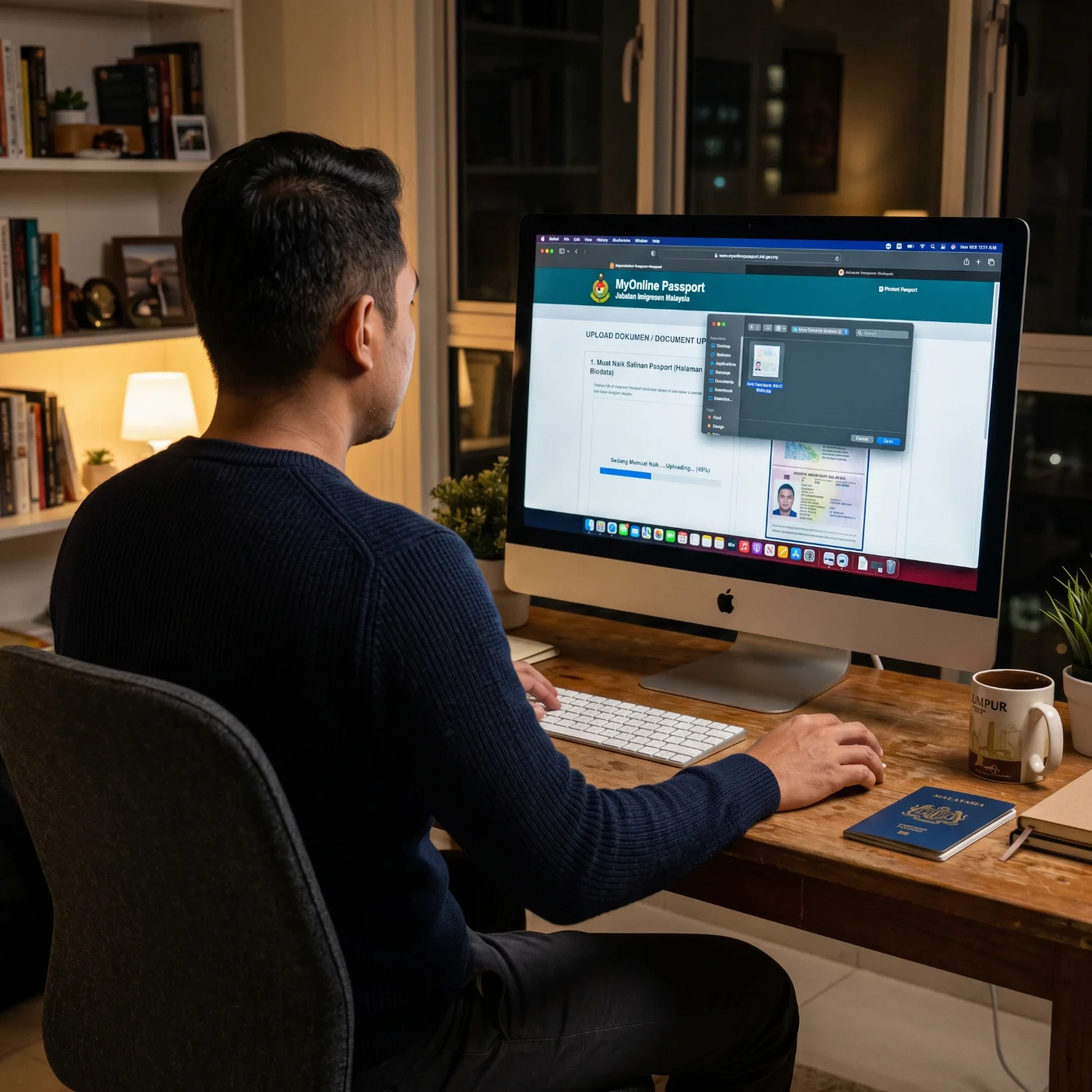
This is the question that confuses most first-time Malaysian passport applicants — and the answer is different depending on where you apply. Malaysia operates a tiered photo submission system that most other countries do not have.
At a JIM Counter Inside Malaysia: No Photo Required
For any passport application submitted in person at a domestic Jabatan Imigresen Malaysia office, you do not need to bring a printed photograph. JIM counters across all states use the Facial Live Capture (FLC) system — a calibrated biometric camera operated by JIM staff that captures your photo on-site in a single controlled session. The image is saved directly to your application record in the JIM system. Because the backdrop, lighting, and camera are standardised, technical compliance is guaranteed.
What you are responsible for is presenting yourself correctly: no glasses on your face, no large or face-obscuring accessories, hair away from the face, and a hijab (if worn) in a dark colour, with the full face visible. A JIM officer will ask you to adjust anything that does not comply before the capture.
On the MyOnline Passport Portal: A Digital File That Must Pass the Automated Check
The MyOnline Passport portal requires a digital photo upload during the online application. The portal's automated validator checks resolution (minimum 413×591 pixels), background colour (white only), and basic ICAO facial alignment. If the photo fails, the application cannot proceed until a passing image is uploaded.
Two things to know: first, the portal has a tick-box for applicants wearing a head covering — use it, or the system may flag your photo purely based on the coverage before a human can review it. Second, a photo taken on a smartphone with portrait mode enabled often fails because the background-blur effect makes the white wall appear graduated rather than uniformly white. Turn portrait mode off before shooting.
At an Overseas Malaysian Mission: One Printed Photo Required
Malaysians applying at an overseas embassy, High Commission, or consulate must bring one printed colour photo sized at exactly 35×50 mm on photo-quality paper. The same content rules apply. Check the specific mission's website: some missions specify they need two prints; the majority require one.
Which channel needs which format:
Domestic JIM counter → No photo needed; captured on-site by FLC biometric system
MyOnline Passport portal → 1 digital JPEG, minimum 413×591 pixels, white background
Overseas Malaysian Mission → 1 (sometimes 2) printed 35×50 mm colour photo
Photographing Babies and Children for a Malaysian Passport
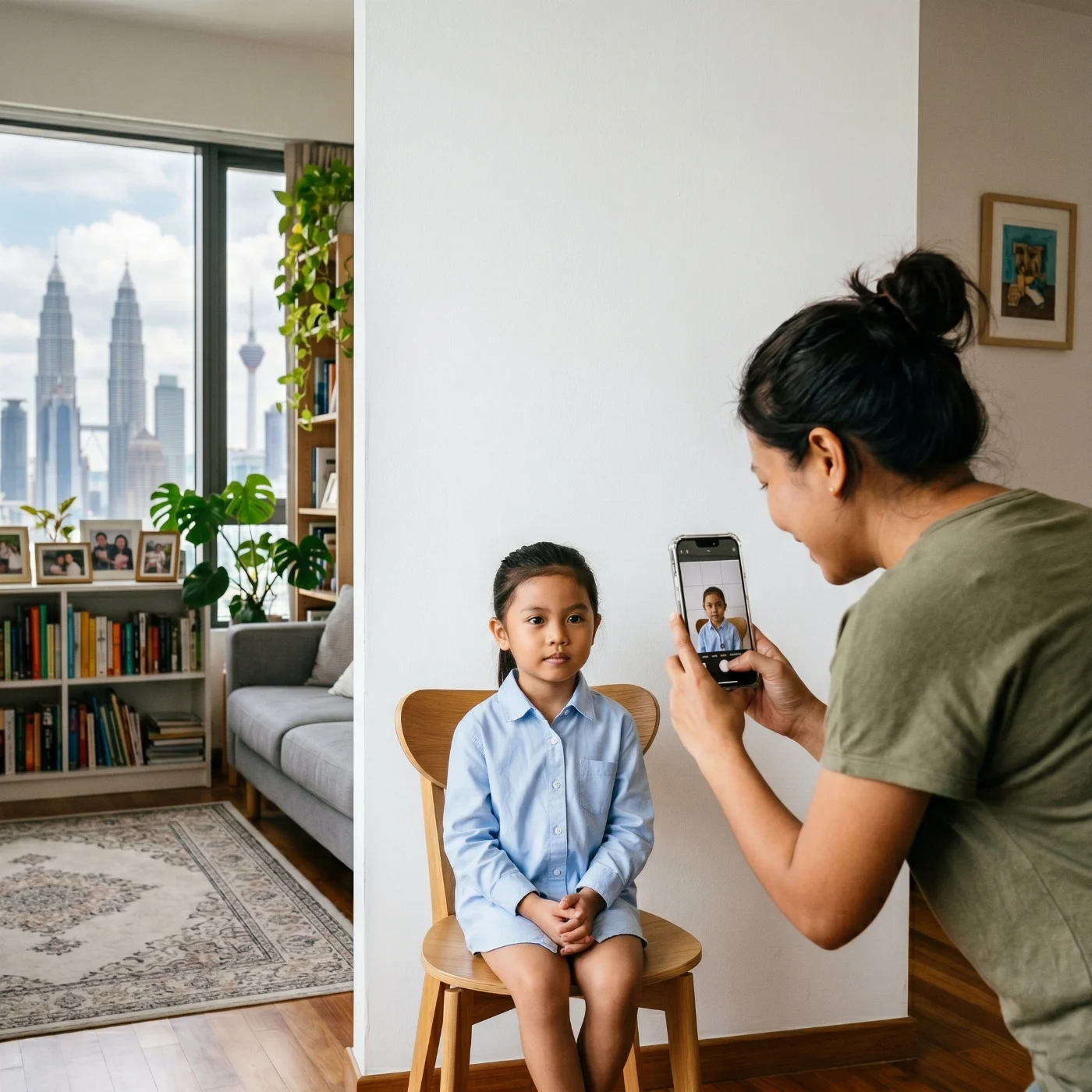
Parents often underestimate how different the rules are for young children, and what exceptions JIM actually allows by age group.
Newborns and Infants Under 1 Year
Newborns can be photographed lying flat on a plain white sheet, with the camera positioned directly overhead so that the entire frame shows only the baby's face and the white surface. This overhead angle eliminates the background shadow problem that makes upright infant photos so difficult. Alternatively, a parent can hold the baby upright from behind — both hands must remain completely out of the frame.
Eyes do not need to be fully open. The mouth may be open or closed. No pacifiers, feeding bottles, toys, or supporting props of any kind may be visible. Dress the baby in dark-coloured clothing — a dark top or bib helps the face stand out clearly against the white background.
At domestic JIM counters, a trained officer will manage the infant capture. Parents should bring the baby well-rested and fed to increase the chance of a calm, cooperative session.
Children Aged 1 to 5
For this age group, JIM does not strictly require a neutral expression or direct gaze, but the face must be clearly visible and centred in the frame. The background must be plain white with no shadows. No other person, toy, or object may appear in the image. If taking the photo at home, have a second adult gently guide the child's attention to the camera while the photo is taken.
Children Aged 6 to 17
From age 6, every adult rule applies without exception: neutral expression, mouth closed, eyes open and directed at the camera, no glasses, no visible accessories, white background. For children who wear a hijab, the full facial oval must be clearly visible, and the covering must be dark-coloured. Photos must be taken within 6 months of the application.
Where to Get a Compliant Malaysian Passport Photo
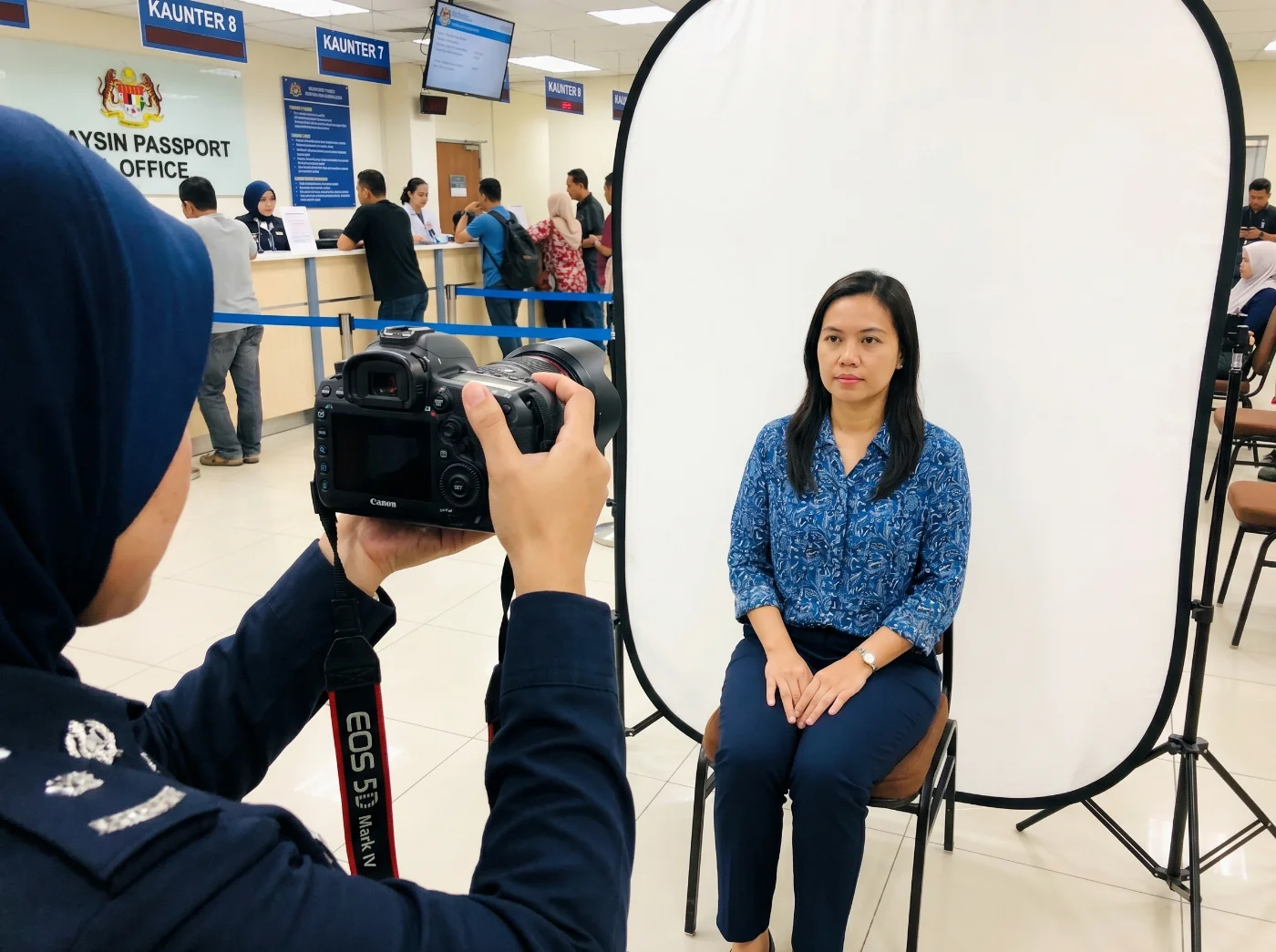
JIM State Offices: The Easiest Option for Domestic Applicants
Every JIM state immigration office — Kuala Lumpur, Putrajaya, Shah Alam, Penang, Johor Bahru, Kota Kinabalu, Kuching, and all district offices — operates the Facial Live Capture system. If you are applying in Malaysia, simply show up, and the photo is handled for you. Appointment slots are available at imigresen-online.imi.gov.my.
Photo Studios and Pharmacies for Printed Photos
If you need a printed 35×50 mm photo for an overseas mission, photography studios and selected pharmacies across Malaysia offer this service. Watson's and Guardian branches in Klang Valley shopping centres (Mid Valley Megamall, Sunway Pyramid, NU Sentral, IOI City Mall) typically offer walk-in passport photo printing. Independent photo studios in Petaling Jaya, Penang Georgetown, and Johor Bahru are also reliable. Cost: RM 5–20. Always ask for the 35×50 mm Malaysian passport size — not the 35×45 mm UK size, which some booths default to.
Self-Service Booths in Hypermarkets and Stations
Self-service photo booths are available in Mydin hypermarkets, Giant, Aeon, and at KTM Komuter and LRT stations in the Klang Valley. Before paying, confirm the booth is set to Malaysian passport format (35×50 mm). Booths that output a digital code as well as prints are particularly useful for MyOnline Passport portal submissions.
PhotoGov Online Passport Photo Maker
PhotoGov's online passport photo maker accepts a selfie taken on any smartphone and returns a JPEG cropped to 35×50 mm, white-background-corrected, and sized to the portal's minimum 413×591-pixel requirement. Having a pre-validated digital file reduces the risk of the MyOnline Passport portal stalling your application. The same tool prepares a Malaysia eVisa photo online, for applicants filing through the visa portal.
Malaysian Passport Photo Options: Speed, Cost, and Compliance Compared
Option | Approx. cost | Turnaround | Digital file for portal | Best suited for |
JIM counter (FLC on-site) | Included | Instant | Captured biometrically | All domestic applications |
PhotoGov online passport photo maker | Free | 30 seconds | Yes — 413×591 px JPEG | Online portal submissions, printable file |
Photo studio or pharmacy | RM 5–20 | 5–10 min | On request | Overseas missions, printed backup |
Self-service booth | RM 6–12 | 2–3 min | Some booths | Quick printed copies |
Taking Your Own Malaysian Passport Photo: A Step-by-Step Setup
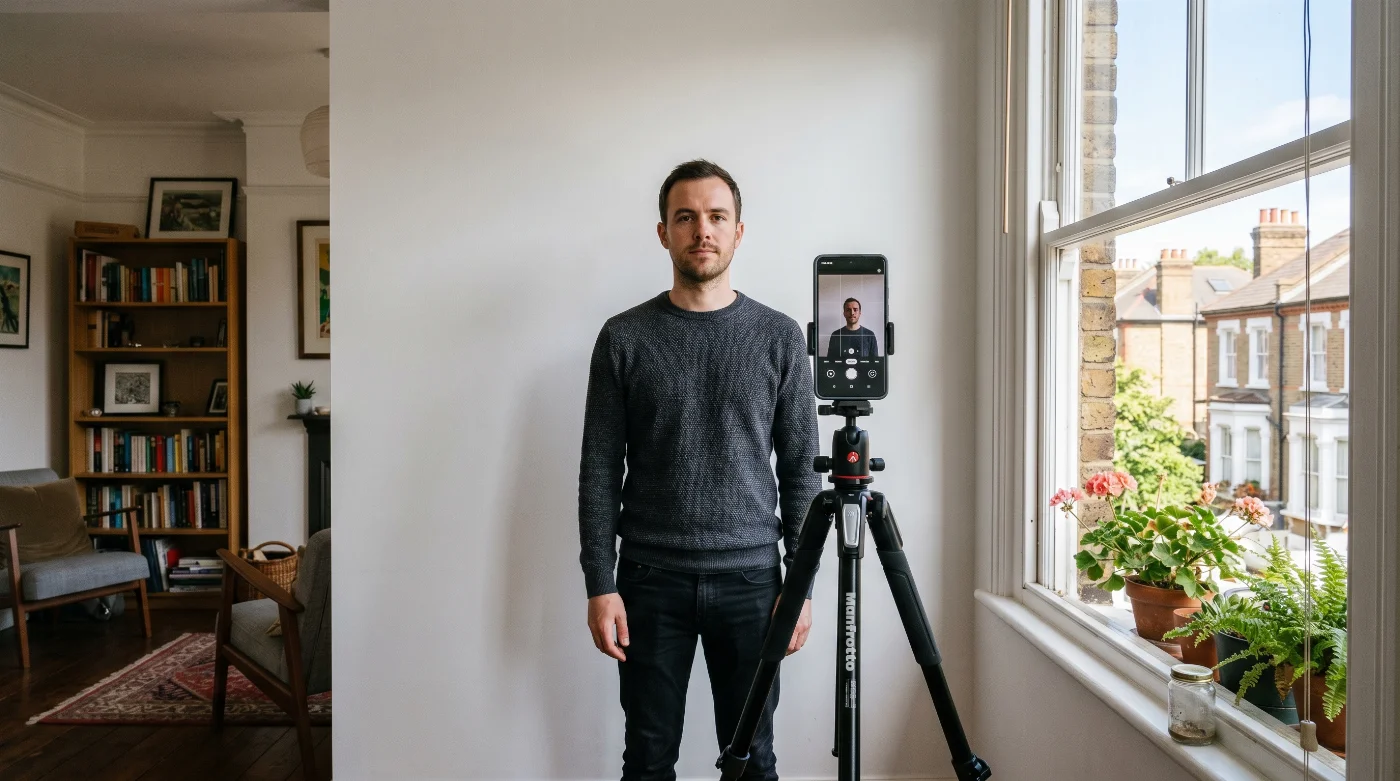
The most common DIY failure points in a Malaysian passport photo are the pale background that reads as cream rather than white, and the hijab that casts a shadow or merges with the background. The setup below eliminates both.
Tape a large white sheet flat and smooth against a plain wall. The sheet must be crease-free — folds create shadow lines that the portal validator detects as background texture.
Position your main light source in front of you, facing your face from the front. Two lamps or a large window on either side of the camera give even, shadow-free illumination. Do not stand with a window or lamp behind you.
Stand at least 1 metre from the white background. At this distance, no body shadow falls onto the white surface behind you.
Set the camera at eye level. Use a tripod or ask someone to take the shot. Frame your full head and upper shoulders — do not crop the top of the head.
Remove all glasses, earrings, and accessories. Turn off portrait mode, beauty mode, and any AI enhancement on your phone camera.
If you wear a hijab: choose your darkest available one. Black is ideal. Lay it flat against your face and shoulders so the fabric is smooth and not catching light. Check in a mirror that your full forehead, both cheeks, and chin are clearly visible with no shadow anywhere on the face.
Keep your head level, eyes open, mouth closed, expression neutral. Take at least six shots and review each at full zoom for sharpness.
Upload the sharpest, most evenly lit shot to PhotoGov. The tool sets the background to pure white, crops to 35×50 mm, and outputs a compliant JPEG ready for the MyOnline Passport portal, or a print file for overseas mission submissions.
12 Reasons Malaysia Passport Photos Get Rejected — and How to Fix Each Issue
Knowing not just what the rule is, but why the specific photo fails, helps you fix the problem on the first retry. Here are the 12 most common rejection reasons with their root causes:
Wrong photo size, not 35×50 mm: the most common mistake. Even slight deviations from the correct size will cause a photo rejction.
Cream, grey, or off-white background: visually similar to white under regular lighting, but detected as non-white by the portal's colour-luminance check.
Shadow on background from standing too close to the wall: standing less than 1 metre from the background causes your shadow to appear behind you, creating a non-compliant photo.
Shadow under chin from overhead or uplighting: use front-facing, diffuse light from both sides.
Glasses: any glasses should be removed for a Malaysian passport photo.
Large accessories, obstructing the face or your silhouette: a scarf covering the neck, large earrings, piercings that alter your natural look, and a full-face view must be removed.
Hair over the forehead or eyebrows: tie back loose hair or clip it away before taking the photo.
Light-coloured hijab blending with background: the silhouette merges with the white background, erasing the border between your silhouette and the background.
Portrait mode: blurs the edges between the subject and the background. Always turn off portrait mode when making an ID photo.
Beauty filter or skin-smoothing: detected by automated systems as altering natural features. Turn off all image enhancement before shooting.
Photo older than 6 months: check the file metadata date before submitting.
Digital file below 413×591 pixels: Use a modern smartphone or camera with a full resolution setting for taking a photo.
If JIM or the Portal Rejects Your Photo
At a domestic JIM counter, you will be asked to retake the photo on-site using the FLC system, or to return with a corrected print. At the MyOnline Passport portal, the system identifies the rejection reason and prompts you to upload a replacement. Address the specific reason cited — re-uploading the same image produces the same result.
Frequently Asked Questions
What Are the Passport Photo Requirements in Malaysia?
In Malaysia, passport photos must follow specific dimensions and biometric rules defined by the Jabatan Imigresen Malaysia (JIM) and ICAO standards.
Key requirements:
Size: 35 mm wide × 50 mm long (digital: 413 × 591 pixels at 300 DPI equivalent).
Background: Pure white, evenly lit, without patterns or shadows.
Pose: Full face facing the camera, head level, eyes open, mouth closed, neutral expression.
Head size: Face centred, filling most of the frame (not too small, not cropped).
Glasses: Should be removed; no sunglasses or tinted lenses.
Head coverings: Allowed for religious/medical reasons, but the full face must be clearly visible; dark colours recommended for contrast.
Clothing: No uniforms and no white or near-white tops to avoid blending into the background.
Image quality: Sharp, in focus, natural colour, no filters, no retouching, no visible compression artifacts.
Recency: Photo should be taken within the last 6 months.
What Is the Malaysian Passport Photo Size?
The Malaysian passport photo size is 35 x 50 millimetres (3.5 × 5.0 cm, or 1.38 × 1.97 inches).
For digital photos, this dimenstions are 413×591 pixels at an effective resolution of 300 DPI, keeping the same 35×50 mm proportion.
When you create or order a Malaysian passport photo, specify “35×50 mm, 35 mm (width) × 50 mm (height)” so that the file or print matches the required dimensions in both millimetres and pixels.
What Background Colour Is Required for a Malaysian Passport Photo?
For Malaysian passport photos, the background must be a solid, pure white colour with no shadows, patterns, textures, or gradients. Any off‑white, cream, grey, or coloured background (including blue) can cause the photo to be rejected, so always use a clean, uniform white backdrop.
How Recent Must a Malaysian Passport Photo Be?
A Malaysian passport photo must be taken within the last 6 months before the date you submit your application. This 6‑month validity rule helps ensure that your appearance in the photo still accurately matches how you look at the time of processing.
What Is the Digital Size for a Malaysian Passport Photo, and Where Is It Used?
For Malaysian passport applications, the digital photo size commonly used is 413×591 pixels, which corresponds to a 35×50 mm photo at an effective 300 DPI and keeps the correct passport aspect ratio.
This digital size is primarily used when you submit your application online (for example, via Malaysian immigration or visa e‑services), where you must upload a compliant JPEG file instead of providing only printed photos.
Can You Smile in a Malaysian Passport Photo?
No. ICAO biometric standards, which JIM follows, require a neutral expression. A smile changes the position of the cheeks, the shape of the lips, and the partial closure of the eyes — all of which affect biometric landmark mapping. Keep your mouth firmly closed, your jaw relaxed, and your eyes naturally open.
What Is the Malaysia Passport Photo Blue Background Color Code?
Modern Malaysian passport photos use a pure white background, and blue is no longer accepted for standard Malaysian international passports. If you find older or third‑party references to a “Malaysia passport photo blue background color code”, they usually refer to legacy or specific visa/permit photos that required a light blue background, not to current Malaysian passport requirements; for today’s passport applications, you should always use a solid white background instead.
I'm Applying at a JIM Counter Inside Malaysia. Do I Need to Bring a Printed Photo?
No. Domestic JIM counters use the Facial Live Capture (FLC) biometric system to take your photo on-site. You do not need to bring a printed photograph for a counter application inside Malaysia. However, you must present yourself in compliance with all JIM photo rules: no glasses, no earrings, hair away from the face. If applying at an overseas Malaysian Mission, one printed 35×50 mm colour photo is required.
What Colour Hijab Should I Wear in a Malaysian Passport Photo?
The darker the better. Black is the safest choice. Dark navy, dark brown, or charcoal are also acceptable. The reason colour matters: the mandatory white background is pure white, and a pale or cream hijab can blend visually into it, making it impossible for JIM's biometric system to cleanly detect the edge of the face. A dark hijab creates a clear contrast line at the jaw and forehead. The full forehead-to-chin, ear-to-ear face oval must be visible and shadow-free regardless of covering colour.
Can I Use a Photo Booth Print for the MyOnline Passport Portal?
Only if the booth outputs a digital code or file at the correct specifications (JPEG, minimum 413×591 px, white background, 35×50 mm ratio). Photo booth prints are physical — they cannot be uploaded directly to the portal. Some booths provide a digital download code alongside the print. If the booth only provides a printed photo, arrange a separate digital upload through a tool such as PhotoGov.
My Child Is 3 Years Old. Do They Need to Look at the Camera?
For children under 6, JIM does not strictly require a direct gaze or neutral expression, but the face must be clearly visible and centred in the frame. At a domestic JIM counter, staff are trained to work with young children. For a home photo for an overseas mission application, have a second adult stand just behind the camera and engage the child's attention. Take multiple shots and choose the one where the face is most clearly visible.
What File Format and Minimum Resolution Does the MyOnline Passport Portal Accept?
The MyOnline Passport portal accepts JPEG (.jpg) format only. The minimum resolution is 413×591 pixels (width × height) at an effective 300 DPI for the 35×50 mm print size. Higher resolution is accepted. The background must be pure white, and no digital editing should have been applied. The portal runs an automated ICAO alignment check on upload.
What Is the Difference Between a Malaysian Passport and a MyPR Permit Photo?
Malaysian International Passport photos follow the 35×50 mm specification set by Jabatan Imigresen Malaysia. MyPR and long-term pass documents may have separate photo requirements specified by the relevant department at the time of application. Always check the specific documentation checklist provided with each application type. When in doubt, a 35×50 mm white-background ICAO photo is the safest default for any JIM-related document submission.
Official Government Sources
Official Requirements for Malaysian International Passport Photo: Jabatan Imigresen Malaysia
MyIMMIGRATION Online Portal: Immigration Department of Malaysia
Malaysian Passport Services: Jabatan Imigresen Malaysia
Was this helpful?
82 found this helpful
Top expert
Based on official government sources
Helpful votes: 82
Was this helpful?
82 found this helpful
Service provided by Y VISION TECHNOLOGIES LLP · Stoney Works 8 Stoney Lane, London, England, SE19 3BD · Terms · Refund policy · Contact
We value your Privacy
We use cookies to enhance your browsing experience, serve personalized ads or content. By clicking “Accept All”, you consent to our use of cookies.