New Zealand Visa Photo Requirements 2026 — Tips, Samples & Rejection Fixes
Table of contents:
- Immigration NZ Photo Requirements: a Checklist
- Which New Zealand Application Are You Preparing?
- New Zealand Immigration Photo Size: Digital vs Printed
- Where to Take a New Zealand Visa Photo?
- How to Take a New Zealand Visa Photo at Home: 5 Easy Steps
- 10 Common Reasons for New Zealand Visa Photo Rejection
- What to Do if Your New Zealand Visa Photo Is Rejected
- Frequently Asked Questions
- Official Government Sources
Getting ready for a trip to New Zealand? The New Zealand immigration photo requirements depend on whether you submit a visa application online, request an NZeTA, or use a paper form. For an online application, submit one recent, unaltered JPG or JPEG portrait with a 3:4 aspect ratio, dimensions from 900 × 1,200 to 2,250 × 3,000 pixels, a file size within the safe upload range of 512 KB to 3 MB, and a plain, light-coloured, neutral background. Your face must be centred, fully visible, and cover 70% to 80% of the image; keep a neutral expression and look directly at the camera. Paper visa applications require 35 × 45 mm colour photos in the quantity stated on the application form.
This guide explains the NZ immigration photo requirements for visa and NZeTA applications, including digital and printed formats, common rejection reasons, and practical ways to take a compliant photo.
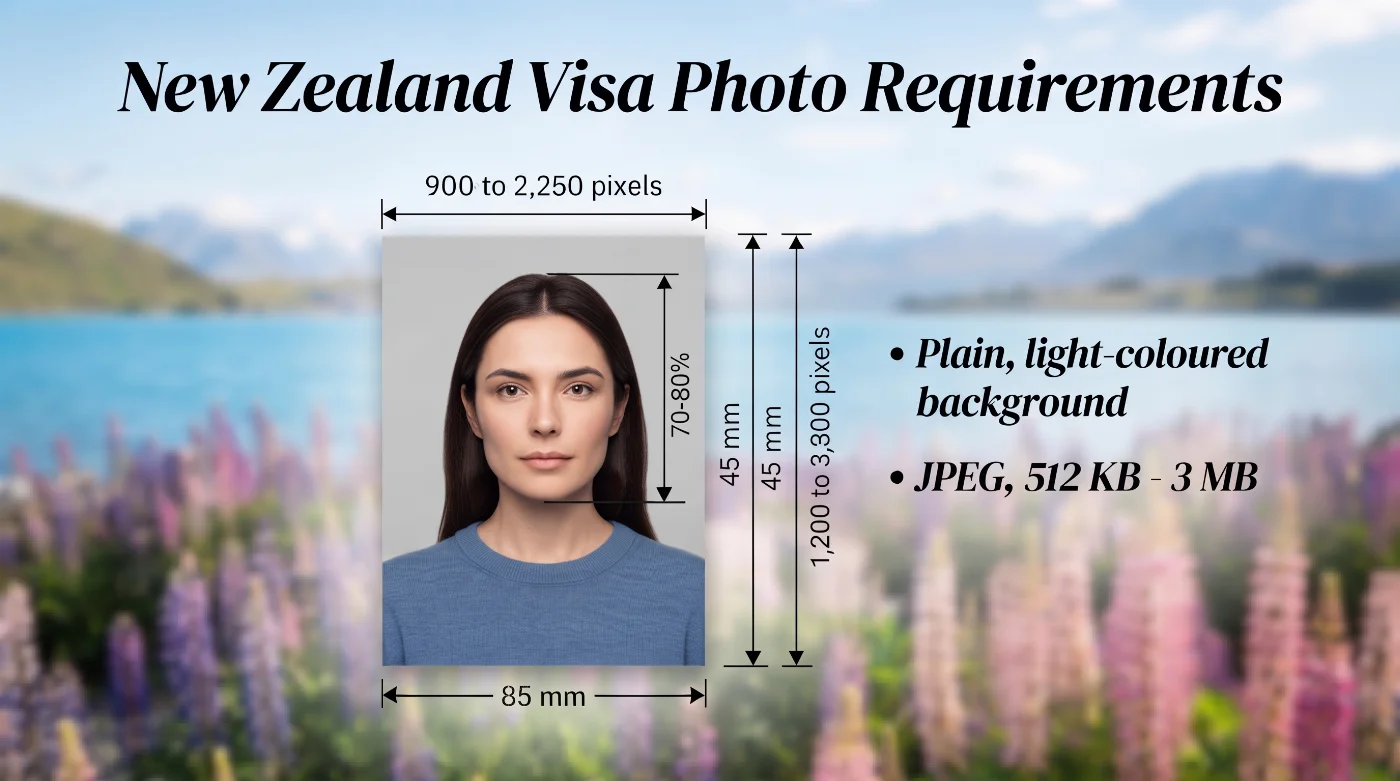 Source: Immigration New Zealand
Immigration NZ Photo Requirements: a Checklist
Immigration New Zealand (INZ) sets the photo standards for visa and NZeTA applications. The checklist below covers all current visual, technical, and submission specs that every applicant must follow to avoid application delays or rejections.
Parameter | Requirement |
1. Number of photos | One digital photo for online visa applications and NZeTA requests. For a paper application, submit the number of 35 × 45 mm prints requested in the form. |
2. Recency | A photograph taken within the last six months, accurately reflecting the applicant’s current appearance. |
3. NZ Visa Photo Size | 900 × 1200 to 2250 × 3000 pixels for online applications (3:4 aspect ratio). 35 × 45 mm for in-person applications. |
4. Colour | Natural colour photograph in the sRGB colour space, preserving the applicant’s real skin tone. |
5. Background | Light-coloured, plain, evenly lit background. |
6. Lighting | Even lighting on the face and the background, no shadows. |
7. Positioning and Framing | An applicant must face the camera directly. The face takes 70% to 80% of the image in portrait orientation. |
8. Facial Expression | Neutral expression, with the mouth closed, both eyes open, and the gaze directed straight at the camera. |
9. Attire, Head Covering, and Accessories | Wear everyday clothing in colours that contrast with the background. Arrange the hair so the face and ears remain visible. You may wear a head covering for religious or medical reasons; keep the mouth and both sides of the face fully visible. |
10. Glasses | Prescription glasses are allowed. Only clear, untinted lenses and light frames that leave the eyes and face visible are allowed. Check the image for glare. If a reflection remains, remove the glasses for the photo. Tinted and sunglasses aren’t permitted. |
11. Digital Format and Integrity | JPG or JPEG, sized 512 KB - 3 MB. The image must be natural and unaltered: AI enhancements, filters, beautification, background replacement, object removal, or adjustments to colour, brightness, contrast or sharpness aren’t allowed. |
12. Print Quality | Sharp colour photograph printed on high-quality photo paper with natural detail and a clean surface. |
Which New Zealand Application Are You Preparing?
NZeTA Photo Requirements
The New Zealand Electronic Travel Authority (NZeTA) is required for many travellers from visa-waiver countries, passengers of cruise or cargo ships, and some transit travellers. You can request NZETA through the official website or mobile app before you travel.
Every applicant must provide an acceptable photo. The mobile app allows you to take the photo directly, but for a regular visa application, someone else should take it for you. If you already hold a valid New Zealand visa, you will generally travel using that visa and will not need a separate NZeTA.
Visitor Visas
Before applying, check Immigration New Zealand’s Visit section to find out whether you need a Visitor Visa or an NZeTA. Visitor Visa applications are usually submitted online and require one digital photo. If Immigration New Zealand asks you to use a paper form, provide 35 × 45 mm printed photos in the quantity specified on the form.
Student Visas
Applications for most New Zealand student visas are submitted online. This includes fee-paying, pathway, exchange and scholarship student visas. You will need to upload one digital photo together with the documents required for your chosen visa.
Work Visas
New Zealand offers several types of work visas, including the Accredited Employer Work Visa, working holiday visas and partnership-based work visas. A New Zealand work visa photo follows the same core visual rules as other visa photos. Most applications are submitted online and require one digital photo for each applicant.
Resident and Permanent Resident Visas
The same digital photo requirements apply to online resident visa applications. Most resident and permanent resident visa applications are submitted online, although a limited number still require a paper form. Check Immigration New Zealand’s online-or-paper list before preparing your application.
New Zealand Immigration Photo Size: Digital vs Printed
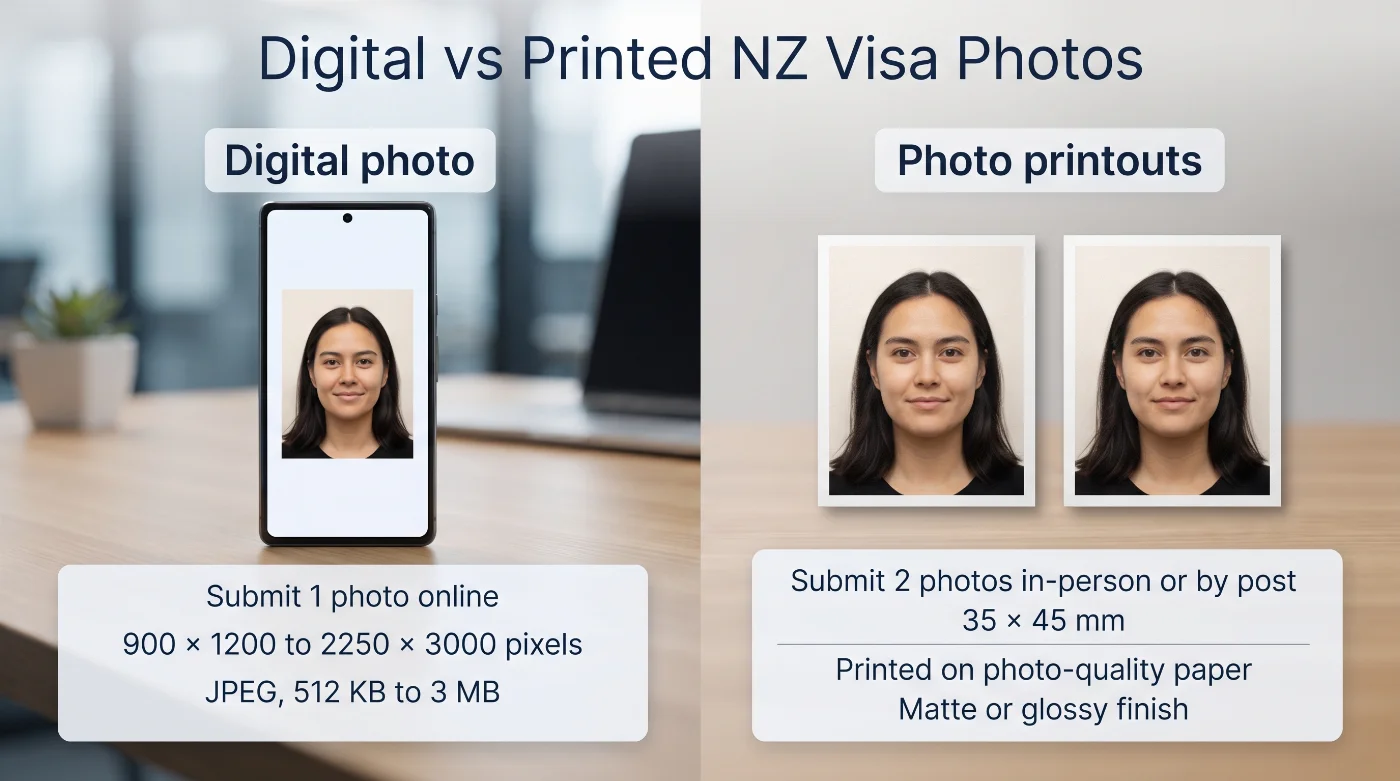 The required format depends on how you apply. Most New Zealand visa applications and all NZeTA requests require a digital photo. Printed photos are only needed for applications submitted on paper. Check Immigration New Zealand’s online-or-paper visa list to confirm which method applies to your visa.
Digital Photos for Online Applications
Upload one recent, unaltered JPG or JPEG photo for each applicant. The image must have a 3:4 aspect ratio, measure between 900 × 1200 and 2250 × 3000 pixels, and have a file size within the safe upload range of 512 KB to 3 MB. Your face should be centred and fill 70% to 80% of the image. Look directly at the camera with your eyes open and mouth closed, and use even lighting and a plain background.
Printed Photos for Paper Applications
Printed visa photos must measure 35 × 45 mm and follow the same rules for pose, expression, lighting, and background as digital photos. The application form will tell you how many copies to provide and whether they need to be attached or signed in a particular way.
The photo itself should look the same in either format. The difference is in how it is submitted: digital photos must meet the file type, pixel, aspect-ratio, and file-size limits, while printed photos must meet the physical size and print-quality requirements.
Specification | Digital | Printed |
Purpose | Identity photograph uploaded with an online visa application | Identity photographs attached to a paper visa application |
Quantity | 1 digital file per applicant for common online visa routes | The current paper form states the number of matching prints |
Dimensions | Portrait 3:4; 900 × 1200 to 2250 × 3000 pixels | 35 × 45 mm |
Format | JPG or JPEG; 512 KB to 3 MB | Natural colour print on quality photo paper |
Submission | Upload through the Immigration New Zealand application system | Attach matching prints exactly as directed by the current paper form |
Where to Take a New Zealand Visa Photo?
You can take the NZ visa photo at home or use a professional photographer or retail photo service. For an online application, request the original JPG or JPEG file sized 512 KB to 3 MB, with 900 × 1200 to 2250 × 3000-pixel dimensions. For a paper application, request a 35 × 45 mm colour print and follow the quantity stated on the current form. Whether the photo is taken at home or professionally, it must remain natural and must not be digitally enhanced or placed on a replacement background.
If you want to skip a studio visit, use the online New Zealand Visa Photo Maker and download an application-ready digital or printable file in under a minute.
How to Take a New Zealand Visa Photo at Home: 5 Easy Steps
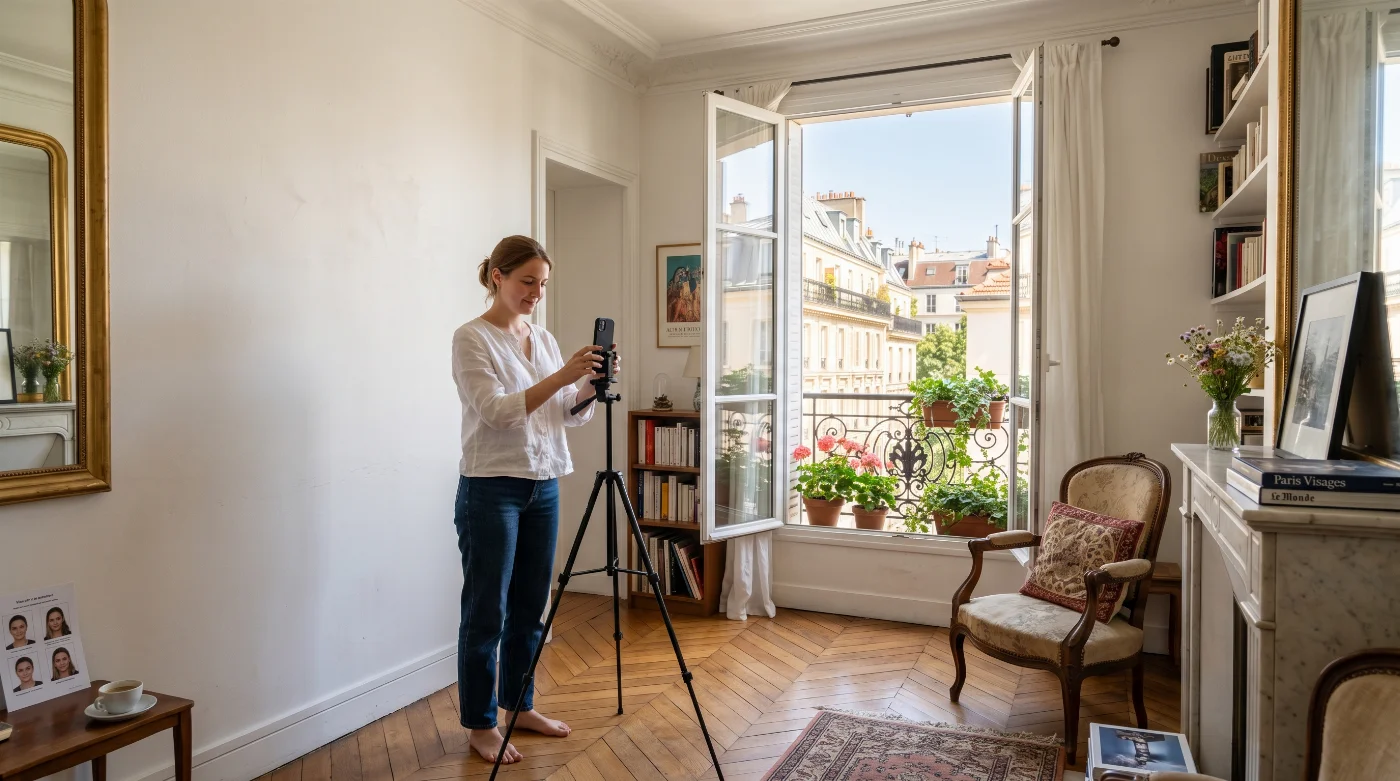
Ask another person to take the photograph. Immigration New Zealand permits a handheld selfie only when the NZeTA mobile app provides that capture option.
Stand approximately 0.5 metres in front of a neutral, plain background. Use soft, even light and make sure there are no shadows on the face or background.
Face the camera directly, keep the head upright, open both eyes, and close the mouth. The face should be centred and occupy approximately 70% to 80% of the image. Keep hair away from the face and ears unless a religious or medical covering is worn.
Prescription glasses are permitted when the lenses are clear and untinted, the frames do not obscure the face, and there is no glare. Remove the glasses if reflections remain.
Turn off filters, portrait effects, beautification, and automatic enhancement features before taking the photograph. Do not replace the background or change the colour, brightness, contrast or sharpness after capture. If the background, lighting, focus or pose is unsuitable, take a new photograph instead of digitally repairing it.
Taking New Zealand Visa Photos of Your Child
Each child included in a New Zealand visa application needs an individual acceptable photograph. Online routes use one digital image per child, while paper routes use the number of prints stated on the current form. Immigration New Zealand applies the same identity standard: a current natural portrait, full-front pose, open eyes, clear facial features, plain background, even light, and the child alone in the frame.
Choose a calm, alert moment and ask another adult to photograph the child. Keep the camera at eye level, create a clean, pale background, and capture the face directly from the front. PhotoGov’s baby passport photo guide provides a practical setup for newborn and infant portraits.
10 Common Reasons for New Zealand Visa Photo Rejection
Immigration Online checks whether it can read the file and clearly identify the applicant. Review these ten common problems before uploading:
Wrong shape or pixel size: Use a portrait 3:4 image from 900 × 1200 to 2250 × 3000 pixels.
Face too large or too small: Centre the face and keep it within 70% to 80% of the image.
Objects or patterns in the background: Use a plain neutral background with the applicant alone in the frame.
Shadows or uneven light: Light the face and background evenly and keep the natural skin tone clear.
Head turned or tilted: Face the camera directly, level the eyes, and keep the head upright.
Eyes or expression unclear: Keep both eyes open, look at the camera, and keep the mouth closed.
Glare or tinted glasses: Choose clear, untinted lenses and check for a reflection-free view. Remove the glasses when glare remains.
Hair or a covering hides the face: Keep the mouth and both sides of the face visible; show the ears unless a religious or medical covering applies.
Filters or digital alteration: Use a fresh natural camera photo with the original facial features, colour, and skin texture.
File rejected during upload: Save the image as JPG or JPEG, use the accepted dimensions, and keep the file size within the safe upload range of 512 KB to 3 MB.
What to Do if Your New Zealand Visa Photo Is Rejected
When Immigration Online finds a problem, it displays an error message. Read that message first: it usually names the issue, such as file size, image shape, face position, blur, shadows, glare, or a busy background.
For an upload error, open Immigration New Zealand’s photo-error guide, find the exact message, and follow the matching fix. Correct that point, save a fresh JPG or JPEG, and upload it again.
When an Immigration New Zealand officer asks for another photo, follow the wording in that request. Submit a new recent photo through the stated channel and within the stated timeframe.
Take a new photo when the issue involves blur, glare, lighting, pose, or background. Keep the applicant’s real appearance and natural skin texture.
If you used PhotoGov, send the exact Immigration Online error message to Support so the selected route and technical output can be checked.
Frequently Asked Questions
What Are the Current New Zealand Visa Photo Requirements?
Your New Zealand visa photo must meet the following requirements:
Recency: taken within the last six months, matching your current appearance
Background: plain, light-colored, evenly lit, no shadows
Framing: face centered and covering 70% to 80% of the image
Expression: neutral, mouth closed, both eyes open, looking straight at the camera
Editing: natural and unaltered — no AI enhancements, filters, background replacement, or retouching
Glasses: clear, untinted prescription lenses allowed if there's no glare
Head coverings: religious or medical coverings allowed if they don't obscure the face
For an online visa application or NZeTA request:
Format: JPG or JPEG
Aspect ratio: 3:4 portrait
Dimensions: 900 × 1200 to 2250 × 3000 pixels
File size: 512 KB to 3 MB
For a paper application:
Size: 35 × 45 mm color prints
Quantity: as stated on the current form
What Is the New Zealand Visa Photo Size?
The New Zealand immigration photo size depends on how you apply. An online visa photo must have a 3:4 portrait ratio and dimensions between 900 × 1200 and 2250 × 3000 pixels. A paper visa photograph must measure 35 × 45 mm (3.5 x 4.5 mm).
What is the File Format and Size of Online New Zealand Visa Photo?
Use a JPG or JPEG file. Immigration New Zealand’s main photo page states 512 KB to 3.14 MB, while its upload-error guidance states 500 KB to 3 MB. A file between 512 KB and 3 MB falls within both published ranges and is safe for an upload.
How Recent Must the New Zealand Visa Photo Be?
The photograph must have been taken within the last six months and must accurately reflect your current appearance.
Can I Edit a New Zealand Visa Photo?
You can only crop and resize the photo. Immigration New Zealand does not accept AI-enhanced or digitally altered photographs. Do not replace the background, retouch the face, remove objects, apply filters, or change the colour, brightness, contrast, or sharpness.
Can I Wear Glasses or a Head Covering in My New Zealand Visa Photo?
Clear prescription glasses are permitted if the eyes remain visible and there is no glare or tint. Religious and medical head coverings are allowed when they do not cover the mouth or sides of the face or create shadows.
Are NZeTA Photo Requirements the Same as Online Visa Photo Requirements?
Immigration New Zealand applies the same core visual standards to visa and NZeTA photographs. The application flows differ: visa applicants upload a file through Immigration Online, while NZeTA applicants use the official website or mobile app. A handheld selfie is permitted only when the NZeTA mobile app provides that option.
Can I Use Passport Photo for My New Zealand Visa Application?
No. Immigration New Zealand requires a photo that meets its own specific standards: a recent, unaltered image with a plain light-colored background, the face centered and covering 70% to 80% of the frame, and either a digital JPG/JPEG file (3:4 ratio, 900 × 1200 to 2250 × 3000 pixels, 512 KB to 3 MB) or a 35 × 45 mm print, depending on your application type. A photo taken for your passport, even if it looks similar, may not match these requirements — such as background color, digital format, or aspect ratio — and should not be reused without checking it against the current New Zealand visa photo specs.
What Should I Do if My New Zealand Visa Photo Is Rejected?
Read the exact Immigration Online error message first. Correct a technical file problem only when the original photograph already meets the visual requirements. If the problem concerns lighting, focus, background, pose, glare, or facial visibility, take a new photograph rather than digitally repairing the existing one.
Official Government Sources
Visa and NZeTA photo standards: Immigration New Zealand — Acceptable Photos for a Visa or NZeTA
NZeTA eligibility and application: Immigration New Zealand — New Zealand Electronic Travel Authority (NZeTA)
Online and paper application routes: Immigration New Zealand — Visas You Must Apply for Online or on Paper
Visa categories: Immigration New Zealand — Visit; Study; Work; Resident Visas
Upload errors and photographer guidance: Immigration New Zealand — Fixing Photo Upload Errors; Immigration New Zealand — Taking Acceptable Visa Photos
Was this helpful?
25 found this helpful
Top expert
Based on official government sources
Helpful votes: 25
Was this helpful?
25 found this helpful
Service provided by Y VISION TECHNOLOGIES LLP · Stoney Works 8 Stoney Lane, London, England, SE19 3BD · Terms · Refund policy · Contact
We value your Privacy
We use cookies to enhance your browsing experience, serve personalized ads or content. By clicking “Accept All”, you consent to our use of cookies.