Singapore Visa Photo Requirements in 2026: Complete Guide
Table of contents:
- 11 Essential Singapore Passport Photo Requirements: Checklist
- Acceptable Singapore Visa Photo Examples
- Unacceptable Singapore Visa Photo Examples
- Digital vs Printed Singapore Visa Photos Explained
- How to Take a Singapore Visa Photo at Home
- Singapore Visa Photo Requirements for Children
- How to Apply for a Singapore Visa?
- Common Reasons for Singapore Visa Photo Rejection
- Frequently Asked Questions
- Other Pages — Singapore Visa Photos
- Official Government Documentation Sources
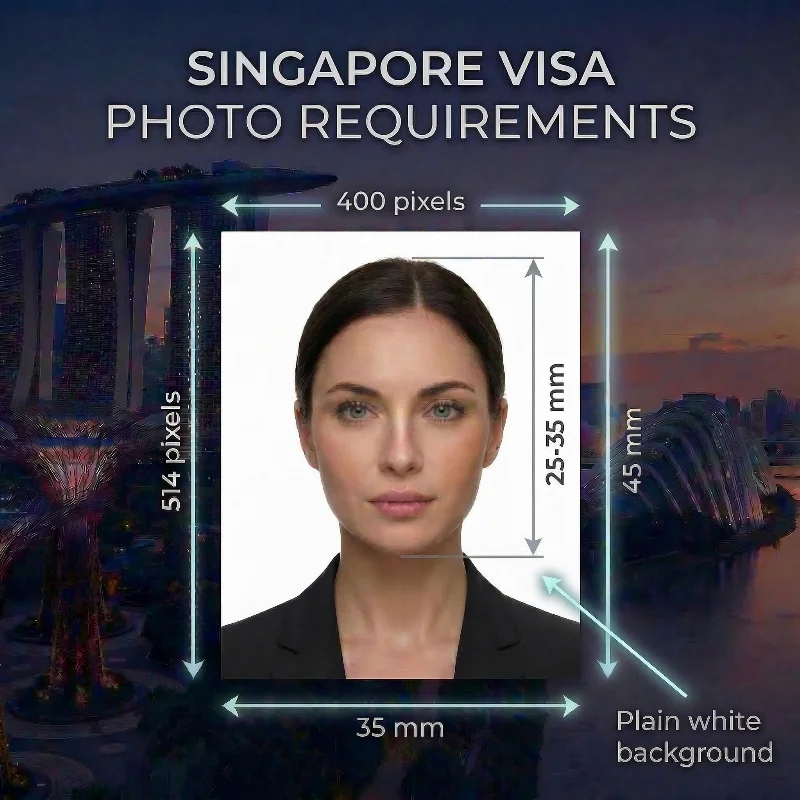
When you apply for a Singapore visa, pay extra attention to the quality of the photo that you submit with your application. Singapore has strict rules for biometric photos: 35×45 mm or 400×514 pixels, plain white background, taken within the past three months, printed on matte or semi-matte photo paper, and other important parameters. An incorrectly taken image can lead to visa rejections or delays.
But worry not, this 2026 Singapore visa photo requirements complete Guide covers all the specifications you need to meet, from exact dimensions and digital formats to clothing rules and common rejection reasons. Whether you are visiting a professional studio or taking the photo yourself at home, following these guidelines will help your application proceed without unnecessary delays.
Source: ICA
“We recommend that you use mobile apps or platforms designed specifically for passport or identity card photographs. These tools help applicants produce images in the required dimensions. The photograph will be accepted if it complies with our guidelines.”
— Immigration & Checkpoints Authority Singapore
11 Essential Singapore Passport Photo Requirements: Checklist
The Singapore visa photo requirements are defined by the Immigration and Checkpoints Authority Singapore (ICA) and follow the biometric standards of the International Civil Aviation Organisation (ICAO). We created this Checklist with 12 passport photo requirements to help you smooth the application process and produce an acceptable photo on the first try.
The good news is that you don’t need to memorise each one of them: our passport photo maker, PhotoGov, is designed to apply them automatically to your selfie. Simply upload it to our platform, and get a technically correct, 100% ICA-compliant, and application-ready Singapore visa photo.
Requirement | Specification |
1. Number of Photos | One visa photo is required for online applications. Visa centres may require 1-2 identical prints (check your provider's instructions). |
2. Recency | The picture must be taken within the past three months and reflect the applicant's current appearance. A new photo must be submitted for each application; previously used photos are not accepted. |
3. Photo Size | 35×45 mm (1.38×1.77 inches) for printed photos; 400×514 pixels for online photo submission through e‑Services or overseas missions. The applicant's head must occupy 70-80% of the frame (25-35 mm). |
4. Colour | A colour photograph with natural skin tone and accurate exposure is required. The photo must be clear, in focus, and free from any reflections or shadows. Overexposed or underexposed images are rejected. |
5. Background | A plain white background without shadows, patterns, or texture. |
6. Lighting | Uniform lighting with even brightness, free from glare, shadows, or overexposure. |
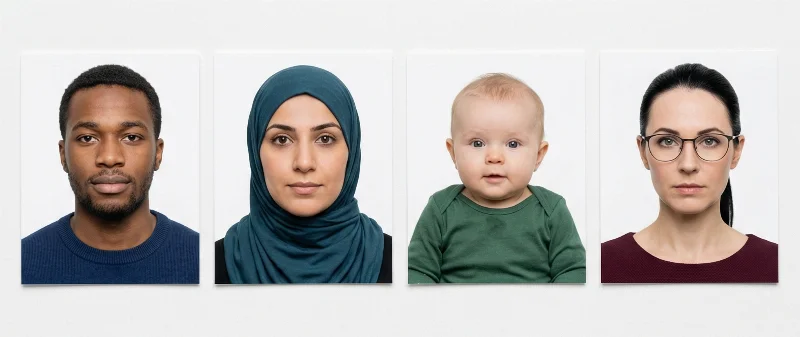
7. Positioning and Framing | The applicant's face and shoulders must be centered in the frame. Eyes directed at the camera, with the full face, neck, and ears visible. |
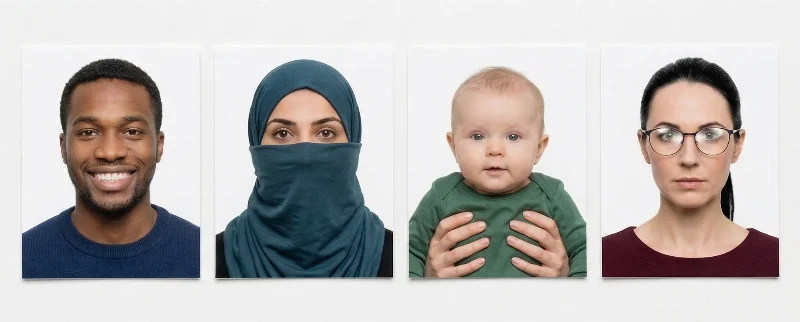
8. Facial Expression | A neutral facial expression with both eyes open, and the mouth closed, looking directly into the camera. Smiling or frowning is not permitted. |
9. Attire and Head Coverings | Appropriate everyday attire in darker colours is required. Head coverings are permitted only for medical, religious, or racial purposes — and only if they don't obscure facial features. Hair should not cover the face or eyes. Uniforms are not allowed in visa photos. |
10. Glasses | Allowed — but only if there is no reflection or glare on the lenses and the frames don’t cover the eyes. Tinted lenses (even prescription ones) or sunglasses are not accepted. |
11. Print and Digital Quality | For in-person applications, the physical copies must be printed on high-quality photo paper with a non‑reflective (matte or semi‑matte) finish. For ICA e‑Services, accepted formats include JPG, JPEG, HEIC, HEIF, and PNG, with a maximum file size of 8 MB and a 400 × 514 pixel size. The digital photo must be high‑resolution and free of pixelation. |
Acceptable Singapore Visa Photo Examples
Unacceptable Singapore Visa Photo Examples
Digital vs Printed Singapore Visa Photos Explained
Singapore accepts both formats, depending on your application method. Digital files are uploaded directly through the ICA portal for online submissions. Printed photos are attached to paper applications submitted at authorised visa centres or embassies.
PhotoGov creates both formats from your single selfie upload — producing the precise digital file for online applications and a printable template for physical submissions.
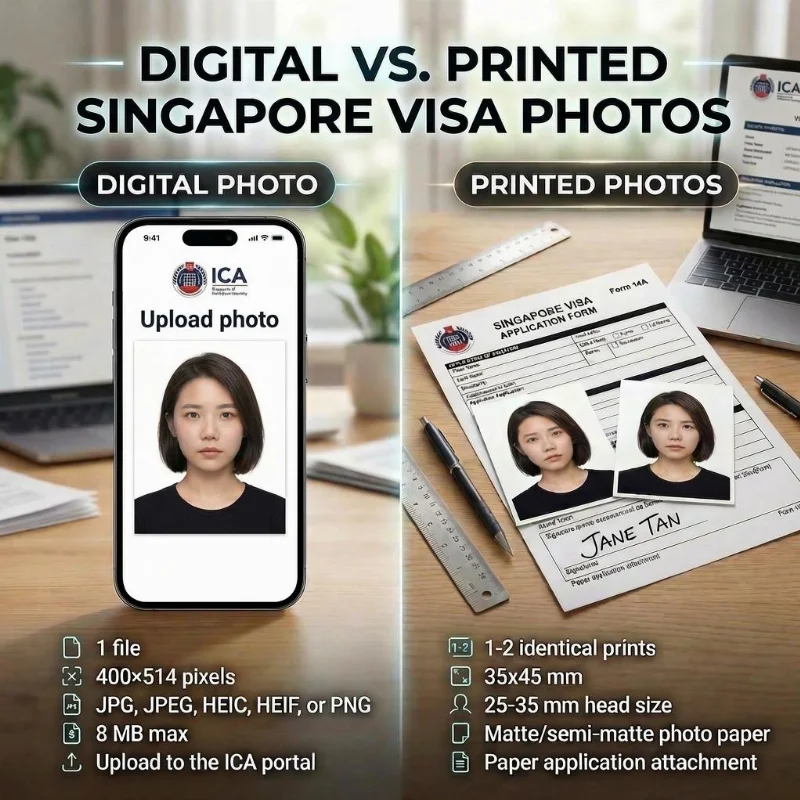
Specification | Digital Photo | Printed Photo |
Purpose | Online ICA portal upload | Paper application attachment |
Dimensions | 400 × 514 pixels | 35 mm × 45 mm |
File/Format | JPG, JPEG, HEIC, HEIF, or PNG, 8 MB max | Matte/semi-matte photo paper |
Quantity | 1 file | 1-2 identical prints |
Submission | Direct upload | Glue one to form, one loose |
How to Take a Singapore Visa Photo at Home
Today, you don't need to spend time and money to take a photo at a studio — with tools like PhotoGov, you can create a perfectly compliant image right from your home. Follow the tips of our ID compliance team, take a good shot, upload it to our tool, and receive a ready-for-submission photo.
- Choose a spot near the window with soft natural light for even exposure.
- Stand against a white background, ensuring no harsh shadows fall on your face.
- Place your phone about 40-50 cm (16-20 in) from your face — it has to be fully visible in the frame.
- Take a few shots, and choose the best one.
- Upload the photo to the PhotoGov platform.
- Wait for about half a minute, and preview the results.
- Choose add-ons: Clothing adjustment or Human verification, if needed.
- Download a digital file for online submission or a printable PDF page for in-person application.
Singapore Visa Photo Requirements for Children
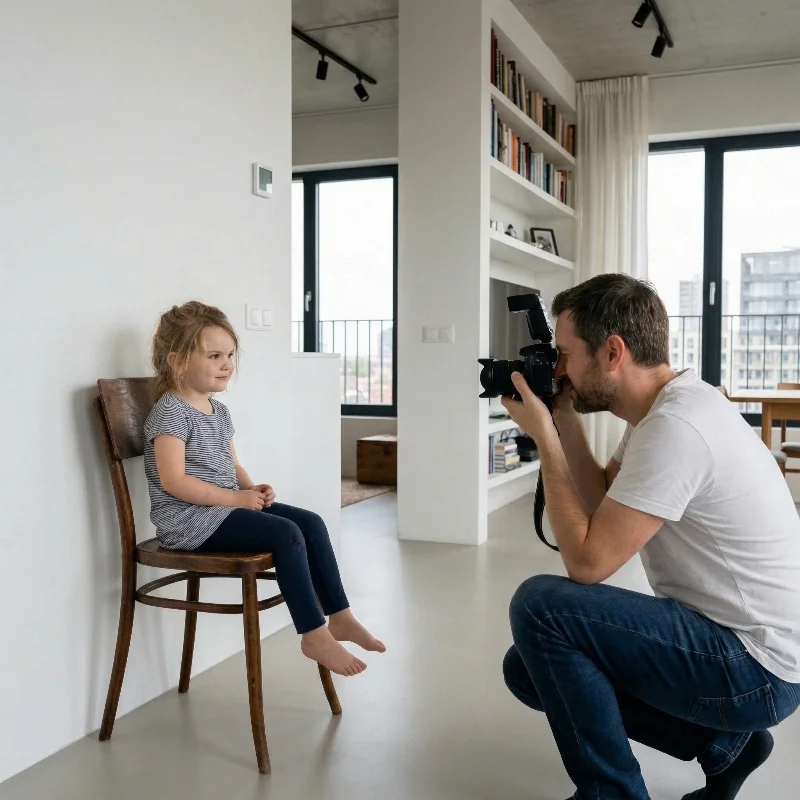
Singapore visa photo requirements for children are almost the same as for adults. A child’s picture must be recent, in colour, sized 35 × 45 mm (400 × 514 pixels), and taken against a plain white background, with the face clearly visible and looking straight at the camera. The eyes should be open, the mouth closed, and the expression neutral or with only a very slight smile, without any exaggerated emotions.
For babies, authorities usually accept more flexibility: infants under one year may have their eyes closed, but the image must still follow the same size, background, and quality standards as any other Singapore visa photo.
Taking baby visa photos can be slightly harder than clicking pictures of adults; that's why it's so convenient to do it from the comfort of your home. Use our handy tips mentioned above — and let PhotoGov take care of the rest.
How to Apply for a Singapore Visa?
You need a valid visa to be officially granted access to Singapore, and an arrival card — to enter the country physically.
When applying for a Singapore visa, you must submit a complete application, which includes a valid passport or travel document and all supporting documents, including a visa photo, as specified by the ICA. Make sure that all information is accurate and that their application is complete before submitting it to avoid delays or rejection.
Submit your visa application online via e-Service, Singapore Overseas Mission, or through authorized visa agents, paying a non-refundable visa processing fee.
If your visa is approved, apply for a Singapore Arrival Card (SGAC) via e-Service or My ICA Mobile app within three days before you enter Singapore. The SGAC application is free, and you typically receive it in your email within a few hours.
The processing time for a Singapore visa application is 3 to 5 working days. After submission, ICA officers will review your application, supporting documents, and verify that the photos meet the official requirements. Check the application status online, using your reference number.
Important Note: Apply for your visa at least 30 days prior to your visit to Singapore.
Common Reasons for Singapore Visa Photo Rejection
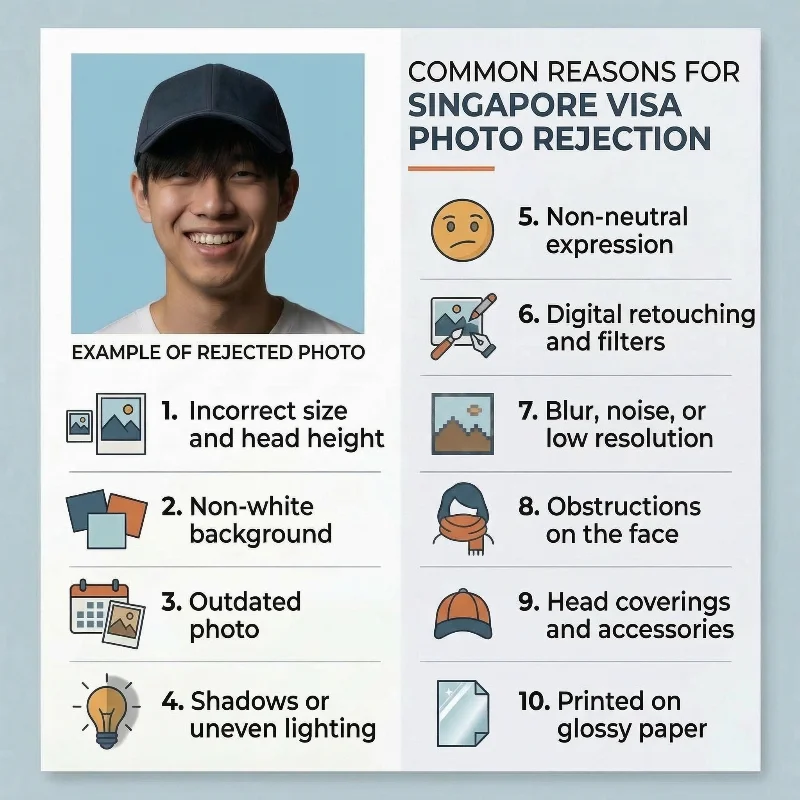
The Immigration and Checkpoints Authority (ICA) most frequently flags the following 10 issues for visa photo rejections:
- Incorrect size and head height: Printed photos not measuring exactly 35 mm × 45 mm, or head size outside the 25-35 mm chin-to-crown limits. Digital files that aren’t exactly sized 400 × 514 pixels
- Incorrect background colour: Background that is off-white, cream, coloured, patterned, or textured instead of a plain white backdrop without shadows.
- Outdated photos: Images taken longer than 3 months ago or no longer matching your current appearance (for example, after major changes to facial hair or hairstyle).
- Shadows or uneven lighting: Visible shadows on the face, neck, or background, or strong highlights that wash out facial features.
- Wrong facial expression: Smiling broadly, frowning, tilting the head, or not looking straight at the camera instead of a neutral, front-facing pose with eyes open and mouth closed.
- Digital retouching and filters: Beauty modes, skin-smoothing, colour filters, red-eye correction, or any edits that alter natural appearance.
- Blur, noise, or low resolution: Grainy, pixelated, out-of-focus, or low-quality images that don't show clear facial detail. Digital files with low resolution (below 300 DPI) or larger than 8 MB.
- Obstructions on the face: Hair covering eyes or eyebrows, heavy glare on glasses, tinted lenses, or large jewellery hiding facial contours.
- Head coverings and accessories: Fashion hats, caps, or non-religious/non-medical headwear that conceals the hairline or casts shadows. Religious headwear must not obscure facial features.
- Poor print quality: Home inkjet prints, streaks, colour casts, creases, fingerprints, or damage to the photo surface. Incorrect paper type (glossy instead of matte or semi-matte) or photos with white borders.
Use the PhotoGov Singapore visa photo maker to reduce the risk of rejection. Our online tool automatically matches your image to Singapore visa photo rules, creating an application-ready photo in a digital or printable format.
What to Do if Your Photo Singapore Visa Photo is Rejected
If ICA rejects your Singapore visa photo, you will receive notification explaining the specific reason via your submission channel (embassy, consulate, accredited agent, or the ICA e-Visa portal). You can resubmit without paying additional application fees. Once ICA receives your new photo, processing resumes, and you will be notified of the outcome.
In case your Singapore visa photo taken with PhotoGov has been rejected, contact our support team within 30 days. We will retake your photo free of charge or issue a full refund — as long as your original photo met all our processing guidelines.
Frequently Asked Questions
What are the Exact Singapore Visa Photo Requirements I Must Follow to Avoid Rejection?
To avoid rejection, make sure your Singapore visa photo meets the following ICA requirements:
- Size: 35 mm × 45 mm print, or 400 × 514 pixels digital
- Head size: 25-35 mm from chin to crown
- Background: Plain white without shadows, patterns, or textures
- Resolution: Minimum 300 DPI
- File format: JPG, JPEG, HEIC, HEIF, and PNG, 8 MB max
- Recency: Taken within the past 3 months, showing current appearance
- Expression: Neutral with eyes open and mouth closed
- No editing: Filters, beauty modes, skin smoothing, or AI enhancement aren’t permitted
Where Can I Get Singapore Visa Photos Taken That Fully Comply With Official Requirements?
Depending on your location, you can get compliant photos at professional studios, pharmacies, post offices, retail chains, or visa application centres. These locations use professional lighting and high-resolution cameras, though they require travel time and appointments.
PhotoGov offers a convenient alternative: you capture your photo at home using any smartphone, and the system automatically matches it to all ICA requirements. You get an application-ready Singapore visa photo in less than 30 seconds, no appointment or studio visit required!
What Size and Background colour Are Required for a Singapore Visa Photo for a Successful Application?
For a successful application, your photo must be exactly 35 mm × 45 mm for prints, with your head occupying 25-35 mm from chin to crown. Digital files must measure exactly 400 × 514 pixels. The background must be plain white — not off-white, cream, or grey — without any shadows, textures, or patterns.
Use the PhotoGov Singapore photo maker to automatically convert your original photo to the exact specifications of ICA. Just upload your selfie, and get a correctly sized, cropped visa photo with a correct background and biometric proportions. Download it in a digital or printable format. You’re ready to submit right away!
How Can I Check if My Digital Photo Meets Singapore Visa Photo Requirements Before I Submit My Application Online?
Use PhotoGov Singapore visa photo maker to validate your image automatically. Upload a selfie taken with your smartphone, and the tool instantly checks that your file dimensions are exactly 400 × 514 pixels, the resolution is high, and all biometric requirements are met. It converts the background to plain white while removing shadows, and confirms your facial expression is neutral with eyes open and mouth closed. In under 30 seconds, you receive a digital file formatted for direct ICA portal upload.
What Are the Common Mistakes People Make With Singapore Visa Photos, and How Can I Avoid Them to Get My Visa Approved?
The ICA most frequently rejects photos due to incorrect dimensions, non-white backgrounds with shadows, and facial expression errors such as smiling or head tilting.
Other common issues include:
- Shadows on the face
- Hair covering eyes
- Non-religious headwear
- A scarf covering the neckline
- Photos older than 3 months
- Low resolution, pixelation
- Portrait mode or beauty filters
- Glossy photo paper for prints.
Read this article and use PhotoGov to eliminate these risks — the tool automatically checks your photo against every ICA specification before you submit. It can also adjust your clothing to formal attire to increase the chance of approval.
How Do I Take a Compliant Singapore Visa Photo at Home Using My Phone and Simple Lighting?
Just follow these two simple steps to first take your photo at home, and then convert it to an official, ICA-compliant Singapore visa photo:
- Photograph yourself in natural daylight against any plain background (wall, curtain, or sheet): Position the camera at eye level and use a tripod or stable surface to ensure sharp focus. Face the camera directly with a neutral expression, eyes open, and mouth closed.
- Upload your unedited image to PhotoGov. The system automatically resizes your image to exactly 400 × 514 pixels, replaces your background with plain white, removes all shadows, and generates a submission-ready, ICA-compliant file.
What Are the Photo Requirements for a Singapore Tourist Visa, and How Strict Are They During Processing?
Singapore tourist visa photos follow identical biometric specifications to all other ICA visa categories: 35 × 45 mm print size or 400 × 514 pixels digital, plain white background, 300 DPI minimum, and taken within 3 months.
Processing is strict — automated systems check dimensions and background compliance immediately upon upload, and any deviation triggers rejection. PhotoGov ensures strict compliance before submission.
How Can a Professional Photo Studio Guarantee My Photos Meet All Singapore Visa Requirements So My Application is Not Delayed?
Studios like The Photo Studio Singapore, Tommy Photo Studio, or Kodak Express outlets often advertise ICA compliance with retake guarantees. These studios use professional lighting and high-resolution cameras to meet 300 DPI requirements. However, PhotoGov offers the same compliance guarantee from home — automatic formatting to exact ICA specifications with protected payment if rejected.
Which Online Tools Can Help Me Create a Singapore Visa Photo That Meets All Official Specifications?
PhotoGov is an online tool that creates Singapore visa photos that meet all official specifications. Upload any clear selfie from your smartphone, and it will resize it to exactly 35-45 mm or 400 × 514 pixels, swap your background for plain white, and remove any shadows. It checks that your face is centred, eyes are open, and expression is neutral. It takes under 30 seconds to create an application-ready, technically compliant file that you can download as a digital or a printable file, depending on the submission method.
Can I Use a Passport Photo for a Singapore Visa Application, or are the Photo Requirements Different?
We recommend that you create a new Singapore visa photo, especially since it must be taken within the past three months. You don't need an appointment or a professional studio visit — you can create a technically compliant, submission-ready visa picture from the comfort of your home or office. Upload any recent photo to PhotoGov, and the tool will automatically match it to Singapore visa specifications regardless of the original format.
Where is the Best Place Near Me to Print Singapore Visa Photos that Match the Exact Government Requirements?
You can print your Singapore visa photos at Kodak or Fujifilm centers, local photo labs, or some visa application centres. However, for guaranteed accuracy, use PhotoGov's printable template.
Here's how it works: upload your selfie to PhotoGov, and the system generates a professional-quality PDF template from your photo. This template is pre-formatted to exact ICA specifications (35 × 45 mm with proper head positioning), so you can print it anywhere — even at home on matte or semi-matte photo paper — and receive a compliant physical copy without guessing measurements or relying on print shop staff to resize correctly.
Are there Specific Singapore Visa Photo Requirements for Children and Babies, and Where Can I Get Them Done Correctly?
Singapore visa photos for babies and children follow the same technical specifications as adult photos: 35 × 45 mm dimensions, 400 × 514 pixels digital, plain white background, and JPEG format. However, for infants, the rules for facial expressions are relaxed — newborns may have their eyes closed or partially open, and a neutral expression is not required as long as the face is clearly visible.
You can visit any local professional photo studio in your city that offers visa photo services, or mall photography chains like Kodak Express or Max Photo.
However, photographing young children at home is often easier and less stressful. Simply capture an image with your smartphone and use PhotoGov to automatically match it to all ICA specifications, eliminating the hassle of studio visits with an infant.
What is Singapore Visa Photo Size?
The Singapore visa photo size is 35×45 mm (1.38×1.77 inches). Head height must be between 25 and 35 mm (0.98-1.38 inches). The background must be plain white, and the lighting must remain even on both the face and the background for an ICA-accepted result.
How To Resize a Photo to Singapore Visa Size?
To resize a picture to 35×45 mm, use a PhotoGov photo-making tool: it automatically applies ICA requirements to your original photo. It requires under 30 seconds and a few simple steps:
- Take a selfie or upload one from your phone or laptop to our platform.
- Wait 30 seconds until the system crops it to 35×45 mm, automatically adjusting head size, margins, and background to Singapore government regulations.
- The final ICA-compliant file is generated instantly. Download it in the required format. You're ready to apply!
Where To Take a Singapore Visa Photo?
There are a few locations in Singapore that offer visa photo services:
- PhotoMe self-service booths in MRT stations and malls
- Kodak Express outlets
- FujiFilm stores and partner studios
- Harvey Norman Photo Centres
- PhotoGov online photo-making tool.
When using a tool like PhotoGov, you save yourself time and money for a visit to the studio. Processing time is under a minute, the first photo is free, and a range of expert services enhances compliance assurance.
Where To Print a Singapore Visa Photo?
Visa photos can be printed at a few convenient locations in Singapore:
- Kodak Express and FujiFilm shops
- Harvey Norman Photo Centres
- Popular Bookstores and SingPost branches
After generating the visa photo size 35×45 mm ICA-aligned file on PhotoGov, you can print it at any of these locations. Remember that only photos on photo paper with a matte or semi-matte finish are accepted.
What are the Common Mistakes in Singapore Visa Photos?
- Incorrect head size or framing
- Uneven lighting or shadows
- coloured or patterned backgrounds
- Glare on glasses or tinted lenses
- Tilted head or expressive facial features
- Headgear covering facial features
- Low-quality files caused by filters or compression
- PhotoGov checks these parameters automatically to reduce rejection risk.
What is a Singapore Visa, and Do I Need it?
A Singapore visa is an official pre-entry permission issued by the Immigration & Checkpoints Authority (ICA) that allows travelers to seek entry into Singapore. It is important to note that holding a valid Singapore visa does not guarantee entry into the country; the final decision rests with ICA officers at the immigration checkpoints.
The visa application process involves paying a service fee, and additional value-added service fees may apply depending on the chosen submission method. The ICA reviews each application on its own merits, and successful applicants will be granted an immigration pass upon arrival in Singapore.
Check if you need a visa for Singapore.
PhotoGov.net follows global ID photo standards and ICAO biometric guidelines.
Other Pages — Singapore Visa Photos
Official Government Documentation Sources
General Singapore Visa Photo Requirements: Immigration and Checkpoints Authority Singapore
The List of Overseas Missions: Ministry of Foreign Affairs Singapore
e-Services for Visa Applications: Immigration and Checkpoints Authority Singapore
MyICA Mobile app for Singapore Arrival Card (SGAC) Application: mmigration and Checkpoints Authority Singapore
List of Countries: Entry Requirements for Singapore: Immigration and Checkpoints Authority Singapore (ICA)
Biometric Regulations for International ID Documents: International Civil Aviation Organization (ICAO) Document 9303
Was this helpful?
46 found this helpful
Authored by:
Nathaniel K. Rowden (Compliance consultant)Approved author
Verified by Photogov experts
ICAO 9309 compliant
Based on official government sources
Helpful votes: 46
Was this helpful?
46 found this helpful