Thailand Visa Photo Requirements: a Complete Guide to a Successful Application
Table of contents:
- 11 Essential Thailand Visa Photo Requirements: a Checklist
- Acceptable Thailand Visa Photo Examples
- Unacceptable Thailand Visa Photo Examples
- Digital vs Paper Thailand Visa Photo Explained
- What Are the Thailand Visa Photo Requirements for Children and Babies?
- Where to Take a Thailand Visa Photo Near Me
- How to Take a Thailand Visa Picture at Home
- Common Reasons for a Thailand Visa Photo Rejection
- Who Needs a Thailand Visa and How to Apply
- Documents Required for a Thailand Visa Application
- Frequently Asked Questions
- Official Government Sources
A successful Thailand e-Visa application relies on the quality of the photo you upload with it. If you are applying online through thaievisa.go.th, upload a digital JPG or JPEG under 3MB, taken within the last six months. If you are submitting a paper application at a Thai embassy or consulate, you must submit a printed 35×45 mm photo (but please keep in mind that some missions, like the Royal Thai Embassy in Singapore, require a 40x60 mm photo, so always double-check the exact specs at your Thai embassy, consulate, or visa center).
This guide covers 2026 Thailand visa photo requirements in detail for online and offline applications.
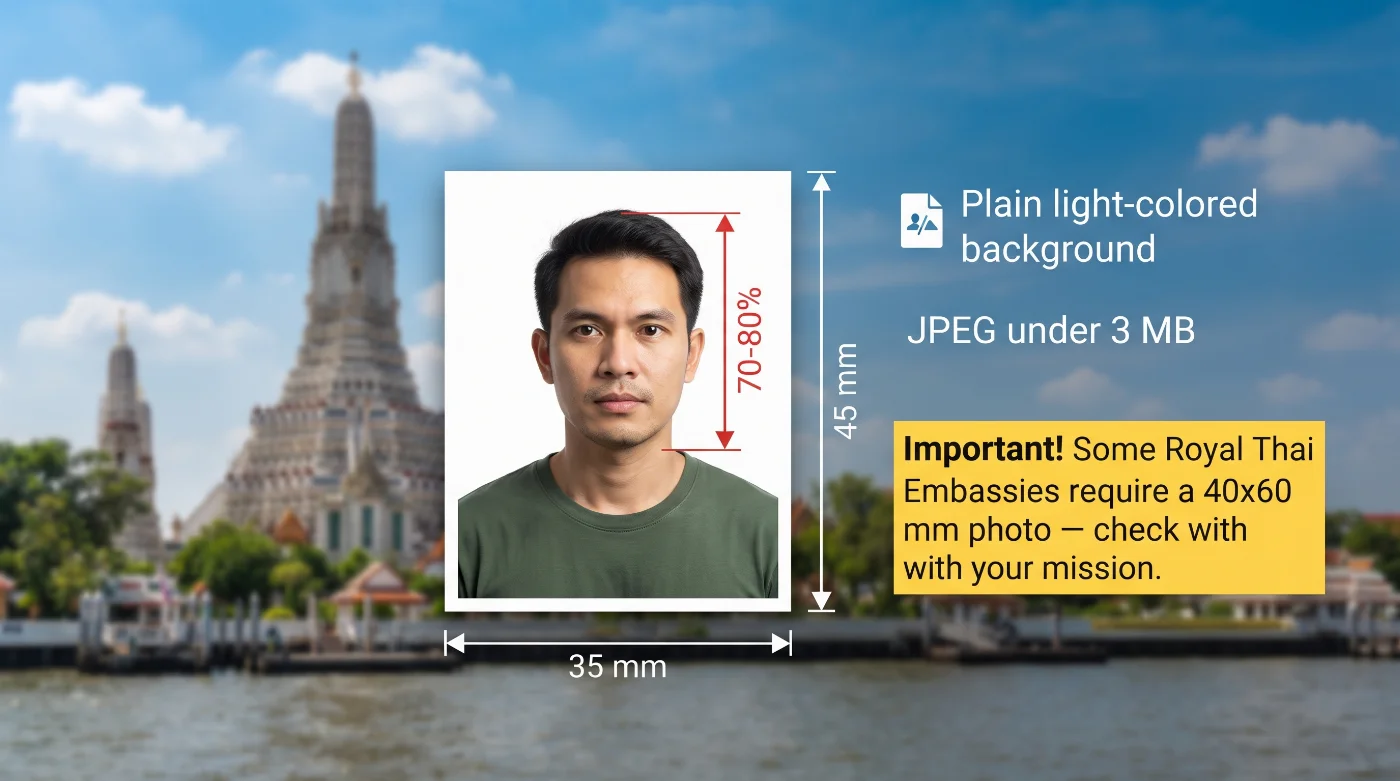 Source: thaievisa.go.th
11 Essential Thailand Visa Photo Requirements: a Checklist
Thailand e-Visa photo requirements are based on the official instructions provided by thaievisa.go.th, the visa portal of the Ministry of Foreign Affairs of the Kingdom of Thailand. The official user manual confirms the accepted file format, the 3MB file size limit, and the six-month recency rule at the “Upload Photograph” step. For an application-ready result, prepare the photo in the standard 35×45 mm format and follow ICAO Document 9303 guidelines for biometric photo composition. Always double-check the exact requirements of your mission, as some of them ask for a 40 x 60 mm photo with a Thai visa application.
Requirement | Details |
1. Recency | The photo must be taken within the last six months. thaievisa.go.th states that failure to meet this may result in rejection of the visa request |
2. Thailand Visa Photo Size | 3.5 x 4.5 cm — the most common format. However, the Royal Thai Embassy in Singapore's e-Visa photo specifications page requires a 4 x 6 cm (472 x 709-pixel) photo. Since Thai missions don't apply a single uniform size across all locations, confirm the exact dimension requested by the specific embassy, consulate, or entry point you're applying through. |
3. Color | The image must be in color and accurately reflect the applicant's natural skin tone and hair color |
4. Background | A plain, white, evenly lit background |
5. Lighting | Even, natural lighting without harsh shadows |
6. Positioning and Framing | Face the camera directly, with head and shoulders square to the camera |
7. Facial Expression | A neutral expression with eyes open, mouth closed |
8. Attire, Head Covering, and Accessories | Remove headwear and heavy accessories that may obstruct your facial features, hairline, or neck |
9. Glasses | Allowed if the frames don’t obstruct your eyes and there is no glare on the lenses. Sunglasses and tinted lenses aren’t allowed. The safest practice is to remove glasses before taking a visa photo |
10. Thailand e-Visa Digital Photo Requirements | JPG or JPEG format, file size under 3 MB |
11. Print Quality (Paper Applications) | Usually, two photos printed on photographic paper are required, with no marks or creases. If you're applying on paper at a Thai embassy or consulate, check that mission’s requirements. |
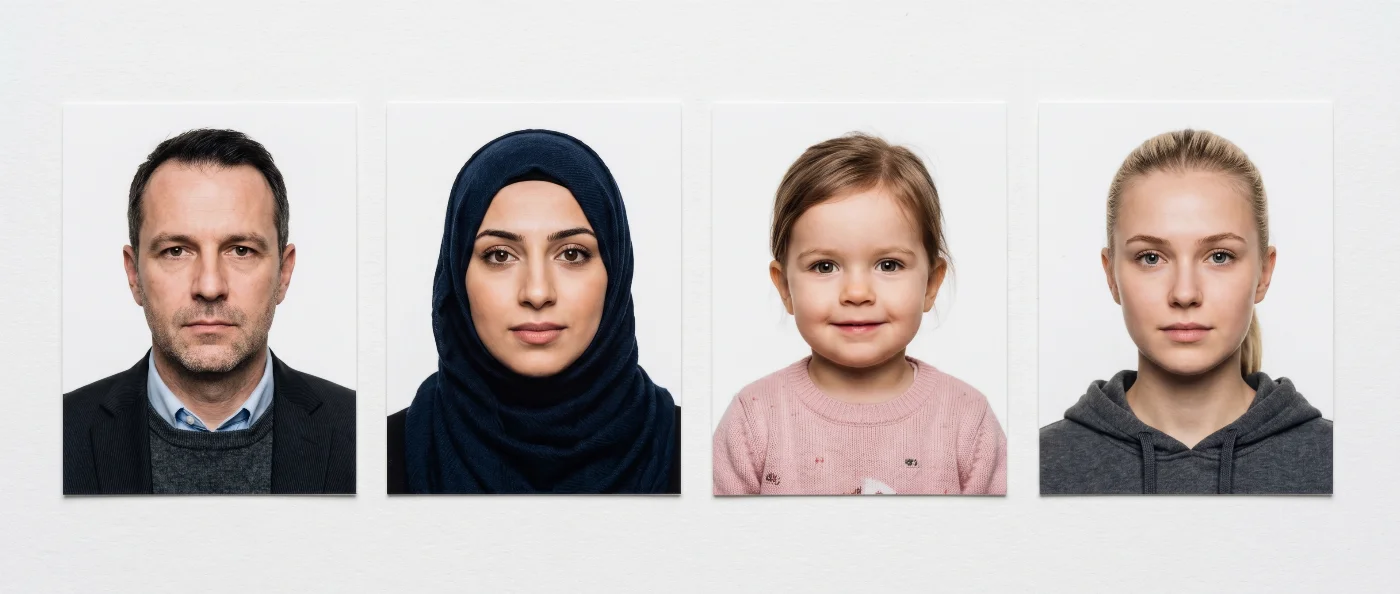
Acceptable Thailand Visa Photo Examples
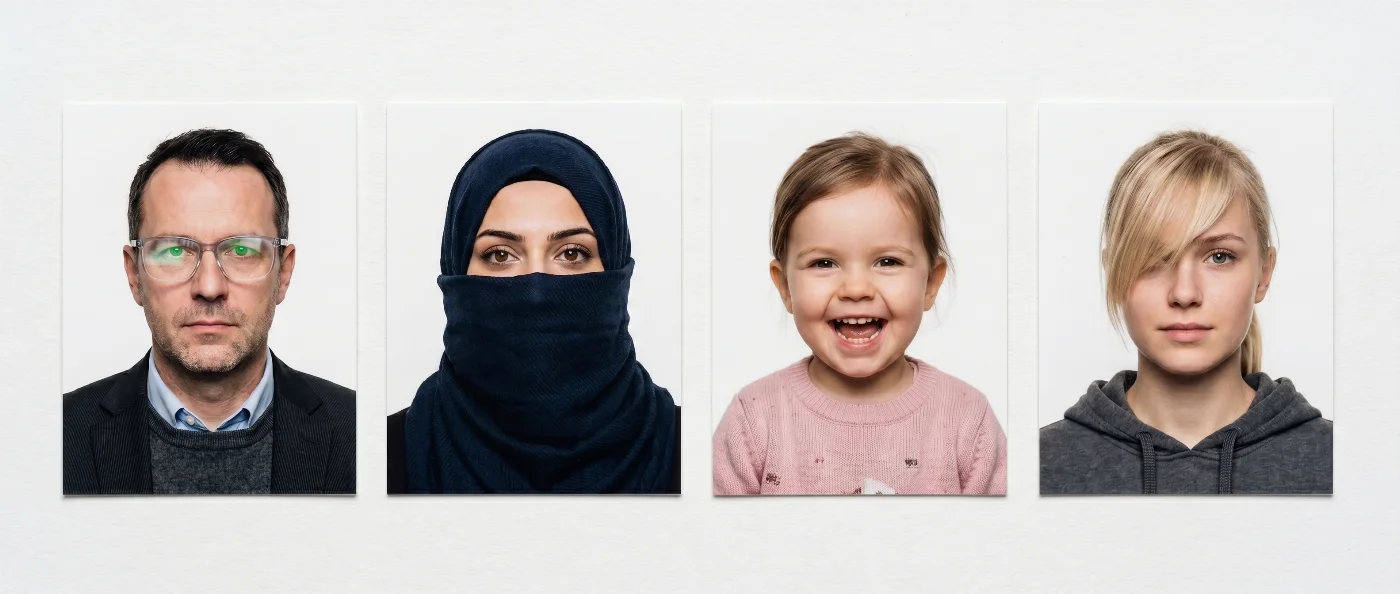
Unacceptable Thailand Visa Photo Examples
Digital vs Paper Thailand Visa Photo Explained
Digital photos are required for the e-Visa application at thaievisa.go.th. The image must be a JPG or JPEG under 3MB, taken within the last six months, uploaded at the "Upload Photograph" step under Applicant Information.
Printed photos are required for paper applications submitted in person at a Thai embassy or consulate — many missions still accept this route alongside the e-Visa.
Requirement | Digital Photo (e-Visa) | Printed Photo (Embassy) |
Use case | thaievisa.go.th online application | In-person applications at embassies or consulates |
Quantity | 1 file | Usually 2 printed photos |
Dimensions | 3.5 x 4.5 cm | 3.5 x 4.5 cm, but check your consulate or embassy’s requirements |
Format | JPG / JPEG | No frames or borders |
File/Print specs | Under 3MB; taken within 6 months | High-quality print |
What Are the Thailand Visa Photo Requirements for Children and Babies?
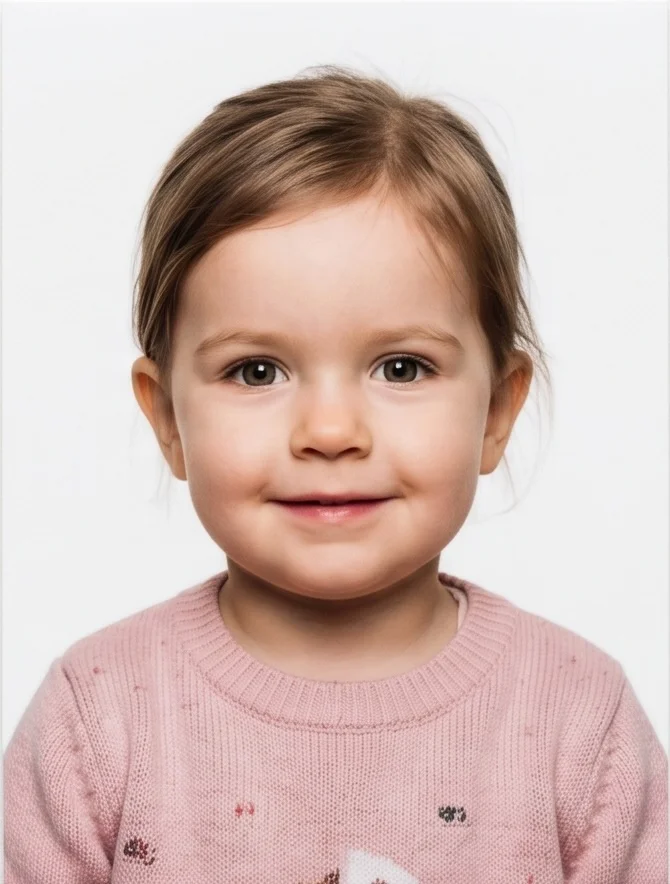 Each traveller listed on a Thailand visa application, children included, needs their own photo meeting the same published rules: a recent 35 x 45 mm photo saved as a JPG/JPEG under 3MB, with the child's face clearly visible.
Infants and Babies Under 1
We recommend following the general ICAO Doc 9303 guidelines for newborns and babies under 1 year old: photograph the baby lying down on a plain, light-coloured surface, camera positioned directly above, face centred and clearly visible. It is generally acceptable for a very young baby's eyes not to be fully open, as long as the facial features are clear and recognisable.
Toddlers and Young Children
For toddlers, the priority is an unobstructed, clearly visible face. A perfectly neutral expression can be difficult to achieve at this age; a natural, relaxed look is acceptable as long as the child faces the camera directly, with no toys, hands, or other people visible in the frame.
Older Children
Older children should follow the same standard as adults: facing the camera, neutral expression, eyes open, mouth closed, head and shoulders within the frame.
Where to Take a Thailand Visa Photo Near Me
You can get a Thailand visa photo taken at a professional photo studio, a pharmacy chain, a post office, a photo booth, or use an online visa photo maker if you want to skip the hassle of a studio visit.
Option | Time to Complete | Appx. price | Pros / Cons |
Professional Photo Studio | 10-30 minutes | $20-100 | High-quality result, reliable/Most expensive, may require an appointment |
Pharmacy/Post | 10-30 minutes | $16-20 | Fast and widely available/result quality varies by location |
/ Photo Kiosk | 5 minutes | $10 | Very fast and affordable/The quality can be the downside |
PhotoGov Thailand visa photo maker | Under 30 seconds | Two free ID photos per day, depending on your location; $6.90 in the US | Delivers a compliant Thai visa photo in seconds, two free ID photos per day, depending on your location/Doesn’t deliver prints |
How to Take a Thailand Visa Picture at Home
With a reliable online visa photo-making tool, taking a Thailand visa picture at home is straightforward. Follow these steps, upload the photo, and get a file ready for online submission in seconds.
Choose a well-lit spot where natural light doesn't cast shadows — ideally, facing a window.
Stand against a plain wall. Hold your phone at eye level, about an arm's length away.
Keep a neutral expression, both eyes open, mouth closed, and look directly at the camera.
Upload the selfie to PhotoGov and wait about 30 seconds while the tool converts it into a JPG under 3MB.
Download the digital file for the Thai eVisa official website, or the printable file for a paper application at an embassy.
Common Reasons for a Thailand Visa Photo Rejection
Below are the reasons most likely to cause a Thailand visa photo rejection, based on the information from the Thai eVisa official website.
Wrong file format. The portal accepts JPG or JPEG only. A PNG, HEIC, or other format will be rejected by the upload system.
File too large. The file must be under 3MB. An oversized file won't upload.
Photo older than six months. thaievisa.go.th states directly that this may result in rejection of the visa request.
Low image quality. Blurred focus, heavy compression, or visible pixelation are common technical rejection causes for any digital upload.
Obstructed face. Sunglasses, hats, or hair covering the face interfere with the biometric composition ICAO Doc 9303 expects, even though Thailand doesn't publish this rule explicitly for the e-Visa.
If your PhotoGov photo is rejected by authorities, contact Customer Support immediately. We will investigate the cause, and if it stems from a technical error on our end, you will receive a full refund and a free retake.
Who Needs a Thailand Visa and How to Apply
Whether you need a visa to enter Thailand depends on your nationality and the purpose and length of your trip — some nationalities can enter visa-free or apply for a visa on arrival, while others need to apply in advance. Thai eVisa official website includes an eligibility check where you enter your nationality and travel details to see what applies to you; check it before assuming you do or don't need a visa.
You can apply for a Thailand visa through:
The official e-Visa portal
A Thai embassy or consulate, for a paper application
Documents Required for a Thailand Visa Application
Exact document requirements vary by visa type and nationality — check the current list on the Thai eVisa official website for your specific case. In general, an e-Visa application asks for:
A valid passport, scanned at the biodata page
A recent digital photo meeting the specifications above
A completed online application form
Supporting documents specific to your visa category and nationality
Frequently Asked Questions
What Size and Dimensions Are Required for Thailand Visa Photos?
Though thaievisa.go.th does not publish a specific millimetre or pixel size for the e-Visa photo, the widely used format for Thai visa photos is 35 x 45 mm. But please beware that some missions, for example, the Royal Thai Embassy in Singapore, require a 40 x 60 mm photo with Thailand visa applications — always double-check the exact specs before applying! When you submit it for your eVisa, the file must be a JPG or JPEG under 3MB, taken within the last six months.
What Are the Current Thailand Visa Photo Requirements for a Successful Application?
Your Thailand e-Visa photo must be a recent, color, plain-background image that clearly shows your face. Here's what the photo needs to meet:
Recency: Taken within the last 6 months.
Size: Not explicitly published by the e-Visa portal, but 35 x 45 mm (3.5 x 4.5 cm) is the recommended and widely accepted standard, matching Thai consular photo requirements. However, some missions may require 4 x 6 cm photographs for Thailand visa applications — always double-check before submitting.
Color: Full color, accurately showing your natural skin tone and hair color.
Background: Plain white or off-white, evenly lit with no shadows.
Expression: Neutral, mouth closed, both eyes open, facing the camera directly.
Head and shoulders: Squared to the camera, full face visible from hairline to chin.
Headwear: Not allowed, except for items worn daily for religious reasons.
Glasses: Allowed — just make sure the flash doesn't create glare on the lenses.
Digital file: JPG or JPEG format; check the exact file-size limit on your upload screen, since the portal's stated cap can vary.
Printed photos: If applying on paper at a Thai embassy or consulate, bring two prints on photographic paper, free of marks or creases.
What Are the Background Color and Lighting Requirements for Thailand Visa Photos?
Your Thailand visa photo needs a plain, solid white background with even lighting and no shadows, reflections, or visible texture behind you. Sit or stand at least a foot away from the wall to avoid a shadow falling on the background, and use soft, diffused light rather than a direct flash or overhead spotlight, which can wash out your features or create harsh contrast. PhotoGov applies this exact background and lighting standard automatically when you upload your photo, replacing an uneven or colored backdrop with a compliant plain white one.
Where Can I Get a Thailand Visa Photo Taken That Meets All Requirements Near Me?
A professional photo studio, passport-photo print shop, or photo kiosk at a pharmacy or convenience store can produce a properly lit, plain-background color photo in the correct 3.5 x 4.5 cm (or, depending on a mission, 4 x 6 cm) size. For the e-Visa specifically, you'll also need the shot as a digital JPG or JPEG file under 3 MB — not just a printed copy — so confirm the studio can email or export it as a file, or scan the print and run it through an online photo tool to convert it to the right format and size. If you're applying in person at an embassy or consulate that still accepts paper applications, ask the studio for two printed copies as well, since some missions request both formats.
Can I Smile in a Thailand Visa Photo?
Keep your expression neutral, with your mouth closed and both eyes open, rather than smiling. Thai visa photos follow the standard used for biometric ID and passport photos worldwide: a natural, relaxed face without a wide smile, since an open-mouth expression can distort the facial measurements used to verify your identity against your passport and other travel documents.
Can I Wear Glasses in My Thailand Visa Photo?
It's best to remove your glasses for a Thailand visa photo. While policies differ slightly by mission, several Thai consulates explicitly instruct applicants not to wear eyeglasses or dark glasses in their visa photo, since lenses can create glare or reflections that obscure the eyes. Removing them before your photo is taken avoids this risk entirely and keeps your application consistent with the strictest interpretation applied across Thai missions.
How Do I Take a Thailand Visa Photo at Home?
Stand about an arm's length from a plain white wall in a well-lit room, ideally near a window during daytime for soft, natural light. Have someone else take the photo straight-on at eye level, or use a tripod and timer to avoid the angle distortion of a handheld selfie. Once you have a clear, front-facing shot, upload it to an online Thailand visa photo maker like PhotoGov, which crops it to 3.5 x 4.5 cm (default Thai visa size), corrects the background, and exports it as a JPG under 3 MB, ready for the e-Visa portal upload — just make sure the source photo was taken within the last six months.
Can I Apply for a Thailand Visa on Paper Instead of the e-Visa Portal?
Yes. Many Thai embassies and consulates still accept paper visa applications alongside the e-Visa system, and this route is often used by applicants who prefer submitting documents in person or whose visa category isn't fully supported online yet. Photo requirements for paper applications are set individually by each mission rather than by thaievisa.go.th, so specifics like print size, number of copies, or acceptable background can vary slightly from one embassy to the next — always confirm directly with the consulate handling your application before printing your photos.
Official Government Sources
Thailand e-Visa Official Website and Photo Upload: Ministry of Foreign Affairs of the Kingdom of Thailand
Thailand e-Visa Application Guide (Official PDF Manual): Ministry of Foreign Affairs of the Kingdom of Thailand
Thailand eVisa photo specifications (4 x 6 cm photo requirements): Royal Thai Embassy Singapore
Biometric Regulations for International ID Documents: International Civil Aviation Organization (ICAO) Document 9303
Was this helpful?
88 found this helpful
Top expert
Based on official government sources
Helpful votes: 88
Was this helpful?
88 found this helpful
Service provided by Y VISION TECHNOLOGIES LLP · Stoney Works 8 Stoney Lane, London, England, SE19 3BD · Terms · Refund policy · Contact
We value your Privacy
We use cookies to enhance your browsing experience, serve personalized ads or content. By clicking “Accept All”, you consent to our use of cookies.