Vietnam Visa Photo Requirements 2026 for E‑Visa, Embassy & Visa on Arrival
Table of contents:
- 12 Essential Vietnam Visa Photo Requirements: a Checklist
- Digital vs. Printed Vietnam Visa Photos Explained
- Vietnamese E-Visa Digital Photo Requirements
- How to Take a Vietnam Visa Photo at Home
- Vietnam Visa Photo Requirements for Children
- 10 Common Reasons for Vietnam Visa Photo Rejection
- What to Do If Your Vietnam Visa Photo Gets Rejected
- Frequently Asked Questions
- Official Government Sources
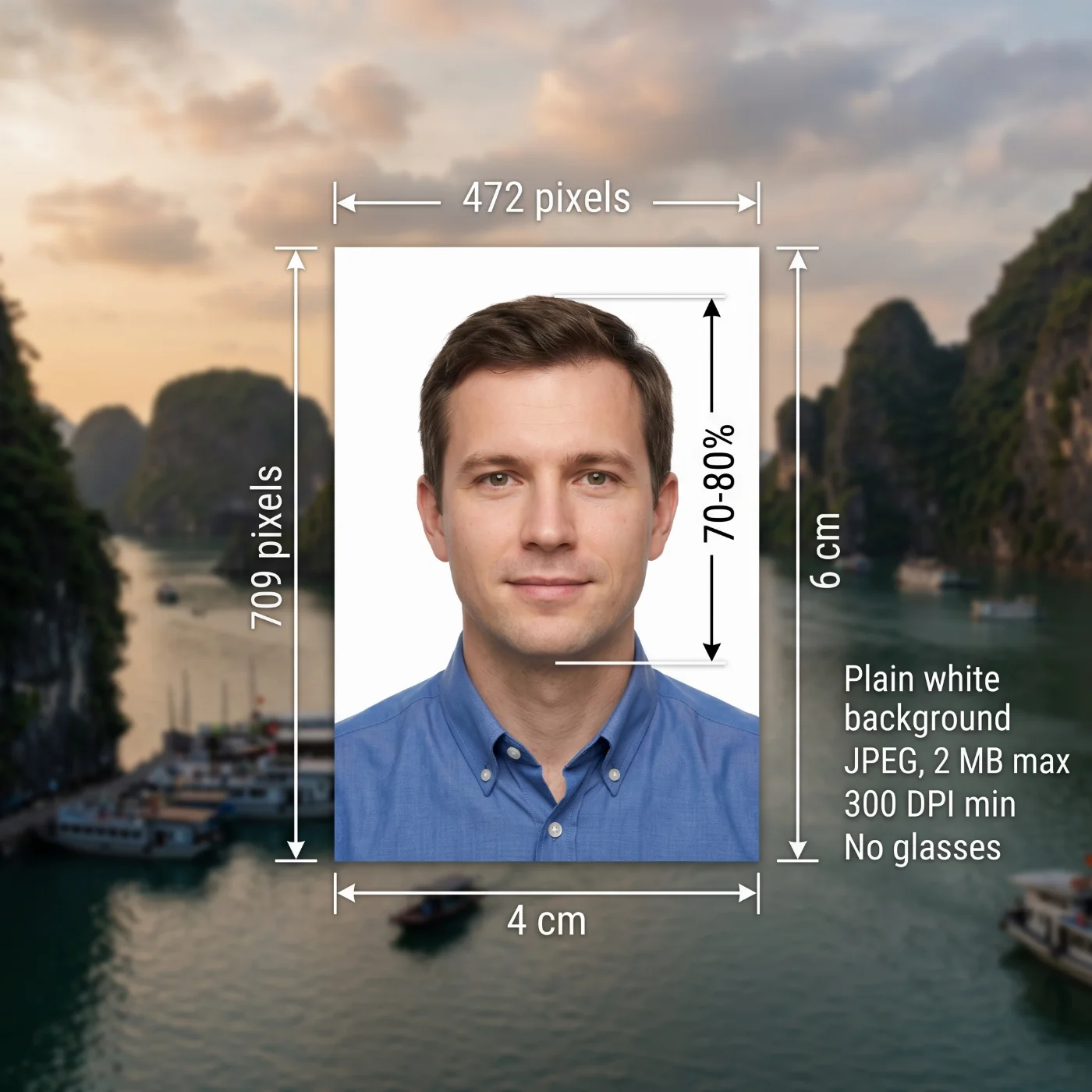
A Vietnam visa photo is a biometric image required for all visa applications to enter Vietnam. The photo must be 4 × 6 cm, JPEG, 2 MB max, taken against a plain white background within the last six months, showing the applicant's full face with a neutral expression and no glasses on. These specifications apply to both the e-visa (evisa.gov.vn) and embassy or visa-on-arrival applications. When applying via the electronic visa application system, you must also upload a high-quality scan of your passport’s first page. A Vietnam passport photo uses the same 4 x 6 cm format, prepared with our tool for that document.
This 2026 Vietnam Visa Photo Requirements guide covers the current rules for all visa types. Follow them, and get your photo approved on the first try.
Source: Ministry of Public Security Immigration Department
12 Essential Vietnam Visa Photo Requirements: a Checklist
Vietnam visa photo specifications are set by the Ministry of Public Security Immigration Department, which follows the international biometric standards of the International Civil Aviation Organization Document 9303. These rules apply to all applicants, regardless of nationality or visa type — and only photos following them are accepted for submissions.
Specification | Official Requirement |
|---|---|
1. Photo Size | 4 × 6 cm or 472 × 709 pixels (at 300 DPI). |
2. File Format and Size | JPG or JPEG only. PNG, PDF, and GIF are not accepted by the evisa.gov.vn portal, even if the image is otherwise correct. File size: 2 MB max for each — the portrait photo and the passport bio-page scan. |
3. Recency | The photo must be taken within the last six months and accurately reflect your current appearance. Using an older photo risks rejection and potential problems at the Vietnamese immigration on arrival. |
4. Background | A plain white background only. No patterns, textures, objects, shadows, or other people should be visible in the background. |
5. Colour | Only full-colour photographs are accepted. Black-and-white, sepia, or colour-filtered photos are not permitted. The image must reproduce natural skin tones and facial detail accurately. |
6. Facial Expression | A neutral, natural expression is mandatory: both eyes open and fully visible, mouth closed, no smiling, frowning, or squinting. |
7. Positioning and Framing | The applicant must face the camera directly, with the head centred horizontally and vertically in the frame. No tilting, turning, or angling. Head, shoulders, and upper body must be visible and squared to the camera. |
8. Glasses | Glasses are not allowed. If glasses must be worn for medical reasons, they cannot be sunglasses or tinted lenses, and the eyes must be fully visible with no glare, reflections, or shadow on the lenses. In practice, glasses frequently cause automated rejections on the evisa.gov.vn portal — remove them if medically safe to do so. |
9. Head Coverings and Accessories | Head coverings are permitted only for documented religious or medical reasons. If you wear a religious or a medical covering, make sure your face is fully visible — including forehead and eyebrows. The covering cannot obstruct or cover your facial features. |
10. Lighting | Even, natural lighting, evenly illuminating the face and the background. |
11. Digital Editing | The photo must be an unaltered original. No filters, beauty-mode processing, skin-smoothing, background replacement, or AI photo enhancement of any kind are allowed. |
12. Number of Photos | E-visa (evisa.gov.vn): two separate digital uploads are required — one portrait photo of the applicant and one scan of the passport bio-data page. Embassy or visa-on-arrival: two identical printed photographs. |
Digital vs. Printed Vietnam Visa Photos Explained
Your Vietnamese visa photo format and the submission method depend on your visa type. For most nationalities in 2026, the e-visa through evisa.gov.vn is the standard route. Embassy and visa-on-arrival applications still require printed photographs. Domestic identity documents use a smaller frame, and our 3x4 cm Vietnam ID card photo tool prepares it.
For e-visa applications, you must upload two separate files during the online application process: your portrait photo and a scan of your passport bio-data page. The portal automatically checks file format, size, and basic image quality. For embassy and visa-on-arrival applications, you must bring two identical printed colour photographs to the embassy or to the immigration counter at a Vietnamese international airport.
For applications that request a square image, our Vietnam visa photo 2x2 inch tool prepares that format.
Specification | E-Visa (Digital Upload) | Embassy / Visa on Arrival |
|---|---|---|
Submission method | Upload via evisa.gov.vn | Printed — bring in person |
Number of photos | 1 portrait + 1 passport page scan | 2 identical printed copies |
Format | JPG / JPEG only | Printed on photographic paper |
Size | 472 × 709 pixels (equaling 4 x 6 cm) | 4 x 6 cm |
Portrait file size | Max 2 MB | N/A |
Passport scan file size | Max 2 MB | N/A |
Background | Plain white | Plain white |
Vietnamese E-Visa Digital Photo Requirements
When applying through evisa.gov.vn, you must upload two separate photos during the application process — your passport-size photograph and the scan of your passport page. Our Vietnam visa photo online tool prepares the portrait file for e-visa, embassy, and visa-on-arrival filings.
Portrait Photo Upload for an E-Visa
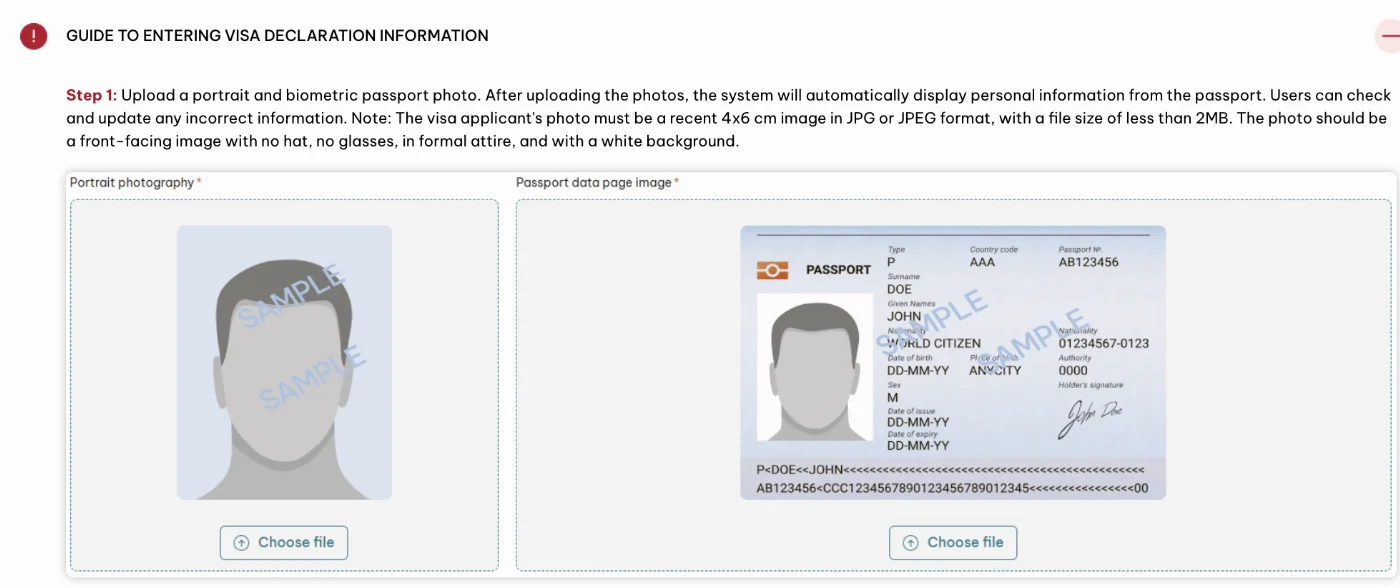
Official Requirement | Your Vietnam Visa Portrait |
|---|---|
File format | JPG / JPEG only (PNG, PDF, GIF not accepted) |
Photo size | 4 x 6 cm (472 × 709 pixels) |
Minimum resolution | 300 DPI |
Maximum file size | 2 MB |
Colour | Full colour |
Photo recency | Taken within the last 6 months |
Background | Plain white |
Expression | Neutral, mouth closed, eyes open |
Glasses | Not allowed |
Head coverings | Only for religious or medical reasons |
Framing | Head, shoulders, and upper body visible |
Image quality | Clear, in focus, no shadows, no red eye |
Editing / filters | Not permitted — no beauty apps, no AI enhancement |
Passport Bio-Page Photo Scan for an E-Visa
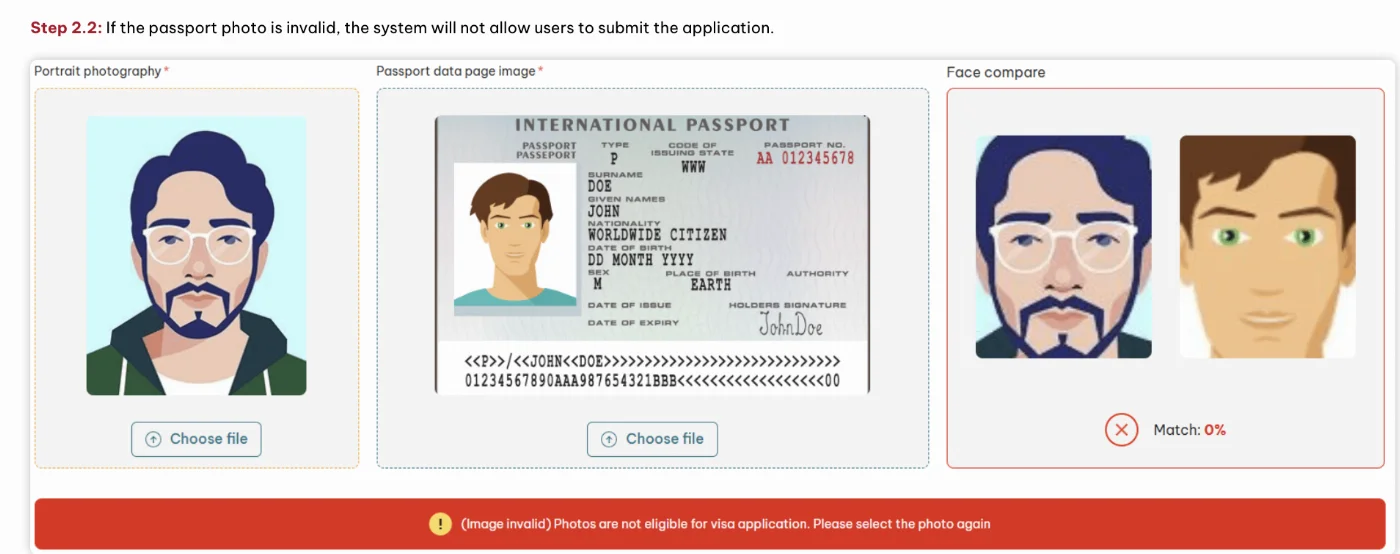
Official Requirement | Your Passport Photo Scan |
|---|---|
File format | JPG / JPEG |
Maximum file size | 2 MB |
Content | Full bio-data page of your passport — no cropped or hidden parts |
Quality | Clear, high-resolution, all text legible |
How to Upload Your Photo and Passport Bio-Page Photo Scan for an E-Visa
Both uploads must be made simultaneously during the online application. The portal will reject files in unsupported formats or above the file size limit. Rename files simply (e.g., photo.jpg) — special characters in file names can cause upload errors.
How to Take a Vietnam Visa Photo at Home
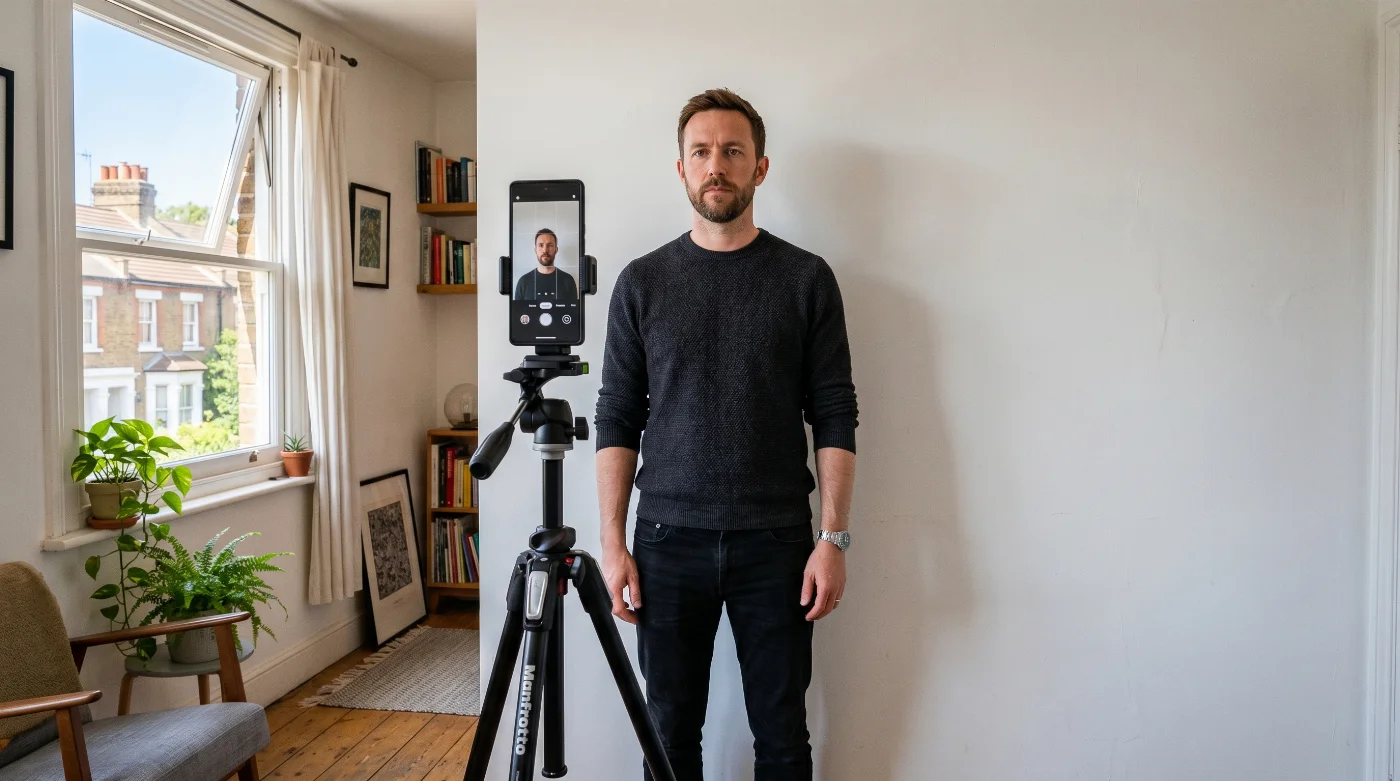
Taking your Vietnam visa photo at home is straightforward with a modern smartphone and good natural light. Follow these steps, then verify your photo meets the technical specifications before uploading.
Set up the right lighting. Position yourself facing a window or use two soft light sources on either side of your face. The illumination should be even across your face — no shadows under the nose or chin, no bright patches on the forehead. Avoid using a direct on-camera flash.
Prepare a plain white background. Stand or sit in front of a plain white wall, or hang a plain white sheet. The background should have no visible patterns, textures, or shadows. Plain white gives the best contrast against your face and is the most reliable choice for the evisa.gov.vn portal.
Remove glasses and head coverings. Take off glasses if it is medically safe to do so. Remove any hat or non-religious head covering. Glasses are one of the most common causes of automated rejection on the Vietnamese e-visa portal due to glare detection.
Use a tripod or ask for assistance. Position the camera at eye level, approximately one to one-and-a-half metres (three to five feet) away. If taking the photo yourself with a front camera, hold the phone at arm's length and ensure it is level with your face to avoid distortion. Having someone else take the photo gives better results.
Frame and position correctly. Your head, shoulders, and upper body should all be visible. Look directly into the lens, keep your head level and straight, and maintain a neutral expression — eyes open, mouth closed.
Turn off all filters and enhancements. Disable any beauty mode, portrait mode, AI enhancement, or skin-smoothing on your camera before taking the shot. These features are prohibited and will cause rejection. Take multiple shots and select the sharpest, most evenly lit one.
Check the technical specifications. Confirm the file is in JPG or JPEG format, resolution is at least 350 DPI, and file size is under 2 MB. If your photo is too large, use a JPEG compression tool at 75–85% quality to bring it under the 2 MB limit without visible quality loss.
Adjust the photo to official requirements. To avoid costly mistakes, use a Vietnamese visa photo tool at PhotoGov.net. The service will automatically resize, crop, frame, and adjust the background to the official Vietnam visa photo requirements. It doesn’t alter facial features, producing a compliance-aligned output. For higher chances of approval, you can add a casual-to-formal clothing adjustment option, or choose Human Verification, where the PhotoGov’s senior compliance specialist manually reviews your photo, providing an acceptance likelihood feedback.
Upload the two files separately. On evisa.gov.vn, upload your portrait photo and your passport bio-page scan as two separate files. Do not submit the same file twice. Preview each upload before finalising the application.
Vietnam Visa Photo Requirements for Children
All applicants, including infants, must submit their own visa photo. Children's photos must meet the same technical specifications as adult photos: 4 × 6 cm (or 472 × 709 pixels), plain white background, full-colour, taken within the last six months. No exceptions are made for children regarding photo size or format.
For infants and very young children, certain practical exceptions apply: the baby's eyes may be partially closed, and a slight mouth opening is generally tolerated. The infant must be alone in the frame — no visible parents' hands, toys, pacifiers, or support structures.
Tips for a successful child's Vietnam visa photo:
Timing: Choose a moment when the child is awake, calm, and alert — typically after a nap or feeding.
Setup: Lay the infant on a plain white surface with soft, indirect light above. For seated older children, use the same guidance as for adults.
Expression: Encourage a calm, open-eyed neutral expression. No pacifiers or toys in the frame.
Background: A plain white cot sheet or a plain white wall is ideal.
Frame: Ensure the child's full face is visible, and no parent's hands, clothing, or accessories appear in the shot.
10 Common Reasons for Vietnam Visa Photo Rejection
Photo errors are among the most common reasons for e-visa application delays. The evisa.gov.vn portal performs automated checks on upload, and embassy staff review printed photos manually. Understanding these failure points allows you to avoid costly delays.
1. Wrong file format: The portal accepts JPG and JPEG only. PNG, PDF, and GIF files are automatically rejected even if the image is otherwise correct.
2. File too large: Portrait photos over 2 MB will fail upload. High-resolution smartphone photos often exceed this limit. Compress the JPEG to 75–85% quality to bring the file under 2 MB.
3. Photo older than six months: The image must reflect your current appearance. Significant changes in appearance since the photo was taken — new haircut, weight change, facial surgery — also require a retake regardless of when the photo was taken.
4. Non-white or patterned background: Backgrounds that are beige, cream, yellow-tinted, grey, or coloured are frequently rejected. Plain white is the safest option. Shadows in the background are also a common cause of rejection.
5. Glasses in the photo: Even prescription glasses with clear lenses fail automated checks due to glare, reflection, shadow over the eyes, or eye obstructions. The automated eye geometry check requires fully visible, unobstructed eyes. Remove glasses for your Vietnam visa photo.
6. Non-neutral facial expression: Smiling, frowning, squinting, or raised eyebrows violate biometric standards. Keep a completely neutral expression with the mouth closed.
7. Blurred or low-resolution image: Images under 472 × 709 pixels or visibly blurred will be rejected. Ensure the camera is in focus and the image is sharp before uploading.
8. Digital retouching or AI enhancement: Filters, skin-smoothing, teeth whitening, background alteration, or AI face-enhancement apps — including built-in smartphone beauty modes — are not permitted. Submit the original, unprocessed photo.
9. Uploading the same file twice: The e-visa portal requires two separate uploads: a portrait photo and a passport bio-page scan. Uploading the same file for both fields is a common mistake that causes rejection.
10. Cropped or partially obscured passport page: The passport scan must show the full bio-data page with all text and the machine-readable zone clearly legible. Cropped, folded, or glare-obscured passport scans are rejected.
What to Do If Your Vietnam Visa Photo Gets Rejected
If the evisa.gov.vn portal rejects your photo on upload, read the rejection message carefully — it usually identifies the specific issue (file format, size, or image quality). Retake the photo, correcting the flagged problem, and re-upload. The portal allows you to retry without restarting the entire application.
If your application has already been submitted and is returned due to a photo issue, you will receive a notification with instructions and a deadline to resubmit. Act immediately — delays can affect your travel dates. For urgent cases, retake the photo the same day and resubmit.
If you arrive at a Vietnamese international airport without a valid visa or with an approval letter that requires a printed photo at immigration, on-site photo services are available at most major airports for approximately USD 2. This is not ideal, but provides a safety net if photos were forgotten or rejected in transit.
Frequently Asked Questions
What Is the Official Vietnam Visa Photo Size?
The official Vietnam visa photo size is 4 × 6 cm. For digital e-visa uploads, the file must be 472 × 709 pixels at 300 DPI or 944 × 1417 pixels at 600 DPI.
How Many Photos Do I Need for a Vietnam E-Visa?
Two separate digital uploads are required for the e-visa on evisa.gov.vn: one portrait photo of the applicant and one scan of the passport bio-data page. These must be uploaded as separate files — submitting the same file twice is a common error that causes rejection.
Can I Use a White Background for My Vietnam Visa Photo?
Yes. A plain white background is required for Vietnam visa photos. It provides the clearest contrast between the face and background and is the most consistently accepted option across both the e-visa portal and embassy submissions. Light grey is technically acceptable for printed embassy photos, but plain white is the safer choice.
Can I Smile in My Vietnam Visa Photo?
No. A neutral expression with both eyes open and mouth closed is required. Smiling — even slightly — changes the geometry of facial features and can cause the automated biometric check to fail. Keep a completely relaxed, natural expression.
Are Glasses Allowed in Vietnam Visa Photos?
No. If you must wear them for medical reasons, the lenses must be clear (no tint), and there must be no glare, reflections, or shadow over the eyes. In practice, even compliant glasses frequently trigger automated rejections on the evisa.gov.vn portal due to glare detection algorithms. Remove glasses wherever medically safe.
Can I Use My UK or European Passport Photo for a Vietnam Visa?
No. UK and European passport photos use the ICAO 35 × 45 mm portrait format. Vietnam requires a 4 × 6 cm format. The dimensions are different, and a photo taken for a UK or German passport will not satisfy Vietnam's size requirement. Prepare a separate photo set specifically for your Vietnam visa application.
How Do I Compress My Photo Under 2 MB?
Use JPEG compression at 75–85% quality in an image editor such as Photoshop, GIMP, Preview on Mac, or Paint on Windows. Alternatively, free online tools such as PhotoGov automatically adjust your original photo size to the Vietnam visa photo requirements, no manual adjustments needed. Just upload your recent selfie, and download a submission-ready digital photo.
Do I Need a Printed Photo for the Vietnam E-Visa?
No. For the standard e-visa through evisa.gov.vn, only digital uploads are required. Printed photos are needed only for embassy visa applications and for visa-on-arrival processing at the airport immigration counter. One exception: Chinese nationals applying for a visa on arrival must bring two printed 4 × 6 cm photographs.
How Recent Does the Vietnam Visa Photo Need to Be?
The photo must be taken within the last six months. It must also accurately reflect your current appearance. If you have undergone a significant change in appearance — such as a new hairstyle, significant weight change, or facial surgery — a new photo is required even if the original was taken within the six-month window.
Official Government Sources
Vietnam Visa Photo Requirements: Ministry of Public Security Immigration Department
Vietnam National Electronic Visa Portal: evisa.gov.vn
Vietnam Immigration Department: xuatnhapcanh.gov.vn
Was this helpful?
26 found this helpful
Top expert
Based on official government sources
Helpful votes: 26
Was this helpful?
26 found this helpful
Service provided by Y VISION TECHNOLOGIES LLP · Stoney Works 8 Stoney Lane, London, England, SE19 3BD · Terms · Refund policy · Contact
We value your Privacy
We use cookies to enhance your browsing experience, serve personalized ads or content. By clicking “Accept All”, you consent to our use of cookies.