Create an Emirates ID Photo Online for Free
Create an Emirates ID photo, ready for ICP (former ICA) approval. Just upload your portrait to our Emirates ID photo checker, and it will convert it into an official photo for Emirates ID.
No studio · No app · 30 seconds
We value your Privacy
We use cookies to enhance your browsing experience, serve personalized ads or content. By clicking “Accept All”, you consent to our use of cookies.
PhotoGov is an independent service. We are not affiliated with any government, embassy, or consulate. All information on this website is based on official government requirements and verified primary sources. Final acceptance is determined solely by the issuing authority.
Make an Emirates ID Photo Online
Create an Emirates ID photo from the comfort of your home or office with our UAE ID photo checker. Follow the on-screen instructions below, and in just a few clicks, you'll get a ready-to-download digital image.
Get photo for: UAE ID card online 35x45 mm ica.gov.ae
Instructions:
How to take a good photo?


1/7 Image format
Photo must be in color. Taken within the last 6 months.
How to take a good photo?
1/7 Image format
Photo must be in color. Taken within the last 6 months.
ID & Passport Photo Tool. Your personal data is processed in accordance with security and privacy standards.
If you need assistance, don't hesitate to contact our Support team, which is always there to help.
How Our Emirates ID Photo Checker Works
Our free Emirates ID photo checker automatically converts your selfie's size, head proportions, framing, and background to the official Emirates ID photo standards. Choose additional services — casual-to-formal clothes change, human verification by our expert, or 9 extra clothing variations. Download the final photo in digital or printable format. Entry visas use their own specification, and our UAE visa photo requirements guide explains the size and background rules that apply.
Photo Upload
Take a selfie and upload it to PhotoGov
Service Selection
Add Human Verification or select other services
Processing
Wait while automatic adjustments are applied
Download
Get an Emirates ID photo size online, free
Written by Olia Potiagaeva, Managing Editor Reviewed by the PhotoGov Editorial Team★ 4.8 / 5.0 GoogleChecked against official government requirements
On THIS PAGE:
- Make an Emirates ID Photo Online
- How Our Emirates ID Photo Checker Works
- What is an Emirates ID photo?
- Your Final Emirates ID Photo from PhotoGov
- Emirates ID Photos That Pass the Checks
- Emirates ID Photos That Don’t Pass the Checks
- Why Use the PhotoGov Service
- PhotoGov — Service Aligned With the ICP Rules for ID Photos
- Frequently Asked Questions
- Official Government Sources
- Other Documents — UAE ID Photos
What is an Emirates ID photo?
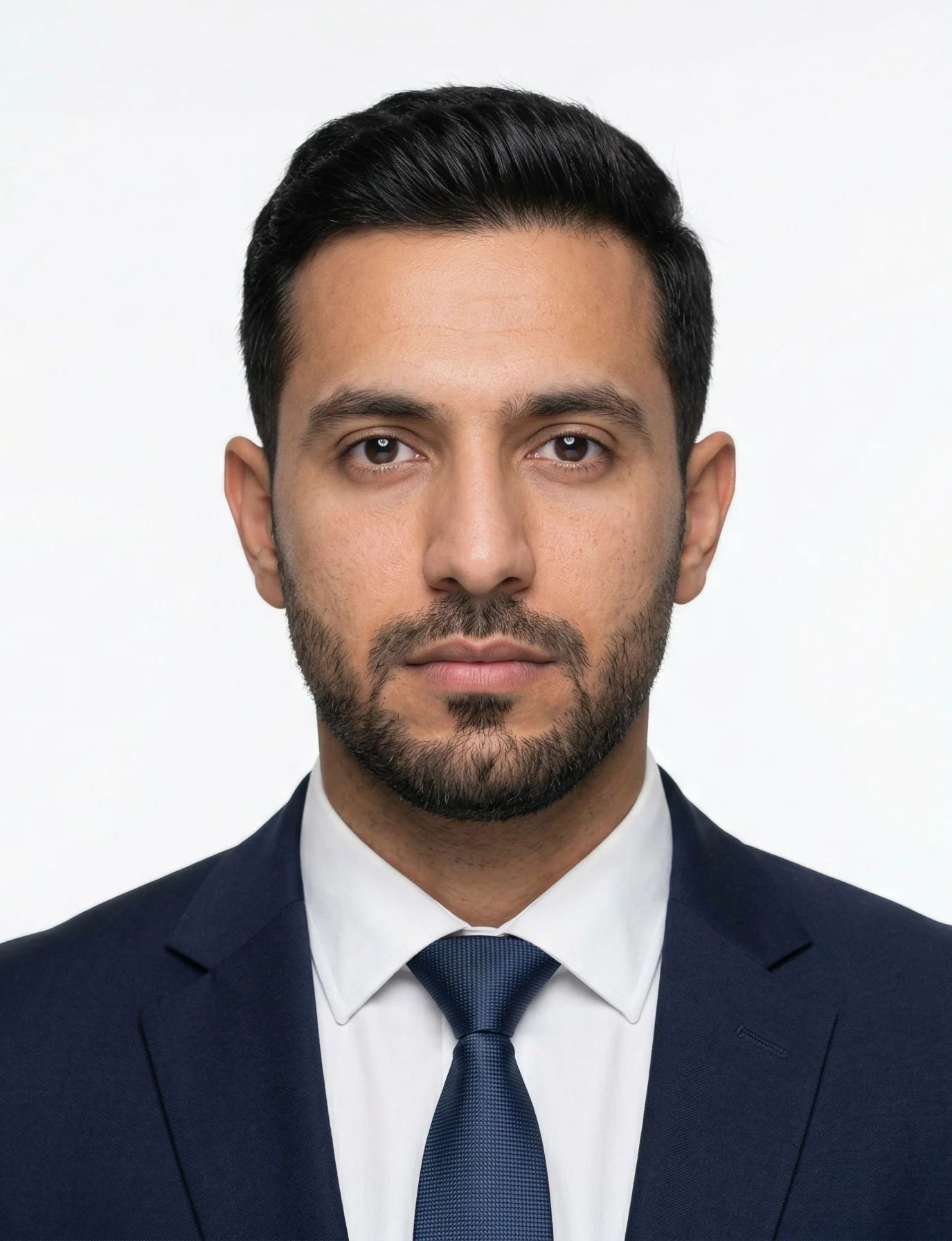
The UAE ID Card Photo editor crops your image to the selected format and positions the head within the frame. It sizes the picture you upload without changing your facial features, and the built-in photo checker tests the file against the selected format. The selected format is 826 x 945 pixels. Before you submit the photo, check the photo instructions for the application you are completing.
The official photo format required for Emirates ID cards in the UAE.
Automatically prepared by PhotoGov as a correctly sized, ICP rules-aligned, application‑ready file.
Suitable for digital submission and professional printing, depending on the service channel.
Your Final Emirates ID Photo from PhotoGov
PhotoGov automatically applies all official requirements to your original photo. The final image is ready for submission and doesn’t require any adjustments from you. Below are the key technical parameters of your final Emirates ID photo from PhotoGov.
For a full overview of official standards, please see our Emirates ID Photo Requirements Guide.
Parameter | Your Final Photo |
Photo size | 826 x 945 pixels / 35 × 45 mm |
Head size | 70-80% of the image |
Background | Plain, light-colored |
File format | JPEG / Printable PDF |
Resolution | High‑resolution digital file at 600 DPI |
Head positioning | Automatically centered |
Colour | Full colour |
Face visibility | Fully visible, no retouching |
Submission | Ready for online upload via UAE e-Services / Printable for in-person applications |
Your photo is processed in a private session in a secure environment. Facial features are never altered — the tool only resizes, crops, and replaces the background. If you want extra reassurance, optional Human Verification is available at checkout.
Emirates ID Photos That Pass the Checks
Emirates ID Photos That Don’t Pass the Checks
Why Use the PhotoGov Service
Convenience
Photos accepted for online and in-person submissions
Compliance-Aligned Output
Designed to meet the current ICP guidelines
Availability
No registration, installation, or studio visits
Extra Assurance
Optional Human Verification by an in-house compliance specialist
Secure Processing
Your data is secure and not transferred to third parties
PhotoGov — Service Aligned With the ICP Rules for ID Photos
PhotoGov is a technology platform powered by advanced software that analyzes each uploaded image against the official requirements stored in the system. The database is continuously updated, and our ID photo specialists, together with compliance experts, review all standards manually every eight weeks. The photo you create with our Emirates ID photo checker meets all essential criteria — correct size, framing, head position, and lighting.
PhotoGov also allows you to adjust clothing in the image without altering facial features. Within 30 seconds, you receive a compliant photograph ready for submission to your ID card.
Our service is built to meet all current standards set by the Federal Authority for Identity, Citizenship, Customs, and Port Security. Please note that final acceptance of your photo remains at the discretion of the ICP. For the travel document itself, the UAE passport photo requirements 2026 guide sets out size, background, and how recent the photo must be.
The PhotoGov users may opt for Human Verification — a detailed manual inspection performed by an experienced compliance expert. This additional review provides maximum accuracy and is particularly useful for applications that require fast processing.
For other Emirates ID photo services, see our dedicated tools: UAE Visa Photo Tool, UAE Passport Photo Maker.
Frequently Asked Questions
The PhotoGov passport photo maker is an online tool that lets you upload your picture and automatically crop it to the Emirates ID photo size for free. All you need is a selfie taken in good light, against a light, plain background, with a neutral expression, looking directly at the camera. Upload it to PhotoGov, choose “Emirates ID” as your document type, and get your submission-ready photo that is technically compliant with all ICP requirements.
PhotoGov is rated 4.7 out of 5 based on 2,500+ Google reviews and adjusts the background and size for your Emirates ID photo automatically. It is an online tool that is available on any OS, works on your desktop or smartphone browser, and doesn't need installation or registration.
Specifically for Emirates ID photos, PhotoGov automatically converts your uploaded image to meet ICP requirements: it crops the photo to the exact 35 × 45 mm dimensions, replaces any coloured or messy background with a clean, plain white backdrop, and ensures the file is saved at the required resolution. The entire process takes under 30 seconds, and you can download the print-ready JPEG instantly or save it for later upload to the ICP portal.
Use a reliable passport photo maker to edit and compress your Emirates ID photo to the correct size online for free before submitting your application. The final image must follow the key ICP guidelines: 826 x 945 pixels 935 × 45 mm) size, plain white background, head centered, and taking 70-80% of the image. Simply upload your photo, wait while the system processes it, and download the result in a digital format for a direct upload to the ICP portal.
Use a reliable online Emirates ID photo checker — it is the easiest way to crop, center, and resize an Emirates ID photo online for free, for immediate download.
Crop: Upload your selfie, and an Emirates ID photo checker will automatically detect your face proportions, trimming the image to the exact 35 × 45 mm frame required by the ICP. No manual adjustments needed — the tool removes excess background while keeping your head and shoulders in the required crop range.
Center: A service positions your face dead-center using biometric markers. It aligns your eyes horizontally, places them at the correct vertical height (approximately 31–36 mm from the bottom edge), and ensures equal white space on both sides so your face occupies exactly 70–80% of the photo height for ICAO compliance.
Resize: A reliable photo checker automatically scales your image to 826 x 945-pixel size. It compresses the file, maintaining 600 DPI resolution, delivering an ICP-compliant JPEG, available for immediate download.
PhotoGov is a free online service that can automatically change your photo background to pure white and resize it for Emirates ID submission. Upload a selfie with any background — the service removes the original backdrop, replaces it with mandatory white, adjusts the image to exact 35 × 45 mm dimensions, and ensures 600 DPI resolution. You get a compliant JPEG ready for immediate ICP portal upload or printing, with no manual editing or software installation required.
Use a free online size editor that supports Emirates ID photo requirements. Take a clear headshot with your phone against a neutral wall, then upload it to the tool. The automated system will remove the existing background, replace it with the required plain white, crop the image to 35 × 45 mm, and align your face according to ICAO-style biometric guidelines, without retouching your features. Once processing is complete, save the final high‑resolution image to your device.
For studio-quality printing, open the downloaded file and print it on 4×6-inch (10×15 cm) glossy photo paper using your home printer’s highest quality setting (600 DPI or the maximum available). The prepared file will already contain the correct dimensions and resolution, so you get a sharp, compliant result without visiting a studio or using professional equipment.
PhotoGov is a free online Emirates ID photo maker that automatically сhecks and adjusts your photo to meet ICP specifications. The tool scans your uploaded selfie to confirm the image matches the required 35 × 45 mm dimensions, validates that your face occupies 70–80% of the frame height, and checks background uniformity — all without manual input. If any element falls outside acceptable parameters, the system corrects it instantly and flags potential compliance issues before you download.
You can generate a passport‑style Emirates ID photo online for free by using a dedicated Emirates ID photo editor.
Step 1: Upload Your Selfie
Take a clear headshot with your phone and upload it to an online Emirates ID photo tool that accepts images with any background colour or lighting. The system will analyse your face and prepare it for conversion.
Step 2: Automatic Processing
The editor detects your facial landmarks, crops the image to 35 × 45 mm, removes the original background and replaces it with plain white, centres your face with correct eye alignment, and scales the file to about 600 DPI in line with Emirates ID photo guidelines.
Step 3: Download
Download the processed JPEG file with the updated size and background. The image is ready for online submission with your Emirates ID request or for printing on photo paper if a hard copy is required.
You can easily create a compliant Emirates ID photo online for free without going to a studio. Browse the PhotoGov Emirates ID photo maker, upload your selfie taken in good light, full frontal view, with a neutral facial expression. Select add-on options like the Formal clothes match or Human Verification, wait about 30 seconds while the tool processes your original image, and download an ICP-compliant, submission-ready photo in a digital or printable format.
Yes, depending on your location: our ICP photo size maker gives two free ID photos per day, and in the UAE, a digital photo costs AED 16. We also offer paid services — Human Verification, when our compliance specialist analyses the final photo and provides their feedback on the acceptance likeness; and Formal Clothing Match, when your daily clothes are changed to a more official, formal one, increasing the chances of approval. Both services are very affordable and suit time-sensitive or high-priority applications.
Yes. The PhotoGov passport photo maker offers a Human Verification service to all users. For a small fee, your final photo for Emirates ID is checked by our senior compliance specialist, who carefully reviews the technical and biometric parameters and provides expert feedback on whether the photograph is likely to pass the official compliance check.
Yes. The final Emirates ID photo that you receive at PhotoGov can be directly used for an online application as it adheres to all official ICP parameters for digital ID photos.
At PhotoGov, you can retake your photo as many times as needed, free of charge. For an extra layer of assurance, we recommend adding the Human Verification service: for a small fee, our compliance expert reviews your final photo and provides feedback on its technical and compliance parameters, helping you avoid further rejections.
A smartphone is enough. Moreover, it doesn’t need to be of a recent model. Take a selfie according to our guidelines, upload it to our Emirates ID photo checker, and it will automatically turn it into an ICP photo size. The whole process takes under 30 seconds; you get two free ID photos per day, depending on your location, and in the UAE a digital photo costs AED 16.
Yes. Your personal data is 100% safe when you use the PhotoGov passport photo maker. We use the same security protocols as modern banking systems. Your personal data is never transferred to third parties or AI agents, and is deleted after the image has been processed. Learn more about our Privacy Policy.
Yes. Open photogov.net in the phone browser, upload a picture and download the finished file. No app is required; the PhotoGov app for iOS and Android does the same job if you prefer it.
No. PhotoGov applies the selected format automatically: the tool sets the frame and the head position for you. Before you submit the photo, check the photo instructions for the application you are completing.
Official Government Sources
Official UAE ID Photo Requirements: Federal Authority for Identity, Citizenship, Customs, and Port Security (ICP)
Online UAE ID Application: ICP Interactive Services
In-Person UAE ID Application: Customer Happiness Centers
Biometric Regulations for International ID Documents: International Civil Aviation Organization (ICAO) Document 9303
Other Documents — UAE ID Photos
United Arab Emirates
10 doc.
- Emirates ID / residence visa for UAE ICP
- UAE ID card 4x6 cm
- UAE ID card online 35x45 mm ica.gov.ae
- UAE Register Arrivals 600x600 pixels
- UAE Visa offline 43x55 mm
- UAE Visa online Emirates.com 300x369 pixels
- UAE driving license 4x6 cm
- UAE family book 35x45 mm
- UAE passport 4x6 cm
- UAE residence 4x6 cm
Service provided by Y VISION TECHNOLOGIES LLP · Stoney Works 8 Stoney Lane, London, England, SE19 3BD · Terms · Refund policy · Contact
We value your Privacy
We use cookies to enhance your browsing experience, serve personalized ads or content. By clicking “Accept All”, you consent to our use of cookies.