Australian Passport Photo Requirements 101: Updated 2026 Guide
Table of contents:
- 12 Essential Australian Passport Photo Requirements: Checklist
- Acceptable Australian Passport Photo Examples
- Unacceptable Australian Passport Photo Examples
- Printed vs Digital Australian Passport Photo Explained
- Where to Take an ID Photo in Australia?
- Australian Passport Photo Services: Overview
- How to Take an Australian Passport Photo at Home
- Australian Passport Photo Requirements for Children
- Common Reasons for Australian Passport Photo Rejection
- Frequently Asked Questions
- Other Pages — Australian ID Photos
- Official Government Documentation Sources
Australian Passport Photo Requirements 101: Updated 2026 Guide
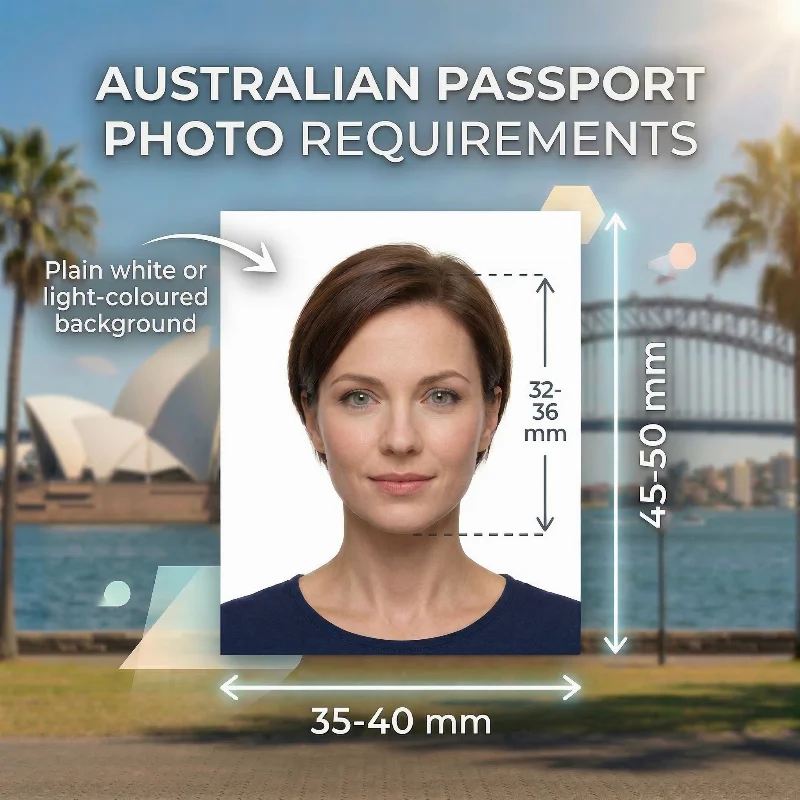
Australian passport photo requirements are strict, and a well‑taken photo is one of the most important parts of your application. Your picture must follow all official rules: 35-40 mm wide and 45-50 mm high, a plain white or light‑coloured background, and sharp, high‑quality glossy prints that clearly show your face. Even the smallest issues with lighting, focus, or framing can delay processing or lead to rejection.
This 2026 Guide focuses on the key checks you should make before you lodge your application. If you follow these rules and use a reliable passport photo tool such as PhotoGov, you can quickly create a submission‑ready image that meets all Australian passport standards.
12 Essential Australian Passport Photo Requirements: Checklist
The Australian passport photo requirements are set by the Department of Foreign Affairs and Trade (DFAT) and comply with International Civil Aviation Organization (ICAO) standards. Below is a list of key rules that every applicant must follow.
Requirement | Details |
1. Number of Photos | Two identical pictures are required for a passport application processed in Australia or abroad. Each copy must match in colour, contrast, and facial proportions. |
2. Recency | The image must be taken within the last six months and accurately represent the applicant's current appearance, including hairstyle, facial hair, and any distinguishing features. Portraits that appear outdated will be rejected. |
3. Photo Size | 35-40 mm wide and 45-50 mm high. The head height — from chin to crown — must measure 32-36 mm. These requirements are the same for printed pictures submitted in person with an application form and for digital copies submitted online. Australian passport photo size in cm is 3.5-4.0 cm wide and 4.5-5.0 cm high. Australian passport photo size in inches is 1.38-1.57 × 1.77-1.97 inches. |
4. Colour | A coloured image is required. It must be of appropriate brightness, accurately reflecting the applicant's natural skin tone without filters, colour grading, or artificial enhancements. Overexposed or underexposed pictures are not accepted, and harsh contrast that distorts facial features is grounds for rejection. |
5. Background | White or light-coloured. The background must be free from shadows, patterns, objects, texture, or colour variation. Any uneven surface, folds in the backdrop, or visible gradients will cause the ID picture to be rejected. |
6. Image Quality | Only pictures with proper brightness and contrast are accepted. Strong highlights, visible glare, shadows under the chin or around the facial outline, and reflections on the skin are not permitted. Indoor lighting must be adjusted to avoid colour casts (yellow, blue, or green tone). Images cannot be digitally altered (for example, to remove a red-eye effect) to prevent identity fraud. |
7. Lighting | Natural lighting that provides appropriate illumination across the face and background is required. |
8. Positioning and Framing | The face and shoulders must be centred and positioned in front of the camera. The full face, including the outer edges of the cheeks and the full jawline, must be visible. The applicant must maintain a straight posture without tilting or rotating the head. The face must occupy approximately 70-80% of the entire frame, and the full crown must be visible. |
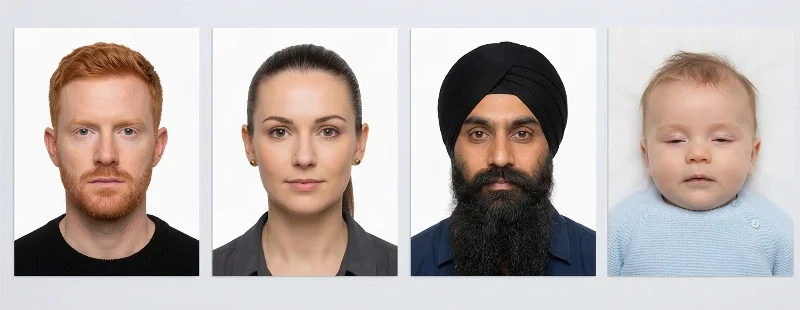
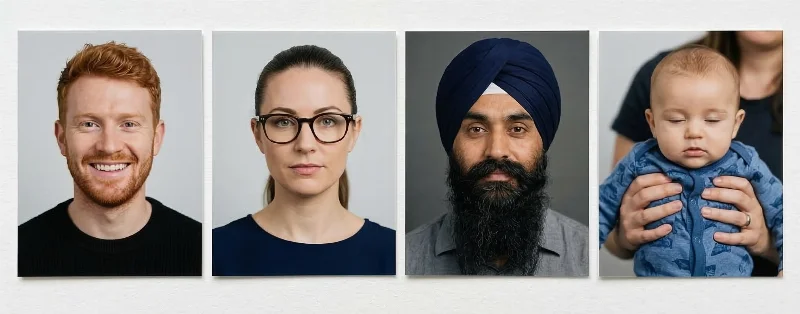
9. Facial Expression | A neutral expression is required: eyes open, mouth closed, and no smiling, frowning, or raised eyebrows. DFAT does not accept expressive, playful, or stylised portraits. The gaze must be directly into the camera lens, without squinting or lowering the eyelids. |
10. Attire, Head Coverings, and Accessories | Everyday clothing is acceptable. Uniforms and camouflage attire must be avoided. Head coverings are permitted only for medical and religious reasons, and only if they do not cast shadows or obscure the eyebrows, eyes, cheeks, jawline, or forehead. All medical accessories must be supported by a signed medical certificate and a signed B11 Form explaining the reasons for their use. If an applicant wears a hearing aid, it can remain in the picture, provided that it doesn't obscure the features. |
11. Glasses | DFAT doesn't allow applicants to wear glasses in official ID pictures. Glasses are permitted only for medical reasons, such as recent eye surgery or a vision impairment — in this case, a signed certificate from a medical provider must be submitted with an application. Sunglasses, tinted lenses, and thick frames are not acceptable under any circumstances. |
12. Print and Digital Quality | Only good-quality colour prints on professional glossy photo paper are permitted. Prints on matte paper are not accepted. Digital files for online lodgement must be high-resolution (600 DPI), 826 × 1062 pixels, sharp, with accurate colour rendering, and free of compression artefacts. |
Acceptable Australian Passport Photo Examples
Unacceptable Australian Passport Photo Examples
Printed vs Digital Australian Passport Photo Explained
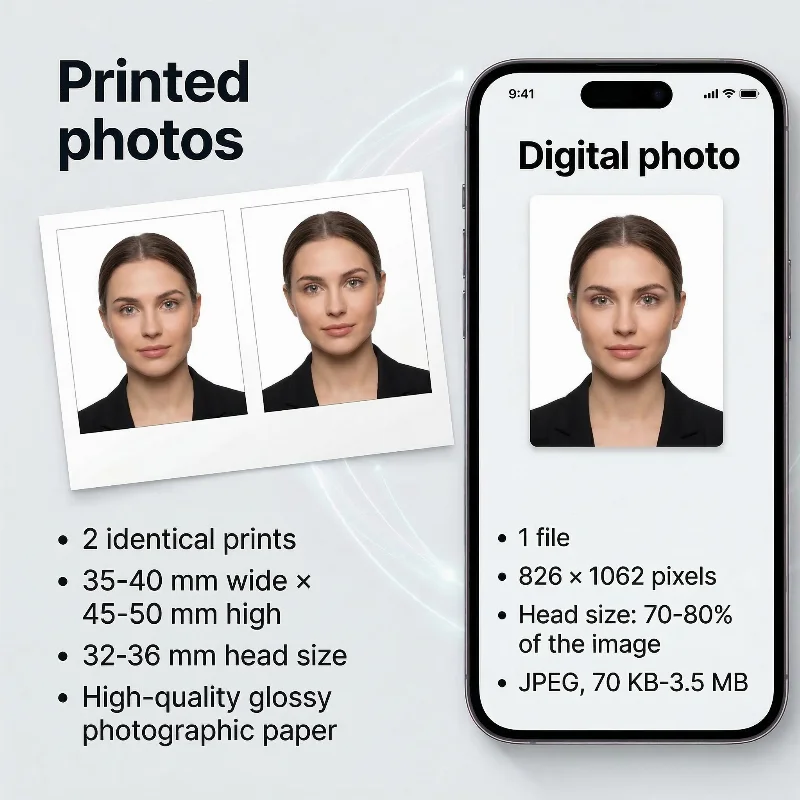
For Australian passports, the official application accepts only printed photos, while digital files are used for online visa or citizenship applications and for ordering compliant prints.
For a passport application, you must provide two identical colour prints measuring 35-40 mm wide and 45-50 mm high on high‑quality glossy photo paper, with your face from chin to crown measuring 32-36 mm. These prints must be recent, sharp, on a plain light background, with a neutral expression, a closed mouth, eyes open and clearly visible, and without digital retouching or filters.
Specification | Printed | Digital |
Purpose | Submit the passport application to the Australian Passport Office | Upload to online visa/citizenship portals; order compliant prints for passport applications. |
Quantity | 2 identical prints | 1 file |
Dimensions | 35-40 mm wide × 45-50 mm high; head 32-36 mm from chin to crown | 826 × 1062 pixels; head takes 70-80% of the image |
Format | High‑quality glossy photographic paper | JPEG, 70 KB-3.5 MB |
Submission | Lodge in person or by mail | Use as a digital file for professional printing in a photo shop |
Where to Take an ID Photo in Australia?
You can take Australian ID pictures in a wide range of everyday locations — from office supply chains to professional studios. Each option has its pros and cons. Here is a detailed breakdown:
Retail Photo and Office Stores. Large national chains such as Officeworks and Harvey Norman PhotoCentre offer in-store photography services and give good results with a high approval rate.
Post Office Branches. Many Australia Post outlets offer photo services on-site. For applicants lodging documents through the post office, this becomes a simple two-in-one visit: you take the picture and submit the application at the same time.
Self-Service Photo Stations. Photo booths — such as PhotoMe — can be found in major shopping centres, transport hubs, and busy retail precincts. We don't recommend taking your ID, visa, or passport photos in the booths as they are often rejected due to poor quality.
Professional Studios and Camera Retailers. Specialised studios and professional photographers — along with camera stores such as Camera House — are a reliable choice for applicants who want the high-quality result with proper lighting, correct background tone, and precise biometric framing. These locations consistently follow the DFAT and ICAO requirements, although the service may take time and require a higher budget.
Local Pharmacies. Small neighbourhood pharmacies and local chemists often provide quick photo services. Popular options include selected Chemist Warehouse and Priceline Pharmacy branches that have photo counters or kiosk setups. Quality varies by location, but in general, this is a convenient option.
Online Photo-Making Tools. A reliable passport photo maker like PhotoGov allows you to create an Australian passport picture online without visiting any physical location. The system applies the correct 35-40 × 45-50 mm layout, adjusts face scale and background, and produces a compliant digital image or a printable PDF crop page in under 30 seconds — a fast and cost-efficient alternative to in-store services.
Australian Passport Photo Services: Overview
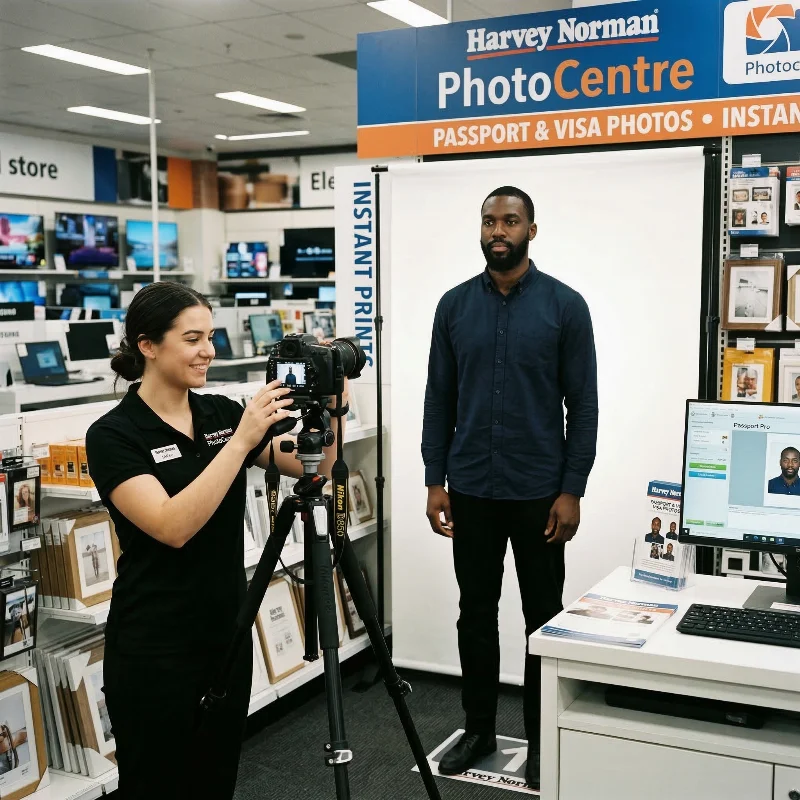
Service | Time to Get an Australian ID Picture | Pricing | Chance of Approval |
Retail Photo & Office Stores (Officeworks, Harvey Norman PhotoCentre) | 10-20 minutes | AUD 15-20 | High-moderate |
Australia Post Locations | 10-20 minutes | AUD 16.95-20 | High-moderate |
Self-Service Photo Stations (PhotoMe booths) | 5-10 minutes | AUD 12-15 | Low |
Professional Studios & Camera Retailers (Camera House, independent studios) | 1 hour to 1-2 days | AUD 25-45+ | High |
Local Pharmacies (Chemist Warehouse, Priceline Pharmacy) | 10-20 minutes | AUD 15-20 | Moderate |
PhotoGov Online ID Photo Tool | Under 30 seconds | Free | High |
How to Take an Australian Passport Photo at Home
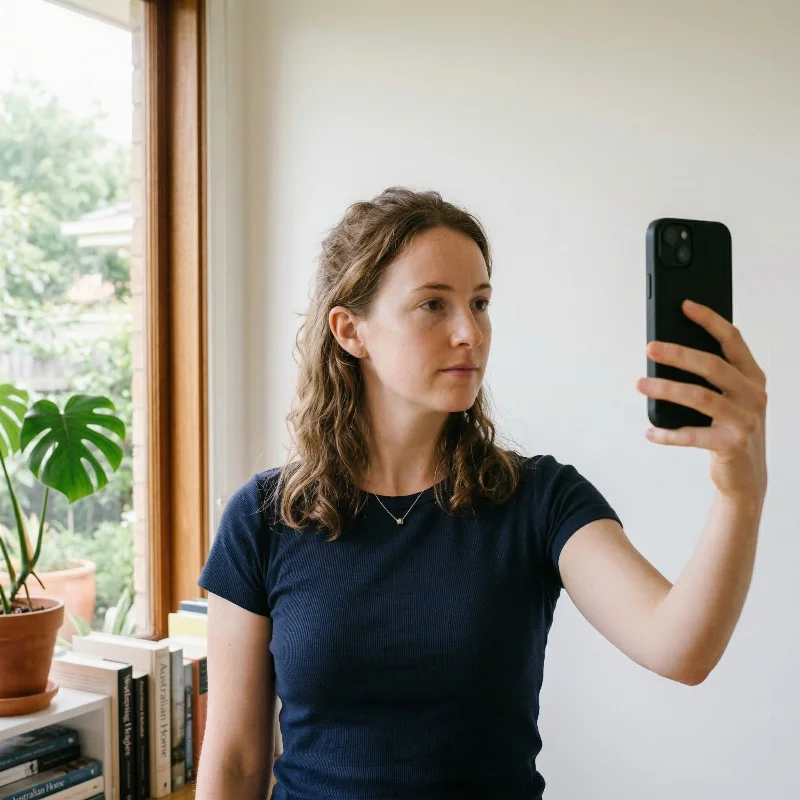
Creating an Australia passport photo size 35-40×45-50 mm at home is simple when using an online service like PhotoGov. A clear portrait taken on your phone is enough to begin with, and the platform handles all the necessary adjustments automatically. You avoid the need for a studio appointment, and the final result matches all of the official DFAT standards. Follow the short set of selfie tips below — and let our service handle the formatting, dimensions, and overall layout for you.
Choose a bright area in your home — soft daylight near a window works best. The portrait must be taken in soft, face-uniform lighting, so the features appear clear and evenly illuminated.
Stand against a plain wall that is free of shadows, textures, or patterns.
Hold your phone about 40-50 cm (16-20 in) away from your face when using the front camera, or roughly 1 m (3 ft) if you’re using the rear phone or a digital camera (in this case, placing your device on a tripod works best).
Look directly at the lens, keep your head straight, and maintain a natural, neutral expression. Take several shots.
Select the clearest portrait and upload it to PhotoGov. Pick Australia as your document and photo type, and continue through the on-screen steps.
If your passport application is time-sensitive or of high priority, add a Human Verification service — our senior compliance specialist will provide feedback on the photo’s quality and evaluate its acceptance likeness.
After the image has been processed, download your DFAT-aligned image as a PDF layout ready for printing or as a digital file.
You are ready for submission!
Australian Passport Photo Requirements for Children
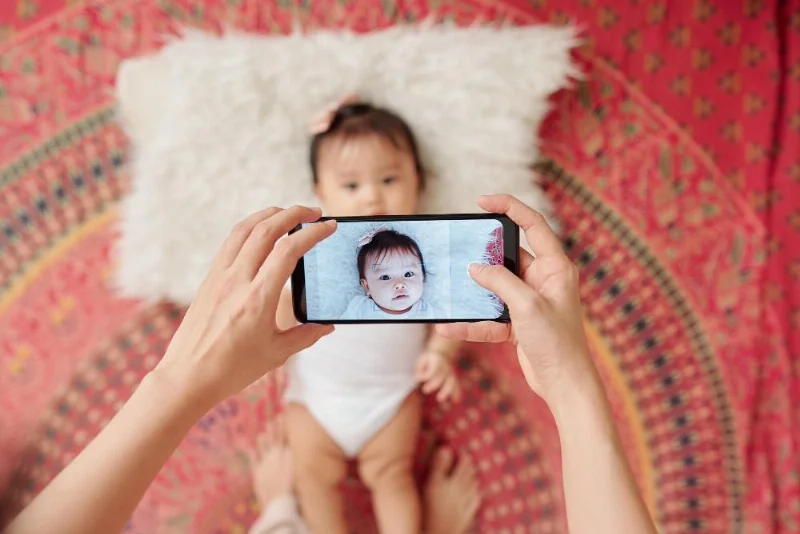
Australian child passport photos follow the same DFAT technical standards as adult photos for size, composition, background, and image quality.
- The image must be 35 × 45 mm, with the child’s head measuring about 32-36 mm from chin to crown and positioned centrally in the frame
- The background must be plain and light (usually white or very light grey), evenly lit, and free from patterns or shadows
- The photo must be in colour, sharply focused, and show natural skin tones with no beauty filters or heavy retouching.
There are a few relaxations for very young children. For infants and toddlers, authorities accept that the mouth may be slightly open and eye contact may not be perfect, yet no other person, hand, or support can appear in the frame, and the child’s face still has to be clearly recognisable.
Today, with convenient online tools, you can create your child’s passport photo from the comfort of your home. An iPhone, or any other smartphone, allows you to capture a clear picture without visiting a studio, especially when you prepare the setup in advance.
Setting
Uniform lighting from a natural source, plain background.
Position
A newborn may lie on a blanket; older children — sit or stand.
Expression
Neutral facial expression, no crying or laughing.
Frame
No toys, parents’ hands, or other objects in the frame.
Common Reasons for Australian Passport Photo Rejection
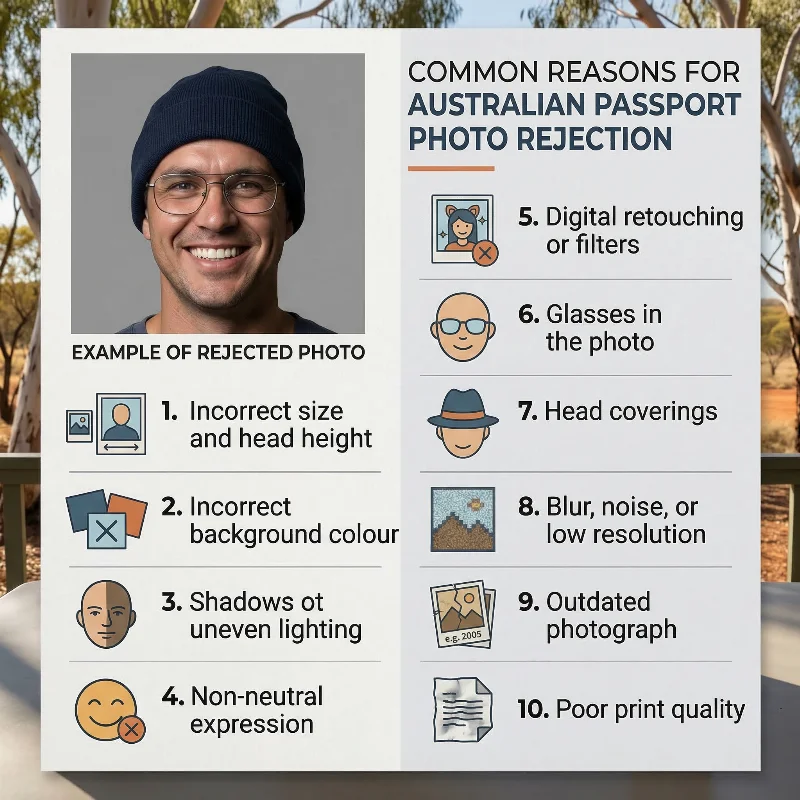
Australian passport applications are often delayed because of avoidable photo mistakes. The Australian Passport Office most frequently flags the following 10 issues:
- Incorrect size and head height: Printed photos not within the required 35-40 mm × 45-50 mm range, or head size outside the 32-36 mm chin‑to‑crown limits.
- Incorrect background colour: Background that is dark, coloured, patterned, textured, or not evenly lit instead of a clean, light backdrop.
- Outdated photos: Images taken longer than 6 months ago or no longer matching your current appearance (for example, after major changes to facial hair or weight).
- Shadows or uneven lighting: Visible shadows on the face, neck, or background, or strong highlights that wash out features.
- Wrong facial expression: Smiling broadly, frowning, tilting the head, or not looking straight at the camera instead of a neutral, front‑facing pose.
- Digital retouching and filters: Beauty modes, skin‑smoothing, colour filters, red‑eye correction, or any edits that alter natural appearance.
- Blur, noise, or low resolution: Grainy, pixelated, out‑of‑focus, or low‑quality images that don’t show clear facial detail.
- Glasses or other obstructions on the face: Hair covering eyes or eyebrows, or large jewellery hiding facial contours. Any glasses or tinted lenses.
- Head coverings and accessories: Fashion hats, caps, or non‑religious/non‑medical headwear that conceals the hairline or casts shadows.
- Poor print quality: Home inkjet prints, streaks, colour casts, creases, or damage to the photo surface.
Using PhotoGov reduces the risk of rejection by automatically checking your image against Australian passport photo rules before generating the final file and printable photos.
What to Do if Your Australian Passport Photo is Rejected
If the Australian Passport Office rejects your photo, you will receive notification via email explaining the specific reason.
For online applications, you will get an email with instructions to upload a new photo directly through the portal—no need to mail physical copies.
For paper applications, you must submit new physical photos that address the identified issues. Processing will resume once compliant photos are received.
No additional application fee is required for photo resubmission unless your application has expired.
If your Australian passport photo taken with PhotoGov is rejected by the Australian Passport Office, simply contact our support team within 30 days. We will provide free re-processing to correct the issue or offer a full refund. This guarantee covers technical compliance with all Australian Passport Office specifications, including size, background, lighting, and resolution requirements — if your original photo has met the necessary requirements.
Frequently Asked Questions
What Are the Current Australian Passport Photo Requirements for Adults Applying for a New Passport?
- Adult applicants must submit two identical, good‑quality colour photos printed on glossy photographic paper, taken within the last six months.
- Each photo must be 35-40 mm wide and 45-50 mm high, with the face from chin to crown measuring 32-36 mm, centred and facing the camera directly.
- The image must be in sharp focus, with uniform lighting, a plain white or light grey background, neutral expression, closed mouth, and eyes open and clearly visible.
What is Australian Passport Photo Size?
The official Australian passport photo size is 35-40 mm wide and 45-50 mm high, with a face height between 32 and 36 mm. Even if your selfie is of a different size, our online platform will adjust it to the exact dimensions required by DFAT.
Where Can I Download a Checklist of Australian Passport Photo Requirements to Avoid My Application Being Rejected?
Here is an official checklist published by the Australian Passport Office. It summarises key requirements — size, head position, background, lighting, expression, glasses, head coverings, and print quality.
Use the Australia passport photo maker PhotoGov to check and automatically adjust your photo to official DFAT requirements. Upload your picture, and the system checks it against Australian passport rules for size, head height, background, and framing. If adjustments are needed, it automatically crops the image, fixes the background, and prepares a 35-40 mm × 45-50 mm photo (or an 826 × 1062 px digital file) that meets all DFAT technical specifications.
What Are the Australian Passport Photo Size and Dimension Requirements for a Successful Application?
Australian passport photos must measure between 35 mm and 40 mm in width and between 45 mm and 50 mm in height. Within this frame, the visible face (chin to crown) must be between 32 mm and 36 mm so that the head occupies about 70-80% of the image. You must provide two photos that match exactly in size, framing, and exposure.
What Clothing and Background Are Required to Meet Australian Passport Photo Guidelines?
You should wear everyday clothing in contrast with the light background, avoiding uniforms, camouflage patterns, or high‑visibility workwear.
The background must be plain white or light grey, evenly lit, with no patterns, textures, or visible edges, and no shadows falling behind the head or on the wall.
Shoulders and upper chest must be visible, and the photo must show a full‑face, front‑on view.
Which Online Passport Photo Service Can Ensure My Images Meet Australian Passport Photo Requirements?
The PhotoGov Australian passport photo maker utilizes an official biometric Australian passport photo template for size, background, and framing specifications. Here is a step-by-step guide for getting a technically compliant, application-ready photo:
Step 1. Take a photo with your phone against a light background
Step 2. Upload your selfie to PhotoGov, selecting “Australia passport”
Step 3. The system automatically adjusts crop, proportions, head height, and background to match the required 35-40 × 45-50 mm format.
Step 4. The processed image can be downloaded as a digital file or a print‑ready sheet.
Where Can I Get Professional Photos That Comply With Australian Passport Photo Requirements Near Me?
You can have Australian passport‑compliant photos taken at many Australia Post outlets, camera shops, and pharmacy photo counters that explicitly offer Australian passport photo services. These providers are familiar with Australian Passport Office standards and normally print your images on glossy photographic paper in the correct size.
If you prefer not to travel or queue, you can create an Australian passport‑style photo at home with PhotoGov: take a photo against a light background, upload it to the platform, select “Australia passport”, and download a file that’s already sized and framed for printing at any local lab.
How Can I Check if My Digital Photo Meets Australian Passport Photo Requirements Before I Submit My Application Online?
The safest approach is to run your picture through a reputable online tool that uses the Australian passport template to verify size, head height, background, and facial position. PhotoGov’s Australia passport photo maker does this automatically: you upload a selfie, choose “Australia passport”, and the system checks alignment, crops the image, adjusts the background, and prepares a 35×45 mm passport layout for you.
This lets you spot and fix problems such as incorrect proportions, uneven lighting, or a non‑plain background before you print or attach the photo to your application.
What Are the Australian Passport Photo Rules for Babies and Children, and Where Can I Get Them Taken Correctly?
For babies and children, Australian passport photo rules use the same size, background, and lighting as for adults, but there is slightly more tolerance for minor expression changes in children under three years old, as long as the face is clearly visible. The photo must still show only the child, with no hands, toys, dummies, or other support items visible in the frame.
You can have these photos taken at a studio or an Australia Post branch that specifically advertises children’s Australian passport photos.
If you want to avoid a studio visit and save money, you can take the picture at home and use PhotoGov passport photo maker to automatically match the image to the DFAT children's passport photo requirements. It takes under 30 seconds, and you get a technically compliant, application-ready photo in a digital or printable format.
Can I Take My Own Picture at Home That Still Complies With All Australian Passport Photo Requirements?
You can take your own picture at home, keeping in mind the essential technical rules for an Australian passport: correct size and head height, plain light background, even lighting, sharp focus, and neutral facial expression. It is easier if someone else takes the photo while you stand about 1-1.5 metres from the camera against a white or light grey wall, using good natural light.
Next, we recommend using an online passport photo maker, PhotoGov. It will automatically crop, centre, and adjust the background of your home‑taken photo to match the Australian passport requirements. In under 30 seconds, you receive an application-ready, DFAT-compliant photo in a digital or printable format. Print it on glossy photo paper, and you’re ready to submit.
What are Australian Passport Size Photo Requirements?
The official Australian passport photo size is 35-40 mm wide and 45-50 mm high, with a face height between 32 and 36 mm. Even if your selfie is of a different size, our PhotoGov passport photo maker will adjust it to the exact dimensions required by DFAT.
Where To Print a Passport Photo in Australia?
ID photos can be printed in many everyday locations across Australia, from office-supply chains to pharmacy photo counters. Most places offer same-day printing, so you can download your prepared image from PhotoGov and have it printed within minutes.
Can I Smile in Australian Passport Photo?
No. You cannot smile or show any exaggerated emotions, such as frowning, in the official ID images. You must look directly into the camera with a neutral expression. Your mouth should be closed and your eyes open.
What Are the Australian Passport Photo Requirements for Glasses, Head Coverings, and Facial Expressions?
Glasses are not allowed in Australian passport photos; only rare medical exemptions are accepted, supported by a certificate, and even then, frames must not obscure the eyes, and there must be no reflections.
Head coverings are permitted for religious or medical reasons, but they must be plain, not cast shadows, and must not cover the face or hairline edges.
Your facial expression must be neutral, with mouth closed, no visible teeth, eyes open, and looking straight at the camera, and no exaggerated frowning or smiling.
How Many Photos Do I Need and What Printing Quality Is Required to Meet Australian Passport Photo Standards?
You must submit two identical colour photos that meet all size and quality requirements. They must be printed professionally on a high‑quality, coloured, glossy paper. Inkjet prints are not acceptable because they can show lines or dot patterns when scanned. The prints must be clean, undamaged, and free of creases, stains, or marks.
What Are the Australian Passport Photo Requirements for Renewing an Existing Passport by Mail?
When renewing an Australian passport by mail, you must include two identical colour photos that follow the same size, framing, and print‑quality rules as for any new passport: 35-40 mm wide, 45-50 mm high, head height 32-36 mm, printed on glossy photographic paper. The photos must be recent (taken within the last six months), show your current appearance, and meet all background, lighting, and expression requirements (plain light background, even illumination, neutral expression, mouth closed, eyes clearly visible).
For standard adult renewals using the dedicated renewal form, a guarantor and photo endorsement are not required, but the exact requirements depend on the form type and where you apply (in Australia or overseas). You should always follow the instructions on your specific renewal form and the latest guidance from the Australian Passport Office or the embassy/consulate handling your application.
PhotoGov.net strictly adheres to the Global regulations for ID photos.
Other Pages — Australian ID Photos
Official Government Documentation Sources
Australian Passport Photo Requirements: Department of Foreign Affairs and Trade — Australian Passport Office (DFAT)
Australian Passport Application Portal: Department of Foreign Affairs and Trade
Application for Citizenship: Department of Foreign Affairs and Trade — Immigration and Citizenship
Biometric Regulations for International ID Documents: International Civil Aviation Organization (ICAO) Document 9303
Authored by:
Nathaniel K. RowdenApproved by Association of Visa center
On this page:
- 12 Essential Australian Passport Photo Requirements: Checklist
- Acceptable Australian Passport Photo Examples
- Unacceptable Australian Passport Photo Examples
- Printed vs Digital Australian Passport Photo Explained
- Where to Take an ID Photo in Australia?
- Australian Passport Photo Services: Overview
- How to Take an Australian Passport Photo at Home
- Australian Passport Photo Requirements for Children
- Common Reasons for Australian Passport Photo Rejection
- Frequently Asked Questions
- Other Pages — Australian ID Photos
- Official Government Documentation Sources