Canada Citizenship Photo Requirements, Expert Verified & Updated, 2026
Table of contents:
- 12 Essential Canadian Citizenship Photo Requirements: Checklist
- Acceptable Citizenship Photo Examples
- Unacceptable Citizenship Photo Examples
- Digital vs Printed Canada Citizenship Photo Explained
- Canadian Citizenship Photo Requirements for Children
- Where to Take a Citizenship Photo in Canada
- Canadian Citizenship Photo Services: Overview
- How to Take a Citizenship Photo at Home
- Common Reasons for Rejection of Canadian Citizenship Photos
- Frequently Asked Questions
- Other Pages — Canadian ID Photos
- Official Government Documentation Sources
You’ve waited a long time for this moment — you’re finally about to become a Canadian citizen. To keep your application process running smoothly, all documents have to be in order, including your photos. They must follow all official specifications: 50 × 70 mm or 420 × 540 pixels, head measuring 31-36 mm, a plain white or light-coloured background, the studio’s signature, and other essential parameters.
This page is dedicated to Canada citizenship photo requirements that our experts have carefully updated and verified for 2026. Read on to take a good photo, accepted on the first attempt.
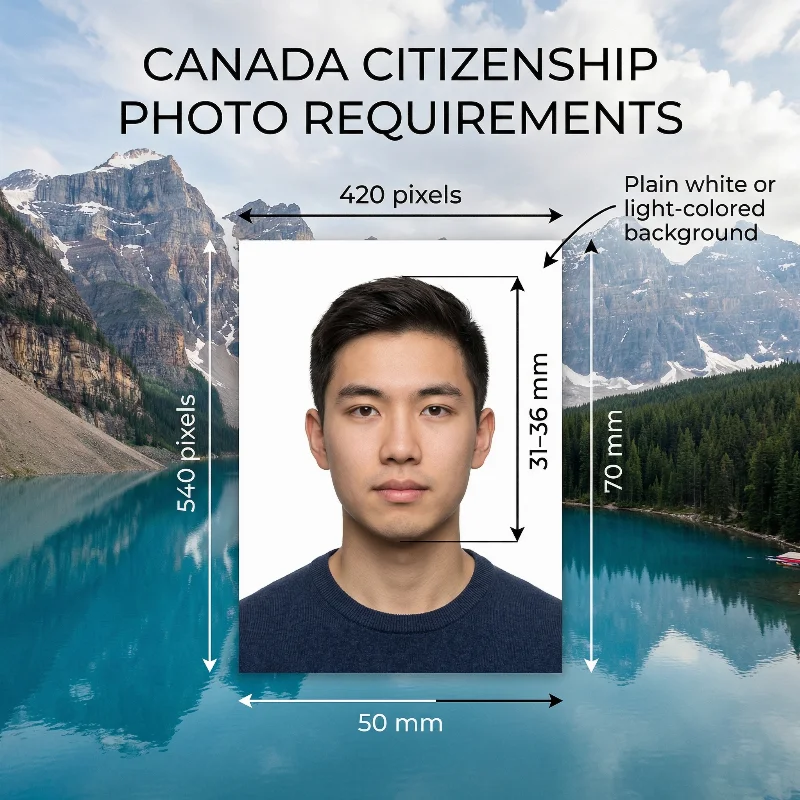
Source: IRCC
12 Essential Canadian Citizenship Photo Requirements: Checklist
To get Canadian citizenship, you must submit professionally taken photographs that meet the Immigration, Refugees and Citizenship Canada (IRCC) requirements that follow the International Civil Aviation Organization (ICAO) Document 9303 specifications for biometric identification. The same rules apply to a citizenship certificate application.
You don’t need to memorize them all: use our PhotoGov passport photo maker to apply the 11 key requirements listed below automatically to receive an IRCC-compliant,
Requirement | Details |
1. Number of photos | One digital photo is required for the online application; two printed photos — for the paper application. |
2. Recency | Taken within the last six months, clearly reflecting the applicant's current appearance. |
3. Canadian Citizenship Photo Size | 50-70 mm (2 × 2¾ inches) with the head measuring between 31 mm and 36 mm (1¼-1 7/16 inches) or 420×540 pixels with the head measuring 44-51% of the photo. |
4. Colour | Both coloured and black-and-white photos are accepted, though coloured images are preferable. |
5. Background | A plain white or light-coloured background, free from any patterns or textures. |
6. Lighting | Professional uniform lighting is required. It must accurately reflect the applicant's skin tone and hair color. No shadows, glare, or reflections are allowed on the image. |
7. Positioning and Framing | The person must face the camera directly, with their full face and upper shoulders visible in the frame. No motion or head tilts are allowed. No decorations, framing, or shadows may be present in the photo. |
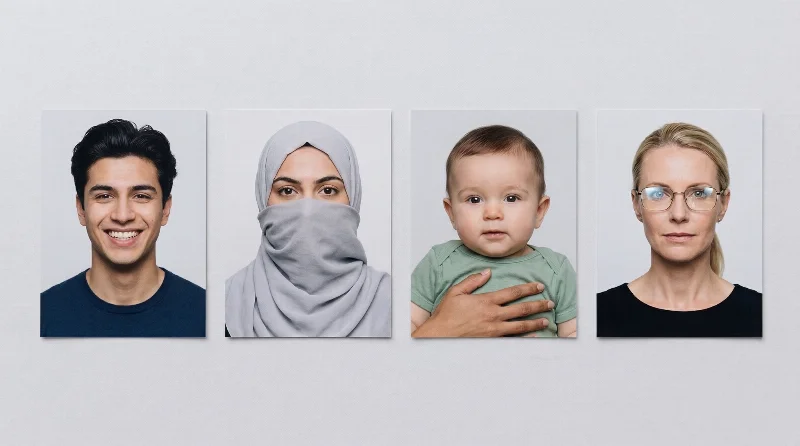
8. Facial Expression | Only a neutral facial expression is accepted, with the eyes open and the mouth closed. Smiling, frowning, and other emotional expressions are prohibited as they can interfere with biometric identification. |
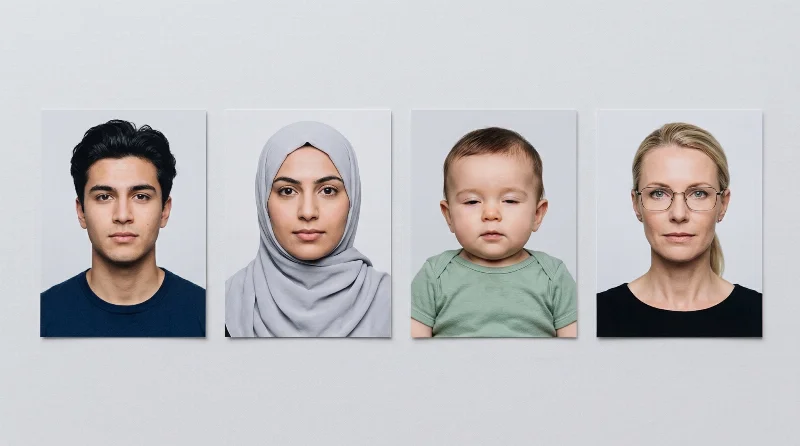
9. Attire, Head Covering, and Accessories | Wear regular street clothes in colours that contrast with the background. Military or camouflage clothing is not allowed. No hats or head coverings are permitted unless worn for religious or medical reasons, and they do not obscure facial features. If a head covering is worn for medical reasons, the applicant must provide a signed medical certificate explaining the reason. Remove any accessories that obscure your face or the hairline. |
10. Glasses | Glasses are allowed on Canadian citizenship photos, but only if worn for medical reasons, and the frames don't obscure the eyes, and the lenses don't have reflections or glare. Tinted glasses or sunglasses are not permitted in a citizenship photo. |
11. Digital and Print Quality | A digital photo must be submitted in JPG or JPEG format, in high resolution of at least 600 DPI and 420×540 pixels, and file size 240 kB-4 MB. It may be either the original image or a high‑quality scan of a professional photo. Photos for the in-person citizen application must be professionally printed on matte or glossy, high‑quality photo paper. |
12. Studio's Signature | For printed photos, one image must include the studio details written or stamped on the back: the applicant’s (or their child’s) full name, the photographer’s or studio’s name, the studio address, and the date the picture was taken. The photographer does not need to sign the photo personally; a clear stamp or handwritten text with this information is sufficient. For online applications with a digital photo, the studio information is usually provided as a separate file (a studio letter, plus a receipt). |
Acceptable Citizenship Photo Examples
Unacceptable Citizenship Photo Examples
Digital vs Printed Canada Citizenship Photo Explained
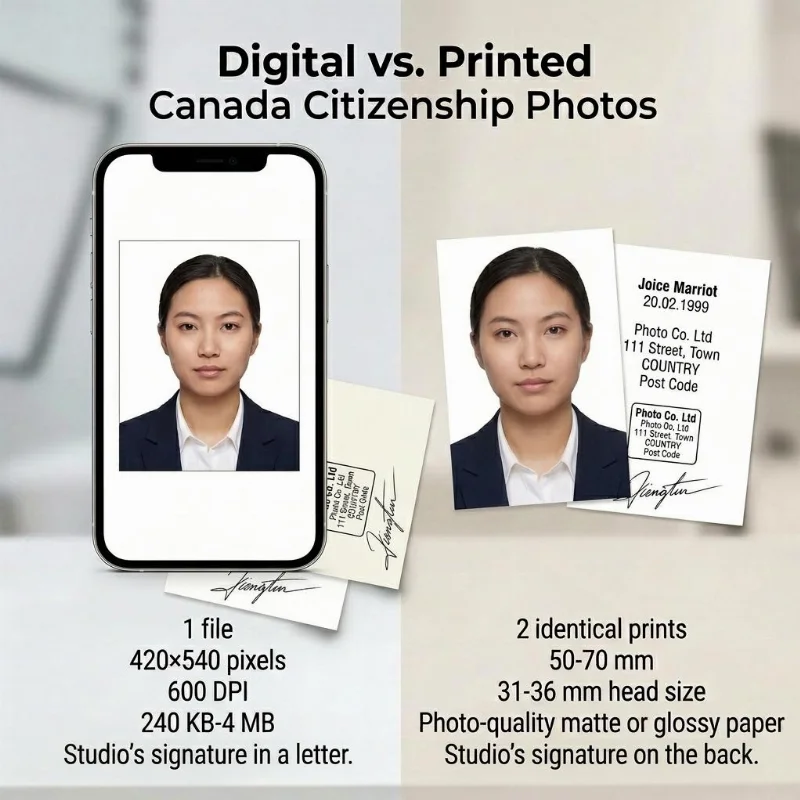
Depending on your application method, you need to submit either a digital or a printed Canadian citizenship photo.
Online applications require one digital photo (420×540 pixels, 600 DPI, file size 240 KB-4 MB) uploaded through the IRCC Permanent Residence Portal.
Paper applications require two identical printed photos (50 mm × 70 mm) on high-quality photographic paper, with your name and date of birth, as well as the studio information and the date when the photo was taken, written on the back of one photo.
Both formats must meet identical content standards: plain white or light-coloured background, neutral expression with no smile, eyes open and clearly visible, head measuring 31-36 mm from chin to crown, and photo taken within the last 6 months.
Requirement | Digital Submission (Online) | Printed Submission (Paper) |
Quantity | 1 digital file | 2 identical prints |
Dimensions | 420×540 pixels | 50 mm × 70 mm (2" × 2¾") |
Resolution | 600 DPI | 600 DPI (professional photo paper) |
File Format | JPEG, 240 kB to 4 MB | High-quality photographic paper |
Studio signature | Needed. Included in a separate letter | Needed. Name, date of birth, and studio stamp included on the back of the photo |
Processing | Instant upload, resubmission allowed | Mailing required, delays if rejected |
Canadian Citizenship Photo Requirements for Children
Canadian citizenship photo requirements for children are almost the same as for adults: the photo must be sized 50 × 70 mm, with a plain white or light background, taken within the last six months, and printed on high‑quality photo paper.
The child must be alone in the picture, facing the camera, and there should be no hats, toys, pacifiers, or hands in the frame. Religious head coverings are allowed as long as the child’s entire face is uncovered.
A neutral expression is preferred, but authorities generally accept that young children may keep their eyes partially closed, and their expression may not be 100% neutral, as long as the face is clear and recognisable.
Where to Take a Citizenship Photo in Canada
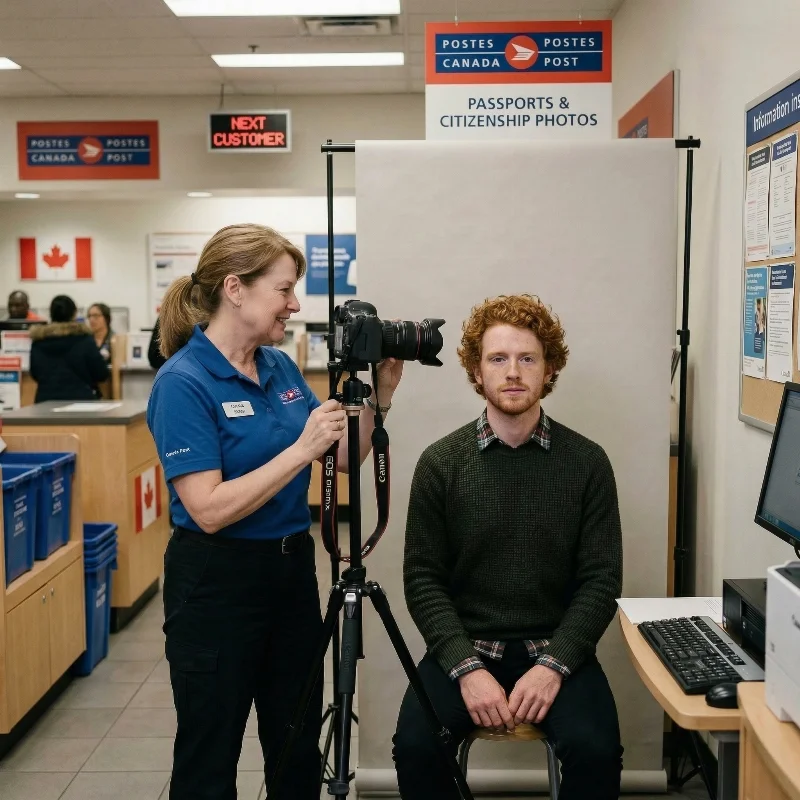
You can have your Canadian citizenship photos taken in many common locations across the country. Don't forget the studio's signature or a stamp on the back of one photo.
Retail photo and office chains. Large chains such as Walmart, Costco, Staples, and similar photo counters in supermarkets often offer “passport/ID” packages. They are quick and relatively affordable, and the staff are usually familiar with Canadian document standards.
Post offices. Some postal locations have in‑store photo counters. This is convenient if you want to take the photo and handle paperwork or mailing in one visit, though availability varies by province and city.
Self‑service photo booths. Booths in malls, subway stations, and shopping centres can sometimes produce acceptable 50×70 mm images, but the lighting and framing are often inconsistent. Because of this, citizenship photos from booths are more likely to be rejected, so this option is generally not recommended for important applications.
Professional studios and dedicated ID photographers. Independent portrait studios and specialty ID‑photo shops are a solid choice to make Canadian citizenship photos. They know the 50×70 mm format, head size range, background rules, and other IRCC criteria, so approval rates are high. Expect higher prices and, in some cases, an in-advance appointment.
Pharmacies. Many drugstores and local pharmacies in Canada have small photo corners for passport‑style pictures. Turnaround is fast, and prices are mid‑range, but quality can depend heavily on the individual branch and staff experience.
Online photo tools. Services like PhotoGov let you create Canadian citizenship photos at home using a smartphone or digital camera. You upload a portrait, select the Canadian citizenship format, and the system adjusts the image to the required 50×70 mm frame, head size, and background, producing a ready‑to‑print file or digital image. This is often the fastest and most cost‑efficient alternative, especially if you need multiple attempts or photos for several family members.
Canadian Citizenship Photo Services: Overview
Service type | Time to get Canadian citizenship photos | Typical pricing (approx.) | Likely acceptance rate |
Retail photo & office chains (Walmart, Costco, Staples) | 10-20 minutes | CAD 12-20 | High-moderate |
Post offices | 10-20 minutes | CAD 15-25 | Moderate |
Self-service photo booths | 5-10 minutes | CAD 10-15 | Low |
Professional studios & ID photographers | 30 minutes to 1-2 days | CAD 25-50+ | Very High |
Pharmacies & local photo counters | 10-20 minutes | CAD 15-25 | Moderate |
PhotoGov online photo tool | Under 30 seconds (file ready) | Free first photo; next from CAD 8.30 for a digital photo and CAD 13.90 for a printable file | Very High |
How to Take a Citizenship Photo at Home
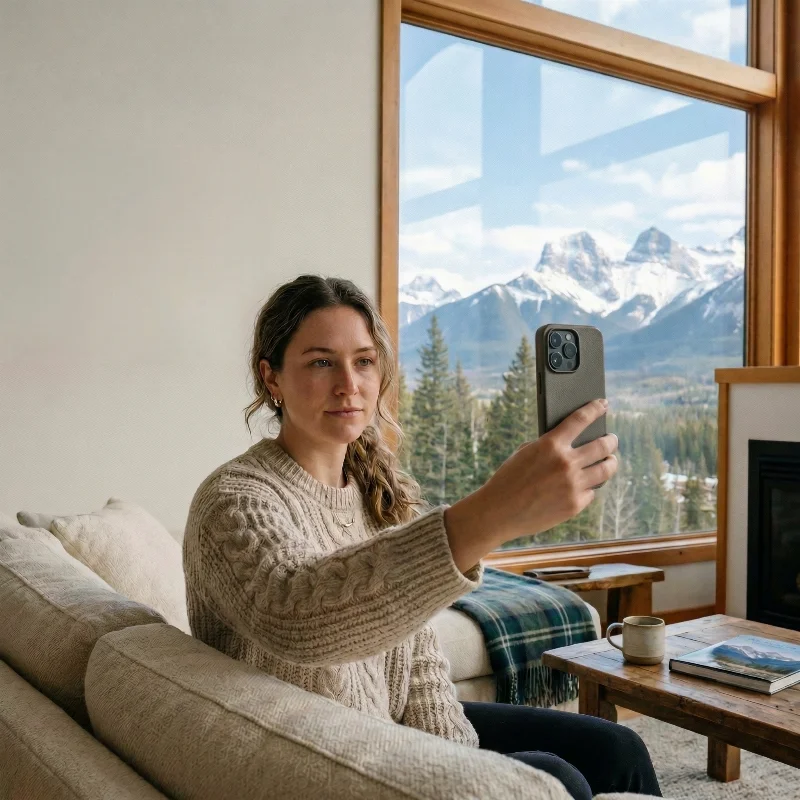
You can easily take a photo for Canadian citizenship or a citizenship certificate at home. All you need is your smartphone or a laptop and a simple setup.
- Find a bright spot with soft, even light (near a window works best), and use a plain white or very light wall as your background.
- Position the camera at eye level, about an arm’s length away, and make sure it is stable (tripod, shelf, or stack of books).
- Stand or sit straight, look directly into the lens, keep a neutral expression, and remove any items that could cast shadows on your face.
- Take several shots, and choose the sharpest image where your face is evenly lit and centered.
- Browse PhotoGov, pick Canada citizenship as your document type, and upload this photo from your phone. The system will automatically crop and scale the image to the correct 50 × 70 mm format, check basic technical requirements, and prepare a file you can download for printing or online submission.
Taking Canadian Citizenship Photos of Your Child
To avoid the stress of a professional studio visit, take the photos for your child's citizenship application from the comfort of your home. Try to make the baby look into the camera with as neutral a facial expression as possible; their mouth can be slightly open.
Use the handy tips below to capture a photo, and the PhotoGov passport photo maker will adjust it to the IRCC specifications.
Setting
Uniform lighting from a natural source, plain background.
Position
A newborn may lie on a blanket; older children — sit or stand.
Expression
Neutral facial expression, no crying or laughing.
Frame
No toys, parents’ hands, or other objects in the frame.
Common Reasons for Rejection of Canadian Citizenship Photos
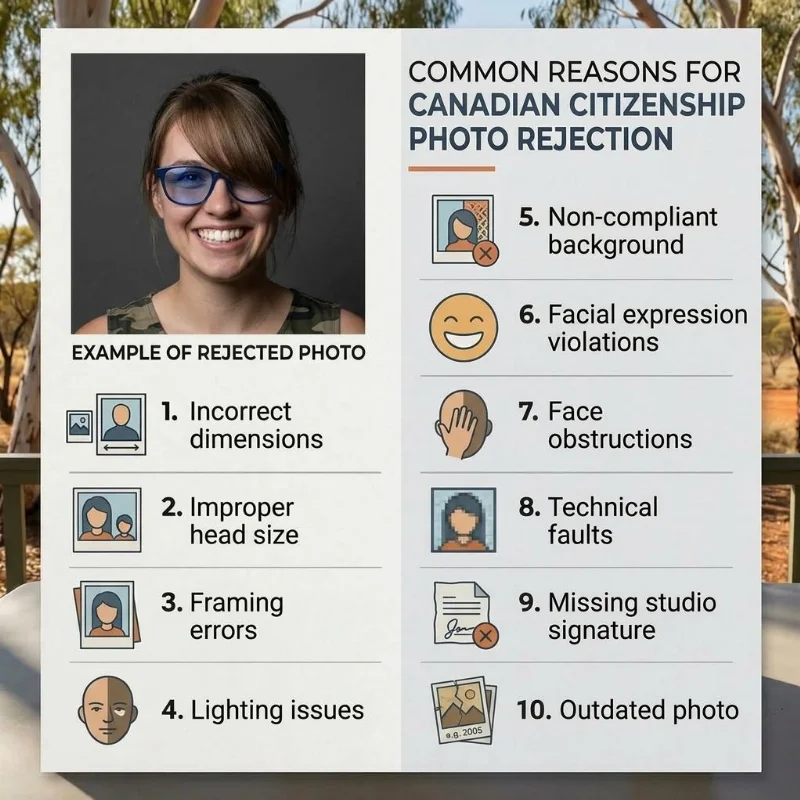
IRCC won’t accept photos that don’t adhere to official specifications. The common reasons for rejection are:
- Incorrect dimensions: Photo does not measure exactly 50 mm × 70 mm (2" × 2¾")
- Improper head size: Face measures less than 31 mm or more than 36 mm from chin to crown
- Framing errors: Head is tilted, turned, or not centered; shoulders are not visible
- Lighting issues: Shadows appear on the face or background; uneven exposure
- Non-compliant background: Not plain white or light-coloured; patterns or objects in the background
- Facial expression violations: Smiling, open mouth, eyes partially open, exaggerated expressions
- Face obstructions: Wearing tinted glasses, hair covering eyes, or head coverings (not religious/medical)
- Technical faults: Low resolution, blurry, pixelated, or digitally altered images.
- Missing studio signature: The applicant’s name and date of birth are not written on the back; information about the studio (date the photo was taken, name, and address of the studio) is missing.
- Outdated photo: Taken more than 6 months before the application date.
What to Do if the Canadian Citizenship Photos Were Rejected?
If IRCC rejects your Canadian citizenship photos, your application package will be returned with a note explaining why the pictures did not meet the official specifications. Use this notice as a checklist: make new photos that strictly follow the 50 × 70 mm size, 31-36 mm head height, background, lighting, and back‑of‑photo information rules, and double‑check them against IRCC’s citizenship photo specifications before you resubmit.
Keep the rejection letter and include the new compliant photos with your corrected application; this usually does not require paying a new citizenship fee, but it does delay processing, so it’s best to fix every listed issue in one go.
Frequently Asked Questions
What Are the Official Canada Citizenship Photo Requirements to Get My Citizenship Application Approved the First Time?
To get your citizenship application approved the first time, your photo must meet these IRCC specifications:
- Dimensions: Exactly 50 mm wide × 70 mm high (2" × 2¾")
- Digital specifications: 420 × 540 pixels minimum, JPEG format, 240 KB-4 MB file size
- Head size: 31-36 mm from chin to crown, centered and occupying 44-51% of the frame
- Background: Plain white or light-coloured, evenly lit with no patterns, shadows, or textures
- Expression: Neutral, mouth closed, eyes open, and looking directly at the camera
- Quality: Sharp, in focus, full colour,
- Recency: Taken within the last 6 months
- Originality: Not digitally altered, filtered, or scanned from an existing photo
- Printing: High-quality photographic paper for paper applications
- Back information: Your name, date of birth, photographer/studio name and address, and the date the photo was taken (or as a letter for digital submissions)
What Size and Background Color Do I Need to Follow to Match Canada Citizenship Photo Requirements for My Application?
The photo must measure exactly 50 mm wide by 70 mm high; IRCC will return applications with photos that do not meet these dimensions. Your head, from chin to crown, must measure between 31 mm and 36 mm, occupying roughly 44-51% of the photo height. The background must be plain white or light-coloured, uniform, with no patterns, gradients, or shadows.
How Many Copies Do I Need and What Printing Specifications Apply Under Canada Citizenship Photo Requirements?
If you apply for citizenship or a citizenship certificate on paper, you must provide 2 identical printed photos that meet the citizenship photo specifications.
If you apply online, you must provide 1 digital photo that meets the same composition and quality requirements as printed photos.
Printed photos must be original, unaltered, on high‑quality photographic paper, and include the studio’s signature on the back; for renouncing citizenship, IRCC requires 1 printed photo.
Which Online Photo Services Can Correctly Format My Picture to Meet Canada Citizenship Photo Requirements?
PhotoGov passport photo maker can correctly format your picture to meet Canada citizenship photo requirements. The platform automatically checks your original photo against the IRCC official photo template, adjusting it to the correct size, framing, head positioning, and background colour, if needed. In under 30 seconds, you get a technically compliant, application-ready Canada citizenship photo that matches 100% official requirements.
How Do I Check If My Existing Passport-Style Photo Meets Current Canada Citizenship Photo Requirements?
Use the PhotoGov Canada citizenship photo checker:
- Browse the website
- Choose “Canada” as your country and “Canada Citizenship” as the document type
- Upload your passport-size photo
- Wait for about 30 seconds while the system analyzes your photo
- If the photo needs corrections to meet the IRCC biometric specifications, it will be automatically converted
- Choose additional services — for an extra assurance, add the Human Verification, or choose formal clothing adjustment for a more professional look
- Download your application-ready Canada citizenship photo as a digital or a printable file.
What Should I Wear in My Citizenship Photo?
Wear simple, everyday clothes in neutral or muted colours that do not blend into the background. Avoid bright colours, logos, or busy patterns so the focus stays on your face.
Can I Smile in the Photo for the Citizenship Application?
No. You need to maintain a neutral expression for a citizenship photo. Keep your mouth closed, eyes open, and look straight at the camera.
How Recent Should My Picture Be?
Your photo must be recent and reflect your current appearance. It should be taken within the last six months before you apply.
Do I Need a Physical Picture or Is a Digital One Enough?
Both options are available: you can get a digital file or a printable version, depending on whether your application is submitted online or on paper. Just choose the format that matches IRCC’s instructions for your application.
Are There Specific Canada Citizenship Photo Requirements for Glasses, Head Coverings, and Facial Expressions?
Glasses: Remove them if possible. If you must wear glasses for medical reasons, ensure lenses are not tinted, frames do not cover any part of your eyes, and there is no glare or reflection visible.
Head coverings: Allowed only for religious or medical reasons. The covering must not cast shadows on your face or obscure the full outline of your face from chin to crown.
Facial expressions: Maintain a neutral expression with your mouth closed and eyes open, looking directly at the camera. Smiling or showing teeth will result in rejection.
What Are the Most Common Mistakes People Make With Canada Citizenship Photo Requirements That Cause Application Delays?
- Incorrect photo size: Not exactly 50 mm × 70 mm
- Wrong head size: Face smaller than 31 mm or larger than 36 mm from chin to crown
- Non-uniform background: Coloured, patterned, or shadowed background instead of plain white or light-coloured
- Visible shadows: Shadows on the face or background from poor lighting
- Expression violations: Smiling, open mouth, or exaggerated expressions
- Obstructions: Glasses, hair covering eyes, or improper head coverings
- Outdated photos: Images taken more than 6 months before the application
- Poor print quality: Low resolution, home-printed on non-photographic paper, or digitally altered images
- Missing back information: Name, date of birth, photographer details, and date when the photo was taken are not provided on the photo back (or as a letter for digital submissions)
Where Can I Get Professional Photos Taken That Fully Comply With Canada Citizenship Photo Requirements Near Me?
Major pharmacy chains provide convenient walk-in service nationwide. Shoppers Drug Mart operates over 1,300 locations across Canada, offering two citizenship photos for approximately $19.99. London Drugs offers a biometric photo service with advanced software verification at approximately $14.99 for two photos. Jean Coutu serves Quebec and Eastern Canada with ID photo services meeting government standards without appointment.
Walmart Photo Centres offer citizenship photos at approximately $16.97 for two prints, with stamps on the back to meet Passport Canada requirements. UPS stores provide biometric photos with immediate shipping options to Case Processing Centres.
Professional photography studios in major cities offer specialized IRCC-compliant services with 100% acceptance guarantees and digital copies.
For home preparation, PhotoGov passport photo maker enables you to capture, crop, and validate your image against IRCC specifications using your smartphone, then print at any location or export for online submission.
What Canada Citizenship Photo Requirements Should Photographers Know to Create Compliant Citizenship Pictures for Clients?
Photographers must produce photos, strictly adhering to the following requirements:
- Size — exactly 50 × 70 mm, with the applicant’s head between 31-36 mm from chin to crown
- The head and shoulders must be centered, in full frontal view
- The background must be white or light-coloured
- Lighting must be even, without shadows
- Red-eye corrections, or any other digital retouching, filters, or changes to facial features are not permitted.
- Photos must be printed on high‑quality photographic paper
- The back of each print must bear the photographer’s or studio’s name, full address, and the date the photo was taken, along with the applicant’s name and date of birth, as required by the IRCC.
- For digital submissions, a digital file with a 600 DPI resolution, 420 × 540 pixels, in JPEG format, and a 240 KB-4 MB file size must be provided, together with the information placed on the back of the photo, but in the form of a letter.
PhotoGov.net strictly adheres to the Global regulations for ID photos.
Other Pages — Canadian ID Photos
Official Government Documentation Sources
Canadian Citizenship Photo Requirements, Paper Applications: Immigration, Refugees and Citizenship Canada (IRCC)
Canadian Citizenship Photo Requirements, Online Applications: Immigration, Refugees and Citizenship Canada (IRCC)
Biometric Regulations for International ID Documents: International Civil Aviation Organization (ICAO) Document 9303
Was this helpful?
58 found this helpful
Authored by:
Nathaniel K. Rowden (Compliance consultant)Top expert
Verified by the Photogov compliance team
ICAO 9309-compliant
Based on official government sources
Helpful votes: 58
Was this helpful?
58 found this helpful
We value your Privacy
We use cookies to enhance your browsing experience, serve personalized ads or content. By clicking “Accept All”, you consent to our use of cookies.