Canadian Passport Photo Requirements: Complete Guide, 2026 Updated
Table of contents:
- Acceptable Canadian Passport Examples
- Unacceptable Canadian Passport Examples
- Studio’s Signature Explained
- Guarantor's Signature: Important for First-Time Applicants
- Canadian Passport Child Photo Requirements
- Printed vs Digital Canadian Passport Photo Explained
- Where to Take a Canadian Passport Photo
- Canadian Passport Photo Services: Overview
- What to Wear for a Passport Photo in Canada
- Common Reasons for Canadian Passport Photo Rejection
- Immigration, Refugees and Citizenship Canada most commonly rejects photos for the following 10 reasons:
- Frequently Asked Questions
- Official Government Documentation Sources
To get your passport application successfully approved, your photo must meet all official Canadian passport photo requirements — 50 mm × 70 mm (2 inches × 2¾ inches) for in-person and mail-in applications, or between 1,200 × 1,800 and 3,000 × 4,500 pixels for online renewals, with a plain white or light-coloured background, taken within the last six months, and signed by a photo studio, as well as the other essential parameters.
This 2026 Guide covers all key specifications for Canadian passport photos. From exact dimensions and background requirements to guarantor procedures and rejection pitfalls — you will find everything you need to submit photos, approved on the first try.
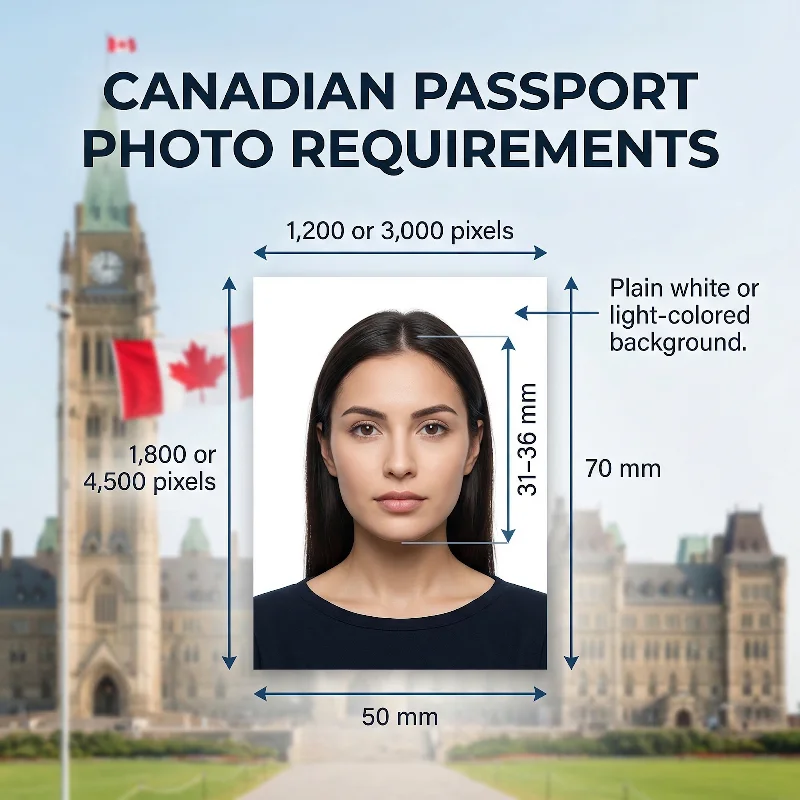
Source: IRCC
12 Essential Canada Passport Photo Requirements: Checklist
The official requirements for Canadian passport photos are defined by the Immigration, Refugees and Citizenship Canada (IRCC). In turn, they follow the biometric standards set by the International Civil Aviation Organization (ICAO) Document 9303. Continue reading for a complete breakdown of 12 essential IRCC requirements.
Requirement | Details |
1. Recency | Taken within the last 6 months, and showing the applicant's current appearance. |
2. Number of Photos | Two identical photos are required for each passport application. |
3. Photo Size | 50 × 70 mm (2 × 2¾ inches) for print submissions, with the face measuring between 31 and 36 mm (1 1/4-1 7/16 inches) from chin to crown; head and shoulders facing the camera directly, body centered, posture straight. 1,800 × 1,200 to 4,500 × 3,000 pixels for digital submissions, with the face taking 44-51% of the image. |
4. Background | Plain white, off-white, or light-coloured background, free of texture and patterns; the face must stand out clearly and appear in natural skin tones. |
5. Colour | Photos can be in colour or black and white; they must be sharp, well-defined, and in focus; photos with red-eye or any retouching or filters that change your appearance are not accepted. |
6. Lighting and Shadows | Uniform lighting without shadows, glare, or flash reflections; photos with shadows around the ears, across the face, on the shoulders, or in the background are not accepted. |
7. Pose and Expression | Neutral expression: eyes open and clearly visible, face straight toward the camera, shoulders centred, facial features fully visible, mouth closed, no smiling or frowning. |
8. Studio's Confirmation | All photos must be signed by the studio that took them; the back must show the applicant's full name, date of birth, studio name and address, and the date the photo was taken (or a letter for digital). |
9. Attire, Hats, Accessories | No head coverings unless worn for religious or medical reasons; hair may be up or down, but the facial outline must be fully visible; a wheelchair may appear if a white blanket covers the headrest. |
10. Glasses | Glasses are allowed if the eyes remain clearly visible and there is no glare; sunglasses and tinted glasses, including prescription ones, are not accepted. |
11. Print Quality | For new passport applications made in person, two photos must be professionally printed on high-quality photographic paper. |
12. Digital Quality | For online renewals, the photographer must provide an original high‑resolution digital file: 600 DPI, 1,800 × 1,200 to 4,500 × 3,000 pixels, 200 KB-5 MB; it cannot be a scan of a printed photo. |
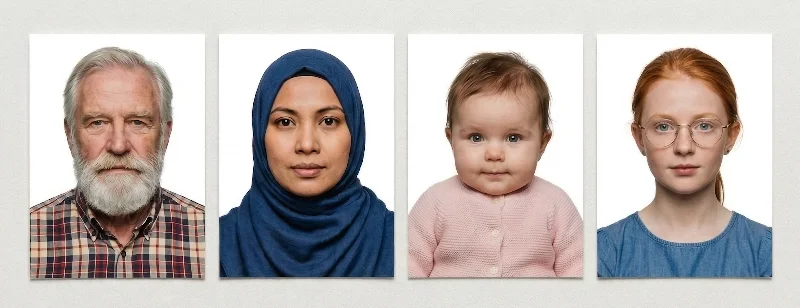
Acceptable Canadian Passport Examples
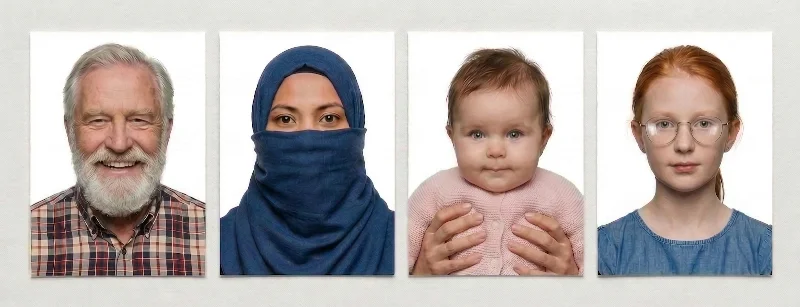
Unacceptable Canadian Passport Examples
Studio’s Signature Explained
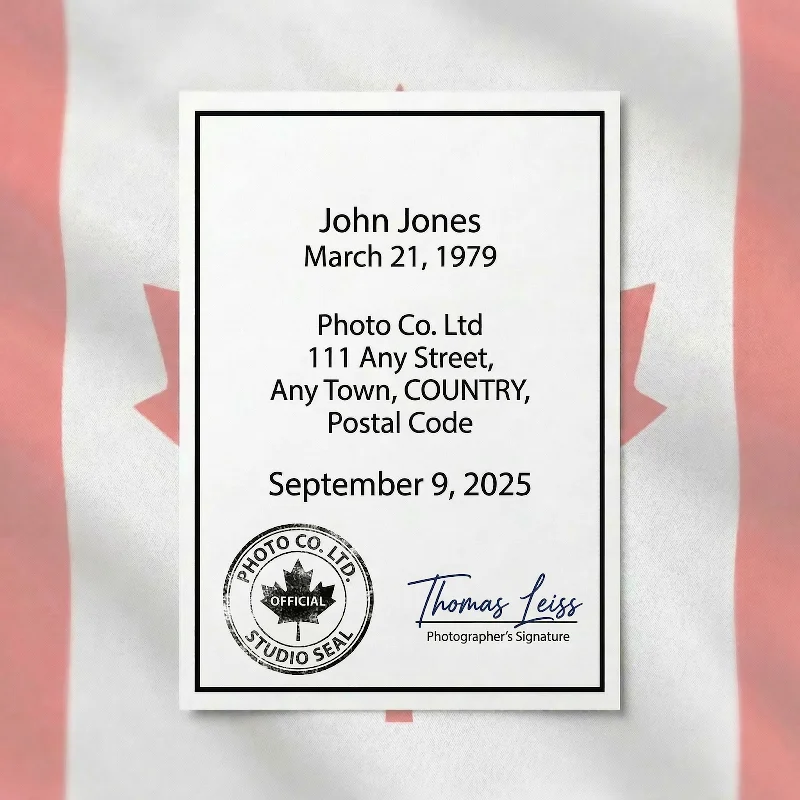
As we mentioned in the checklist, all passport applications — both new and renewals — require a studio’s signature on the back of the photo. It is a guarantee of the image’s originality and recency.
The back of the photo can be stamped or handwritten. The text must include:
Your name
Your date of birth
The official studio’s name
The studio’s address
The date the photo was taken
Studio’s stamp or signature
Guarantor's Signature: Important for First-Time Applicants
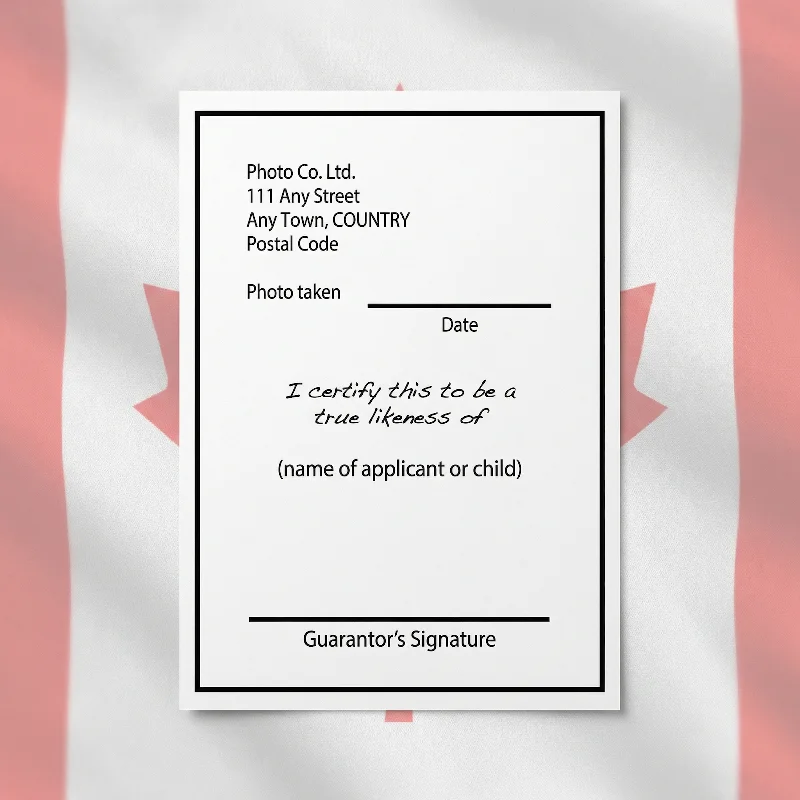
For first-time Canadian passport applicants, one of the photos must include your guarantor’s signature.
A guarantor — any Canadian citizen who has known you for over two years and has held Canadian citizenship status for over five years. The guarantor must write “I certify this to be a true likeness of (applicant’s name)” and sign the image. Read more on the Government of Canada website.
In addition to the guarantor's statement, printed photos must also include a confirmation from a commercial photographer or a studio, as mentioned in the requirements section. They must write or stamp on the back of the photo the date it was taken, and the full name and address of the photo studio. The name of the applicant and their birth date must also be added to the passport picture.
Canadian citizens renewing their passports don't have to provide a guarantor's statement.
Canadian Passport Child Photo Requirements
Children's passport photos follow the same technical standards as adults, with special considerations for age and a simplified guarantor process.
Guarantor Process for Children
For children under 16, a parent or legal guardian signs the back of one printed photo instead of a separate guarantor. They must write "I certify this to be a likeness of (child's name)" — no third-party guarantor is required.
Flexibility for Infants and Toddlers
Newborns and infants: Eyes may be partially or fully closed. The face must remain clearly visible.
Support devices: Car seats or other infant supports are permitted if they are covered with a plain white blanket.
Neutral expression: Required for older children who are old enough to cooperate.
Technical Specifications
Children's photos follow passport requirements identical to adults: 50 mm × 70 mm for printed applications, or 1,800 × 1,200 to 4,500 × 3,000 pixels for digital renewals. The same rules apply for background (plain white or light-coloured), no white clothing, no digital alterations, and photos must be taken within the past 6 months.
Important Restrictions
No other people (including hands supporting the child) may appear in the photo.
The child must face the camera directly with face and shoulders centred.
Both printed and digital formats require the photographer's verification (stamped/written for prints, entered during upload for digital).
Printed vs Digital Canadian Passport Photo Explained
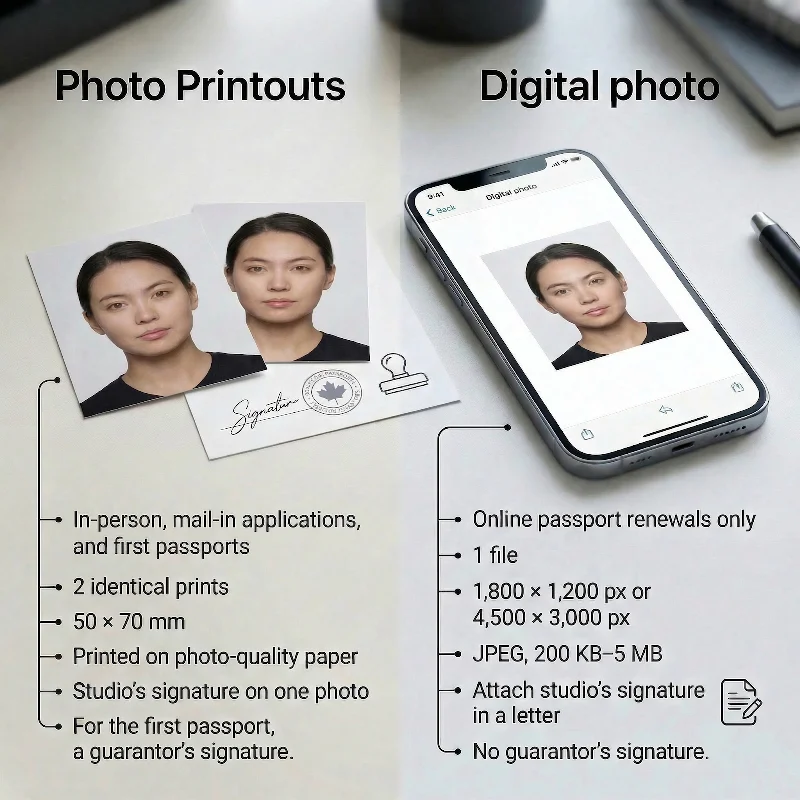
Specification | Printed | Digital |
Purpose | In-person or mail-in applications, including first-time passport applications | Online passport renewals only |
Quantity | 2 identical prints | 1 file |
Dimensions | 50 × 70 mm; head 31-36 mm from chin to crown | 3:2 portrait; 1,800×1,200 px, max 4,500×3,000 px; chin-to-crown 45-50% of height |
Format | High-quality photographic paper | JPEG, 200 KB-5 MB |
Studio’s signature | Written/stamped on the back of 1 photo | Entered during upload / attached as a photographer’s letter |
Guarantor signature | Required for first-time passport applications | Not required |
Submission | In person or by mail | Upload through the online system |
Where to Take a Canadian Passport Photo
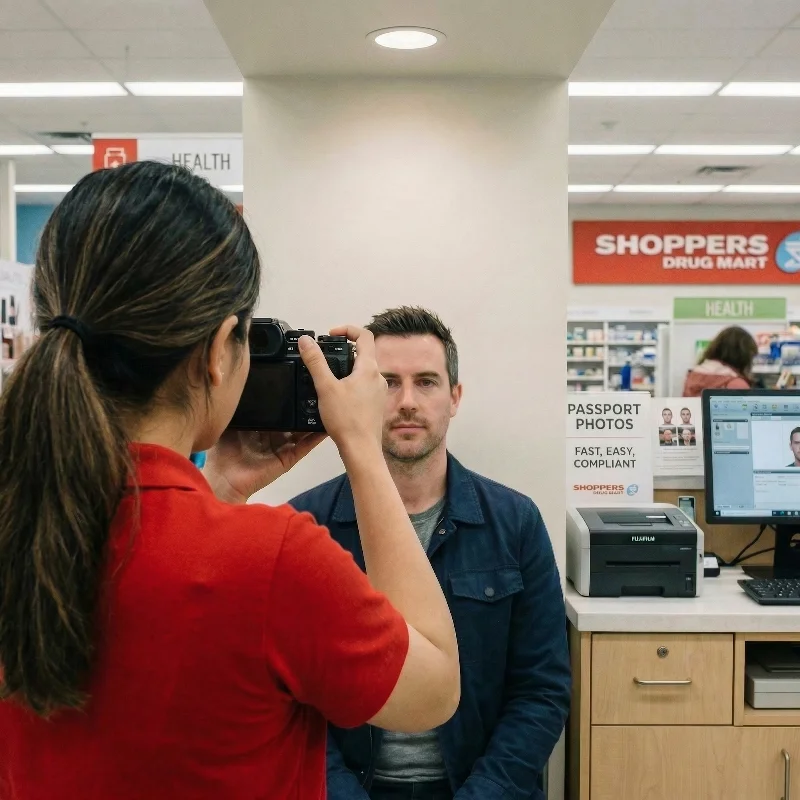
Drugstore chains. Major chains such as Shoppers Drug Mart and Rexall offer in‑store Canadian passport photo services that follow the official 50×70 mm and face‑height rules, with prints ready in about 10-20 minutes, at a moderate price.
Shipping and office centres. Many Staples Print & Copy locations, and some UPS Store branches, take Canadian passport photos to specification, giving you a convenient option if you also need printing or shipping services.
Retail photo counters. Large retailers with photo departments, such as Walmart Photo Centre and London Drugs, provide passport photo booths or staffed counters calibrated to Government of Canada standards; prices are usually in the lower to mid range and vary by region.
Professional studios and ID photographers. Independent studios and ID‑photo specialists in Toronto, Vancouver, Montreal, Calgary, Ottawa, and other cities offer professional services with quality lighting and setup, producing Canadian passport photos that meet all IRCC technical requirements and minimize the risk of rejection. This is the most costly option, though.
Online photo tools. Online tools like PhotoGov save you time and money, allowing you to create a compliant photo from the comfort of your home. Just upload your portrait, and the platform will automatically match it to the IRCC requirements. Download it in digital or printable format, print on photo-quality paper — and you're ready for your Canada passport application.
Canadian Passport Photo Services: Overview
Service Type | Time to Get Canadian Passport Photos | Typical Pricing (approx.) | Likely Acceptance Rate |
Pharmacy Chains | 10-20 minutes | CAD 12-20 | High-moderate |
Post Offices | 10-20 minutes | CAD 15-25 | High-moderate |
Self‑service Photo Booths | 5-10 minutes | CAD 10-15 | Low |
Professional studios & ID photographers | 30 minutes to 1-2 days | CAD 25-50+ | Very high |
Pharmacies | 10-20 minutes | CAD 15-25 | Moderate |
PhotoGov Passport Photo Maker | Under 30 seconds | CAD 8.30 (digital), CAD 13.90 (printable) | Very high |
What to Wear for a Passport Photo in Canada
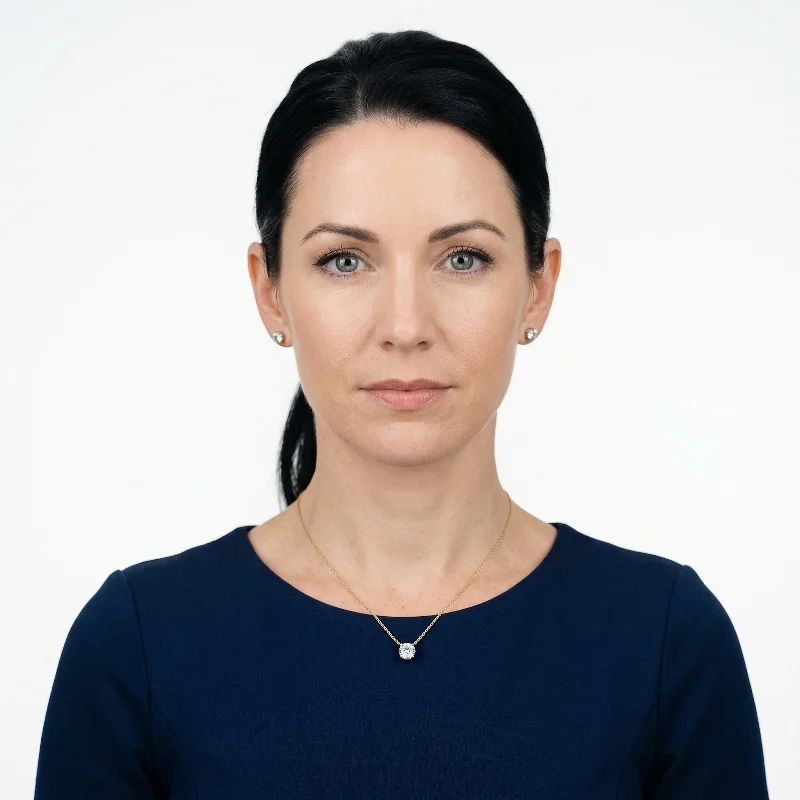
Choose your everyday clothing in darker colours, with an open neck and closed shoulders. Avoid accessories (like scarves or heavy jewelry) that cover your neckline. Hair can be worn up or down, provided it does not obstruct the face. Head coverings are permitted if worn daily, for medical or religious reasons.
Our users often ask if you can wear a hoodie in a passport photo in Canada, and the short answer is “Yes, but not over your head.” The hood must remain down, and your full face, hairline, and shoulders must be clearly visible. The photo must show your natural appearance without any clothing that obscures your features.
Three other popular questions are: “Can you wear earrings in a Canadian passport photo?”, “Can you wear makeup in a Canadian passport photo?”, and “Can you have bangs in a Canadian passport photo?” The answer to all three is yes — as long as they do not hide or change your natural facial features. Earrings and facial piercings must not cover any part of your face or cast strong shadows, so visible nose, lip, or eyebrow rings are best removed before the photo. Makeup is acceptable if it looks natural and does not create glare or harsh contrast; glossy lipstick or heavy highlighter can cause reflections and may force a retake. Bangs are also allowed, provided they do not cover your eyes, eyebrows, or the outline of your face.
Best Clothing Colours for Canadian Passport Photos
If you’re wondering what colour to wear for a passport photo in Canada, give preference to clothing in darker colours. White clothing isn't recommended as it blends with the background.
Clothing and Accessories to Avoid in Passport Photos
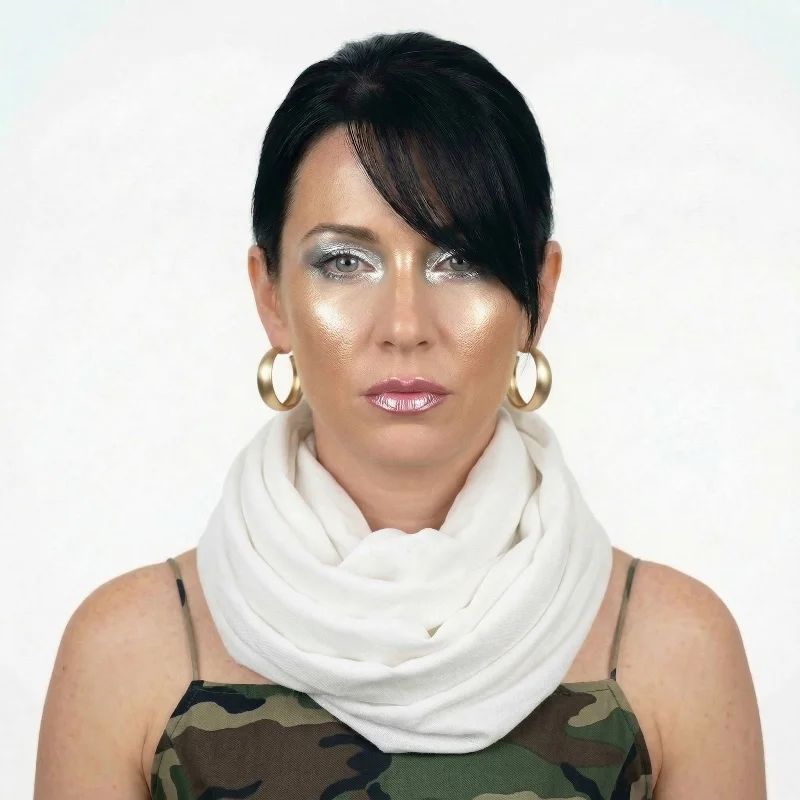
Here is a list of clothes that aren't acceptable for Canadian passport photographs:
Military uniforms or camouflage attire
Clothes in bright colours, with large logos or letterings
Scarves and other accessories that obstruct the face, neck, or shoulders
Hats or head coverings, unless worn for religious beliefs
Earrings and piercing accessories that obstruct facial features or cause glare
Tinted glasses, even prescription ones, and sunglasses
Common Reasons for Canadian Passport Photo Rejection
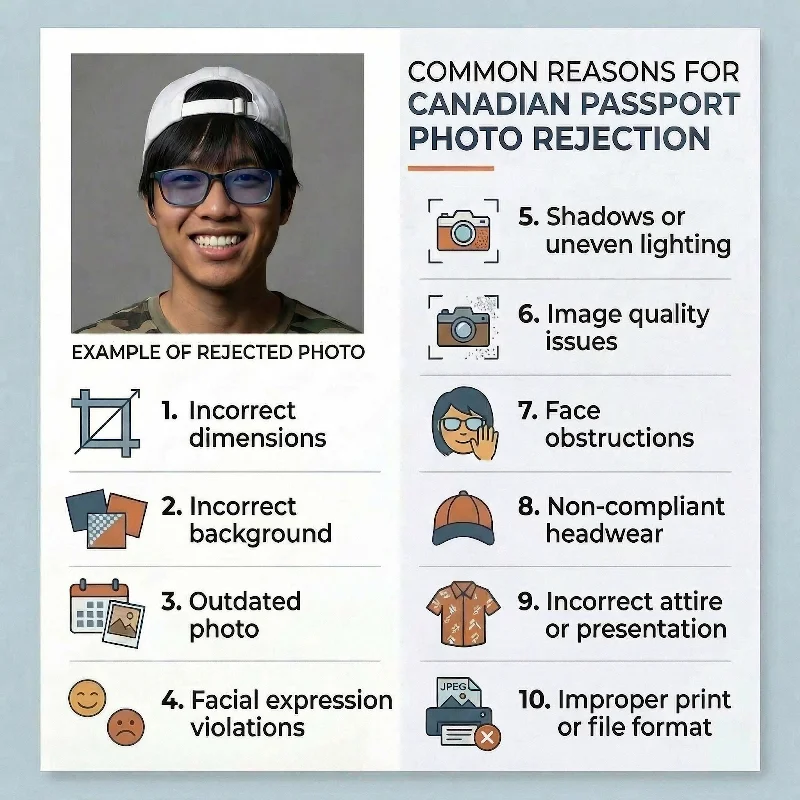
Immigration, Refugees and Citizenship Canada most commonly rejects photos for the following 10 reasons:
Incorrect dimensions: Printed photos not measuring exactly 50 mm × 70 mm, or digital files not meeting the 3:2 aspect ratio with 1,800-4,500 pixels height; head size outside 31-36 mm (prints) or 45-50% of height (digital).
Incorrect background: Background that is dark, coloured, patterned, or textured instead of plain white or light-coloured; shadows visible on the face or background.
Outdated photos: Images taken more than 6 months ago or no longer reflecting current appearance (significant changes to facial hair, weight, or features).
Facial expression violations: Smiling, frowning, tilting the head, or not looking directly at the camera instead of maintaining a neutral expression with mouth closed and eyes open.
Digital alterations: Filters, colour correction, skin smoothing, red-eye removal, or AI-enhanced modifications.
Image quality issues: Blurry, grainy, pixelated, or out-of-focus photos; scanned copies of printed photos submitted as digital files.
Face obstructions: Hair covering eyes or eyebrows, heavy glare on glasses, tinted lenses, sunglasses, or accessories hiding facial features.
Non-compliant headwear: Hats, caps, or head coverings not worn daily for religious beliefs or medical reasons; shadows cast by permitted headwear.
Incorrect attire or presentation: White clothing blending into the background; hands or support persons visible in children's photos.
Improper print or file format: Home-printed photos on non-photographic paper; incorrect JPEG specifications for digital submissions; missing or incomplete photographer information on the reverse of prints.
Using the PhotoGov passport photo maker helps you prevent these issues. Our online tool automatically checks your original photo against all official IRCC requirements, helping you to produce a technically compliant Canadian passport photo.
What to Do if Your Canadian Passport Photo is Rejected
If IRCC rejects your passport photo, you will receive a "Photos — Notice of Rejection Passport Application Form" by mail explaining the specific reason. You have 90 days to submit a compliant replacement without paying additional fees.
If your photos were taken at a participating studio like Shoppers Drug Mart or Staples, present the rejection notice and your receipt — they will typically retake your photos at no extra charge.
Retake your photos at a commercial studio experienced in Canadian passport specifications, ensuring strict compliance with dimensions, background, and lighting requirements. For online applications, upload the new photo through the PR Portal; for paper applications, mail the new photos with the rejection notice to the address provided.
If IRCC rejects your Canadian passport photo taken with PhotoGov, contact our support team within 30 days. We will re-process your image at no additional cost to address any compliance concerns or provide a full refund. This guarantee covers every specification, including dimensions, background colour, lighting, and resolution standards — if your original photo has met all requirements for framing, lighting, positioning, and facial expression.
Frequently Asked Questions
What Are the Official Canadian Passport Photo Requirements for an Adult Application?
For adult applications submitted in person or by mail, you must provide:
Two identical, unaltered colour photos
Taken within the last 6 months by a commercial photographer in person
Size: 50 mm wide × 70 mm high (2 inches × 2¾ inches)
Face measurement: 31-36 mm from chin to crown
Neutral facial expression with eyes open and clearly visible, mouth closed, no smiling or frowning
Face and shoulders centred and squared to the camera
Plain white or light-coloured background with uniform lighting and no shadows
Clear, sharp, and in focus with natural skin tones
No digital alterations or filters of any kind
Professionally printed on high-quality photographic paper (no home printing)
On the back of one photo: photographer's name, complete studio address, and date taken
For first-time applicants: guarantor's signature certifying likeness.
What Size and Dimensions are Required for a Canadian Passport Photo to be Accepted?
Printed photos must measure 50 mm wide by 70 mm high (2 inches by 2¾ inches), with your face measuring 31-36 mm from chin to crown. Digital photos for online renewals must have a 3:2 aspect ratio in portrait orientation, between 1,800 × 1,200 and 4,500 × 3,000 pixels, with the chin-to-crown measurement being 45-50% of the photo's height.
How Close-Up Should My Face Be in a Canadian Passport Photo to Meet the Measurement Rules?
For printed photos, your face must measure between 31 mm (1¼ inches) and 36 mm (1⁷⁄₁₆ inches) from chin to crown. For digital photos, the chin-to-crown measurement must be 45-50% of the photo's total height.
What Clothing and Background Rules Do I Need to Follow for Canadian Passport Photos?
Wear regular clothing in colours other than white—white clothing blends into the background and will result in rejection. The background must be plain white or light-coloured with a clear difference between your face and the background. Uniform lighting is required with no shadows, glare, or flash reflections.
What Are the Specifications for Head Position and Facial Expression in Canadian Passport Photos?
Your face and shoulders must be centred and squared to the camera, not tilted in any direction. You must look straight at the camera with a neutral expression: eyes open and clearly visible, mouth closed, not smiling or frowning
Are There Special Canadian Passport Photo Requirements if I Wear Glasses, a Head Covering, or Have a Beard?
Glasses are permitted only if your eyes are clearly visible with no glare on the lenses. Tinted lenses and sunglasses are not accepted.
Head coverings are accepted only if worn daily for religious beliefs or medical reasons, provided your full face is clearly visible with no shadows. Medical headwear or nasal cannulas require a signed letter of explanation, and a doctor's letter may be requested.
Beards are permitted as long as your photo reflects your current appearance and meets all other requirements.
Can You Wear Glasses in a Canadian Passport Photograph?
Yes. The glasses are officially allowed by the Immigration, Refugees and Citizenship Canada (IRCC). However, the frames cannot cover your eyes or have glare or flash reflections. If you are wearing glasses, make sure your eyes are fully visible.
Who Can Sign a Passport Photo Canada?
If you are a first-time passport applicant, a guarantor must sign your photograph. A guarantor is a person who has known you for at least two years and has held a Canadian citizenship status for at least five years. Read the requirements section on this page to learn more.
Also, all pictures submitted for the application (for both first and recurring applicants) must be signed by a studio that took your photograph: the back of the image must have the studio's name, address, the date when it was taken, and the applicant's name and birth date.
Where Can I Get Guaranteed Compliant Canadian Passport Photos Taken Near Me?
You must have your photo taken in person by a commercial photographer or photo studio. The Government of Canada does not endorse specific providers, but any professional photographer who can produce photos meeting the official specifications is acceptable.
How to Take a Passport Photo Canada?
It should be taken only by a professional photographer or in a commercial studio. Shoppers Drug Mart, London Drugs, Walmart Photo Centre, Staples Print & Copy, and Post Offices offer these services. To make sure you get a fully compliant image, use the PhotoGov online service to get a preview: upload your selfie, and our tool automatically adjusts it to all official requirements.
How Much Does a Passport Photo Cost Canada?
From around CAD 19 at centers like Shoppers Drug Mart or Walmart Photo Center to CAD 40 and higher in professional studios. If you make your picture online with the PhotoGov Canadian passport photo maker, it’s only CAD 8.30 for a digital and CAD 13.90 for a printable file.
How Much is Passport Photo at Walmart Canada?
The price of a passport photo at Walmart Canada is CAD 18.57 for a set of compliant prints. Refer to the Walmart Canada Photo Services page for updated information.
How Long is a Passport Photo Valid for Canada?
Six months. The photograph must reflect your current appearance and be retaken if there are significant changes, such as a drastic weight loss or plastic surgery.
What Size is a Passport Photo Canada?
For in-person applications — 50 mm×70 mm (2 × 2¾ inches). The head height — between 31 mm (1¼ inches) and 36 mm (1⁷⁄₁₆ inches). For online applications — 1,800×1,200 and 4,500×3,000 pixels, with the head measuring 45-50% of the image.
Which Online Services Can Create Canadian Passport Photos that Meet All Government Requirements?
PhotoGov creates Canadian passport photos that meet all government requirements. It only adjusts technical parameters (size, cropping, background uniformity) without altering your facial features, in line with IRCC rules. You can create a technically compliant image online in under 30 seconds, and print it at a professional shop nearby.
What Are the Printing and Paper Quality Requirements for Canadian Passport Photos?
Photos must be professionally printed on plain, high-quality photographic paper. Home printing is not accepted. The prints must be clear, sharp, and in focus without alterations of any kind.
PhotoGov.net strictly adheres to the Global regulations for ID photos.
Official Government Documentation Sources
Canadian Passport Photo Requirements:Immigration, Refugees and Citizenship Canada (IRCC)
Canadian Passport In-Person Applications: Immigration, Refugees and Citizenship Canada
Canadian Passport Online Applications: Immigration, Refugees and Citizenship Canada
Get Passport Services Abroad: Immigration, Refugees and Citizenship Canada
Canadian Embassies and Consulates Across the World: Immigration, Refugees and Citizenship Canada
Biometric Regulations for International ID Documents: International Civil Aviation Organization (ICAO) Document 9303
Was this helpful?
45 found this helpful
Authored by:
Nathaniel K. Rowden (Compliance consultant)Approved author
Verified by Photogov experts
ICAO 9309 compliant
Based on official government sources
Helpful votes: 45
Was this helpful?
45 found this helpful