Canada Visa Photo Requirements 2026 — Tips, Samples & Mistakes to Avoid
Table of contents:
- 12 Essential Canada Visa Photo Requirements: Checklist
- Acceptable Canada Visa Photo Examples
- Unacceptable Canada Visa Photo Examples
- Сanadian Digital vs Printed Visa Photos Explained
- Where to Take a Canada Visa Photo?
- Canada Visa Photo Services: Overview
- How to Take a Canadian Visa Photo at Home
- Taking Canadian Visa Photos of Your Child
- 10 Common Reasons for Canada Visa Photo Rejection
- What to Do if Your Canada Visa Photo is Rejected
- Frequently Asked Questions
- Official Government Documentation Sources
- Other Documents — Canadian ID Photos
Applying for a Canadian visa in 2026 means your photo must meet strict, up‑to‑date technical and biometric standards, or your application risks delays and rejection. In this guide, you’ll find a clear breakdown of all Canada visa photo requirements — from size, crop, and background to clothing, glasses, and digital file quality — so you can prepare a compliant picture the first time and avoid costly re-takes.
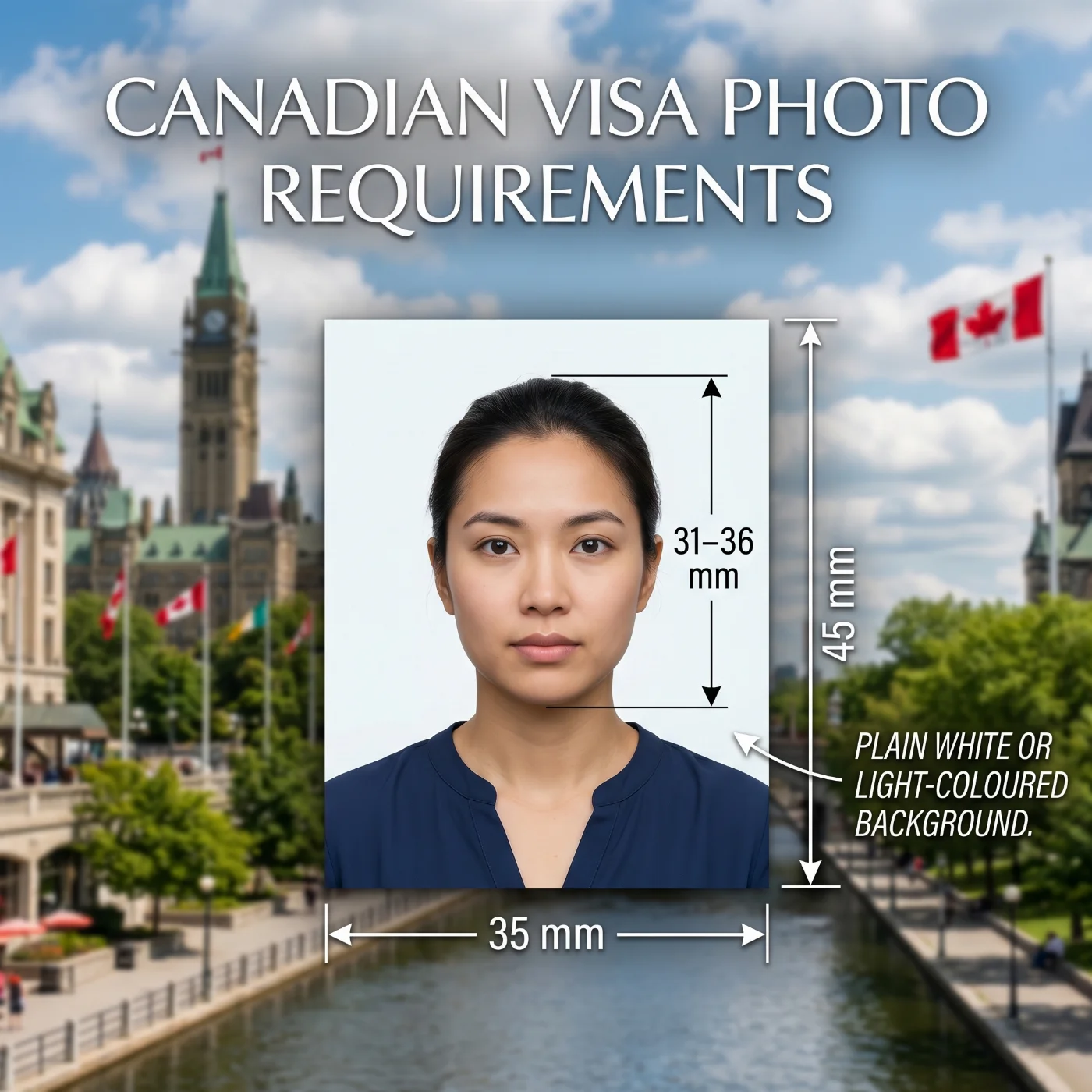 Source: IRCC
12 Essential Canada Visa Photo Requirements: Checklist
Canada visa photo requirements are determined by the Immigration, Refugees and Citizenship Canada (IRCC) and are based on the international biometric standards of the International Civil Aviation Organisation (ICAO) Document 9303. To convert your photo to visa size for free, use our Canadian visa photo tool — it automatically applies all the specifications listed below to your original photo.
Parameter | Requirement |
1. Number of photos | Two photos are required for the in-person Canadian visa submissions, and one digital photo — for online applications. |
2. Recency | Visa pictures must be taken in the last six months and accurately reflect the applicant's current appearance. |
3. Canada Visa Photo Size | 35 x 45 mm (1 3/8x1 3/4 in); head size 31-36 mm (1 1/4 x 1 7/16 in) from chin to the top of the head. |
4. Colour | Both coloured and black-and-white photos are permitted when applying for a Canadian visa. |
5. Background | Plain white or light-coloured background — texture, pattern, shadow, and reflections-free. |
6. Lighting | The soft, uniform lighting must evenly illuminate the face and show the natural skin tone and hair colour. Avoid shadows, reflections, or glare on the image. |
7. Positioning and Framing | A Canadian visa photo must present the applicant facing the camera directly, full face, and the top of the shoulders visible. Head and shoulders must be square to the camera. Head tilts aren’t allowed on visa photos. |
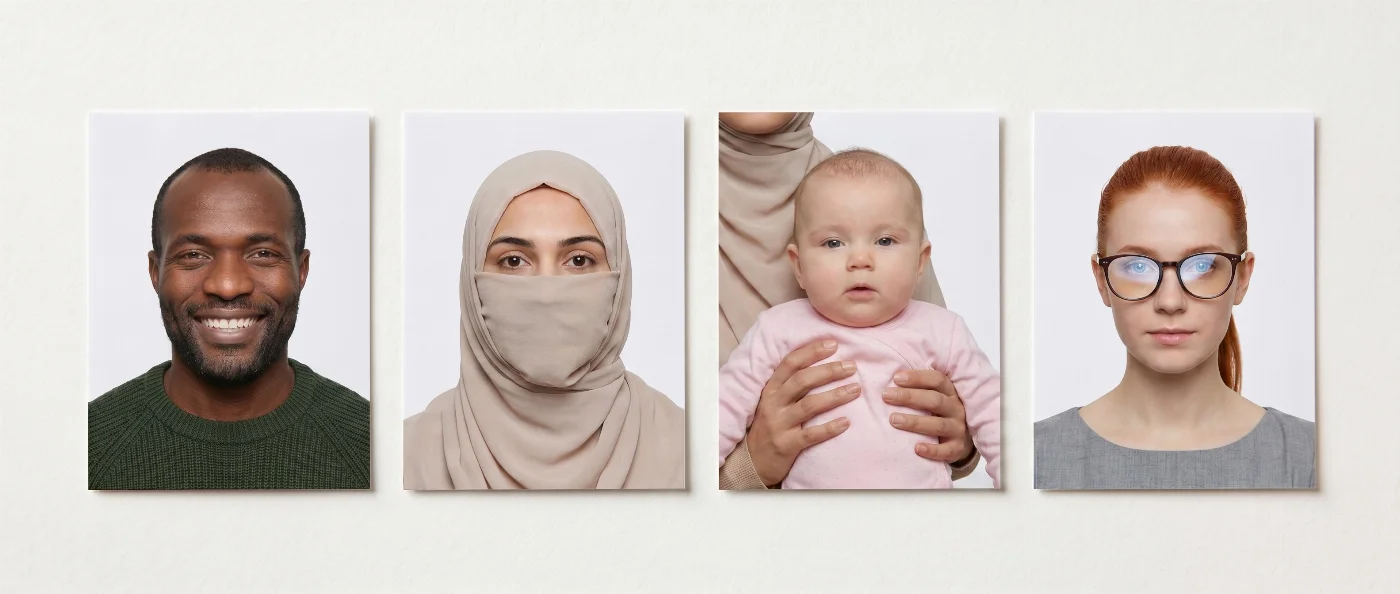
8. Facial Expression | A neutral facial expression is required with eyes open and mouth closed. Smiling, frowning, and any other exaggerated emotions aren't permitted in visa photos. |
9. Attire, Head Covering, and Accessories | Everyday clothes, preferably of colours that contrast with the background, are required. Headwear isn’t permitted unless worn for religious or medical purposes — and only if it doesn't obstruct the facial features and hairline. No accessories, including jewelry and scarves, are allowed if they cover any parts of an applicant’s face, cast shadows, or cause glare. |
10. Glasses | The Canadian government allows glasses in visa photos — but only if the frame doesn't cover the applicant's eyes or the upper part of the face, and if no glare of flash reflection is present on the lenses. Tinted glasses and sunglasses aren't allowed in visa photos. |
11. Digital Quality | When an applicant submits a Canada visa photo online, JPEG or PNG format is acceptable. File size — up to 4 MB, with a clear, high‑resolution image that is not compressed or altered. Professionally scanned photo studio photographs are also acceptable. |
12. Print Quality | The photos must be professionally printed on high-quality photo paper, matte or glossy. |
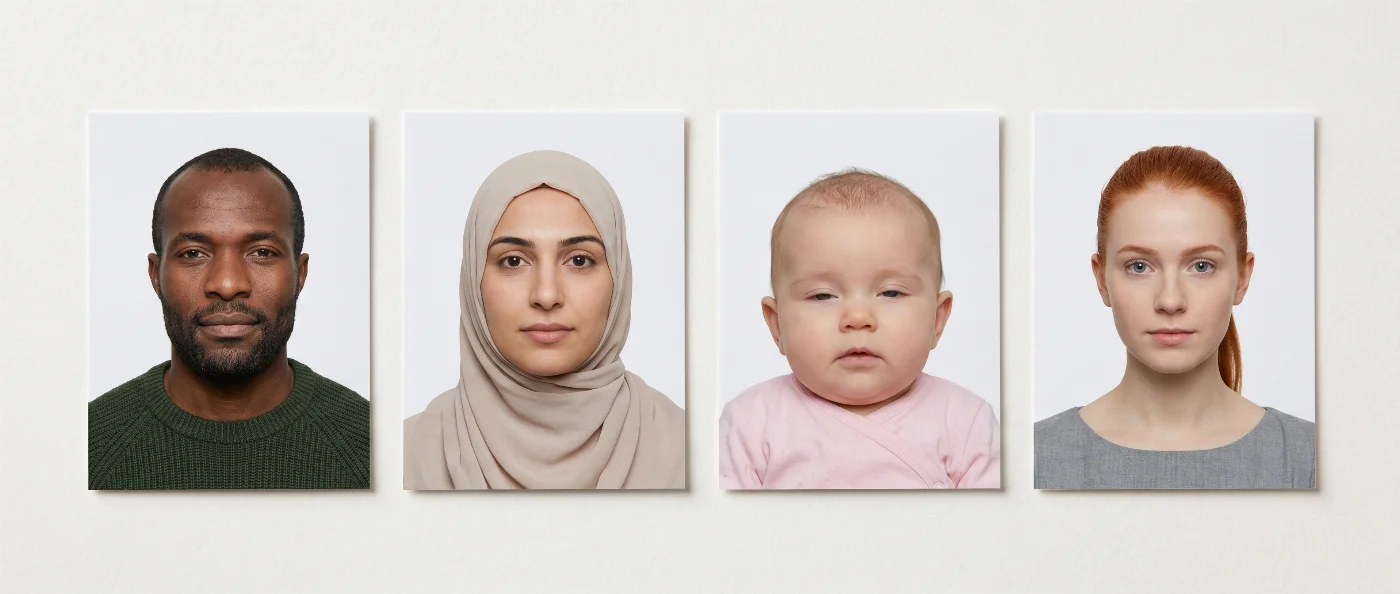
Acceptable Canada Visa Photo Examples
Unacceptable Canada Visa Photo Examples
Сanadian Digital vs Printed Visa Photos Explained
For Canadian visas, digital photos are required for online applications, and printed photos — for paper‑based submissions in visa centres, embassies, or consulates.
What is a Digital Photo for a Canada Visa?
A digital Canada visa photo is a digital photo file that you submit online with your visa application. The requirements for digital photos differ from those for printed ones. The file must be saved in a particular format — JPEG or PNG are accepted, and have a size of 4 MB max. The image itself must have digital dimensions of at least 420 × 540 pixels. The head size must fall into an allowed 70-80% of the frame range. Usually, one digital Canada visa photo is required per application. Photos that don’t adhere to these specifications may be rejected, so it makes sense to double-check them before submitting by using an online Canada visa photo checker.
What are the Printed Photo Specs for a Canadian Visa?
A printed Canada visa photo must have a size of 35 × 45 mm with the head height between 31–36 mm from chin to crown. The photo must be printed on high‑quality matte or glossy photo paper. If creating a printout from a digital photo, make sure the resolution is at least 300 DPI, better 600 DPI, so the final image is of high quality, sharp, and doesn’t show any compression artefacts. Usually, two printed photos are required for in-person Canadian visa applications.
No matter the application channel, your photo must meet the same biometric standards. It must be recent, sharply focused, and show a neutral expression with eyes open and mouth closed. The applicant faces the camera directly, with the top of the shoulders visible, no head tilt, and no filters or digital retouching that alter facial features. Glasses, head coverings, and accessories are only acceptable if they do not obscure the eyes, hairline, or any part of the face, and do not create shadows or glare.
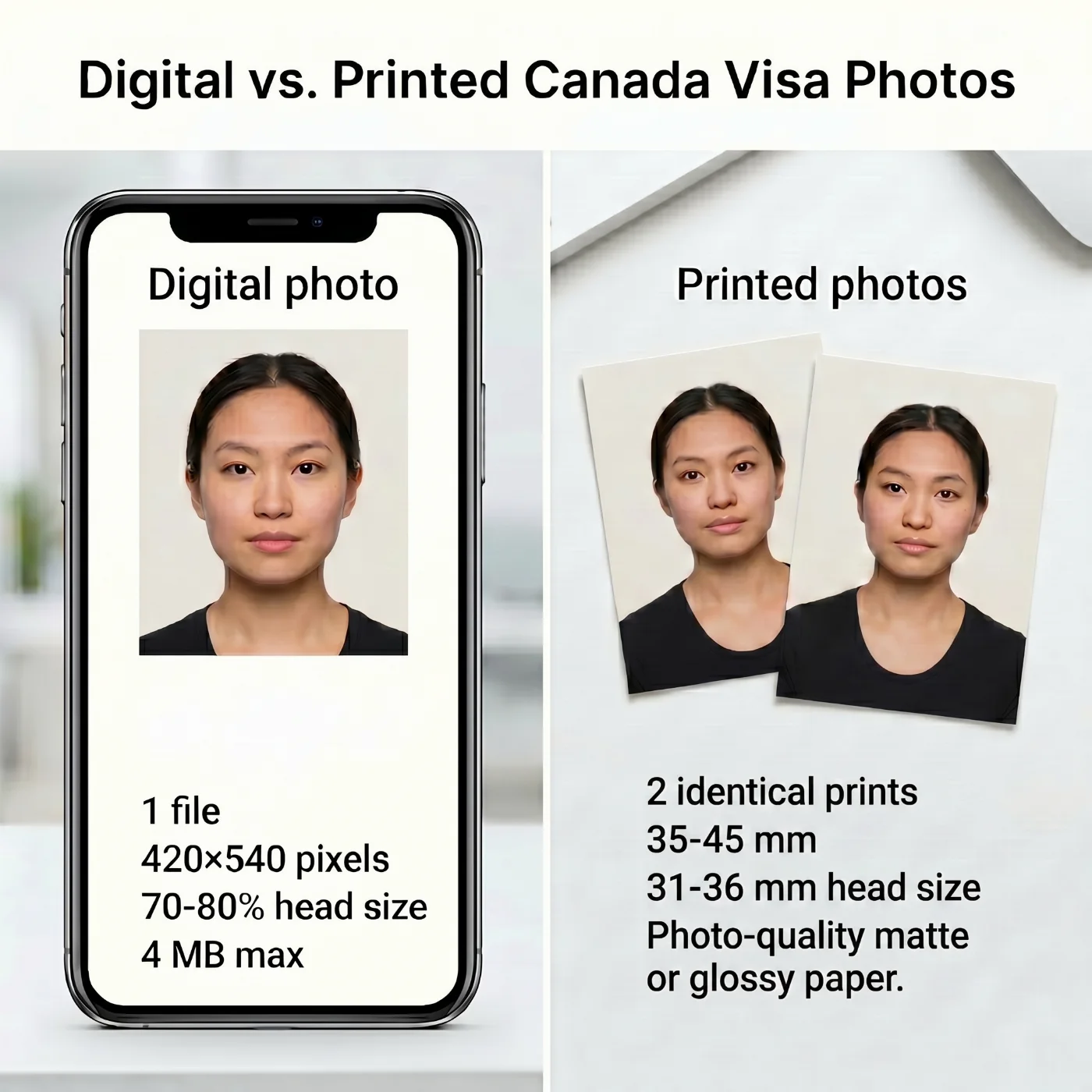
Specification | Digital | Printed |
Purpose | Upload with an online Canadian visa application | Submit the visa application in person at Canadian embassies, consulates, or visa centres |
Quantity | 1 digital file | 2 identical printed photos |
Dimensions | 420 × 540 pixels minimum; head size 70–80% of the image | 35 × 45 mm; head size 31–36 mm from the chin to the top of the head |
Format | JPEG or PNG. File size — up to 4 MB | Professionally printed on high‑quality photo paper, matte or glossy |
Submission | Upload the digital photo through the official online visa application system (Canada visa portal / IRCC online application forms that accept photo upload) | Attach prints to the paper visa application and lodge in person |
Where to Take a Canada Visa Photo?
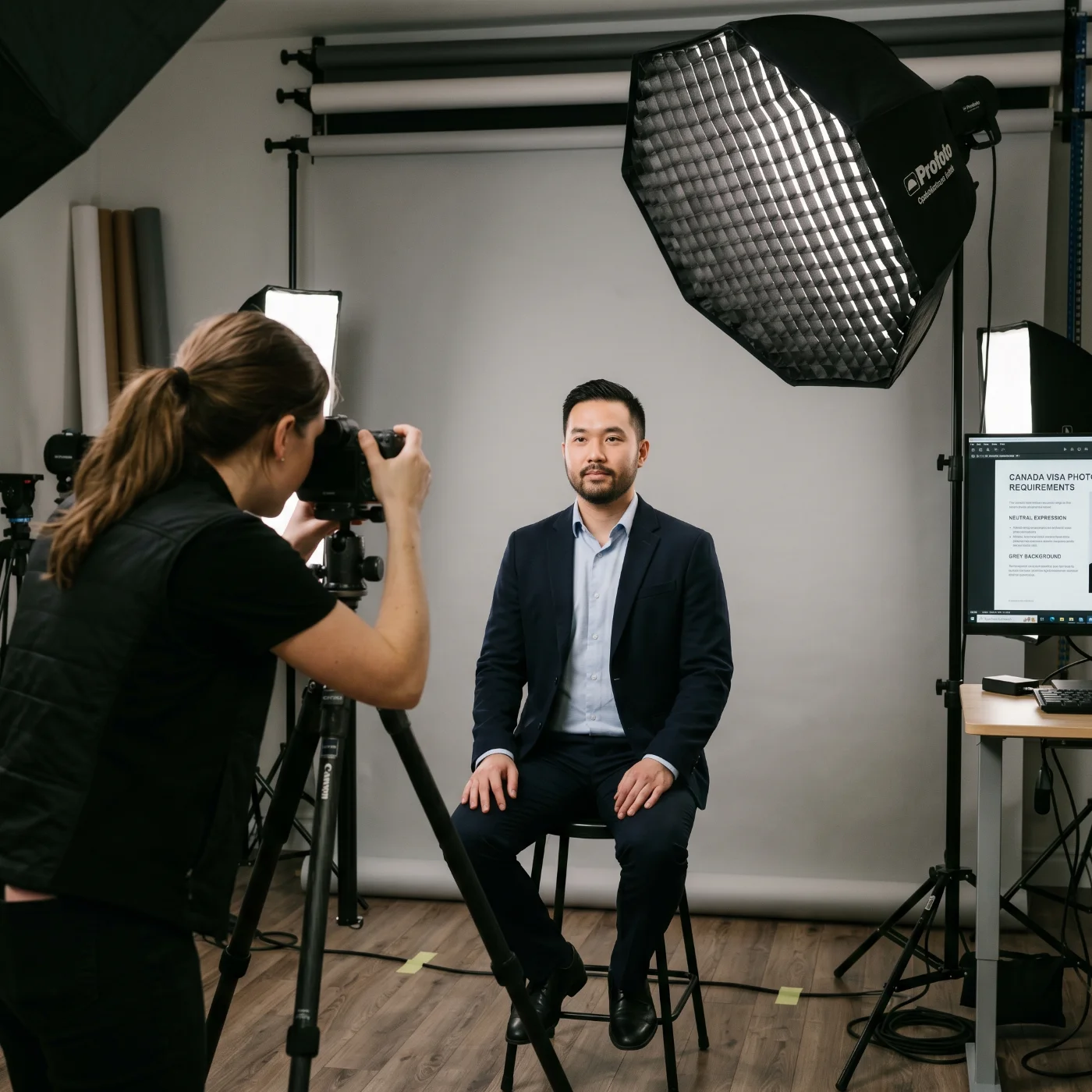
You can take a Canada visa photo in many common locations worldwide — from neighborhood photo labs and post offices to professional studios and online tools — as long as they can deliver a 35 × 45 mm image with a 31–36 mm head height and a plain white or light‑coloured background. Before choosing the provider, make sure they are familiar with the official Canadian visa photo specs.
Local Photo Labs and Retail Photo Counters
High‑street photo labs, minilabs in supermarkets, and photo counters in electronics or office‑supply stores often offer passport and visa photo services with custom sizing. For a Canada visa photo, you should clearly specify that you need a 35 × 45 mm picture with the head between 31–36 mm from chin to crown and a uniform white or light background. It is worth asking to show you a test print or an on‑screen preview so you can verify framing and head size before final printing.
Post Offices
In many countries, national postal operators and their partner outlets provide passport and visa photo services. Post office locations that handle international IDs can usually produce a Canada visa photo on request, using standard 35 × 45 mm templates and neutral backgrounds. This option is convenient if you are already mailing forms or documents. Some branches offer a digital copy alongside printed photos.
Self‑Service Photo Booths
Self‑service photo booths in malls, train and metro stations, or busy public areas have passport and visa formats among their presets. However, for a Canada visa photo, they are a less reliable solution: booths often produce images with incorrect head size, uneven lighting, shadows, or slightly off proportions. If you have access to a studio, lab, or a specialised online service, a booth should remain a last‑resort option.
Professional Photo Studios
Professional portrait studios and specialised ID‑photo providers are typically the safest offline choice for Canada visa photos. They can set controlled, even lighting, use a plain white or light‑coloured background, and adjust camera distance to achieve a 35 × 45 mm print with a 31–36 mm head height that fills about 70–80% of the frame. Many such studios will also supply both printed photos and a correctly cropped digital file suitable for online visa applications.
Pharmacies and Convenience Chains
In some countries, large pharmacy and convenience chains (like Walgreens and CVS in the US) operate small kiosks or counters for passport and visa photos. These locations can be a quick option for a Canada visa photo if staff are familiar with the Canadian format and can print 35 × 45 mm images on proper photo paper. Before you sit for a picture, confirm that they can provide a plain white or light‑coloured background and ask whether a digital file is available in addition to printed copies.
Online Canada Visa Photo Tools
Online Canada visa photo tools are a practical way to obtain a compliant visa photo without visiting a physical location. You take a picture with a smartphone or camera against a plain, light background, upload it to a Canada visa photo checker, and the system automatically crops it to 35 × 45 mm, adjusts your head height to the required 31–36 mm range, and normalises the background to white or light. The final file can usually be downloaded both as a high‑resolution JPEG for online submission and as a layout ready for printing on photo paper. After receiving the processed image, you either upload it directly with your online visa application, send it to a local lab for printing, or print it at home if you have photo paper.
Canada Visa Photo Services: Overview
Service | Time to Get a Canada Visa Photo | Pricing | Chance of Approval |
Retail Photo Labs & Photo Counters | 10–20 minutes | Varies (approx. $10–20) | High–moderate |
Post Offices | 10–20 minutes | Varies (approx. $10–20) | High–moderate |
Self‑Service Photo Booths | 5–10 minutes | Varies (approx. $8–15) | Low |
Professional Studios & ID‑Photo Providers | 1 hour to 1–2 days | Varies (approx. $20–50+) | High |
Pharmacies & Convenience Chains | 10–20 minutes | Varies (approx. $10–20) | Moderate |
Online Canada Visa Photo Tools | Under 1 minute | Free–$23 | High |
How to Take a Canadian Visa Photo at Home
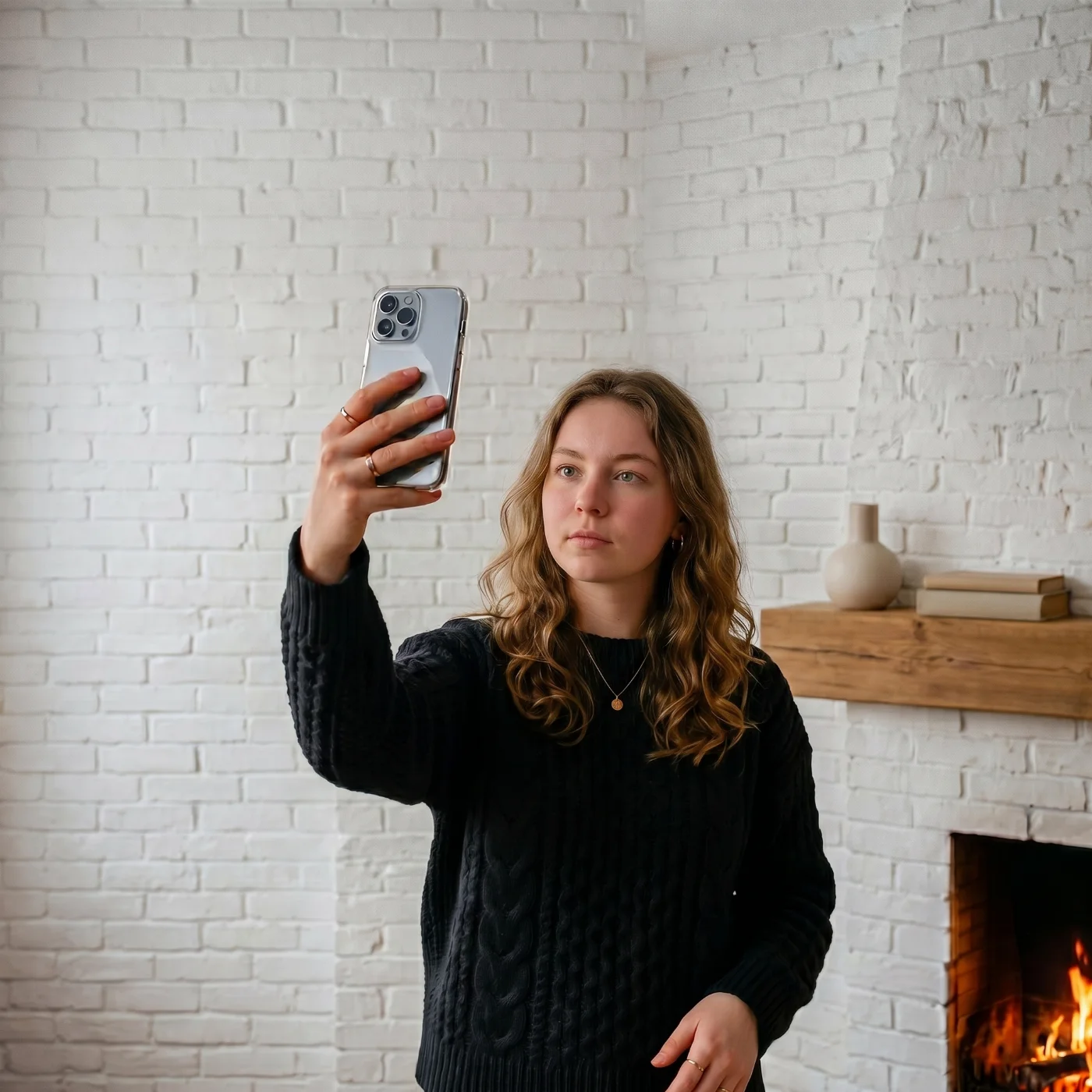
At busy times before a trip, we want to streamline every step as much as possible. Spending time on a studio visit feels like a tiring and unnecessary extra — and that’s when services like PhotoGov really come in handy. With our IRCC photo editing tool available 24/7 from anywhere in the world, you can simply snap a selfie, upload it to the platform, and get a Canada visa photo online in under 30 seconds.
The service guarantees technical compliance with Canadian visa photo requirements. These simple setup tips will help you take a good photo with your iPhone, and we’ll take care of the rest.
Take your photo during the day, preferably, at a well-lit spot by a window. Ideally, if the background is plain and off-white.
Place your tripod about 2 metres (6.5 feet) from the wall, or, if using your phone's front camera, hold it roughly 50 cm (20 inches) away at face level.
Keep a neutral expression, with eyes open, mouth closed, and head and the top of the shoulders fully visible. Refrain from wearing any extra accessories or headwear, unless for religious or medical reasons.
Turn off the portrait mode, and, if needed, set up the timer to 3 or 10 seconds. Take a few shots.
Choose the best image — make sure it is in focus, sharp, without any blur, distortions, or pixelation. Check official examples here for guidance.
Upload your picture to PhotoGov, choose Canada as the country, and "visa" as the document type. Wait about 30 seconds and get a visa-ready image in digital or printable format.
If you're submitting your application in person, print the pictures on quality photographic paper. You're ready for a consulate visit!
Taking Canadian Visa Photos of Your Child
When it comes to baby visa photos, the same general approach still applies: we want to save time and money and avoid the stress of visiting a professional photographer with a small child. With a free Canada visa photo tool like PhotoGov, you can obtain a 100% compliant child visa photo without leaving home.
The key requirements remain, but the infant's expression does not have to be perfect: their mouth can be slightly open, as long as there are no extra objects in the frame and the baby is looking more or less toward the camera. Choose a calm moment, set up a simple background, take your baby's picture, and use our tool to match it to the Canada visa photo requirements.
Setting: Uniform lighting from a natural source, plain background.
Position: A newborn may lie on a blanket; older children — sit or stand.
Expression: Neutral facial expression, no crying or laughing.
Frame: No toys, parents’ hands, or other objects in the frame.
10 Common Reasons for Canada Visa Photo Rejection
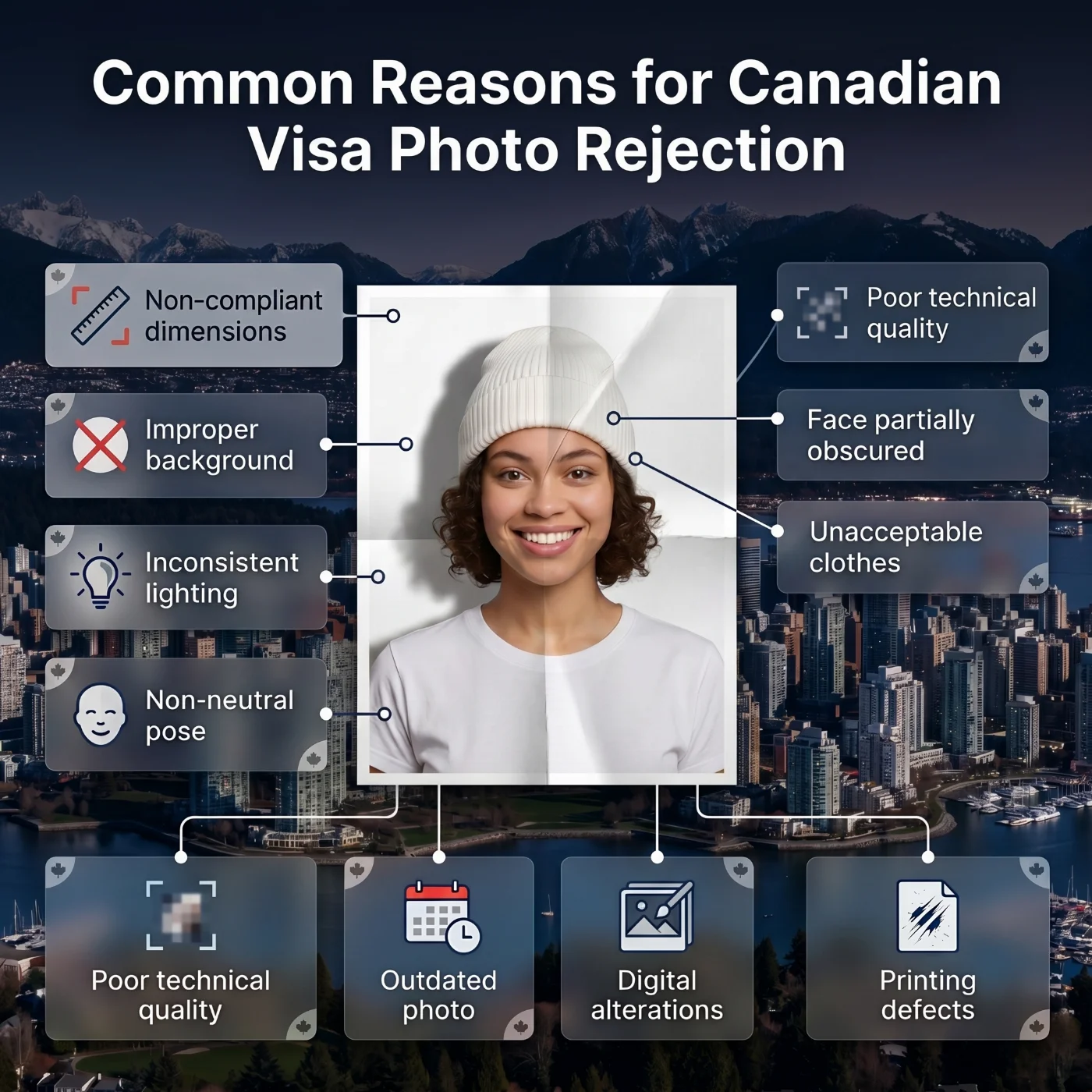
Canada visa photo submissions are often rejected due to technical non‑compliance or poor image quality. The most common issues include:
Non‑compliant dimensions: The photo is not 35 × 45 mm, the head height falls outside the required 31–36 mm range, or the face occupies too little or too much of the frame.
Improper background: The background is not plain white or light‑coloured, or it contains visible patterns, shadows, gradients, or texture.
Inconsistent lighting: Uneven illumination, harsh shadows, glare, or overexposure that changes the way facial features appear.
Non‑neutral pose: The head is turned or tilted, or the expression is not neutral (for example, smiling, frowning, or raised eyebrows).
Poor technical quality: The image is not sharp, shows visible noise or compression artefacts, or has insufficient resolution.
Face partially obscured: Hair, accessories, or objects cover parts of the face — eyes, eyebrows, or jawline.
Unacceptable accessories or clothes: Glasses, tinted lenses, or head coverings that are not worn for religious or medical reasons, or that cast shadows or hide facial features. Military or camouflage wear.
Outdated photo: The picture is older than six months or does not reflect your current appearance due to significant changes.
Digital alterations: Filters, AI enhancement, or retouching that modifies skin tone, texture, or facial structure beyond simple exposure and colour correction.
Printing defects (for paper photos): Low‑quality printing, incorrect colours, streaks, marks, creases, or other physical damage to the photo.
A dedicated online Canada visa photo editor will help reduce these risks by automatically applying the correct size, background, and head‑position rules to your uploaded image. It is a convenient way to check the image that you’re planning to submit for both — biometric and technical errors, and reduce the rejection risk.
What to Do if Your Canada Visa Photo is Rejected
If IRCC or a visa centre decides that your Canada visa photo does not meet the official specifications, they will ask you to provide a new photograph before continuing to process your application. The notice or message normally indicates what is wrong with the image (for example, size, head height, background, or lighting).
For online applications: take a new photo that follows all Canada visa photo rules, create a compliant digital file, and upload it to your online account as a replacement for the rejected picture.
For paper applications: have new photos printed according to the Canadian visa requirements, then submit the replacement prints exactly as described in the letter or email from the visa centre or IRCC office.
Sending updated photos is usually treated as a correction to your existing file; most likely, you won’t need to resubmit the whole application.
If you used an online Canada visa photo editor, share the feedback from IRCC with their support team so they can adjust the crop, background, or quality settings, or advise you when it is better to retake the photo completely.
Frequently Asked Questions
What is the Canadian Visa Photo Size?
35-45 mm (1 3/8 x 1 3/4 inches). The head size must be measured between 31 mm and 36 mm (1 1/4 x 1 7/16 inches).
What are the Essential Canada Visa Photo Requirements?
Size: 35 × 45 mm.
Recency: Taken within the last 6 months.
Background: Plain white or light-coloured.
Quality: Colour or black-and-white, sharp, no blur, no filters.
Face: Centered, full head and top of shoulders visible.
Expression: Neutral, mouth closed, eyes open, looking straight at the camera.
Accessories: No sunglasses or tinted glasses; head coverings only for religious/medical reasons, with the full face visible.
Where to Take a Canada Visa Photo?
You don’t have to hunt for a special “Canada-only” photo studio to get a valid visa picture. Any place that offers standard passport photos can usually produce images that meet Canadian visa specifications, as long as you bring the size and framing requirements with you. Many pharmacies, copy centres, and mall photo booths in Canada, as well as professional studios abroad, are familiar with the 35×45 mm format and neutral, light background standards.
If you prefer to avoid travelling to a studio, an online service like PhotoGov lets you create a Canada visa photo from home using a regular smartphone portrait. You simply upload your picture, select Canada as your document type, and the system adjusts the size, head position, and background to match current visa guidelines. This option is especially convenient if you live far from a studio, are applying for several family members at once, or need a fast, digital-ready image for an online application.
How Much is a Canada Visa Photo?
The cost of a Canada visa photo depends on the format you choose and the country you are ordering from. With PhotoGov, a digital Canada visa photo costs C$5.90 in Canada, and C$6.90 with a printable A4 sheet. In the United States, a digital photo costs $6.90, and a printable sheet is $2.90 more; in the United Kingdom, it is £4.90 for a digital photo and £6.90 with a printable sheet. Users in other countries can create two free ID photos per day, depending on location.
Offline, prices are usually higher: pharmacies, photo kiosks, and studios in Canada and abroad typically charge per printed set, often adding up to the cost of several online files at once. In practice, even with paid options, PhotoGov remains the more affordable choice, because you pay once for a ready-to-use digital file (and optional print layout) instead of returning to a studio every time a photo is rejected or updated.
How Many Photos do I Need for a Canadian visa?
Two photos are required for paper applications; one digital photo is required for online submissions.
How to Make Sure My Photo Meets Official Requirements?
You don't need to worry about that when you use PhotoGov — all official specifications are applied to your original photo automatically. The system processes the selfie that you've uploaded to our platform, producing a 100% compliant, visa-ready image.
What’s the Best Way to Capture a Digital Visa Photo?
The best way is to click a selfie at home using the expert tips that we've provided on this page. Then, simply upload your portrait to our platform, and it will automatically match it to the Canada visa photo requirements. All you need is your smartphone or a laptop, no studio visits, queues, or appointments!
Where to Get a Canada Visa Photo?
You can get a Canada visa photo at most locations that offer standard passport photo services, as long as they can produce a 35 × 45 mm image with a plain, light background. Typical options include photo labs, professional studios, some post offices, pharmacies, and retail photo counters that handle ID photos.
If you prefer not to visit a physical location, you can take a portrait at home and process it through an online Canada visa photo tool such as PhotoGov, which automatically applies the correct size, head height, and background.
What is the Photo Size for Canada Visa?
The photo size for a Canada visa is 35 mm wide and 45 mm high. Within this frame, your head must measure between 31 mm and 36 mm from the bottom of the chin to the top of the head, so your face fills most of the image while leaving a small margin above the hair. These measurements apply to both printed photos and the way a digital image is cropped for online applications.
Which Size Photo is Required for Canada Visa?
For Canada visa applications, only photos that are exactly 35 × 45 mm are accepted. Smaller, larger, or manually cut photos, even if they look “almost right”, do not match the official requirements. If you are not using a specialised visa photo tool, always double‑check that you’ve correctly chosen your document type, “Canadian visa,” as it automatically applies official requirements to your original photo.
How to Take Digital Photo for Canada Visa?
To take a digital photo for a Canada visa:
Stand facing the camera in front of a plain white or light‑coloured wall with soft, even lighting and no strong shadows.
Hold the camera at eye level, frame your full head and the top of your shoulders, keep a neutral expression with your mouth closed and eyes open, and make sure the image is sharp, and in focus.
Upload the picture to a Canada visa photo editor like PhotoGov, which will crop it to 35 × 45 mm, adjust your head height into the required range, and standardise the background.
Download your photo in a digital JPEG format for online uploads.
As an add-on option, you can choose Human Verification — a senior compliance expert will evaluate your final photo’s acceptance chances. And change your casual clothes to formal (5 additional photos in different outfits), which increases acceptance likelihood.
How to Upload Digital Photo for Canada Visa?
When you apply for a Canada visa online, the application form includes a step where you must upload your photo file. Before you do, check that the image is cropped to the Canada visa format, saved as a JPEG or PNG, and within the allowed file size — up to 4 MB. Then choose the prepared file from your device, upload it to the photo field in your application, and confirm in the preview that your entire face and the top of your shoulders are clearly visible without extra borders or cut‑offs.
Where to Take Canada Visa Photo?
You can take a Canada visa photo at any professional studio, photo lab, or retail photo point that applies the 35 × 45 mm Canada visa size and can work with a plain white or light‑coloured background. Another option is to take your own picture using a smartphone or camera at home, following the visa photo rules, and then let an online Canada visa photo tool handle the technical adjustments so the final image is ready for printing or digital submission.
PhotoGov.net strictly adheres to the Global regulations for ID photos.
Official Government Documentation Sources
Canadian Visa Photo Requirements: Immigration, Refugees and Citizenship Canada (IRCC)
Biometric Regulations for International ID Documents: International Civil Aviation Organization (ICAO) Document 9303
Other Documents — Canadian ID Photos
Was this helpful?
83 found this helpful
Top expert
Based on official government sources
Helpful votes: 83
Was this helpful?
83 found this helpful
Service provided by Y VISION TECHNOLOGIES LLP · Stoney Works 8 Stoney Lane, London, England, SE19 3BD · Terms · Refund policy · Contact
We value your Privacy
We use cookies to enhance your browsing experience, serve personalized ads or content. By clicking “Accept All”, you consent to our use of cookies.