India Visa Photo Requirements 2026: How to Make It Right & Avoid Rejection
Table of contents:
- 11 Essential India Visa Photo Requirements: a Checklist
- Acceptable Indian Visa Photo Examples
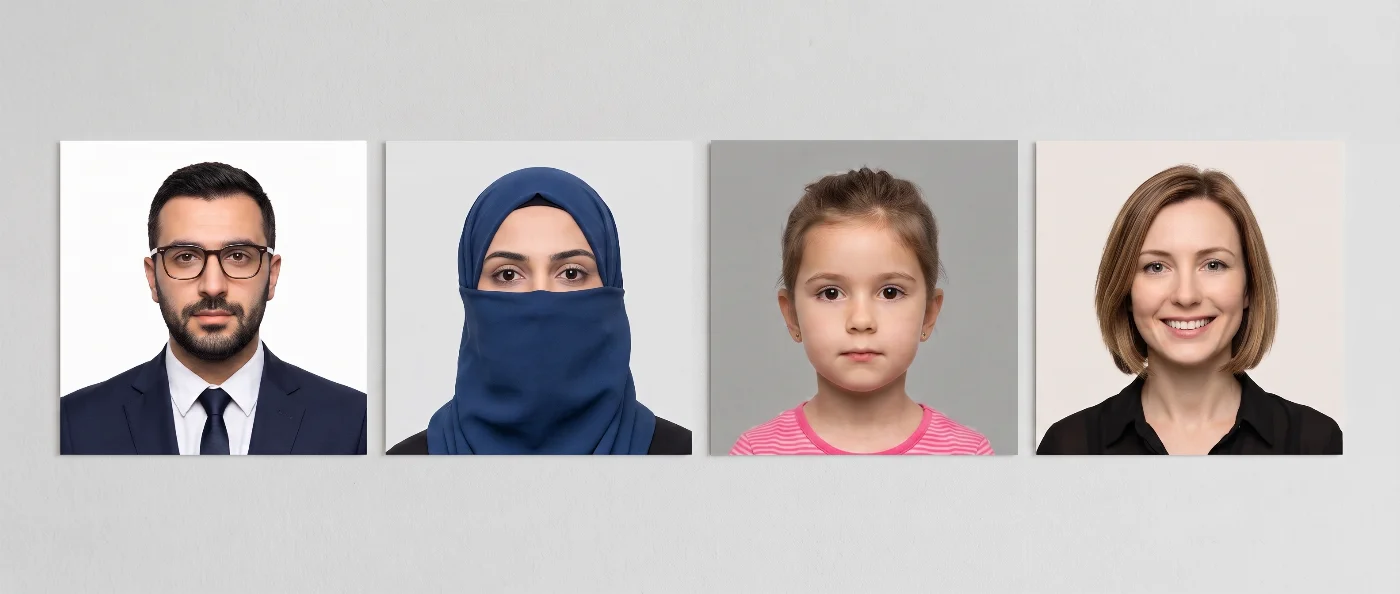
- Unacceptable Indian Visa Photo Examples
- India Visa Photo Size and Pixel Dimensions Explained
- India e-Visa vs Regular Visa Photo Requirements: What's Different
- India Visa Photo Background, Lighting, and Framing Rules
- India Visa Photo Rules: Glasses and Facial Expression
- India Visa Photo Rules for Children and Infants
- Where to Apply for an India Visa Photo: e-Visa Portal and Missions Abroad
- How to Take an India Visa Photo at Home: 5 Easy Steps
- Common Reasons an India Visa Photo Gets Rejected
- How to Check Your India Visa Photo Before You Submit
- Your India Visa Photo Is Ready: What's Next?
- Frequently Asked Questions
- Official Sources
Planning a trip to India? When applying for a visa, you must upload a compliant photograph that follows all India visa photo requirements — a square image with a plain light-colored or white background, 350 x 350 to 1,000 x 1,000 pixel dimensions with the head measuring 1 to 1-3/8 inches (25 to 35 mm) from chin to hairline, saved as a JPEG of 10 KB – 1 MB for an e-Visa and
10 – 300 KB for a regular visa.
This Guide covers all India visa photo requirements for 2026, so you can submit your application successfully. Have a nice trip!
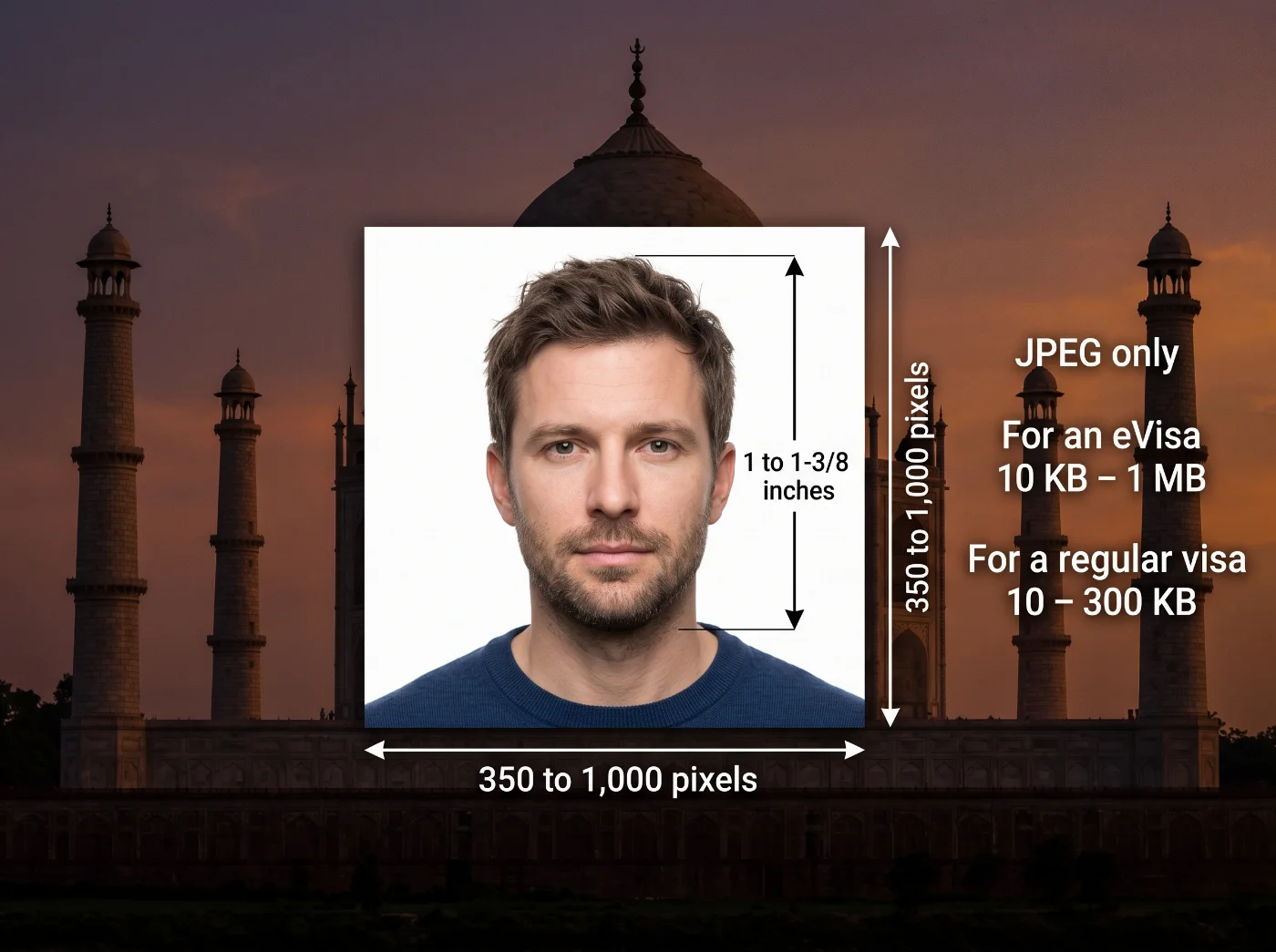 Source: Bureau of Immigration, Ministry of Home Affairs, Government of India
11 Essential India Visa Photo Requirements: a Checklist
Indian photo requirements are published on the official visa and e-Visa portal operated by the Bureau of Immigration under India's Ministry of Home Affairs. Specifications in the table below apply to the standard online upload for both the regular visa and the e-Visa. Follow them exactly: a file that misses one or more official specs may get automatically rejected by the portal.
Requirement | Details |
|---|---|
1. File Format | JPEG only. |
2. File Size | 10 KB – 1 MB for an e-Visa application; 10 – 300 KB for a regular visa application. |
3. Photo Dimensions | 350 x 350 to 1,000 x 1,000 pixels. |
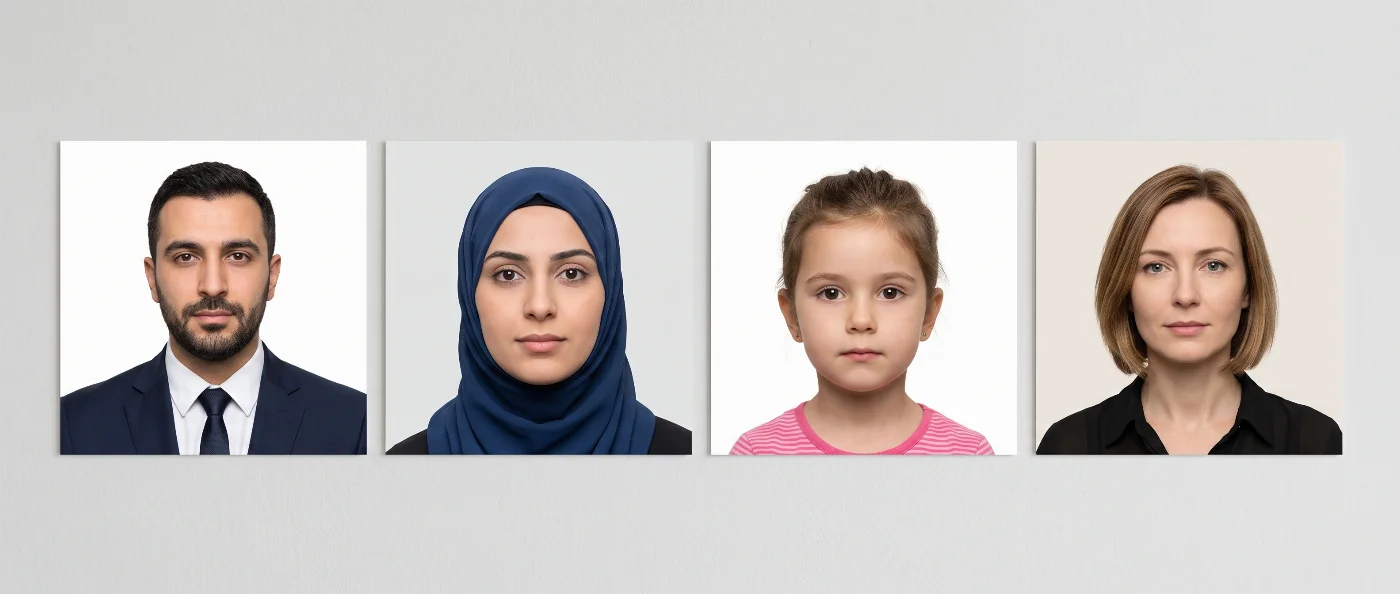
4. Background | Plain light colored or white background. |
5. Framing | Full-face, front view, centered in the frame, showing the entire head from the top of the hair to the bottom of the chin. |
6. Head Size | The head must measure 1 to 1-3/8 inches (25 to 35 mm), from the bottom of the chin to the top of the hair. |
7. Facial expression | Neutral facial expression. Eyes open, mouth closed. |
8. Glasses | The official eVisa website requires a photo "without spectacles." |
9. Headwear and accessories | Remove any headwear and accessories obstructing facial features or fully covering your neck (scarf). Only medical (with a relevant letter from a medical provider) or religious headwear worn daily is accepted. |
10. Lighting | Even, shadow-free lighting on the face and background — no shadows, textures, glare, or reflections. |
11. Borders, frames, decorative artefacts | The photo must be cropped to the edge — no frames, borders, or any decorative elements are allowed. |
Acceptable Indian Visa Photo Examples
Unacceptable Indian Visa Photo Examples
India Visa Photo Size and Pixel Dimensions Explained
India visa photo is a digital upload — its size is measured in pixels. The regular visa instructions on the official visa portal require photos of a minimum of 350 x 350 pixels and a maximum of 1,000 x 1,000 pixels. A rectangular crop, even a photo that is just a few pixels off square, will fail the upload check.
The head, measured from the bottom of your chin to the top of your hair, needs to fill 1 to 1-3/8 inches (25 to 35 mm). Standing too close to the camera pushes the head measurement over the limit; standing too far back leaves too much background, making the face too small for biometric identification. The best way to shoot a proper photo is to stand about three feet away from the camera, placed on a tripod at eye level.
India e-Visa vs Regular Visa Photo Requirements: What's Different
Most travelers apply for an Indian visa through the e-Visa system. It covers tourist, business, medical, conference, and several other short-stay categories entirely online. A smaller group of applicants, mainly those filing for employment, student, journalist, or research visas, use the regular (sticker) visa route instead. Initially, the application is submitted via the official visa portal too, but it requires a printed application submitted through an Indian mission or its outsourced visa partner. The photo file, therefore, must follow a slightly different set of requirements.
Comparison Table: e-Visa vs Paper Visa Sticker Photo
Aspect | e-Visa | Regular Visa |
|---|---|---|
File size | 10 KB to 1 MB | 10 KB to 300 KB |
Format | JPEG | JPEG |
Where it's uploaded | Directly in the e-Visa application on indianvisaonline.gov.in | On the same portal, then the printed application and photo are submitted with your documents |
Glasses | eVisa portal requires photos "without spectacles" | Though authorities don’t specify the glasses rule for regular visas, we recommend removing them for the photo |
Typical use case | Tourist, business, medical, conference, and other short-stay categories | Employment, student, journalist, research, and other categories outside the e-Visa list |
If you already have a compliant e-Visa photo and later need to switch to a regular visa application, check the file size again before you resubmit it. A photo saved at 800 KB clears the e-Visa limit but is too large for the regular visa upload: you would need to compress it before the portal accepts it.
India Visa Photo Background, Lighting, and Framing Rules

The official Indian visa portal requires a plain light-colored or white background with even lighting on the face and background, free of shadows. The framing instructions ask for a front-facing headshot, with the full head visible from the top of the hair to the bottom of the chin. A tilted head, a photo taken from slightly above or below eye level, or a stray white frame left in by an editing app are all common reasons for rejection.
India Visa Photo Rules: Glasses and Facial Expression
On the official Indian visa portal, glasses are explicitly addressed only for the e-Visa, where the instructions require the photo to be taken "without spectacles." We recommend following the same rule for a visa sticker application too — it's the safer choice, since even prescription glasses with clear lenses can produce glare or reflections that interfere with biometric identification.
The international rule for facial expression in ID photos is set by the International Civil Aviation Organization Document 9303. It requires a neutral facial expression with both eyes open and mouth closed. Exaggerated expressions, including a wide smile, can compromise the biometric scans. Therefore, when making an Indian visa photo, maintain a calm, natural expression — it keeps your photo consistent both for automated identification systems and border officers.
According to international visa photo standards, all head coverings must be taken off, unless worn for religious or medical reasons. If you wear a religious head covering daily, keep your full face visible from the bottom of your chin to the top of your hairline, following the general framing rule. Check with your Indian mission or the eVisa Help Desk at indian-evisa@gov.in or at +91 82 7808 7808 beforehand if you have a specific concern.
India Visa Photo Rules for Children and Infants
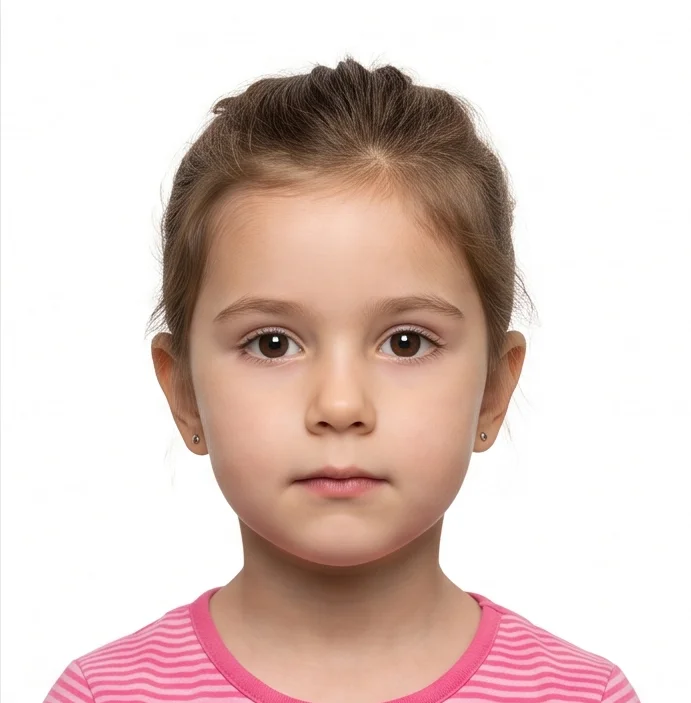
Every applicant, including an infant, needs their own visa and their own photo. The portal applies the same specifications to every applicant regardless of age. So, a child's photo follows the same file format, size, background, and framing rules as an adult's.
The practical challenge is getting an infant or toddler to sit still, front-facing, with both eyes open, against a plain background. When taking a photo of your infant at home, lay them on a plain light-colored sheet or blanket and photograph from directly above, with the camera level and the baby's face centered in the frame. For a baby who can sit up, a car seat or high chair pushed against a bare wall works, keeping straps, hands, and toys clear of the final crop. Take a longer sequence of shots, twenty or more, and pick the sharpest frame with both eyes open and fingers clear of the face.
Where to Apply for an India Visa Photo: e-Visa Portal and Missions Abroad
The e-Visa application, including the photo upload, is completed entirely on indianvisaonline.gov.in. The Bureau of Immigration has issued a public advisory naming it as the only correct website for the e-Visa, after several lookalike sites were found copying the government's design to collect fees and personal documents from applicants. Before you upload an Indian visa photo, check that the address bar reads indianvisaonline.gov.in exactly.
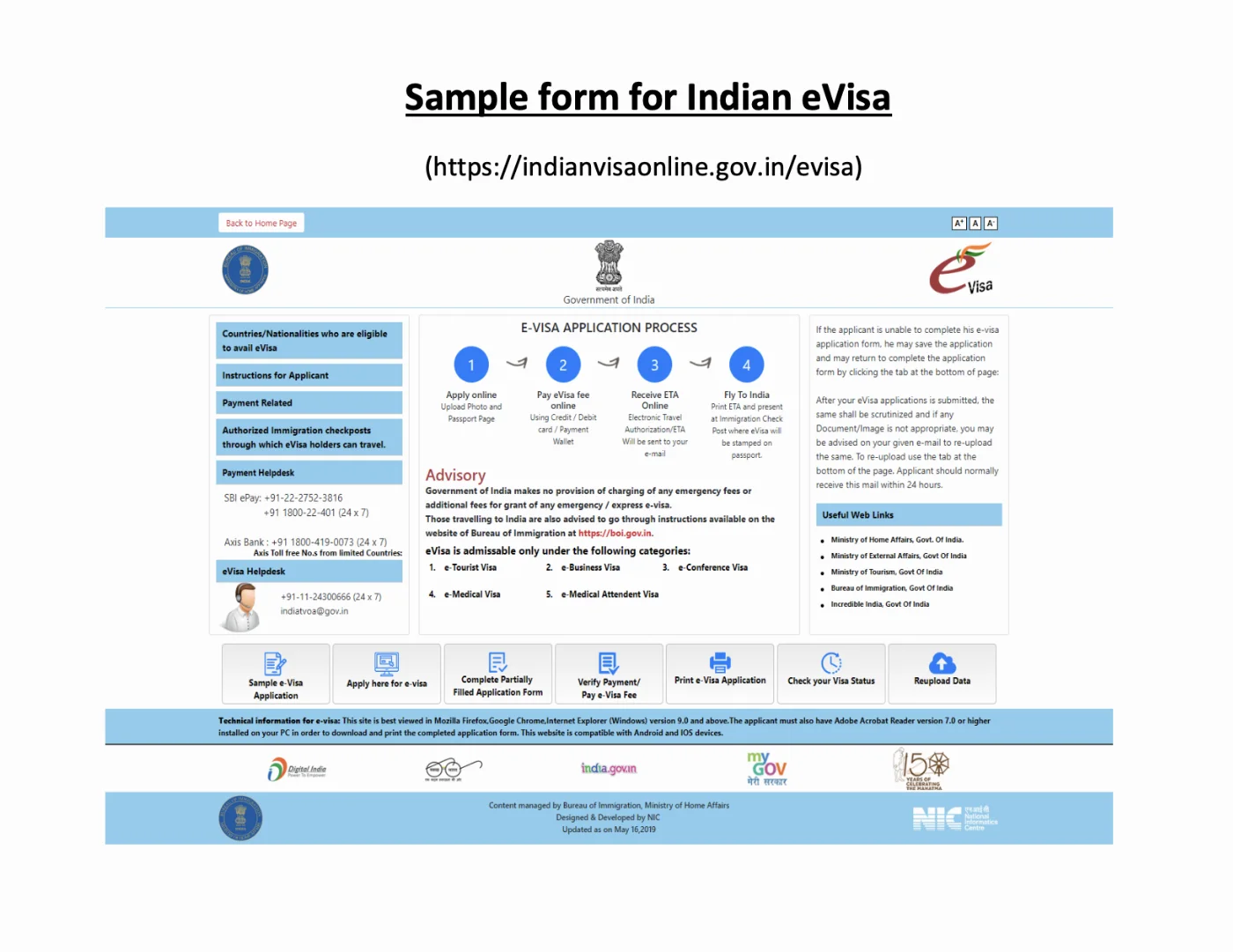
A regular visa application starts on the same portal, but the printed form, photo, and passport are then submitted in person or through an outsourced visa application center that handles document collection for Indian missions in the United States and elsewhere. If a visa center or a travel agent quotes you a photo rule that conflicts with what is published on the government portal, the portal is the version that governs your application.
The Bureau of Immigration has also stated plainly that "Government of India has not authorized any agent or intermediary to charge any fee for facilitation of emergency / express Visa/eVisa." A third party can help you fill out paperwork, though the Bureau of Immigration alone sets the rules for your visa timeline and the photo specifications.
Route | Photo Upload Channel | Visa Purpose |
|---|---|---|
e-Visa | Uploaded directly on indianvisaonline.gov.in | Tourist, business, medical, conference, and other eligible short-stay categories |
Regular visa | Uploaded to the portal, then the printed application is submitted through an Indian mission or a third-party visa center | Employment, student, journalist, research, and categories outside the e-Visa list |
How to Take an India Visa Photo at Home: 5 Easy Steps
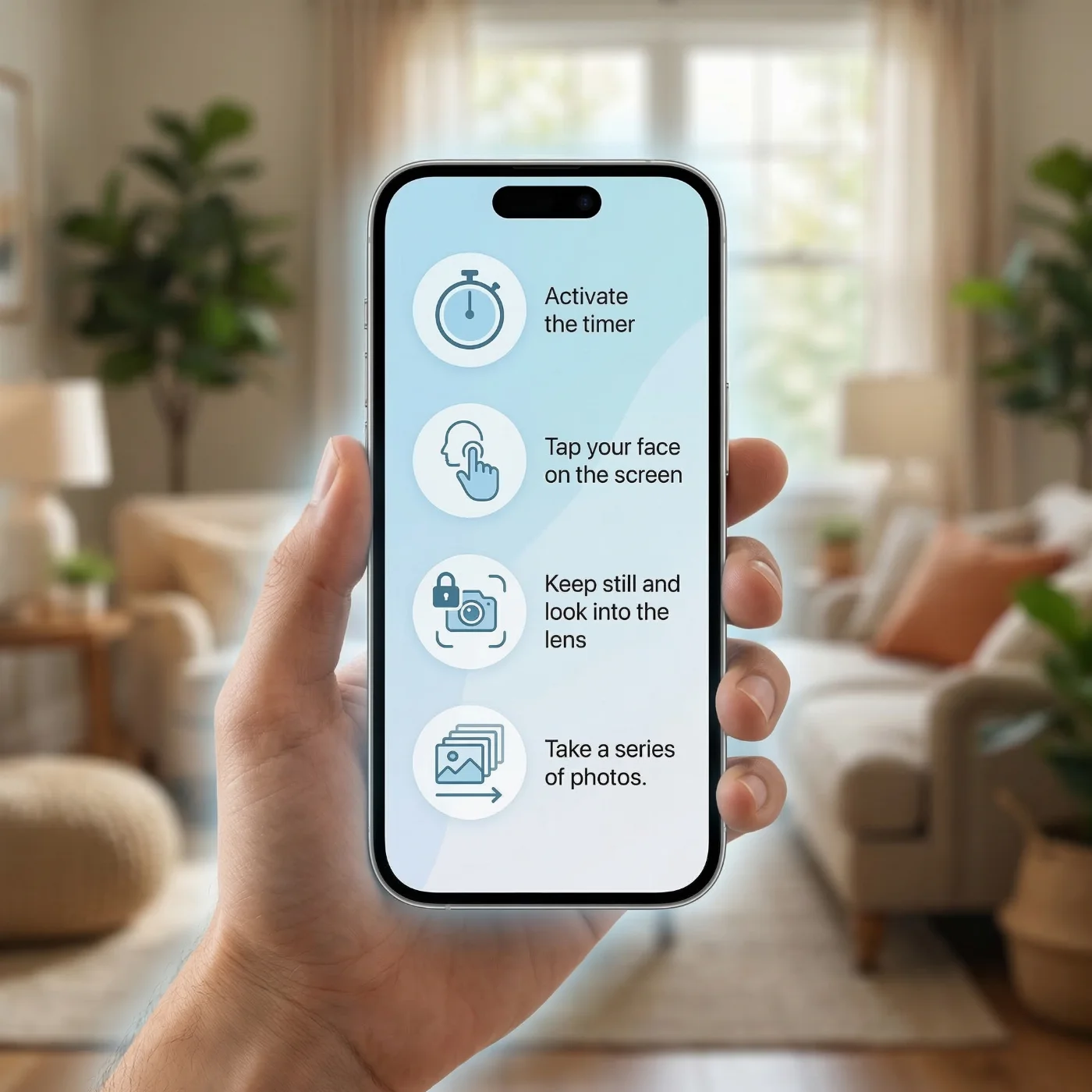
A home setup is enough to produce a compliant India visa photo:
Place your phone on a tripod against a light-colored or white wall, preferably by the window. Take the photo in daylight only. Always use the rear camera on your phone for sharper detail than the front-facing one typically captures. Set up a timer.
Remove your glasses, heavy accessories, and non-medical or non-religious headwear.
Stand about three feet from the wall, keep a neutral expression looking directly into the camera.
Take a few shots and choose the best one for your Indian visa.
Use a reputable online tool to create an application-ready photo. For example, PhotoGov's India visa photo maker automates the cropping and background steps: it resizes your uploaded selfie to a square file, checks the pixel dimensions against the range published on indianvisaonline.gov.in, and adjusts the background color. The tool creates a ready-to-submit digital file of the right size, crop, and dimensions that you can download in under 30 seconds.
Common Reasons an India Visa Photo Gets Rejected
An upload that fails even one of the published parameters gets rejected by the portal, and you have to fix the file and try again before your application can move forward.
Reason for rejection | How to fix it |
|---|---|
Wrong dimensions | Crop the image to a square before you save it |
Wrong file size | Compress or resave the JPEG until it falls between 10 KB and 300 KB (regular visa) or 10 KB and 1 MB (e-Visa) |
Wrong file format | Save the file as a JPEG (.jpg), the only format the portal accepts |
Wrong background color, shadows, or textures | Reshoot against a plain light-colored or white wall with even lighting |
Glasses, accessories, or headwear | Remove your glasses, large accessories, and headwear (unless medical or religious) and reshoot |
Wrong head size | Reframe so your head measures 1 to 1-3/8 inches (25 to 35 mm), and reshoot |
Border or frame | Re-export the file cropped flush to the edge |
A file size or border problem can usually be fixed with the same photo. A shadow, a tilted head, or visible glasses on an e-Visa photo generally calls for starting over with a new shot.
How to Check Your India Visa Photo Before You Submit
Since the photo is uploaded as part of the online application, the only real test is whether the file passes the portal's own checks on the first try. Before you upload, confirm the file is a JPEG, is square, falls within the 350 x 350 and 1,000 x 1,000 pixel range, and is sized 10 KB to 1 MB for eVisa and 10 KB to 300 KB for a regular visa. The background must be white or light-colored, and the image must be free of shadows, glare, and textures. You must face the camera directly with a neutral expression, mouth closed and eyes open. To be sure, use a reliable online visa photo checker.
Your India Visa Photo Is Ready: What's Next?
Your India visa photo is ready. Before you submit your application, here's what to check next.
Review the rest of your application. The photo is only one requirement — make sure your passport is valid for at least six months beyond your intended date of entry, your application form is complete, and any supporting documents are ready to upload.
Check if other Indian documents need a photo too. If you're also applying for an Indian passport, the photo standard is different — see PhotoGov's guide to Indian passport photo requirements for the separate 35×45 mm specification.
Applying for another country as well? Photo specs vary by destination. PhotoGov helps you create submission-ready US visa photo, Canadian visa photo, Schengen visa photo, and many more — each automatically adjusted to current official requirements.
Frequently Asked Questions
What Size is an Indian Visa Photo?
The Indian visa photo must be square, between 350 x 350 and 1,000 x 1,000 pixels, with the head measuring 1 to 1-3/8 inches (25 to 35 mm) from chin to hairline.
What is the File Size Limit for an India e-Visa Photo?
Between 10 KB and 1 MB. A regular (non-e-Visa) application requires a smaller range of 10 KB to 300 KB — always double-check the official source (indianvisaonline.gov.in) before applying.
Can I Wear Glasses in My India Visa Photo?
No. The official e-Visa instructions specifically require the photo to be taken "without spectacles," and we recommend following the same rule for a regular (sticker) visa.
What Color is the Background for Indian Visa Photo?
A plain light colored or white background, evenly lit and free of shadows on the face or the background. A light gray or pale wall is acceptable as long as it is even and free of texture.
How Recent Must My India Visa Photo Be?
Use a current photo that matches your appearance at the time of application, and check for an exact requirement with your Indian mission for your visa category.
Do I Need to Submit a Printed Photo, or is Digital Enough?
For an Indian e-Visa, you must submit your photo online — so only a digital photo. For a regular visa, the photo is uploaded to the same portal, and the printed application is then submitted through an Indian mission or a third-party visa center.
Do the Same India Visa Photo Rules Apply to Children?
Yes. The Bureau of Immigration applies the same Indian visa photo specifications to every applicant regardless of age, so a child's photo follows the same format, size, background, and framing rules as an adult's — plain light-colored or white background, 350 x 350 to 1,000 x 1,000 pixels, head measuring 1 to 1-3/8 inches (25 to 35 mm) from chin to hairline, saved as a JPEG of 10 – 300 KB for a regular visa or up to 1 MB for an e-Visa.
What File Format is Required for an Indian Visa Photo?
JPEG only. The Indian visa upload will reject PNG, HEIC, and other digital photo formats, so make sure you’re creating the right file. If you don’t know how to convert your Android or iPhone photo into a JPEG, use PhotoGov’s India Visa Maker — the tool will automatically prepare an application-ready JPEG with the right proportions and digital file specs.
Do e-Visa and Regular India Visa Photos Share the Same Requirements?
Yes and no. Both an eVisa and a regular Indian visa require a square photo within a 350 x 350 to 1,000 x 1,000 pixel limit, taken against a white or light-colored background and saved as a JPEG. But the file size for a photo upload differs: 10 KB to 1 MB for the e-Visa, and 10 KB to 300 KB for the regular visa.
Why Does My Indian Visa Photo Keep Getting Rejected on Upload?
The most common causes for Indian visa photo rejection are:
A non-square crop falling outside the 350 x 350 to 1,000 x 1,000 pixel range
A file outside the size limit of 10 – 300 KB for a regular visa or up to 1 MB for an e-VisaNon-white or non-light-colored background
Shadows or textures in the background
Applicant wears glasses
Non-religious headwear.
Check each item against the checklist in this guide before you reapply.
Is indianvisaonline.gov.in the Only Official Site for an India Visa Photo?
Yes. The Bureau of Immigration’s only official website is indianvisaonline.gov.in. Do not try to apply for an Indian visa through any other commercial websites.
Can I Use the Same Photo for My Indian Visa and my Passport?
No. We don’t recommend doing so, as each document type has specific requirements. However, if you’re using online photo-making tools to create a photo for your document, you can use one source image if it’s of sufficient quality.
What is the Difference Between an India Visa Photo and an Indian Passport Photo?
An India visa photo and an Indian passport photo are part of applications for two completely different documents, issued by different authorities. An India visa photo is submitted by a foreign national applying to enter India; it must be square, sized between 350×350 and 1,000×1,000 pixels. An Indian passport photo, on the other hand, is submitted by an Indian citizen to Passport Seva, following a 35×45 mm photo size and a different set of requirements — you can learn them from our detailed Indian passport photo requirements guide.
Official Sources
Instructions for Regular Visa Application: Bureau of Immigration, Ministry of Home Affairs, Government of India
Online Visa Photo Upload Process: Bureau of Immigration, Ministry of Home Affairs
e-Visa Application Portal and Instructions: Bureau of Immigration, Ministry of Home Affairs
How to Apply for a Visa: Bureau of Immigration, Ministry of Home Affairs
Advisory on Fake Indian E-Visa Websites: Consulate General of India, San Francisco
e-Visa FAQ Section: Bureau of Immigration, Ministry of Home Affairs
Biometric Regulations for International ID Documents: International Civil Aviation Organization (ICAO) Document 9303
Was this helpful?
16 found this helpful
Top expert
Based on official government sources
Helpful votes: 16
Was this helpful?
16 found this helpful
Service provided by Y VISION TECHNOLOGIES LLP · Stoney Works 8 Stoney Lane, London, England, SE19 3BD · Terms · Refund policy · Contact
We value your Privacy
We use cookies to enhance your browsing experience, serve personalized ads or content. By clicking “Accept All”, you consent to our use of cookies.