UAE Passport Photo Requirements 2026, Updated and Expert-Verified
Table of contents:
- 11 Essential UAE Passport Photo Requirements: Checklist
- Acceptable UAE Passport Photo Examples
- Unacceptable UAE Passport Photo Examples
- UAE Passport Photo Requirements for Online Applications
- What Shall I Wear for the Arab Emirates Passport Photo?
- Where to Take a Passport Photo in the UAE
- Passport Photo Services in the UAE: Comparison
- United Arab Emirates Passport Photo Requirements for Children
- Taking a United Arab Emirates Passport Photo at Home in 8 Simple Steps
- How to Apply for the Arab Emirates Passport
- How Do I Apply for My Child's Arab Emirates Passport?
- Common Reasons for UAE Passport Photo Rejection
- Frequently Asked Questions
- Official Government Documentation Sources
UAE Passport Photo Requirements 2026, Updated and Expert-Verified
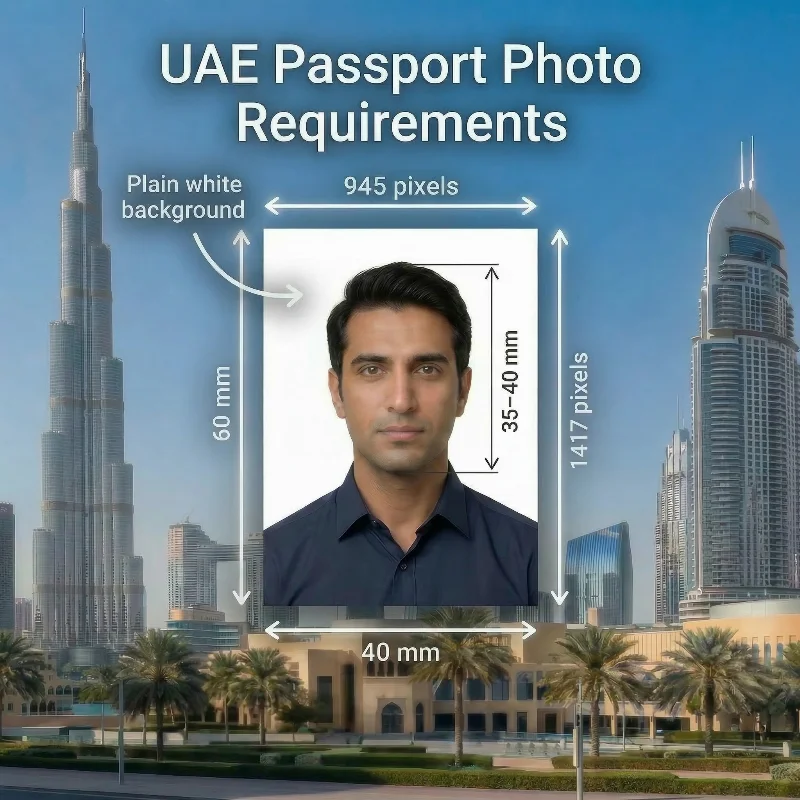
A UAE passport photo is a biometric image that meets a strict set of technical specifications — 40 x 60 mm or 945 x 1417 pixels, plain white background, taken within the last 6 months, and other essential parameters. This 2026 Guide covers all official UAE passport photo requirements to help you avoid delays, repeat submissions, or reappointments.
Source: ICP
11 Essential UAE Passport Photo Requirements: Checklist
Defined by the Federal Authority for Identity and Citizenship, Customs and Port Security (ICP), UAE passport photo requirements are based on the International Civil Aviation Organization (ICAO) Document 9303 standards.
In this section, we focus on 11 core requirements you should check before submitting your picture for an Emirati passport. Today, with convenient tools like PhotoGov, you do not need to memorise all of them — you can use our passport photo maker to turn your original portrait into a 100% compliant, application-ready UAE passport photo.
Requirement | Specification |
1. Number of photos | One digital photo is required for a UAE passport application. |
2. Recency | Taken within the last six months, reflecting the current appearance of the applicant. If they have undergone a significant appearance change, such as weight loss or plastic surgery, the most recent picture is required for the application. |
3. UAE passport photo size | 40 × 60 mm (1.57 × 2.36 in) or 945 × 1417 pixels. According to ICAO guidelines, the required head size is 35-40 mm. |
4. Color | The UAE passport photo must be in color, naturally reflecting the applicant's skin tone and hair color. |
5. Background | A plain white background is required for a UAE passport application. It must be free from shadows, patterns, and any other distractions. |
6. Lighting | Uniform lighting is required for UAE passports — no harsh shadows, reflections, or red‑eye effect can be present in the photo. |
7. Positioning and framing | The photo must not have a frame. Face and shoulders must be square to the camera, with only the upper part of the shoulders visible. |
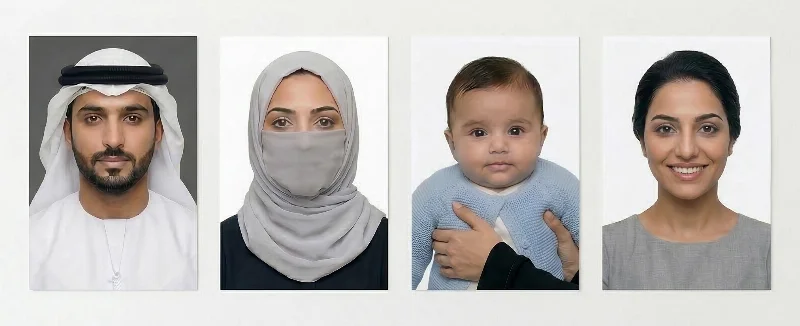
8. Facial expression | A neutral facial expression is required — the applicant must keep their eyes open, and mouth closed, and look directly into the camera. Avoid unnatural expressions, as well as smiling or frowning, on ID, passport, and visa photos. |
9. Attire, head covering, and accessories | Everyday clothing in colors that contrast with the background is required. Attire customarily worn for religious purposes is permitted, provided it does not obscure facial features. The same applies to head coverings worn for religious or medical reasons. Accessories such as jewelry may be kept if they do not cover any part of the face or hairline. |
10. Glasses | Glasses should be removed in the UAE passport photo. Tinted glasses — including prescription ones — and sunglasses are prohibited. Applicants who wear glasses or eye patches for medical reasons, such as following eye surgery, must include a signed statement from their treating hospital or medical provider. |
11. Digital quality | Digital photos must have a resolution of 600 DPI, 945 × 1417 pixels, saved as JPG, with a file size of 1-15 MB. A UAE passport picture should be in focus and free from shadows, filters, or any visible printing or compression marks. |
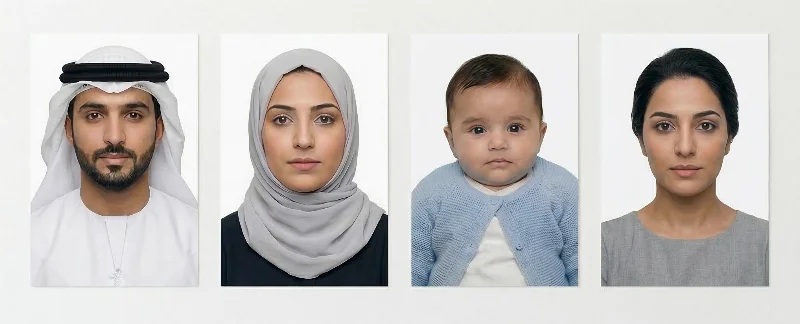
Acceptable UAE Passport Photo Examples
Unacceptable UAE Passport Photo Examples
UAE Passport Photo Requirements for Online Applications
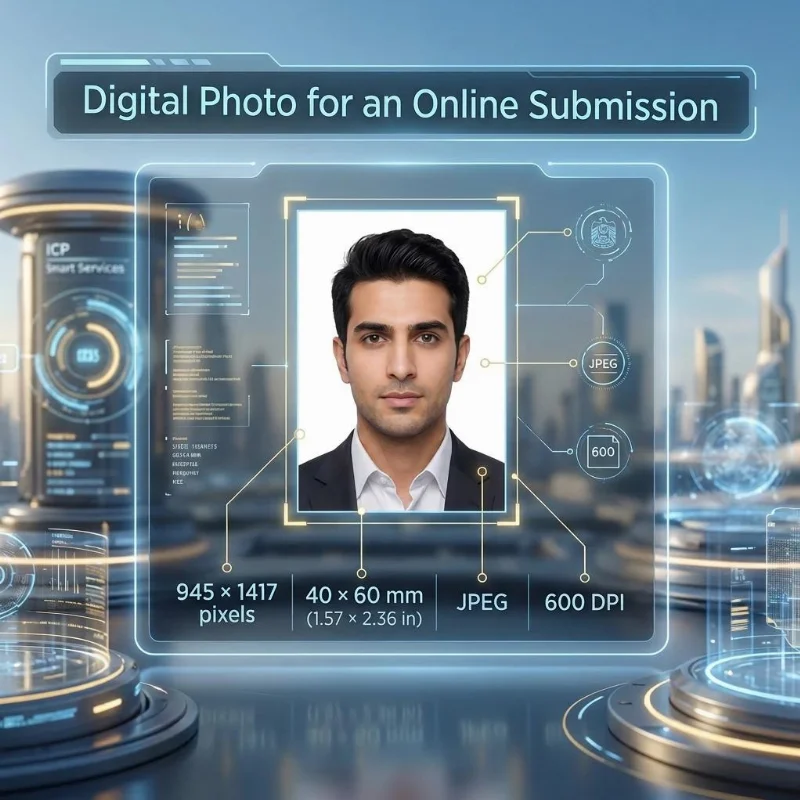
The United Arab Emirates is a digitally advanced nation where passport applications are submitted online through the ICP Smart Services portal or via the UAEICP app. Key digital photo specifications for online applications:
Requirement | Specification |
Digital dimensions | 945 × 1417 pixels |
Physical size | 40 × 60 mm (1.57 × 2.36 in) |
Format | JPEG |
Resolution | 600 DPI |
Submission | Upload through the ICP portal using the UAE Pass/via the UAEICP app |
What Shall I Wear for the Arab Emirates Passport Photo?
Wear your everyday clothes, preferably in darker, solid colours. Avoid white or very light tops that blend into the background, as well as overly bright patterns or logos that may distract from your face. Uniforms or camouflage-style clothing are prohibited in official photographs.
The hairline and the neckline must be open and visible in the photo. Clothing and head coverings worn for religious reasons are allowed, provided your entire face remains clearly visible. Medical head coverings are also permitted, as long as they do not cast shadows on your face or obscure any facial features. In this case, you must provide a letter signed by your medical provider, explaining the need for a medical headpiece.
As for accessories, the general rules apply: they must not cover facial features or cast shadows. Large earrings, necklaces, or piercings must be removed.
Where to Take a Passport Photo in the UAE
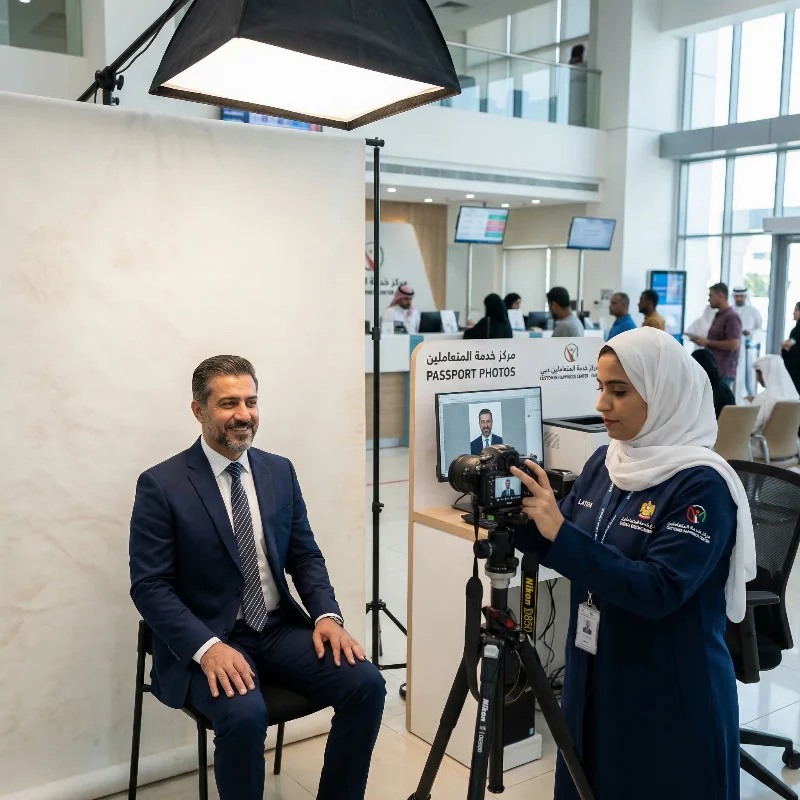
Passport photos in the UAE can be taken at professional photo studios, authorized printing centers, and major retail chains offering ID photo services. Customer Happiness Centers and ICP offices across the Emirates provide on-site photo services for submitting passport or ID applications.
For a faster, more convenient alternative, you can use PhotoGov, an online passport photo maker that allows you to create application-ready, ICP-compliant images from the comfort of your home.
Passport Photo Services in the UAE: Comparison
Service | Approx. Price (AED) | Time to Get a Photo | Likely Approval Chance | Notes |
Photo studios: Express Studio, Photo Magic, Snap Orchid Studio | Approx. 30-60 AED for a printed set | 10-20 min | Moderate | Professional setup, experienced staff; you can request multiple shots and select the best one. Digital copies are available on request. |
Authorised printing / photo centres (DESCO-type print shops, mall kiosks) | Approx. 25-50 AED for an ID/passport set | 10-20 min | High | Good balance of price and quality. Operators are used to ID photos and are familiar with passport requirements. |
Major retail chains with photo desks | Approx. 20-40 AED for instant photos | 5-15 min | Moderate to Low | Convenient option while shopping and usually fast, though staff may focus on generic ID shots rather than strict biometric parameters unless you clearly mention an Emirates passport. |
Customer Happiness / ICP service centres | Often bundled into application fees or charged as an extra, typically under 50 AED | Linked to visit time; photo taken during application | High | The photo is captured according to ICP standards, which reduces rejection risk. There is less flexibility in posing or retakes, and waiting times can depend on the centre workload. |
PhotoGov online passport photo maker | Free processing; payment only for add-on formal clothing adjustment or the Human Verification service | 30 seconds | High | Online passport photo maker with automatic sizing, cropping, and background adjustment to UAE passport specifications. You can take unlimited retakes at home. |
United Arab Emirates Passport Photo Requirements for Children
For UAE passports, baby photo rules are almost the same as for adults, with a few practical differences. The picture must be in colour, recent, on a plain light background, and the baby’s face should be clearly visible and turned towards the camera.
Unlike adults, babies are not expected to keep a perfectly neutral expression, and slightly open eyes are usually accepted for newborns. You can simply photograph your baby at home on a light blanket or against a plain wall. No hands, toys, or other objects can appear in the frame, and nothing should cover the face, so remove hats, headbands, hoods, and pacifiers before taking the photo.
Upload your baby’s picture to PhotoGov to have it automatically cropped and adjusted to UAE passport photo requirements, and get a submission-ready photo in under 30 seconds.
Taking a United Arab Emirates Passport Photo at Home in 8 Simple Steps
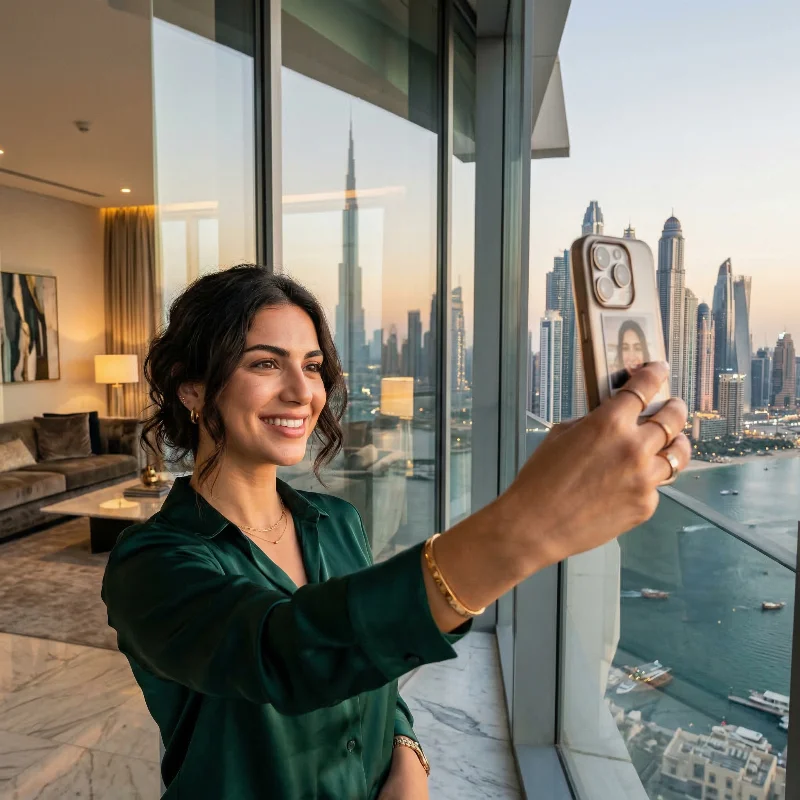
When a tool like PhotoGov is at hand, taking passport pictures isn't harder than taking a regular selfie. Prepare the setup, click a selfie, upload it to our platform, and get an ICP-compliant photograph.
- Take your photograph in good daylight against a plain background.
- Hold the phone at head level, about 40-50 cm (16-20 in) away.
- Look directly into the camera, and take a few shots.
- Upload a picture to the PhotoGov passport photo maker.
- Choose “UAE Passport” as your document type.
- Select add-on services — Human Verification or Formal clothes adjustment.
- Wait about 30 seconds while the system converts your image into a UAE passport photo.
- Download a submission-ready Emirates passport photo in a digital or printable format.
How to Apply for the Arab Emirates Passport
There are four options for the Emirati citizens to obtain passport services:
- Online via the ICP eServices portal
- Through the UAEICP mobile application, available on Google Play and the App Store
- At Customer Happiness Centers located across the country
- At the passport service counters in Abu Dhabi, Dubai, and Sharjah airports, which operate around the clock, but only on an emergency basis.
When applying online, you must submit your Arab Emirates passport photo in a digital version. When applying in person, submit photos printed on high-quality photo paper.
How Do I Apply for My Child's Arab Emirates Passport?
Passports for Emirati newborns are issued through the Mabrouk Ma Yak program that simplifies the registration of a child’s birth and the issuance of all essential identity documents.
NOTE: Parents can receive the newborn’s birth certificate, Emirates ID, and passport in one streamlined application without submitting separate applications to different authorities.
Common Reasons for UAE Passport Photo Rejection
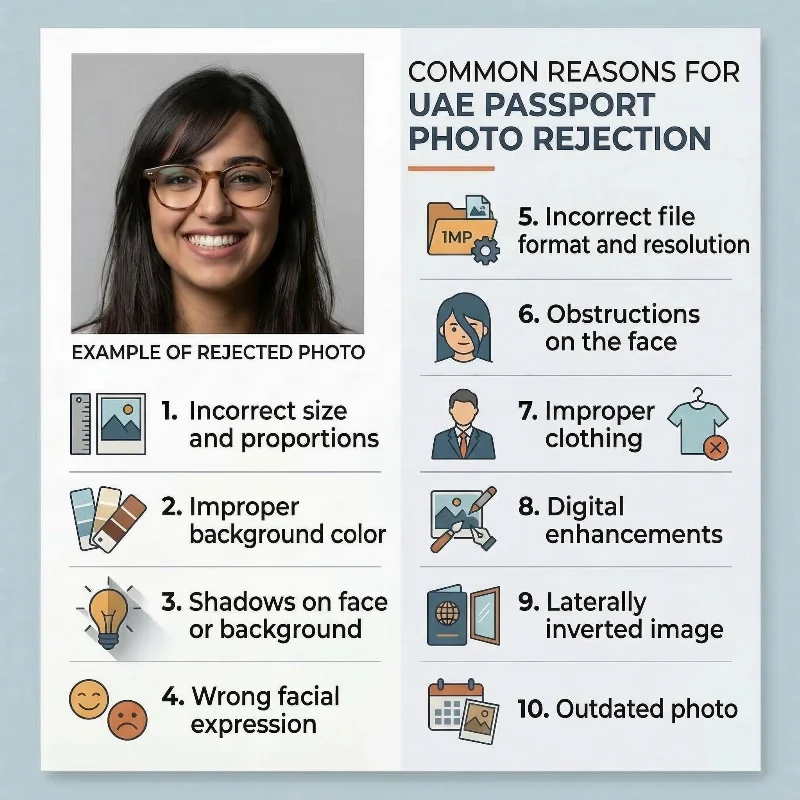
The Federal Authority for Identity and Citizenship (ICP) most frequently flags the following 10 issues that can lead to a passport photo rejection:
- Incorrect size and proportions: Images not within the required 40 mm × 60 mm / 945 × 1417 pixels dimensions
- Improper background colour: Background that is not plain white, or has shadows, patterns, textures, or uneven lighting instead of a clean, uniformly white backdrop
- Shadows on face or background: Visible shadows on the face, neck, or background that interfere with biometric recognition systems
- Wrong facial expression: Smiling broadly, frowning, tilting the head, or not looking straight at the camera
- Incorrect file format and resolution: Submitting a digital photo in an incorrect format (PNG instead of JPG), dimensions, and resolution below 600 DPI
- Obstructions on the face: Hair covering eyes or eyebrows, heavy glare on glasses, tinted lenses, or accessories that hide facial contours or the hairline
- Improper clothing: large logos, clothing resembling military attire, or items that blend with a white background
- Digital enhancements: Any digital retouching applied to the image, including colour correction, brightness adjustments, or automatic enhancement features
- Laterally inverted image: photos with digitally switched left and right sides of the face.
- Outdated photos: taken more than 6 months before the application, or photos that don’t show the applicant’s current appearance if they have undergone a significant appearance change.
Using PhotoGov reduces the risk of rejection by automatically checking your image against the UAE passport photo rules. Our passport photo maker allows you to create a technically compliant, application-ready Emirates passport photo in under 30 seconds.
What to Do if Your UAE Passport Photo is Rejected
If your UAE passport or Emirates ID photo is rejected, the Federal Authority for Identity, Citizenship, Customs & Port Security (ICP) will notify you by SMS or through your online account, stating why the image was not accepted and asking you to upload a replacement.
To avoid further delays, fix the specific problems mentioned (such as background, lighting, or size) and resubmit a new compliant photo via the ICP website or mobile app, or, if you applied in person, through an ICP Customer Happiness Centre or authorised typing centre.
Your application will only move forward once a suitable photo has been provided, so it is important to respond to the rejection notice promptly.
If your UAE passport photo created with PhotoGov is rejected by ICP, you can contact our support team within 30 days. We will re-process your image at no additional cost to resolve any compliance issues or provide a full refund. This guarantee applies if your original photo captured by PhotoGov met the technical requirements, including dimensions, background, lighting, and resolution standards.
Frequently Asked Questions
What Are the Current UAE Passport Photo Requirements and Exact Size Specifications for a Successful Application?
To ensure the photo is accepted, it must meet the following official requirements:
- Passport size photo: 40x60 mm / 945x1417 pixels
- Image quality: sharp, in focus, without blur or pixelation
- Expression: Neutral expression, looking into the camera directly
- Frame: Full face is centered in the frame, head covers 70-80% of the image
- Background: Plain white or light colored background
When you're using the PhotoGov service, the original photo doesn't have to be perfect. Upload the photograph to our photo-making tool. Wait about 30 seconds, and get your ICP-compliant passport-size photo.
What Are the Exact Dimensions, Resolution, and File Format Required for a UAE Passport Photo for Online Submission?
The digital file for online submission must adhere to the following specifications: Dimensions:
- Size: exactly 945 pixels wide × 1417 pixels high
- Resolution: Must be at least 600 DPI to meet biometric system requirements
- File format: JPEG, file size up to 5 MB
- Image quality: Images must maintain original colour balance without any digital enhancement, filters, or compression artifacts that degrade quality.
Use the PhotoGov UAE passport photo maker to create an official photograph, required for online submission. Simply upload your selfie, and get a submission-ready, technically compliant Emirates passport photo in under 30 seconds.
How Can I Make Sure My Digital Photo Meets All UAE Passport Photo Requirements Before I Submit My Application Online?
Use the PhotoGov UAE passport photo maker to validate and format your image automatically. Upload a selfie taken with your smartphone or camera, and the tool instantly checks compliance against all Federal Authority for Identity and Citizenship (ICP) specifications:
- Verifies that your file dimensions are exactly 945 × 1417 pixels at 600 DPI
- Converts the background to plain white while removing shadows and textures
- Confirms your facial expression is neutral with eyes open and mouth closed.
- Detects and rejects filtered, retouched, or AI-enhanced images, ensuring only natural, unaltered photos proceed.
- Generates a digital file formatted for direct upload through the ICP portal using UAE Pass authentication, eliminating the risk of rejection due to technical errors.
Where Can I Get UAE Passport Photos Taken That Strictly Follow Official Government Photo Requirements?
Professional photo studios in major UAE cities such as Dubai, Abu Dhabi, and Sharjah offer ICP-compliant passport photography services. However, visiting studios requires travel time, appointment scheduling, and payment of fees without guarantee of first-time acceptance.
PhotoGov offers a more convenient alternative — capture your photo at home using any smartphone, and our system automatically checks compliance against all official UAE requirements and converts your image to the exact ICP biometric specifications. In under 30 seconds, you get a digital, submission-ready, technically compliant UAE passport photo.
Can I Use a Smartphone Photo for My UAE Passport if I Adjust It to Meet All Official Photo Requirements?
Yes, you can use a smartphone photo for your UAE passport application. Follow these 5 steps:
Step 1: Capture the image Use your smartphone to take the photo in natural daylight, standing against any plain background (wall, curtain, or sheet). Position the camera at eye level and use a tripod or stable surface to ensure sharp focus. Face the camera directly with a neutral expression, eyes open, and mouth closed.
Step 2: Upload to PhotoGov Upload your unedited image to PhotoGov. The system accepts clear, well-lit photos regardless of the original background colour or minor imperfections.
Step 3: Automatic conversion PhotoGov automatically resizes your image to exactly 945 × 1417 pixels at 600 DPI, ensuring biometric compatibility with ICP systems.
Step 4: Background processing The tool replaces your original background with a plain white backdrop and removes all shadows, textures, or uneven lighting.
Step 5: Download and submit PhotoGov creates an ICP-compliant, digital file that you can submit right away. The whole process takes about 30 seconds and is absolutely free.
How Do UAE Passport Photo Requirements Differ for Babies and Children, and Where Can I Get Compliant Photos Taken?
UAE passport photos for babies and children follow the same technical specifications as adult photos: 40 mm × 60 mm dimensions, 945 × 1417 pixels at 600 DPI, plain white background without shadows, and JPEG format. However, for infants, the rules for facial expressions aren't so strict. Newborns and very young babies may have their eyes closed or partially open, and a neutral expression is not required as long as the face is clearly visible.
You can get photos taken in professional photo studios, mall photography booths, or at ICP Customer Happiness Centres located across Dubai, Abu Dhabi, Sharjah, and other emirates. These locations typically offer on-the-spot printing and digital files formatted for immediate upload.
However, the most convenient, free, and stress-free option is to take your UAE passport photo at home using PhotoGov. Simply capture an image with your smartphone against any plain background, and our system will automatically validate it against all ICP specifications—including the exact 945 × 1417 pixel dimensions, 600 DPI resolution, plain white background conversion, and JPEG formatting. This eliminates travel time, studio fees, and the risk of non-compliance rejection, allowing you to submit your application through the ICP portal with confidence.
What Clothing, Background Color, and Facial Expression Are Allowed Under UAE Passport Photo Requirements?
Wear dark or neutral clothing that contrasts with the white background—avoid white or very light colours. The background must be plain white without shadows, patterns, or textures. Your facial expression must be neutral with mouth closed and eyes open, looking directly at the camera. Head coverings are only permitted for religious or medical reasons.
Where Can I Download a UAE Passport Photo Template or Guideline to Ensure My Photo Meets All Requirements at Home?
The ICP website lists official specifications, though no downloadable template is provided. Use this article as your guideline, and the PhotoGov online tool as a real-time template. Upload your photo to the platform at home — and it will be immediately adjusted to the correct UAE passport dimensions, framing, head positioning, background, and other biometric specifications.
Which Photo Studios Specialize in UAE Passport Photo Requirements and Offer a Guarantee of Acceptance?
Strap Studios in Abu Dhabi (Khalifa City, Al Reem Island), Masoud Raoufi in Dubai, and Express Studio locations across the UAE advertise ICP compliance with retake guarantees. These studios use professional lighting and high-resolution cameras to meet 600 DPI requirements.
Our PhotoGov passport photo maker offers the same compliance guarantee from home — it will automatically format your original photo to exact ICP specifications with protected payment if rejected.
What Are the Common Reasons UAE Passport Photos Are Rejected, and How Do I Meet All Requirements to Avoid Delays?
The ICP most frequently rejects photos due to incorrect dimensions (not exactly 945 × 1417 pixels or below 600 dpi), non-white backgrounds with shadows or patterns, facial expression errors (smiling or head tilting), and digital alterations, including filters or AI enhancement. Other common issues include shadows on the face, hair covering the eyes, outdated photos, or poor file quality.
Use PhotoGov to eliminate these risks. The tool automatically checks your photo against every ICP specification — verifying dimensions and resolution, converting backgrounds to plain white, validating facial expression and eye visibility, and rejecting any digitally altered images. You receive a compliant JPEG file ready for direct ICP portal upload, ensuring first-time acceptance.
Which Online Tools or Services Can Automatically Format My Picture to UAE Passport Photo Requirements?
PhotoGov handles the entire conversion automatically. Upload any clear photo from your smartphone, and the tool resizes it to exactly 945 × 1417 pixels at 600 DPI, swaps your background for plain white, and removes any shadows. It checks that your face is centred, eyes are open, and expression is neutral. If the image has filters, beauty mode, or AI edits, it won't pass validation. You get a digital file ready to upload directly to the ICP portal through UAE Pass.
Is the Photo for the UAE Visa the Same Size as the Passport Photo?
No. The United Arab Emirates visa photo size is 43x55 mm, and the passport photograph dimensions are 40x60 mm.
Is the Photo for the UAE Passport the Same Size as an ID Card Photo?
No. The passport photograph is 40x60 mm, and the ID Card photo is 35x40 mm.
PhotoGov.net strictly adheres to the Global regulations for ID photos.
All information presented here is verified and updated in accordance with the official United Arab Emirates Government Platform, ensuring full compliance with the national UAE passport requirements.
Official Government Documentation Sources
Official UAE Passport Photo Requirements: Federal Authority for Identity and Citizenship, Customs and Port Security (ICP)
Online UAE Passport Application: ICP Smart Services or the UAEICP mobile application, available on Google Play and the App Store
In-Person UAE Passport Application: Customer Happiness Centers
Issuing a New Passport: Federal Authority for Identity and Citizenship, Customs and Port Security
Passport Renewal: Federal Authority for Identity and Citizenship, Customs and Port Security
Passport Replacement: Federal Authority for Identity and Citizenship, Customs and Port Security
Biometric Regulations for International ID Documents: International Civil Aviation Organization (ICAO) Document 9303
Was this helpful?
40 found this helpful
Authored by:
Nathaniel K. Rowden (Compliance consultant)Top expert
Verified by the Photogov compliance team
ICAO 9309-compliant
Based on official government sources
Helpful votes: 40
Was this helpful?
40 found this helpful
We value your Privacy
We use cookies to enhance your browsing experience, serve personalized ads or content. By clicking “Accept All”, you consent to our use of cookies.