Passport Photo Requirements in the UK: 2026 Complete Guide
Table of contents:
- 12 Essential Passport Photo Requirements in the UK: Checklist
- Acceptable UK Passport Photo Examples
- Unacceptable UK Passport Photo Examples
- Digital vs Paper UK Passport Photo Explained
- When Must a UK Passport Photo be Countersigned?
- Baby Passport Photo Requirements in the UK
- Passport Photo Near Me: The Most Convenient UK Locations
- Passport Photo in the UK: Service Comparison
- How to Take a British Passport Photo at Home?
- Common Reasons for a UK Passport Photo Rejection
- Frequently Asked Questions
- Other Pages — UK ID Photos
- Official Government Documentation Sources
A correctly taken UK passport photo is an essential part of a successful application. It must follow a strict set of rules set by the British government, including proper 35×45 mm sizing and a plain, light‑coloured background, or a 600×750-pixel image in a 50 KB–10 MB JPEG file for digital submissions. This 2026 passport photo requirements, UK Guide includes all the recent official information on passport photo standards — by following them, you will create a compliant photo with a high chance of acceptance.
12 Essential Passport Photo Requirements in the UK: Checklist
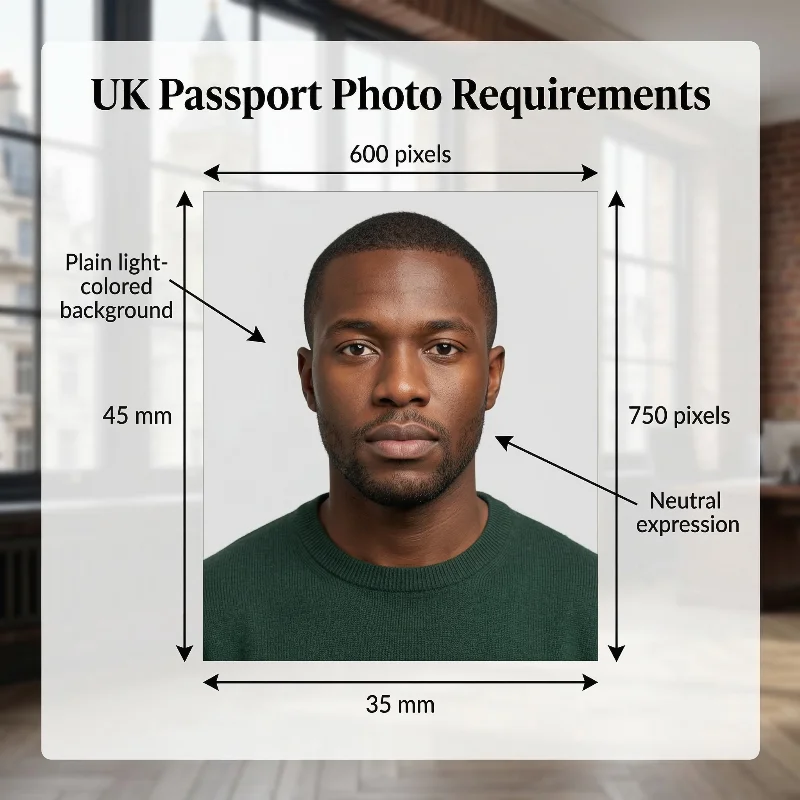
Source: HM Passport Office
The British passport photo requirements are determined by His Majesty's Passport Office and are based on the International Civil Aviation Organization (ICAO) Document 9303 biometric standards. When using the PhotoGov online passport photo generator, adherence to the official guidelines is automatic: the UK passport photo you create meets the correct size, crop, proportions, and background requirements. Below is a full list of 12 guidelines for a United Kingdom passport photo.
Requirement | Details |
1. Number of Photos | Two printed photos are required for in-person submissions. One digital photo is required when applying for a British passport online. |
2. Recency | Your photo must be taken within the last month, even if your appearance hasn't changed. |
3. Countersigning | A new passport photo must be signed by a British citizen in case you are applying for a first adult or child passport, replacing a lost, stolen, or damaged passport, renewing a passport for a child aged 11 or younger, or renewing because your appearance has changed and you are no longer recognisable in your current passport. Read the section below this checklist for more information. |
4. UK Passport Photo Size | 35 × 45 mm, with a full head measuring 29-34 mm from the crown to the chin for in-person submissions. 600 × 750 pixels for online submissions. |
5. Colour | Only coloured photos are accepted with British passport applications, with the colour unaltered by computer software. |
6. Background | Plain light-coloured background — plain cream or light grey. |
7. Lighting | A photo must be sharp, properly lit, and free of reflections or shadows on your face. The applicant's figure must be in clear contrast to the background. Skin tones must appear natural. |
8. Positioning and Framing | An applicant must look straight at the camera with the face, shoulders, and upper body square in the shot. A head close-up takes about 75% of the shot. |
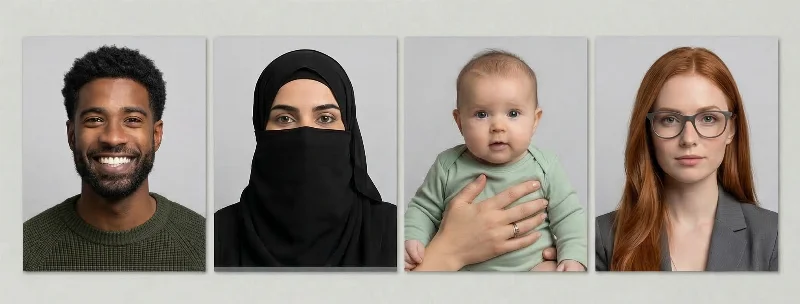
9. Facial Expression | A neutral facial expression is required. The applicant's eyes must be open, and their mouth closed. Smiling or any exaggerated emotions may cause the application to be delayed or rejected. |
10. Attire, Head Coverings, and Accessories | Regular street clothes in solid, contrasting colours that stand out against the cream background are required. Head coverings must not appear in the image unless they are worn for religious or medical reasons, and in all cases must leave the full face visible. If a head covering is required for medical reasons, the applicant must provide a signed doctor's statement confirming the medical condition. Anything covering your face (accessories, jewellery, scarves) isn't allowed on UK passport pictures. |
11. Glasses | No glasses — is the HM Passport Office recommendation. However, if the applicant must wear glasses (for medical reasons), the frames must not cover the eyes, and no glare or flash reflections can be present. Sunglasses or tinted glasses aren't allowed. |
12. Print and Digital Quality | A British passport photo must be professionally printed on plain white photographic paper (matte or glossy) without frames or borders. A digital passport photo for online submission must be of high resolution (600 DPI), at a minimum of 600 × 750 pixels, with a file size from 50 KB to 10 MB. |
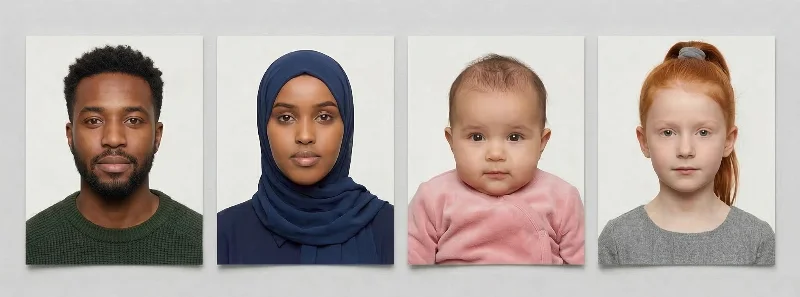
Acceptable UK Passport Photo Examples
Unacceptable UK Passport Photo Examples
Digital vs Paper UK Passport Photo Explained
Your application method dictates the photo format. Online applications require a digital photo (uploaded directly or via a photo code from a booth). Paper applications require two identical printed photos (35 × 45 mm) submitted by post.
Both formats share identical content rules: plain light background, neutral expression, no glasses, taken within the last month. However, technical specifications differ. Digital photos must be 600 × 750 pixels minimum, JPEG, 50 KB–10 MB. Printed photos must be on photo-quality paper with gloss or matte finish.
You cannot mix formats: online applicants must use digital photos exclusively; paper applicants cannot upload files. Choose your application channel first — this determines your photo requirements.
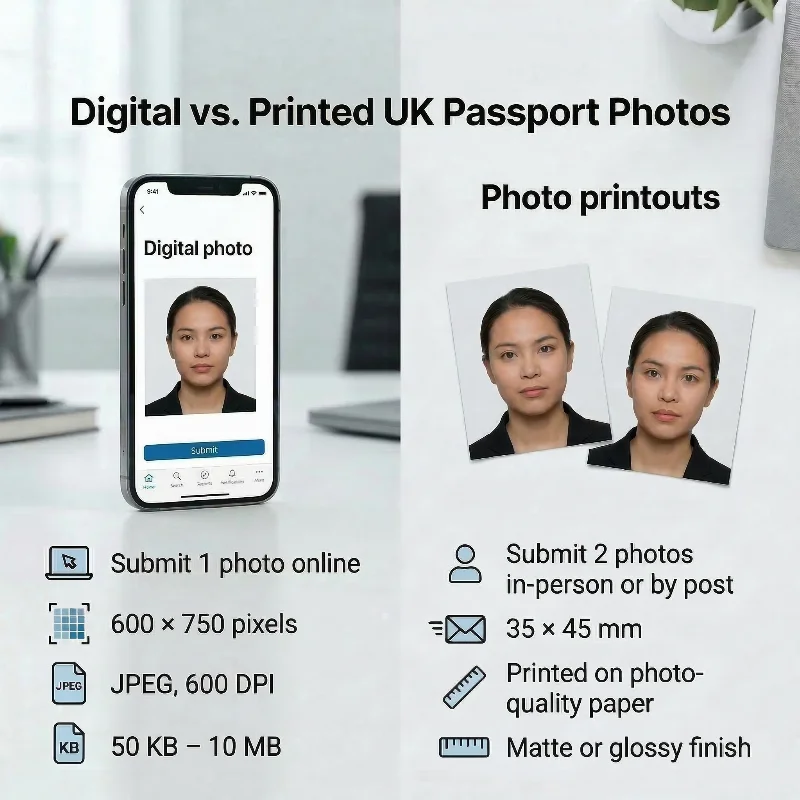
Requirement | Digital Photo (Online) | Printed Photo (Paper) |
Quantity | 1 file | 2 identical photos |
Dimensions | 600 × 750 pixels (min) | 35 × 45 mm |
Format | JPEG, 600 DPI | Photo-quality paper, matte or glossy |
File/Print specs | 50 KB – 10 MB | Gloss or matte finish |
Submission | Upload or photo code | Physical enclosure by post |
When Must a UK Passport Photo be Countersigned?
New UK passport photos must be countersigned for identity verification reasons in the following cases:
- First adult passport applications
- First child passport applications
- Replacement applications for lost, stolen, or damaged passports
- Renewal applications for passports of children aged 11 or under
- Renewal applications when the holder’s appearance has changed so much that they can no longer be reliably recognised from the existing passport photo.
Who Can Countersign?
According to HM Passport Office guidelines, the countersignatory must be a British citizen who has known the applicant (or the adult signing the form for a child under 16) for at least two years and can personally identify them. This person must be of good standing in their community or work in (or be retired from) a recognised profession, such as a teacher, accountant, lawyer, nurse, civil servant, or post office official.
The countersignatory cannot:
- Be related to the applicant by birth or marriage
- Live at the same address
- Be in a relationship with the applicant
- Work for His Majesty's Passport Office.
If the applicant is submitting the documents from outside the UK, the countersignatory must hold a current British, Irish, EU, US, or Commonwealth passport.
Can a Friend Sign a Passport Photo?
Yes, a friend can sign a UK passport photo, but only if they meet the official countersignatory criteria.
- They must have known the applicant personally for at least 2 years (as a friend, neighbour, or colleague), be at least 18, and be able to confirm the applicant’s identity.
- They must be a person of good standing in the community or work in (or be retired from) a recognised profession (for example, teacher, accountant, lawyer, civil servant, nurse).
- They cannot be related by birth or marriage, live at the same address, be in a relationship with the applicant, or be involved in the application in an official capacity.
If all these conditions are met, a friend is permitted to sign (or countersign) the passport photo and application.
How Should the UK Passport Photo Be Countersigned?
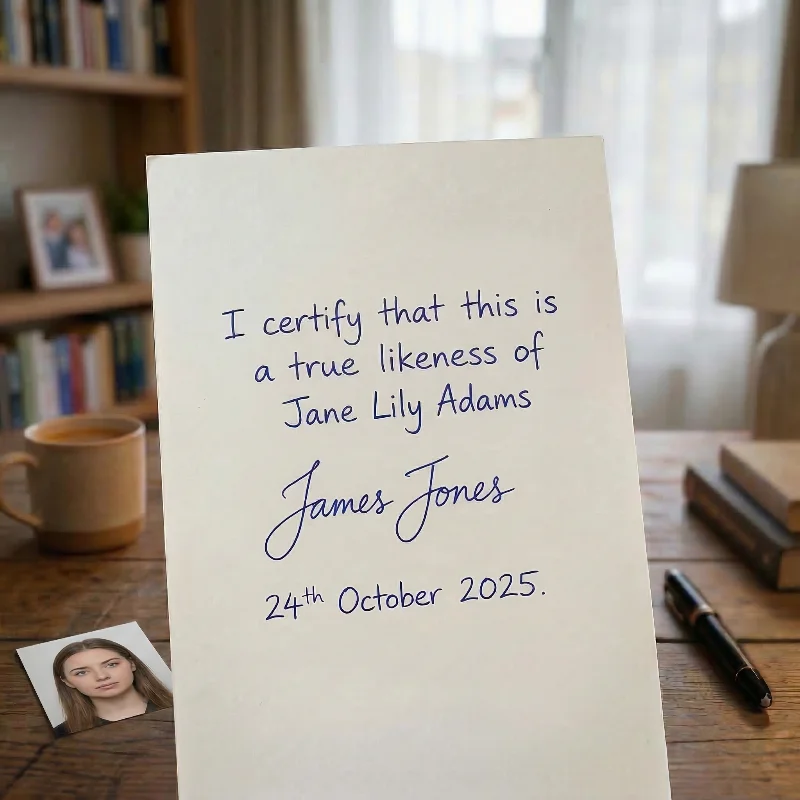
For paper form applications, one new photo must be certified on the back. The countersignatory should write a brief declaration: “I certify that this is a true likeness of [full name of applicant]”, then add their signature and the date in ink.
The applicant must not write anything on the photos; only the countersignatory verifies their identity as part of the official requirements of His Majesty’s Passport Office.
Baby Passport Photo Requirements in the UK
Baby passport photo requirements in the UK follow the same core standards as adult applications, but His Majesty's Passport Office allows certain age-based exceptions. The specific requirements depend on your child's age group, as detailed below.
Newborns and Babies Under 1
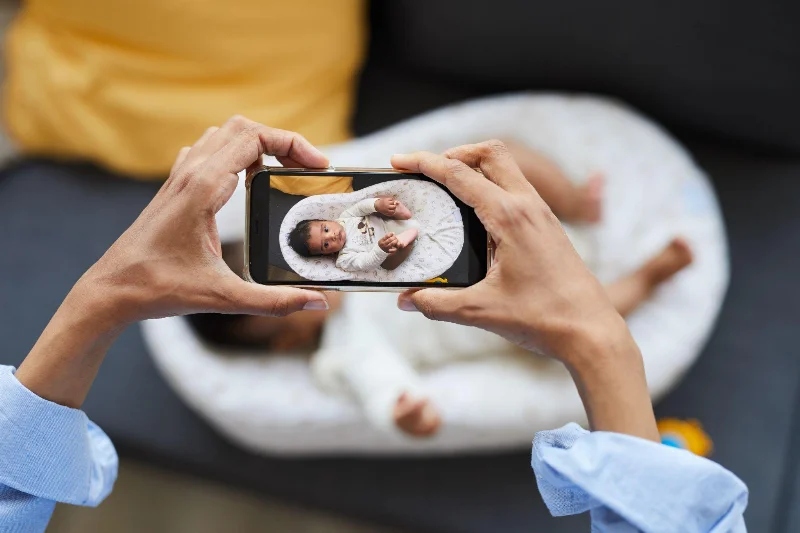
Newborns may be photographed lying on a plain light‑coloured sheet, with the picture taken from above to avoid shadows on the face or background. The image must be a clear, recent colour photo that meets the standard UK passport requirements for lighting, focus, background, and quality.
Babies under 1 do not have to have their eyes wide open, and their mouth may be open. The baby must be safely positioned, with no hands or other people visible in the photo.
Children Aged 1 to 5
For children under 6, a neutral expression and looking directly at the camera are not strictly required, but the face must be clearly visible. Children must be alone in the picture, with no toys, dummies, other people, or visible support in the frame.
Children Aged 6 to 15
Photographs for children aged 6 and over must meet the same standards as adult passport photos. They must look directly at the camera, have a neutral expression with their mouth closed, eyes open and clearly visible, and no one else or any objects may appear in the photo.
Passport Photo Near Me: The Most Convenient UK Locations
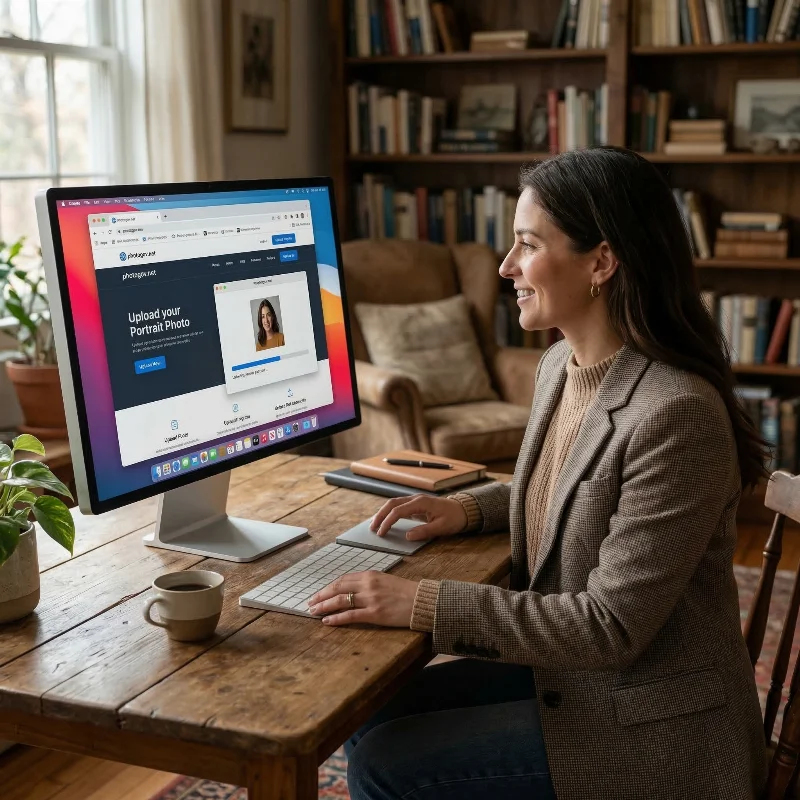
Asking yourself, “Where can I get professional photos that fully meet UK passport photo requirements near me or online”? You’ve got a few options: a photo booth next time you’re shopping for groceries, a high-street photo shop near work, a service at the local post office, or an online tool if you’d rather stay home with a cup of tea.
Photo Booths and Supermarkets
Self-service photo booths are widely available in supermarkets Tesco, Asda, and Sainsbury’s, as well as shopping centres and train stations. These booths provide instant prints and usually a code for online applications. The average price is £5–8, and the service is fast — usually just a few minutes.
High-Street Photo Shops and Pharmacies
Large chains such as Timpson and Max Spielmann, Snappy Snaps, and select pharmacies offer walk-in passport photo services. Staff help ensure the photo meets HMPO requirements and print quality is professional. Prices typically range from £10–15, and you get both digital and print formats.
Post Office ‘Check & Send’ Service
Many Post Office branches offer a ‘Check & Send’ service where staff take your photo, check it meets official requirements, and upload or attach it to your application. The process is reliable, though costs are around £16, and not every location provides this service.
Professional Photographers and Studios
If you want personalised service or need a photo for a baby or someone with special needs, photography studios create high-quality, compliant images. Expect to pay £15 or more, and allow time for travel and possible appointment scheduling.
Online Tools
Online passport photo makers like PhotoGov allow you to instantly create ID photos from the comfort of your home or office. All you need to do is take a selfie with your iPhone or digital camera, upload it to the service, wait about 30 seconds, and download a digital file or a PDF sheet with four printable images. Your passport photos are double-checked for HMPO compliance, and you avoid the need to travel or queue.
Passport Photo in the UK: Service Comparison
Service | Time to Get a UK Passport Photo | Pricing | Chance of Approval |
Photo Booths, Supermarkets | 5–10 min, walk-in | £5–8 for prints | Moderate |
High-Street Photo Shops (Timpson, Snappy Snaps) | 10–15 min, walk-in | £10–15, print & digital | High to moderate |
Post Office Check & Send | 15–20 min, booking optional | ~£16, includes checks | High to moderate |
Professional Studios | 30–60 min+, appointment optional | £15+ | Very High |
Online Passport Photo Maker PhotoGov | Instant, online | The first photo is free. The rest — £4.40–7.30 digital/print | Very High |
How to Take a British Passport Photo at Home?
For your picture to match official photo requirements for the UK passport, you must create a simple setup and follow a few basic tips:
- Find a spot with good lighting and a plain background. Use a tripod or ask someone to take the photo for you. Stand 5-7 feet (1.5-2.1 m) away from the camera.
- Stand straight, shoulders square to the camera, and look straight into the lens. If taking a selfie, hold the phone steadily at roughly 20 inches (50 cm) from your face.
- Keep a neutral expression. Keep your eyes open and mouth closed. Make sure that nothing obstructs your facial features. Avoid any head coverings unless they are worn for religious or medical reasons.
- Take a few shots, and choose the best one. Use the PhotoGov platform to upload and process your photo to the HM Passport Office requirements.
- Choose additional services such as clothing adjustment or human verification.
- Download the final image in a digital or printable format.
Common Reasons for a UK Passport Photo Rejection
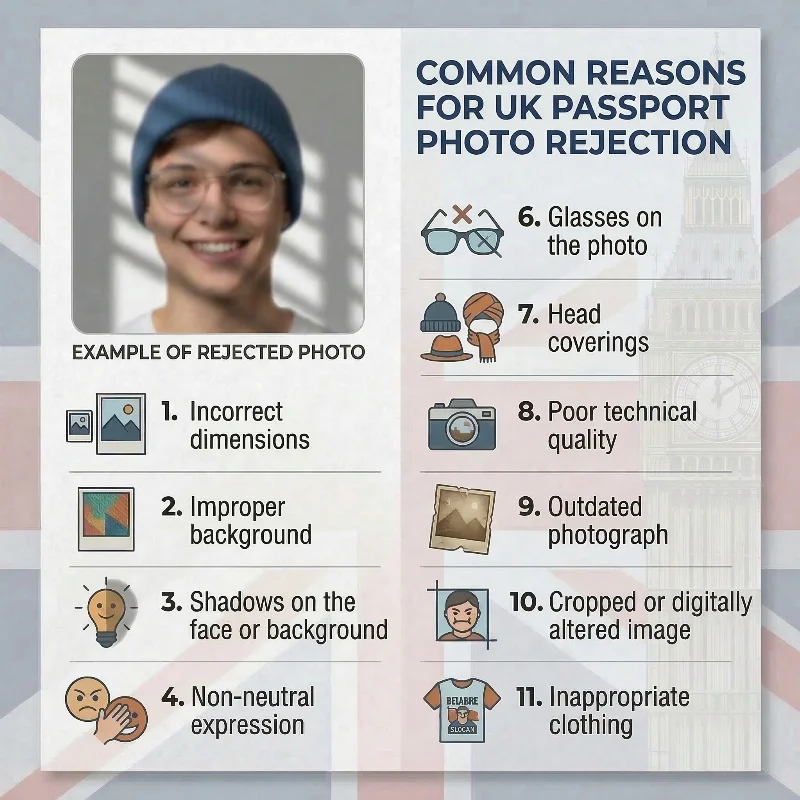
If you’re asking yourself, “What are the main UK passport photo requirements that cause applications to be rejected and how can I avoid these issues?”, use this checklist with the 12 most common British passport photo rejection reasons:
- Incorrect dimensions: The submitted photo does not meet the required size; printed images are not exactly 45 × 35 mm, or digital photos are below 600 × 750 pixels.
- Improper background: The background is not plain cream or light grey; instead, it appears white, off-white, patterned, textured, or coloured.
- Shadows on the face or background: visible shadows are present on the face or background as a result of uneven or insufficient lighting.
- Non-neutral expression: The applicant is not maintaining a neutral facial expression (mouth not fully closed, smiling, frowning, raised eyebrows, or other exaggerated expressions).
- Obstructed facial features: Key biometric areas (eyes, eyebrows, nose, mouth, or facial contour) are partially covered or obscured by hair, shadows, accessories, or head coverings.
- Glasses in the photo: HMPO only allows glasses that are necessary for medical reasons (for example, after an eye surgery). All other glasses must be removed.
- Head coverings: Non‑religious or non‑medical headwear is worn, or permitted coverings obscure the face or cast shadows on facial features.
- Poor technical quality: The image is blurry, pixelated, out of focus, improperly exposed, or the file size is outside the accepted 50 KB–10 MB range.
- Outdated photographs: The photo was taken more than one month before submission.
- Cropped or digitally altered images: The image has been modified with filters, retouching, beauty modes, heavy post-processing, or manual cropping that affects the original composition.
- Inappropriate clothing: The applicant is wearing a uniform, camouflage, or clothing that blends into the background or resembles official attire.
- Foreign objects or people in infant photos: Objects or other persons are visible in the frame, such as toys, pacifiers, furniture, or supporting hands.
What to Do if Your UK Passport Photo is Rejected
If His Majesty's Passport Office rejects your photo, you must submit a new compliant image. For online applications, simply upload a replacement digital photo through the government portal. For paper applications, include new printed photos with your paperwork. You can use the official online photo checker to verify compliance before submission. If your application is already in progress, HMPO will contact you requesting a replacement, which may extend your passport processing timeline.
If you’ve submitted a photo created with the PhotoGov passport photo maker and it hasn’t been accepted due to the image’s quality issues, contact our Customer Support team. If our specialists confirm that the issue resulted from the service, you will be eligible for a refund and a free retake.
Frequently Asked Questions
What are the Current UK Passport Photo Requirements for Adults and Children to Ensure My Application is Accepted the First Time?
Below is a list of current UK passport photo requirements for adults and children. Follow them to ensure your UK passport application is accepted the first time.
Photo format:
- Online: 1 digital photo (600 × 750 pixels min, JPEG, 50 KB–10 MB)
- Paper: 2 identical printed photos (45 × 35 mm, photo-quality paper)
- Taken within the last month, even if your appearance hasn't changed
Photo content:
- Full head and shoulders, facing forward, looking at the camera
- Plain cream or light grey background, no shadows
- Neutral expression, mouth closed, eyes open, face fully visible
- No glasses recommended; no head coverings (except religious/medical)
- No other people, toys, or dummies in the frame
Children under 6:
- Under 1: May lie on a plain sheet, eyes and mouth may be closed/open, no visible hands or support
- Ages 1–5: Do not need to look directly at the camera or maintain a neutral expression, as long as the face is fully visible.
Children 6+:
- Same standards as adults (neutral expression, eyes open, mouth closed)
What Size and Dimensions are Required for a UK Passport Photo, and How do I Avoid Common Rejection Reasons?
Here are the standard dimensions for a UK passport photo in different units:
- UK passport photo size in mm. The United Kingdom passport photo size is 35 x 45 mm.
- UK passport photo size in cm. The British passport size in cm is 3.5 x 4.5 cm.
- UK passport photo size in inches. The UK passport photo size in inches is 1.38 x 1.77.
- UK passport photo size in pixels. The minimum digital size is 600 x 750 pixels. However, many services support higher resolutions. For example, the digital photo size width can be 826 pixels, with a length of 1062 pixels at 600 DPI.
To avoid common rejection reasons for your UK passport photo:
- Take the photo within the last month, even if your appearance has not changed
- Use a plain cream or light grey background with no shadows, patterns, or objects visible
- For printed photos: size 35x45 mm, printed on photo-quality paper, do not crop or cut yourself, no creases or marks
- For digital photos: 600 x 750 pixels, JPEG format, file is between 50 KB and 10 MB with no compression artifacts
- Maintain a neutral expression: mouth closed, eyes open and clearly visible, no smiling or frowning
- Remove glasses to avoid glare and ensure your eyes are fully visible
- Keep hair away from your face; no hair covering eyes
- Submit a true, unedited likeness with no filters, digital alterations, red-eye correction, or retouching
How Many Photos are Needed for a UK Passport Application?
Two printed photos are needed for paper form submissions. One digital photo is required for online submissions.
What Are The Official UK Passport Photo Rules For Background, Lighting, and Face Position When Taking Photos At Home?
Here are six tips to take a good-quality picture at home:
- Set up a plain, light-coloured background (cream or light grey) with even lighting and no visible shadows.
- Stand or sit facing the camera directly, keep your head straight, look into the lens, and maintain a neutral expression with your mouth closed and eyes clearly visible.
- Frame a close-up of your full head and upper shoulders so that the head occupies the correct portion of the image without cutting off hair or chin.
- Turn off the portrait mode, making sure the photo is in sharp focus and in colour.
- Remove glasses, sunglasses, tinted lenses, or head coverings unless required for religious or medical reasons.
- Take a few shots and upload the best selfie to PhotoGov. It adjusts your image to meet the requirements of the HM Passport Office and ICAO. We keep to a key rule: the final photo is unaltered by computer software — it is only cropped, resized, and aligned to the required format so that facial features remain completely authentic.
Where Сan I Get a Passport Photo?
You can get your photo taken at convenient locations nearby — photo booths, supermarkets, post offices, and professional studios.
But if you want to save time and money, it makes sense to use an online passport photo maker like PhotoGov. Available 24/7 from any location, it only requires your smartphone or a laptop. You take a selfie, upload it to the system, and get a 100% HM Passport Office-compliant passport photo in under 30 seconds. We also offer valuable add-on services such as clothing adjustment or human verification for applicants who prefer an additional level of assurance.
Can You Wear Glasses in Passport Photo UK?
Yes, you can — if you genuinely need them for medical reasons. However, the HM Passport Office strongly advises against it as frames can obstruct your eyes and facial features, and lenses often have glare or reflection from the flash. If you can avoid wearing glasses, do so to reduce the risk of your application being delayed or rejected.
What Happens if Passport Photo Rejected UK?
If a UK passport photo is rejected, the application is not immediately refused, but it will be delayed until a new photo is provided.
Here is what typically happens:
- HM Passport Office pauses processing and sends a notification (by email or post) explaining that the photo does not meet the rules and giving a deadline to submit a replacement.
- If you provide a new digital photo for online submission or send new, compliant, printed photos for paper submission within the specified timeframe, the application resumes and continues through the normal processing stages.
- If you miss the deadline or never send an acceptable photo, the application can be cancelled, and you may need to apply again and pay the fee a second time.
So the main risks are extra waiting time and, if you do not fix the problem in time, losing the fee and having to restart the application.
Can You Smile in a Passport Photo UK?
No. You cannot smile, frown, or show any exaggerated emotions in passport pictures, according to the International Civil Aviation Organization (ICAO) biometric standards.
What Are the UK Passport Photo Requirements for Digital Applications, and How Can I Upload a Compliant Image Online?
Below are the UK passport photo requirements for digital uploads, as well as recommendations on the upload process.
Digital photo requirements:
- Resolution: Minimum 600 × 750 pixels
- Format: JPEG only
- File size: Between 50 KB and 10 MB
- Color: Color photos only (not black and white)
- Recency: Must be taken within the last month
How to Upload Online:
- Photo code method: Get a digital code from a photo booth or shop, enter it during your application to link the photo automatically
- Direct upload: Select "I'll take or upload a digital photo" during application, choose your JPEG file, confirm compliance, and continue
Note: Online applications require digital photos only. Printed photos (45 × 35 mm) are only accepted with paper applications submitted by post.
What Are the UK Passport Photo Requirements For Babies And Children, and Where Can I Get Kid-Compliant Photos Taken?
Below is a full breakdown of the UK passport photo requirements for children of different ages, as well as the recommendations on where to take kid-compliant photos.
Infants under 1 year:
- May lie on a plain light-coloured sheet, photo taken from above
- Eyes need not be open
- The mouth may be open
- Head may be supported by hand, but the hand must not be visible in the photo
- No toys or dummies
Сhildren aged 1–5:
- Do not need to look directly at the camera
- Neutral expression not required (smiling allowed)
- Face must be clearly visible
- No toys or dummies
- No visible support or hands in frame
School kids aged 6–15:
- Same standards as adults: neutral expression, mouth closed, eyes open
- Looking directly at the camera
- No head coverings (except for religious/medical reasons)
All ages:
- Must be alone in the picture
- Plain cream or light grey background
- Taken within the last month
- Good contrast, no shadows
Where to get compliant photos:
- Photo booths — digital code or printed photos (UK passport size 35 × 45 mm)
- Retail stores — Boots, Tesco, Asda, Timpson, Max Spielmann
- Professional photo studios
- At home — use the PhotoGov passport photo maker: upload your selfie, and the tool automatically adjusts it to the HM Passport Office requirements, creating an application-ready, technically compliant photograph.
What Are The UK Passport Photo Specifications For Printed Photos And Where Can I Order High Quality Compliant Prints Online?
Your UK passport printed photos must meet the following HM Passport Office specifications:
- Quantity: 2 identical photos
- Dimensions: 45 × 35 mm
- Face size: 29–34 mm from crown to chin
- Quality: Printed professionally, sharp, and in focus
- Paper: Plain white photographic paper with no borders
- Condition: Without creases or marks; unaltered by software
You can order your prints online from the following services:
- Zippi — Upload your photo, get 8 UK-regulation prints (35 × 45 mm) with trim marks for easy cutting; standard next‑day delivery starts from £1.49, while the exact print price is shown at checkout on the Zippi website.
- Pixum — Order 8 passport photos (35 × 45 mm) for £2.99 using the online editor for background adjustment and cropping.
- Photo-Me — Professional booth-quality prints with a digital photo code option; a standard UK passport package in Photo-Me booths is around £10 for 5 printed photos plus a digital code for online applications.
- Passport Photo Digital — Upload your image to receive a verified UK passport photo code for £6.99, with an option to order 4 printed photos for an additional £6.99, fully checked against HM Passport Office standards.
When ordering online, ensure your uploaded image meets all official requirements (600 x 750 pixels, JPEG format, file is between 50 KB and 10 MB, plain cream or light grey background, neutral expression, no shadows) as services print exactly what you upload.
What Clothing And Appearance Rules Do I Need To Follow To Meet UK Passport Photo Requirements And Get Fast Approval?
Clothing requirements
- Wear everyday clothing — no uniforms or camouflage attire
- Avoid white or very light colours that may blend with the cream or light grey background
Head coverings and hair
- No head coverings allowed, unless worn for religious or medical reasons
- If worn for religious or medical reasons, ensure your face is fully visible from chin to forehead and edge to edge of face
- Hair must not cover your eyes — keep it away from your face
Glasses and accessories
- Glasses are not recommended
- If you must wear them: no tint, no glare or reflection, frames must not cover your eyes, and eyes must be fully visible
- No sunglasses or tinted lenses permitted
- Remove headphones, earpieces, or any visible accessories that obscure your face
Appearance
- No smiling, frowning, or raised eyebrows — maintain a neutral expression
- Mouth must be closed
- Eyes open and clearly visible
- No makeup or digital alterations that change your appearance
What to avoid
- Uniforms, military or work dress
- Heavy jewellery that frames the face
- Hats, caps, or hair accessories (unless religious)
- Anything that casts a shadow on your face
PhotoGov clothing upgrade service
Don't have formal attire for your passport photo? PhotoGov's clothing replacement add-on instantly transforms your casual clothes into professional business attire that meets HM Passport Office standards. Upload your selfie, select the upgrade, and get a compliant photo with natural-looking formal clothing — no wardrobe change required.
How Can I Check If My Selfie Meets UK Passport Photo Requirements Before I Pay For My Passport Application?
You can check your selfie for free using PhotoGov's UK passport photo checker before submitting your application. Here's how it works:
- Upload your selfie — Take a photo with your smartphone and upload it to PhotoGov
- Processing — The tool automatically adjusts your photo for size (35 × 45 mm), crops it correctly, removes/optimizes the background, and checks lighting
- Compliance verification — The system verifies your photo meets HM Passport Office requirements (neutral expression, no shadows, proper contrast, etc.)
- Result — Download your compliant digital photo ready for upload to the official UK passport application.
What PhotoGov Checks
- Correct dimensions (600 × 750 pixels minimum for digital, 35 × 45 mm for print)
- Plain cream or light grey background
- Proper head positioning and sizing
- Neutral expression requirements
- No shadows or glare.
Using PhotoGov before paying for your passport application ensures your photo meets standards, preventing delays or rejections from the HM Passport Office.
How Do UK Passport Photo Requirements Differ For Standard Passports Versus Emergency Travel Documents When Getting Photos Taken?
Photo requirements for Emergency Travel Documents (ETDs) are identical to standard UK passports: 45 mm × 35 mm, plain cream or light grey background, neutral expression, eyes open, no shadows.
However, for ETDs, you must apply in person at a consulate or embassy, and photos are checked on the spot. If rejected, you must provide new ones immediately to avoid delays during your urgent travel. Professional verification is strongly recommended before your appointment.
PhotoGov.net strictly adheres to the Global regulations for ID photos.
The HM Passport Office prohibits digital alterations of ID photographs. Our platform provides sizing and cropping services only and does not modify or enhance images.
Other Pages — UK ID Photos
Official Government Documentation Sources
Passport Photo Requirements: His Majesty's Passport Office
Biometric Regulations for International ID Documents: International Civil Aviation Organization (ICAO) Document 9303
Was this helpful?
63 found this helpful
Authored by:
Nathaniel K. Rowden (Compliance consultant)Top expert
Verified by the Photogov compliance team
ICAO 9309-compliant
Based on official government sources
Helpful votes: 63
Was this helpful?
63 found this helpful
We value your Privacy
We use cookies to enhance your browsing experience, serve personalized ads or content. By clicking “Accept All”, you consent to our use of cookies.