UK Visa Photo Requirements in 2026: a Complete Guide to Avoid Rejection
Table of contents:
- 14 Essential UK Visa Photo Requirements: a Checklist
- How to Submit Your UK Visa Photo in 2026: 3 Official Channels
- How to Take a Compliant UK Visa Photo at Home
- UK Visa Photos of Children and Infants
- Increase Your Chance of UK Visa Approval: Checklist
- Common Reasons for UK Visa Photo Rejection
- What to Do if Your UK Visa Photo Has Been Rejected?
- UK Visa Photo vs UK Passport Photo: Key Differences
- UK Photo Format vs International Standards
- UK Visa Photo Requirements: Final Thoughts
- Frequently Asked Questions
- Official Sources
A UK visa photo is a digital photograph submitted as part of your visa or immigration permission application to the UK Visas and Immigration (UKVI). Unlike many countries that still accept printed passport-style photos at consulates, UKVI now requires all applicants to upload a digital photo through the online application portal or the UK Visas and Immigration: ID Check app. Our UK passport photo checker turns the same shot into a file for His Majesty's Passport Office.
This Guide covers 2026 UK digital visa photo requirements — from 600 x 750-pixel dimensions and 50 KB-6 MB size to a light-coloured background and “preferably no glasses” rule. Follow them all to avoid a delay or rejection of your Great Britain visa application.
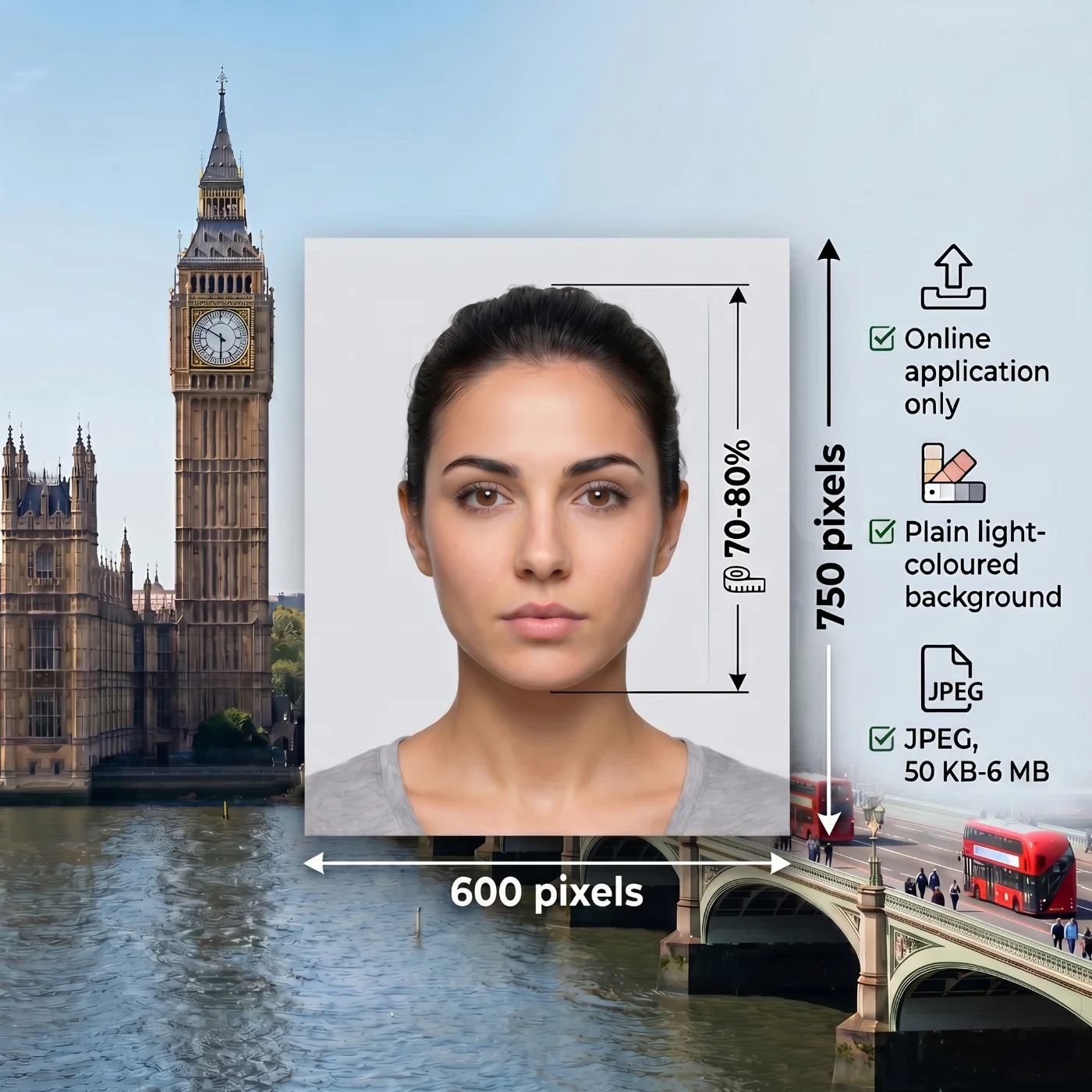
Quick-Reference: UK Visa Photo Specs (UKVI, 2026)Photo type: Digital upload only Minimum size: 600 × 750 pixels File size: 50 KB – 6 MB File format: JPG / JPEG only Background: Plain, light-coloured Expression: Neutral, mouth closed, eyes open Glasses: Not recommended; conditional exception only Head covering: Only for religious or medical reasons Photo recency: Taken recently — must reflect current appearance |
14 Essential UK Visa Photo Requirements: a Checklist
The UK Visa photo requirements are defined by the UK Visas and Immigration (UKVI), which follow the international biometric standards of the International Civil Aviation Organization (ICAO) Document 9303. All specifications listed in this article reflect the official GOV.UK guidelines as of February 12, 2026.
Your UK digital visa photo must meet them exactly: the image is used for biometric verification during the application, and is matched against your travel document at the point of entry.
Specification | Official Requirement |
|---|---|
1. Photo Type | Digital upload only. Unlike many countries that still accept printed photos at consulates, UKVI requires all applicants to upload a digital photo through the online application portal or the UK Visas and Immigration: ID Check app. No printed photographs are submitted for standard visa applications. |
2. Recency | The photo must have been taken within the last month and accurately reflect your current appearance. A significant change — new facial hair, post-surgery changes, or substantial weight change — requires a new photo. |
3. Photo Dimensions | 600 x 750 pixels. The image must be vertically oriented. Landscape orientation is automatically rejected. There is no specified maximum pixel dimension; the file size limit applies instead. |
4. File Size | Minimum 50 KB, maximum 6 MB. |
5. File Format | JPG ( JPEG) only. PNG, HEIF, BMP, PDF, and all other formats are not accepted by the UKVI visa portal. |
6. Colour | Only full-colour photographs are accepted. Black-and-white, sepia, and colour-filtered images are not permitted. The image must reproduce natural skin tones and facial detail accurately. |
7. Background | Plain, light-coloured background only — cream, ivory, off-white, or light grey. No textures, patterns, shadows, or objects should be visible. Your face must be in clear contrast to the background. |
8. Lighting | Even, diffuse illumination with no harsh shadows under the nose, chin, or around the ears. No flash glare on the forehead. No shadows cast behind you on the background. Natural window light or soft lighting on both sides of the face produces the best results. |
9. Positioning and Framing | The applicant must face the camera directly, with the head centred horizontally and vertically in the frame. No tilting, turning, or angling of the head. The full head, shoulders, and upper body must be visible and squared to the camera. |
10. Facial Expression | A neutral expression is mandatory — both eyes open and fully visible, mouth closed, no smiling, frowning, or squinting. No hair covering the eyes or obscuring facial features. Biometric facial recognition systems require relaxed facial muscles for accurate measurement. |
11. Attire, Head Coverings, and Accessories | Everyday clothing in solid or plain colours is acceptable. Head coverings are permitted only for documented religious or medical reasons — the full face from chin to forehead must remain completely visible. Fashion hats, caps, and decorative headbands are not allowed. All earphones, earbuds, and wireless headsets must be removed. |
12. Glasses | Glasses are not recommended. GOV.UK guidance states: “Do not wear glasses in your photo unless you have to.” If worn for medical reasons, lenses must be clear — no tinted or darkened lenses — and there must be no glare, reflections, or shadows over the eyes. Glasses frequently cause automated rejection even when the lenses are clear. |
13. Editing and Filters | Not permitted. The photo must be digitally unaltered — no beauty apps, AI skin-smoothing, Instagram-style filters, background replacement, teeth whitening, or auto-enhance modes. The image must be the original, unedited photograph submitted directly from the camera. |
14. Source Device | Photos taken with a phone or tablet are acceptable. Professional equipment is not required. Disable all automatic beauty modes, portrait mode, and AI enhancement features before taking the photo. GOV.UK recommends having another person take the photo — selfies are allowed, but produce worse results. |
Source: UK Visas and Immigration
⚠️ UKVI Digital-Only Policy (February 2026)
The UK Visas and Immigration guidance page for visa photos was published on 12 February 2026. UKVI now processes applications digitally. Paper photos are no longer submitted at visa application centres for most application types. Always check your specific visa application form for current submission instructions.
How to Submit Your UK Visa Photo in 2026: 3 Official Channels
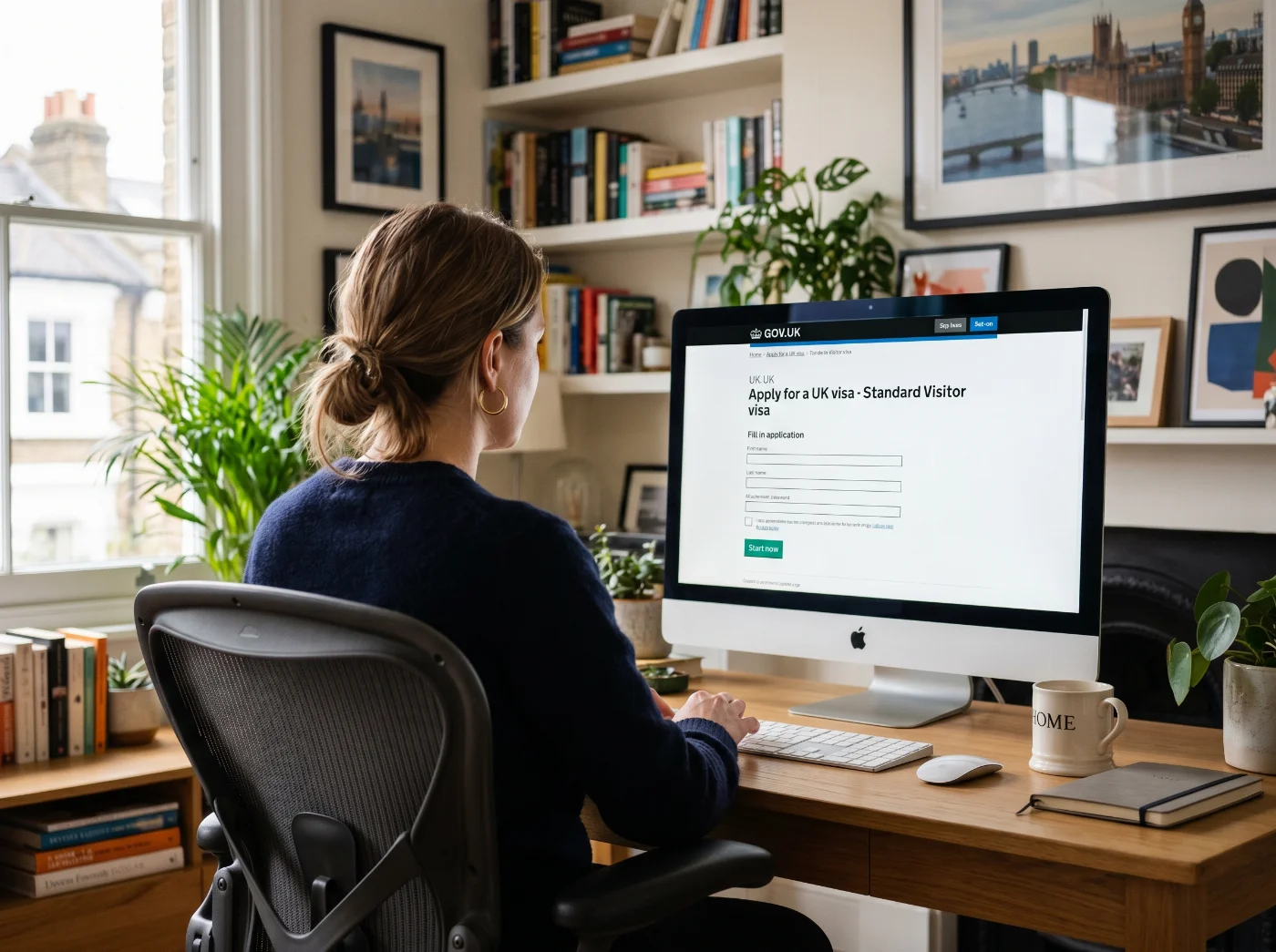 Since February 2026, the UK visa and immigration permission applications can only be submitted online. Your photo is uploaded directly during the online application process. Choose one of the three submission channels relevant to your case.
1. Online Visa Application Portal
The most common way to apply for a British visa is via the GOV.UK portal. After completing a small questionnaire, you will be guided to a relevant page for your type of application, for example, a Standard visitor visa.
Complete your visa application. You will be prompted to upload your digital photo at the relevant step. The portal automatically checks whether your photo meets the 2026 technical and biometric specifications. If your photo is rejected, you will be prompted to upload another photograph.
2. UK Visas and Immigration: ID Check App
Some applicants can use the UKVI ID Check app to verify their identity and submit their photo from a smartphone. The app includes a built-in photo check that validates lighting, focus, and face positioning in real time. Available for eligible nationalities with biometric passports.
Follow the in-app guidance to complete your visa submission. Please note that Ukrainian citizens are currently unable to use the app for visa applications.
3. Visa Application Centres (VAC)
If you cannot submit biometric information online, you may be required to attend a Visa Application Centre. At the VAC, your biometric data (fingerprints and photograph) is captured digitally by the staff. You do not bring a printed photo to the VAC — the photo is taken there.
How to Take a Compliant UK Visa Photo at Home
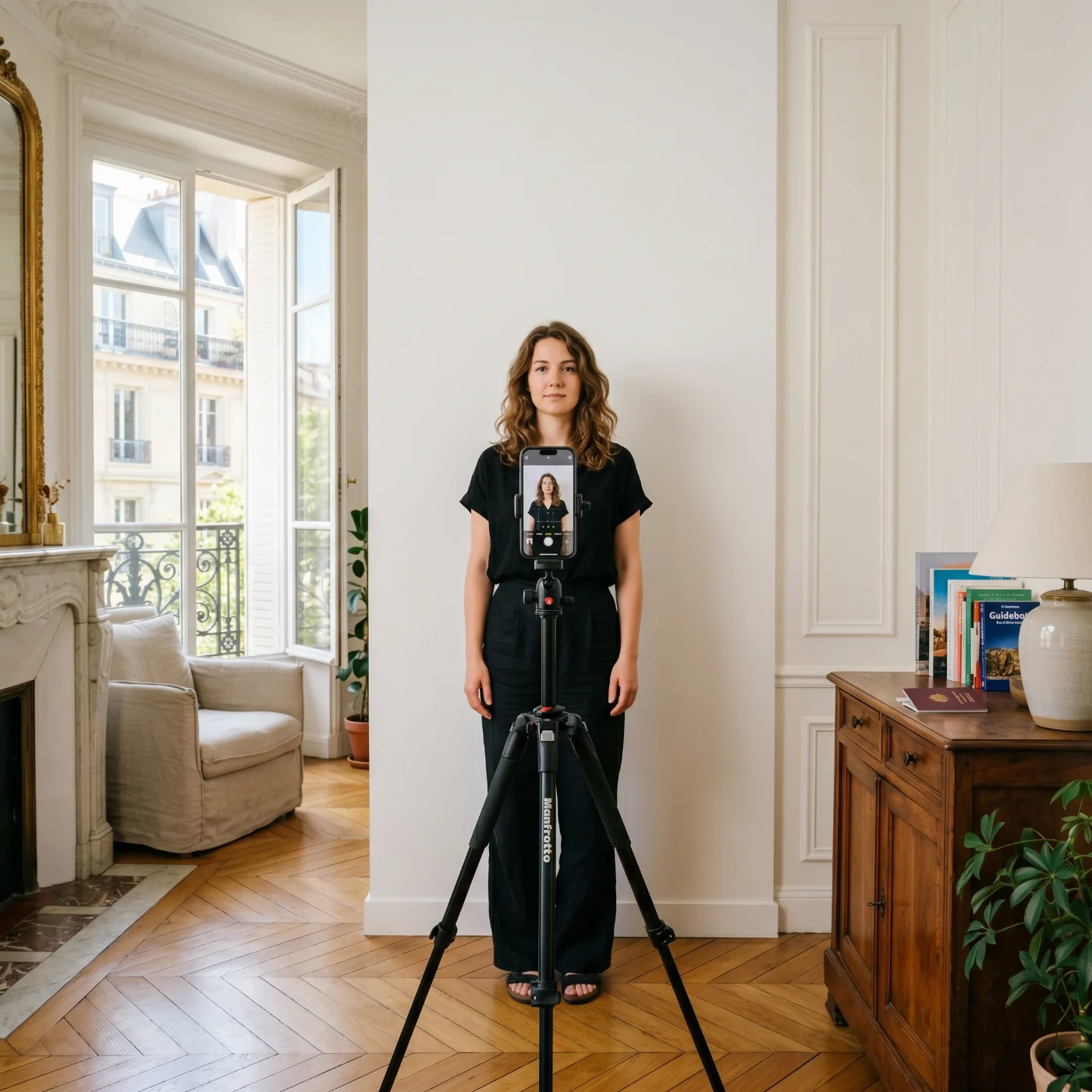 Set up the Shot
Start with your background: find a plain, light-coloured wall or hang a plain cream/white/light grey sheet — no texture, no pattern, nothing behind you. Before you do anything else, set up your lighting. Face a window with natural daylight, or use two soft light sources on either side of your face to eliminate shadows.
Prepare Your Appearance
Remove glasses if you safely can — the UKVI's automated biometric system checks eye geometry as a core verification step. Glasses — even transparent ones — can interfere with this check and result in photo rejection.
GOV.UK guidance states: "Do not wear glasses in your photo unless you have to." If you must wear glasses (for medical reasons), the following conditions apply:
No sunglasses.
No tinted lenses — glasses must be clear.
Eyes must not be covered by frames.
No glare, reflections, or shadows from the lenses.
Eyes must be clearly visible.
Head coverings are not permitted in UK visa or passport photos unless worn for religious or medical reasons.
Religious head coverings (e.g. hijab, turban, kippah) arepermitted — but your face from the bottom of your chin to the top of your forehead must be fully visible.
Medical head coverings (e.g. post-surgical cap) arepermitted with appropriate documentation from the medical provider.
Fashion hats, caps, or decorative headbands arenot permitted.
Correctly Frame the Shot
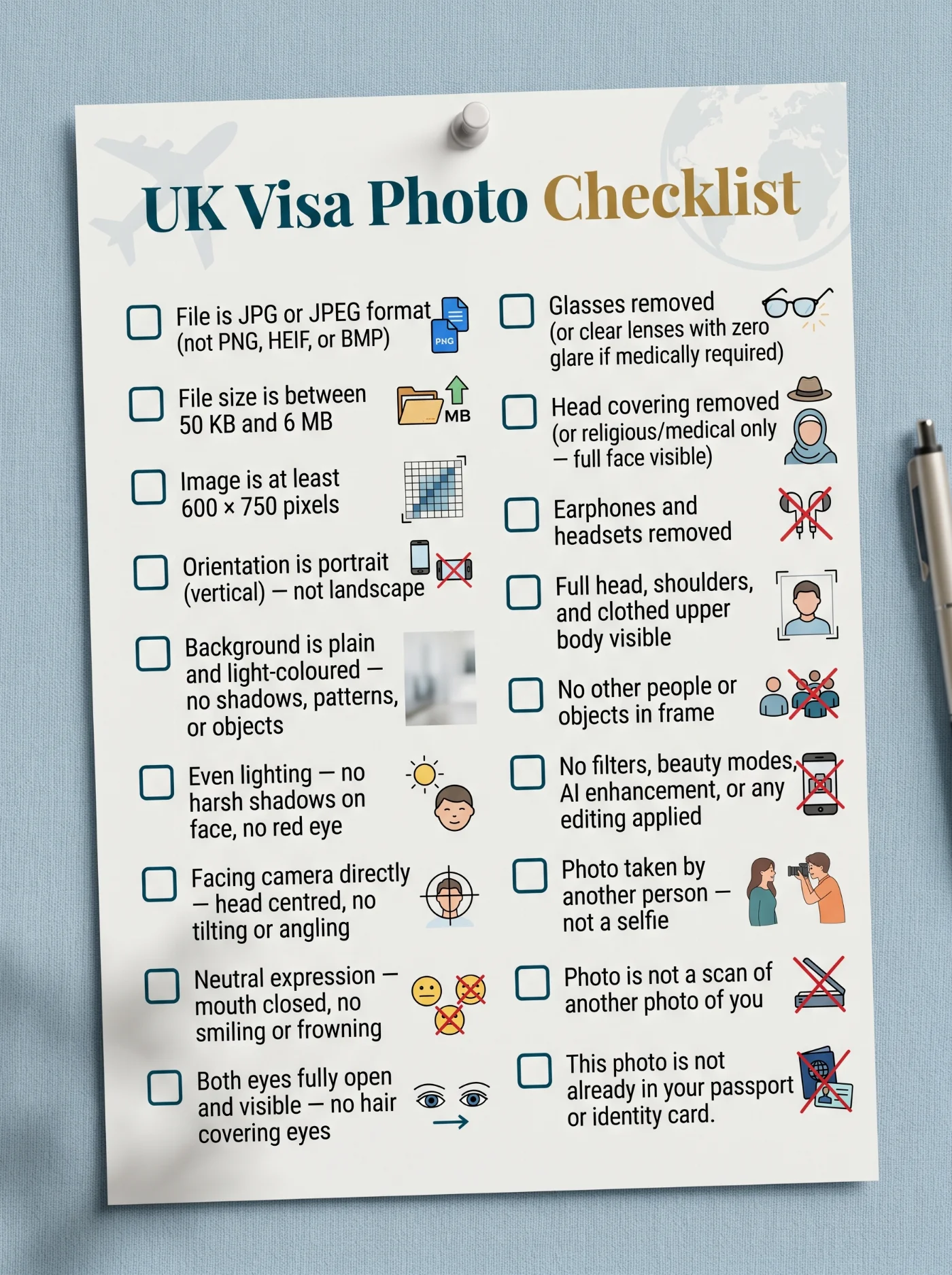
Frame the shot so your full head, upper shoulders, and clothed torso are in the picture. Before uploading, check that the file is JPG or JPEG, vertically oriented, at least 600×750 pixels, and between 50 KB and 6 MB. Turn off any auto-beautify, portrait mode, or AI enhancement on your phone camera. Filters and AI retouching are prohibited and will cause automatic rejection.
Take the Photo
Have someone else take the photo — don't take a selfie if you can avoid it. A phone or tablet on a stand with a timer works too. Look straight at the camera, keep a completely neutral expression, close your mouth, and make sure both eyes are fully open and visible.
GOV.UK recommends asking someone else to take your photo. Self-photos (selfies) are technically allowed if taken with a phone or tablet, but having another person take the photo reduces the risk of bad angles, shadows, and rejection.
Adjust the Photo to the UK Visa Photo Requirements
Use a reliable online UK visa photo tool to correctly frame, resize, and adjust your original photo to the official 2026 UK photo specs. The PhotoGov UK visa photo editor follows all international biometric photo rules, and doesn’t alter your facial features or skin complexion, providing a technically correct digital image, ready for immediate submission.
Apply for Your UK Visa Photo
Upload directly through the UKVI online portal or the UK Visas and Immigration: ID Check app. The system runs automated biometric quality checks on upload and will flag problems immediately.
UK Visa Photos of Children and Infants
Children applying for a UK visa or passport must meet the same general rules as adults, with the following age-specific exceptions:
Age Group | Exception |
|---|---|
Under 6 years | Do not have to be looking directly at the camera or have a plain expression |
Under 1 year | Eyes do not have to be open |
Under 1 year | Can be supported by a parent's hand — but the hand must not be visible in the photo |
Under 1 year | May lie on a plain light-coloured sheet; photo taken from above |
All children | Must be alone in the picture — no adults visible |
Babies | Must not be holding toys or using dummies |
Increase Your Chance of UK Visa Approval: Checklist
Common Reasons for UK Visa Photo Rejection
UKVI's portal and ID Check App perform automated technical and biometric photo checks. Photographs that fail these checks are rejected before the application is processed. Common causes of rejection include:
1. Wrong photo dimensions: Images under 600 × 750 pixels do not contain sufficient resolution for biometric face-matching algorithms to process reliably.
2. File too small or too large: Images under 50 KB are typically too heavily compressed. Compression artefacts distort facial geometry data and trigger automated rejection. Files over 6 MB are automatically rejected.
3. Glasses causing glare or shadow over eyes: Even clear prescription glasses can interfere with the eye geometry check. UKVI strongly recommends removing glasses entirely.
4. Background has shadows or patterns: A non-uniform or patterned background reduces facial contrast and causes the face-detection step to fail.
5. Eyes not open or partially obscured by hair: The system requires both eyes to be fully visible. Hair over the eyes, a heavy fringe, or partially closed eyes will cause the biometric check to fail.
6. Photo is digitally altered or filtered: Any post-processing — including smartphone beauty modes, AI skin-smoothing, teeth whitening, or background replacement — disqualifies the photo. The image must be the unaltered original.
7. Landscape (horizontal) orientation: The system expects portrait orientation. Landscape files are automatically rejected without manual review.
8. Reusing a passport photo: GOV.UK explicitly prohibits submitting the same photo that appears in your passport or identity card. A new photo must be taken for your visa application.
9. Strong expression (smile or frown): Smiling, frowning, or raised eyebrows alter facial landmark geometry. A completely neutral expression with the mouth closed is required.
10. HEIF or PNG format: The UK visa portal accepts JPG/JPEG only. Photos submitted in PNG, HEIF (HEIC), and other formats will be automatically rejected.
11. Head covering (non-religious/medical): Head coverings not worn for religious or medical reasons obstruct biometric head geometry measurements and cause rejection.
What to Do if Your UK Visa Photo Has Been Rejected?
What to Do if Your UK Visa Photo Has Been Rejected?
If the UKVI portal or the ID Check App rejects your photo on upload, read the rejection message carefully — the system usually identifies the specific issue, such as wrong file format, image too small, or a detected quality problem. Correct the flagged issue and re-upload immediately; the portal allows you to retry without restarting your entire application. The most common fixes are: switching from PNG to JPEG, disabling beauty or portrait mode on your phone before retaking the photo, and ensuring the background is plain and shadow-free. If your glasses triggered the rejection, retake without them. If your application has already been submitted and returned due to a photo issue, you will receive a notification with a resubmission deadline — act the same day. If you are directed to a Visa Application Centre (VAC), do not bring printed photos: your biometric photograph is captured digitally by staff on site.
UK Visa Photo vs UK Passport Photo: Key Differences
Both types of photos follow the same general appearance rules. The main practical differences are:
Criteria | UK Visa Photo (UKVI) | UK Passport Photo |
|---|---|---|
Authority | UK Visas & Immigration (UKVI) | HM Passport Office (HMPO) |
Submission method | Digital upload only | Digital (online) or 2× printed (paper form) |
Digital file size | 50 KB – 6 MB | 50 KB – 10 MB |
Digital format | JPG / JPEG only | JPEG or PNG |
Printed size | Not applicable | 45 mm × 35 mm |
Printed face height | Not applicable | 29–34 mm |
Background | Plain light-coloured | Plain cream or light grey |
Guidance published | 12 February 2026 | Updated January 2026 |
A DVLA photocard is another case: the UK driving licence photo is prepared on its own page.
Same Photo Across UK Documents?
You cannot reuse your passport photo for a visa application. GOV.UK guidance explicitly states your photo must not be the same photo that is in your passport or identity card.
UK Photo Format vs International Standards
The UK uses a 35 × 45 mm format for printed photos — the same as the ICAO (International Civil Aviation Organization) Document 9303 standard used in most of Europe and internationally. This makes the UK format compatible with EU visa photos (Germany, France, Netherlands, etc.).
Country / Document | Photo Size | Background | Glasses |
|---|---|---|---|
UK Visa (UKVI) | Digital only; 35×45mm equivalent | Plain light-coloured | Not recommended |
UK Passport (HMPO) | 45×35mm printed / 600×750px+ digital | Cream or light grey | Not recommended |
Germany (Reisepass) | 35×45mm | Light grey preferred | Conditionally permitted |
EU Schengen Visa | 35×45mm | White or off-white | Conditionally permitted |
US Passport | 2×2 inch (51×51mm) | White only | Not permitted |
India Passport (2026) | 35×45mm | Plain white only | Not permitted |
UK Format Is ICAO-Compatible
Because the UK uses the ICAO 35×45mm format, a photo taken to UK visa spec may also be usable for Schengen visa applications and most European identity documents — provided background colour and other local rules are satisfied. Always verify with the destination country's official guidance.
UK Visa Photo Requirements: Final Thoughts
The UK visa photo process in 2026 is fully digital as of February; submitting printed photos with visa agencies or dropping your application off at a consulate isn’t available anymore.
The UK uses the ICAO 35×45 mm format — compatible with most European documents — but is incompatible with the US 2×2 inch square format. The visa and passport photo rules are nearly identical in appearance, but differ in file specs: visa caps at 6 MB and accepts JPG/JPEG only, while the passport portal also accepts PNG and allows up to 10 MB. You cannot reuse a photo already in your passport — this is explicitly prohibited. You can also make a UK passport photo online, since the appearance rules are nearly identical.
The UKVI's portal and the ID Check App run automated biometric checks, so technical compliance matters as much as your appearance in the shot.
The two most common failure points are AI-enhanced photos (auto-beauty modes on iPhones, Samsung, and Pixel phones silently alter images) and glasses, which interfere with eye geometry verification even when lenses are clear. Avoid that, and follow the recommendations we provided in this guide, and your photo has a high chance of approval.
Frequently Asked Questions
What Are the Current UK Visa Photo Size Requirements?
Your UK visa photo must be a digital file of at least 600 × 750 pixels (width × height) in portrait/vertical orientation. The file must be between 50 KB and 6 MB, saved in JPG or JPEG format only — PNG, HEIF, BMP, and PDF are not accepted.
The photo must be in full colour with a plain, light-coloured background. Lighting must be even and diffuse, with no harsh shadows on the face, no flash glare, and no red eye. The UKVI portal runs automated biometric checks on upload and flags any file that falls outside these parameters immediately.
Can I Take My Own UK Visa Photo With a Smartphone?
Yes. GOV.UK guidance states that photos can be taken with a phone or tablet. However, you are advised to have another person take the photo for you, as this reduces the risk of poor angles and shadow. Make sure the device camera is set to the highest quality and no filters or beauty modes are active.
What Background Colour is Correct for the UK Visa — White or Light Grey?
For UK visa photos, the UK Visas and Immigration official website says “plain light-coloured background” without specifying a single colour. Acceptable shades include cream, ivory, off-white, and light grey. A bright white background is generally acceptable, but avoid stark white that may cause overexposure and affect facial contrast.
Does the UK Visa Photo Need to be Taken Recently?
Yes. Your photo must accurately reflect your current appearance. UK Visas and Immigration does not specify an exact recency for visa photos specifically, but we recommend using the photo taken within the last month.
What Are the UK Visa Photo Requirements for Glasses, Beard, and Headwear?
Glasses are not recommended. The official UK Visas and Immigration guidance states: "Do not wear glasses in your photo unless you have to." If worn for a documented medical reason, lenses must be clear — no tinted or darkened glass — and there must be no glare, reflections, or shadows over the eyes, which must remain fully visible. Even clear prescription glasses frequently trigger automated rejection due to interference with the eye geometry biometric check.
Beard and facial hair carry no specific restrictions. Any beard, moustache, or stubble is permitted, provided the face from chin to forehead is clearly visible and the neutral expression requirement is met. If significant facial hair changes occur after the photo was taken, a new photo reflecting your current appearance is required.
Headwear is permitted only for religious or medical reasons:
Religious coverings (hijab, turban, kippah) are allowed — but the full face from chin to forehead must remain completely unobstructed
Medical head coverings (e.g., post-surgical cap) are permitted with appropriate documentation
Fashion hats, caps, and decorative headbands are not permitted under any circumstances.
What Clothes Are Allowed for UK Visa Photos?
Everyday clothing in any colour or plain style is acceptable for a UK visa photo. There are no restrictions on formal, casual, or cultural dress — the rules focus entirely on the head and face area remaining unobstructed.
Avoid heavy patterns or prints, which can interfere with facial recognition processing
Head coverings are permitted for religious or medical reasons only — a hijab, turban, or kippah is allowed, provided the full face from chin to forehead remains completely visible; fashion hats, caps, and decorative headbands are not permitted
Note that all earphones, earbuds, and wireless headsets must also be removed before the photo is taken.
Can I Wear a Hijab or Religious Head Covering in My UK Visa Photo?
Yes. Head coverings worn for religious or medical reasons are permitted. Your full face from chin to forehead must remain visible and unobstructed in the photo.
My Photo Was Rejected by the UKVI Portal — What Do I Do?
Read the rejection reason displayed on screen. Common issues are file format (must be JPG/JPEG), file too small, or photo not meeting appearance rules. Retake the photo, correcting the flagged issue and re-upload. If you continue experiencing problems, consult the GOV.UK guidance page or contact UKVI customer services.
Can I Use a Photo Booth Photo for My UK Visa Application?
Only if it meets the technical spec: JPG/JPEG format, minimum 600×750 pixels, 50 KB–6 MB, no editing. Modern digital photo booths typically output compliant files. Check that the background is plain light-coloured and the booth does not auto-apply enhancement. Traditional printed photos from photo booths cannot be uploaded directly — you would need to scan them, which UK Visas and Immigration explicitly prohibits ('must not be a scan or photo of another photo of you'). Use a digital-native photo source.
Is the UK Visa Photo the Same as the UK Passport Photo?
No. The UK Visas and Immigration guidance explicitly states that your visa photo must not be the same photo that appears in your passport or identity card — a new photo is required.
The appearance rules for both documents are nearly identical, but the technical specs differ in a few key areas. The visa photo file cap is 6 MB and accepts JPG/JPEG only, while the passport online portal also accepts PNG and allows up to 10 MB. Scanning a printed passport booth photo and uploading it is also prohibited — GOV.UK states the image "must not be a scan or photo of another photo of you." The UK passport photo requirements guide on PhotoGov compares the digital and printed specs side by side.
Do I Need a Paper Photo For a UK Visa Application?
No. In 2026, UKVI processes applications digitally, and your biometric photo is submitted through the online portal or ID Check app. Some older or specialist application routes may still involve a Visa Application Centre visit, where staff capture your biometric data (including photo) digitally. Always check the specific instructions for your visa category.
What Are the UK Visa Photo Requirements for Professional Studio Photography?
As of February 2026, UKVI accepts digital photos only — professional studio equipment is not required. UK Visas and Immigration explicitly states that photos taken with a phone or tablet are fully acceptable, provided the file is JPG/JPEG, at least 600 × 750 pixels, and between 50 KB and 6 MB.
The same core principles that guide studio photography apply regardless of the device:
Lighting must be even and diffuse — no flash glare or shadows on the face
Background must be plain and light-coloured — cream, ivory, off-white, or light grey
Framing must show the full head, upper shoulders, and clothed torso; head centred with no tilting
No editing — beauty apps, AI skin-smoothing, filters, and auto-enhance modes are prohibited and cause automatic rejection
UK Visas and Immigration recommends having another person take the photo rather than a selfie, as this reduces the risk of poor angles and shadows.
Official Sources
Official UK Visa Photo Requirements: UK Visas and Immigration
How to Take a Photo for a UK Visa Application or Permission, Video: UK Visas and Immigration
Check if You Need a UK Visa — Official Tool: gov.uk/check-uk-visa
ICAO Biometric Standards: Document 9303, Part 3 — Specifications for Machine Readable Travel Documents
Was this helpful?
48 found this helpful
Top expert
Based on official government sources
Helpful votes: 48
Was this helpful?
48 found this helpful
Service provided by Y VISION TECHNOLOGIES LLP · Stoney Works 8 Stoney Lane, London, England, SE19 3BD · Terms · Refund policy · Contact
We value your Privacy
We use cookies to enhance your browsing experience, serve personalized ads or content. By clicking “Accept All”, you consent to our use of cookies.