Convert Your Selfie to UK Visa Photo Size from Home
Traveling to the UK? Save time and skip a photo studio visit, and create a photo for your UK visa from the comfort of your home or office: upload your recent selfie to our visa photo-maker, and get a submission-ready digital or printable file. Works on any smartphone or laptop; no editing skills required.
No studio · No app · 30 seconds
We value your Privacy
We use cookies to enhance your browsing experience, serve personalized ads or content. By clicking “Accept All”, you consent to our use of cookies.
PhotoGov is an independent service. We are not affiliated with any government, embassy, or consulate. All information on this website is based on official government requirements and verified primary sources. Final acceptance is determined solely by the issuing authority.
Get Your UK Visa Photo Online for Free Now
Use our UK visa photo-maker to get a submission-ready UK visa photo. Follow the on-screen instructions below, and download a digital or printable file to your device.
Get photo for: UK Visa 35x45 mm (3.5x4.5 cm)
Instructions:
How to take a good photo?


1/7 Image format
Photo must be in color. Taken within the last 6 months.
How to take a good photo?
1/7 Image format
Photo must be in color. Taken within the last 6 months.
ID & Passport Photo Tool. Your personal data is processed in accordance with security and privacy standards.
If you need assistance, don't hesitate to contact our Support team, which is always there to help.
How Our UK Visa Photo Editor Works
Our free UK visa photo editor automatically converts your selfie's size, head proportions, framing, and background to the official GOV.UK specs. Choose additional services — human verification by our expert or 9 extra clothing variations for a more official, visa-ready look.
Photo Upload
Take a selfie and upload it to PhotoGov
Service Selection
Add Human Verification or select other services
Processing
Wait while automatic adjustments are applied
Download
Get a UK visa photo size 35 x 45 mm
Written by Olia Potiagaeva, Managing Editor Reviewed by the PhotoGov Editorial Team★ 4.8 / 5.0 GoogleChecked against UK Visas and Immigration requirements
Requirements re-checked every 8 weeks
Against the UK Visas and Immigration specification, so the template never falls behind a rule change. Last checked: 08.10.2026.
→ Official Government SourcesOn THIS PAGE:
- Get Your UK Visa Photo Online for Free Now
- How Our UK Visa Photo Editor Works
- What is a UK visa photo?
- Your Final UK Visa Photo from PhotoGov
- UK Visa Photos That Pass the Checks
- UK Visa Photos That Don't Pass the Checks
- Why Use the PhotoGov Service for UK Visa Photos
- PhotoGov and UK Visas and Immigration Standards for Visa Photos
- Frequently Asked Questions
- Official Government Sources
- Other Documents — UK ID Photos
What is a UK visa photo?
The UK Visa Photo editor crops your image to the selected format and positions the head within the frame. It sizes the picture you upload without changing your facial features, and the built-in photo checker tests the file against the selected format. The selected format is 35 x 45 mm. Before you submit the photo, check the photo instructions for the application you are completing.
The official photo format required for UK visa applications.
Automatically prepared by PhotoGov as a correctly sized, application-ready, GOV.UK-compliant file.
Accepted for digital upload in online visa applications, and suitable for professional printing for paper applications at embassies, consulates and visa centers.
Your Final UK Visa Photo from PhotoGov
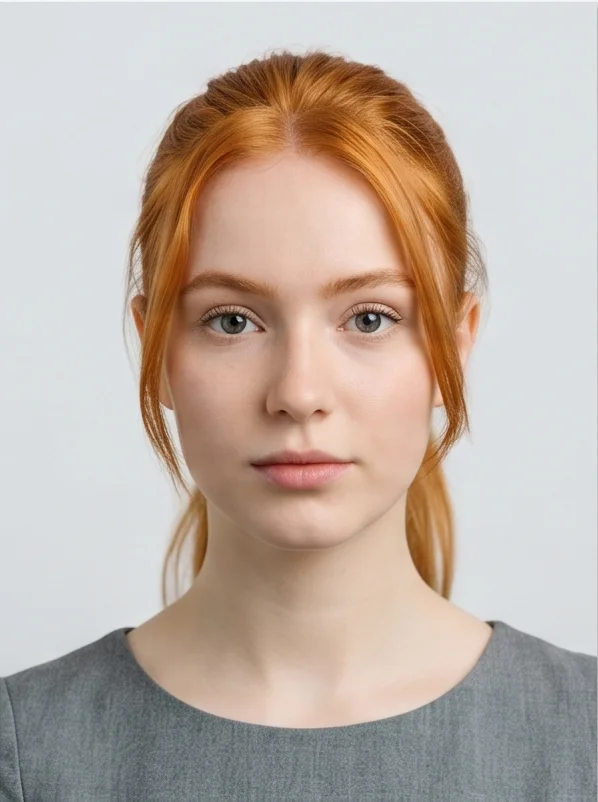
PhotoGov automatically applies all official GOV.UK requirements to your original photo. The final image is ready for submission and doesn't require any adjustments from you. Below are the key technical parameters of your final UK passport photo from PhotoGov.
Parameter | Your Final Photo |
Photo size | 600 x 750 pixels |
Head size | 29–34 mm from chin to crown |
Background | Plain, light-coloured |
File format | JPEG / Printable PDF or JPEG sheet |
Resolution | High-resolution digital file at 600 DPI |
Head positioning | Automatically centered |
Colour | Full colour |
Face visibility | Fully visible, no retouching |
Submission | Digital photo for online submissions / Printable for in-person applications at embassies, consulates or visa centers |
Photo requirements depend on your application route; check our UK visa photo requirements guide for a full breakdown based on your specific visa type.
Your photo is processed in a private session in a secure environment. Facial features are never altered — our UK visa photo editor only resizes, crops, and replaces the background. If you want extra reassurance, optional Human Verification is available at checkout.
UK Visa Photos That Pass the Checks
UK Visa Photos That Don't Pass the Checks
Why Use the PhotoGov Service for UK Visa Photos
Convenience
Photos accepted for online and in-person submissions
Compliance-Aligned Output
Designed to meet the current GOV.UK guidelines
Availability
No registration, installation, or studio visits
Extra Assurance
Optional Human Verification by an in-house compliance specialist
Secure Processing
Your data is secure and not transferred to third parties
If your photo is rejected due to technical issues on PhotoGov's side, we provide a free retake or a full refund.
PhotoGov and UK Visas and Immigration Standards for Visa Photos
PhotoGov's UK visa photo tool is based on the photo rules published by UK Visas and Immigration and the biometric standards set out in ICAO Document 9303. Our team checks these requirements on an ongoing basis and updates the tool whenever the guidance changes.
When you process a UK visa photo with PhotoGov, the output is the exact 35 x 45 mm frame, with a head height of 29-34 mm, centered against a plain, light-colored background. The facial features of your original photo remain unaltered — the editor only handles resizing, cropping, and background replacement. The same 35 x 45 mm print size is required for UK passports too. However, for online submissions, digital specs differ: check our UK passport photo requirements page for a full breakdown.
If you'd like an extra layer of confidence, our Human Verification add-on lets a senior compliance specialist check your photo against current GOV.UK criteria manually, before you submit it.
For other UK ID photos, see our dedicated tools: UK Passport Photo Tool, UK Passport Online Photo Tool, UK Driving Licence Photo Tool.
Our platform is built to meet UK Visas and Immigration photo rules. However, the final acceptance of your photo is always at the full discretion of UK Visas and Immigration.
Frequently Asked Questions
Take a front-facing photo against a plain, light-coloured wall in even daylight, upload it to PhotoGov, and choose your submission type — in person at a British embassy or consulate, or online. Download the result as a digital JPEG, or as a printable PDF or JPEG to be printed at a local print shop or at home and used for paper applications.
Yes. The paper application requires the finished 35 x 45mm crop. The online application needs the uncropped wider frame. Submitting one format for the other route is a common cause of rejection — PhotoGov produces the correct version for your submission channel.
No. A UK passport application and a UK visa application use separate upload specifications, and a photo prepared for one isn't guaranteed to pass the other. Generate each file separately with the correct document type selected.
Yes. A recent smartphone photo is enough if it's sharp, evenly lit, and taken against a plain background. Upload it to our UK visa photo-making tool, and PhotoGov handles the cropping, head position, and background for you.
Yes. PhotoGov gives two free ID photos per day, depending on your location. Upload your image, select "United Kingdom" and "Visa" as the document type, and download the result. Optional paid extras include Human Verification and Casual-to-Formal Clothing Replacement. Learn more from our Prices page.
Yes. Select Human Verification at checkout, and a senior compliance specialist reviews your file against current GOV.UK rules before submission. If our expert flags any errors, a retake would be recommended.
If your photo is rejected because of a technical issue on our side, we will either refund your payment or give you a free retake. If the problem lies in the original picture, you'll need to take a new photo and upload it again.
Yes. We treat your personal data and images with great care. PhotoGov uses your information solely to generate an official ID photo and deletes it from our servers once the process is complete. We never share your data with third parties or external AI services. If you have any questions, you can always contact our Customer Support team or read more details in our Privacy Policy.
Yes. Open photogov.net in the phone browser, upload a picture and download the finished file. No app is required; the PhotoGov app for iOS and Android does the same job if you prefer it.
No. PhotoGov applies the selected format automatically: the tool sets the frame and the head position for you. Before you submit the photo, check the photo instructions for the application you are completing.
PhotoGov.net strictly adheres to Global regulations for ID photos.
Official Government Sources
Checked against the UK Visas and Immigration photo requirements: https://www.gov.uk/guidance/how-to-take-a-photo-for-a-visa-application-or-permission · Last checked: 08.10.2026
Other Documents — UK ID Photos
United Kingdom
19 doc.
- British Seaman's card 35x45 mm
- British Seaman's discharge book 35x45 mm
- London Freedom pass 35x45 mm
- Oyster travel photocard
- UK BASC Firearms / Shotgun Licensing 35x45 mm
- UK BNO passport
- UK Boat licence 35x45 mm
- UK Bus pass online form
- UK Driving Licence 35x45 mm (3.5x4.5 cm)
- UK ID / residence card 45x35 mm (4.5x3.5 cm)
- UK Leisure pass 35x45 mm
- UK Passport offline 35x45 mm (3.5x4.5 cm)
- UK Passport online
- UK Railcard 35x45 mm
- UK School card 35x45 mm
- UK Taxicard 35x45 mm
- UK Visa 35x45 mm (3.5x4.5 cm)
- UK bus pass 35x45 mm
- UK child passport online
Service provided by Y VISION TECHNOLOGIES LLP · Stoney Works 8 Stoney Lane, London, England, SE19 3BD · Terms · Refund policy · Contact
We value your Privacy
We use cookies to enhance your browsing experience, serve personalized ads or content. By clicking “Accept All”, you consent to our use of cookies.