Australia Visa Photo Requirements: a 2026 Complete Guide
Table of contents:
- 11 Essential Australia Visa Photo Requirements: Checklist
- Acceptable Australia Visa Photo Sample
- Unacceptable Australia Visa Photo Sample
- Digital vs Printed Australian Visa Photos Explained
- Where to Take an Australian Visa Photo?
- Australian Visa Photo Services: Overview
- How to Take an Australian Visa Photo at Home
- 10 Common Reasons for Australian Visa Photo Rejection
- What to Do if Your Australian Visa Photo Is Rejected
- Frequently Asked Questions
- Official Government Sources
- Other Documents — Australian ID Photos
Australian visa photo requirements are among the strictest in the world, and a compliant photo is a mandatory part of the application package. The image must be 35–40 mm wide and 45–50 mm high, taken within the last six months against a plain, light grey background, and show the applicant’s head and shoulders with a neutral expression and mouth closed. For the passport itself, the Australian passport photo size page prepares the same dimensions from a phone picture.
To increase the chances of approval on the first submission, it is essential to follow the full 2026 Australian visa photo specifications described in this guide, which have been checked and confirmed by our internal compliance team.
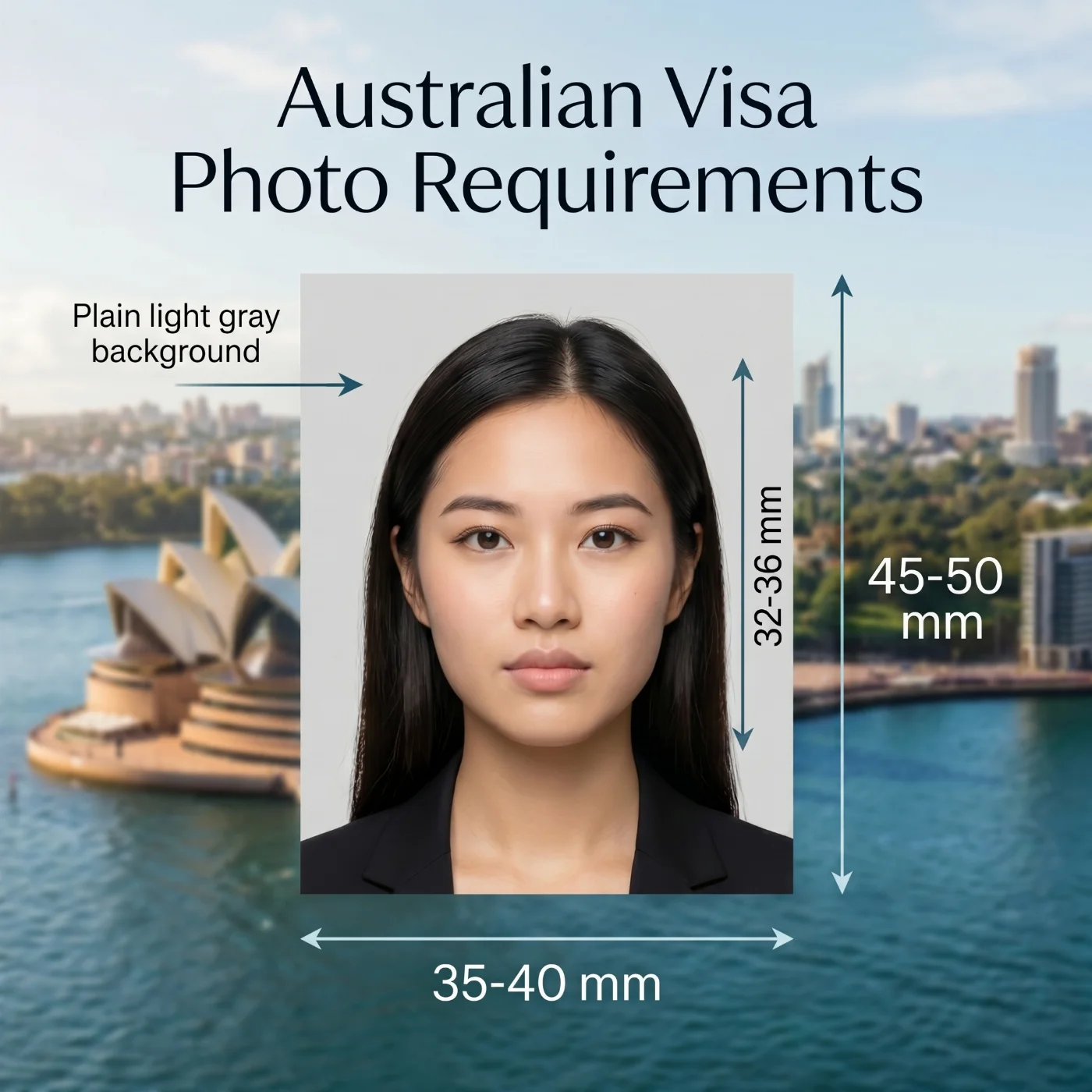 Source: DFAT
11 Essential Australia Visa Photo Requirements: Checklist
Australia visa photo requirements are determined by the Department of Foreign Affairs and Trade (DFAT) and are based on the biometric standards of the International Civil Aviation Organization (ICAO). For a visa application to be accepted, the photos submitted with it must fully comply with the official guidelines listed below.
Parameter | Requirement |
1. Number of photos | One digital photo is required when applying for your visa online via ImmiAccount. Two printed photos may be requested by the visa service provider for an in-person paper application. |
2. Recency | A visa photo for Australia must be taken within the last six months of the application and exactly reflect the applicant's current appearance. |
3. Australia visa photo size | Australia visa photo size is 35–40 mm wide and 45–50 mm high — the DFAT requires the same dimensions for visa pictures as for the passport photos. The head must take 70-80% of the image, or 32-36 mm from the chin to the top of the head. The passport rules differ in the background colour, and the PhotoGov Australian passport photo guide sets them out in full. |
4. Colour | Only coloured photos are accepted for Australian visa applications. The colours in the picture must accurately show the applicant's natural skin tone and hair colour. |
5. Background | A plain, light grey background, free of textures or patterns, is required for Australian visa photos. |
6. Lighting | Even, uniform lighting with no harsh shadows or reflections. |
7. Positioning and framing | Head in close-up, square to the camera, no tilting of head or shoulders. |
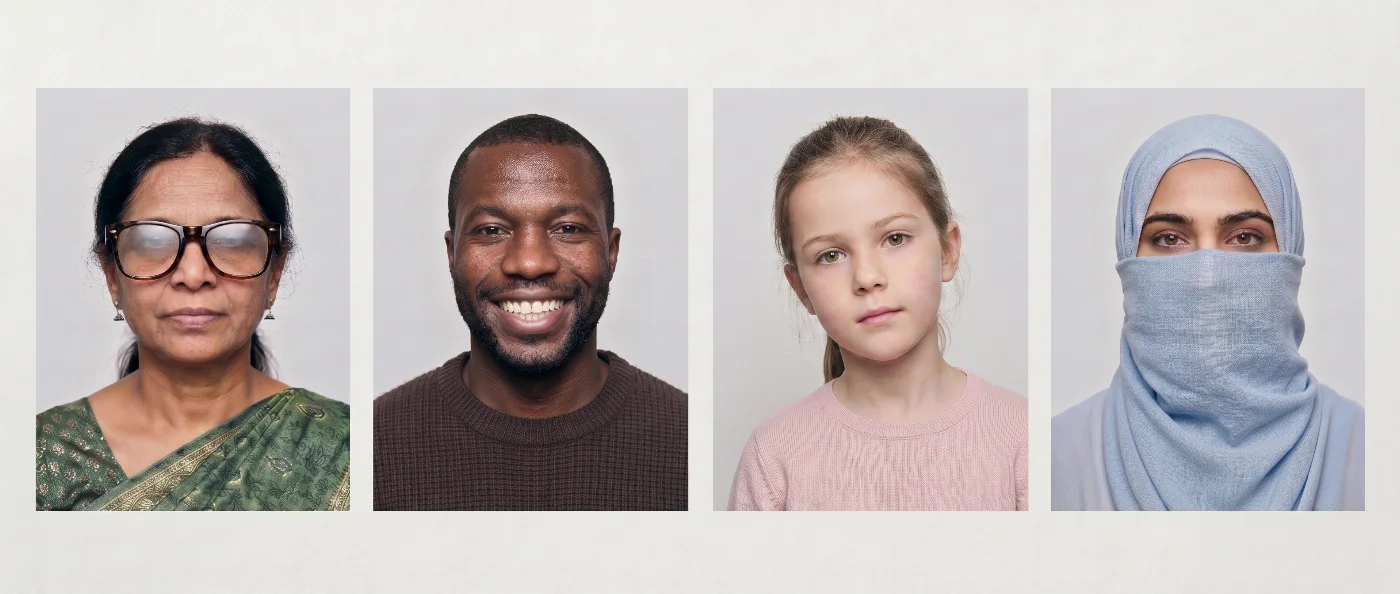
8. Facial expression | Neutral expression, eyes open, mouth closed; no smiling, frowning, or exaggerated expressions. |
9. Clothing, headwear, and accessories | Normal clothes; avoid uniforms, camouflage, turtlenecks, or overly casual attire. Solid colors contrasting with the background are recommended. No hats or head coverings unless for religious or medical reasons, and they must not obscure facial features. Hearing aids are allowed. |
10. Glasses | Generally discouraged. Allowed only for medical reasons with a supporting certificate, and lenses must be free of glare and reflections. Tinted glasses and sunglasses are not allowed. |
11. Print and Digital quality | For in-person applications, visa photos must be professionally printed on photo paper. Digital visa photo must be 826 × 1062 pixels, JPEG, 70 KB-3.5 MB, free from pixelation, digital noise, and alterations, including red-eye removal. |
You can use our online tool to make an Australian visa photo that meets all official requirements, including format, size, background, composition, and image quality.
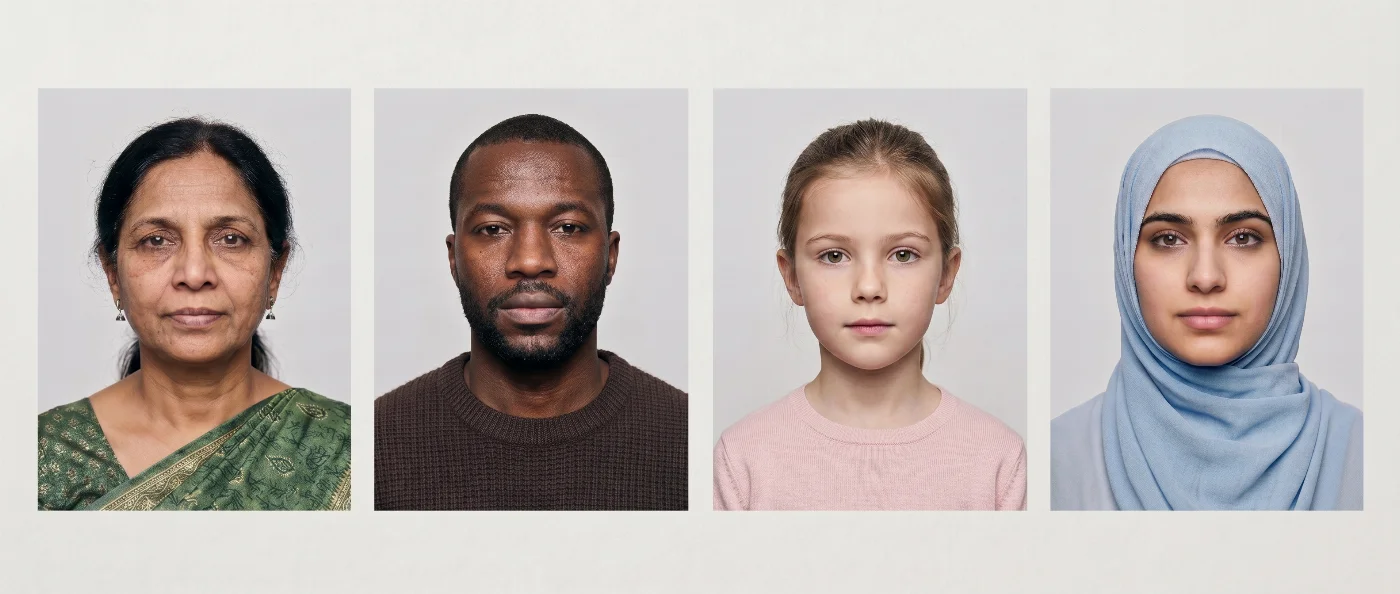
Acceptable Australia Visa Photo Sample
Unacceptable Australia Visa Photo Sample
Digital vs Printed Australian Visa Photos Explained
For Australian visas, digital photos are used for online applications, while printed photos may be requested for paper‑based submissions in consulates, embassies, or visa service providers.
A compliant printed photo generally follows the same biometric standards as an Australian passport picture: 35–40 mm wide and 45–50 mm high, with the face from chin to crown measuring 32–36 mm, printed in colour on high‑quality photo paper. A digital photo must fall into the 826 × 1062 pixels; the head takes 70-80% of the image requirements, with the file saved as a JPEG, sized 70 KB-3.5 MB.
Both printouts and digital photos must be recent, sharp, on a plain light grey background, with a neutral expression, mouth closed, eyes open and clearly visible, and without digital retouching or filters.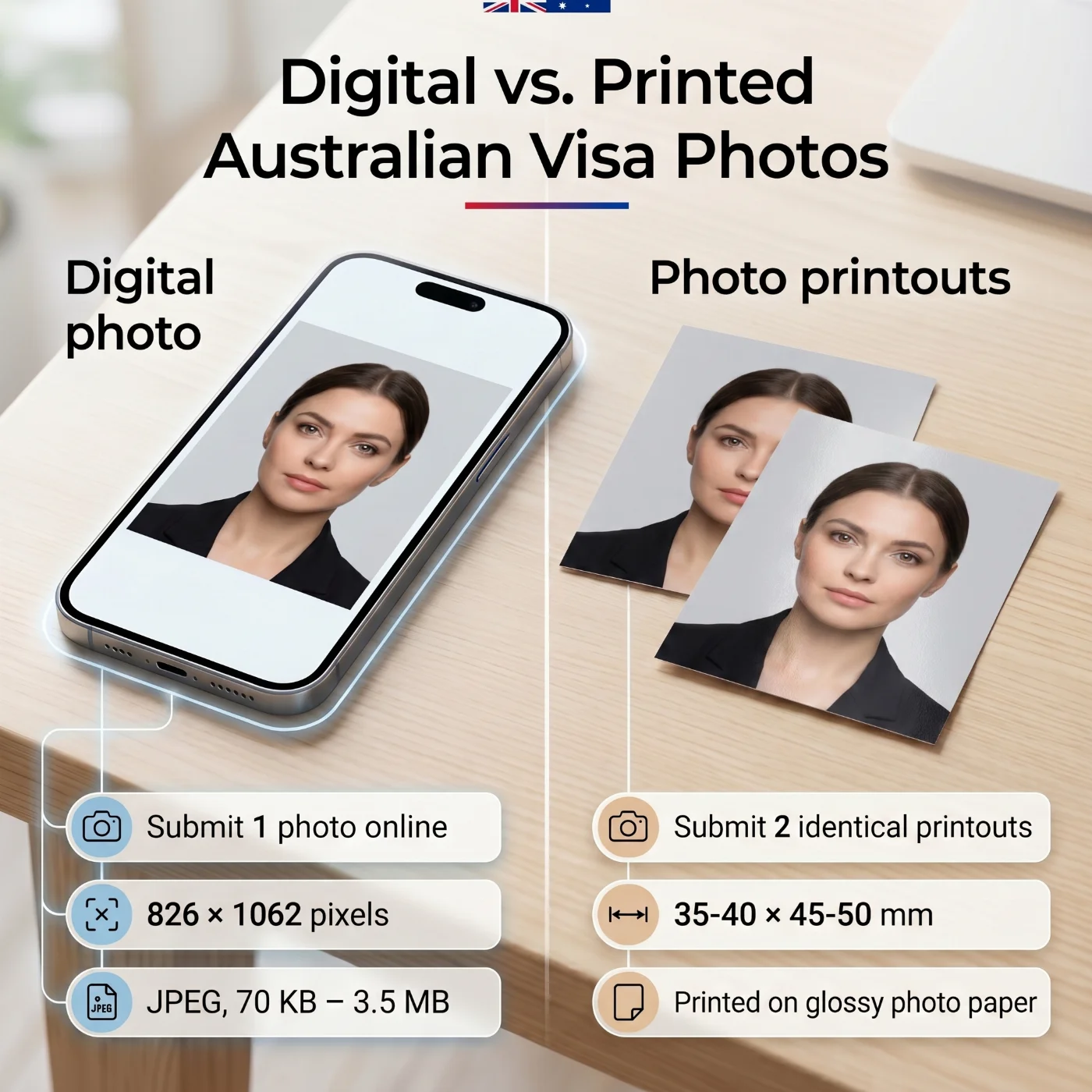
Specification | Digital | Printed |
|---|---|---|
Purpose | Upload online via ImmiAccount | Submit the visa application at Australian embassies, consulates, or visa service providers |
Quantity | 1 file | 2 identical prints |
Dimensions | 826 × 1062 pixels; head takes 70-80% of the image | 35-40 × 45-50 mm; head 32-36 mm from chin to crown |
Format | JPEG, 70 KB-3.5 MB | High‑quality glossy photographic paper |
Submission | Apply online | Lodge in-person |
Where to Take an Australian Visa Photo?
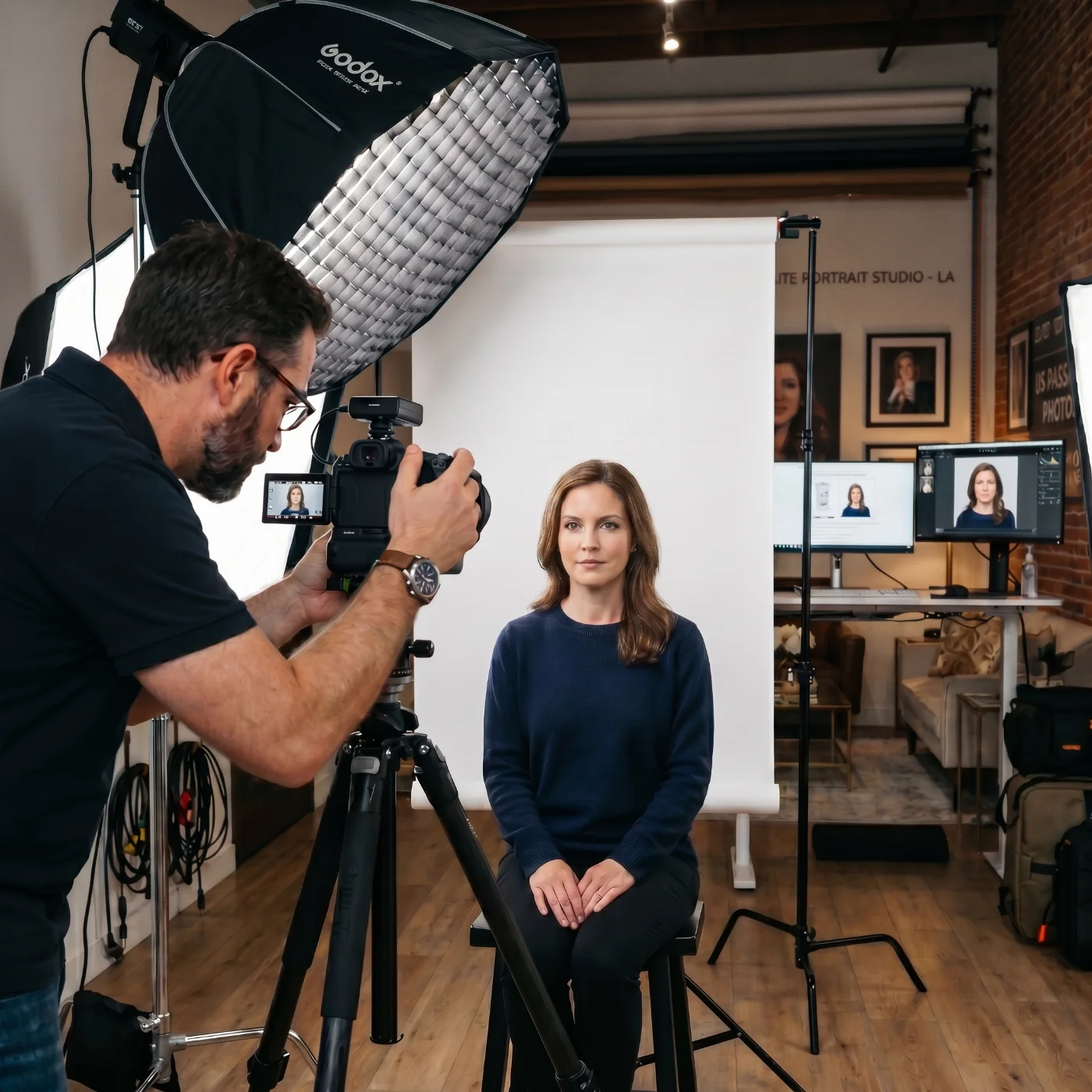
You can get an Australian visa photo in many standard locations worldwide — from local photo labs and pharmacies to professional studios and online tools — as long as they can follow Australian size and biometric rules (typically 35–40 mm × 45–50 mm, face 32–36 mm from chin to crown, plain light grey background).
Local Photo Labs and Retail Photo Counters
Most countries have chain photo labs, minilabs in supermarkets, or electronics and office retailers with photo counters that can print visa and passport photos to custom sizes. When using them for an Australian visa, you need to explicitly ask for Australian visa dimensions (usually 35–40 mm wide and 45–50 mm high, with a face 32–36 mm), a plain light grey background, and a recent, sharp colour print.
Post Offices
Many postal operators (for example, USPS in the United States, Canada Post in Canada, Deutsche Post/DHL in Germany, La Poste in France, or Royal Mail in the United Kingdom) offer passport/visa photo services. These locations usually have calibrated setups for multiple countries’ visas and can produce an Australia visa photo size on request, with correct framing and a light grey background.
Self-Service Photo Booths
Photo booths in shopping centres, metro stations, and high‑traffic areas often support several international formats, including the Australian visa photo size. However, for Australian visas, they are a risky option: images are frequently rejected for shadows, incorrect distance, wrong head size, or uneven lighting, so booths should be treated as a last resort if you do not have access to a studio or online service.
Professional Studios and Dedicated ID‑Photo Providers
Professional photo studios and specialised ID‑photo providers are the most reliable offline option for Australian visa photos. They can set even lighting, provide a plain white or light grey background, and match Australian and ICAO standards for photo size and head proportions (35–40 × 45–50 mm, face 32–36 mm from chin to crown, head about 70–80% of the frame). Many studios will supply both printed photos and a compliant digital file for upload to ImmiAccount.
Pharmacies and Convenience Chains
In many countries, large pharmacy and convenience chains operate small photo counters or kiosks for passport and visa photos. This is a convenient “on the way” option, but staff expertise and knowledge of Australian requirements vary by branch. It is important to confirm that they can produce an Australian visa photo in the correct dimensions with a plain light grey background, and to check whether a digital JPEG file for online submission is provided.
Online Australian Passport Photo Makers
An online visa and passport photo maker is a reliable and convenient way to produce a compliant Australian visa photo.
You take a picture with a smartphone or camera, upload it to an Australian visa photo maker, and the system automatically crops it to the correct size 35-40 × 45-50 mm, scales the face to 32-36 mm (70-80% of the frame), corrects the background to a plain light grey colour, and saves the file in an appropriate JPEG size for upload to ImmiAccount or a printable PDF sheet.
After receiving your final photo, you can either submit the digital file directly with your online visa application or send it to any local photo lab for printing on photo paper.
Australian Visa Photo Services: Overview
Service | Time to Get an Australian Visa Photo | Pricing | Chance of Approval |
Retail Photo Labs & Photo Counters | 10–20 minutes | Varies (approx. $10–20) | High–moderate |
Post Offices | 10–20 minutes | Varies (approx. $10–20) | High–moderate |
Self-Service Photo Booths | 5–10 minutes | Varies (approx. $8–15) | Low |
Professional Studios & ID-Photo Providers | 1 hour to 1–2 days | Varies (approx. $20–50+) | High |
Pharmacies & Convenience Chains | 10–20 minutes | Varies (approx. $10–20) | Moderate |
Online Australian Visa Photo Makers | Under 1 minute | Free–$23 | High |
How to Take an Australian Visa Photo at Home
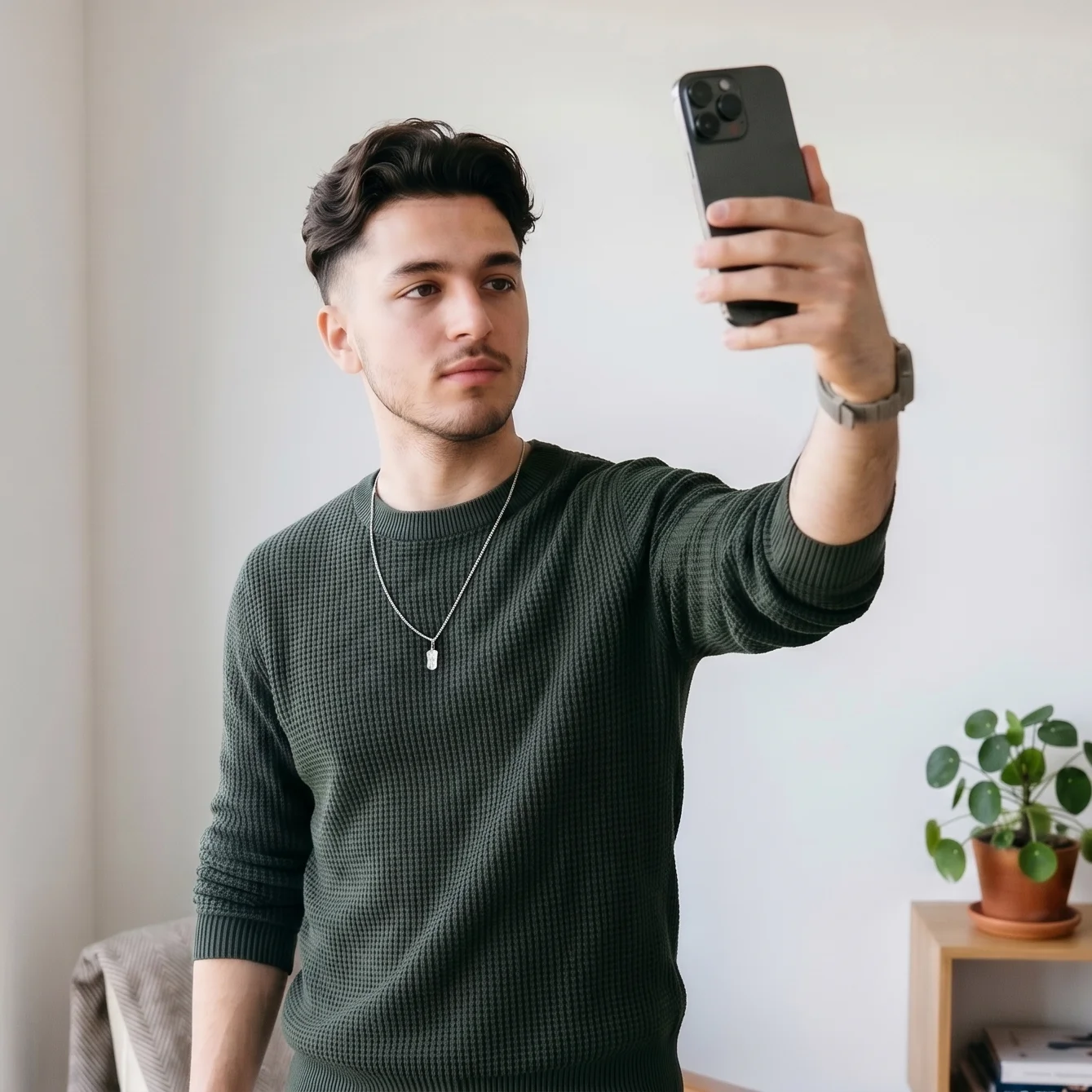
Taking an Australian visa photo in the correct 35–40×45–50 mm format at home is quick and straightforward when you use an online tool like PhotoGov. You can start with a simple smartphone portrait, and the platform automatically adjusts the background, proportions, and required settings. There’s no need for a photo studio visit — the finished result will meet all Department of Foreign Affairs and Trade (DFAT) visa and passport photo guidelines.
Set up your shot in a bright, evenly lit area — natural daylight beside a window is ideal. Make sure the background is perfectly plain white or light in color — cream, or pale gray. The light should evenly illuminate your face to avoid shadows or glare.
Hold your phone about 40–50 cm (16–20 in) away if using the front camera, or approximately 1 m (3 ft) away when using the back camera. Look directly at the lens, keep your head level, and maintain a calm, neutral expression. Take a few pictures to choose the sharpest one. Head coverings are only acceptable for religious or cultural reasons, and they must not obscure facial features.
Upload your chosen photo to PhotoGov and select “Australia” followed by your visa or document type. The automatic system will crop, resize, and align your image according to the latest visa photo rules.
If your submission is of high priority, consider adding the Human Verification — a senior expert with an embassy background will check your photo for Australian visa photo specifications compliance. If the photo needs corrections, you will be offered to retake it.
Once a 100% technically compliant image is produced, it can be lodged with your visa application, in person or online.
Taking Australian Visa Photos of Children With an iPhone
Just as pictures of adult applicants, baby visa photos must also comply with the Department of Home Affairs requirements. Taking them at home is often simpler and more comfortable for both parent and child. With proper lighting and setting, your iPhone can easily capture a clear baby portrait that meets official standards.
Note that DFAT allows infants' mouths to be slightly open in visa photos. Once you've completed the mission, upload the image to an online Australian visa photo checker, and the system will instantly check and convert it into a compliant Australian visa photo.
Setting
Uniform lighting from a natural source, plain background.
Position
A newborn may lie on a blanket; older children — sit or stand.
Expression
Neutral facial expression, no crying or laughing.
Frame
No toys, parents’ hands, or other objects in the frame.
10 Common Reasons for Australian Visa Photo Rejection
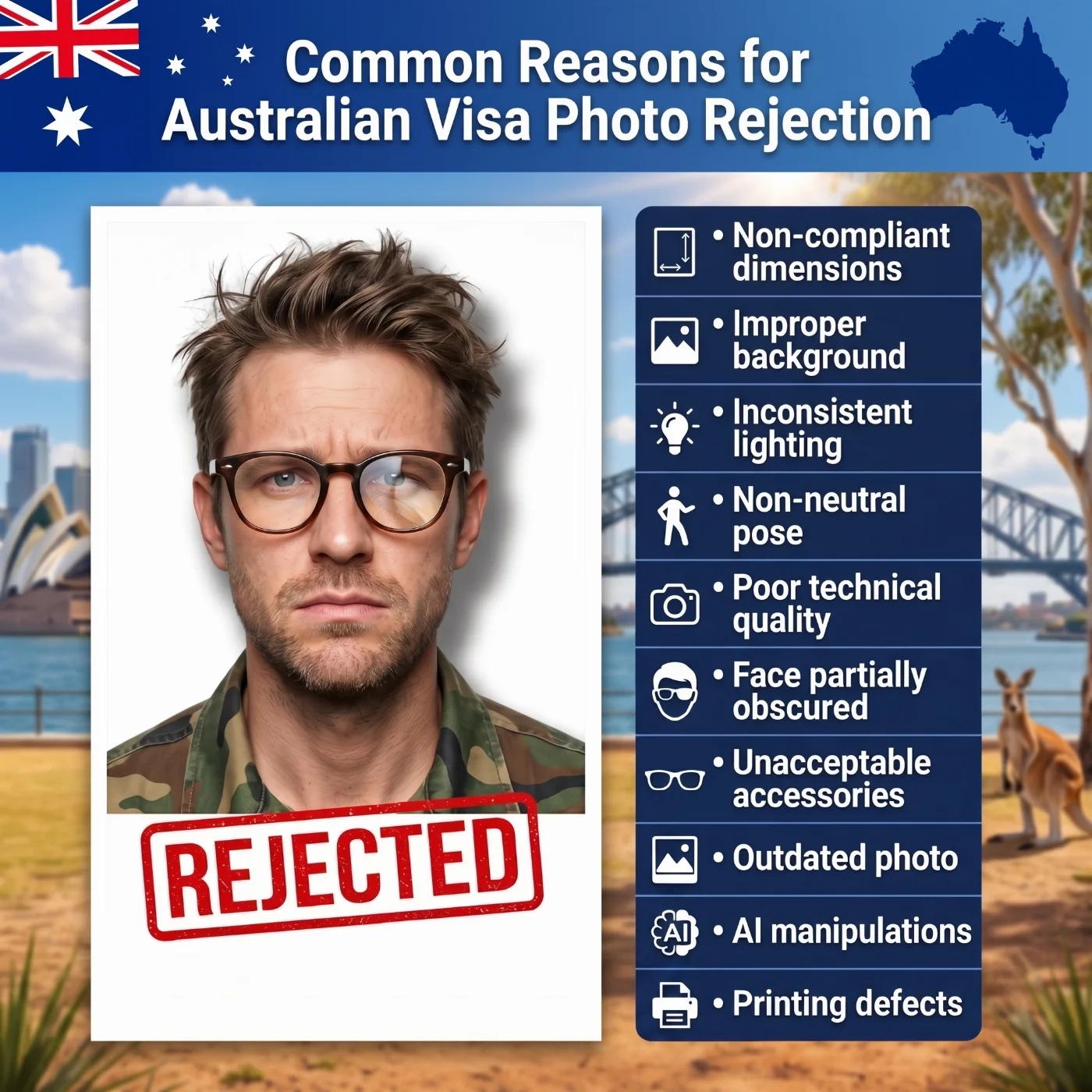
Australian visa photo submissions are frequently refused due to technical non-compliance or poor image quality. The most typical problems include:
Non-compliant dimensions: The photo does not fall within the required 35–40 mm width and 45–50 mm height, or the face is too large or too small relative to the frame (must be 32–36 mm from chin to crown).
Improper background: Background is not plain and light (white or light grey), or shows gradients, shadows, or visible texture.
Inconsistent lighting: Uneven illumination, harsh shadows, or bright spots that distort facial features.
Non-neutral pose: Head turned, tilted, or facial expression not neutral (e.g., smiling or raised eyebrows).
Poor technical quality: Lack of sharpness, visible compression artifacts, or insufficient resolution.
Face partially obscured: Hair, accessories, or objects covering key facial areas such as eyes or jawline.
Unacceptable accessories: Glasses, tinted lenses, or headwear that is not for religious or medical purposes.
Outdated photo: The image does not reflect your current look due to a time gap or noticeable changes.
AI manipulations: Use of filters, AI enhancement, or retouching that alters skin tone, texture, or facial structure
Printing defects (if applicable): Low-quality output, incorrect colors, or physical damage to the photo.
Online visa photo tools help minimize these risks by automatically aligning the image with Australian requirements, including correct sizing, background normalization, and facial positioning.
What to Do if Your Australian Visa Photo Is Rejected
If your photo is not accepted, the immigration system will indicate the reason for rejection.
For digital submissions: Replace the image directly in ImmiAccount with a corrected version that meets all specifications.
For paper-based applications: Provide new printed photos that fully comply with the requirements.
Resubmitting a photo does not incur additional charges unless your visa application has lapsed.
If you used an online photo service to create your Australian visa picture, you can typically request a correction or refund, provided the issue relates to technical compliance rather than the original image quality.
Frequently Asked Questions
What are the Key Australian Visa Photo Requirements?
Here is a list of essential Australian visa photo specifications. Follow them to avoid visa delays or rejections:
Size: 35–40 mm wide and 45–50 mm high, head 32–36 mm from chin to crown.
Framing: Face centred, head straight, filling about 70–80% of the photo.
Background: Plain white or light-coloured, evenly lit, with no patterns or shadows.
Quality: Recent colour photo (within 6 months), sharp, in focus, no filters or retouching.
Appearance: Neutral expression, mouth closed, eyes open, no glasses or non‑religious headwear blocking the face.
How Recent Should My Photo Be for an Australian Visa?
Your picture must be taken within the past six months and clearly reflect your current appearance.
Can I apply for an Australian Visa Using Digital Photos?
Yes. If you're applying online via the ImmiAccount, you must submit a digital photo with your application.
Can I Use my Australia Visa Photo for Another Application?
The Department of Foreign Affairs and Trade (DFAT) sets the same requirements for visa and passport photos. You can use your passport photo to apply for an Australian visa, and vice versa.
What is the Australian Visa Photo Size?
35–40 × 45–50 mm is the official passport photo size range set by the Department of Foreign Affairs and Trade (DFAT) of Australia for passport-sized photos. This is why the 35×45 mm format is widely used for Australian visa photos, as it sits comfortably within these standard measurements and is accepted for most applications.
What is Australia Student Visa Photo Size?
For an Australian student visa, the required photo size is 35 × 45 mm, with your head measuring 32–36 mm from chin to crown and centred against a plain light background. This format matches the standard Australian visa photo dimensions used across visitor, student, and work visa subclasses.
What is Australia Visitor Visa Photo Size?
For an Australian visitor visa, the standard photo size is 35 × 45 mm, with the head measuring 32–36 mm from chin to crown and centered against a plain light or light grey background.
What is Australia Visa Photo Size in CM?
Australia visa photos must be between 3.5–4.0 cm wide and 4.5–5.0 cm high, with the face taking roughly 70–80% of the image (about 3.2–3.6 cm from chin to crown). Any size within this 3.5–4.0 × 4.5–5.0 cm range is acceptable.
What is Australia Visa Photo Size in Inches?
Australia visa photo size in inches is 1.38–1.57 inches wide and 1.77–1.97 inches high.
Can Head Coverings be Used in Australian Visa Pictures?
No. The only two exceptions — if they are religious head coverings worn daily for religious reasons; another acceptable reason is medical, for example, if the head covering is necessary after a surgery. In this case, an applicant must provide a signed certificate from their medical provider.
Can I Wear Makeup in my Australian Visa Picture?
Yes, you can, but only if it doesn't obstruct or alter your facial features in any way. Reflective makeup that can cause glare or reflections should be avoided.
How to Print my Australian Visa Picture?
Make sure your visa photos are printed on premium matte or glossy paper for physical submissions. Check that your digital file satisfies the necessary resolution and file size before uploading your online entry — preferably, 600 DPI, and the size falls into a 35–40 × 45–50 mm range, with the head taking 70-80% of the image.
How to Make a Perfect Australian Visa Picture With an iPhone?
Follow these 7 steps to make a perfect visa picture with your iPhone, and our tool will handle all the necessary adjustments to provide you with a 100% photo.
Lighting: Use even, soft light to avoid shadows.
iPhone: Keep it steady at eye level, turn off Portrait mode.
Background: Must be plain. Stand against a plain, light-colored wall.
Posture: Face the camera straight with relaxed, straight shoulders.
Capture. Capture a few shots and choose the best one.
Process. Upload your selfie to a reliable online photo-making tool to convert it into an official visa picture.
Download. Get a ready photo in digital format or a PDF printable sheet.
What are the Typical Issues in Visa Photos and How to Avoid Them?
Here is a short list of typical issues with visa pictures:
Glare on glasses: Remove glasses or adjust the light so there are no reflections.
Uneven background: Use our background removal tool for a smooth, uniform backdrop.
Incorrect sizing: Double-check the dimensions, and correct the crop with our tool.
Shadows: Avoid any shadows on your face when taking a visa photo.
Do Children Need a Different Australian Visa Photo?
No. Australian visa photos of children must meet the same technical standards as adults: 35–40 × 45–50 mm photo size, 32–36 mm head height, plain light grey background, and a neutral expression. For infants, the child must be alone in the frame, lying on a light blanket or seated in a chair, with no visible hands, toys, or support, eyes open where possible, and no hats or headbands covering the forehead or ears.
Can I Take an Australian Visa Photo at Home?
Yes. You can take it at home if you reproduce studio-like conditions: place the camera or phone at eye level about 1.5–2 m away, stand in front of a flat light-coloured wall, and use soft, even light (for example, facing a window) so there are no shadows on your face or background. Take several shots with a neutral expression and then use a visa photo tool such as PhotoGov to crop the image to 35–40 × 45–50 mm and adjust the head to 32–36 mm from chin to crown.
Can I Use a Selfie for an Australian Visa Photo?
Yes, but only if it’s taken correctly. The best way is to use a tripod or stand, set the camera at eye level directly in front of you, use a timer or remote, and produce a straight, undistorted portrait that meets all size and background rules.
Are Glasses Allowed in Australian Visa Photos?
You should remove glasses whenever possible, as reflections, frame shadows, and covered pupils are common rejection reasons. If you cannot remove them for medical reasons, only clear, untinted lenses without glare and thin frames that do not cut across the eyes or eyebrows are acceptable; sunglasses and photochromic (darkening) lenses are not allowed.
Do I Need to Remove Facial Piercings for My Visa Photo?
There is no blanket ban on facial piercings, but the photo will be rejected if jewellery hides facial contours, casts visible shadows, or produces strong reflections. Small, matte studs usually cause no issues, while large rings, tunnels, or shiny metal pieces should be removed for the photo to minimise the risk of refusal.
Can I Smile in My Australian Visa Photo?
No. Even a slight smile is considered non-compliant if it changes the shape of your mouth or cheeks or shows teeth. You must keep a neutral expression with your mouth closed, eyes open, and facial muscles relaxed so that biometric measurements remain accurate.
What are Australia Visa Photo Dimensions for Digital Uploads?
For an online Australian visa application, you must upload 1 digital photo through
ImmiAccount. The image must be 826 × 1062 pixels, saved in JPEG format, and the file size must be between 70 KB and 3.5 MB. Your head should occupy about 70–80% of the image, which corresponds to the standard Australian visa photo proportions.
How Many Australian Visa Photos Do I Need to Submit?
For online applications, you normally upload one digital photo per applicant through ImmiAccount. For paper-based applications, most forms require two identical printed photos, but you must follow the exact number stated in the instructions for that particular visa form.
Can I Use a Black-and-White Photo for an Australian Visa?
No. Australian visa photos must be in colour to show natural skin tones and clear detail; black-and-white or monochrome images are not accepted.
Is a Beard or New Hairstyle a Problem for My Visa Photo?
A beard, moustache, or new hairstyle is not a problem as long as your photo is less than 6 months old and your face is fully visible. Issues arise only when facial hair or haircuts obscure the jawline, cheeks, eyes, or eyebrows, in which case you should adjust your hair or trim your beard and retake the photo.
Can I Edit the Background of My Australian Visa Photo?
Yes. You may clean and standardise the background to a plain light grey colour using online tools like an Australia visa photo checker or an Australia visa photo editor, provided the outline of your head and face is not altered, and no visible artefacts appear around the hair. Any editing that smooths skin, reshapes features, or otherwise changes your natural appearance is not acceptable.
What Should My Child Wear for an Australian Visa Photo?
Dress your child in everyday clothes that contrast with the light grey background, such as mid-tone or darker tops without large logos or bright patterns. Avoid white shirts that blend into the background, anything resembling a uniform, and any hoods, hats, or headbands that cover the forehead, ears, or hairline.
Are Earphones or Headphones Allowed in Australian Visa Photos?
No. All earphones, earbuds, headphones, and headsets must be removed before the photo is taken; no electronic devices or accessories should appear in the picture.
PhotoGov.net strictly adheres to the Global regulations for ID photos.
Official Government Sources
Application for Australian Visas via ImmiAccount: Department of Foreign Affairs and Trade — Immigration and Citizenship
Visa and Citizenship Photo Requirements: Australian Government Department of Home Affairs — Immigration and Citizenship
Biometric Regulations for International ID Documents: International Civil Aviation Organization (ICAO) Document 9303
Other Documents — Australian ID Photos
Was this helpful?
47 found this helpful
Top expert
Based on official government sources
Helpful votes: 47
Was this helpful?
47 found this helpful
Service provided by Y VISION TECHNOLOGIES LLP · Stoney Works 8 Stoney Lane, London, England, SE19 3BD · Terms · Refund policy · Contact
We value your Privacy
We use cookies to enhance your browsing experience, serve personalized ads or content. By clicking “Accept All”, you consent to our use of cookies.