Make an Australian Visa Photo Online for Free — Submission-Ready
Create an Australian visa photo online for free and instantly get a submission‑ready digital or printable image that meets DFAT photo standards.
No studio · No app · 30 seconds
We value your Privacy
We use cookies to enhance your browsing experience, serve personalized ads or content. By clicking “Accept All”, you consent to our use of cookies.
PhotoGov is an independent service. We are not affiliated with any government, embassy, or consulate. All information on this website is based on official government requirements and verified primary sources. Final acceptance is determined solely by the issuing authority.
Turn Your Selfie into an Australian Visa Photo
Create an Australian visa photo without leaving your home: just upload your selfie to our online photo editor, and it will convert it into a visa-ready picture. Just follow the on-screen steps below.
Get photo for: Australia Visa 35x45 mm (3.5x4.5 cm)
Instructions:
How to take a good photo?


1/7 Image format
Photo must be in color. Taken within the last 6 months.
How to take a good photo?
1/7 Image format
Photo must be in color. Taken within the last 6 months.
ID & Passport Photo Tool. Your personal data is processed in accordance with security and privacy standards.
If you need assistance, don't hesitate to contact our Support team, which is always there to help.
How Our Australia Visa Photo Tool Works
PhotoGov is a software‑based visa photo tool with a built‑in Australian visa photo template. It automatically adjusts your portrait to current DFAT‑derived standards for size, head position, and background, and produces a submission‑ready image for online upload or printing. You can also add optional services such as business‑style clothing adjustment or Human Verification of your final photo.
Photo Upload
Take a selfie and upload it to PhotoGov
Service Selection
Add Human Verification or select other services
Processing
Wait while automatic adjustments are applied
Download
Get an Australia visa photo
Written by Olia Potiagaeva, Managing Editor Reviewed by the PhotoGov Editorial Team★ 4.8 / 5.0 GoogleChecked against official government requirements
On THIS PAGE:
- Turn Your Selfie into an Australian Visa Photo
- How Our Australia Visa Photo Tool Works
- What is an Australia Visa Photo?
- Your Final Australian Visa Photo from PhotoGov
- Australian Visa Photos That Pass the Checks
- Australian Visa Photos That Don’t Pass the Checks
- Why Use the PhotoGov Service
- PhotoGov and DFAT Standards for Australian ID Pictures
- Frequently Asked Questions
- Official Government Sources
- Other Documents — Australian ID Photos
What is an Australia Visa Photo?
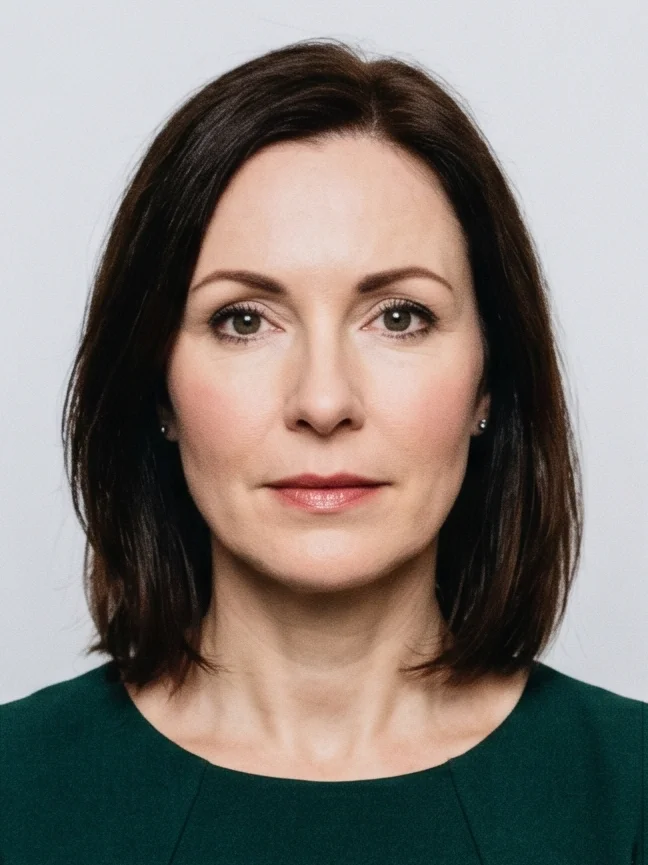
The Australian Visa Photo editor crops your image to the selected format and positions the head within the frame. It sizes the picture you upload without changing your facial features, and the built-in photo checker tests the file against the selected format. The selected format is 35–40 mm × 45–50 mm. Before you submit the photo, check the photo instructions for the application you are completing.
The official photo format required for an Australian visa application.
Automatically prepared by PhotoGov as a correctly sized, DFAT‑compliant, and submission-ready file.
Accepted for digital upload in online visa applications, and suitable for professional printing if required.
Your Final Australian Visa Photo from PhotoGov
PhotoGov automatically applies the official parameters to your original photo. You don’t need to adjust or verify any technical details manually. Below are the technical parameters of your final Australian visa photo from PhotoGov.
For a full overview of official standards, please see our Australian Visa Photo Requirements Guide. The Australia visa photo guide 2026 walks through the size, background, and expression rules that apply to every visa subclass.
Parameter | Your Final Photo |
Dimensions | 35–40 mm × 45–50 mm / 826 × 1062 pixels (at 600 DPI) |
Head size | 32–36 mm (chin to crown), 70-80% of frame height |
Head positioning | Automatically centered |
File format | JPG in high resolution / PDF, printable format |
Background | Plain, light grey |
Colour | Full colour |
Face visibility | Fully visible, no retouching |
Submission | Submit in person / Submit online via ImmiAccount |
Your photo is processed in a private session in a secure environment. Facial features are never altered — our Australia visa photo tool only resizes, crops, and replaces the background. If you want extra reassurance, optional Human Verification is available at checkout.
Australian Visa Photos That Pass the Checks
Australian Visa Photos That Don’t Pass the Checks
Why Use the PhotoGov Service
Convenience
Photos accepted for online and in-person submissions
Compliance-Aligned Output
Designed to meet the current DFAT guidelines
Availability
No registration, installation, or studio visits
Extra Assurance
Optional Human Verification by an in-house compliance specialist
Secure Processing
Your data is secure and not transferred to third parties
If your photo is rejected due to technical issues on PhotoGov's side, we provide a free retake or a full refund.
Our service is built to meet all current Australian visa photo rules. However, the final acceptance of your photo is always at the full discretion of the Department of Foreign Affairs and Trade (DFAT).
PhotoGov and DFAT Standards for Australian ID Pictures
PhotoGov is a software‑based visa photo tool with a built‑in Australian visa template aligned with DFAT and ICAO photo rules. The official standards are regularly reviewed and manually approved by an in‑house team of ID‑photo and compliance specialists. When you upload a portrait, PhotoGov applies the required parameters for size, centering, and background while preserving your natural facial features and not altering your face in any way. The tool then produces a submission‑ready digital or printable photo for your Australian visa application.
Australian visa applications are assessed under very strict technical rules, so you can enable Human Verification: a senior specialist manually checks that your image complies with all current Australian visa photo requirements before you submit it.
For other Singapore document services, see our dedicated pages: Australia Passport Photo Tool.
Frequently Asked Questions
Yes. You can create a compliant Australian visa photo online at no cost by uploading a portrait to an Australian visa photo tool, letting it automatically crop and format the image to 35 × 45 mm with the correct head size and background, and then downloading the standard digital file for your application.
An Australian visa photo maker is an online tool that takes a simple portrait and converts it into a 35 × 45 mm image with a 32–36 mm head height, plain light grey background, and correct framing for Australian visa applications.
Yes. With PhotoGov, you can upload your portrait, have it automatically formatted to the Australian visa photo size, background, crop, and other essential requirements, and download a standard digital file for free. You only pay if you add extras such as Human Verification, business clothing adjustment, or printed copies.
An Australian visa photo size is 35 × 45 mm — it must fall within the official 35–40 mm by 45–50 mm range, with the head measuring about 32–36 mm from chin to crown and taking roughly 70–80% of the image.
Yes, but only if it is taken correctly and processed by a professional service like PhotoGov that enforces DFAT‑aligned rules for size, crop, head positioning, background, and framing.
Take a photo in good daylight against a plain light or light grey background, upload it to an Australian visa photo editor, select the document type, let the system crop and adjust the image, and then download the ready digital file for ImmiAccount or printing.
Yes. Once you have a correctly formatted 35 × 45 mm file with the proper head size, you can send it to any photo lab, pharmacy photo counter, or print kiosk and ask them to print it on high‑quality photo paper.
Yes. It can be accepted on the same basis as a studio photo, provided it meets all technical rules: 35–40 × 45–50 mm size, 32–36 mm head height, plain light grey background, neutral expression, no digital retouching, and good print or file quality.
No, different Australian visa subclasses require the same characteristics — 35–40 × 45–50 mm size, 32–36 mm head height, plain light grey background, neutral expression. The photo must be taken within the past six months, reflecting your current appearance.
You may only remove distractions and make the background uniformly light; any editing that reshapes facial features, smooths skin, applies beauty filters, or changes colours unnaturally is not acceptable.
There are two ways to know if your Australian visa photo is compliant:
1. Manually check that the final image size is 35–40 × 45–50 mm, the head height is 32–36 mm, the background is plain light grey, and your face is neutral and unobstructed.
2. Use an online visa photo tool to automatically adjust your portrait to an Australian visa photo that follows DFAT rules. This is a reliable option, as reputable services use built‑in templates based on official Australian visa photo specifications. PhotoGov additionally offers Human Verification, where a senior expert manually confirms that your photo meets current Australian visa photo rules before you submit it.
Yes. Open photogov.net in the phone browser, upload a picture and download the finished file. No app is required; the PhotoGov app for iOS and Android does the same job if you prefer it.
No. PhotoGov applies the selected format automatically: the tool sets the frame and the head position for you. Before you submit the photo, check the photo instructions for the application you are completing.
Official Government Sources
Application for Australian Visas via ImmiAccount: Department of Foreign Affairs and Trade — Immigration and Citizenship
Visa and Citizenship Photo Requirements: Australian Government Department of Home Affairs — Immigration and Citizenship
Biometric Regulations for International ID Documents: International Civil Aviation Organization (ICAO) Document 9303
Other Documents — Australian ID Photos
Australia
8 doc.
- Australia NSW Driver's Licence Photo-kit 35x45 mm
- Australia Passport 35x45 mm (3.5x4.5 cm)
- Australia Queensland Driver's Licence Photo 35x45 mm
- Australia Victoria Driver's Licence Photo-kit 35x45 mm
- Australia Visa 35x45 mm (3.5x4.5 cm)
- Australia adult proof of age card 35x45 mm (3.5x4.5 cm)
- Australia citizenship 35x45 mm
- Australia degree assessment 1200x1600 pixels
Service provided by Y VISION TECHNOLOGIES LLP · Stoney Works 8 Stoney Lane, London, England, SE19 3BD · Terms · Refund policy · Contact
We value your Privacy
We use cookies to enhance your browsing experience, serve personalized ads or content. By clicking “Accept All”, you consent to our use of cookies.