Indian PAN Card Photo Requirements in 2026 — New 3.5 x 4.5 cm Rules
Table of contents:
- Indian Permanent Account Number Card Photo Explained
- 12 Key Indian PAN Card Photo Requirements: a Checklist
- Acceptable Indian PAN Card Photos
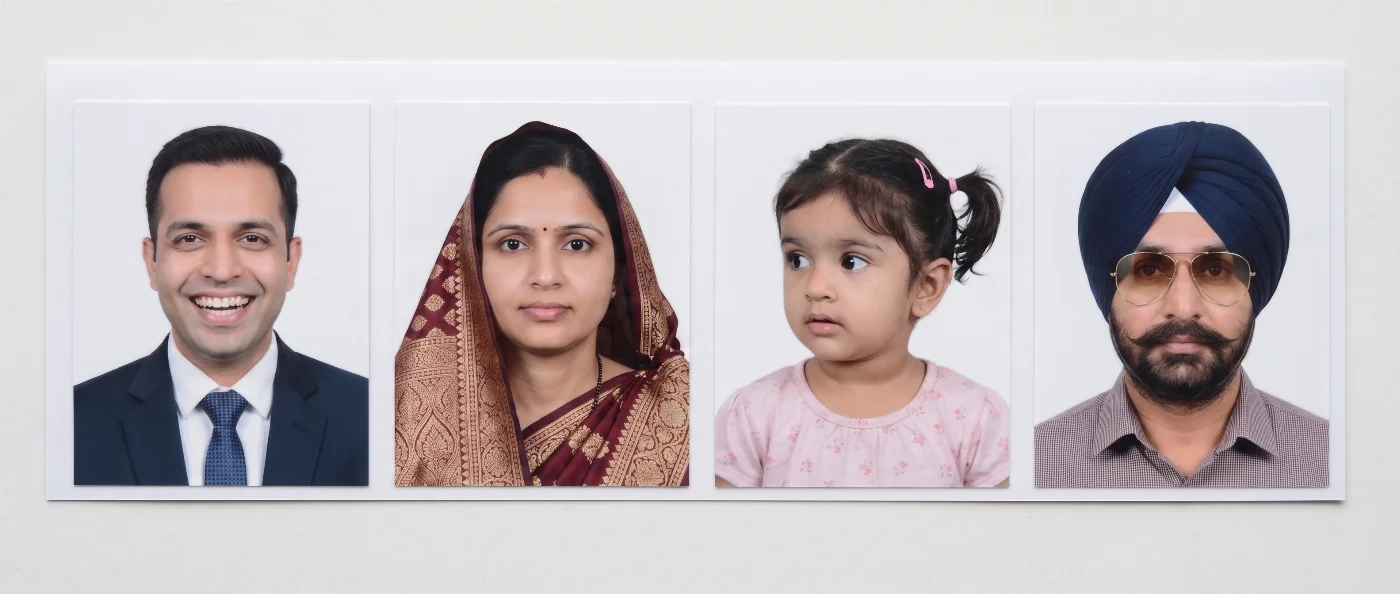
- Unacceptable Indian PAN Card Photos
- India’s New PAN Application Photo Rule: What Changed in 2026
- Indian PAN Card Photo Background: White
- Glasses in Indian PAN Card Photos
- Where to Get a Compliant Indian PAN Card Photo in 2026
- Indian PAN Card Photos for Minors
- Common Reasons for Indian PAN Card Photo Rejection
- What to Do If Your Indian PAN Card Photo Is Rejected
- Frequently Asked Questions
- Related guides
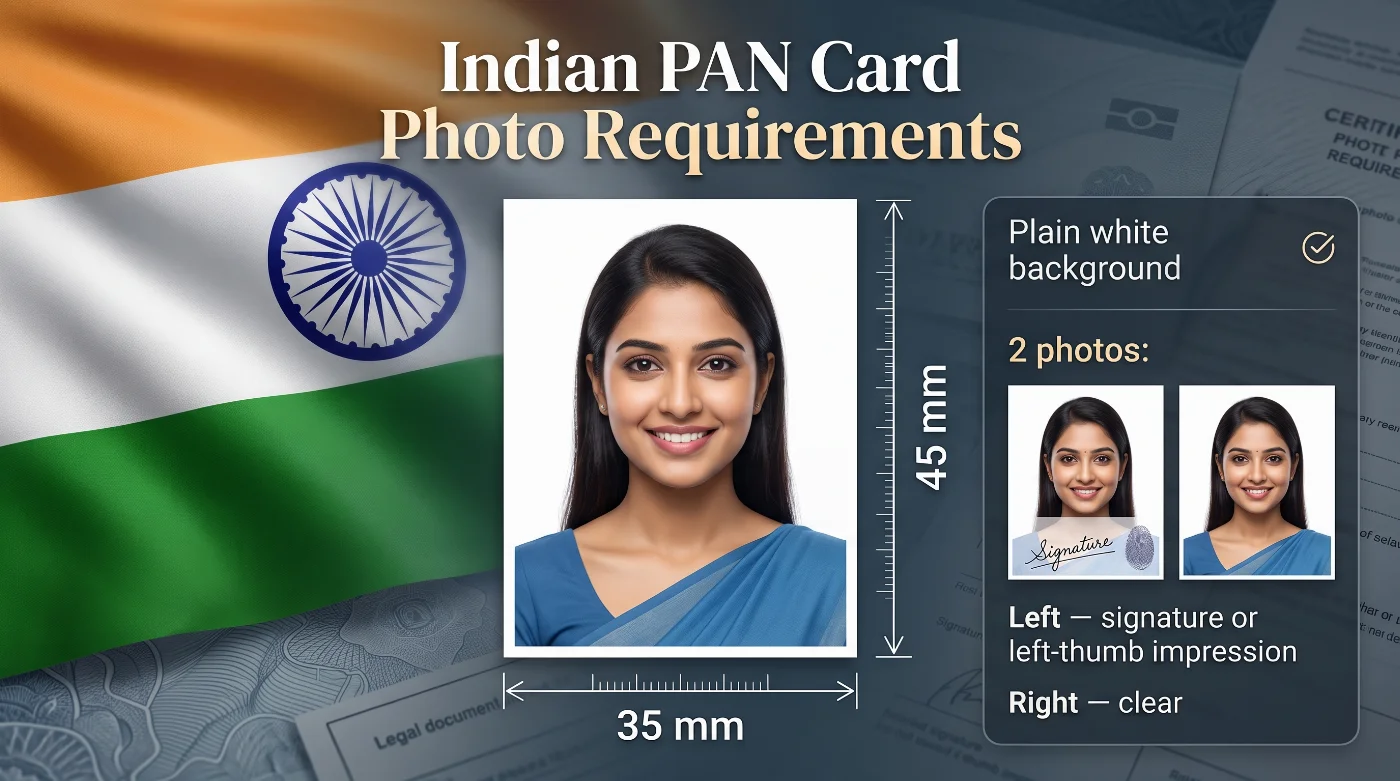
Applying for a Permanent Account Number (PAN) in India and unsure which photo belongs on the form? Prepare two matching recent colour photographs in the 3.5 x 4.5 cm (35 × 45 mm) format, both taken against a plain white background. One photo must present your signature or a left-thumb impression across the edge; the second stays clear — it’s the portrait that will be printed on your PAN card. This format serves other applications too: an Indian passport size photo 35x45 mm can be prepared with our online maker.
This guide takes you through every current PAN card photo requirement, from size and background to placement, signing and submission, with direct links to the official forms and authorised application channels.
Indian Permanent Account Number Card Photo Explained
A Permanent Account Number, or PAN, is a ten-character alphanumeric identifier issued by India’s Income Tax Department. If you are applying as an individual, the form asks for two matching photographs, and each print does a different job. The left image links your signature or left-thumb impression to the application, while the right image supplies the portrait reproduced on the PAN card. Travel documents use other specifications: an India e visa photo is prepared in the 2 x 2 inch format on a separate page.
The left-hand box of the form is for the photo crossed by your signature or left-thumb impression, with the mark continuing onto the form. The right-hand box is for your portrait to be used on the card.
The form you will use for PAN application depends on your citizenship. Indian citizens apply on Form No. 93, while applicants who hold another citizenship use Form No. 95. Applications can be filed online through Protean eGov or UTIITSL, or in person at an authorised Protean PAN Centre or UTIITSL PAN Centre. Instant e-PAN is a separate Aadhaar e-KYC service and uses the photograph held in the Aadhaar record. Applicants holding OCI status often need an OCI passport photo online as well, in the format that document requires.
12 Key Indian PAN Card Photo Requirements: a Checklist
The Income Tax Department sets the current PAN photo rules for individual applicants in the official Form No. 93 and Form No. 95 guidelines. The table below consolidates the full specifications for a clean, correctly attached submission.
Parameter | Requirement |
1. Applicant scope | Individual applicants, including minors and applicants using a Representative Assessee, provide photographs with Form No. 93 or Form No. 95. |
2. Number of photos | Two matching recent colour photographs. |
3. PAN photo size | 3.5 × 4.5 cm (35 × 45 mm). |
4. Orientation | Portrait orientation. |
5. Colour | Natural colour with clear, accurate facial detail. |
6. Background | Plain white background. |
7. Recency | A recent photograph that reflects the applicant’s current appearance. |
8. Image clarity | Sharp focus, clear facial features, balanced exposure, and a clean print surface. |
9. Attachment method | Photo adhesive secures each print inside the designated box. |
10. Left photograph | Signature or left-thumb impression crosses the photograph and continues onto the form. |
11. Right photograph | A clear, unobstructed image free from signatures, stamps, and other marks. |
12. Thumb-impression authentication | A Magistrate, Notary Public, Oath Commissioner, or Gazetted Officer attests a left-thumb impression under official seal and stamp. |
Prepare the correct image with PhotoGov’s PAN card photo maker, download a print-ready file in the 4.5 × 3.5 cm (35 × 45 mm) format, and print two matching copies. Then attach and sign the photos according to the form instructions.
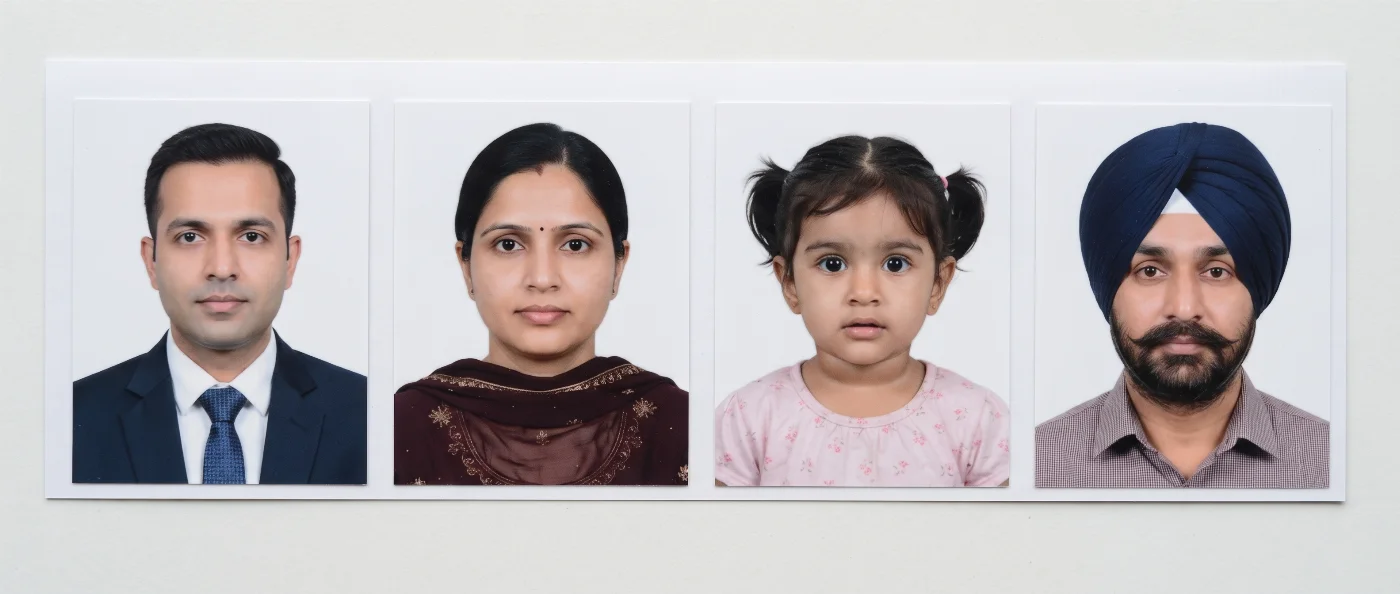
Acceptable Indian PAN Card Photos
Unacceptable Indian PAN Card Photos
India’s New PAN Application Photo Rule: What Changed in 2026
India introduced a new set of PAN application forms under the Income-tax Rules, 2026. New applications filed from Apr 1, 2026 use Form No. 93 for individual Indian citizens and Form No. 95 for individuals who are citizens of another country.
Current Forms 93 and 95 require two recent colour photos in the 4.5 × 3.5 cm (35 × 45 mm) format. The earlier Form 49A and Form 49AA used the smaller 3.5 × 2.5 cm (35 × 25 mm) format. Use the current 35 × 45 mm size for applications filed under the 2026 rules.
How to Submit Photos with Form No. 93 or Form No. 95
Use the form that matches your citizenship category: No. 93 if you are a citizen of India, No. 95 if you are a citizen of another country. Each form provides two portrait boxes sized for 4.5 × 3.5 cm prints.
Prepare two matching recent colour photographs with a white background.
Trim each print to 35 × 45 mm.
Apply photo adhesive evenly and place both photographs squarely inside the printed boxes.
Sign or place the left thumb impression across the left photograph so the mark extends onto the form.
Keep the right photograph clean and fully visible.
Place the final signature or left-thumb impression inside the declaration box on the last page.
Arrange official attestation for a left-thumb impression through a Magistrate, Notary Public, Oath Commissioner, or Gazetted Officer, with the official seal and stamp.
Applicants using an online PAN application with a physical-document submission mode follow the acknowledgement instructions shown by the selected service. The acknowledgement carries the photographs, signatures, and supporting documents for dispatch through the stated channel.
Indian PAN Card Photo Background: White
The current Income Tax Department guidelines specify a white background for both photographs. Use a smooth, evenly lit white surface that creates clear separation around the head, hair, and shoulders.
Stand about one metre in front of the background and direct soft light toward the face. This setup keeps the background bright, the facial features clear, and the skin tone natural. Frame a straightforward head-and-shoulders portrait with the face centred and the camera at eye level.
The official PAN forms focus on identification quality rather than a published biometric head-height percentage. Give the face generous space within the 35 × 45 mm frame while keeping the complete head and upper shoulders visible.
Glasses in Indian PAN Card Photos
For the clearest result, remove glasses before capture. This keeps both eyes fully visible and prevents lens glare. Tinted lenses, sunglasses, or prescription glasses with heavy frames are generally not allowed on ID photos. If you must wear glasses, make sure they have transparent lenses, and look directly into the camera.
Where to Get a Compliant Indian PAN Card Photo in 2026
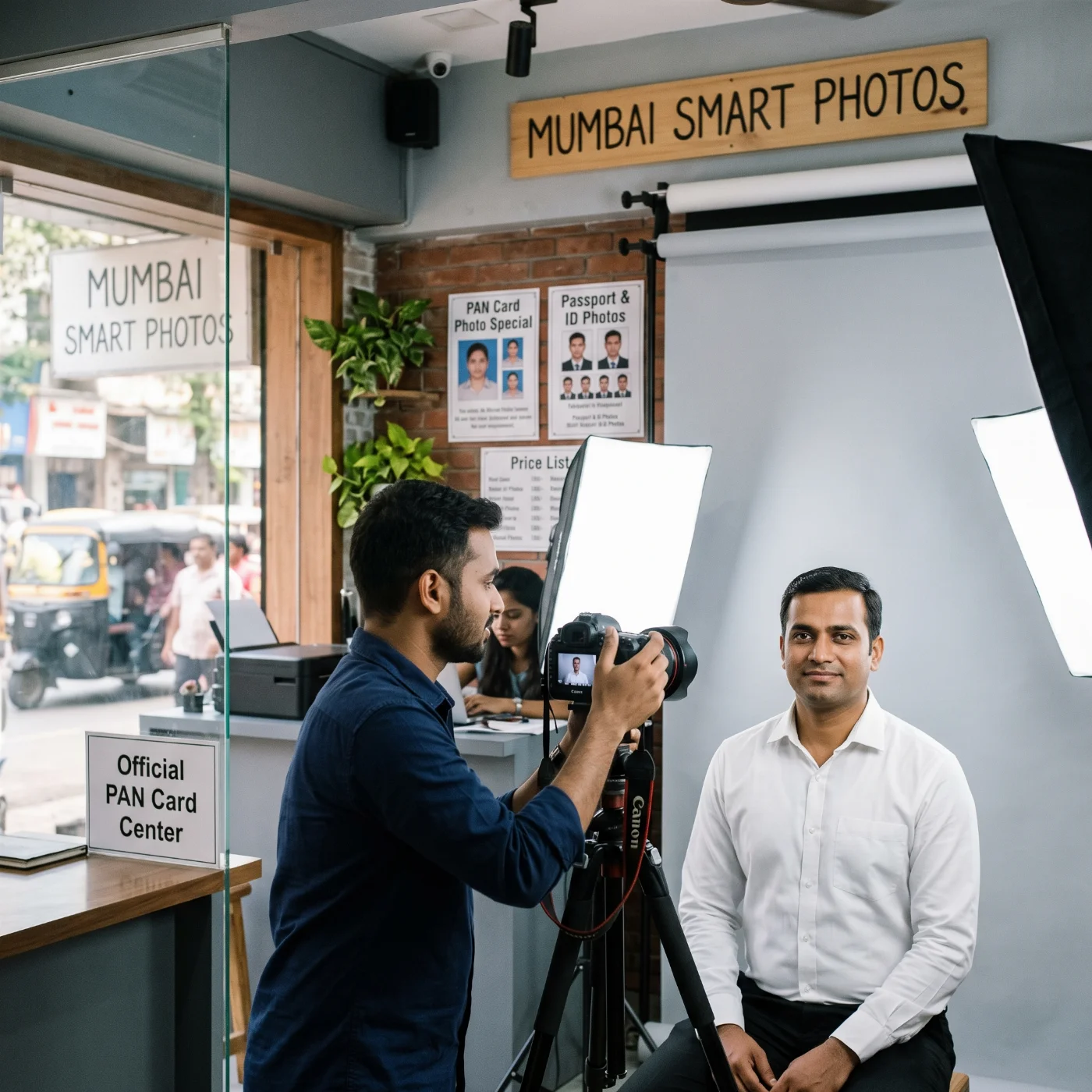
A paper PAN application requires two photo prints. You can prepare the photo at home, using an online photo-making tool, get it done by a professional photographer, at a local photo studio, or use a self-service booth. Other Indian forms use the same 35 x 45 mm portrait, and our page on the Indian driving licence photo size explains the RTO version.
Option | What you provide | What you receive | Use-case scenario |
PhotoGov | A clear smartphone portrait | Application-ready 35 × 45 mm file with a white background, printable | Home capture followed by local printing |
Professional photographer | The current PAN brief: 35 × 45 mm, white background, two prints | A captured portrait and two finished colour prints | In-person help with capture and printing |
Local photo lab | The current PAN brief: 35 × 45 mm, white background, two prints | A photo sheet or two trimmed PAN-size prints | Printing a photo prepared online |
Self-service photo booth | You just show up at the booth | A printed ID-photo sheet | Applicants with a suitable booth nearby |
How to Prepare a PAN Card Photo with PhotoGov
PhotoGov is a convenient option when you don't want to spend time and money on a studio visit. Start with a clear, front-facing smartphone photo taken against a simple light surface. Upload it to PhotoGov and select the 35 × 45 mm Indian PAN Card format.
The tool prepares the white background, crop, and printable layout for the required physical size. Download the finished file and order two identical colour prints at a local print shop. The result is a ready-to-attach pair of photos: the left print receives the signature or thumb impression, and the right one remains clear for the card portrait. Choosing a different document type produces an India passport size photo from the same portrait.
Indian PAN Card Photos for Minors
The Form No. 93 and Form No. 95 guidelines apply the same photo requirement to every individual applicant, including minors. Prepare two recent colour photographs with a white background in the 4.5 × 3.5 cm format.
Choose a calm moment and photograph the child from directly in front. Use an eye-level camera, even light, a smooth white background, and a frame containing only the child. For a baby, place the infant on a smooth white sheet and hold the camera directly above the face.
A minor’s application uses a Representative Assessee where the form requires one. Complete the photograph and signature or left-thumb impression fields according to the current form, and arrange official attestation when a thumb impression is used.
Common Reasons for Indian PAN Card Photo Rejection
PAN application review focuses on the form, portrait clarity, photograph placement, and authentication marks. These issues create the highest risk of a deficient submission:
Old 35 × 25 mm format: prepare new 35 × 45 mm prints for the current Form No. 93 or Form No. 95.
Single photograph: attach two matching photographs in the two designated boxes.
Coloured or textured background: use a smooth white background with even illumination.
Soft focus or low contrast: select a sharp portrait with clear facial detail and natural colour.
Staple or clip marks: secure each print with photo adhesive.
Signature placed entirely inside the left image: extend the signature or left-thumb impression across the photo-form boundary.
Mark on the right image: reserve the right photograph as a clean, unobstructed portrait.
Unattested thumb impression: obtain the required official attestation, seal, and stamp.
Crooked or undersized print: trim each photograph precisely and align it squarely within the box.
Portrait that differs from the applicant’s current appearance: use a fresh image that supports immediate identification.
What to Do If Your Indian PAN Card Photo Is Rejected
A photo-related deficiency usually identifies a practical correction: size, quantity, background, print clarity, attachment, or signature placement. Use the deficiency message as the checklist for a fresh submission.
Identify the exact issue stated by the PAN service or processing authority.
Prepare two fresh 35 × 45 mm colour prints on a white background.
Attach the prints with adhesive and complete the left-photo signature and right-photo clarity check.
Resubmit through the channel stated in the deficiency notice and keep the acknowledgement for tracking.
PhotoGov is an independent service. The Income Tax Department and its authorised PAN service channels make the final acceptance decision. This guide reflects the current official forms and government guidance available for 2026 applications.
Frequently Asked Questions
What Are the Official Indian PAN Card Photo Requirements?
An individual applicant submits two recent colour photos with plain white backgrounds, each in the 3.5 × 4.5 cm (35 × 45 mm) format. Sign or place a left-thumb impression across the left photo and the form. Keep the right photo clear, and fix both prints with photo adhesive.
What Is the Indian PAN Card Photo Size in Millimetres?
The current PAN card photo size is 35 × 45 mm (4.5 × 3.5 cm).
What Is the PAN Card Photo Size in Pixels?
At 300 DPI, the PAN size is 413 × 531 pixels. At 600 DPI — 826 × 1062 pixels. The official Forms 93 and 95 specify the physical 35 × 45 mm dimensions, while the pixel setting depends on the print resolution.
How Many Photos Are Required for a PAN Card Application?
Form No. 93 and Form No. 95 require two matching recent colour photographs for an individual applicant. Both photographs fit the 4.5 × 3.5 cm boxes printed on the form.
Does a PAN Card Photo Need a White Background?
Yes. The current Income Tax Department filing guidelines specify a white background. Use an evenly lit white surface with clear separation around the applicant’s head and shoulders.
Where Do I Sign the PAN Card Photographs?
Place the signature or left-thumb impression across the left photograph so one part appears on the image and the other part appears on the form. Preserve the right photograph as a clean portrait. Add the final signature or left-thumb impression inside the declaration box on the last page.
Can I Use a Left-Thumb Impression?
Yes. The form accepts a left-thumb impression. The impression requires attestation by a Magistrate, Notary Public, Oath Commissioner, or Gazetted Officer under official seal and stamp.
Are Glasses Allowed in a PAN Card Photo?
The current form uses facial clarity as the eyewear-related quality test. A glasses-free portrait delivers the clearest eye area. Clear everyday glasses also support a usable image when the lenses stay transparent and reflection-free.
How Recent Should a PAN Card Photo Be?
The official guideline uses the term “recent colour photographs” and sets the practical test as current identification. Use a newly captured portrait that closely matches the applicant’s appearance on the filing date.
Do Minors Need PAN Card Photos?
Yes. The current guidelines include minors in the two-photo rule. Prepare two recent colour photographs with white backgrounds in the 35 × 45 mm portrait format and complete the Representative Assessee section where applicable.
Does Instant e-PAN Require a Photo Upload?
Instant e-PAN uses Aadhaar e-KYC and completes identity verification through the Aadhaar record. The service skips a separate scanned photo and signature upload. Eligible applicants receive a valid e-PAN through the online process.
Can I Take a PAN Card Photo with a Smartphone?
Yes. Use another person to hold the smartphone at eye level, create soft front lighting, and stand against a smooth white background. Save the sharpest portrait, crop it to 35 × 45 mm, and print two matching copies at exact size.
How Is a PAN Card Photo Different from an Indian Passport Photo?
Both documents use a 35 × 45 mm portrait footprint in the current workflow. The PAN application requires two prints and a specific left-photo signature placement. The Indian passport process follows its own biometric framing and submission rules; review PhotoGov’s Indian passport photo guide for that separate standard.
Can I Use the Old 35 × 25 mm PAN Photo Size?
The 35 × 25 mm format belongs to the earlier Form 49A and Form 49AA workflow. Current individual applications use the 35 × 45 mm portrait boxes shown on Form No. 93 and Form No. 95.
Official Government Sources
Current PAN Card Photo Requirements: Income Tax Department — Form No. 93
Current rules for an individual who is a citizen of another country: Income Tax Department — Form No. 95
New PAN forms for applications filed in 2026: Income Tax Department — Income Tax Forms FAQ
Aadhaar KYC, separate photo-upload treatment, and e-PAN delivery: Income Tax Department — Instant e-PAN FAQ
Related guides
Was this helpful?
94 found this helpful
Top expert
Based on official government sources
Helpful votes: 94
Was this helpful?
94 found this helpful
Service provided by Y VISION TECHNOLOGIES LLP · Stoney Works 8 Stoney Lane, London, England, SE19 3BD · Terms · Refund policy · Contact
We value your Privacy
We use cookies to enhance your browsing experience, serve personalized ads or content. By clicking “Accept All”, you consent to our use of cookies.