Make Your Indian Driving Licence Photo Online — RTO & Parihavan-Ready
Applying for or renewing your Indian DL on the Parivahan Sarathi portal? Click a selfie on your phone, and our online passport photo maker turns it into an Indian 35 × 45 mm and 420 × 525-pixel driving licence photo for free.
No studio · No app · 30 seconds
We value your Privacy
We use cookies to enhance your browsing experience, serve personalized ads or content. By clicking “Accept All”, you consent to our use of cookies.
PhotoGov is an independent service. We are not affiliated with any government, embassy, or consulate. All information on this website is based on official government requirements and verified primary sources. Final acceptance is determined solely by the issuing authority.
Turn a Selfie into an RTO-Ready Driving Licence Photo
Upload a recent selfie, and our online tool adjusts it to the official Indian driving licence format. Follow the steps below to get your DL photo ready, and download it as a digital or a printable photo.
Get photo for: India driving licence 35x45 mm (1.4x1.75 inch)
Instructions:
How to take a good photo?


1/7 Image format
Photo must be in color. Taken within the last 6 months.
How to take a good photo?
1/7 Image format
Photo must be in color. Taken within the last 6 months.
ID & Passport Photo Tool. Your personal data is processed in accordance with security and privacy standards.
If you need assistance, don’t hesitate to contact our Support team, which is always there to help.
How Our Driving Licence Photo Maker Works
PhotoGov converts your portrait into an RTO-compliant Indian driving licence photo, handling the 35 × 45 mm crop, head position, plain white background, and JPEG file size for the Parivahan Sarathi portal — no manual resizing needed.
Photo Upload
Click a selfie and upload it to PhotoGov
Processing
Wait while automatic adjustments are applied
Service Selection
Add Human Verification or bundle other services
Download
Get your Indian driving licence photo ready for the RTO upload
Written by Olia Potiagaeva, Managing Editor Reviewed by the PhotoGov Editorial Team★ 4.8 / 5.0 GoogleChecked against official government requirements
On THIS PAGE:
- Turn a Selfie into an RTO-Ready Driving Licence Photo
- How Our Driving Licence Photo Maker Works
- What is an Indian Driving Licence Photo?
- Your Final Indian Driving Licence Photo from PhotoGov
- Driving Licence Photo Examples That Pass the RTO Checks
- Driving Licence Photo Examples That Fail the RTO Checks
- Why Make Your Indian Driving Licence Photo with PhotoGov
- PhotoGov and the RTO Driving Licence Photo Standards
- Frequently Asked Questions
- Official Government Sources
- Other Documents — India ID Photos
What is an Indian Driving Licence Photo?
The Indian Driving Licence Photo editor crops your image to the selected format and positions the head within the frame. It sizes the picture you upload without changing your facial features, and the built-in photo checker tests the file against the selected format. The selected format is 35 x 45 mm. Before you submit the photo, check the photo instructions for the application you are completing.
The photograph the RTO requires when you apply for or renew a driving licence, online or at the office.
Built by PhotoGov to the Parivahan specifications — 35 × 45 mm, 420 × 525 pixels, plain white background — and ready to upload.
Saved as a JPEG for the Sarathi portal upload or downloadable as a PDF for professional printouts.
Your Final Indian Driving Licence Photo from PhotoGov
PhotoGov automatically applies every RTO requirement to your selfie, so the final photo is ready to upload to the Parivahan Sarathi portal without any edits. Here are the exact specifications of your final Indian driving licence photo from PhotoGov.
Parameter | Your Final Photo |
Photo size | 35 × 45 mm / 3.5 × 4.5 cm / 420 × 525 pixels |
Background | Plain white |
File format | JPEG / Printable PDF |
Resolution | High-resolution image at 600 DPI |
Head positioning | Automatically centred |
Colour | Full colour |
Face visibility | Fully visible, no retouching |
Submission | Ready for the online Parivahan/Sarathi application |
Your photo is processed in a private session in a secure environment. Facial features are never altered — the tool only resizes, crops, and replaces the background. If you want extra reassurance, optional Human Verification is available at checkout.
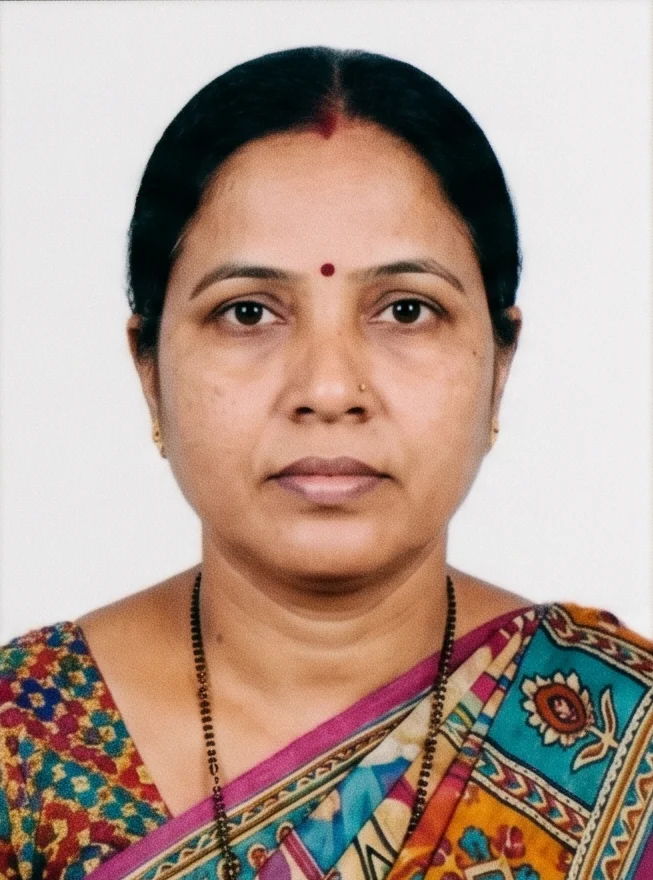
Driving Licence Photo Examples That Pass the RTO Checks
Driving Licence Photo Examples That Fail the RTO Checks
Why Make Your Indian Driving Licence Photo with PhotoGov
RTO-Ready Specs
35 × 45 mm at 420 × 525 px, exactly as the RTO and Parivahan require
Parivahan Upload-Ready
A JPEG compressed to the Sarathi portal’s file-size limit
Make It from Home
No studio visit — click a selfie and get your DL photo in any browser
Extra Assurance
Optional Human Verification by an in-house compliance specialist
Secure Processing
Your image is processed privately and never shared with third parties
If your photo is rejected due to technical issues on PhotoGov’s side, we provide a free retake or a full refund.
PhotoGov and the RTO Driving Licence Photo Standards
Driving licence photo rules in India are set by the Regional Transport Offices under the Ministry of Road Transport and Highways and applied through the Parivahan Sarathi portal. PhotoGov tracks these specifications and keeps its template updated, so every photo you download matches what the RTO accepts right now.
PAN applications go through a different department, and the Indian PAN card photo requirements describe the two prints that the form asks for.
A driving licence photo made with PhotoGov is 35 × 45 mm (420 × 525 pixels) with your head centred against a plain white background, saved as a JPEG within the Sarathi upload limit. The tool changes only the size, crop, and background — it never reshapes or smooths your face — and the file is ready in under a minute.
For a first application or a renewal, you cannot afford to get rejected. Add Human Verification: a senior PhotoGov specialist checks your driving licence photo against the latest RTO and Parivahan rules before you upload it.
Government ID-issuing authorities prohibit digital alterations of ID photographs. Our platform provides sizing and cropping services only and does not modify or enhance images.
Frequently Asked Questions
The RTO and Parivahan require a 35 × 45 mm (3.5 × 4.5 cm) driving licence photo, which works out to 420 × 525 pixels at 300 DPI. PhotoGov outputs exactly this size, so you do not have to measure or crop anything yourself.
For the online application on the Sarathi portal, the photo must be a JPEG at 35 × 45 mm (420 × 525 px) and compressed to a small file — usually around 20 KB for the driving licence upload. PhotoGov resizes and compresses the file for you so it is ready to upload right away.
Open PhotoGov in any mobile browser, click a fresh selfie or pick one from your gallery, and choose the driving licence format. The online tool sets the 35 × 45 mm size, centres your head, applies a plain white background, and saves an RTO-ready JPEG — no app to install.
Upload your photo to the PhotoGov driving licence photo converter and select the Indian DL format. The tool rescales and crops it to 420 × 525 pixels (35 × 45 mm) and fixes the background, so the dimensions match the RTO requirement precisely.
The RTO requires a plain white background with no patterns, shadows, or coloured walls. PhotoGov removes your original background and replaces it with a clean white one automatically, so a selfie taken against any light surface still works.
PhotoGov compresses your final JPEG to the small file size the Sarathi portal expects — around 20 KB for the driving licence — without making the photo blurry. You download a file that uploads to Parivahan without a size error.
Yes. You can make your Indian driving licence photo online for free with PhotoGov. Upload your selfie, let the software adjust it to the RTO format, and download a submission-ready photo in under a minute, for free.
Yes. The file PhotoGov gives you is a JPEG at the correct 420 × 525-pixel format and within the Sarathi/Parivahan file-size limit, so you can upload it straight to your online driving licence application along with your signature.
It is better not to. A driving licence photo follows the RTO’s 35 × 45 mm and 420 × 525 px specification, while the Indian passport uses its own biometric format and file rules. Use the format that matches the document you are applying for to avoid a rejection. The Passport Seva photo requirements page sets out the format that applies when you apply for the passport itself.
Yes. PhotoGov automatically checks your driving licence photo for size, head position, background, and lighting against the RTO and Parivahan guidelines, and flags anything that needs a retake. Add Human Verification for a manual review by a senior compliance specialist.
Yes. We treat your personal data and images with great care. PhotoGov uses your information solely to generate your Indian driving licence photo and deletes it from our servers once the process is complete. We never share your data with third parties or external AI services. If you have any questions, you can always contact our Customer Support team or read more details in our Privacy Policy.
No. The Parivahan Sarathi portal lets you upload a photo but does not provide a maker that sizes or compresses it for you. PhotoGov is built around the official RTO specifications and adds a simpler interface plus options like Human Verification and a formal-attire change.
Yes. Open photogov.net in the phone browser, upload a picture and download the finished file. No app is required; the PhotoGov app for iOS and Android does the same job if you prefer it.
No. PhotoGov applies the selected format automatically: the tool sets the frame and the head position for you. Before you submit the photo, check the photo instructions for the application you are completing.
PhotoGov.net strictly adheres to the Global regulations for ID photos.
Official Government Sources
Driving Licence Services (Sarathi): Ministry of Road Transport and Highways, Government of India
Vehicle and Licence Services: Parivahan Sewa, Government of India
International Biometric Photo Rules: ICAO Document 9303
Other Documents — India ID Photos
India
22 doc.
- India FRRO (Foreigner Registration) 35x35 mm online
- India OCI Passport (2x2 inch, 51x51mm, 200x200 to 1500x1500 pixels)
- India OCI passport 360x360 - 900x900 pixel
- India PAN card 35x25mm (3.5x2.5cm)
- India PAN card online 213x213 pixel
- India PCC / Birth Certificate 35x35 mm (3.5x3.5 cm)
- India PIO (Person of Indian Origin) 35x35 mm (3.5x3.5 cm)
- India Passport Offline (2x2 inch, 51x51 mm)
- India Passport for BLS USA Application (2x2 inch, 51x51mm)
- India Police clearance certificate (PCC) (2x2 inch, 51x51mm)
- India Police clearance certificate (PCC) 160x200-212 px
- India Visa (2x2 inch, 51x51mm)
- India Visa 190x190 px via VFSglobal.com
- India Voter ID card
- India child passport Seva 35x45 mm
- India driving licence 35x45 mm (1.4x1.75 inch)
- India e-visa for indianvisaonline.gov.in
- India online driving licence 420x525 pixels
- India passport 35x35 mm
- India passport Seva 3.5x4.5 cm
- India registration of birth 100x120 pixel
- UDAAN DCGA
Service provided by Y VISION TECHNOLOGIES LLP · Stoney Works 8 Stoney Lane, London, England, SE19 3BD · Terms · Refund policy · Contact
We value your Privacy
We use cookies to enhance your browsing experience, serve personalized ads or content. By clicking “Accept All”, you consent to our use of cookies.