Singapore Passport Photo Requirements: a Complete 2026 Guide
Table of contents:
- 12 Essential Singapore Passport Photo Requirements: Checklist
- Acceptable Singapore Passport Photo Examples
- Unacceptable Singapore Passport Photo Examples
- Digital vs Printed Singapore Passport Photo Explained
- Singapore Passport Renewal Photo Requirements
- Baby Passport Photo Requirements in Singapore
- Where To Take a Passport-Size Photo in Singapore
- Passport Photo Services in Singapore: Comparison
- Where To Print a Passport-Size Photo in Singapore
- How to Take a Singapore Passport Photo at Home
- Common Reasons for Singapore Passport Photo Rejection
- Frequently Asked Questions
- Other Pages — Singapore ID Photos
- Official Government Documentation Sources
A correctly taken photo is an essential part of your Singapore passport application. It must fully meet the official ICA Singapore passport photo requirements: a plain white background, 400 × 514 pixels for online submissions (at 600 DPI and up to 8 MB), or 35 × 45 mm for in‑person applications, along with several other key parameters. Even small mistakes can lead to delays or rejection.
But don't worry. This 2026 guide explains all ICA specifications. There is no need to memorise them: by using a convenient passport photo maker like PhotoGov, you can get an ICA-compliant passport photo from the comfort of your home or office.
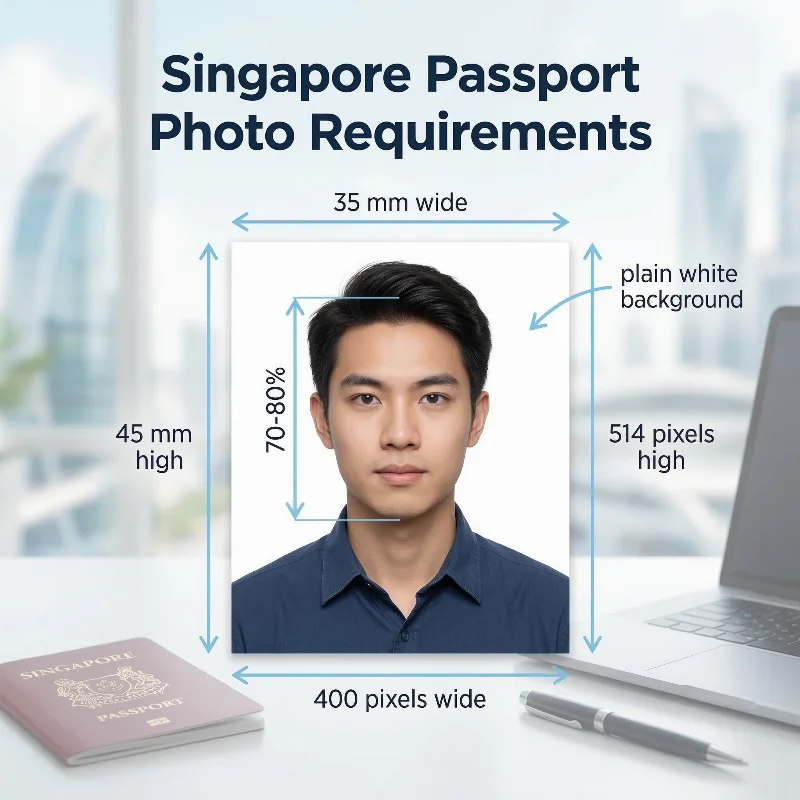
Source: ICA
We recommend that you download and use mobile apps that are specifically designed to take photographs for passport or identity card applications. These apps usually come with features that will help you take photographs in the required dimensions. The photograph will be accepted if it complies with our photo guidelines.
— The Immigration and Checkpoints Authority Singapore
12 Essential Singapore Passport Photo Requirements: Checklist
The Singapore passport picture requirements are set by the Immigration and Checkpoints Authority Singapore (ICA). In turn, they are determined by the International Civil Aviation Organisation (ICAO) Document 9303 standards. Below is a complete list of 12 essential Singapore passport specifications.
1. Number of Photos | One passport-size photo is required for online submission. |
2. Recency | Three months. Accurately reflects the applicant's current appearance. |
3. Photo Size | 400 x 514 pixels — a digital photo size for an online application via e-Services in Singapore or with a form submitted from overseas. for the printed photo |
4. Colour | A colour photograph, naturally reflecting the applicant's skin tone. Over- or underexposed pictures are not accepted. |
5. Background | A plain white background, free from shadows, textures, or patterns, is required for ID photos in Singapore. |
6. Lighting | Natural, uniform, good lighting that doesn't cast shadows or produce glare on the picture is required. |
7. Positioning and Framing | Face and shoulders must be centered, square to the camera, and take about 70-80% of the frame. They must look directly into the camera. The full face, neck, and ears must be visible in the shot and unobstructed. |
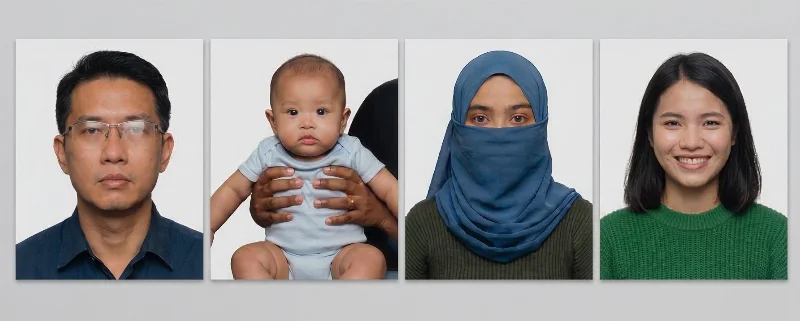
8. Facial Expression | Neutral facial expression with eyes open and mouth closed is acceptable. Smiling, frowning, or other similar expressions are to be avoided in Singapore ID, passport, or visa photos. |
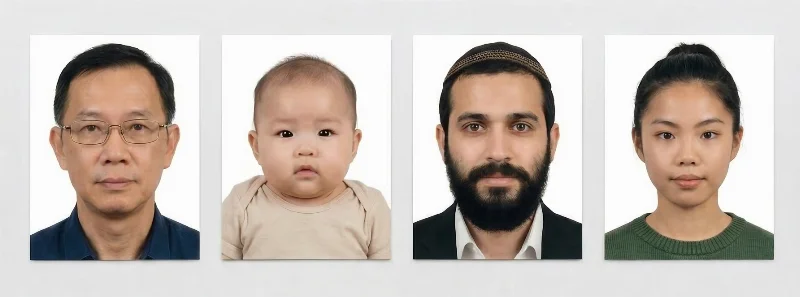
9. Attire, Head Covering, and Accessories | Dress formally. Military and camouflage attire aren't allowed. Head coverings are allowed only if worn for religious reasons and don't obscure facial features. Any attire worn for medical reasons must be supported by an official confirmation letter from a medical provider. |
10. Glasses | Glasses are allowed on Singapore passport photos — but only if the frame, glare, or flash reflection doesn't cover the eyes, and they remain fully visible. Tinted glasses, even prescription ones, and sunglasses aren't allowed on ID photos. |
11. Print Quality | For offline submissions, the picture must be printed on high-quality photo paper with matte or semi-matte finish (glossy prints are not acceptable). |
12. Digital Quality | For digital submissions via e-Services, high-resolution JPG, JPEG, HEIC, HEIF, and PNG photos are acceptable, with a maximum file size of 1-8 MB, and 400 x 514 pixel size. |
Acceptable Singapore Passport Photo Examples
Unacceptable Singapore Passport Photo Examples
Digital vs Printed Singapore Passport Photo Explained
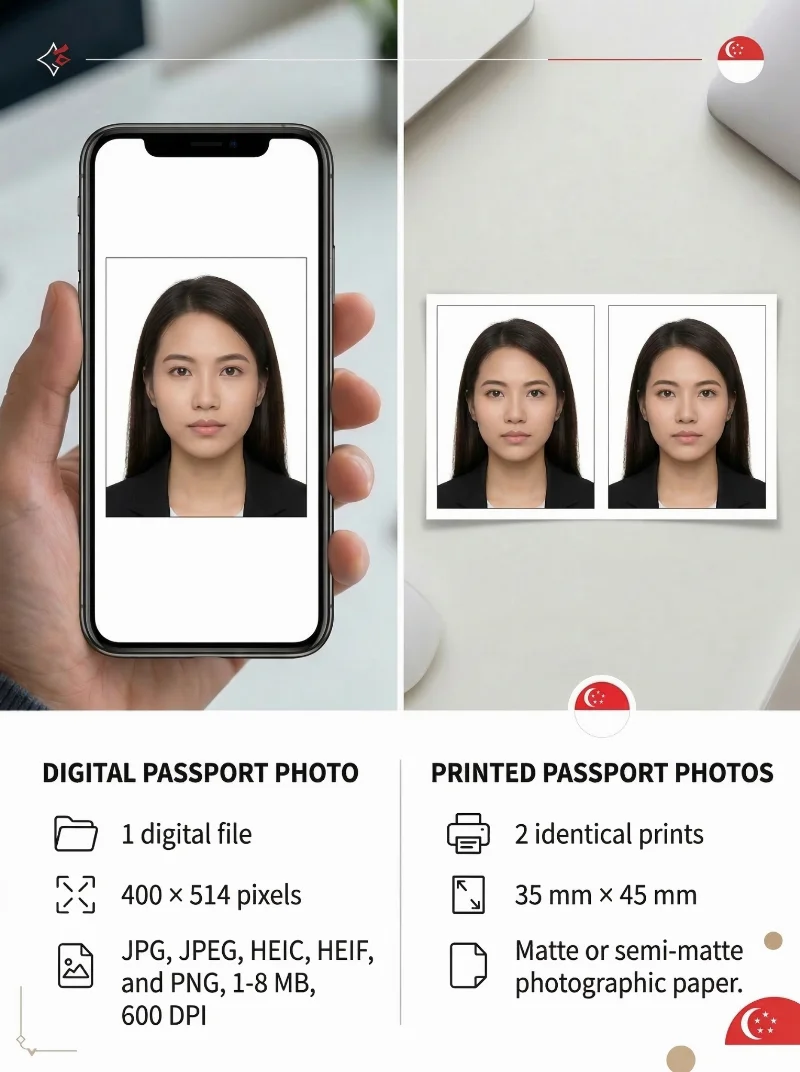
The format you need depends on whether you submit your application online or in person.
For digital submissions via the ICA Electronic System
, upload a single JPEG file sized at 400 × 514 pixels with a maximum file size of 8 MB.
For physical submissions, prepare two matching prints measuring 35 mm × 45 mm on matte or semi-matte photographic paper. Your face — from chin to the top of your head — must measure between 25 mm and 35 mm within the frame.
Regardless of the submission method, the image must follow the same general guidelines: a plain white background without shadows, a neutral facial expression with mouth closed and eyes open, the head and face occupying 70-80% of the photo, and the image captured within the last three months.
Requirement | Digital photo | Printed photo |
Quantity | 1 digital file | 2 identical prints |
Dimensions | 400 × 514 pixels | 35 mm × 45 mm |
File Format | JPG, JPEG, HEIC, HEIF, and PNG, 1-8 MB, 600 DPI | Matte or semi-matte photographic paper |
Processing | Upload via the ICA portal | Physical submission at ICA or authorised centers |
Singapore Passport Renewal Photo Requirements
Below is a list of 7 essential Singapore passport renewal photo requirements (equal to new passport photo submissions):
- Photo size: 35 x 45 mm / 400 × 514 pixels without borders, or decorations
- Face size: The face must occupy 70-80% of the frame (25-35 mm from chin to crown)
- Background: Plain white background free from shadows or patterns.
- Recency: Taken within the last three months
- Quality: The image should be sharp, clear, and digitally unaltered
- Digital properties: JPG, JPEG, HEIC, HEIF, PNG format, up to 8 MB
- Expression: Neutral expression, eyes open, and mouth closed.
You can renew your Singapore passport online through the official ICA website.
Baby Passport Photo Requirements in Singapore
Singaporean baby passport photos must follow the same technical specifications as adult photos: 35 mm × 45 mm for physical prints, or 400 × 514 pixels for digital submissions in JPEG format not exceeding 8 MB. The photo must be taken within the last three months, in colour, with even lighting, against a white matte or semi-matte background without shadows or textures. The face should occupy roughly 75 percent of the frame, with approximately 3 mm from the top of the photo to the top of the hair.
Exceptions for infants:
- Newborns under one month may have eyes partially or fully closed
- Children under one year may keep their mouths slightly open
- The baby's head can be supported from behind, provided hands remain completely out of the frame
- The baby may be laid down on a white sheet instead of having them sit upright.
Where To Take a Passport-Size Photo in Singapore
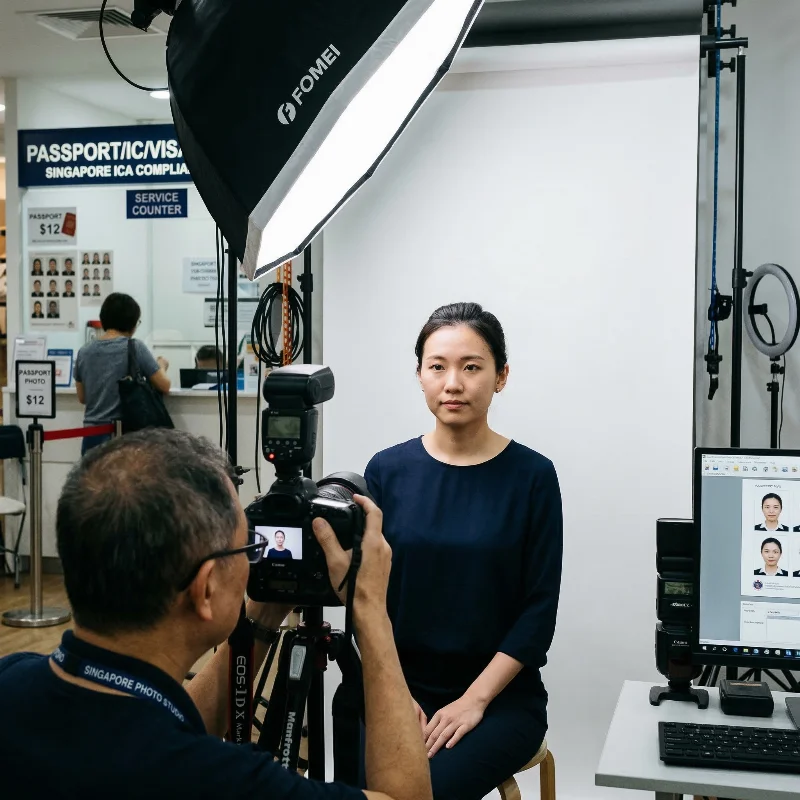
In Singapore, you can take a compliant passport photo at major retail and photo service chains, including:
- PhotoMe self-service booths (available in most MRT stations and malls)
- Kodak Express outlets across the city
- FujiFilm stores and partner studios
- Harvey Norman Photo Centres
- Popular bookstores with printing kiosks
- Commercial photo studio
Alternatively, you can use PhotoGov, an online passport photo maker that instantly converts your selfie into a 35×45 mm ICA-approved image — ready for digital submission or printing.
Passport Photo Services in Singapore: Comparison
Service | Approx. Price (SGD) | Time to Get a Photo | Likely ICA Approval Rate | Notes |
PhotoMe booths (MRT / malls) | $8-$10 per session | 5-10 min (instant prints, usually no digital copy) | Moderate - depends on lighting and positioning | Convenient and fast, but quality and compliance may vary. |
Kodak Express outlets | $15-$20 | 10-20 min (shoot + prints) | Moderate-High | Professional lighting setup, ICA-compliant. Ask about e-file availability. |
FujiFilm / Photo Hub studios | $15-$25 | 15-30 min | High | The photographer checks the background, focus, head size, and composition. Usually includes both print and digital copies. |
Harvey Norman Photo Centres | $10-$18 | 10-20 min (depends on queue) | Moderate-High | Professional lighting setup, ICA-compliant. Ask about e-file availability. |
Popular Bookstore kiosks | $6-$10 | 5-15 min | Moderate | Self-service or light assistance; no manual ICA-standard review. |
Professional Photo Studio / Commercial Photographer | $30-$95 (basic passport service) | 20-40 min (shoot + review + edits) | Very High | Multiple shots offered; professional lighting; free light editing; digital copy included. |
PhotoGov passport photo maker | Free | 30 seconds via smartphone selfie | Very High (auto verification, plus optional Human Verification) | DIY at home, unlimited retakes. Auto-crops and resizes to 35×45 mm per ICA specs. Instant download, ready for e-submission or printing. Human verification as an add-on. Best for convenience and cost. |
Where To Print a Passport-Size Photo in Singapore
You can print your passport-size photo at many convenient locations across Singapore, including:
- Kodak Express and FujiFilm shops
- Harvey Norman Photo Centres
- Popular Bookstores and SingPost branches
Once you’ve created your photo with PhotoGov, you can download the ICA-compliant 400x514 pixels file and print it at any of these locations or through an online print delivery service.
How to Take a Singapore Passport Photo at Home
Today, creating a perfect photo for your Singapore passport photo at home has never been simpler. All you need to do is take a suitable selfie and use a reliable online passport photo maker.
- Find a well-lit spot, preferably near a window, and with a white background.
- Hold your iPhone 40-50 cm (16-20 in) from your face when using the front camera, and 1 meter (3 ft) away when using a back or a digital camera.
- Keep a neutral expression and your face centered. Click a few shots.
- Choose the best image, upload it to our online tool, choose the country, and the photo type.
- Add Premium services or Human verification if your application is of high priority.
- Download your perfect photo, fully compliant with ICA requirements, in a digital format or a crop page (a single sheet in PDF), ready for a photo printer.
Your Singapore passport photo is ready!
Taking a Singapore Passport Photo of Your Child
Taking a baby’s photo for a Singaporean passport at home follows the same steps, but with a few peculiarities. Follow these general guidelines to create an ICA-accepted picture.
Setting
Uniform lighting from a natural source, plain background.
Position
A newborn may lie on a blanket; older children — sit or stand.
Expression
Neutral facial expression, no crying or laughing.
Frame
No toys, parents’ hands, or other objects in the frame.
Common Reasons for Singapore Passport Photo Rejection
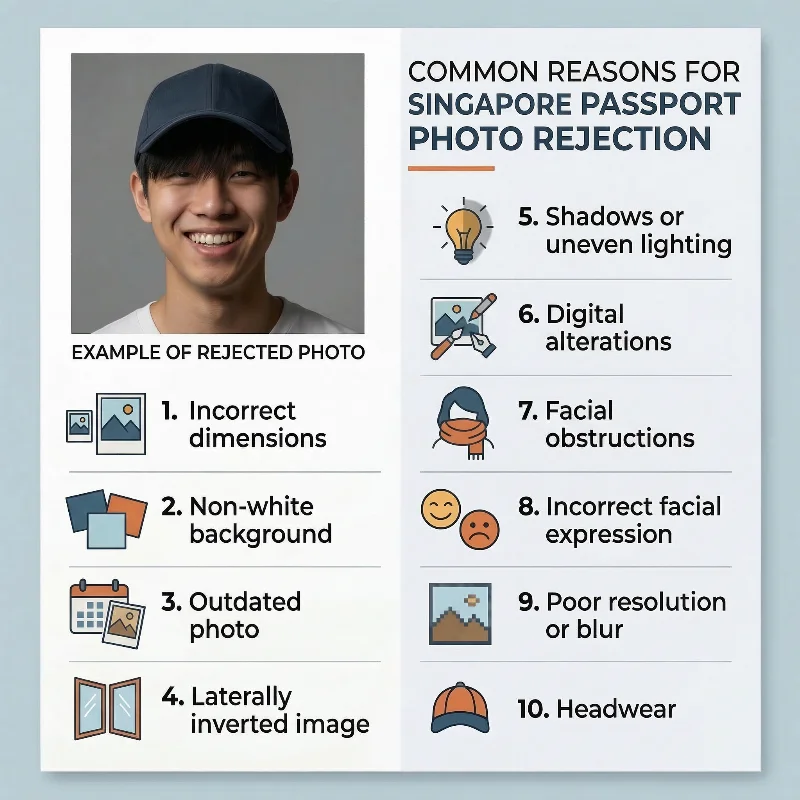
Many applications get delayed or rejected due to small errors in the photo. The Immigration & Checkpoints Authority lists 10 common issues that cause rejections:
- Incorrect dimensions: Photos not meeting the 35 mm × 45 mm print size or 400 × 514 pixel digital specifications
- Non-white background: Any colour, pattern, or shade violates ICA's strict plain white background requirement
- Laterally inverted images: Selfies or mirror-reversed photos that flip facial features horizontally
- Outdated photos: Images captured more than three months before the application
- Shadows or uneven lighting: Shadows on the face, neck, or background, or overexposed/washed-out images
- Incorrect facial expression: Smiling, frowning, or any non-neutral expression, rather than a closed mouth and a neutral look
- Digital alterations: Any editing, filters, beauty modes, or touch-ups that modify appearance
- Poor resolution or blur: Pixelated, blurry, or low-quality images not meeting sharpness standards
- Facial obstructions: Glare on glasses, hair covering eyebrows, or large reflective jewellery obscuring features
- Headwear: Hats, scarves, or any other headpieces besides the religious/medical head coverings.
Using PhotoGov helps eliminate these issues automatically — the system checks each image for ICA compliance before generating your final photo.
What to Do If Your Singapore Passport Photo is Rejected
If ICA rejects your passport photo, you will receive notification via letter or email explaining the specific reason for rejection. You have three options to resubmit a compliant photo:
- By mail: Attach the new photo to the re-submission slip enclosed with the notification letter and mail it to ICA
- Online: Use the Photo Resubmission service link (if provided in the email notification)
- In person: Submit it at the Passport Unit's Information Counter, Level 2, ICA Building
Once ICA receives your new photo, processing takes approximately one to two weeks, and you will be notified when your passport is ready for collection.
Frequently Asked Questions
What are the Current Singapore Passport Photo Requirements and Exact Size Specifications for a Successful Application?
Here is a list of essential requirements for a Singaporean passport photo:
- Colour photo, taken within the last 3 months, showing your current appearance
- Size: 35 × 45 mm for prints, or 400 × 514 px for online submission
- Plain white background, even lighting, no shadows or patterns.
- Head centred and facing the camera, filling about 70-80% of the frame; full face, neck, and ears visible
- Neutral expression (eyes open, mouth closed), no smiling or frowning
- No military/camouflage clothing; head coverings only for religious or medical reasons, without hiding facial features
- Glasses are allowed only if eyes are fully visible and there is no glare or tint.
What is Singapore Passport Photo Size?
The official Singapore passport photo size is 35×45 mm (1.38×1.77 inches, or 400x514 pixels). The head should measure between 25 and 35 mm (0.98-1.38 inches) from chin to crown, and the photo must have a plain white background with even lighting and no shadows.
For full compliance with the Immigration & Checkpoints Authority (ICA) standards, PhotoGov automatically adjusts your photo to the correct dimensions, proportions, and background tone — ready for online submission or printing.
What is Singapore Passport Photo Size in Pixels?
Singapore passport photo size in pixels is 400x514 pixels.
You can ICA-resize a photo to 400 by 514 pixels for free using our online Singapore passport size photo maker. Simply upload your selfie to our platform, and it will be converted into an official passport photograph within 30 seconds.
What is the Required Singapore Passport Photo Size in cm and Pixels for Online and In-Person Applications?
Singapore photo size in cm is 3.5×4.5 cm, with the head measuring between 2.5 and 3.5 cm. These are the dimensions required for in-person applications.
However, if you submit your application online, your photo size must be measured in pixels — 400 × 514 pixels and have a high resolution of 600 DPI.
Where Can I Get Singapore Passport Photos Taken That Fully Comply With All ICA Requirements?
You can get them in across convenient locations in Singapore — professional photo studios or photo shops. Find the nearest to your location by searching “Singapore passport photo near me.”
However, the fastest and most convenient way is to get your Singapore passport photo from the comfort of your home or office by using an online passport photo maker like PhotoGov.
All you need is a properly taken selfie (in good daylight, against a plain white background, the phone or camera directly in front of your face) and our portal.
Upload your original photo, choose “Singapore passport” as your document type, and let the system produce an ICA-compliant, application-ready photo in under 30 seconds.
With PhotoGov, you don’t need to spend time and money to create a perfectly sized, proportioned, lit official biometric photograph that meets all Singapore passport photo requirements.
What are the Singapore Passport Photo Background Colour and Lighting Rules I Must Follow to Avoid Rejection?
Singapore passport photos require a plain white background with even, shadow-free lighting that leaves your face clearly visible. These are the two most common rejection triggers, so following ICA's specifications exactly will help your application proceed without delay.
Background requirements:
- Colour: Pure white only. Off-white, cream, or grey backgrounds are not accepted.
- Uniformity: The background must be plain with no patterns, textures, or shadows.
- Coverage: The white backdrop should fill the entire frame behind your head and shoulders.
- Shadows: No shadows cast by your head or body onto the background wall.
Lighting specifications:
- Even illumination: Light must fall uniformly across your face without creating hotspots or dark areas.
- No shadows: Shadows under the chin, nose, or around the eyes will cause rejection.
- No red-eye: Camera flash should not produce red-eye effect; retouched red-eye removal is not permitted.
- Natural appearance: Avoid overexposure that washes out skin tones or underexposure that makes the image too dark.
Common mistakes to avoid:
- Using a cream or off-white wall instead of pure white.
- Taking photos near windows that create uneven side-lighting or shadows.
- Using a flash too close to the face, creating harsh shadows or glare on glasses.
- Standing too far from the background, allowing shadows to appear behind you.
If you are taking the photo at home, position yourself about 1 metre away from a plain white wall and use natural daylight or two balanced light sources at 45-degree angles to eliminate shadows.
What Are the Guidelines for Clothing, Glasses, and Head Coverings in Singapore Passport Photo Requirements?
Clothing. Wear everyday attire that contrasts with the white background. Avoid uniforms, costumes, or clothing that matches the background colour. Formal or business casual clothing is recommended for official documents.
Glasses. Remove glasses if possible. If you must wear them for medical reasons, ensure the lenses are clear and untinted with no glare or reflection. Frames must not cover any part of the eyes. Sunglasses and tinted lenses are prohibited.
Head Coverings. Hats and head coverings are generally not allowed. Exceptions apply for religious or medical reasons only if supported by a signed statement from a religious leader or doctor. The head covering must be dark-coloured to contrast with the white background, and your full face must remain visible from chin to forehead without any shadows cast on your face.
How Can I Take a Compliant Singapore Passport Photo at Home That Meets All ICA Requirements?
Use the Singapore passport photo maker PhotoGov. The service allows you to get an official biometric photograph that meets all ICA technical requirements for Singapore passport photos. All you need is a smartphone. Take a selfie, upload it to PhotoGov, and wait for about 30 seconds, while the system adjusts the size, frame, proportions, background, and lighting. Download your ready-to-apply Singapore passport photo in digital or printable format. And it’s free!
What Are the Common Reasons Singapore Passport Photos Get Rejected, and How Do I Make Sure Mine Meets All Requirements?
ICA rejects passport photos that fail to meet strict technical and content standards. The most frequent reasons for rejection are easily avoidable with attention to detail.
Common reasons for rejection:
- Non-white background: Off-white, cream, grey, or patterned backgrounds are not accepted. Only pure white is permitted.
- Laterally inverted images: Selfies or mirror-reversed photos that flip facial features horizontally will be rejected.
- Outdated photos: Images taken more than three months before the application.
- Shadows or uneven lighting: Shadows on the face, neck, or background, or uneven brightness across the face.
- Digital alterations: Any editing, filters, beauty modes, or touch-ups that modify appearance.
- Poor resolution or blur: Pixelated, blurry, or low-quality images.
- Facial obstructions: Glare on glasses, hair covering eyebrows, or large reflective jewellery obscuring features.
How to ensure your photo meets requirements:
- Use a plain white wall as the backdrop and position yourself about one metre away to avoid shadows.
- Ensure even lighting from the front without harsh shadows or red-eye.
- Take the photo within three months of your application date.
- Face the camera directly with a neutral expression and mouth closed.
- Avoid any digital editing or filters; submit the original image.
- Verify dimensions: 35 mm × 45 mm for prints or 400 × 514 pixels for digital uploads.
- Remove glasses if possible, and keep hair away from your face.
Are There Different Singapore Passport Photo Requirements for Children and Infants, and What Should Parents Prepare?
No, the technical specifications remain identical for applicants of all ages. Children and infants must submit photos measuring 35 mm × 45 mm for prints or 400 × 514 pixels for digital submissions, with the same white background and lighting requirements as adults.
However, there are a few less strict rules for younger children:
- Newborns under one month: Eyes do not need to be fully open.
- Infants: May be photographed lying on a white sheet instead of sitting upright.
- Support: Parents may support the baby's head, but hands must not be visible in the final photo.
- Expression: Neutral expression is preferred, but mouths may be slightly open for children under one year.
- Prohibited items: No toys, pacifiers, bottles, or other objects may appear in the photograph.
What is the Exact List of Singapore Passport Photo Requirements for Digital Photo Uploads to ICA E Services?
Below is a list of 11 essential Singapore passport photo requirements for digital photo uploads to ICA E Services.
- Dimensions: 400 × 514 pixels (width × height)
- File format: JPEG (.jpg) only
- File size: 1-8 MB
- Resolution: Minimum 600 DPI
- Colour mode: Full colour (no black-and-white, sepia, or filters)
- Recency: Taken within the last 3 months
- Background: Plain white without patterns, textures, or shadows
- Lighting: Even illumination with no shadows on face or background
- Face size: the face must occupy 70-80% of the photo height
- Position: Full face, front view, centred in the frame
- Expression: Neutral with no smile, mouth closed, and eyes open.
Additional rules:
- No headgear unless worn for religious or medical reasons (must not cover facial features)
- Glasses permitted only if eyes are clearly visible with no glare or reflection; no tinted lenses
- No digital editing, filters, or alterations to the original image
- Scanned prints are not accepted; must be original digital capture.
Where Can I Find an Online Tool or Service That Checks if My Photo Meets Singapore Passport Photo Requirements Before Submitting?
Browse PhotoGov.net — this is the tool that checks that your photo meets Singapore passport photo requirements. Upload your photo, and the PhotoGov passport photo maker will analyse it based on the official ICA biometric photo template.
If adjustments are needed, it will automatically correct the image — resize it to 35x45 mm or 400x514 pixels, correct the head positioning to take 70-80% of the photo, and change the background to plain white, required by the authorities. In under 30 seconds, you get a free, technically compliant, application-ready Singapore passport photo, ready to be downloaded in a printable or digital format.
Can I Smile In A Singapore Passport Photo?
No. You must keep a neutral expression with your mouth closed and eyes fully open. Broad smiles, visible teeth, or exaggerated expressions are not allowed because they change how your face looks and can lead to rejection.
Are Glasses Allowed In A Singapore Passport Photo?
Yes, but only if they do not obstruct your eyes. The frames must not cover the pupils, there should be no glare or reflections on the lenses, and the lenses cannot be tinted; sunglasses and dark prescription lenses are never permitted.
Can I Wear A Headscarf, Turban, Or Other Head Covering?
Yes, when it is worn for religious or medical reasons. The covering must not hide any part of your face from chin to forehead and should not cast heavy shadows or obscure your features.
Can I Use Filters Or Heavy Editing On My Photo?
No. Beauty filters, strong retouching, or skin‑smoothing tools are not allowed, and the photo must show your natural skin tone and real appearance so immigration officers can recognise you easily.
PhotoGov.net strictly adheres to the Global regulations for ID photos.
Other Pages — Singapore ID Photos
Official Government Documentation Sources
General Singapore Passport Photo Requirements: Immigration and Checkpoints Authority Singapore (ICA)
Apply for a Singapore Passport / Renew a Singapore Passport: Immigration and Checkpoints Authority Singapore
Biometric Regulations for International ID Documents: International Civil Aviation Organization (ICAO) Document 9303
Was this helpful?
72 found this helpful
Authored by:
Nathaniel K. Rowden (Compliance consultant)Top expert
Verified by the Photogov compliance team
ICAO 9309-compliant
Based on official government sources
Helpful votes: 72
Was this helpful?
72 found this helpful
We value your Privacy
We use cookies to enhance your browsing experience, serve personalized ads or content. By clicking “Accept All”, you consent to our use of cookies.