Make Your Bangladesh Passport Size Photo Online for Free — Ready in 30 Seconds
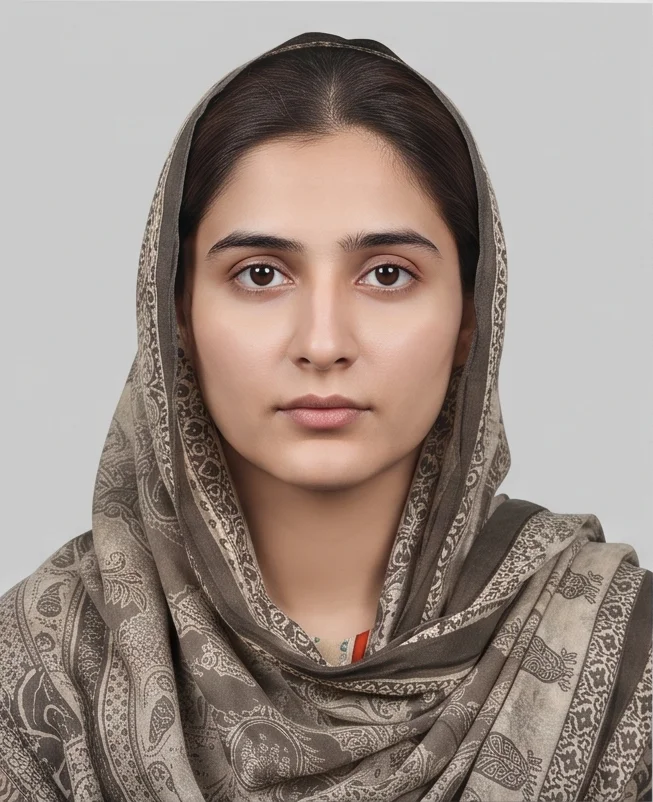
Need a Bangladesh MRP photo? Use PhotoGov’s free Bangladesh passport size photo maker to turn a clear phone picture into a 45 x 55 mm passport photo online. The tool crops the image, centres the head, creates a light grey background and prepares a digital or printable file in about 30 seconds. Works on iPhone, Android and desktop — no app or editing skills required.
No studio · No app · 30 seconds
We value your Privacy
We use cookies to enhance your browsing experience, serve personalized ads or content. By clicking “Accept All”, you consent to our use of cookies.
PhotoGov is an independent service. We are not affiliated with any government, embassy, or passport office. All information on this website is based on official government requirements and verified primary sources. Final acceptance is determined solely by the issuing authority.
Free Bangladesh Passport Size Photo Maker — Make Your Photo Now
Upload a clear photo taken on your phone or camera. Our MRP Bangladesh passport photo converter crops, resizes, and centres it for the 45 x 55 mm format, prepares a light grey background, and creates a digital or printable file. Follow the steps below to make your passport-size photo online for free.
Get photo for: Bangladesh passport 55x45 mm (5.5x4.5 cm)
Instructions:
How to take a good photo?


1/7 Image format
Photo must be in color. Taken within the last 6 months.
How to take a good photo?
1/7 Image format
Photo must be in color. Taken within the last 6 months.
ID & Passport Photo Tool. Your personal data is processed in accordance with security and privacy standards.
If you need assistance, don't hesitate to contact our Support team, which is always there to help.
How Our Free Bangladesh Passport-Size Photo Maker Works
Our free Bangladesh passport-size photo maker checks the source photo and applies the required 45 x 55 mm crop, head proportions, light grey background, and file settings. It does not retouch facial features or add filters. Choose Human Verification if you want an additional manual review, then download your digital or printable Bangladesh passport photo.
Photo Upload
Take a selfie and upload it to PhotoGov
Service Selection
Add Human Verification or bundle other services
Processing
Wait while automatic resizing and cropping are applied
Download
Download the digital JPG or printable 45 x 55 mm MRP photo
Written by Olia Potiagaeva, Managing Editor Reviewed by the PhotoGov Editorial Team★ 4.8 / 5.0 GoogleChecked against official government requirements
On THIS PAGE:
- Free Bangladesh Passport Size Photo Maker — Make Your Photo Now
- How Our Free Bangladesh Passport-Size Photo Maker Works
- What Is a Bangladesh Passport Size Photo?
- Your Final MRP Bangladesh Passport Size Photo from PhotoGov
- Bangladesh Passport Photos That Pass the Checks
- Bangladesh Passport Photos That Don't Pass the Checks
- Why Use PhotoGov for Your Bangladesh Passport Photo
- PhotoGov and Bangladesh Passport Photo Requirements
- Frequently Asked Questions
- Official Government Sources
- Other Pages — Bangladesh ID Photos
What Is a Bangladesh Passport Size Photo?
The Bangladesh Passport Photo editor crops your image to the selected format and positions the head within the frame. It sizes the picture you upload without changing your facial features, and the built-in photo checker tests the file against the selected format. The selected format is 45 x 55 mm. Before you submit the photo, check the photo instructions for the application you are completing.
A recent biometric portrait for a Bangladesh Machine Readable Passport (MRP) application.
Sized to 45 x 55 mm, with the head centred and a plain light grey background.
Ready to download as a digital JPG or a printable photo file.
Your Final MRP Bangladesh Passport Size Photo from PhotoGov
PhotoGov applies the technical settings for a 45 x 55 mm Bangladesh MRP photo. The final image is ready for submission and doesn't require any adjustments from you. Below are the key technical parameters of your final photo from PhotoGov.
For a full overview of official standards, please see our Bangladesh Passport Photo Requirements Guide.
Parameter | Your Final Photo |
Photo size | 45 x 55 mm (4.5 x 5.5 cm) |
Head size | 70 – 80% of the frame |
Background | Plain, light grey |
File format | Digital JPG / Printable PDF |
Resolution | High-resolution digital file |
Head positioning | Automatically centred |
Colour | Full colour |
Face visibility | Fully visible, natural and unretouched |
Submission | Digital download / Printable 45 x 55 mm photo |
Your photo is processed in a private session in a secure environment. Facial features are never altered — our passport photo maker only resizes, crops, and replaces the background. If you want extra reassurance, optional Human Verification is available at checkout.
Bangladesh Passport Photos That Pass the Checks
Bangladesh Passport Photos That Don't Pass the Checks
Why Use PhotoGov for Your Bangladesh Passport Photo
Convenience
Receive a submission-ready photo, accepted for MRP applications
Compliance-Aligned Output
Designed to meet the official MRP 45 x 55 mm Bangladesh passport photo requirements
Availability
No retakes in studios — create your digital passport photo from your phone in any browser, no visit required
Extra Assurance
Optional Human Verification by an in-house compliance specialist
Secure Processing
Your image is processed in a private session and never shared with third parties
If your photo is rejected due to technical issues on PhotoGov's side, we provide a free retake or a full refund.
PhotoGov and Bangladesh Passport Photo Requirements
The official Bangladesh MRP application form specifies a 45 x 55 mm photograph, and published passport guidance requires a recent colour photo with a light grey background.
Our Bangladesh passport photo checker reviews the dimensions, head position, facial visibility, image quality, and background before the file is generated. Then, PhotoGov applies that size, centres the head, prepares the light grey background, and creates the final digital or printable file. It does not retouch facial features or add beauty filters. If the source image is blurred, poorly lit, or taken at an angle, PhotoGov asks for a better photo rather than hiding the problem with cosmetic editing.
For extra reassurance, add Human Verification: a PhotoGov compliance specialist reviews the final photo against the Bangladesh 45 x 55 mm requirements and either confirms it is ready or asks for a new upload. This is especially useful for child photos, previous rejections, or urgent applications.
PhotoGov provides photo-making services only. Final acceptance is determined solely by the issuing authority.
Frequently Asked Questions
Yes, you can make a Bangladesh passport-size photo online for free. Upload a clear photo to PhotoGov by choosing “Bangladesh” → “Passport Photo,” and download the finished passport photo without installing an app. Human Verification and other optional extras are charged only if you add them.
Ask someone to take a photo of you or use a tripod and a timer for a more reliable result, using the rear, not the selfie camera. Stand at a well-lit spot against a plain, light backdrop. Look directly at the camera with a neutral expression, keep both eyes open, and turn off filters or portrait effects. Click a few photos, choose the best one, and upload it to PhotoGov. It will make all the necessary adjustments, apply a 45 x 55 mm crop, light grey background, and produce an application-ready digital or printable file.
Upload the original full-resolution image to a free Bangladesh passport size photo converter. It detects the face, crops the picture to 45 x 55 mm, centres the head, prepares the light grey background, and creates the final file for online or in-person submission.
Yes. Our automated Bangladesh passport photo checker reviews the dimensions, head position, framing, background, lighting, sharpness, and facial visibility. If the source photo is of sufficient quality, PhotoGov prepares the final file automatically; if it is too blurred, dark, or distorted, you will need to upload a better photo. Human Verification adds a manual check by a compliance specialist.
“PP size photo” is a common shorthand for “passport-size photo” in Bangladesh. The phrase does not always identify the dimensions, so check the form or mission instructions before printing. On this page, PP size means the 45 x 55 mm Bangladesh passport format.
Use this tool only if the passport office or mission specifically asks for a 45 x 55 mm child photo. Under the official e-passport process, the face image is normally taken during enrolment; for children under 6, a separate 3R photo may be requested instead. Follow the instructions for the child’s age and application route. When 45 x 55 mm is required, Human Verification can add a manual compliance check.
Yes. Choose the printable option to download a PDF with the 45 x 55 mm photos. Print at 100% or actual size on photo paper, without “fit to page” or further resizing. You can print it at home on photo paper or send the file to a copy shop for professional printing.
Human Verification adds a manual review by a PhotoGov compliance specialist. The reviewer checks the 45 x 55 mm dimensions, head position, background, lighting, sharpness, and facial visibility, then confirms the file is ready or asks you to upload a better source photo. It is especially useful for child photos, previous rejections, or applications with a tight deadline.
Read the reason first. If it concerns blur, shadows, pose, or facial visibility, take a new source photo. If a rejection is caused by a technical problem on PhotoGov’s side, we provide a free retake or refund under the applicable terms. Contact our Support team, and we will help.
Yes. The BD passport size photo maker works in a mobile browser on iPhone and Android, so there is no app to install. Upload the original camera image rather than a screenshot or a version compressed by a messaging app, then download the finished photo to your phone.
Yes. But it has to be taken correctly. A close arm’s-length selfie can distort the face and make the head look too large. For the best result, ask someone else to take the picture, or use the rear camera with a timer and place the phone at eye level. Keep the camera straight, step back, and turn off portrait mode, filters, and beauty settings.
Yes. PhotoGov handles uploaded information under its current Security and Privacy policies. The Privacy Policy explains what data is collected, how it is used, when it may be disclosed, and how long it is retained.
No. PhotoGov is an independent photo-preparation service. It does not submit, assess, approve, or issue a Bangladesh passport; it only prepares the photo file. The Bangladesh passport office or mission processing the application makes the final decision.
Yes. Open photogov.net in the phone browser, upload a picture and download the finished file. No app is required; the PhotoGov app for iOS and Android does the same job if you prefer it.
No. PhotoGov applies the selected format automatically: the tool sets the frame and the head position for you. Before you submit the photo, check the photo instructions for the application you are completing.
Official Government Sources
Official MRP Application Form: Bangladesh Department of Immigration and Passports
E-Passport Photo and Enrolment Guidance: Bangladesh e-Passport Portal
Five Steps to Your e-Passport: Bangladesh e-Passport Portal
Biometric Regulations for International ID Documents: ICAO Document 9303
Other Pages — Bangladesh ID Photos
Bangladesh
9 doc.
- Bangladesh driving license 35x45 mm
- Bangladesh dual nationality 40x50 mm (4x5 cm)
- Bangladesh e-visa 45x35 mm
- Bangladesh passport 30x25 mm (3x2.5 cm)
- Bangladesh passport 40x50 mm (4x5 cm)
- Bangladesh passport 55x45 mm (5.5x4.5 cm)
- Bangladesh passport application 45x35 mm (4.5x3.5 cm)
- Bangladesh visa 37x37 mm
- Bangladesh visa 45x35 mm
Service provided by Y VISION TECHNOLOGIES LLP · Stoney Works 8 Stoney Lane, London, England, SE19 3BD · Terms · Refund policy · Contact
We value your Privacy
We use cookies to enhance your browsing experience, serve personalized ads or content. By clicking “Accept All”, you consent to our use of cookies.