Create a 50 × 70 mm Citizenship Photo Sample Online for Free
Applying for Canadian citizenship? Use our passport photo maker to convert a regular selfie into a 50 × 70 mm Canada citizenship photo sample in a digital or printable format. Works on iPhone, Android, any browser — no editing skills required.
No studio · No app · 30 seconds
We value your Privacy
We use cookies to enhance your browsing experience, serve personalized ads or content. By clicking “Accept All”, you consent to our use of cookies.
PhotoGov is an independent service. We are not affiliated with any government, embassy, or consulate. All information on this website is based on official government requirements and verified primary sources. Final acceptance is determined solely by the issuing authority.
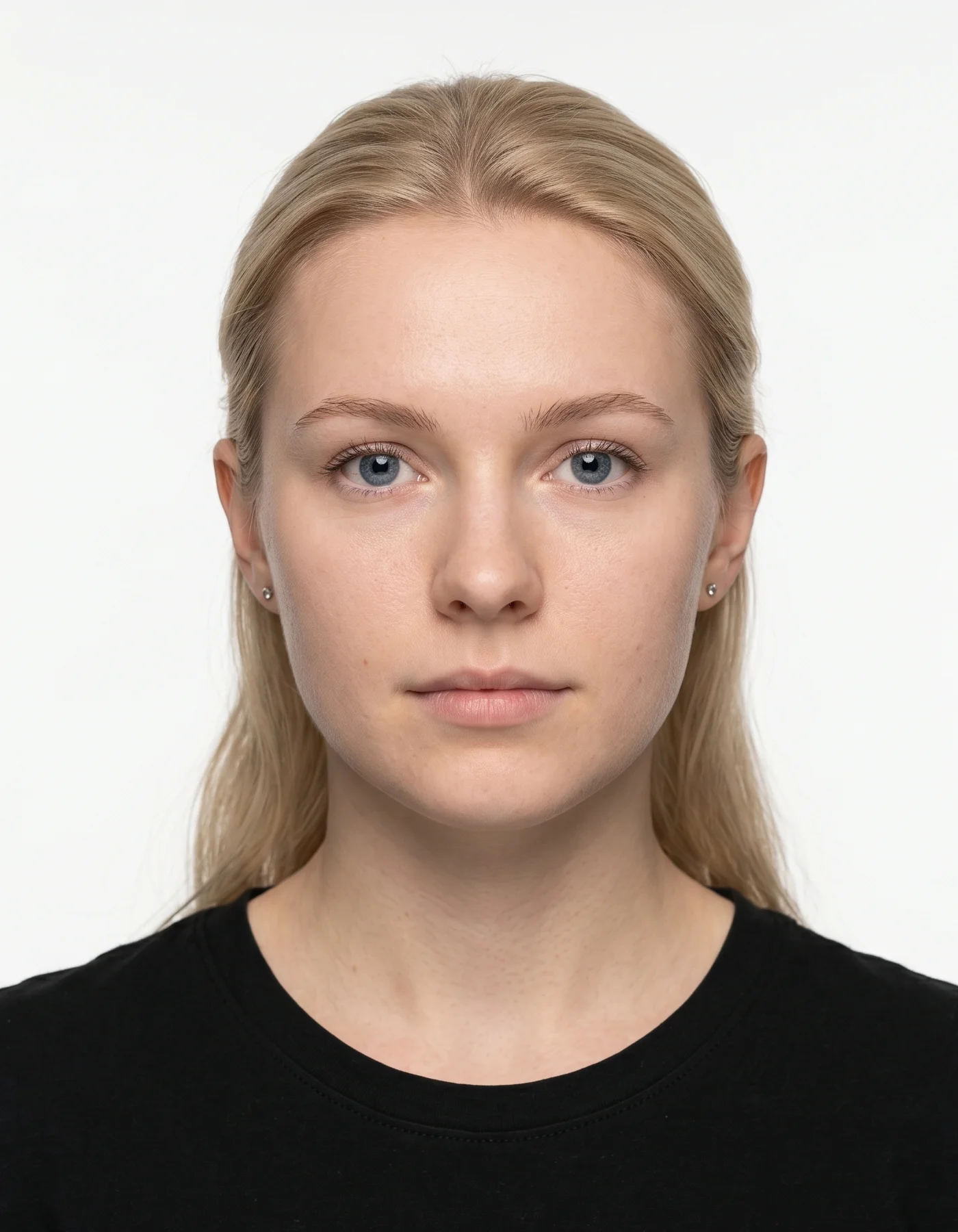
Make Your Canada Citizenship Photo Sample Now (50 × 70 mm / 420 × 540 px)
Upload a selfie, and our free photo editor resizes and crops it to the format used by IRCC for online citizenship applications and in-person submissions. Just follow the step-by-step instructions below.
Get photo for: Canada Citizenship 5x7 cm (50x70mm)
Instructions:
How to take a good photo?


1/7 Image format
Photo must be in color. Taken within the last 6 months.
How to take a good photo?
1/7 Image format
Photo must be in color. Taken within the last 6 months.
ID & Passport Photo Tool. Your personal data is processed in accordance with security and privacy standards.
If you need assistance, don't hesitate to contact our Support team, which is always there to help.
How Our Canada Citizenship Photo Maker Works
Our citizenship photo cropping tool automatically converts your selfie's size, head proportions, framing, and background to the official 50 × 70 mm (2 × 2¾ inch) IRCC standards. Choose additional services — human verification by our senior compliance expert, or 9 extra clothing variations — and download your free Canada citizenship photo sample in digital or printable format.
Photo Upload
Take a selfie and upload it to PhotoGov
Service Selection
Add Human Verification or select other services
Processing
Wait while automatic resizing and cropping are applied
Download
Get a Canada citizenship photo sample 50 × 70 mm (420 × 540 px)
Written by Olia Potiagaeva, Managing Editor Reviewed by the PhotoGov Editorial Team★ 4.8 / 5.0 GoogleChecked against official government requirements
On THIS PAGE:
- Make Your Canada Citizenship Photo Sample Now (50 × 70 mm / 420 × 540 px)
- How Our Canada Citizenship Photo Maker Works
- What Is a Canadian Citizenship Photo?
- Your Canada Citizenship Photo Sample from PhotoGov
- Canada Citizenship Photos That Pass the Checks
- Canada Citizenship Photos That Don't Pass the Checks
- Why Use PhotoGov for Your Canada Citizenship Photo
- PhotoGov and IRCC Standards for Citizenship Photos
- Frequently Asked Questions
- Official Government Sources
- Other Documents — Canadian ID Photos
What Is a Canadian Citizenship Photo?
The Canada Citizenship Photo editor crops your image to the selected format and positions the head within the frame. It sizes the picture you upload without changing your facial features, and the built-in photo checker tests the file against the selected format. The selected format is 50 x 70 mm. Before you submit the photo, check the photo instructions for the application you are completing.
The official biometric photo format required for Canadian citizenship applications, certificates, and proof of citizenship submissions.
Automatically prepared by PhotoGov as a correctly sized, application-ready sample, aligned with IRCC standards.
Suitable as a reference for digital upload to the online citizenship application, or professional printing for in-person and mail-in applications.
Your Canada Citizenship Photo Sample from PhotoGov
PhotoGov automatically applies all official IRCC technical requirements to your original photo. The sample image is ready as a layout template and doesn't require any adjustments from you. Below are the key technical parameters of your Canada citizenship photo sample from PhotoGov.
For a full overview of official standards, please see our Canada Citizenship Photo Requirements Guide.
Parameter | Your Sample Photo |
Photo size | 50 × 70 mm / 2 × 2¾ inches / 420 × 540 pixels |
Head size | 31 – 36 mm (1¼ – 1 7/16 inches), 44 – 51% of frame |
Background | Plain white or light-coloured |
File format | JPG / JPEG (digital) / printable PDF |
Resolution | High-resolution digital file at 600 DPI |
Head positioning | Automatically centered |
Colour | Full colour (black-and-white also accepted by IRCC) |
Face visibility | Fully visible, no retouching |
Submission | Ready for online citizenship application upload / Layout-aligned for in-person and mail-in printed submissions |
If your photo is rejected due to technical issues on PhotoGov's side, we provide a free retake or a full refund.
Canada Citizenship Photos That Pass the Checks
Canada Citizenship Photos That Don't Pass the Checks
Your photo is processed in a private session in a secure environment. Facial features are never altered — the tool only resizes, crops, and replaces the background. If you want extra reassurance, optional Human Verification is available at checkout.
Why Use PhotoGov for Your Canada Citizenship Photo
Convenience
Sample photos accepted as templates for online citizenship application uploads and printable for in-person and mail-in submissions
Compliance-Aligned Output
Designed to meet the current IRCC citizenship photo requirements
Availability
No retakes in studios — make a Canada citizenship photo sample from your phone in any browser
Extra Assurance
Optional Human Verification by an in-house compliance specialist
Secure Processing
Your image is processed in a private session and never shared with third parties
Our platform is designed to align with IRCC citizenship photo rules. Final acceptance is determined by the citizenship officer reviewing your application. IRCC requires that printed citizenship photos include studio details (full name, photographer's or studio's name, studio address, and date) on the back of one image.
PhotoGov and IRCC Standards for Citizenship Photos
IRCC sets its own detailed rules for Canadian citizenship photos, and PhotoGov is built to follow those requirements together with the biometric principles laid out in ICAO Doc 9303. Our team keeps track of IRCC updates and adjusts the underlying templates and technical settings whenever the official specifications change, so the citizenship photo format in the tool stays current. Permanent resident cards use the same 50 x 70 mm print, and our Canada PR card photo requirements guide sets out the rest.
For Canadian citizenship applications, PhotoGov generates sample images in the 50 × 70 mm (2 × 2¾ inch / 420 × 540 px) format with a head size of 31–36 mm, centred in the frame, and a plain white or light‑coloured background with even, shadow‑free lighting. The tool only standardises size, crop, and background; it does not alter or enhance any facial features. The resulting sample file is ready to be printed on compliant photo paper or attached to a digital application in just a few seconds.
If you want additional reassurance, you can add Human Verification. In this mode, a senior compliance specialist checks your image against the latest IRCC citizenship photo instructions before you submit your application. This is particularly helpful for urgent timelines, citizenship applications for children, or cases where a retake would be difficult or cause delays.
For other Canadian document photos, see our dedicated tools: Canada Passport Photo Tool, Canada Visa Photo Tool, Canada PR Card Photo Tool, Canada Study Permit Photo Tool.
IRCC prohibits digital alterations of ID photographs. Our platform provides sizing and cropping services only and does not modify or enhance images.
Frequently Asked Questions
Yes — PhotoGov lets you get a Canadian citizenship photo sample online, with two free ID photos per day, depending on your location. Just upload your selfie, choose "Canada" → "Citizenship Photo 50 × 70 mm" as your document type, and download your ready-to-apply sample. In Canada, a digital photo costs C$5.90. Keep in mind that IRCC only accepts photos signed by a studio for citizenship applications, so you may only use the photo that you’ve produced online as a reference.
You can use a reliable online passport photo editor to convert your photo into the official 50 × 70 mm (2 × 2¾ inch / 420 × 540 px) Canada citizenship format. You need to upload your photo to the online photo maker, and it will automatically resize, crop, and apply a plain white or light-coloured background. At PhotoGov, you get two free ID photos per day, depending on your location; in Canada, a digital photo costs C$5.90. No registration or installation required.
To resize a photo to the official Canada citizenship size, use a reliable Canada citizenship photo resizer such as PhotoGov. Upload your image to our online Canada citizenship photo tool, and the system will automatically detect your face, crop the frame, adjust head size and margins, set a plain white background, and instantly generate a 50 × 70 mm (420 × 540 px) sample file suitable for both printing and digital submission. No manual editing required.
You can use a reliable citizenship photo editor online for free by uploading your selfie and letting the tool adjust it to all official specifications — resize, reframe, crop, and apply a plain white or light-coloured background.
Yes. A 420 × 540-pixel JPG/JPEG file meets the technical specs of the online IRCC citizenship application and will be accepted if you provide a studio confirmation letter. It must contain the following information:
Applicant’s name
Applicant’s date of birth
The date the photo was taken
Full studio’s name
Full studio’s address
At any commercial photo studio — that's the only source IRCC accepts. After you generate your Canada citizenship photo sample with PhotoGov, take the printable file (or just the layout reference) to a local studio. They print on photo paper and either stamp or handwrite their full name, address, and the date the photo was taken on the back of one of the two prints. The applicant's full name is also added to the back.
You can take a selfie at home and use an online passport photo maker to format it into an IRCC-aligned sample. To complete the application, however, the printed photo still has to go through a commercial studio for paper-grade printing and the studio signature on the back. Home printer outputs are not accepted by IRCC.
Yes. A senior PhotoGov compliance specialist reviews your sample against the current IRCC citizenship photo specs and the IRCC-published examples of acceptable and unacceptable photos before you take the file to a studio. Particularly useful close to a deadline, with a child applicant, or with anything borderline — religious head covering, medical glasses, hair partially covering the face.
Yes — for printed Canada citizenship applications, IRCC requires that the back of one photo include the applicant's full name, the photographer's or studio's name, the studio address, and the date the photo was taken. The information may be handwritten or stamped. For online citizenship applications with a digital photo, studio details are usually provided as a separate file (a studio letter and a receipt). PhotoGov generates a print-ready sample, and the studio signature is added by the commercial studio that prints your photo.
Yes. We treat your personal data and images with great care. PhotoGov uses your information solely to generate an official ID photo sample. We never share your data with third parties or external AI services. If you have any questions, you can always contact our Customer Support team or read more details in our Privacy Policy.
IRCC does not provide an official online citizenship photo maker; instead, it publishes detailed photo specifications and a list of acceptable and unacceptable examples on the Government of Canada website. Our PhotoGov tool is built around these official specifications, and features a more user-friendly interface and a broader range of services. Besides the regular photo maker options, you can add Human Verification — and our compliance and ID photo experts will manually review your photo, giving you an extra layer of assurance before the application.
Yes. Open photogov.net in the phone browser, upload a picture and download the finished file. No app is required; the PhotoGov app for iOS and Android does the same job if you prefer it. For a Canadian citizenship application, IRCC requires a photo taken by a commercial photographer; use the tool to check size and framing.
No. PhotoGov applies the selected format automatically: the tool sets the frame and the head position for you. Before you submit the photo, check the photo instructions for the application you are completing.
PhotoGov.net strictly adheres to the Global regulations for ID photos.
PhotoGov is an independent service. We are not affiliated with any government, embassy, or consulate. All information on this website is based on official government requirements and verified primary sources. Final acceptance is determined solely by the issuing authority.
Official Government Sources
Apply for Canadian Citizenship: Immigration, Refugees and Citizenship Canada (IRCC)
Canada Citizenship Photo Requirements: Immigration, Refugees and Citizenship Canada (IRCC)
Online Canadian Citizenship Application: Immigration, Refugees and Citizenship Canada (IRCC)
Proof of Canadian Citizenship: Immigration, Refugees and Citizenship Canada (IRCC)
Biometric Regulations for International ID Documents: International Civil Aviation Organization (ICAO) Document 9303
Other Documents — Canadian ID Photos
Canada
13 doc.
- Canada Citizenship 5x7 cm (50x70mm)
- Canada Health Insurance card of Quebec 5x7 cm
- Canada Passport 5x7 cm (715x1000 - 2000x2800)
- Canada Permanent Resident Card 5x7 cm (715x1000 - 2000x2800)
- Canada Permanent Resident card 1200x1680 pixels
- Canada Temporary Resident Visa 35x45 mm (3.5x4.5 cm)
- Canada Veteran's Service Card 5x7 cm
- Canada Visa 35x45 mm (3.5x4.5 cm)
- Canada firearms licence 280x370 px
- Canada firearms licence 45x57 mm
- Canada indian status 5x7 cm
- Canada personnel screening 43x54 mm
- Canada security licence 5x7 cm
Related pages
Service provided by Y VISION TECHNOLOGIES LLP · Stoney Works 8 Stoney Lane, London, England, SE19 3BD · Terms · Refund policy · Contact
We value your Privacy
We use cookies to enhance your browsing experience, serve personalized ads or content. By clicking “Accept All”, you consent to our use of cookies.