CVS Passport Photo: Get it Online in 30 Seconds
Skip a visit to the pharmacy and get a fully compliant CVS digital passport photo online.
PhotoGov is an independent service — a passport-size photo maker. We are not affiliated with any government, embassy, or consulate. All information on this website is based on official government requirements and verified primary sources. Final acceptance of the photo is determined solely by the issuing authority.
Make a CVS Digital Passport Photo Online
Use the PhotoGov passport photo maker to create a CVS digital passport photo online. All it takes is your smartphone and 30 seconds. Just click your selfie, upload it to our platform, and follow the on-screen instructions.
Get photo for: CVS Digital Passport
Instructions:
How to take a good photo?
1/7 Image format
Photo must be in color. Taken within the last 6 months.
How to take a good photo?
1/7 Image format
Photo must be in color. Taken within the last 6 months.
ID & Passport Photo Tool. Your personal data is processed in accordance with security and privacy standards.
The U.S. Department of State prohibits the digital alteration of identification document photographs. Our platform provides sizing and cropping services only and does not modify or enhance images.
How to Use the CVS Passport Photo Online Tool
Save time and money by creating your CVS digital passport photo online. When your original portrait is processed into a compliant passport-size photo, you can download it in high-quality, digital, or printable format.
Photo Upload
Take a selfie and upload it to the PhotoGov platform.
Processing
In about 30 seconds, the system processes the image.
Checkout
Select our services or add expert verification.
Download
Get a compliant baby passport photo.
CVS Passport Photo Service
When searching for a CVS passport photo, the goal is typically to find a quick and straightforward way to obtain an official ID photo. CVS is one of the largest pharmacy and retail chains in the United States, and its stores offer basic in-person photo services. However, this option is limited to physical locations and requires traveling to a store, waiting in line, and paying at the counter.
With PhotoGov, ID photos are created entirely online — there is no need to visit a studio, wait in line, or pay extra. A portrait picture can be uploaded to our tool from any device — the system automatically formats it according to official requirements. The final image is ready for instant download, free of charge.
If you require additional images or plan to use our tool frequently, please visit our Pricing page and select the option that best suits your needs.
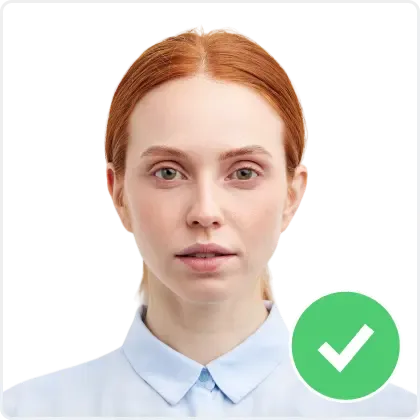
Acceptable CVS Passport Photo Examples
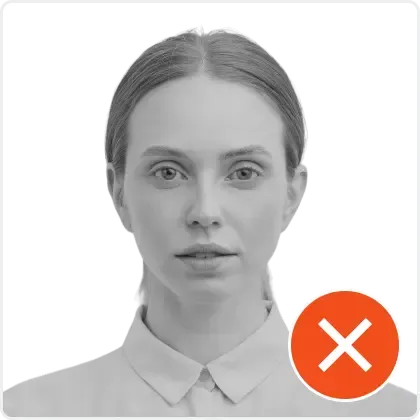
Unacceptable CVS Passport Photo Examples
Why Users Switch from CVS Photo Center to PhotoGov
CVS Pharmacy is a popular option for people preparing official documents. The stores are widely available across the United States, and CVS passport photo services are a convenient option for getting a compliant passport image without booking a professional studio. Searching for “CVS passport photo near me” typically leads to the nearest store with a photo center, where the picture is taken and printed on site. However, this approach comes with several limitations:
1. CVS Passport Photo Hours
First, the process depends entirely on store schedules. CVS passport photo hours vary by location, which means planning around store availability and travel time. If you want to get your picture taken outside regular business hours, it’s simply not possible.
By contrast, an online photo tool is available 24/7. There are no travel time and costs, no additional service fees. The image is digital, compliant, accepted for official use, and absolutely free.
2. Passport Photo CVS Cost
The CVS passport photo cost in 2025 is around $16.99 for two printed copies, with an additional fee for a CVS passport photo digital copy. If you need multiple prints or formats, the total increases to over $20.
Our online passport photo maker, PhotoGov, offers the same compliant image for $5.90 only for a digital image — with the first photo free of charge, no CVS passport photo coupon required, and no surprise add-ons.
3. CVS Passport Photo Appointment
Appointments are another inconvenience. A CVS passport photo appointment isn’t mandatory, but many locations operate on a first-come, first-served basis, which means unpredictable CVS passport photo times. This often leads to queues and delays, especially in busy urban areas. An online photo generator eliminates this uncertainty — the process takes just a few minutes at home.
4. CVS Passport Photo Digital Copy
Another key difference is formatting. In a store, a CVS passport picture depends on the staff, lighting, and printing equipment. Results may vary from one location to another.
The online tool PhotoGov uses automated processing to produce the correct background, proportions, and dimensions of the photos, depending on the type of application document.
You can upload a headshot with a distorted background, of a different size than the required document, and our online photomaker will take care of the adjustments — it will remove the background, crop the photo to the required size, and automatically comply with the government authority’s standards of the issuing country. There’s no need to worry about retakes, CVS passport photo printing errors, or incorrect cropping.
CVS Passport Picture vs Online Photo Maker: Service Comparison
Feature | CVS Passport Photo | Online Photo Tool Photogov.net |
|---|---|---|
Availability | In-store only. The service requires visiting a local CVS store with a photo center during business hours. | 24/7 online. The photo can be created from anywhere, at any time, without visiting a physical location. |
Price | $16.99 for printed photos + $3.99 for digital copy = $20.98 total. | The first photo is free. Additional photos are available from $5.90. No hidden fees. |
Digital file | Available only with an extra fee. Digital delivery is not included in the base price. | Digital file included automatically. The image is ready for instant download in the State Department-approved formats. |
International formats | Primarily U.S. passport photo format. Limited support for other document types. | U.S. + international formats supported. Photos can be generated for visas, ID cards, permits, driving licenses, and more. |
Waiting time | On average, 20–30 minutes, including travel, queue, and service. | Instant. The file is generated in seconds after uploading or taking a new photo. |
Appointments | Not required but often recommended during busy hours. | No appointment needed. The process is fully automated and available at any time. |
File format | Printed copy by default. Digital image requires an additional fee. | High-resolution digital file, ready to print or upload to official forms. |
Background and formatting | Depends on the store equipment and staff. | Automated formatting, background removal, and compliance checks. |
Convenience | Requires physical presence, store search, and schedule coordination. | Fully remote. Photo created from home using any device. |
Promotions and coupons | Occasional CVS passport photo coupon or discount may apply, but the base price remains fixed. | First photo free, processed in the regular queue (subject to server load). |
All Popular CVS Passport Photo Formats, Now Online
PhotoGov offers a fully digital alternative to CVS passport picture services. The platform is designed to process the most common types of ID photos automatically, applying the strict technical standards and the official requirements of the U.S. Department of State. Below are the most popular ID types supported by our tool.
- Digital passport photo
- US visa photo
- US citizenship 2x2 inch photo
- US green card 2x2 inch photo
- US employment authorization picture
- US veteran ID card photo
- USA crew visa picture
- USA nursing license 2x2 inch photo
- USA re-entry permit photo
Key Advantages of Our Baby Passport Photo Maker
24/7 Availability
Make CVS digital passport photo online, no pharmacy visit.
Guaranteed Compliance
100% complianсе with the ICAO official guidelines.
Convenience
Works on any device, browser, or OS.
Transparency
No registration, installation, or hidden fees.
PhotoGov: CVS Passport Photo Compliance
PhotoGov formats CVS-compatible passport photos to meet the official U.S. Department of State rules for passport and visa images, including size, background, head position, and color settings required by authorities. The system automatically corrects sizing and framing, without altering facial features — so you can skip a visit to CVS, but get a 100% compliant photo online.
All technical settings follow biometric photo recommendations based on the International Civil Aviation Organization (ICAO) framework. PhotoGov reviews publicly available guidance from both the Department of State and ICAO to keep its presets aligned with the latest standards.
For users who want extra assurance before printing or submitting their passport-size photos, PhotoGov offers an optional Human Verification service, where an experienced specialist double-checks the photo for framing, exposure, background uniformity, and facial visibility. This additional review helps reduce the risk of a photo being rejected and gives guidance on the improvements, if needed.
Frequently Asked Questions
What is the CVS Passport Photo Cost?
The CVS passport photo price is around $16.99 for two printed passport photos. With digital copies, the cost increases to $20.98. Alternatively, use the PhotoGov passport photo maker that offers a fully compliant passport picture — first photo free, and the following ones $5.90 for a digital, and $9.90 for a printable file. The entire process takes place online, with no need for appointments or visits to the store.
Where Can I Find CVS Passport Photo Near Me?
Searching for “CVS passport photo near me” usually means driving to the nearest pharmacy that has a photo center. If you have time, go for it. But you can also make a passport-sized photo from the comfort of your home. Use our free online photo tool, PhotoGov, from anywhere in the world and generate a compliant passport photo* in less than a minute. The first photo with sizing and cropping is free of charge; the others cost less than a cup of coffee.
Does CVS Offer Passport Photos Online?
No. CVS does not provide online passport photo services. All photos must be taken in person at a CVS store with a photo center. There is no official option to upload an image or order a digital file through the CVS website. Our online photo maker, PhotoGov, fills this gap by offering a fully online passport photo tool, available at any time, free of charge for the first passport-size photo.
Are CVS Passport Photos Valid For Official Documents?
Yes. CVS passport photos meet U.S. Department of State standards. Our free online photo maker, Photogov.net, applies the same technical and biometric requirements, including background, size, and positioning, ensuring that photos generated online are equally compliant and valid for official use.
Can I Get A CVS Passport Photo Without Leaving Home?
Yes. In this case, you need to use our free online tool, as CVS passport photo services are in-store only. With PhotoGov, you complete the entire process online. There is no need to go anywhere, schedule an appointment, or pay for the photo.
How Long Does it Take to Get a Passport Photo at CVS vs Online?
Our free online photo tool generates a ready-to-use passport photo in seconds. The digital image is available for immediate download. Getting a CVS passport photo at a pharmacy typically takes 20–30 minutes, including travel, waiting, and payment.
Is the Quality of an Online Passport Photo the Same as at CVS?
Yes. PhotoGov uses automated image processing to meet the same requirements as in-store services. The generated file includes proper background removal, size adjustment, and face positioning, ensuring the same level of compliance as CVS, with no cost.
Does CVS Offer International Passport Photo Sizes?
CVS mainly focuses on U.S. passport photo formats. International sizes may not be supported at all locations. PhotoGov covers dozens of international formats, including the European Union, Canada, the UK, Australia, and Asia, and formats the photo automatically.
What Documents Can I Use the Photo For?
Photos generated by PhotoGov can be used for U.S. passports, visas, green cards, residence permits, work permits, driver’s licenses, national ID cards, and other official identity documents. All files comply with government standards.
What Happens if My CVS Passport Photo is Rejected?
CVS offers a refund in case of rejection, but you must keep your receipt and return to the store. PhotoGov online passport photo maker allows unlimited retakes. You can generate a new compliant photo online without the need to travel.
Why Choose PhotoGov Instead of CVS Passport Photo Services?
PhotoGov is fully online, free for the first passport-size photo, and faster. CVS requires visiting a physical location, waiting in line, and paying for the service. Our free online photo maker provides the same compliance with lower effort and no cost for the first CVS passport photo, and if you need more, they will be less costly than a visit to the shop.
CVS Passport Photo: Is It Better to Take In Person or Online?
Choosing between an in-store CVS passport photo and an online passport photo maker depends on how you prefer to manage the process. CVS offers a traditional, fixed-price service that requires visiting a physical location, with the cost reaching up to $20, depending on the selected options. PhotoGov provides the same compliant result entirely online, at no cost, and within minutes. The file can be downloaded instantly and used for official applications without scheduling, travel, or additional fees.
Official Government Documentation Sources
Baby Passport Photo Requirements: The US Department of State — Travel
Biometric Regulations for International ID Documents: International Civil Aviation Organization (ICAO) Document 9303
Other Documents — USA ID Photos
United States
30 doc.
- Baby Passport Photo
- CIBTvisas visa photo (any country)
- CVS photo
- Digital Passport Photo
- Travisa visa photo (any country)
- US Citizenship (naturalization) 2x2 inch (51x51 mm)
- US Electronic Diversity Visa Lottery (600x600 px, 2x2 inches, white bg)
- US Employment Authorization 2x2 inch (51x51 mm)
- US Green Card (Permanent Resident) 2x2
- US NFA ATF form 2x2 inch
- US NY Gun License 1.5x1.5 inch
- US NY MTA Metrocard for Seniors
- US Passport 2x2 inch (51x51 mm)
- US Veteran ID Card 2x2 inch
- US Visa 2x2 inch (600x600 px, 51x51mm)
- US passport card 2x2 inch
- USA CCHI ID badge 3x3 inch
- USA FOID 1.25x1.5 inch
- USA Form I-130 2x2 inch
- USA Nursing License 2x2 inch
- USA PADI certification card 45x57 mm (1.75x2.25 inch)
- USA Re-entry Permit 2x2 inch
- USA SAT 2x2 inch
- USA advance parole 2x2 inch
- USA bar examination 300x300 pixels
- USA crew visa 2x2 inch
- USA welding certificate 2x2 inch
- Visa Headquarters visa photo (any country)
- VisaCentral visa photo (any country)
- VisaHQ visa photo (any country)