Green Card Photo Tool — Make Your Green Card Photo at Home in 30 Seconds
Use the PhotoGov Green Card Photo Tool to convert your selfie into an interview-ready green card photo — 2x2 inches, white/off-white background, head size 50-69% of the frame. Download your photo instantly, ready to print and submit. Works on iPhone, Android, in any browser — no editing skills required.
No studio · No app · 30 seconds
Please note that a DV Lottery entry requires a different photo: you can make it here
We value your Privacy
We use cookies to enhance your browsing experience, serve personalized ads or content. By clicking “Accept All”, you consent to our use of cookies.
PhotoGov is an independent service. We are not affiliated with any government, embassy, or consulate. All information on this website is based on official government requirements and verified primary sources. Final acceptance is determined solely by the issuing authority.
Turn Your Selfie Into an Interview-Ready Green Card Photo
Make an interview-ready or USICS-application green card photo from the comfort of your home or office. Follow the on-screen instructions below, and download your print-ready file in just a few clicks.
Get photo for: US Green Card (Permanent Resident) 2x2
Instructions:
How to take a good photo?


1/7 Image format
Photo must be in color. Taken within the last 6 months.
How to take a good photo?
1/7 Image format
Photo must be in color. Taken within the last 6 months.
ID & Passport Photo Tool. Your personal data is processed in accordance with security and privacy standards.
If you need assistance, don't hesitate to contact our Support team, which is always there to help.
How Our Green Card Photo Tool Works
Our green card photo tool automatically applies all official photo parameters to your original portrait. It crops the image to 2×2 inches, adjusts head framing to 50-69%, replaces the background with plain white/off-white, and saves the file as a high-resolution JPEG — ready to print and bring to your consular interview or submit with your USCIS filing.
At checkout, you can add Human Verification — a manual review by a senior compliance specialist who evaluates your photo and estimates the likelihood of acceptance. We also recommend the Clothing Swap option if your attire may not meet official photo standards.
Photo Upload
Take a selfie and upload it to the PhotoGov green card photo tool
Service Selection
Add Human Verification or bundle other PhotoGov services
Processing
Automatic resizing, head framing, and background adjustment are applied
Download & Print
Get a print-ready 2×2-inch green card photo
Written by Olia Potiagaeva, Managing Editor Reviewed by the PhotoGov Editorial Team★ 4.8 / 5.0 GoogleChecked against official government requirements
On THIS PAGE:
- Turn Your Selfie Into an Interview-Ready Green Card Photo
- How Our Green Card Photo Tool Works
- What Is a Green Card Photo?
- Your Final Green Card Photo from PhotoGov
- Green Card Photos That Pass the Checks
- Green Card Photos That Don’t Pass the Checks
- Why Use the PhotoGov Green Card Photo Tool
- PhotoGov & the Official Green Card Photo Standards
- Frequently Asked Questions
- Official Government Sources
- Other Documents — US ID Photos
What Is a Green Card Photo?
The 2×2 inch printed photograph required at a U.S. immigrant visa consular interview or submitted with eligible USCIS filings as part of a green card application.
Created by PhotoGov as a printable file aligned with the U.S. Department of State and USCIS photo specifications for immigrant visa applicants.
Printed at any photo shop, drugstore kiosk, or home printer and presented in person at the consular interview, or included with your USCIS adjustment of status filing.
Your Final Green Card Photo from PhotoGov
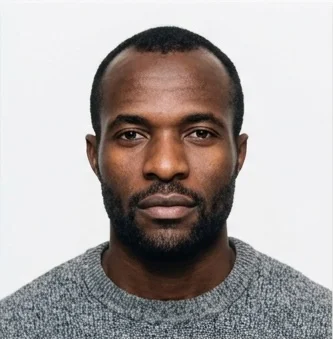
PhotoGov automatically applies all official US Department of State and USICS requirements to your original photo. The final image is ready for submission and doesn’t require any adjustments from you. Below are the key technical parameters of your final green card photo from PhotoGov.
For a full overview of official standards, please see our Green Card Photo Requirements Guide.
Parameter | Your Final Photo |
Photo size | 2 x 2 inches |
Head size | 1-1⅜ inches (25-35 mm), 50-69% of the image |
Background | Plain, white/off-white |
File format | JPEG / Printable PDF |
Resolution | High‑resolution digital file at 600 DPI |
Head positioning | Automatically centered |
Color | Full color |
Face visibility | Fully visible, no retouching |
Submission | Ready to be presented in person at the consular interview / Included with USCIS filing for permanent residency card renewals |
Your photo is processed in a private session in a secure environment. Facial features are never altered — the tool only resizes, crops, and replaces the background. If you want extra reassurance, optional Human Verification is available at checkout.
Green Card Photos That Pass the Checks
Green Card Photos That Don’t Pass the Checks
Why Use the PhotoGov Green Card Photo Tool
Convenience
Intuitive and fast — upload a selfie and get a print-ready photo for a green card in under 30 seconds
Compliance-Aligned Output
Designed to meet the current U.S. Department of State and USCIS specifications for green card applicants
Availability
No retakes in studios — make a green card photo from your phone in any browser
Extra Assurance
Optional Human Verification by an in-house compliance specialist
Secure Processing
Your image is processed in a private session and never shared with third parties
Our platform is designed to align with the U.S. Department of State and USICS photo rules. Final photo acceptance is at the discretion of the consular officer or USCIS adjudicator.
If your photo is rejected due to technical issues on PhotoGov's side, we provide a free retake or a full refund.
PhotoGov & the Official Green Card Photo Standards
PhotoGov is a green card photo tool designed to convert a regular selfie into an interview-ready green card photo that meets the U.S. Department of State standards for immigration photographs. It automatically applies all key parameters to your original selfie — 2 × 2-inch (51 × 51 mm) dimensions, white/off-white background, head height of 1–1 ⅜ inches from chin to crown (50-69% of the frame), downloadable as a print-ready file. All photos produced with PhotoGov are also aligned with the international biometric photo standards set out in the International Civil Aviation Organisation (ICAO) Document 9303. The final acceptance remains at the full discretion of the issuing authority.
To ensure ongoing compliance, our internal green card photo template is reviewed by our compliance team every eight weeks, following the U.S. Department of State and USCIS photo guidelines, and a broader set of forms — including I-485, I-90, I-130A, and N-400 (naturalization).
The green card interview is a high-priority step, so you can add the Human Verification service, where a senior compliance specialist manually reviews your image and provides expert feedback before submission.
For other US immigration and travel photo services, see our dedicated tools: US Passport Photo Maker, US Visa Photo Tool, DV Lottery Photo Tool.
Frequently Asked Questions
PhotoGov.net strictly adheres to the global regulations for ID photos.
PhotoGov is an independent service. We are not affiliated with any government, embassy, or consulate. All information on this page is provided for guidance only and does not constitute legal advice.
Official Government Sources
Green Card Photo Requirements: The U.S. Department of State — Travel
Green Card Photo Template, Example: The U.S. Department of State — Travel
Immigrant Visa Process: U.S. Department of State — Travel
Photo Requirements for USCIS Benefits: U.S. Citizenship and Immigration Services
Biometric Regulations for International ID Documents: International Civil Aviation Organization (ICAO) Document 9303
22 CFR §42.33 — Immigrant Visa Issuance: Code of Federal Regulations
Immigrant Visa Photo Requirements: U.S. Department of State — Travel
Other Documents — US ID Photos
United States
30 doc.
- Baby Passport Photo
- CIBTvisas visa photo (any country)
- CVS photo
- Digital Passport Photo
- Travisa visa photo (any country)
- US Citizenship (naturalization) 2x2 inch (51x51 mm)
- US Electronic Diversity Visa Lottery (600x600 px, 2x2 inches, white bg)
- US Employment Authorization 2x2 inch (51x51 mm)
- US Green Card (Permanent Resident) 2x2
- US NFA ATF form 2x2 inch
- US NY Gun License 1.5x1.5 inch
- US NY MTA Metrocard for Seniors
- US Passport 2x2 inch (51x51 mm)
- US Veteran ID Card 2x2 inch
- US Visa 2x2 inch (600x600 px, 51x51mm)
- US passport card 2x2 inch
- USA CCHI ID badge 3x3 inch
- USA FOID 1.25x1.5 inch
- USA Form I-130 2x2 inch
- USA Nursing License 2x2 inch
- USA PADI certification card 45x57 mm (1.75x2.25 inch)
- USA Re-entry Permit 2x2 inch
- USA SAT 2x2 inch
- USA advance parole 2x2 inch
- USA bar examination 300x300 pixels
- USA crew visa 2x2 inch
- USA welding certificate 2x2 inch
- Visa Headquarters visa photo (any country)
- VisaCentral visa photo (any country)
- VisaHQ visa photo (any country)
Service provided by Y VISION TECHNOLOGIES LLP · Stoney Works 8 Stoney Lane, London, England, SE19 3BD · Terms · Refund policy · Contact
We value your Privacy
We use cookies to enhance your browsing experience, serve personalized ads or content. By clicking “Accept All”, you consent to our use of cookies.