Make a Malaysia eVisa Photo Online for Free — Ready in 30 Seconds
Applying for a Malaysia eVISA? Your photo has to meet the official standard before the portal will accept your application. Take a selfie on your phone, and our online visa photo maker produces a submission-ready Malaysia eVisa photo — no studio appointment required.
No studio · No app · 30 seconds
We value your Privacy
We use cookies to enhance your browsing experience, serve personalized ads or content. By clicking “Accept All”, you consent to our use of cookies.
PhotoGov is an independent service. We are not affiliated with any government, embassy, or consulate. All information on this website is based on official government requirements and verified primary sources. Final acceptance is determined solely by the issuing authority.
Convert Your Selfie into a Malaysia eVisa Photo Now
Convert your selfie into an eVisa photo by simply uploading your portrait to our visa photo maker. Follow the on-screen instructions below to get a submission-ready digital photo in under a minute.
Get photo for: Malaysia eVisa online application 35x50 mm
Instructions:
How to take a good photo?


1/7 Image format
Photo must be in color. Taken within the last 6 months.
How to take a good photo?
1/7 Image format
Photo must be in color. Taken within the last 6 months.
ID & Passport Photo Tool. Your personal data is processed in accordance with security and privacy standards.
If you need assistance, don’t hesitate to contact our Support team, which is always there to help.
How Our Malaysia eVisa Photo Maker Works
PhotoGov processes your uploaded selfie into a fully compliant Malaysia eVisa photo. The tool sets the 35 × 50 mm dimensions, positions and centres your head, applies the required plain white background, and saves the result as a JPEG under the eVISA portal’s 100 KB limit — without altering your facial features. Optional extras, including Human Verification and a casual-to-formal clothing change, can be added before you download the final photo.
Photo Upload
Take a selfie and upload it to PhotoGov
Processing
Wait while automatic adjustments are applied
Service Selection
Add Human Verification or bundle other services
Download
Get a Malaysia eVisa photo ready to upload or print
Written by Olia Potiagaeva, Managing Editor Reviewed by the PhotoGov Editorial Team★ 4.8 / 5.0 GoogleChecked against official government requirements
On THIS PAGE:
- Convert Your Selfie into a Malaysia eVisa Photo Now
- How Our Malaysia eVisa Photo Maker Works
- What is a Malaysian eVisa Photo?
- Your Final Malaysia eVisa Photo from PhotoGov
- Malaysia eVisa Photo Examples that Pass the Checks
- Malaysia eVisa Photo Examples that Don’t Pass the Checks
- Why Make Your Malaysia eVisa Photo with PhotoGov
- PhotoGov and the Malaysia eVisa Photo Standard
- Frequently Asked Questions
- Official Government Sources
- Other Documents — Malaysia ID Photos
What is a Malaysian eVisa Photo?
The Malaysia eVisa Photo editor crops your image to the selected format and positions the head within the frame. It sizes the picture you upload without changing your facial features, and the built-in photo checker tests the file against the selected format. The selected format is 35 x 50 mm. Before you submit the photo, check the photo instructions for the application you are completing.
The biometric photo required for a Malaysia eVISA application, and also accepted for a sticker visa submitted at a Malaysian mission.
Prepared by PhotoGov as a correctly sized, application-ready file aligned with the Immigration Department of Malaysia and the ICAO Doc 9303 standard.
Ready for digital upload to the eVISA portal, or for professional printing for an in-person submission.
Your Final Malaysia eVisa Photo from PhotoGov
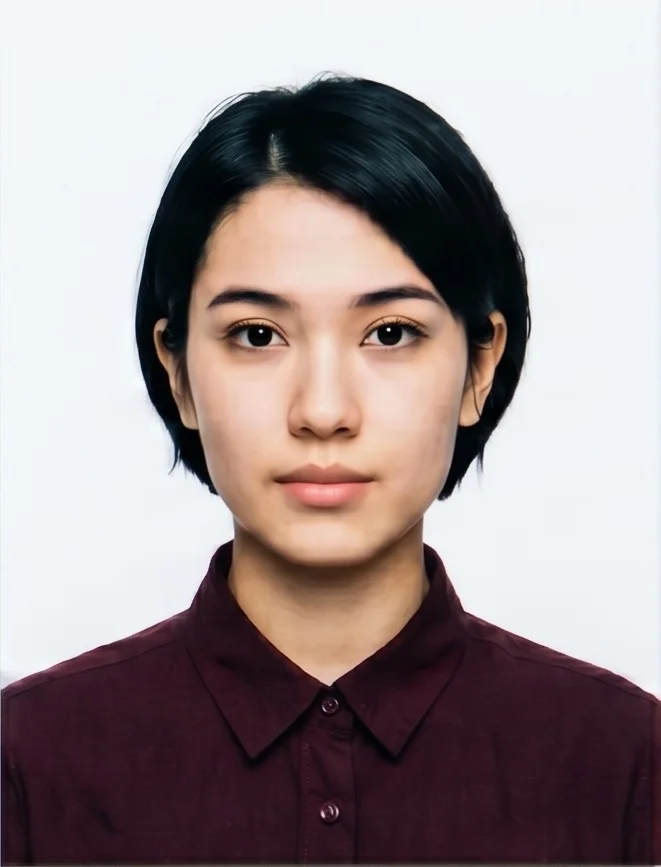
PhotoGov automatically applies every official eVisa photo requirement to your selfie, so the final image is ready to submit without any edits. Here are the exact specifications of your final photo from PhotoGov.
Parameter | Your Final Photo |
Photo size | 35 × 50 mm / 3.5 × 5.0 cm / 413 × 591 px |
Head height | 30–35 mm (chin to crown) |
Background | Plain white |
File format | JPEG / Printable PDF |
Resolution | High-resolution image at 600 DPI |
Head positioning | Automatically centred |
Colour | Full colour |
Face visibility | Fully visible, no retouching |
Submission | Ready for the online eVISA upload / Printable for embassy submission |
Your photo is processed in a private session in a secure environment. Facial features are never altered — the tool only resizes, crops, and replaces the background. If you want extra reassurance, optional Human Verification is available at checkout.
Malaysia eVisa Photo Examples that Pass the Checks
Malaysia eVisa Photo Examples that Don’t Pass the Checks
Why Make Your Malaysia eVisa Photo with PhotoGov
Convenience
Photos accepted for online and in-person submissions
Compliance-Aligned Output
Designed to meet the current Immigration Department of Malaysia and ICAO 9303 requirements
Availability
No registration, installation, or studio visits — make a Malaysia eVisa photo from your phone in any browser
Extra Assurance
Optional Human Verification by an in-house compliance specialist
Secure Processing
Your image is processed in a private session and never shared with third parties
If your photo is rejected due to technical issues on PhotoGov’s side, we provide a free retake or a full refund.
PhotoGov and the Malaysia eVisa Photo Standard
Malaysia eVisa photo requirements are set by the Immigration Department of Malaysia and based on the ICAO Doc 9303 biometric standard. PhotoGov follows these specifications and updates its template whenever the official rules change. The final eVisa photo that you download adheres to all official requirements by the Malaysian and international authorities. Malaysian passports use a pure white background and their own portrait size; see the passport photo requirements in Malaysia for the full specification.
A Malaysia eVisa photo produced by PhotoGov is a 35 × 50 mm image with a plain white background, properly cropped, proportioned, and saved as a JPEG for a seamless application. Only the size, crop, and background are adjusted — your facial features are never reshaped or retouched.
For a time-sensitive eVisa application, Human Verification provides an added safeguard: a senior PhotoGov specialist reviews your Malaysia eVisa photo against the latest requirements and gives an acceptance-likelihood assessment before you submit.
Government ID-issuing authorities prohibit digital alterations of ID photographs. Our platform provides sizing and cropping services only and does not modify or enhance images.
Frequently Asked Questions
PhotoGov works entirely in a web browser on a phone or computer. Select the Malaysia eVisa option, upload a recent selfie, and the size, crop, head position, and white background are applied automatically, producing a finished Malaysia eVisa photo in 30 seconds. No software installation, registration, or account creation is required — the visa-making tool works right in your browser, on any device.
Yes. The process is designed for a phone camera: take a selfie in even light against a plain wall, and the tool handles the framing, head position, and white background. A handheld shot at eye level works well — keep it sharp and free of shadows, and use a dedicated online visa photo maker to turn it into a compliant Malaysia eVisa photo.
The eVISA system accepts only the correct file type and size, which is the most common reason uploads fail. Your Malaysia eVisa photo produced with PhotoGov is saved as a JPEG and compressed within the portal’s limit, so it is accepted without any further resizing or converting on your part.
Yes. You receive two versions of the same compliant image: a digital JPEG file for the online eVISA and a print-ready PDF sheet version. Upload the digital file to the portal, and keep the printable copy for your records or if you need a hard copy.
Yes. PhotoGov is a free Malaysia eVisa photo maker — upload a selfie and download a compliant photo in seconds. The digital Malaysia eVisa photo is free in all countries outside the U.S., U.K., and Canada; affordable pricing applies and covers additional downloads, the printable file, and options such as a casual-to-formal clothing change.
Upload your photo to an online visa photo maker and select the Malaysia eVisa option — the tool crops it to the 35 × 50 mm frame, positions your head correctly, and changes the background to plain white so you avoid any manual adjustments. The file is saved as a JPEG and is ready for upload to the portal.
A strong free tool does more than crop: it applies the full Malaysia eVisa template — the 35 × 50 mm size, the correct head position, a plain white background, and a JPEG under the portal’s 100 KB limit. PhotoGov is built to follow all official Immigration Department of Malaysia specifications, runs in any browser, on any device, and is free in all countries outside the U.S., U.K., and Canada. It offers add-on options such as Human Verification and a clothing change for a small additional fee.
Yes. The PhotoGov’s automatic check highlights the most common issues — off-centre framing, an uneven background, or poor lighting — before you download. For added certainty, optional Human Verification provides a manual review of your Malaysia eVisa photo with an acceptance-likelihood assessment. If a file is rejected due to a technical fault on our side, a free retake or refund is provided.
Yes. Open photogov.net in the phone browser, upload a picture and download the finished file. No app is required; the PhotoGov app for iOS and Android does the same job if you prefer it.
No. PhotoGov applies the selected format automatically: the tool sets the frame and the head position for you. Before you submit the photo, check the photo instructions for the application you are completing.
PhotoGov.net strictly adheres to the Global regulations for ID photos.
Official Government Sources
Malaysia eVisa Photo Requirements: Immigration Department of Malaysia (Malaysia eVISA)
Malaysia National eVISA Portal: malaysiavisa.imi.gov.my
Immigration Department of Malaysia: Jabatan Imigresen Malaysia
Biometric Regulations for International ID Documents: International Civil Aviation Organization (ICAO) Document 9303
Other Documents — Malaysia ID Photos
Malaysia
12 doc.
- Malaysia APEC Business Travel Card 35x50mm (3.5x5 cm)
- Malaysia EMGS 35x45 mm
- Malaysia EMGS educationmalaysia.gov.my online
- Malaysia Passport 35x50 mm blue background
- Malaysia Passport 35x50 mm white background
- Malaysia Visa 35x45 mm blue background
- Malaysia Visa 35x45 mm white background
- Malaysia Visa 35x50 mm blue background
- Malaysia Visa 35x50 mm white background
- Malaysia driving license 25x32 mm
- Malaysia eVisa online application 35x50 mm
- Malaysia expat 99x142 pixels blue background
Service provided by Y VISION TECHNOLOGIES LLP · Stoney Works 8 Stoney Lane, London, England, SE19 3BD · Terms · Refund policy · Contact
We value your Privacy
We use cookies to enhance your browsing experience, serve personalized ads or content. By clicking “Accept All”, you consent to our use of cookies.