Make Your New Zealand Visa Photo Online for Free — Ready in 30 Seconds
Applying for a New Zealand visa? Make your New Zealand visa photo online for free with PhotoGov. Upload a photo taken on your phone, and our NZ visa photo editor will crop and resize it for an Immigration Online application or prepare a printable 35 × 45 mm version for a paper form. It works on iPhone, Android, and any browser and takes about 30 seconds — no app or editing skills required.
Two free ID photos per day, depending on your location · Paid photos from $6.90 · No app · No studio · 30 seconds
We value your Privacy
We use cookies to enhance your browsing experience, serve personalized ads or content. By clicking “Accept All”, you consent to our use of cookies.
PhotoGov is an independent service. We are not affiliated with any government, embassy, or consulate. All information on this website is based on official government requirements and verified primary sources. Final acceptance is determined solely by the issuing authority.
Free NZ Visa Photo Editor — Make Your Photo Now
Upload a selfie taken on your phone or camera. Our New Zealand visa photo converter crops and resizes it for the format you choose: a 3:4 JPG for Immigration Online or a printable 35 × 45 mm file for a paper application. Select the correct route in the tool and follow the steps below.
Get photo for: New Zealand Visa Offline
Instructions:
How to take a good photo?


1/7 Image format
Photo must be in color. Taken within the last 6 months.
How to take a good photo?
1/7 Image format
Photo must be in color. Taken within the last 6 months.
ID & Passport Photo Tool. Your personal data is processed in accordance with security and privacy standards.
If you need assistance, don't hesitate to contact our Support team, which is always there to help.
How to Make a New Zealand Visa Photo Online for Free
Our free NZ visa photo editor checks your source photo and applies the required crop, head proportions, dimensions, and file settings for the selected format. It does not retouch facial features or add filters. Choose Human Verification if you want an additional manual review, then download your digital or printable New Zealand visa photo.
Photo Upload
Upload a clear photo taken on your phone or camera
Service Selection
Add Human Verification or bundle other services
Processing
Wait while automatic resizing and cropping are applied
Download
Get your New Zealand photo in a digital or a printable format
Written by Olia Potiagaeva, Managing Editor Reviewed by the PhotoGov Editorial Team★ 4.8 / 5.0 GoogleChecked against Immigration New Zealand requirements
Checked against 8 official parameters
Every file is validated before you download it.
→ Compliance checkRequirements re-checked every 8 weeks
Against the Immigration New Zealand specification, so the template never falls behind a rule change. Last checked: 14.09.2026.
→ Official Government SourcesOn THIS PAGE:
- Free NZ Visa Photo Editor — Make Your Photo Now
- How to Make a New Zealand Visa Photo Online for Free
- What Is a New Zealand Visa Photo?
- Your Final New Zealand Visa Photo from PhotoGov
- New Zealand Visa Photos That Pass the Checks
- New Zealand Visa Photos That Don't Pass the Checks
- Why Use PhotoGov for Your New Zealand Visa Photo
- What PhotoGov Users Say
- PhotoGov and Immigration New Zealand Standards for Visa Photos
- Frequently Asked Questions
- Official Government Sources
- Other Pages — NZ ID Photos
What Is a New Zealand Visa Photo?
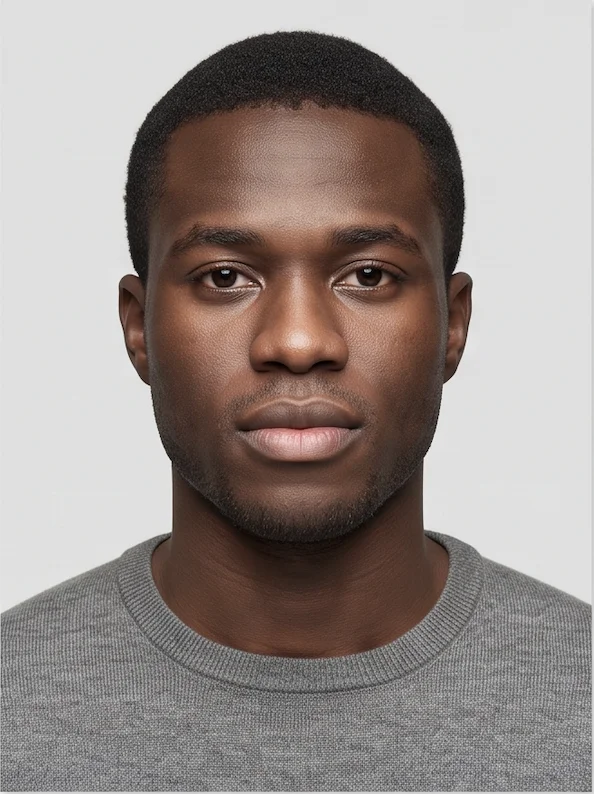
The New Zealand Visa Photo editor crops your image to the selected format and positions the head within the frame. It sizes the picture you upload without changing your facial features, and the built-in photo checker tests the file against the selected format. The selected format is 35 x 45 mm. Before you submit the photo, check the photo instructions for the application you are completing.
A biometric photo for a New Zealand visa application through Immigration New Zealand.
Prepared as a 3:4 JPG or JPEG for an Immigration Online application.
Downloadable as a digital JPEG for online submissions or a printable PDF when the visa application must be submitted on paper.
Your Final New Zealand Visa Photo from PhotoGov
PhotoGov automatically applies all official Immigration New Zealand standards to your original photo. The final image is ready for submission and doesn't require any adjustments from you. Below are the key technical parameters of your final NZ visa photo from PhotoGov.
For a full overview of official standards, please see our New Zealand Visa Photo Requirements Guide.
Parameter | Your Final Photo |
Photo size | 35 × 45 mm (3.5 x 4.5 cm) / 900 × 1,200 - 2,250 × 3,000 pixels |
Head size | 70–80% of the frame |
Background | Plain, light-coloured |
File format | JPEG / printable PDF |
Resolution | High-resolution digital file |
Head positioning | Automatically centred |
Colour | Full colour |
Face visibility | Fully visible, no digital alteration |
Submission | Digital file online uploads / Printable file for paper applications |
Your photo is processed in a private session in a secure environment. Facial features are never altered — our digital passport photo maker only resizes, crops, and replaces the background. If you want extra reassurance, optional Human Verification is available at checkout.
New Zealand Visa Photos That Pass the Checks
New Zealand Visa Photos That Don't Pass the Checks
Why Use PhotoGov for Your New Zealand Visa Photo
Convenience
Prepare an application-ready digital or printable New Zealand visa photo
Compliance-Aligned Output
Designed to meet the current Immigration New Zealand standards for visa photos
Availability
No retakes in studios — create NZ visa photo from your phone in any browser, no visit required
Extra Assurance
Optional Human Verification by an in-house compliance specialist
Secure Processing
Your image is processed in a private session and never shared with third parties
If your photo is rejected due to technical issues on PhotoGov's side, we provide a free retake or a full refund.
What PhotoGov Users Say
“This is an awesome tool for anyone who knows next to nothing about photo editing to get themselves up and running with making their photos turn out in acceptable formats across multiple government agencies and countries in seconds. The better part of it is that, it is free!”
“Reasonable pricing photo is very professional it totally clears up any background shadows,it’s way simpler than me guessing.Ive used it twice but I do have my own software to print 2x2 photos so its easier for me that way.”
“I'm very pleased with the services. While other companies charge $20 for this simple thing that takes no more than 10 s, they do it for free. Big UPS”
PhotoGov and Immigration New Zealand Standards for Visa Photos
PhotoGov maintains a dedicated template for New Zealand visa photos, built around Immigration New Zealand's published specifications and kept aligned with them for both application routes. Select "Immigration Online" or "paper application" in the tool, and PhotoGov applies the correct technical profile automatically — the right pixel dimensions and file-size range for a digital upload, or the correct 35 × 45 mm layout for a printed photo — so you don't need to track the exact numbers yourself.
Every template also reflects INZ's requirement for a natural, unaltered portrait: PhotoGov crops and resizes a suitable source photo without AI enhancement, filters, beautification, background replacement, facial retouching, object removal, or changes to colour, brightness, contrast, or sharpness. If the source image has unsuitable lighting, focus, pose, or background, the fix is a new photo, not digital editing.
Optional Human Verification adds a manual review of the source and prepared file by a PhotoGov compliance specialist, checking it against the current INZ template before you download it — though final acceptance always remains at the discretion of Immigration New Zealand.
Immigration New Zealand does not accept AI-enhanced or digitally altered visa photos. PhotoGov prepares a suitable source image by cropping and resizing it; it does not change facial features or guarantee acceptance. The final decision is at the full discretion of Immigration New Zealand.
Frequently Asked Questions
Yes. Upload a suitable photo to PhotoGov and choose “New Zealand” → “Visa Photo.” The New Zealand photo editor will crop and resize your original portrait for digital upload or printing. The service is free outside the U.S., U.K., and Canada where affordable pricing applies.
Ask another person to take the picture — the result will be more reliable. Stand about 0.5 metres in front of a plain, light-coloured background and position the camera about 1.5 metres away at eye level. Use even light, look directly at the camera with a neutral expression, and turn off filters and portrait effects. Upload the best photo to an online NZ passport photo editor, and download a ready file in a printable or digital format.
Yes, with the help of an NZ visa photo editor. Upload a good-quality headshot taken in daylight, looking directly into the camera with a neutral expression, with head and shoulders square in the shot against a light plain background. The online NZ photo checker will analyze your original photo and adjust it to the NZ visa photo specs, producing a file for a digital or in-person submission.
Yes. PhotoGov is an online platform with a built-in template for the NZ visa photo. It checks the source and prepared file for dimensions, head framing, file format, and other settings, and then automatically adjusts your original headshot to these specs. Optional Human Verification adds a manual review by a senior compliance specialist that checks your final photo and provides compliance feedback. Please note that the final acceptance is always at the discretion of Immigration New Zealand.
To convert a photo to New Zealand visa size, upload the original image to an online New Zealand Visa maker such as PhotoGov. For an online application, it prepares a correct 3:4 JPG file within the 512 KB–3 MB range; for a paper application, it prepares a printable PDF file with 35 × 45 mm images. No manual cropping or additional editing is required.
No. NZeTA and online visa applications follow related portrait-quality rules but use different application flows. The official NZeTA mobile app may capture the photo directly. Select the exact New Zealand visa or NZeTA profile you are applying for instead of assuming one file is interchangeable.
Yes. The child must be alone in the picture, with no adult, hand, toy, or pacifier visible. Use a clear, natural source photo. If the image cannot meet the rules without removing something digitally, take a new picture.
Yes. Select the paper visa format to receive a printable PDF file with 35 × 45 mm photos. Print it on professional photo paper at home or at a copy shop.
Human Verification can help ensure that the photo you’re planning to submit with your application matches all key specifications for your visa type. Add this service at checkout, and our senior compliance specialist will manually review your photo and provide feedback on its compliance. If the reviewer identifies a problem, a retake will be recommended. Please keep in mind that none of the online visa photo-making tools can guarantee acceptance — it is at the full discretion of Immigration New Zealand.
Check the exact INZ error first, and act accordingly. If it concerns lighting, background, focus, pose, or facial visibility, retake and upload a new photo. Don’t edit an old one! If it concerns technical file errors, save the file in the required format and re-upload. If the photo has been produced with PhotoGov and rejected, contact our Support team with the message describing the problem, and we will come back to you with a solution.
Yes. You can use PhotoGov’s New Zealand visa photo maker for a visitor, student, or work visa. Simply upload a good-quality original headshot to the photo-making tool, and it will adjust it to all NZ visa photo specs. Download an application-ready photo in the required digital JPEG or printable PDF format.
Any modern mobile or desktop browser — Safari, Chrome, Edge, Firefox — on iPhone, Android, Mac, or Windows. No app download or account required.
Yes. PhotoGov handles uploaded information under its current Security and Privacy policies. The Privacy Policy explains what data is collected, how it is used, when it may be disclosed, and how long it is retained.
No. PhotoGov is an independent photo-preparation service. It does not submit, assess, approve, or issue a New Zealand visa or NZeTA. Immigration New Zealand makes the final decision.
Yes. Open photogov.net in the phone browser, upload a picture and download the finished file. No app is required; the PhotoGov app for iOS and Android does the same job if you prefer it.
No. PhotoGov applies the selected format automatically: the tool sets the frame and the head position for you. Before you submit the photo, check the photo instructions for the application you are completing.
PhotoGov.net strictly adheres to the Global regulations for ID photos.
Official Government Sources
Checked against Immigration New Zealand photo requirements: https://www.immigration.govt.nz/process-to-apply/applying-for-a-visa/applying-online/uploading-documents-and-photos/visa-and-nzeta-photos/ · Last checked: 14.09.2026
Acceptable Photos for a Visa or NZeTA: Immigration New Zealand
Taking Acceptable Visa Photos — Technical Requirements: Immigration New Zealand (PDF)
Fixing Errors on the Upload: Immigration New Zealand
Biometric Regulations for International ID Documents: ICAO Document 9303
Other Pages — NZ ID Photos
New Zealand
13 doc.
- Kiwi Access Card 35x45 mm
- New Zealand APEC Business Travel Card
- New Zealand Certificate of Identity / Refugee Travel Document 35x45 mm
- New Zealand Firearms Licence 35x45 mm
- New Zealand NZETA 540x720 px
- New Zealand Passport Offline
- New Zealand Passport Online 900x1200 px
- New Zealand SeaCert 1650x2200 px online
- New Zealand SeaCert 35x45 mm offline
- New Zealand Visa Offline
- New Zealand Visa online 900x1200 px
- New Zealand citizenship 35x45 mm
- New Zealand citizenship 900 x 1200 pixels
Service provided by Y VISION TECHNOLOGIES LLP · Stoney Works 8 Stoney Lane, London, England, SE19 3BD · Terms · Refund policy · Contact
We value your Privacy
We use cookies to enhance your browsing experience, serve personalized ads or content. By clicking “Accept All”, you consent to our use of cookies.