US Passport Photo Requirements 2026: Expert-Verified and Updated
Table of contents:
- 11 Essential US Passport Photo Requirements: Checklist
- Acceptable US Passport Photo Examples
- Unacceptable US Passport Photo Examples
- Digital vs Printed US Passport Photos Explained
- Where to Get a US Passport Photo?
- Passport Photo in the USA: Service Comparison
- How to Take Passport Photo at Home
- US Passport Photo Rules for Children
- Common Reasons for a US Passport Photo Rejection
- Department of State Photo Guidance
- Frequently Asked Questions
- Other Pages — US ID Photos
- Official Government Documentation Sources
A US passport photo is a biometric image governed by strict Department of State standards: 2 × 2 inches for printed photos, plain white background, taken within the past 6 months, neutral facial expression, and other essential parameters. To avoid rejection during new passport applications or renewals, the photograph must meet all specifications set by the authorities. This guide covers the 2026 U.S. passport photo requirements by submission channel. Our US passport size photo guide covers preparing a printable photo; check the separate instructions if you are renewing online.
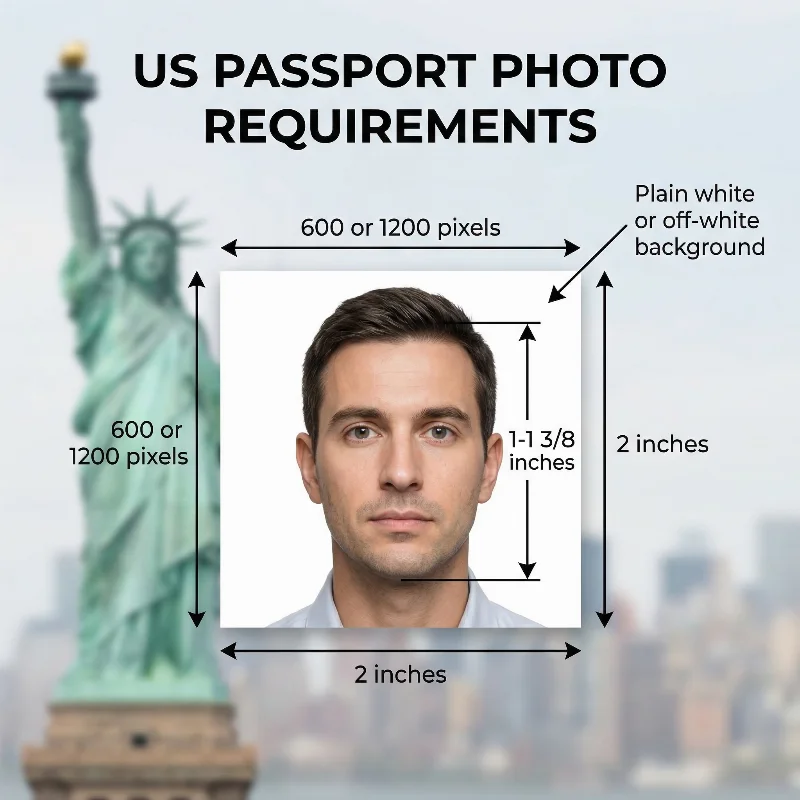
Source: The US Department of State
11 Essential US Passport Photo Requirements: Checklist
The US passport photo requirements are defined by the US Department of State (Bureau of Consular Affairs — Travel) and are based on international biometric standards of the International Civil Aviation Organization (ICAO) Document 9303 for machine‑readable travel documents worldwide.
Below is a detailed list of technical and biometric specifications that every US passport photo must meet.
Requirement | Details |
1. Number of Photos | One passport picture is required per submission. |
2. Recency | The photo must be taken within the last six months of the application and accurately reflect the applicant's appearance (general passport photo requirements). |
3. US Passport Photo Size Requirements | 2 × 2 inches (51 × 51 mm) for printed photos. For online renewal, the U.S. Department of State does not set a pixel size; PhotoGov delivers a JPEG of 600 × 600 pixels. The head size, from chin to crown, measures between 1 and 1⅜ in (25–35 mm). The U.S. visa and driver's license photos follow the same size guidelines. |
4. Color | A photo must be in color, naturally reflecting skin tone and hair color. |
5. Background | Plain white or off-white, free of shadows, textures, or patterns. |
6. Positioning and Framing | The head and shoulders must be square to the camera, and the applicant must face the camera directly, with the face centered and fully visible. |
7. Facial Expression | A neutral facial expression with both eyes open and the mouth closed is required for a passport picture. Keep a neutral expression or a natural closed-mouth smile; frowning and raised eyebrows are not permitted. The face should appear relaxed and natural, without exaggerated expressions or shadows caused by movement. |
8. Attire, Head Covering, and Accessories | Everyday clothing is required; uniforms and camouflage patterns are prohibited. Your face must be fully visible, evenly lit, and free of shadows or obstructions. Head coverings are permitted only for religious or medical reasons. For religious head coverings, submit a signed statement confirming that the item is religious attire worn daily in public. For medical head coverings, submit a signed statement from your physician. |
9. Glasses | Glasses are not permitted, including prescription and tinted lenses. If the applicant must wear glasses for medical reasons or has recently undergone eye surgery, a signed statement from a licensed medical professional must be provided. |
10. Print Quality | For in-person submissions, the image must be sharp and well-focused, free from blur, pixelation, or digital noise. The photo must be professionally printed on matte or glossy photo paper. |
11. US Passport Photo Digital Requirements | For online passport renewals, the digital passport photo must be a JPG, JPEG, PNG, HEIC, or HEIF file, sized from 54 KB to 10 MB. Digital alterations, including filters, AI‑generated edits, or other artificial enhancements, are not acceptable. Do not digitally correct red-eye; instead, take a new photo in natural light. |
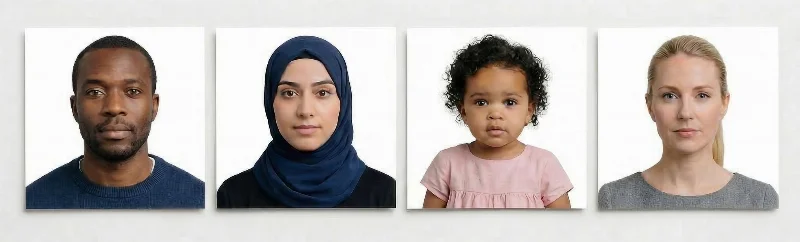
Acceptable US Passport Photo Examples
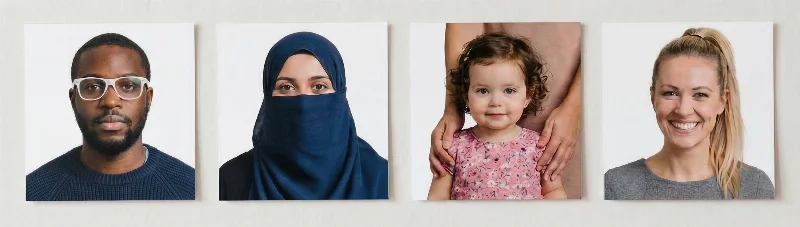
Unacceptable US Passport Photo Examples
Digital vs Printed US Passport Photos Explained
Your application type determines the passport photo format that you submit:
First-Time Passport Application
First-time applicants apply in person (Form DS-11) and submit one printed color photo. See the table below for specifications.
US Passport Renewal Photo Requirements
Renewal applicants choose between online renewal (digital upload) or mail-in renewal (Form DS-82 with one printed photo). See the table below for the US passport online renewal photo requirements.
Both formats share the same photo standards: plain white or off-white background, neutral expression, eyes open, no glasses, taken within the past six months. Technical specs for digital and printed US passport photos differ and are listed in the table below. The passport photo size technical guide explains how the pixel and file size limits are applied at upload.
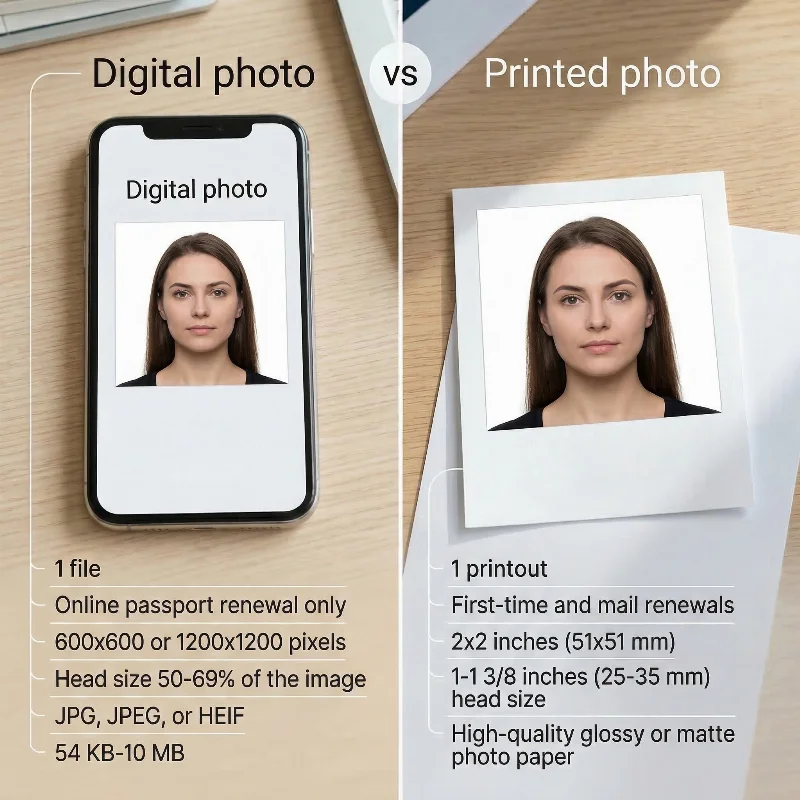
Requirement | Digital Photo | Printed Photo |
Use case | Online renewal only (DS-82) | First-time (DS-11) and mail renewal (DS-82) |
Quantity | 1 file | 1 printout |
Dimensions | Not set by the U.S. Department of State; PhotoGov file: 600 × 600 pixels | 2 × 2 inches (51 × 51 mm) |
Head size | Not set (crop in the application) | 1-1⅜ inches (25-35 mm) from chin to crown |
Format | JPG, JPEG, PNG, HEIC or HEIF | Photo-quality paper |
File/Print specs | 54 KB-10 MB, no compression artifacts | Gloss or matte finish |
Submission | Upload via online portal | In-person or by mail |
Where to Get a US Passport Photo?
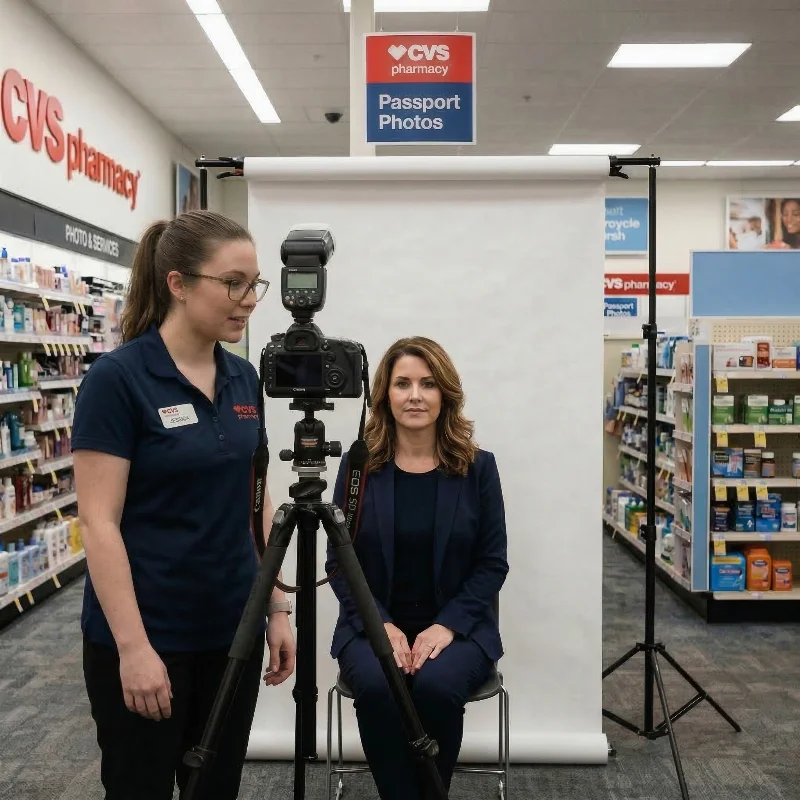
A US passport photo can be taken in many same-day passport locations — from pharmacies and shipping centers to post offices and retail stores. You can Google “Where to get passport photos near me,” and choose the option that best fits your schedule and budget.
Still, more and more people today prefer to create their own passport photo online with a passport photo maker like PhotoGov, as it's faster and easier — you don't need to travel or book an appointment.
Below are some of the most popular offline locations for passport applicants in the United States.
Pharmacies
Large pharmacy chains such as Walgreens, CVS, and Rite Aid offer quick passport services. Pictures are usually ready within minutes and meet all U.S. Department of State guidelines.
Shipping Centers and Post Offices
FedEx and UPS offices often take and print ID photos along with their shipping services. It’s convenient if you’re already stopping by to send a package or renew your passport. Plus, the staff are usually familiar with all ID requirements.
Photo Booths at Retail Stores
You can find photo booths in popular retail chains such as Walmart or Costco. It's an affordable way to take ID photos and have them printed on the spot, following all government standards.
Professional Photographers and Studios
Professional photographers and commercial studios can create a perfect passport photo with excellent lighting, background, and print quality that meet all government requirements. However, it is the most expensive and time-consuming, requiring travel, scheduling, and waiting for the final prints.
Online Photo Making Tools
An online passport photo maker is a convenient and budget-friendly way to prepare a passport photo from the comfort of your home or office. All you need to do is take a selfie, upload it to the passport photo editor, set your parameters, and download the image.
Now that you know where to get passport photos, let’s look at each option and weigh its pros and cons.
Passport Photo in the USA: Service Comparison
Service | Time to Get a 2x2 Photo | Pricing | Chance of Approval |
Pharmacies (Walgreens, CVS), Shipping Centers (UPS, FedEx), Post Offices | Moderate. Around 15-20 minutes, an in-store visit is required | Around $15-$20 for two prints | High to moderate |
Photo-Booths at Retail Stores (Walmart, Costco) | Fast. 10-20 minutes, an in-store visit is required | Around $5-$10 for two prints | Moderate |
Professional Photographer or a Commercial Studio | Slow. From 1-2 hours to a couple of days. | Around $30-100 | High |
PhotoGov Passport Photo Maker | Instant. Under 30 seconds, from home, 24/7 | $6.90 for a digital file in the US; two free ID photos per day, depending on your location | High |
How to Take Passport Photo at Home
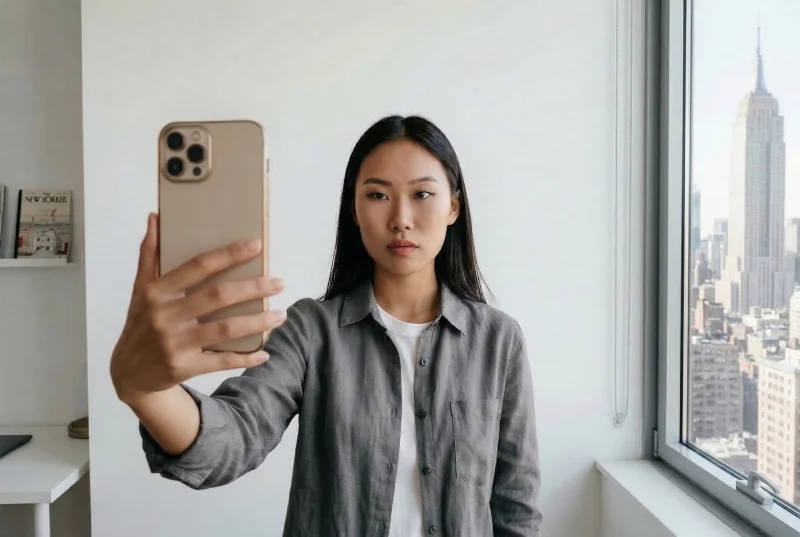
You can save time and money and take a perfect US passport photo at home. All you need is your iPhone and good lighting. No studio visit is required — follow these steps to get a 2x2 picture that meets state requirements. Our walkthrough explains taking a passport photo at home step by step, without any third-party app. Take your photo against a plain, light wall in even lighting — PhotoGov replaces it with the plain white background the U.S. Department of State requires.
Step 1. Choose a well-lit spot. Choose a bright spot near a window. Natural light gives consistent color and prevents shadows on the face or background. Turn off overhead lamps and the phone’s flash.
Step 2. Use the plain background. Ideally, stand in front of a white or off-white wall. If you don’t have one, hang a plain sheet as a backdrop. Make sure it’s smooth and even, with no folds, patterns, or objects visible behind you.
Step 3. Position the camera. Place your iPhone or Android phone at eye level, using a tripod or stable surface. Set the timer for 3 or 10 seconds. On iPhone, disable Portrait mode and HDR. Use square mode for better framing.
Step 4. Take your ID picture. Stand about 5-7 feet from the camera, keeping your head and shoulders centered in the frame. Keep your head straight toward the lens and maintain a neutral expression with both eyes open and mouth closed. Take several shots and choose the best one.
Step 5. Upload a photo to the PhotoGov passport photo maker. The tool will automatically adjust the size and proportions to meet all the US Department of State technical and biometric requirements, and deliver a ready-to-use digital or printable file.
US Passport Photo Rules for Children
US passport photos for children follow specific rules set by the Department of State. Taking a baby passport photo is a bit intimidating, but to avoid the stress of a studio visit, you can do it at home. Children must be photographed alone: adults, hands, toys, pacifiers, or other objects cannot appear in the picture. The background must be plain and light-colored, and the photo must be in focus, evenly lit, and free from shadows or strong reflections. The U.S. Department of State publishes one exception for babies: it is okay if their eyes are not entirely open.
Infants and Babies Under 1 Year
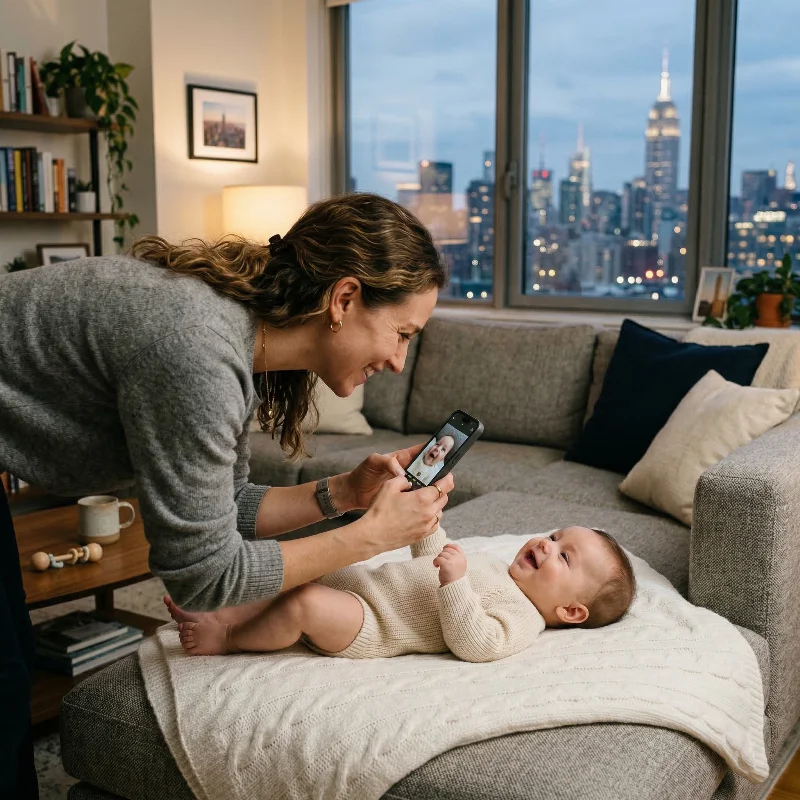
Newborns can be photographed lying on a plain, light background, with the camera positioned above to keep the face and background evenly lit. The photo must be sharp, in color, and meet all general US passport specifications for lighting, focus, and background. The baby's facial expression must be neutral; it is okay if the eyes are not entirely open. The baby must be safely positioned with no visible hands, support, or other objects in the frame.
Toddlers and Young Children (Ages 1 to 5)
If your child is 1-5 years old, they must look directly into the camera with a neutral expression, with head and shoulders square in the frame, eyes open and mouth closed. The photo has to be taken against a plain white or off-white background, free of shadows, patterns, or textures. The child must be alone in the shot, with no foreign objects or people visible.
Older Children (Ages 6 to 15)
From the age of 6, children’s passport photos are expected to follow the same standards as adult photos. The child should face the camera directly with a neutral expression or a slight closed-mouth smile, and eyes open and clearly visible. No one else, and no additional objects, may appear in the image. The background, lighting, and image quality must all comply with the general US passport photo rules.
Common Reasons for a US Passport Photo Rejection
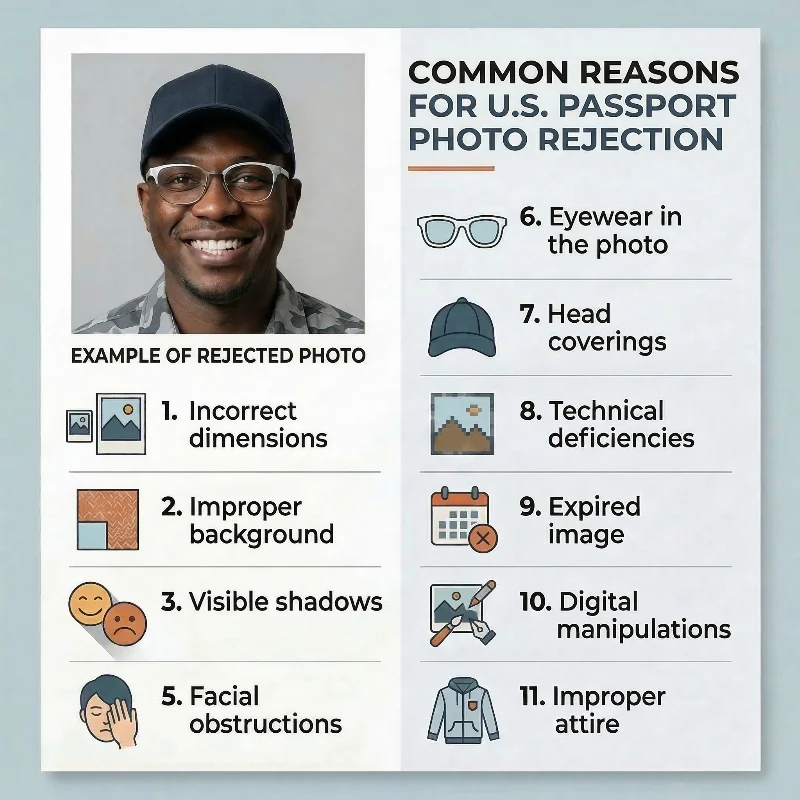
The US Department of State enforces strict biometric standards for passport photographs. Below is a list of the 12 most common mistakes that may cause a processing delay or a photo rejection.
Incorrect dimensions: The print does not measure exactly 2 × 2 inches (51 × 51 mm), or the head height falls outside the required 1-1⅜ inch (25-35 mm) range from chin to crown.
Improper background: The backdrop is not a plain white or off-white; textures, patterns, shadows, or color tints (grey, blue) are present in the shot.
Visible shadows: Shadows appear across the face, hairline, or background, typically caused by uneven lighting or standing too close to the wall.
Expression violations: The applicant smiles with an open mouth or shows teeth, frowns, or raises eyebrows.
Facial obstructions: Hair, accessories, or head coverings obscure the eyes, eyebrows, nose, or mouth; the full hairline and facial contour aren’t fully visible.
Eyewear present: Glasses of any kind are worn without a signed medical certificate.
Head coverings: Hats, caps, or scarves that aren’t worn for religious or medical reasons; permitted coverings cast shadows on facial features.
Technical deficiencies: The image is blurry, grainy, overexposed, underexposed, or pixelated; digital files aren’t submitted in JPG, JPEG, PNG, HEIC, or HEIF, and the file size doesn’t fall into the 54 KB-10 MB range.
Expired image: The photograph was captured more than six months prior to the application date.
Digital manipulations: Filters, beauty modes, portrait effects, red-eye removal and color correction are not allowed. Cropping is allowed inside the online renewal application.
Prohibited attire: Uniforms, camouflage, or attire resembling official government or military dress.
Foreign objects in baby passport photos: People, toys, supporting hands, or background objects appear in the frame.
Two of them, passport photo background errors and uneven lighting, are examined in a separate breakdown.
What to Do if Your Photo is Rejected
If the National Passport Information Center or acceptance facility rejects your photo, you must provide a replacement. For online renewals, upload a new photo with the online renewal application. For paper submissions (Forms DS-11 or DS-82), provide one new printed color photo, 2 × 2 inches (51 × 51 mm). Check the photo against the published requirements before you submit it.
If PhotoGov generated your rejected image due to service-related defects, contact Customer Support for a refund and free retake.
Department of State Photo Guidance
Our US Department of State photo guide discusses photo requirements for different applications; check the section for your document.
Frequently Asked Questions
What Are the Current US Passport Photo Requirements I Must Follow to Avoid Rejection?
To ensure acceptance, your photograph must meet these biometric standards established by the US Department of State:
Correct dimensions: The submitted printed photograph must be exactly 2 × 2 inches (51 × 51 mm), with a head height of 1-1⅜ inches (25-35 mm) measured from the bottom of the chin to the top of the head. Submit one printed color photo. For online renewal, upload one JPG, JPEG, PNG, HEIC, or HEIF file between 54 KB and 10 MB, with no compression artifacts or visible pixelation.
Compliant background: The background must be plain white or off-white, free of textures, shadows, or objects.
Even lighting: The face and background must be illuminated evenly, with no shadows across the face, hairline, or background.
Neutral expression: The applicant must keep a neutral expression or a natural closed-mouth smile, with both eyes open. Frowning and raised eyebrows are prohibited.
Unobstructed face: The full face — from the bottom of the chin to the top of the forehead and hairline — must be fully visible. Hair, accessories, and head coverings must not obscure the eyes, eyebrows, nose, or mouth.
No eyewear: All glasses, including prescription lenses, must be removed unless accompanied by a signed medical statement from a physician.
No headwear: Hats, caps, and scarves are prohibited unless worn daily for religious purposes or medical necessity (requires a doctor's statement). Permitted coverings must not cast shadows or obscure facial features.
Recent photograph: The image must have been captured within six months of the application date to reflect the current appearance.
No digital alterations: Submit a photo without filters, beauty modes, color correction, or red-eye removal. Cropping is allowed inside the online renewal application.
Everyday clothing: Regular street clothes must be worn. Uniforms, camouflage, or attire resembling official government or military dress are prohibited.
No foreign objects in photos of children: The photograph must contain no other individuals, toys, or objects.
How Can I Take a US Passport Photo at Home?
With our online photo editor, taking a passport picture is quick and effortless. You save money on studio visits and can do it anytime, as the service is available 24/7. Follow these simple steps:
Choose an existing picture or take a new photo with your device.
Select the country, and the picture type — 2x2 photo.
The tool will automatically adjust your portrait to the correct 2x2-inch size, following the U.S. Department of State guidelines.
Add optional services, such as expert verification — compliance and ID photography experts will manually verify your image.
Download your digital passport photo or the crop page as a printable PDF file.
Print it at home, or get printed copies at the nearest CVS or Walgreens.
Attach the printed photo to your paper application.
What Clothing and Accessories Are Allowed or Not Allowed Under US Passport Photo Requirements?
Clothing requirements:
Required: Everyday attire and street clothes (plain, non-distracting) must be worn.
Prohibited: Uniforms, uniform-like outfits, and camouflage attire. Darker colors work best, since light clothing can blend into the white background.
Eyewear:
Allowed: Prescription glasses worn when medically necessary and supported by a signed statement from a physician; lenses must be clear, non‑tinted, and free from glare or reflections, and frames must not obscure the eyes.
Prohibited: All glasses worn without a medical waiver, sunglasses, tinted lenses, and any frames that cast shadows or partially cover the eyes are not allowed.
Head сoverings and devices:
Allowed: Religious and medical head coverings if they do not obscure the face or hairline; hearing aids may be worn if used regularly and do not cover face parts, and small, non‑reflective jewelry is acceptable if it does not cover facial features.
Prohibited: Hats, caps, fashion scarves, headbands, headphones, wireless earbuds, and any accessory that covers the forehead, hairline, chin, or cheeks, or casts shadows on the face.
What Are the US Passport Photo Requirements for Babies and Children, and Where Can I Get Them Done Correctly?
Below is a list of essential US passport photo requirements for babies and children, as well as recommendations of reliable photo vendors.
Infants under one year:
Position: The infant may sit in a car seat or lie on a plain white sheet; no hands or supports may appear in the frame.
Eyes: It is okay if the baby's eyes are not entirely open.
Expression: The baby's facial expression must be neutral.
Children ages 1-5:
Position: The child must face the camera; looking away causes rejection.
Eyes: The eyes must be open.
Expression: The child must face the camera directly with a neutral expression.
Children ages 6-15:
The same requirements as adults apply: a neutral expression, open eyes, direct gaze at the camera, and no head tilt.
Where to obtain:
Professional studios specializing in infant photography (typically $30-$50 for sessions including multiple attempts) are recommended.
CVS and Walgreens accept walk-ins but may lack expertise with infants.
Online passport photo maker PhotoGov. Crops and centers children’s U.S. passport photos to match the U.S. Department of State’s size and framing requirements and replaces the background with white.
Are there US Passport Photo Requirements for Glasses, Facial Expressions, and Head Coverings, and How Do I Comply With Them?
Yes, the US Department of State clearly defines passport photo rules for glasses, facial expressions, and head coverings.
Glasses:
General rule: Glasses are not permitted as of November 1, 2016.
Exception: Glasses worn for medical necessity — requires a signed doctor's statement specifying the reason glasses cannot be removed.
Rejection triggers: Any glare, reflection, shadow from frames, or tinted lenses results in rejection, even with a medical statement.
Facial expressions:
Required: A neutral expression; the mouth must be closed, and both eyes must be open and looking directly at the camera.
Prohibited: open-mouth smiling, frowning, grimacing, raised eyebrows, squinting, or exaggerated expressions.
Head coverings:
Prohibited: hats and caps, unless worn daily for religious or medical reasons — in that case, attach a signed statement or a doctor's note.
Religious exception: Head coverings worn daily for religious purposes; they must not obscure any facial features from hairline to chin or cast shadows on the face.
Medical exception: Head coverings worn for medical reasons (e.g., scalp condition, after-surgery period) require a physician's statement.
What Resolution and File Format Should a Digital Image Meet to Comply With US Passport Photo Requirements for Online Applications?
A digital image that complies with US passport photo requirements must have the following specifications:
File format: JPG, JPEG, PNG, HEIC or HEIF.
File size: 54 KB (minimum) to 10 MB (maximum) is required.
Pixel size: For online passport renewal, the U.S. Department of State does not set a pixel size; PhotoGov delivers a JPEG of 600 × 600 pixels.
Resolution and quality: High resolution, sharp, in focus, no visible pixelation or compression artifacts. Original photo — not a scan or a picture of your passport photo.
Rejection triggers: Files under 54 KB or over 10 MB, formats outside the required JPG, JPEG, PNG, HEIC, or HEIF, and compression artifacts can make the photo fail the check.
Where Can I Get Professional US Passport Photos Taken Near Me?
Many walk-in locations offer passport services that meet official requirements.
Retail chains:
CVS Pharmacy: $17.99 for 2 prints; walk-in service, 5-10 minute processing.
Walgreens: $16.99 for 2 prints; appointments are recommended at select locations.
The UPS Store: $11.99-$14.99; a digital code option is available for online renewals.
FedEx Office: $14.95; basic in-store service is provided.
Professional photography studios:
Price range: $25-$50 for standard service; $100+ for premium sessions.
Advantages: Controlled lighting, immediate retakes, expertise in infant/child photography, and compliance verification before printing are provided.
Locations: Independent studios near federal buildings, passport acceptance facilities, or downtown business districts typically offer same-day service.
Online services that check the photo against the published U.S. Department of State requirements:
PhotoGov: $6.90 for a digital photo, $2.90 more for a printable sheet. The service crops and centers your photo to 2 × 2 inches, replaces the background with white, and checks the head proportion (1-1⅜ inches) against the published U.S. Department of State requirements. A digital file suitable for online renewals or a 4×6 sheet to print and submit in person is generated in under a minute. The service includes a money-back guarantee if the photo is rejected due to technical compliance issues, and optional human verification is available for high-priority applications.
Which Passport Photo Apps Can Automatically Format My Picture to Meet All US Passport Photo Requirements for Printing or Digital Use?
PhotoGov is a web-based application available on iOS, Android, and desktop browsers that automatically formats images to meet US Department of State biometric standards. The service transforms uploaded selfies into compliant passport photos within 30 seconds.
Key functions of the PhotoGov passport photo maker:
Automatic cropping and sizing: Images are cropped to exactly 2 × 2 inches (51 × 51 mm) with head proportions adjusted to the required 1-1⅜ inches (25-35 mm) specification.
Background processing: PhotoGov replaces non-compliant backgrounds with a plain white one.
Compliance verification: Built-in biometric checks verify that the head occupies 50-69% of the frame, eyes are positioned at the correct height, and no shadows or obstructions are present.
Output formats: Digital files (JPG, 600 × 600 pixels, 54 KB-10 MB) are generated for online DS-82 renewals; printable templates formatted for 4×6-inch paper are provided for physical submissions.
Expert verification: Optional human review by compliance experts is available as a premium add-on for high-priority applications.
Pricing: $6.90 per digital photo in the US; subscription options are available for frequent users.
Can You Wear Makeup in Passport Photo?
Yes, but only in case it doesn’t alter your features in any way. The makeup must appear natural. Avoid products or techniques that change the shape or contrast of your face, such as overly heavy contouring, bold shadows, or reflective makeup.
Can You Wear Glasses in Passport Photo?
No. The US Department of State doesn’t allow passport applicants to wear glasses. Sunglasses and tinted glasses aren’t allowed either, even for medical reasons. If you cannot remove your glasses for medical reasons, include a signed note from your doctor with your application.
Can You Wear Earrings in a Passport Photo?
Yes, if they don’t obstruct your ears or facial features.
How Much is a Passport Photo at Walgreens?
$16.99 for two printed photos. This information is current as of November 2025.
What to Wear for Passport Photo?
Follow the essential US passport photo clothing requirements to avoid a rejection:
Wear everyday clothes in darker colors that don’t blend with the white background.
Military, camouflage, or any garments resembling them are prohibited.
Headwear or accessories such as scarves aren’t allowed in the US passport photos (only head coverings worn daily for religious or medical purposes are allowed).
Avoid large accessories, clothing that obstructs your facial features, hairline, or neckline.
Avoid shiny, metallic, or overly heavy makeup that can cause glare or change your facial features.
Can You Smile in a Passport Photo?
Yes, a natural smile is allowed if your mouth stays closed and both eyes are open. A neutral expression is the safest choice.
What are the Hair US Passport Photo Requirements?
The key hair US passport photo requirement is that it cannot obscure facial features because they are critical for biometric identification. Style your hair so that it does not cover your eyes, eyebrows, or the outline of your face.
Your eyes must not be covered by hair; religious head coverings must not obscure your hairline or cast shadows on your face.
Your full face, from the bottom of the chin to the top of the forehead, must remain clearly visible without obstruction.
How to Print a Passport Photo?
You can print your passport photo in two ways:
Visit a professional service. Go to a professional photo lab, a pharmacy, or a post office that offers photo printing.
Print it yourself. Use an online service such as PhotoGov. Take or upload a selfie, wait about 30 seconds while the photo is processed, download the file, and print it at home. Make sure your printer settings match the 2x2-inch passport size. Use glossy photo paper. Once you’re done, you can apply by searching for a “Walk-in passport office near me.”
How Much is a Passport Photo?
From $5 to $100, depending on where you take the picture. The cheapest option is a photo booth at retail stores like Walmart or Costco, where two printed photos cost around $5-10. Photo services at pharmacies like CVS or Walgreens start from $15. Professional photographers and studios charge $25-$50 on average for higher-quality results, though sessions take longer. Premium services run $100 or more.
Creating an ID picture with services like PhotoGov is the most affordable and convenient option — a digital photo costs $6.90 in the US, and two free ID photos per day are available, depending on your location.
Important notice: Compliance with U.S. Department of State Regulations on ID Photo Digital Alterations.
Other Pages — US ID Photos
Official Government Documentation Sources
Passport Photo Requirements Official Site: The US Department of State — Travel
US Passport Online Photo Requirements (Digital Photos for Passport Renewals): The US Department of State — Travel
US Passport, First Time and Mail Renewal Requirements: The US Department of State — Travel
Applying for a US Passport With a Disability: The US Department of State — Travel
Biometric Regulations for International ID Documents: International Civil Aviation Organization (ICAO) Document 9303
Was this helpful?
31 found this helpful
Top expert
Based on official government sources
Helpful votes: 31
Was this helpful?
31 found this helpful
Service provided by Y VISION TECHNOLOGIES LLP · Stoney Works 8 Stoney Lane, London, England, SE19 3BD · Terms · Refund policy · Contact
We value your Privacy
We use cookies to enhance your browsing experience, serve personalized ads or content. By clicking “Accept All”, you consent to our use of cookies.