Get Your 26x32 mm Photo for Free with PhotoGov
Need a 26x32 mm photo for a Spanish passport or DNI? Upload a picture from your phone, choose your document type, and the PhotoGov photo maker crops it to 26 × 32 mm, centers your head, and sets a plain white background in about 30 seconds. Download a digital photo as a JPEG or a printable sheet.
We value your Privacy
We use cookies to enhance your browsing experience, serve personalized ads or content. By clicking “Accept All”, you consent to our use of cookies.
PhotoGov is an independent service. We are not affiliated with any government, embassy, or consulate. All information on this website is based on official government requirements and verified primary sources. Final acceptance is determined solely by the issuing authority.
Get photo for: Photo 26x32 mm
Instructions:
How to take a good photo?


1/7 Image format
Photo must be in color. Taken within the last 6 months.
How to take a good photo?
1/7 Image format
Photo must be in color. Taken within the last 6 months.
ID & Passport Photo Tool. Your personal data is processed in accordance with security and privacy standards.
If you need assistance, don't hesitate to contact our Support team, which is always there to help.
How to Make a 26x32 mm Photo Online
Document Selection
Select Spanish passport as your document type. The DNI requires the same 32 x 26 mm photo, so you can use this template for it too.
Photo Upload
Take a selfie against a plain light wall, or select a photo from your gallery and upload it to PhotoGov
Processing
Wait while the tool crops the picture to 26 × 32 mm, centers your head, and adjusts the background color.
Add-On Services
Add Human Verification or select other services, if required
Download
Get your 26x32 photo as a digital file, or a printable sheet to print at a shop or at home
Written by Olia Potiagaeva, Managing Editor Reviewed by the PhotoGov Editorial Team★ 4.8 / 5.0 GoogleChecked against International Civil Aviation Organization (ICAO Doc 9303) requirements
Requirements re-checked every 8 weeks
Against the International Civil Aviation Organization (ICAO Doc 9303) specification, so the template never falls behind a rule change. Last checked: 08.10.2026.
→ Official Government SourcesOn THIS PAGE:
- How to Make a 26x32 mm Photo Online
- What Is a 26x32 mm Photo?
- 26x32 mm Photo Size in mm, cm, Inches and Pixels
- Which Documents Require a 26x32 mm Photo?
- 26x32 mm Photo Requirements, in Brief
- Your Final 26x32 mm Photo from PhotoGov
- How to Take a 26x32 mm Photo at Home
- How to Print 26x32 mm Photos
- Why Create a 26x32 mm ID Photo With PhotoGov
- PhotoGov and the Official Standards for 26x32 mm Photos
- Frequently Asked Questions
What Is a 26x32 mm Photo?
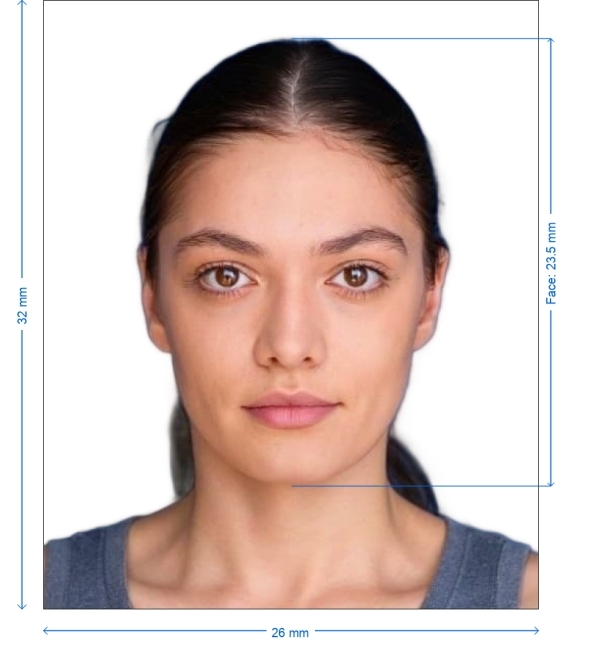
A 26x32 mm photo is a small portrait photo, 26 mm wide and 32 mm high. This 26x32 mm picture size is used in official Spanish documents listed below.
Spanish authorities may refer to this size as “32 x 26 mm”, “32 x 26 mm passport photo”, or “26*32 mm.” All these definitions are relevant for this ID format.
26x32 mm Photo Size in mm, cm, Inches and Pixels
Unit | 26x32 mm photo size |
|---|---|
Millimeters | 26 × 32 mm |
Centimeters | 2.6 × 3.2 cm |
Inches | 1.02 × 1.26 in |
Pixels at 300 DPI | 307 × 378 px |
Pixels at 600 DPI | 614 × 756 px |
If you need to print out your photo, keep in mind that a 26*32 mm print at 300 DPI requires an image of 307 × 378 pixels. While a 2.6 × 3.2 cm photo represents the exact same physical size, the pixel count increases at higher resolutions. As the 26x32 mm format is smaller than a standard 35x45 mm picture, a typical 35x45 ID photo (commonly used for UK passports and Schengen visas) cannot be submitted for Spanish documents. Similarly, a standard 2 × 2 inch U.S. passport photo will not be accepted: check our 2x2 photo requirements guide for 51 x 51 mm files. IDs in the Philippines require a square photo format; see 1x1 picture size requirements in 2026 to learn more.
Which Documents Require a 26x32 mm Photo?
The table below lists the documents and specifications requiring a 32 x 26 mm photo, based on official Spanish government pages verified in October 2026:
Document | Size | Background | Other rules |
|---|---|---|---|
Spanish Passport | 32 × 26 mm, one recent color photo | Plain, uniform, white | Front view; no sunglasses or glasses with tinted lenses; the full face must be visible; printed on high-quality photo paper in high resolution |
Spanish DNI (National ID Card), First-Time Applications | 32 × 26 mm, recent color photo | Plain, uniform, white | Head not covered; religious or medical head coverings allowed if the face from hairline to the chin is visible; photo not older than 2 years |
Replacement of a Ukrainian Driving License at the Spanish Traffic Office (DGT) | 32 × 26 mm photo | N/A | N/A |
If you renew your DNI and apply for a passport on the same day, you don't need a separate passport photo. Keep in mind that job applications require photos taken to a completely different set of rules: see our guide to taking a photo for a job application explaining all intricacies.
26x32 mm Photo Requirements, in Brief
Both the Spanish passport and the DNI require a photo with the same parameters: it must be recent, in color, sized 32 x 26 mm, with a plain white background, and a fully visible face. For the DNI, there is an additional recency requirement: the image must be under two years old. Issuing authorities base these standards on the official international guidelines for machine-readable documents; learn more in our Biometric passport photo guide.
Your Final 26x32 mm Photo from PhotoGov
Parameter | Your Final Photo |
Photo size | 26 × 32 mm (32 × 26 mm exactly, as required by Spanish authorities) |
Background | Plain, white |
File format | JPEG / Printable PDF sheet |
Resolution | High-resolution file, 600 DPI for printing |
Head positioning | Automatically centered |
Color | Full color |
Face visibility | Fully visible, not retouched |
Your photo is processed in a private session in a secure environment. Facial features are never altered — the tool only resizes, crops, and replaces the background. If your photo is rejected due to an error on our side, we offer a free retake or a full refund.
How to Take a 26x32 mm Photo at Home
Stand against a plain white or light wall, facing a window for even lighting.
Remove tinted glasses or anything that covers your face.
Hold the smartphone at eye level or have someone else take the photo. Disable filters and portrait mode.
Look directly at the camera with a neutral expression, mouth closed and eyes open. Your full face must be visible in the shot.
Upload the clearest photo to the tool
How to Print 26x32 mm Photos
At the download step at PhotoGov, select a printable sheet with the required number of 26 × 32 mm photos. Our portal offers two file options, depending on how you print. For home printing, use the JPEG file; for printing in a shop, download a PDF file.
At home: print on matte or glossy photo paper at 100 % scale with auto-scaling ("Fit to Page") disabled. Check the physical print: its sides should measure exactly 2.6 cm and 3.2 cm.
At a print shop: request your photo print at an actual size without scaling. Some services will accept a printable PDF file (that you can download at PhotoGov) by email, but always check the availability of this service in advance.
Why Create a 26x32 mm ID Photo With PhotoGov
Spanish Document Templates
When you select the Spanish passport or DNI card photo at PhotoGov and upload your selfie, the tool automatically resizes it to 26x32 mm, adjusts the background to white, and applies all necessary standards for your selected document type.
No Studio, No App
Our online passport photo maker works in your mobile or desktop browser. No registration or app installation required.
Digital File or a Print Sheet
Get a digital JPEG for online submissions or a printable sheet to print out and submit in person.
Extra Assurance
Add Human Verification at checkout: an in-house specialist reviews your photo against your document’s official photo rules.
Secure Processing
Your image is processed in a private session, and your data is never shared with third parties.
PhotoGov and the Official Standards for 26x32 mm Photos
PhotoGov templates are based directly on issuing authorities' official standards and the biometric guidelines in the International Civil Aviation Organization Document 9303. The requirements are regularly monitored by our compliance team, and the templates are updated as new revisions come into force.
For the 26 x 32 photo, this means the processed image is 26 mm by 32 mm, with a white background, as required by the Spanish issuing authorities. Your photo is adjusted only in terms of size, crop, and background — and your facial features are not altered in any way.
If your application is time-sensitive, or a photo rejection would cause significant inconvenience, select our Human Verification service at checkout. Our senior compliance specialist will manually review your photo against the latest official requirements of your selected document.
Our platform is designed to align with the 26x32 photo rules. Final acceptance is at the discretion of the issuing authority handling your application.
Frequently Asked Questions
A 26x32 mm photo size is 2.6 × 3.2 cm, or 1.02 × 1.26 inches.
Yes. Spanish authorities may refer to this size as 32 x 26 mm (landscape orientation). But the same portrait photo must be submitted and have a 26 mm width and a 32 mm height.
At 300 DPI, a 26*32 mm photo is 307 × 378 pixels. At 600 DPI, it is 614 × 756 pixels.
The Spanish passport and DNI require a 32 x 26 mm photo with a white background. If you need to replace a Ukrainian driving license at the Spanish Traffic Office (DGT), you must also submit a 32x26 photo.
If you’re applying for your first DNI, the photo must be no older than 2 years.
PhotoGov offers two free ID photos per day, depending on your location. There are paid add-on services such as Human Verification and casual-to-formal clothing replacement — all prices are displayed before download.
If the rejection is caused by an error on our side, we offer a free retake or a full refund. If the problem is in the original selfie, take a new one and upload it again.
Yes. We treat your personal data and images with great care. PhotoGov uses your information solely to generate your photo and deletes it from our servers once the process is complete. We never share your data with third parties or external AI services. If you have any questions, you can always contact our Customer Support team or read more details in our Privacy Policy.
PhotoGov.net strictly adheres to Global regulations for ID photos.
Official Government Sources
Checked against the International Civil Aviation Organization (ICAO Doc 9303) photo requirements: https://www.icao.int/publications/doc-series/doc-9303 · Last checked: 08.10.2026
Other documents for the Others
Others
56 doc.
- 2x2 inch photo (about 1 MB in size)
- Biometric passport photo
- IATA ID card 35x45 mm
- Photo 1.25x1.5 inch
- Photo 1.5x1.5 inch (38x38 mm, 3.8x3.8 cm)
- Photo 1.5x2 inch (3.8x5 cm)
- Photo 1x1 inch (2.5x2.5 cm)
- Photo 21x30 mm
- Photo 240x288 pixels
- Photo 25x25 mm (2.5x2.5 cm)
- Photo 25x30 mm (2.5x3 cm)
- Photo 25x35 mm (2.5x3.5 cm)
- Photo 26x32 mm
- Photo 2x2 cm
- Photo 2x2 inch (51x51 mm, 5x5 cm)
- Photo 2x2.5 inch
- Photo 2x2.75 inch (2x2.3/4inch, about 5x7 cm)
- Photo 2x3 cm (20x30 mm)
- Photo 30x35 mm
- Photo 30x40 mm (3x4 cm)
- Photo 32x42 mm
- Photo 33x48 mm (3.3x4.8 cm)
- Photo 358x441 pixels
- Photo 35x35 mm (3.5x3.5 cm)
- Photo 35x40 mm (3.5x4 cm)
- Photo 35x45 mm (aligned by the eye line) (3.5x4.5 cm)
- Photo 35x45 mm (aligned by the top) (3.5x4.5 cm)
- Photo 35x50 mm (3.5x5 cm)
- Photo 37x37 mm
- Photo 38x46 mm (3.8x4.6 cm)
- Photo 3x3 cm (30x30 mm)
- Photo 4.5x6 cm
- Photo 40x50 mm (4x5 cm)
- Photo 40x60 mm (4x6 cm)
- Photo 43x54 mm
- Photo 43x55 mm (4.3x5.5 cm)
- Photo 45x45 mm (4.5x4.5 cm)
- Photo 45x57 mm
- Photo 4x4 cm (40x40 mm)
- Photo 4x4.5 cm (40x45 mm)
- Photo 50x50 mm (5x5 cm)
- Photo 50x70 mm (5x7 cm)
- Photo 5x6.5 cm
- Photo 600x800 pixel
- Photo 6x9 cm
- Photo 9x12 cm
- Photo one big cun 33x48 mm, 390x567 px
- Photo one cun (25x35 mm, 295x413 px)
- Photo one small cun (22x32 mm, 260x378 px)
- Photo two cuns 35x53 mm, 413x626 px
- Photo two small cuns (35x45 mm, 413x531 px)
- Resume Photo 2x2 inch
- Resume Photo 35x45 mm
- School pass 35x45 mm
- UN passport 2x2 inch (51x51 mm)
- Work pass 35x45 mm
Service provided by Y VISION TECHNOLOGIES LLP · Stoney Works 8 Stoney Lane, London, England, SE19 3BD · Terms · Refund policy · Contact
We value your Privacy
We use cookies to enhance your browsing experience, serve personalized ads or content. By clicking “Accept All”, you consent to our use of cookies.